Introduction
Managing hourly teams gets complicated fast when you are dealing with shift changes, time-off requests, overtime, payroll prep, and last-minute callouts. Homebase is designed to bring those workflows into one system, helping small businesses schedule staff, track time, communicate with teams, hire faster, and stay on top of labor costs.
In this in-depth review, you will get a clear look at Homebase’s core features, pricing, user experience, strengths, weaknesses, and best-fit use cases. By the end, you should have a solid sense of whether Homebase is the right shift scheduling software for your business, or whether one of its alternatives may be a better fit.
Overview
What is Homebase
Homebase is an all-in-one workforce management platform built primarily for small businesses with hourly employees. It combines employee scheduling, time tracking, payroll, team messaging, hiring, onboarding, and HR/compliance tools in one app. That makes it especially appealing for restaurants, retail stores, cafes, salons, healthcare practices, and other service businesses that need to manage shifts without stitching together multiple systems.
One of Homebase’s biggest selling points is that it does not start as an expensive enterprise platform. Its free Basic plan covers one location and up to 10 employees, which gives very small teams a real entry point. As your needs grow, the paid tiers add more advanced scheduling, time tracking, AI-powered scheduling, PTO controls, onboarding, labor cost tools, and HR support.
Homebase positions itself as the “everything app for hourly teams,” and that description is largely accurate. It is not just a schedule builder. It is closer to a lightweight operations hub for small and midsize hourly businesses that want less admin and better day-to-day coordination.
Key Features
Homebase Software Specification
Employee Scheduling
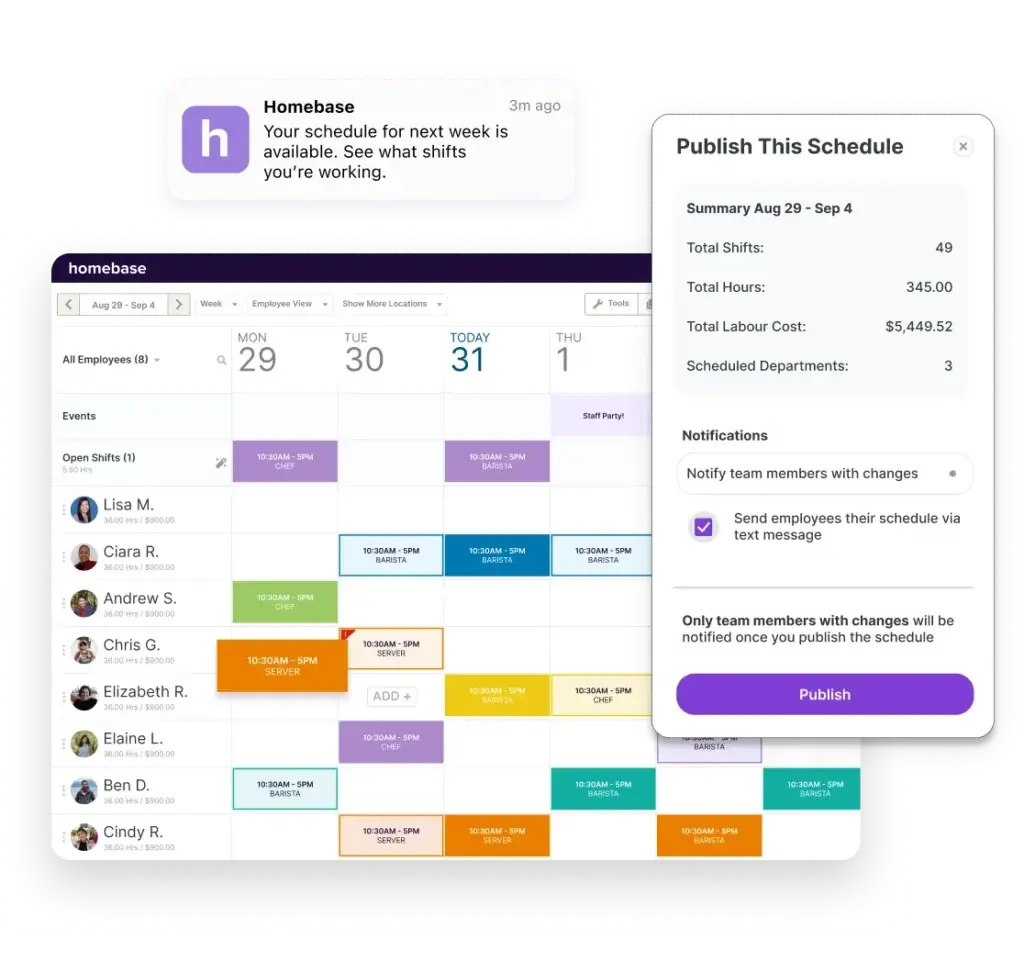
Scheduling is at the center of the Homebase experience. Managers can create schedules faster with drag-and-drop tools, reusable shift patterns, role-based assignments, and built-in visibility into employee availability. Homebase also pushes updates through in-app, text, or email alerts, which helps reduce the “I didn’t see the new schedule” problem.
- Drag-and-drop shift planning: build and edit weekly schedules quickly
- Availability-aware scheduling: factor in roles, availability, and time-off data
- Shift trades and coverage: employees can help resolve gaps faster
- Labor optimization: schedule with labor cost and sales data in mind
A meaningful differentiator is the AI-powered Scheduling Assistant, which is included in the Plus plan and above. For managers spending too much time filling shifts manually, this is one of the more compelling recent upgrades in Homebase’s lineup.
Time Clock and Attendance Tracking
Homebase includes digital time clocks that work on tablets, computers, phones, and POS devices. Hours, breaks, and overtime sync into timesheets automatically, which helps cut manual payroll prep. The platform also supports unique PINs, clock-in photos, and GPS-based controls to reduce buddy punching and time theft.
- Mobile and device-based clock-ins: use tablets, computers, POS devices, or phones
- GPS and photo verification: stronger attendance accuracy
- Automatic timesheets: sync hours, breaks, and overtime
- Late and attendance visibility: spot tardiness patterns faster
This is one of Homebase’s strongest areas. If you need a scheduling tool that also handles everyday time tracking well, Homebase delivers more than many basic rota apps.
Payroll
Payroll is available as an add-on across plans. Homebase converts tracked hours into payroll-ready data, handles wage calculations, supports direct deposit, and positions itself as a simpler payroll workflow for hourly teams. The company also highlights payroll transfer assistance and quick onboarding for businesses switching from another payroll provider.
- Payroll add-on: available on any Homebase plan
- Direct deposit and pay stub access: employee self-service support
- Overtime and wage calculations: fewer manual payroll errors
- Payroll transfer help: easier migration for small businesses
That said, payroll is still a paid add-on, so Homebase is most cost-effective when you actually want scheduling, time tracking, and payroll tied together, not when you only need one of those functions.
Hiring and Onboarding
Homebase goes beyond scheduling by giving small businesses built-in hiring and onboarding tools. You can post jobs, manage applicants, and streamline the early employee journey from offer to paperwork. The All-in-One plan adds stronger onboarding support, while hiring-related add-ons extend recruiting capabilities.
- Job posts and applicant tracking: built into the platform
- Self-onboarding: new hires can complete forms online
- Digital paperwork: reduce paper-based admin
- Background checks: available as an add-on
For small businesses without a dedicated HR stack, this all-in-one approach is practical. You are not getting a full enterprise recruiting suite, but you are getting more than most scheduling-first tools provide.
Team Communication
Homebase includes built-in team messaging, which is especially useful for hourly workplaces where not everyone sits at a desk or uses company email all day. Managers can send updates, notify staff about schedule changes, and keep communication connected to actual shifts and teams.
- In-app team messaging: faster day-to-day coordination
- Schedule alerts: notify staff by app, text, or email
- Connected communication: less reliance on scattered texts
This feature matters more than it may seem at first. For frontline businesses, communication problems often create the same level of friction as scheduling problems.
PTO, Time Off, and Leave Controls
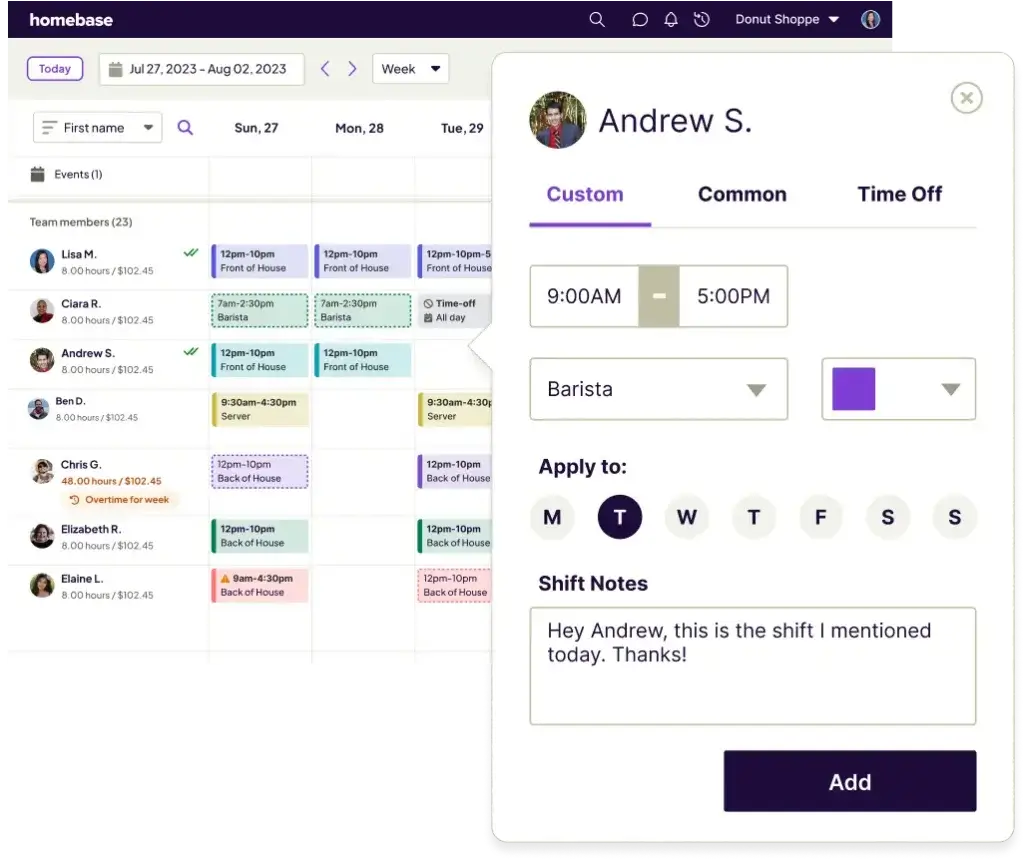
Homebase gives managers better control over time off as you move into higher tiers. The platform can track PTO policies, accruals, balances, blackout dates, advance notice rules, and request limits. Approved time off can flow directly into schedules and timesheets, which helps reduce duplicate admin.
- Time-off requests: submitted and reviewed in-platform
- PTO tracking: monitor accruals and balances
- Policy controls: set blackout dates and request rules
- Schedule sync: approved leave updates schedules automatically
This is one of the features that makes Homebase feel more operationally complete than simpler scheduling apps.
HR and Compliance
Homebase’s HR and compliance tools are aimed at business owners who do not have in-house HR expertise. The platform supports employee records, document storage, e-signatures, certification tracking, time-card retention, break tracking, overtime compliance support, and access to HR advisors through its HR Pro services.
- Employee records and documents: centralize contact info, payroll details, and notes
- E-sign and secure storage: fewer paper-heavy workflows
- Compliance support: track breaks, overtime, and certifications
- HR guidance: access templates, policy help, and HR advice
This is a meaningful advantage for small employers who want one tool to cover scheduling and essential compliance support. It is not a replacement for enterprise HRIS software, but it covers a lot for its category.
Labor Cost Controls and Performance Visibility
Homebase places real emphasis on labor cost awareness. Managers can use labor cost data, sales inputs, and scheduling views to better match staffing to demand. The platform also surfaces practical insights, such as lateness trends and time slots with stronger sales activity.
- Labor cost visibility: track staffing decisions against budget
- Sales-aware scheduling: align coverage with business demand
- Attendance trends: identify repeat lateness patterns
- Performance context: make staffing decisions with more clarity
For restaurants and retail businesses in particular, this makes Homebase more strategic than a simple calendar-based scheduler.
Reporting and Integrations
Homebase supports POS integrations and payroll integrations, which are important for businesses that want cleaner data flow between scheduling, attendance, and pay workflows. Reporting is useful for operational management, though it is still more practical than deeply analytical.
- POS integrations: helpful for labor and sales context
- Payroll integrations: supports connected wage workflows
- Operational reporting: timesheets, labor, attendance, and scheduling insights
The integration story is good for the SMB hourly-workforce category, but not as extensive as broader workforce management platforms aimed at larger enterprises.
Mobile App Experience
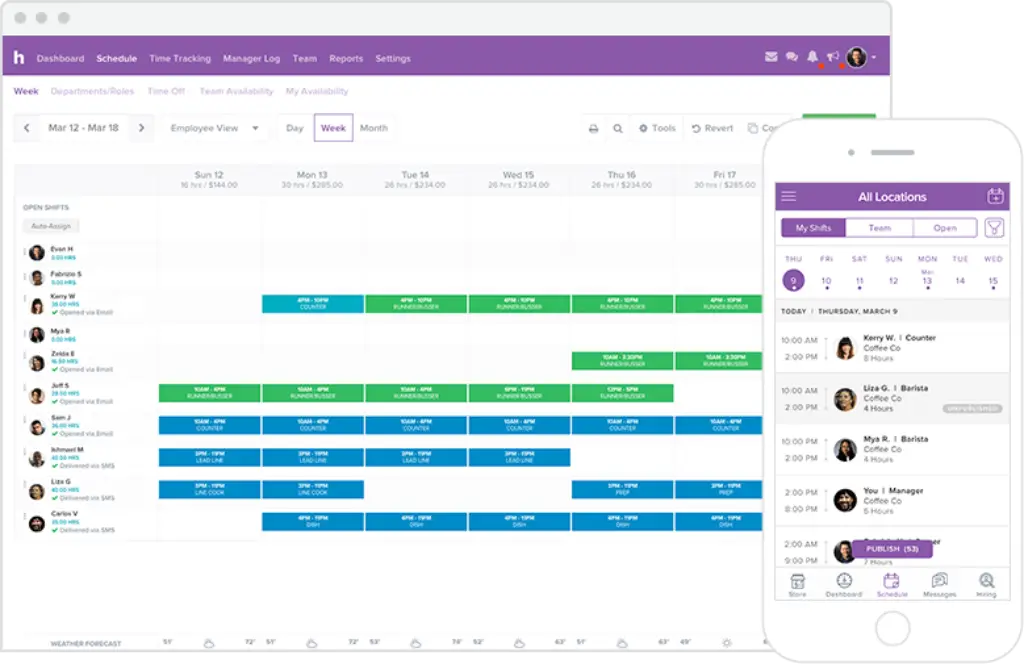
Homebase has a strong mobile story for both managers and employees. Staff can check schedules, request time off, trade shifts, review hours, and stay updated without needing desktop access. Managers can also update schedules and monitor labor details on the go.
- Employee mobile app: included even on the free plan
- Shift access anywhere: better for frontline teams
- Self-service convenience: less admin back-and-forth
For hourly teams, this is not optional anymore. Homebase gets it right.
Pros and Cons
Advantages and Disadvantages
Positive
✅ Strong free plan
✅ User-friendly interface
✅ Practical all-in-one feature mix
✅ AI-powered scheduling on higher plans
✅ Solid compliance support
Negative
❌ Advanced features require upgrades
❌ Payroll is a paid add-on
❌ Not ideal for enterprise complexity
❌ Some users report occasional app glitches
✅ Advantages
- Strong free plan: Homebase offers real value for one location with up to 10 employees, making it easier for very small businesses to get started.
- User-friendly interface: Homebase is widely praised for being easy to navigate, easy to train on, and easy for both managers and staff to adopt.
- Practical all-in-one feature mix: scheduling, time clocks, messaging, hiring, payroll support, and HR tools all live in one system.
- AI-powered scheduling on higher plans: the scheduling assistant can save managers meaningful time when building rotas.
- Solid compliance support: PTO controls, break tracking, overtime support, document storage, and HR resources strengthen the platform.
❌ Disadvantages
- Advanced features require upgrades: some of the most valuable controls are gated behind Plus or All-in-One, which can increase costs quickly.
- Payroll is a paid add-on: businesses wanting a fully unified payroll workflow need to account for the payroll add-on.
- Not ideal for enterprise complexity: very large organizations with highly complex labor rules or broad system ecosystems may outgrow it.
- Some users report occasional app glitches: while usability is often praised, some users mention glitches or occasional instability in the app experience.
User Experience
User Experience and Ease of Use
Homebase performs especially well on usability. This is one of the main reasons it remains so competitive in the shift scheduling software market. It is built for busy managers, not for HR specialists or technical admins, and that shows throughout the product.
Onboarding and Setup
The setup process is approachable, particularly for small businesses moving away from spreadsheets or paper schedules. Homebase is structured so that a manager can start with scheduling and time tracking, then expand into payroll, onboarding, and HR functions later. That gradual adoption path is important because many smaller teams do not want a heavy implementation project.
Everyday Manager Experience
From a manager’s perspective, Homebase is strongest when you use it daily. Building schedules, reviewing timesheets, approving time off, messaging staff, and checking labor data all happen in one place. That reduces the need to bounce between separate tools and helps make the product feel operational rather than fragmented.
The interface is generally clear and modern, and the scheduling workflow is one of the easiest to grasp in the category. The value here is not just visual simplicity. It is reduced friction. Homebase makes common management tasks faster.
Employee Experience
Employees get a straightforward mobile experience for checking shifts, clocking in, requesting leave, trading shifts, and receiving updates. That matters because shift scheduling software succeeds only when staff actually use it. Homebase lowers the barrier to adoption well.
Where the Experience Can Fall Short
The biggest UX tradeoff is that some of the best features sit behind higher tiers or add-ons, so the product can feel more limited if you stay on the free plan too long. In addition, some user reviews mention the occasional app glitch or friction around upsells. Those issues are not enough to outweigh the overall usability strengths, but they are worth mentioning.
Pricing
How Much Does Homebase Cost?
Homebase uses per-location pricing for its core platform, with a free tier for very small teams and paid plans that unlock more scheduling, communication, HR, and labor-management capabilities. Payroll is sold separately as an add-on. This structure works well for single-location and small multi-location operators, though costs can rise as you add premium tools.
Basic
The Basic plan costs $0 per location per month for 1 location and up to 10 employees. It includes:
- Basic scheduling
- Basic time tracking
- Employee mobile app
- POS integration
- Payroll add-on availability
Essentials
The Essentials plan costs $30 per location per month, or $24 per month when paid annually. It includes everything in Basic, plus:
- Advanced scheduling
- Advanced time tracking
- Team communication
- Unlimited employees
Plus
The Plus plan costs $70 per location per month, or $56 per month when paid annually. It includes everything in Essentials, plus:
- AI-powered scheduling assistant
- PTO and time-off controls
- Departments and permissions
- Unlimited employees
All-in-One
The All-in-One plan costs $120 per location per month, or $96 per month when paid annually. It includes everything in Plus, plus:
- Employee onboarding
- Labor cost management
- HR and compliance tools
- Unlimited employees
Payroll Add-On
Homebase Payroll is priced at $39 per month + $6 per employee paid. This makes Homebase more compelling when you want scheduling, time tracking, and payroll connected, but it is an added cost you need to factor into the total price.
Other Add-Ons
- Task Manager: $13/month per location
- Tip Manager: $25/month per location
- Hiring Assistant: starting at $30/post
- Background checks: $30 each
Homebase Pricing Comparison Table
| Feature / Plan | Basic | Essentials | Plus | All-in-One |
| Price | $0/location/month | $30/month or $24 annually | $70/month or $56 annually | $120/month or $96 annually |
| Employee Limit | Up to 10 employees | Unlimited | Unlimited | Unlimited |
| Scheduling | Basic | Advanced | Advanced + AI assistant | Advanced + AI assistant |
| Time Tracking | Basic | Advanced | Advanced | Advanced |
| Team Communication | Limited | Included | Included | Included |
| PTO & Time-Off Controls | Not included | Not included | Included | Included |
| Departments & Permissions | Not included | Not included | Included | Included |
| Employee Onboarding | Not included | Not included | Not included | Included |
| Labor Cost Management | Not included | Not included | Not included | Included |
| HR & Compliance | Not included | Not included | Not included | Included |
| Payroll | Add-on | Add-on | Add-on | Add-on |
Common Use Cases
Best Use Cases and Industries
Homebase is best suited to businesses that manage hourly workers and need a cleaner way to coordinate shifts, track attendance, and reduce payroll admin. It is particularly well matched to teams that want ease of use first, but still need enough depth to handle time-off rules, onboarding, and labor cost visibility.
- Restaurants and cafes: a strong fit for rotating shifts, attendance, and labor-aware scheduling
- Retail stores: useful for team coordination, time tracking, and mobile access
- Salons and wellness businesses: helpful for shift planning and team communication
- Healthcare and service practices: solid for hourly staff coordination and leave tracking
- Multi-location small businesses: works well when you need consistent scheduling across sites
- Growing small businesses: easy to start with free or lower tiers, then expand over time
In my view, Homebase is strongest when the business is operationally busy but not operationally complex. If your team needs stronger enterprise workforce forecasting, highly specialized compliance logic, or broader back-office integration depth, you may eventually look elsewhere. But for the SMB market, Homebase is a very competitive option.
Compare with Others
Alternatives to Homebase
Homebase is one of the stronger small-business scheduling platforms in the market, but it is not the only good option. The right alternative depends on whether you care most about an all-in-one workforce hub, hospitality specialization, or pure scheduling simplicity.
| Parameter | Homebase | Connecteam | 7shifts | When I Work |
| Core Focus | Hourly team scheduling, time tracking, payroll, HR | Frontline workforce operations and internal management | Restaurant and hospitality scheduling | Straightforward scheduling and attendance |
| Best For | Small businesses wanting an all-in-one SMB platform | Teams needing a broader operations app | Restaurants, bars, and hospitality groups | Businesses wanting simplicity over breadth |
| Scheduling Strength | Strong, easy, labor-aware, AI on higher tiers | Flexible and robust | Excellent for restaurant workflows | Simple and approachable |
| Time Tracking | Very strong with time clocks, GPS, and timesheets | Strong with broader team tools | Strong for hospitality teams | Good core attendance features |
| Payroll | Built-in add-on | Not as central as Homebase | Varies by workflow and integrations | Less payroll-centric |
| HR / Compliance | Useful SMB-focused HR and compliance tools | Broader HR and operations flexibility | More specialized than broad HR-focused | More limited overall |
| Ideal Buyer | SMBs replacing spreadsheets and disconnected tools | Operations-heavy teams needing more modules | Hospitality operators with restaurant-specific needs | Managers who want a simpler scheduling-first tool |
Homebase vs Connecteam
Connecteam is often the better choice when you want a broader frontline operations platform with stronger workflow flexibility, training, forms, task management, and internal process controls. Homebase, on the other hand, feels more focused for businesses whose main pain points are scheduling, time tracking, payroll prep, and day-to-day hourly team coordination.
Choose Homebase if you want the more natural fit for shift-based SMBs. Choose Connecteam if you need a wider operations suite and can handle more setup complexity.
Homebase vs 7shifts
7shifts is particularly strong for restaurants and hospitality businesses. If you run a restaurant group and need restaurant-specific scheduling, labor management, and service-industry workflows, 7shifts may be the sharper specialist. Homebase is more flexible across industries and has stronger all-around appeal for general hourly teams.
Choose Homebase for broader industry fit and a balanced all-in-one experience. Choose 7shifts if you are deeply focused on restaurant operations.
Homebase vs When I Work
When I Work is a simpler and more stripped-back option for scheduling and attendance. It can be attractive if you want fewer layers and a lighter feature set. Homebase offers a richer operational package, especially once you factor in payroll, hiring, HR, and compliance tools.
Choose Homebase if you want one app to do more. Choose When I Work if simplicity matters more than breadth.
Overall Takeaway
Homebase stands out because it gives small businesses a lot of operational value without feeling overly complicated. It is one of the more practical choices for hourly teams that want to move beyond spreadsheets, manual timesheets, and fragmented communication.
Setup and Support
Get Started & Tips for Best Use
Getting Started
Getting started with Homebase is relatively straightforward, especially for small teams. You can begin with the free plan, add employees, build your initial schedule, set up time clocks, and then decide whether you need paid upgrades such as AI scheduling, PTO controls, onboarding, or HR/compliance tools. This phased approach is one of Homebase’s biggest advantages for SMB adoption.
Customer Support
Support is one of the areas users mention positively in many reviews, especially around setup and day-to-day troubleshooting. Homebase also provides support content and workflow guidance for common scheduling, payroll, hiring, and compliance questions. That matters because many business owners choosing Homebase are not dedicated HR or operations professionals.
Tips for Maximizing Your Use of Homebase
- Set up availability properly: better input leads to better schedules and fewer conflicts
- Use the time clock consistently: this is where a lot of Homebase’s value shows up
- Review your plan fit regularly: do not overpay for features you are not using
- Adopt messaging inside the platform: reduce scattered communication
- Use PTO and policy controls early: avoid messy manual leave tracking later
- Connect payroll only if it adds real value: useful, but not necessary for every team
Conclusion
Final Thoughts
Homebase is one of the best shift scheduling software options for small businesses with hourly employees. Its biggest strengths are usability, a genuinely useful free plan, strong scheduling and time-tracking workflows, and an all-in-one approach that covers payroll, messaging, hiring, and HR better than many competitors in its category.
It is not the cheapest path once you move into higher tiers and add payroll, and it is not the best fit for businesses with very advanced enterprise workforce management needs. But for restaurants, retail teams, service businesses, and other hourly employers, Homebase gets the fundamentals right. If your priority is to save time, reduce scheduling friction, improve attendance tracking, and run a more organized operation, Homebase is absolutely worth shortlisting.
Have more questions?
Frequently Asked Questions
Is Homebase free to use?
Yes. Homebase offers a free Basic plan for one location with up to 10 employees. It includes basic scheduling, basic time tracking, POS integration, the employee mobile app, and access to paid add-ons like payroll.
How much does Homebase cost?
Homebase paid plans currently start at $30 per location per month for Essentials, then $70 for Plus and $120 for All-in-One. Annual billing lowers the effective monthly price on paid plans.
Does Homebase include payroll?
Payroll is available as a paid add-on. It currently starts at $39 per month plus $6 per employee paid, and it is designed to sync with hours tracked inside Homebase.
What is Homebase best for?
Homebase is best for small businesses with hourly workers that need employee scheduling, time tracking, team communication, payroll support, and basic HR/compliance tools in one platform.
Can employees clock in from their phones?
Yes. Employees can clock in using supported devices, including phones, tablets, computers, and POS devices, depending on how your business sets up the time clock workflow.
Does Homebase help prevent buddy punching?
Yes. Homebase supports unique PINs, clock-in photos, and GPS-based controls, which can reduce buddy punching and other attendance issues.
Does Homebase offer AI scheduling?
Yes. Homebase includes an AI-powered Scheduling Assistant on the Plus plan and above, helping managers build schedules more efficiently.
Is Homebase good for restaurants?
Yes. Homebase is a strong option for restaurants, cafes, and other hospitality businesses that need labor-aware scheduling, time clocks, shift communication, and payroll-ready timesheets.
Does Homebase support PTO and time-off tracking?
Yes. Higher-tier plans add PTO and time-off controls, including accrual tracking, balances, blackout dates, request limits, and schedule syncing for approved leave.
Who should consider an alternative to Homebase?
If you need restaurant-specific depth, 7shifts may be stronger. If you want a broader frontline operations app, Connecteam may be a better fit. If you only want lightweight scheduling, a simpler alternative like When I Work may be enough.