Introduction
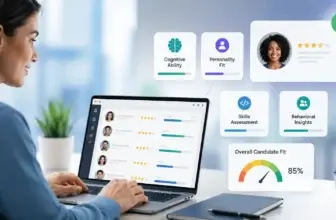
Choosing recruiting software is no longer only about tracking candidates. It affects how quickly your team can source talent, how consistently hiring managers evaluate applicants, how clearly leadership can understand hiring performance, and how efficiently recruiters can move candidates from first touch to signed offer.
In this Ashby review, you will get a practical look at what the platform offers, where it performs well, where it may feel limited, and which hiring teams are most likely to benefit from it in 2026.
Ashby is best understood as an all-in-one recruiting platform rather than a basic applicant tracking system. It combines ATS functionality, CRM and sourcing, interview scheduling, analytics, automation, and AI recruiting tools inside one platform built for ambitious hiring teams.
What Is Ashby?
Ashby is recruiting software designed to help companies manage the full hiring process from one system. You can use it to track applicants, source candidates, build talent pipelines, schedule interviews, automate recruiting workflows, analyze hiring performance, and collaborate with hiring managers.
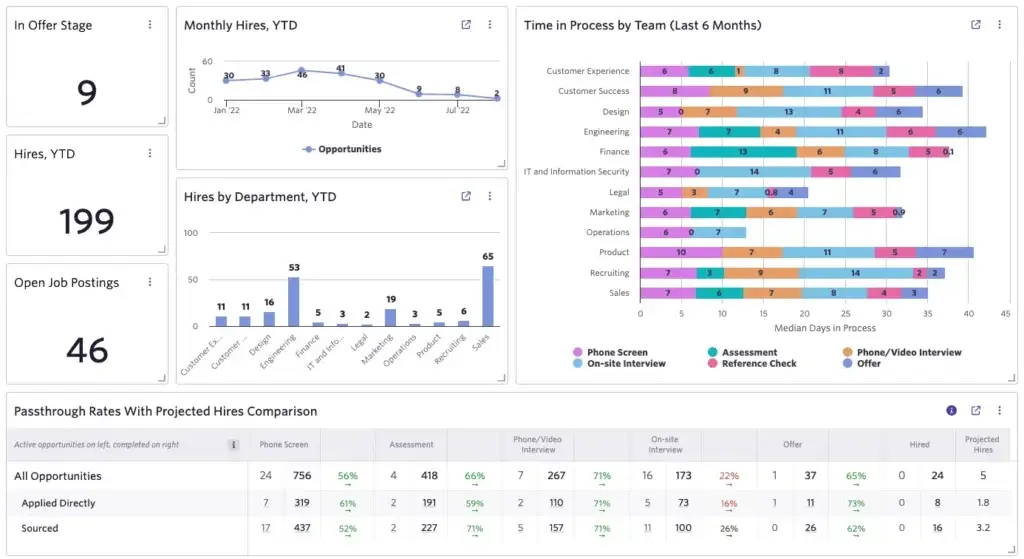
The platform is especially known for its depth in recruiting analytics. Many ATS tools include basic reports, but Ashby puts reporting, dashboards, pipeline analysis, and hiring-plan visibility closer to the center of the product experience.
Background and Positioning
Ashby was founded in 2018 and has grown into one of the more visible modern ATS platforms for startups, scaleups, and enterprise talent teams. Its positioning is clear: instead of asking teams to connect separate tools for ATS, CRM, scheduling, and reporting, Ashby brings these workflows together in one recruiting system.
That all-in-one approach is important because many talent teams lose time switching between sourcing tools, scheduling software, spreadsheets, analytics dashboards, and applicant tracking systems. Ashby aims to reduce that fragmentation while giving recruiting operations teams stronger data visibility.
Target Users and Use Cases
Ashby is especially relevant for several types of organizations:
- Startups scaling hiring – You get an ATS that can grow with your hiring process.
- Growth-stage companies – Ashby fits teams that need better sourcing, reporting, and automation.
- Data-driven recruiting teams – The analytics layer is one of Ashby’s strongest differentiators.
- Recruiting operations teams – Custom workflows, permissions, and reporting support more mature TA operations.
- Enterprise hiring teams – Ashby can support complex hiring processes, integrations, and governance needs.
That said, Ashby is not the best choice for every small business. If you only hire a few people per year and need a simple, low-cost ATS, a lighter tool may be easier to justify. Ashby becomes more compelling when recruiting is frequent, structured, and strategically important.
Core Features
How Does Ashby Work?
Ashby works by connecting the main parts of recruiting inside one platform. Instead of using one tool for applicant tracking, another for sourcing, another for scheduling, and another for reporting, you can manage these workflows from a unified recruiting workspace.
The result is a more connected hiring process. Recruiters can see candidate history, outreach activity, interview progress, feedback, offer status, and reporting data without constantly moving between systems.
Applicant Tracking System
At the center of Ashby is its applicant tracking system. You can use it to manage job openings, candidate profiles, pipeline stages, interview plans, hiring team feedback, application forms, approvals, and offer workflows.
The ATS is flexible enough for teams that need more than a simple candidate board. You can configure workflows, define hiring stages, manage permissions, and build processes that match how your recruiting team actually works.
CRM and Sourcing
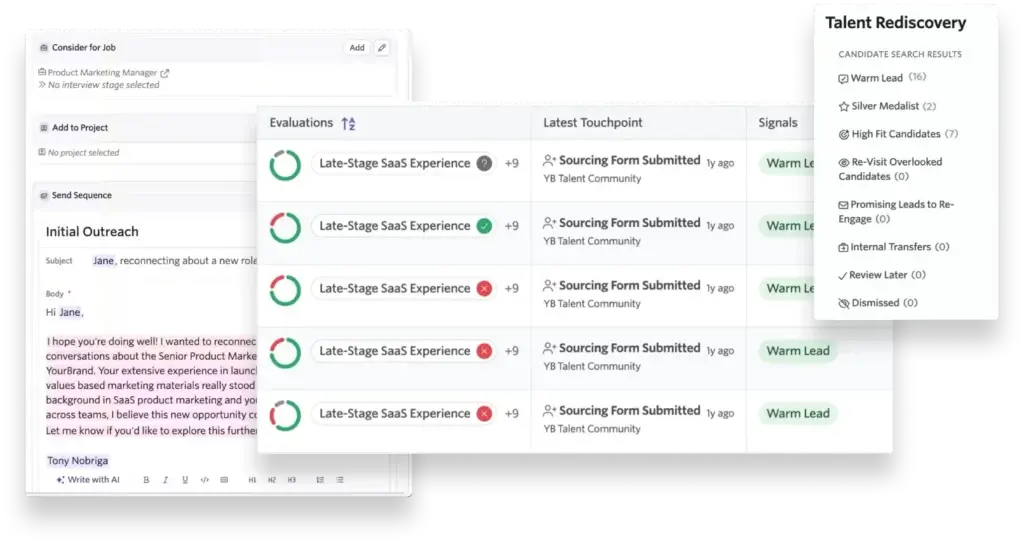
Ashby includes native CRM and sourcing tools. This means you can manage prospects, talent pools, outreach sequences, sourcing projects, and candidate rediscovery without relying entirely on a separate CRM product.
This is useful for companies that do proactive recruiting. Instead of treating every role as a fresh search, you can build a reusable candidate database and re-engage qualified people when new opportunities open.
Chrome Extension and Candidate Capture
Ashby supports sourcing workflows through its browser extension. Recruiters can add prospects to Ashby while sourcing, then connect those candidates to projects, sequences, and future hiring pipelines.
This helps reduce manual data entry and makes sourcing activity easier to track. For teams that source heavily from LinkedIn and other online profiles, this can save meaningful time.
Outreach Sequences
Ashby lets recruiting teams build outbound sequences for candidate engagement. You can create structured touchpoints, personalize outreach, and track how sourcing campaigns perform.
This is valuable because sourcing is not only about finding candidates. You also need to understand which messages, roles, recruiters, and channels generate responses and qualified conversations.
Interview Plans and Scorecards
Ashby supports structured interviewing through interview plans and feedback workflows. You can define what each interviewer should evaluate, collect feedback in one place, and make hiring decisions with better context.
This is especially important for teams that want more consistent hiring. Without structured feedback, interview processes often become subjective, inconsistent, and difficult to audit later.
Recruiting Analytics and Dashboards
Analytics is one of Ashby’s strongest areas. The platform includes dashboards, custom reporting, pipeline visibility, recruiting activity analysis, and hiring-plan tracking.
This gives talent leaders more visibility into bottlenecks, conversion rates, source quality, hiring velocity, interviewer performance, and offer outcomes. If your team currently relies on spreadsheet exports to answer recruiting questions, Ashby can be a major upgrade.
Automation Workflows
Ashby includes automation features that help teams reduce repetitive work. You can automate parts of communication, candidate movement, notifications, approvals, reminders, and internal handoffs.
Automation is most useful when it supports a clear process. Used well, it helps recruiters focus more on candidate relationships and hiring strategy. Used poorly, it can make the candidate experience feel impersonal.
Integrations
Ashby connects with tools across HR, communication, assessment, background checks, scheduling, productivity, and data workflows. This matters because recruiting software rarely operates alone.
For larger companies, integrations can determine how well the ATS fits into the broader HR tech stack. Before buying Ashby, you should review how it connects with your HRIS, calendar system, email, Slack, assessment tools, background check provider, and offer workflows.
Interview Scheduling
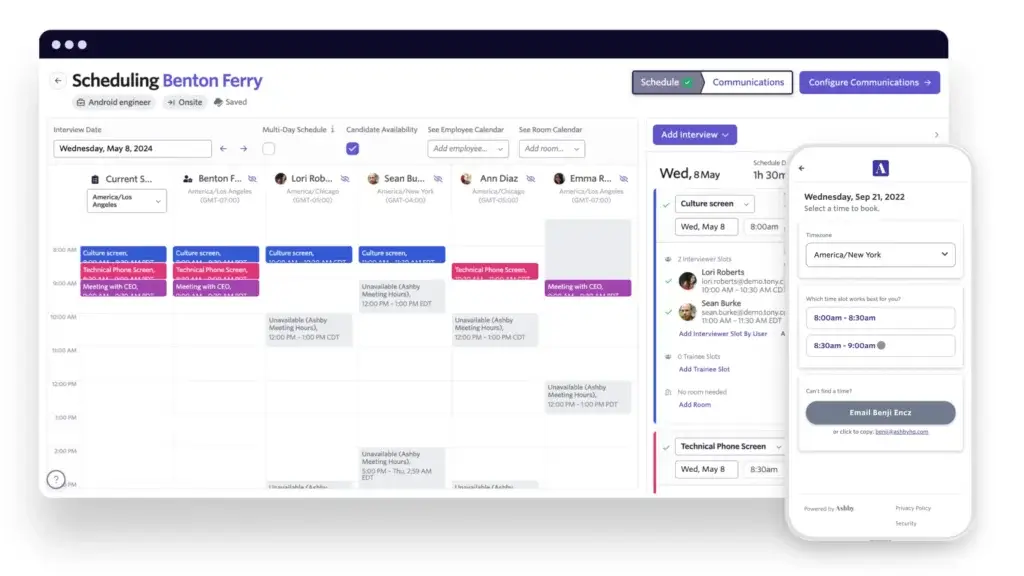
Scheduling is one of Ashby’s most practical workflow features. Recruiters can coordinate interviews, manage interviewer availability, reduce back-and-forth messages, and create smoother candidate scheduling experiences.
For busy teams, scheduling automation can remove a major administrative burden. It also helps improve candidate experience because delays in scheduling often weaken momentum.
AI Recruiting Features
Ashby AI, Automation, and Recruiting Intelligence
Ashby has been moving strongly toward AI-assisted recruiting. Its advantage is that AI features sit on top of a unified recruiting data layer. Candidate profiles, outreach history, interview feedback, scheduling activity, and pipeline data can work together instead of sitting in separate tools.
Ashby Assistant
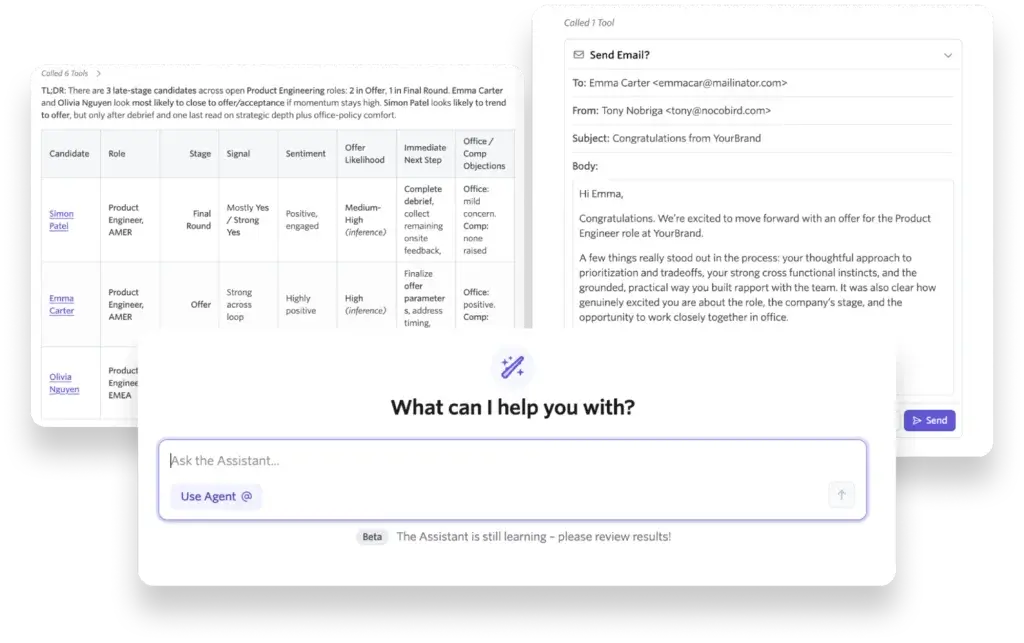
Ashby Assistant is designed to help recruiting teams ask questions, summarize information, draft content, and work more efficiently inside the platform. It can support recruiters with repetitive tasks and help teams move faster through day-to-day workflows.
The practical benefit is speed. Instead of digging through records manually, recruiters can use AI assistance to understand candidate context, prepare communication, or find relevant information faster.
AI Agents
Ashby has introduced AI agent capabilities that can help teams take action across recruiting workflows. This points toward a more operational use of AI, where the system does not only summarize data but can help complete recruiting tasks.
For talent teams, this is one of the more interesting areas to watch. AI agents may reduce administrative work, but they also require clear governance, permissions, and review standards.
AI Talent Rediscovery
Talent rediscovery helps teams search past candidates and surface people who may be relevant for current roles. This is useful because many companies already have strong candidates in their database, but those candidates are often forgotten after a role closes.
With AI-powered rediscovery, recruiters can make better use of existing candidate data and reduce the need to start every search from zero.
AI Notetaker
Ashby’s AI Notetaker is designed to help capture, transcribe, and summarize interviews. This can reduce manual note-taking and help hiring teams review conversations more efficiently.
However, interview transcription should be handled thoughtfully. Candidates should understand how notes are captured, and companies should define internal policies for data retention, consent, and review.
AI Report Interpretations
Ashby also supports AI-assisted reporting interpretation. Instead of only showing dashboards, the platform can help explain what the data means in plain language.
This is especially useful for recruiting leaders who need to share insights with executives, finance, hiring managers, and department heads. Data is more valuable when stakeholders can understand and act on it.
Responsible AI Considerations
AI can improve recruiting productivity, but it should not replace human judgment. Hiring teams should still define job criteria clearly, review candidate context, document decisions, and monitor outcomes for fairness.
When evaluating Ashby, ask how AI features use candidate data, which controls admins have, how permissions work, and how your team can keep humans involved in final hiring decisions.
Pros and Cons
Benefits and Limitations of Using Ashby
Positive
✅ Excellent recruiting analytics
✅ All-in-one recruiting workflow
✅ Strong sourcing and CRM tools
✅ Modern AI recruiting features
Negative
❌ Pricing is not fully public
❌ Can feel complex at setup
❌ May be too advanced for small teams
❌ Hiring manager UX can need training
Strengths & Benefits
Ashby has clear strengths for companies that want a serious recruiting platform rather than a lightweight ATS.
- Excellent recruiting analytics – Ashby gives teams deep visibility into hiring performance.
- All-in-one recruiting workflow – ATS, CRM, scheduling, and analytics live in one system.
- Strong sourcing and CRM tools – Recruiters can manage prospects, talent pools, and sequences.
- Modern AI recruiting features – AI assistant, agents, notetaker, and rediscovery support productivity.
- Highly configurable platform – Teams can adapt workflows, reports, and permissions to their process.
Limitations & Drawbacks
Ashby is powerful, but that power comes with trade-offs.
- Pricing is not fully public – You need to contact sales for an accurate quote.
- Can feel complex at setup – Configuration requires process clarity and admin ownership.
- May be too advanced for small teams – Occasional hiring teams may not need this much depth.
- Hiring manager UX can need training – Non-recruiters may need guidance to use advanced workflows.
- Best value requires adoption – Analytics and automation only pay off when teams use the system consistently.
Operational Fit
Ashby User Experience, Support, and Security
Software fit is not only about features. You also need to evaluate how Ashby feels in daily use, how much effort implementation requires, how well hiring managers adopt it, and whether the platform meets your security expectations.
Ease of Use
Ashby has a modern interface and is often seen as more polished than older enterprise ATS platforms. Recruiters who care about workflow depth, customization, and analytics may find the experience especially strong.
However, Ashby is not the simplest ATS on the market. The same configurability that makes it powerful can also make it feel more complex for teams without dedicated recruiting operations support.
Hiring Manager Experience
Hiring manager adoption is a critical part of any ATS rollout. Ashby gives managers tools to review candidates, submit feedback, participate in interviews, and collaborate with recruiters.
Still, managers who only use the system occasionally may need training. If your hiring managers are used to simple email-based workflows, Ashby will work best when you provide clear instructions and keep feedback tasks focused.
Implementation Experience
Ashby implementation should start with process design. Before configuring the platform, define your hiring stages, approval flows, feedback forms, interview plans, offer process, sourcing workflows, and reporting requirements.
This prevents your team from simply transferring a messy process into a better tool. Ashby is strongest when it supports a clear recruiting operating model.
Customer Support and Enablement
Ashby is known for investing in customer success and product education, but support experience can vary based on your plan, company size, rollout complexity, and internal readiness.
Before buying, ask about implementation support, admin training, data migration, customer success access, response times, and help with workflow design. These details matter as much as the feature list.
Security and Compliance
Recruiting platforms store sensitive data, including resumes, contact details, interview feedback, compensation discussions, offer information, and sometimes demographic data. Security should be part of your evaluation.
Ashby states that it uses AWS infrastructure and maintains SOC 2 Type 2 auditing. The company also provides security and privacy resources for buyers that need more formal review before procurement.
Data Privacy Considerations
If you hire across regions, ask how Ashby supports GDPR-related workflows, candidate data retention, deletion requests, consent, diversity surveys, and access controls.
This is especially important for global employers. Recruiting data often moves across recruiters, hiring managers, interviewers, agencies, and HR systems, so permissions and data governance should be reviewed before rollout.
Pricing
Ashby Pricing & Plans
Ashby does not publish a simple fixed price on its pricing page. Instead, pricing is based on company size, usage, and commitment. That means most buyers need to contact Ashby for a custom quote.
How Ashby Structures Its Plans
Ashby’s public product packaging is generally organized around company stage and scale. The platform is positioned for startups, growth companies, and enterprise teams, with plan names and feature availability depending on the buying motion and company requirements.
You may see references to Foundations, Plus, and Enterprise in Ashby’s product updates and packaging. In practical terms, smaller teams usually need core ATS and all-in-one recruiting workflows, while larger teams may require deeper analytics, governance, AI functionality, integrations, and enterprise controls.
What Affects Total Cost
Your total Ashby cost will likely depend on your company size, recruiter seats, usage needs, AI requirements, sourcing volume, implementation needs, integrations, support requirements, and contract commitment.
This makes Ashby harder to compare against tools with simple per-user pricing. However, it also reflects the platform’s positioning as a more complete recruiting system rather than a basic ATS.
What to Ask Before You Buy
Before choosing Ashby, ask which modules are included in your quote, which AI features are included, whether sourcing and CRM tools are included, how implementation is priced, how integrations are handled, and whether reporting features vary by plan.
You should also ask about data migration, sandbox environments, permission controls, API access, customer success support, and contract flexibility if your hiring volume changes.
Pricing Table
The table below gives a practical summary of how Ashby pricing works today.
| Plan Type | Ashby Pricing | Main Capabilities | Best For |
| Startups / Foundations | Custom quote | Core ATS, scheduling, candidate management, workflows, reporting, and recruiting operations basics | Startups building a scalable hiring process |
| Growth / Plus | Custom quote | ATS, CRM and sourcing, automation, advanced reporting, deeper workflows, and AI capabilities | Scaling companies with active recruiting teams |
| Enterprise | Custom quote | Enterprise-grade workflows, permissions, integrations, governance, analytics, and advanced support needs | Large organizations with sophisticated hiring operations |
Ashby is not a budget ATS. It makes the most sense when you want to consolidate recruiting workflows, improve analytics, and give your talent team a platform that can support scale.
Use Cases
Who Should Use Ashby?
Ashby is strongest when hiring is frequent, measurable, and process-driven. It is a good fit for teams that want recruiting to operate with the same level of visibility and structure as sales, finance, or customer success.
Startups Preparing to Scale
If your startup expects hiring to accelerate, Ashby can help you build the right foundation early. You can manage candidates, create structured workflows, use scheduling automation, and start tracking recruiting performance before your process becomes messy.
This is especially useful for funded startups that need to hire quickly but still want a professional candidate experience.
Growth-Stage Companies
Ashby is a strong fit for growth-stage companies because hiring complexity tends to increase quickly. You may have more roles, more hiring managers, more interviewers, more sources, and more reporting expectations.
At this stage, spreadsheets and basic ATS tools often begin to break down. Ashby gives you more structure without forcing you into a legacy enterprise system.
Data-Driven Talent Acquisition Teams
If your recruiting team cares deeply about analytics, Ashby should be high on your shortlist. The platform helps you understand hiring funnels, conversion rates, candidate sources, team activity, offer progress, and bottlenecks.
This makes it easier to answer leadership questions and improve recruiting performance over time.
Recruiting Operations Teams
Recruiting operations teams will likely appreciate Ashby’s configurability, reporting depth, automation, and workflow control. The platform gives operations leaders more room to design processes that fit the business.
That said, the platform works best when someone owns configuration and data quality. Without ownership, advanced systems can become inconsistent over time.
Enterprise Hiring Teams
Ashby can also fit enterprise organizations that want a modern alternative to older ATS platforms. Enterprise buyers should evaluate integrations, security, compliance, permissions, global workflows, and implementation support carefully.
The main question is not whether Ashby is powerful enough. The question is whether its product direction, support model, and implementation approach match your company’s complexity.
When Ashby Might Not Be Right
Ashby may not be the best choice if you only hire occasionally, have a very small team, need the cheapest ATS possible, or want a basic plug-and-play candidate tracker with minimal configuration.
In those cases, tools like JazzHR, Breezy HR, Workable, or Recruitee may be easier and more affordable options.
User Feedback
Ashby Customer Reviews
Ashby receives strong feedback from many recruiting users, particularly around reporting, customization, modern workflows, and the ability to consolidate recruiting tools. Users often describe it as a powerful ATS for teams that want more control and better visibility.
What Users Like Most
Users commonly appreciate Ashby’s recruiting analytics, custom dashboards, candidate tracking, automation, sourcing workflows, and overall product velocity.
The reporting experience is a recurring strength. For teams that have struggled with limited ATS reports or manual spreadsheet exports, Ashby’s analytics can feel like a meaningful improvement.
Common Complaints
Common concerns include complexity, setup effort, terminology, learning curve, and usability for hiring managers who are not in the system every day.
These complaints are not unusual for highly configurable recruiting platforms. The more powerful a system becomes, the more important onboarding, admin design, and internal training become.
My Take on the Review Pattern
The review pattern suggests that Ashby performs best for teams that are ready to use its depth. If your recruiting team wants analytics, automation, sourcing, CRM, and structured workflows in one platform, Ashby can deliver strong value.
If your team wants the simplest ATS possible, Ashby may feel heavier than necessary. It is not built primarily for occasional hiring. It is built for teams that treat recruiting as an operational discipline.
Competitors
Competitor Alternatives to Ashby
Ashby is often compared with Greenhouse, Lever, Workable, SmartRecruiters, and iCIMS. The right alternative depends on your hiring volume, company size, reporting needs, and recruiting maturity.
| Feature Type | Ashby | Greenhouse | Lever | Workable |
| Core angle | All-in-one ATS, CRM, scheduling, analytics, and AI | Structured hiring and interview process discipline | ATS plus CRM for sourcing-focused teams | Accessible recruiting software for SMB and mid-market teams |
| Best for | Data-driven startups, scaleups, and mature TA teams | Companies that want consistent structured hiring | Growth teams focused on sourcing and relationship management | Teams that want easier setup and broad hiring features |
| Analytics | One of the strongest areas of the platform | Strong reporting, often with structured hiring context | Useful reporting, especially around pipeline and CRM activity | Good for general recruiting visibility |
| CRM and sourcing | Native CRM and sourcing workflows | Available, but often evaluated separately from core ATS needs | Major strength of the platform | Available, but not as deep as Ashby or Lever |
| AI capabilities | Strong AI direction across assistant, agents, notes, reports, and rediscovery | Increasing AI support across recruiting workflows | Automation and AI features support sourcing and hiring workflows | AI tools are useful for practical recruiting tasks |
| Pricing style | Custom pricing based on company size, usage, and commitment | Custom pricing | Custom pricing | More accessible public pricing in many cases |
Compared with Greenhouse, Ashby is often more appealing if your priority is all-in-one recruiting analytics, CRM, scheduling, and AI in a modern platform. Greenhouse may be stronger if your main goal is structured hiring consistency at scale.
Compared with Lever, Ashby has a stronger analytics-led identity, while Lever remains attractive for teams that want ATS and CRM workflows centered around sourcing and nurturing.
Compared with Workable, Ashby is more powerful and more configurable, but Workable may be easier for smaller teams that want faster setup and clearer pricing.
Compared with SmartRecruiters and iCIMS, Ashby may feel more modern and analytics-driven, while those platforms may appeal to larger enterprise teams with specific global talent acquisition requirements.
Best Practices
Getting Started with Ashby
Ashby can be a powerful recruiting platform, but the setup process will shape the results. The best teams do not treat Ashby as a place to simply store candidates. They use it as a recruiting operating system.
Map Your Hiring Process First
Before implementation, define your hiring stages, approvals, interview loops, scorecards, feedback expectations, offer process, candidate communication rules, and reporting needs.
This makes Ashby easier to configure and helps prevent inconsistent workflows across departments.
Build Reporting Around Real Questions
Ashby’s analytics are powerful, but reporting should start with business questions. Track metrics such as source quality, time to fill, conversion rates, interview capacity, offer acceptance, and hiring-plan progress.
This keeps reporting useful for leadership instead of turning dashboards into decorative charts.
Train Hiring Managers Early
Hiring managers should understand how to review candidates, complete scorecards, use feedback forms, and collaborate inside Ashby.
Early training reduces confusion and helps managers become active participants in the hiring process.
Use CRM Data Consistently
If you use Ashby for sourcing, keep candidate data clean. Define how recruiters should tag prospects, manage talent pools, use projects, and document outreach activity.
A clean CRM makes future rediscovery and reporting much more valuable.
Automate Carefully
Automation can save time, but it should support a human recruiting experience. Use templates, reminders, and workflow triggers to reduce admin work without making communication feel robotic.
Candidate experience should remain personal, especially for high-priority roles.
Review Permissions and Privacy
Before launch, review who can access candidate records, reports, compensation details, feedback, diversity data, and confidential jobs.
This is especially important for larger companies with multiple departments, regions, or sensitive hiring workflows.
Conclusion
Final Thoughts
Ashby is one of the strongest modern recruiting platforms for teams that want ATS, CRM, sourcing, scheduling, analytics, automation, and AI in one system. Its biggest advantage is not one isolated feature. It is the way recruiting data and workflows connect across the full hiring process.
The platform is especially strong for data-driven recruiting teams, scaling startups, growth-stage companies, and organizations with dedicated talent acquisition operations. Its analytics, customization, sourcing workflows, and AI direction make it more advanced than many lightweight ATS tools.
The main drawbacks are pricing transparency, setup complexity, and the need for proper adoption. Ashby can feel like too much software for small teams that only hire occasionally. It also requires thoughtful implementation to get the most from its workflows and reporting.
Overall, Ashby is a strong recommendation for companies that want a modern, all-in-one recruiting platform and are ready to manage hiring with more structure, data, and automation. If your team wants to move beyond basic applicant tracking and build a more scalable recruiting operation, Ashby deserves a serious place on your shortlist in 2026.
Frequently Asked Questions
Have more questions?
What is Ashby used for?
Ashby is used for applicant tracking, candidate relationship management, sourcing, interview scheduling, recruiting analytics, automation, AI recruiting workflows, and hiring team collaboration.
Is Ashby an ATS?
Yes. Ashby is an ATS, but it is broader than basic applicant tracking because it also includes CRM and sourcing, scheduling, analytics, automation, and AI recruiting features.
How much does Ashby cost?
Ashby uses custom pricing based on company size, usage, and commitment. You need to contact Ashby for an accurate quote because fixed public pricing is not listed in a simple per-user format.
Does Ashby offer AI recruiting features?
Yes. Ashby offers AI recruiting features such as Ashby Assistant, AI agents, AI Talent Rediscovery, AI Notetaker, and AI-assisted report interpretation.
Is Ashby good for startups?
Yes. Ashby can be a strong option for startups that expect to scale hiring and want a recruiting platform that can grow with them. Very small teams with occasional hiring may prefer a simpler ATS.
Is Ashby good for enterprise recruiting?
Ashby can work well for enterprise recruiting teams that need configurable workflows, analytics, integrations, permissions, and modern hiring operations. Enterprise buyers should evaluate implementation, security, and integration needs carefully.
What makes Ashby different from other ATS tools?
Ashby stands out because it combines ATS, CRM and sourcing, scheduling, analytics, automation, and AI in one platform. Its recruiting analytics are one of its strongest differentiators.
Is Ashby easy to use?
Ashby has a modern interface, but it can feel complex because it is highly configurable. Recruiters may appreciate its depth, while hiring managers may need training to use it confidently.
What are the best Ashby alternatives?
Common Ashby alternatives include Greenhouse, Lever, Workable, SmartRecruiters, iCIMS, Recruitee, and JazzHR. The best choice depends on your company size, hiring volume, reporting needs, and budget.
Is Ashby worth it?
Ashby is worth considering if your team needs a data-driven, all-in-one recruiting platform with ATS, CRM, sourcing, scheduling, analytics, automation, and AI. It may be too advanced for teams that only need basic applicant tracking.