
Introduction
Kit is an email marketing platform designed around creator businesses. Formerly known as ConvertKit, it combines newsletters, subscriber management, landing pages, visual automations, recommendations, digital product sales, paid subscriptions, and sponsorship tools.
The platform is strongest when you need to turn readers, listeners, viewers, or followers into an owned email audience. A form can collect a subscriber, apply an interest tag, deliver a lead magnet, start a welcome sequence, and connect later purchases to the same profile.
Its email design tools are more restrained than Mailchimp, reporting is limited on lower plans, and it lacks ActiveCampaign’s CRM and multichannel depth. Pricing also rises with active subscribers, so a large but lightly monetized list can become expensive.
This Kit review examines its features, automations, newsletter growth tools, commerce options, pricing, strengths, limitations, and best alternatives in 2026.
What Is Kit?
Kit is an email marketing and newsletter platform built primarily for creators. It helps you publish broadcasts, create automated email sequences, organize subscribers with tags and segments, build forms and landing pages, operate a public newsletter site, grow through creator recommendations, and sell digital products or subscriptions.
The company completed its rebrand from ConvertKit to Kit in 2024. The shorter name reflects a broader ambition: instead of functioning only as an email service provider, Kit positions itself as an email-first operating system for creators.
Who Kit Is Designed For
- Newsletter writers – Publish free or paid issues, grow through recommendations, and monetize with sponsorships.
- Authors and bloggers – Deliver lead magnets, automate welcome funnels, and promote books or memberships.
- Podcasters and YouTubers – Convert platform followers into an email audience you control directly.
- Course creators and coaches – Segment leads, nurture prospects, and sell digital products or subscriptions.
- Consultants and experts – Build authority through educational email sequences and targeted offers.
- Small creator teams – Manage broadcasts, automations, products, and subscriber data from one platform.
Kit is less suitable for ecommerce brands that need deep product-catalog automation, companies that require a sales CRM, and marketing teams running coordinated email, SMS, WhatsApp, advertising, and transactional messaging campaigns.
Key Features
Email, Growth, Automation, and Revenue
Kit’s value is not based on having the longest feature list. Its advantage is how the core features connect. A form can apply a tag, that tag can start an automation, the automation can deliver a sequence, a product purchase can change the subscriber’s path, and the same profile can retain the person’s interests, engagement, and purchase history.
Email Broadcasts and the Writing Experience
Broadcasts are one-time emails sent immediately, scheduled for later, or published to your newsletter site. The editor is optimized for clear, content-led email rather than elaborate promotional layouts. You can add text, images, buttons, personalization, conditional content, polls, products, and reusable sections while keeping the message relatively lightweight.
This approach works well for essays, educational newsletters, launch emails, podcast updates, and personal-brand communication. It is less convincing if your brand depends on complex visual merchandising, multi-column product grids, or a large library of polished retail templates.
Subject-line A/B testing is available, with broader testing on Creator Pro. Creator Pro also adds email-content testing, allowing two versions of a broadcast to compete based on click performance. This is useful, but experimentation remains narrower than platforms built for high-volume optimization teams.
Subscriber-Centric Audience Management
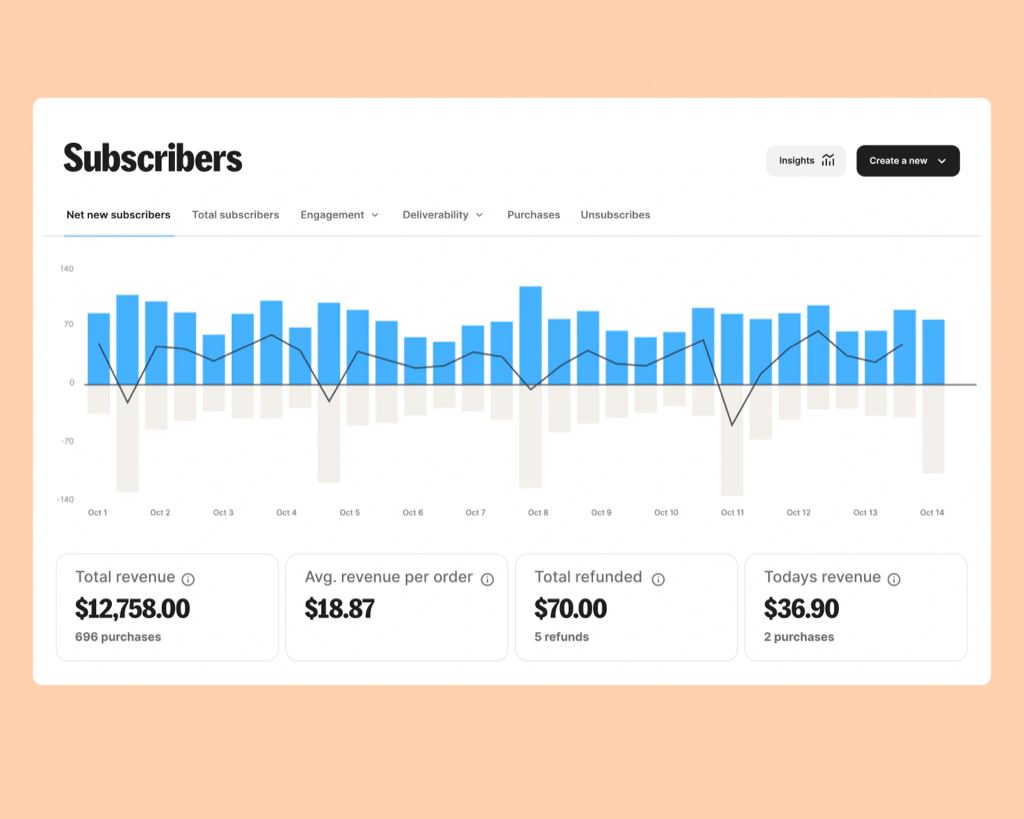
Kit uses one main subscriber database rather than forcing you to maintain separate lists. Each active subscriber is counted once, even when that person joins several forms or belongs to multiple audience groups. You organize people with tags, segments, custom fields, purchases, subscription sources, and engagement data.
This model is especially valuable for creator businesses with overlapping interests. A subscriber can simultaneously be tagged as a podcast listener, course buyer, beginner, and webinar attendee without creating duplicate records or duplicate billing.
Tags are fixed labels, while segments update dynamically according to filters. You can combine conditions to target people who joined through a specific lead magnet, clicked a launch email, purchased one product, or have not purchased another. Subscriber preferences can also let readers choose topics and update their own tags.
Forms, Landing Pages, and Lead Magnets
Kit includes unlimited forms and landing pages across its plans. You can embed forms on a website, publish standalone landing pages, connect a custom domain, collect custom fields, enable double opt-in, redirect subscribers to a thank-you page, and deliver an incentive file through the confirmation process.
The landing page builder is fast and approachable, making it suitable for newsletter signup pages, waitlists, podcast lead magnets, event registration, and simple product validation. Its main limitation is design freedom. You can customize templates, colors, fonts, content, and selected layout elements, but it is not a full landing page optimization suite.
Email Sequences and Visual Automations
Sequences are scheduled sets of automated emails. You can use them for welcome campaigns, evergreen courses, product education, onboarding, launch preparation, post-purchase follow-up, and re-engagement.
Visual Automations connect entry points, actions, events, and conditions on a canvas. A workflow might begin when someone completes a form, apply a topic tag, send a five-email sequence, check whether the subscriber purchased, and move buyers into an onboarding path while non-buyers receive a different offer.
The builder is one of Kit’s strongest features because it makes subscriber movement easy to understand. Paid plans include unlimited visual automations and sequences, while the free Newsletter plan is limited to one basic visual automation with one sequence. Kit also provides automation templates for common creator funnels.
Compared with the advanced logic available in enterprise automation platforms, Kit has fewer cross-channel actions, predictive tools, and CRM objects. For a creator funnel centered on email, however, the balance between power and usability is excellent. Our guide to email marketing automation features explains which capabilities matter as your funnels become more complex.
Creator Network and Newsletter Recommendations
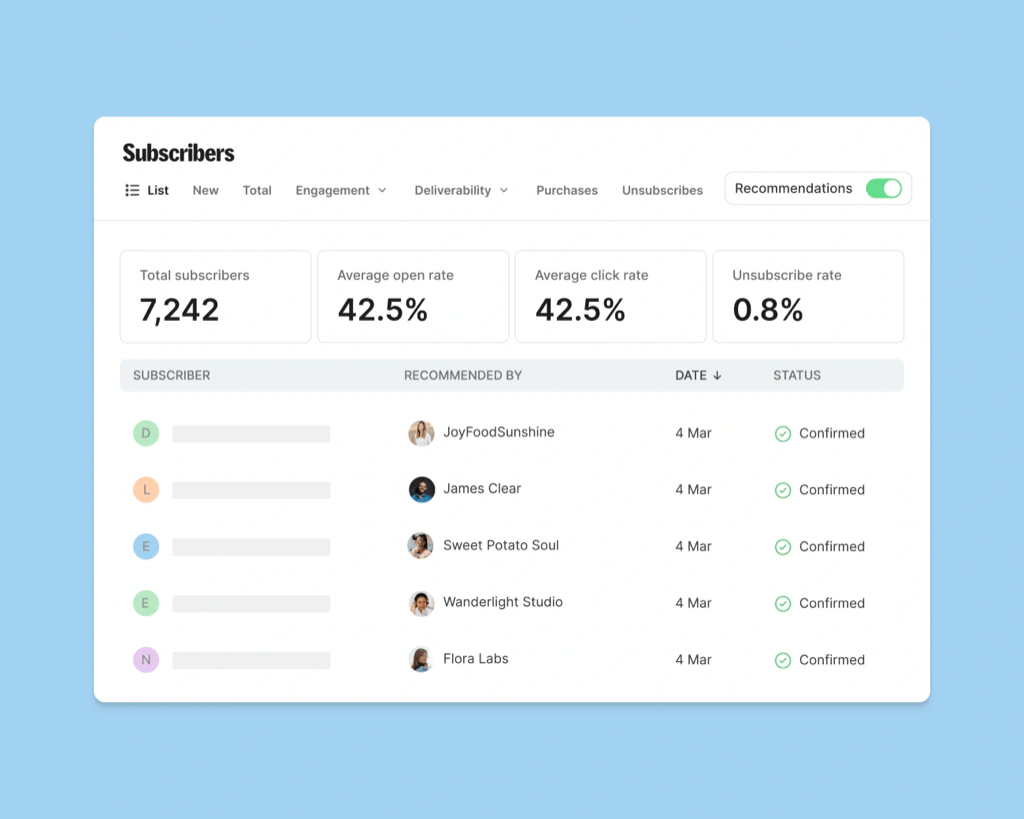
The Creator Network helps newsletters recommend one another after a subscriber joins. You can create recommendation relationships with relevant creators, appear in other recommendation flows, and track how many subscribers each partner generates.
This feature turns the post-signup moment into a growth channel. It is particularly useful when your audience overlaps with adjacent creators but does not directly compete with them. Recommendations can also improve the subscriber experience by introducing readers to useful publications while their interest is high.
The free Newsletter plan includes one Kit-managed recommendation slot. Earnings generated through that managed slot go to Kit, which is the commercial tradeoff behind the unusually generous 10,000-subscriber allowance. Paid plans provide more control and let you earn through Paid Recommendations, although Kit applies a fee to that revenue.
Creator Profile and Newsletter Website
Your Creator Profile functions as a lightweight website and public newsletter archive. It can display your bio, signup form, published posts, products, links, navigation, and branded design. You can use a Kit domain or connect a custom domain.
This is enough for a new newsletter, a link-in-bio destination, or a creator who wants to publish without maintaining WordPress. It is not a replacement for a fully developed content site when you need advanced SEO architecture, custom templates, complex navigation, plugins, or complete control over conversion tracking.
Digital Products, Paid Newsletters, and Tips
Kit Commerce lets you sell ebooks, downloads, workshops, coaching access, recurring memberships, paid newsletters, and other digital offers. Products can use one-time or recurring billing, discount codes, multiple pricing intervals, and checkout upsells. Payments are processed through Stripe.
The standard USD processing fee is 3.5% plus $0.30 per transaction. Commerce is available on free and paid plans in supported countries, so you can validate a small offer without paying a monthly software fee first.
The system is best for straightforward creator products connected directly to email. A purchase can add a tag, trigger onboarding, exclude the buyer from future pitches, or move the customer into another sequence. However, Kit is not a complete ecommerce platform. Physical fulfillment, sophisticated bundles, advanced storefront management, inventory, complex tax operations, and deep cart optimization may require another service.
Integrations, API, and Kit MCP
Kit connects with more than 100 direct apps, including creator, ecommerce, course, membership, and website tools. Common workflows connect Kit with WordPress, Shopify, Teachable, Thinkific, Stripe-powered products, webinar software, form builders, and automation services. An API supports custom integrations.
Kit MCP adds an AI workflow layer. With permission, compatible AI clients can analyze account data, draft broadcasts, tag subscribers, and inspect performance using real campaign context. Apply strict permissions and review actions before an AI tool changes live audience data.
User Experience
Ease of Use and Daily Workflow
Dashboard and Navigation
Kit organizes work around audience growth, sending, automation, earning, and reporting. Creating a broadcast or form is easy, and the automation canvas provides a useful visual explanation of how subscribers move through a funnel.
The platform is most intuitive when your account follows a simple naming system. Without conventions for tags, segments, forms, sequences, and products, a mature account can become difficult to audit. Folders and consistent prefixes help, but Kit is not a substitute for basic lifecycle planning.
Email Creation and Brand Control
The editor is deliberately restrained. That reduces production time and encourages emails that resemble personal communication, which suits many creators. You can create custom templates and reusable content, but design-focused marketers may find the available layout control less flexible than Mailchimp or specialist campaign builders.
This tradeoff is important. A simpler editor can improve consistency and keep you focused on the message, but it may also force compromises when a campaign needs dense product merchandising, advanced responsive layouts, or highly art-directed branding.
Audience Health and Data Controls
Deliverability, Reporting, and Compliance
Email Analytics and Deliverability Reporting
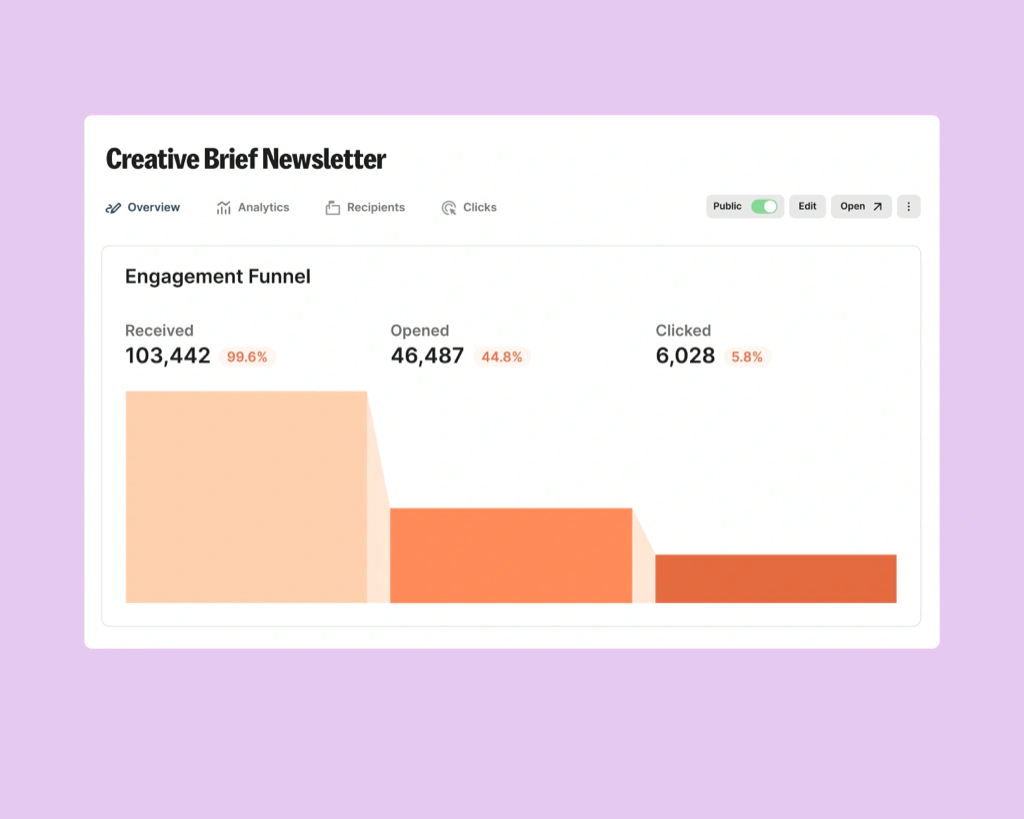
Standard reporting covers sends, deliveries, opens, clicks, unsubscribes, conversions, and performance for broadcasts and sequences.
Creator Pro adds deliverability reporting by email provider or segment, plus engagement scoring based on opens, clicks, and purchases. This helps diagnose problems hidden by an account-wide average.
Kit has published a system-wide delivery rate of 99.8%, but your results still depend on consent, authentication, complaints, list hygiene, sending consistency, and subscriber engagement.
Privacy, Compliance, and Account Controls
Kit provides GDPR support tools, including double opt-in, consent options, geographic filtering, exports, deletion workflows, unsubscribe controls, a Data Processing Addendum, multi-factor authentication, device verification, and CAPTCHA controls. These features can support GDPR and account-security processes.
You remain responsible for your legal basis, privacy notices, imported data, user permissions, and connected apps. Review every integration’s access before exposing subscriber data or allowing external tools to change live records.
Pros and Cons
Benefits and Limitations of Kit
Positive
✅ Excellent creator automations
✅ Generous free subscriber limit
✅ Strong tagging and segmentation
✅ Built-in products and subscriptions
✅ Useful recommendation network
Negative
❌ Pricing rises with subscribers
❌ Limited design flexibility
❌ Advanced reports require Pro
❌ No full CRM or multichannel suite
❌ Free plan has a managed recommendation
Strengths and Benefits
- Creator-centered workflows – Forms, tags, sequences, products, and recommendations work together naturally.
- Subscriber-centric database – Each active person is counted once across forms and tags.
- Approachable automation – The visual builder keeps subscriber journeys understandable.
- Integrated monetization – Products, subscriptions, sponsorships, and recommendations connect with email data.
- Strong free starting point – The 10,000-subscriber allowance provides room to validate a newsletter.
Limitations and Drawbacks
- Subscriber-based pricing – Costs rise as your active list expands.
- Restrained design – The editor is less flexible for visual retail campaigns.
- Reporting tiers – Advanced analysis and testing require Creator Pro.
- Limited business breadth – Kit does not replace a CRM or multichannel suite.
- Free-plan tradeoff – Kit controls one recommendation slot and its earnings.
Costs, Limits, and Value
Kit Pricing and Plans
Kit offers Newsletter, Creator, and Creator Pro plans. Pricing is based on your number of active confirmed subscribers rather than the number of emails you send. A subscriber is counted once regardless of how many tags, forms, or segments apply.
The pricing below was checked in July 2026. Subscriber tiers, promotions, and annual discounts can change, so confirm the amount for your expected list size before purchasing.
| Plan | Starting Monthly Price | Annual Billing | Subscriber Allowance | Automation | Best For |
| Newsletter | $0 | Not applicable | Up to 10,000 | 1 basic automation and 1 sequence | New creators building an audience |
| Creator | $39/month | 2 months free | Up to 1,000 at starting tier | Unlimited automations and sequences | Creators running funnels and products |
| Creator Pro | $79/month | 2 months free | Up to 1,000 at starting tier | Unlimited plus advanced testing and insights | Established creators and growing teams |
Newsletter Plan
The Newsletter plan supports up to 10,000 active subscribers with unlimited sends, forms, landing pages, products, subscriptions, a Creator Profile, recommendations, and one basic automation with one sequence.
One Kit-managed recommendation slot remains enabled, and Kit keeps its revenue. Paid plans add unlimited automation, integrations, RSS campaigns, recommendation control, and Paid Recommendation earnings.
Choose Newsletter for audience growth and publishing. Upgrade when multiple lead magnets, products, or journeys make one automation impractical.
Creator Plan
Creator starts at $39 per month for up to 1,000 subscribers. It adds unlimited broadcasts, sequences, forms, landing pages, visual automations, automation rules, link triggers, integrations, API access, custom templates, custom domains, paid recommendations, branding removal, and two team members.
This is the best-value tier for most serious solo creators. It provides the full foundation for segmenting an audience, running evergreen funnels, launching products, and automating purchases without paying for advanced analytics that you may not yet use.
Creator Pro Plan
Creator Pro starts at $79 per month for up to 1,000 subscribers. It adds up to five subject-line variants, email-content A/B testing, advanced deliverability reports, subscriber engagement scoring, Facebook Custom Audiences syncing, the ability to edit links after a broadcast is sent, and unlimited team members.
The upgrade makes sense when email is already a meaningful revenue channel and better diagnostics can influence business decisions. It is harder to justify for a small list that mainly sends a weekly newsletter.
Additional Costs and Pricing Risks
Kit’s subscription is not the only cost to model. Digital product and subscription transactions carry a processing fee, Paid Recommendation revenue is subject to Kit’s fee, and connected tools such as course platforms, webinar services, ecommerce software, or external automation apps may have separate subscriptions.
The largest risk is list growth. Moving from 1,000 to tens of thousands of active subscribers increases the platform fee even when your workflow does not become more complex. Estimate the value per active subscriber, not only the entry price.
Best-Fit Creator Businesses
Who Should Use Kit?
Best for Audience-First Creator Businesses
Kit is strongest when email is the central relationship layer between your content and your revenue. Authors, podcasters, YouTubers, educators, coaches, and independent experts can use it to convert borrowed social reach into an audience they can contact directly.
Best for Evergreen Funnels and Digital Products
If you use lead magnets, educational sequences, webinars, courses, memberships, or downloadable products, Kit keeps the funnel understandable. Tags and purchase events can personalize follow-up without requiring a sales CRM.
Best for Creators Who Prefer Clear Emails
Kit suits businesses that win through ideas, expertise, and personality rather than elaborate promotional design. The editor makes it easy to produce readable emails consistently and quickly.
Less Suitable for Ecommerce and Sales Teams
Choose another platform when you need product recommendations based on catalog behavior, advanced abandoned-cart logic, SMS and WhatsApp journeys, deal pipelines, lead scoring for sales representatives, complex attribution, or extensive enterprise governance.
Best Kit Alternatives
Competitors for Newsletters and Automation
beehiiv – Best for Newsletter Growth and Ad Monetization
beehiiv is the closest alternative for publishers prioritizing referral programs, web publishing, paid subscriptions, recommendations, and native advertising. Choose beehiiv for media-style growth and ad monetization, or Kit for stronger creator funnels, tagging, automated sequences, and product-driven journeys.
Mailchimp – Best for Design and General Small-Business Marketing
Mailchimp provides more templates, visual campaign design, customer journeys, and ecommerce connections. Choose it for brand-heavy general marketing, or Kit for creator workflows, recommendations, paid newsletters, and digital product funnels. Read the complete Mailchimp review.
ActiveCampaign – Best for Advanced Automation and CRM
ActiveCampaign is stronger for deep automation, multichannel orchestration, sales CRM, lead management, and complex lifecycle logic. Kit is easier for solo creators and content businesses. See the full ActiveCampaign review.
Brevo – Best for Email, SMS, and Flexible Contact Storage
Brevo combines email with SMS, WhatsApp, transactional messaging, CRM, and live chat. Choose Brevo for multichannel and operational communication, or Kit for creator growth, recommendations, newsletters, and products. Our Brevo review explains its pricing and features.
Substack – Best for the Simplest Publishing Experience
Substack is simpler for web publishing, paid subscriptions, and built-in reader discovery. Kit provides more control over automations, segmentation, lead magnets, products, and the broader customer journey, while Substack’s fee on paid revenue can become significant at scale.
| Platform | Primary Strength | Where It Beats Kit | Where Kit Wins |
| beehiiv | Newsletter growth and media monetization | Referrals, ad network, publication analytics | Creator funnels and automation depth |
| Mailchimp | Design and general marketing | Templates and visual campaign creation | Creator tools and free subscriber allowance |
| ActiveCampaign | Advanced automation and CRM | Sales workflows and multichannel logic | Simplicity and creator commerce |
| Brevo | Multichannel customer engagement | SMS, WhatsApp, transactional email, CRM | Newsletter growth and creator monetization |
| Substack | Simple paid publishing | Fast setup and built-in reader network | Ownership, segmentation, and automation control |
Best Practices
Getting the Most Out of Kit
Design Your Tagging System Before Importing
Define a small set of durable tags for interests, products, sources, and lifecycle stages. Avoid creating a new tag for every campaign action unless it supports a real decision. A clean architecture makes automations easier to audit and segments easier to trust.
Build One Revenue Path at a Time
Start with one lead magnet, one welcome sequence, and one relevant offer. Measure where subscribers stop engaging before adding more branches. Complexity should respond to evidence, not compensate for an unclear customer journey.
Separate Buyers From Prospects
Use purchase events and tags to remove customers from sales sequences immediately. Then move them into onboarding, delivery, retention, or cross-sell workflows that reflect what they already own.
Review Cost Per Engaged Subscriber
Do not judge Kit only by total list size. Track the number of subscribers who open, click, purchase, or reply. Regularly suppress or remove inactive contacts according to a documented re-engagement policy so pricing reflects a useful audience.
Conclusion
Final Thoughts
Kit is one of the strongest email marketing platforms for creators in 2026 because its features follow a coherent business model. You can grow an audience, automate education, sell products, publish a newsletter, and connect revenue with subscriber behavior.
Its main advantages are the subscriber-centric database, visual automations, sequences, Creator Network, generous Newsletter plan, and integrated commerce. Its weaknesses are restrained design, Pro-gated reporting, rising subscriber costs, and limited CRM, ecommerce, and multichannel depth.
Choose Kit when email is the operating center of your creator business. Choose beehiiv for publication-style growth, Mailchimp for design-led marketing, ActiveCampaign for advanced automation and CRM, Brevo for multichannel engagement, or Substack for the simplest paid publishing experience.
Frequently Asked Questions
Have more questions?
What is Kit used for?
Kit is used to grow and manage an email audience, send newsletters, build landing pages and forms, automate email sequences, organize subscribers, sell digital products, run paid newsletters, and monetize recommendations or sponsorships.
Is Kit the same as ConvertKit?
Yes. ConvertKit rebranded as Kit in 2024. The platform continues to provide creator-focused email marketing while expanding its newsletter growth, commerce, monetization, and automation tools.
Is Kit free?
Yes. Kit’s Newsletter plan is free for up to 10,000 active subscribers and includes unlimited email sends, forms, landing pages, products, subscriptions, recommendations, and one basic automation with one sequence.
What is the catch with Kit’s free plan?
The free plan includes one Kit-managed recommendation slot, and Kit keeps earnings generated through that slot. It also limits you to one basic visual automation and one sequence.
How much does Kit cost?
The Creator plan starts at $39 per month and Creator Pro starts at $79 per month for up to 1,000 subscribers. Pricing increases as your active subscriber count grows.
Can you sell products with Kit?
Yes. Kit can sell digital products, paid newsletters, subscriptions, workshops, coaching access, and other creator offers. USD transactions currently carry a 3.5% plus $0.30 processing fee.
Does Kit have email automation?
Yes. Kit provides email sequences, automation rules, link triggers, and a visual automation builder. Paid plans include unlimited automations and sequences, while the free plan includes one basic workflow.
Is Kit better than Mailchimp?
Kit is generally better for creator funnels, newsletters, tagging, recommendations, and digital products. Mailchimp is generally better for design-heavy campaigns, broad small-business marketing, and a larger template ecosystem.
Is Kit good for ecommerce?
Kit can support creator products and connect with ecommerce platforms, but it is not the best choice for complex retail automation, inventory, product catalogs, SMS journeys, or advanced revenue attribution.
Who should use Kit?
Kit is best for authors, bloggers, newsletter writers, podcasters, YouTubers, educators, coaches, consultants, and course creators who use email as the central channel for audience relationships and revenue.