Introduction
Creating a professional‑sounding podcast takes more than a good microphone and compelling content. Once you finish recording, the real work begins: cleaning up audio, removing mistakes, balancing levels, and adding music or sound effects. The right podcast editing software streamlines these tasks and helps you transform raw recordings into polished episodes. This guide examines the best podcast editing software 2026, from free tools for beginners to advanced digital audio workstations (DAWs) and AI‑driven platforms. You’ll learn how to evaluate features, pricing, and ease of use so you can choose the tool that fits your workflow and budget.
Factors to Consider When Choosing Podcast Editing Software
Selecting the best podcast editing software involves balancing functionality with your technical comfort level and budget. Keep these factors in mind:
Ease of Use and Interface
Editing software should be intuitive, especially if you’re new to audio production. Look for applications with clear menus, drag‑and‑drop timelines, and helpful tooltips. Complex DAWs often have steeper learning curves but offer more control. AI‑driven platforms with text‑based editing (where you delete words to remove corresponding audio) reduce the technical barrier and speed up editing.
Compatibility and Platforms
Check whether the software runs on your operating system (Windows, macOS, Linux, or browser‑based). If you edit on multiple devices, choose a cross‑platform or web‑based tool. For mobile editing, some providers offer companion apps for iOS or Android.
Recording and Editing Capabilities
Essential editing features include multi‑track support, noise reduction, equalization, compression, volume automation, and the ability to cut, splice, and fade audio. Some tools also provide spectral editing for precise noise removal. If you record remotely, consider platforms that integrate recording and editing so you don’t juggle multiple apps.
AI Features and Automation
Modern podcast software often incorporates artificial intelligence. AI can automatically remove filler words, balance audio levels, suppress background noise, enhance voices, generate transcripts, and even create short clips for social media. These features save time and make editing accessible to non‑experts, but they can be limited on free plans.
Collaboration and Remote Recording
If your show includes co‑hosts or guests, choose software that supports remote recording with separate audio tracks for each participant. Some platforms offer progressive uploads, backups, and roles (host, producer, guest) to ensure smooth remote sessions. Collaborative editing features allow multiple team members to work on the same project.
Export Formats and Distribution
Make sure the software exports in formats required by podcast hosting platforms (MP3, WAV, M4A, etc.). Video podcasters should look for MP4 or WebM export options. Some all‑in‑one platforms integrate hosting and publishing so you can upload episodes directly to Spotify, Apple Podcasts, or YouTube.
Pricing and Value
Podcast editing tools range from free open‑source applications to premium subscription services. Consider whether you need a one‑time purchase, a monthly plan, or free tier. Free plans often include watermarks, limited recording hours, or restricted AI features. Paid plans unlock higher audio quality, unlimited editing, and advanced tools.
Support and Community
Look for software with good documentation, tutorials, and community forums. Active support helps you troubleshoot issues and learn advanced techniques. Free and open‑source tools may rely on user communities, while paid services typically include customer support.
Categories of Podcast Editing Tools
Understanding the types of podcast editing software will help narrow your choices:
Traditional Digital Audio Workstations (DAWs)
DAWs such as Adobe Audition, Logic Pro, Reaper, and GarageBand provide full control over audio. You edit waveforms directly, apply effects manually, and mix multi‑track projects. These tools are ideal for podcasters who want precise editing, advanced sound design, or integration with music production workflows. They tend to have a steeper learning curve but reward users with power and flexibility.
AI‑First Platforms and Text‑Based Editors
Platforms like Descript, Podcastle, and Alitu treat audio as text. You receive an automatic transcript and edit your podcast by deleting or typing in the transcript. AI features can remove filler words, generate voiceover, and enhance audio quality. These tools suit creators who prioritize speed and ease of use over granular control.
All‑in‑One Recording and Editing Suites
Services such as Riverside, SquadCast, Zencastr, and Alitu integrate remote recording, editing, AI enhancements, and publishing. They capture local audio and video for each participant, offer cloud backups, and provide editing tools or integrations with text‑based editors. These suites are perfect for remote interviews and collaborative shows.
Specialized Narrative Editors
Software like Hindenburg Pro focuses on spoken‑word storytelling. It includes automatic leveling, voice profiling, and one‑click publishing to podcast hosts. These features are tailored to journalists, educators, and narrative podcasts where vocal clarity and storytelling flow matter more than music production.
Browser‑Based and Lightweight Editors
Tools such as Veed.io and Auphonic provide quick fixes in your web browser. They’re ideal for trimming, noise reduction, and transcription without installing heavy software. Many of these tools offer free plans with watermarks or limited processing minutes.
Best Podcast Editing Software Options
Below are the top podcast editing tools 2026, organized by category and use case. Each subsection highlights key features, pros and cons, pricing, and who should use it.
Riverside

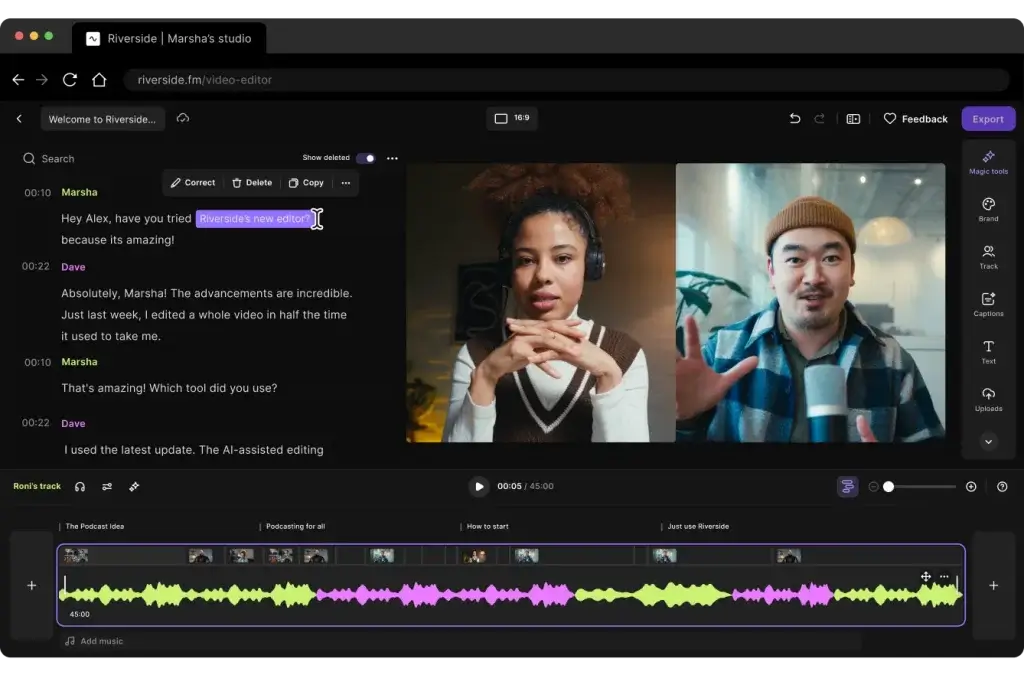
Overview: Riverside is a browser‑based studio for recording and editing high‑quality video and audio. It captures each participant locally and uploads files progressively to the cloud to prevent data loss. Riverside also includes text‑based editing and AI features.
Key Features:
- Record video up to 4K and audio up to 48 kHz locally for every participant
- Progressive uploads to the cloud to avoid losing recordings
- Separate audio and video tracks for each speaker
- Magic Clips and eye contact AI for social media clips and video polish
- Text‑based editing and unlimited transcriptions on higher plans
- Publishing directly to YouTube and podcast directories
- Teleprompter for hosts and live streaming options on higher tiers
Pros:
- Studio‑quality recordings regardless of internet stability
- Progressive uploads ensure backups and reduce audio drift
- Integrated AI tools for noise reduction, filler‑word removal, and show notes
- All‑in‑one platform for recording, editing, repurposing, and publishing
Cons:
- Free plan includes watermarks and limited recording hours
- AI features and higher video resolutions require paid plans
- Not a full DAW; limited advanced audio effects compared with dedicated editors
Pricing: Free plan with limited hours; Pro plan around $24 per month; higher tiers for live streaming and business use.
Who Should Use It: Podcasters who record remote interviews and want high‑quality video and audio with integrated editing and AI repurposing tools.
Descript

Overview: Descript is an all‑in‑one audio and video editor that treats your recordings like a word processor. You receive automatic transcripts and edit by deleting or typing text, and the corresponding audio changes accordingly.
Key Features:
- Text‑based editing of audio and video via transcripts
- Automatic transcription and screen recording
- Overdub: create a synthetic version of your voice to fix mistakes
- Filler‑word removal and long‑pause detection
- Multi‑track mixing with effects, music, and video overlays
- Integrations with Zoom, Dropbox, and other tools
Pros:
- Simplifies editing for non‑technical users
- AI tools save time by removing ums, ahs, and pauses
- Supports both audio and video podcasts in one interface
- Collaboration features allow multiple editors
Cons:
- Subscription required; advanced features cost more
- Editing via transcript may feel odd to audio purists
- Web‑based features require a stable internet connection
Pricing: Plans start around $12 per month for the Creator tier, with increasing transcription hours and AI credits on higher tiers.
Who Should Use It: Podcasters who value speed and ease of use, especially for video podcasts or teams that need collaboration and transcription.
SquadCast
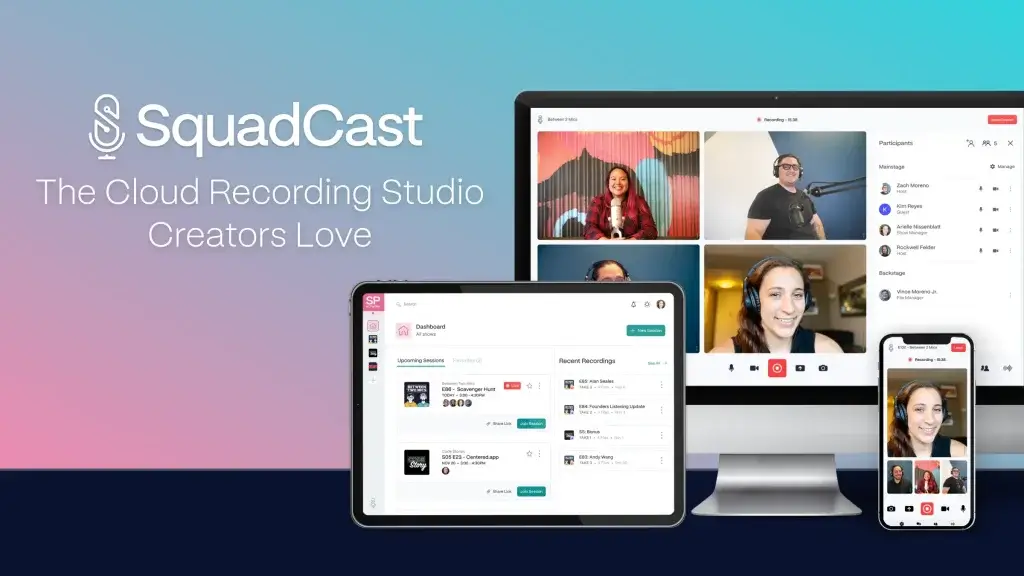
Overview: SquadCast is a cloud‑based recording studio that captures local audio and video for remote participants and uploads segments progressively to avoid data loss. It recently added editing and AI features by integrating Descript.
Key Features:
- Local multi‑track recording for each participant
- Progressive uploads and backups that preserve files even if connections drop
- Separate audio and video files in WAV, MP3, MP4, or WebM formats
- Green Room for guests to test equipment without signing up
- Team roles and backstage participants for producers and assistants
- Descript integration for text‑based editing, transcription, and AI polishing
- AI tools for filler‑word removal, voice enhancement, eye contact correction, and clip generation
- Rollover recording hours on paid plans
Pros:
- High‑fidelity recordings with 48 kHz audio and up to 4K video
- Progressive uploads safeguard your work against network issues
- Seamless transition from recording to Descript editing
- Backstage mode allows producers to monitor sessions without being on camera
- Strong security and SOC 2 certification for data protection
Cons:
- Limited live streaming capabilities
- Free and Hobbyist plans have recording and AI usage limits
- Watermarks on free plan video exports
- Requires separate hosting for podcast distribution
Pricing: Free plan (1 hour/month); Hobbyist ($16/month) with more hours; Creator ($35/month) for 4K exports and full AI suite; Business ($65/month) with higher limits.
Who Should Use It: Remote podcasters who need reliable recordings, collaborative features, and integrated AI editing via Descript.
Alitu

Overview: Built by The Podcast Host, Alitu is designed to take the technical hassle out of podcast production. It offers recording (solo or remote), automatic audio cleanup, easy editing, episode assembly, hosting, and publishing in one web‑based platform.
Key Features:
- Record solo or remote interviews within your browser
- Automatic leveling and noise reduction via AI
- Magic Filters that remove breath sounds and filler words
- Text‑based and waveform editing options
- Episode builder with drag‑and‑drop segments
- Integrated hosting with direct publishing to major podcast directories
- Transcriptions for accessibility and SEO
Pros:
- Extremely user‑friendly; requires minimal audio knowledge
- Saves time with automatic cleanup and Magic Filters
- All‑in‑one workflow from recording to publishing
- Offers a free trial and includes some AI tools
Cons:
- Subscription ($38/month) may be costly for hobbyists
- Limited advanced sound design capabilities
- Only web‑based; depends on internet connectivity
Pricing: Approximately $38 per month with a free trial. Annual plans may offer discounts.
Who Should Use It: Beginners and busy creators who want a streamlined workflow without juggling multiple tools.
Podcaslte
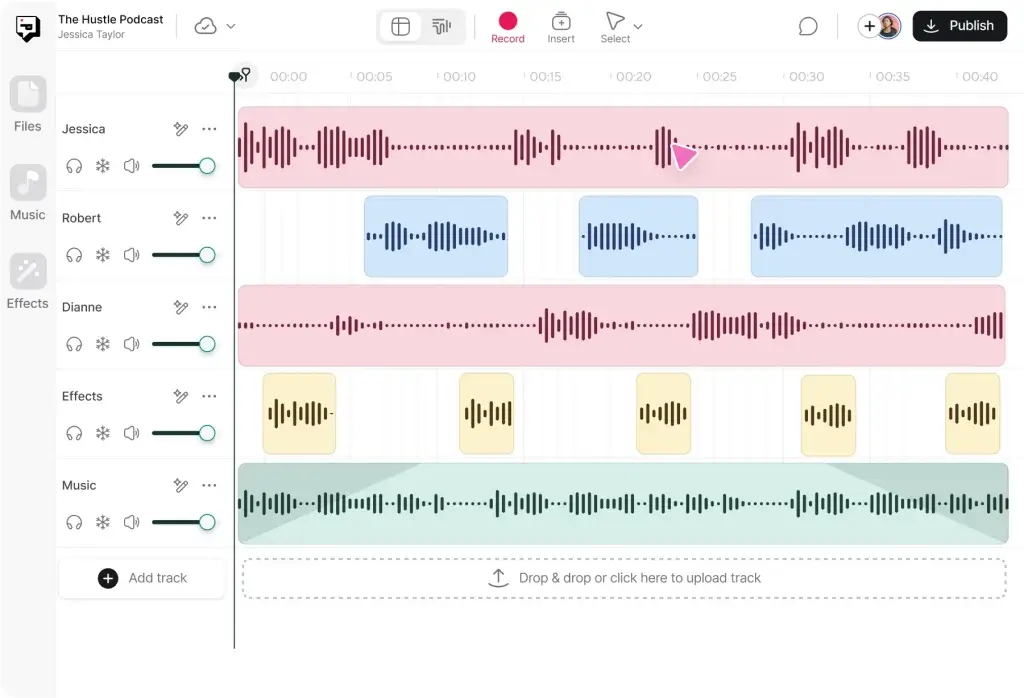
Overview: Podcastle is an AI‑powered platform that helps you record, edit, and produce podcasts and videos without specialized hardware. It offers tools like AI voice cloning and automatic noise reduction to simplify content creation.
Key Features:
- Record audio and video in the browser with separate tracks
- Text‑based editing and automatic transcription
- AI‑powered voice cloning (text‑to‑speech) to create voiceovers
- Magic Dust noise removal and sound enhancement
- Multi‑format export (MP3, WAV, MP4, and more)
- Collaboration tools with project sharing
- Mobile app for recording on the go
Pros:
- AI voice generation enables quick narration or corrections
- User‑friendly interface with minimal technical barriers
- Supports video podcasts and screen recordings
- Free plan available with basic features
Cons:
- Advanced AI features are restricted to paid plans
- Voice cloning may sound synthetic if heavily used
- Web‑based workflow depends on the internet speed
Pricing: Free plan with limited transcription minutes; Pro plan around $23 per month; higher tiers for more AI credits and enterprise use.
Who Should Use It: Creators who want to experiment with AI voiceovers and need a simple browser‑based editor for audio and video.
Zencastr

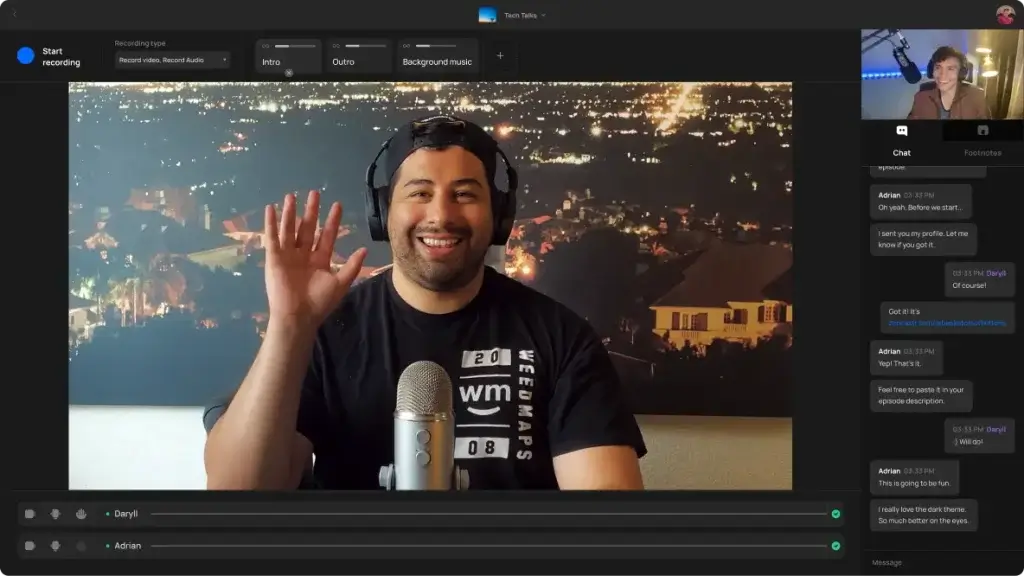
Overview: Zencastr offers remote recording via web browser and includes tools for basic editing and mixing. It provides local audio capture and progressive upload similar to Riverside and SquadCast.
Key Features:
- Local multi‑track recording in 44.1 kHz or 48 kHz
- Automatic post‑production with noise reduction and volume leveling
- Built‑in VoIP and Soundboard for live sound effects
- Separate track downloads in MP3 or WAV
- Hosting and distribution options on paid plans
Pros:
- Simple setup for remote interviews
- Automatic post‑production saves time
- Affordable paid plans
- Built‑in live sound effects for creative podcasts
Cons:
- Video features and advanced editing limited compared with competitors
- Free plan includes limited recording hours
- Occasional latency issues depending on the network
Pricing: Free plan with limited hours; paid plans start around $18 per month.
Who Should Use It: Podcasters who conduct remote interviews and need a straightforward recording and basic editing solution.
Comparison Table of Top Podcast Editing Tools
| Software | Best For | Pricing | Key Features |
| Riverside | Remote recording with AI | $24+/mo | Local 4K capture, progressive uploads, Magic Clips |
| Descript | AI‑driven editing | $12+/mo | Text‑based editing, overdub, filler‑word removal |
| SquadCast | High‑fidelity remote interviews | $16+/mo | Progressive uploads, Descript integration, Green Room |
| Alitu | All‑in‑one beginners | $38/mo | Automatic cleanup, Magic Filters, episode builder |
| Podcastle | AI voice and video editing | $24+/mo | Voice cloning, Magic Dust noise removal, mobile app |
| Zencastr | Remote recording & basic editing | $18+/mo | Local capture, automatic post‑production, soundboard |
How to Choose the Right Software for Your Podcast
Choosing the best podcast editing software depends on your content style, technical comfort, and long‑term goals. Here’s how to match your needs to the right tool:
- Determine your podcast format and complexity. For narrative shows or journalism, opt for Hindenburg Pro or Adobe Audition. For interview or panel shows, remote recording suites like Riverside, SquadCast, or Zencastr simplify coordination. Solo shows can be edited with simpler tools like Audacity or GarageBand.
- Assess your technical skills and desire to learn. If you prefer a minimal learning curve, AI‑driven editors like Descript, Alitu, or Podcastle are user‑friendly. Experienced editors who want total control should consider DAWs like Reaper, Logic Pro, or Adobe Audition.
- Consider collaboration and remote needs. Hosting co‑hosts or guests in different locations? Use a platform with reliable remote recording, separate tracks, and progressive uploads – Riverside or SquadCast are top choices. If your team edits together, look for collaboration features in Descript or Alitu.
- Match your budget to features. Free tools (Audacity, GarageBand, Pro Tools Intro) are great for hobbyists. Subscription platforms offer AI and convenience, but costs add up. Budget for additional transcription minutes or AI credits if you publish frequently.
- Think about future growth. You may start with free software and upgrade as your podcast grows. Tools like Reaper and Pro Tools have affordable entry tiers with upgrade paths. All‑in‑one suites like Alitu and Riverside also scale with your show’s complexity.
- Test multiple options. Most platforms offer free trials or free tiers. Experiment to see which interface and workflow resonate with you. Don’t be afraid to mix tools, record on Riverside and edit on Audition, or clean up audio in Auphonic before final mixing in Logic Pro.
Tips for Effective Podcast Editing
Editing is both a technical and creative process. Use these tips to produce professional‑sounding episodes more efficiently:
- Plan your episode structure. Outline segments (intro, interview, outro) before recording. This helps you record intentionally and reduces the time spent on editing.
- Record clean audio. Use quality microphones, record in a quiet space, and monitor levels. Good source audio requires less cleanup later.
- Listen through once before editing. Make notes on mistakes, pauses, or sections to cut. This overview helps you avoid unnecessary re‑listening.
- Use keyboard shortcuts. Familiarize yourself with shortcuts for cutting, moving, and zooming to enhance your workflow efficiency. Many tools allow custom shortcuts.
- Apply EQ and compression lightly. Subtle equalization removes harsh frequencies, and gentle compression evens out volume. Avoid over‑processing your voice.
- Remove silences and filler words. Tools like Descript’s filler‑word removal or manual editing can tighten your episode and improve pacing.
- Add music and sound effects thoughtfully. Use royalty‑free music for intros, transitions, and outros. Keep levels balanced so speech remains clear.
- Normalize loudness. Aim for consistent loudness levels (around −16 LUFS for stereo podcasts) to provide a comfortable listening experience across devices. Auphonic and Hindenburg can automate this.
- Leave breathing room. Don’t cut every pause; natural breaths make conversations sound human. Use AI tools judiciously.
- Export in the right format. MP3 at 96–128 kbps is standard for most podcast hosts. Save a high‑quality WAV master for future remastering.
Conclusion
High‑quality podcast editing software is essential for producing engaging, professional episodes. The best choice depends on your budget, technical skills, and production needs. Free tools like Audacity and GarageBand offer robust capabilities without cost, while professional DAWs such as Adobe Audition and Logic Pro provide unmatched control. AI‑first platforms like Descript and Podcastle accelerate editing and transcription, and all‑in‑one suites like Riverside, SquadCast, and Alitu simplify remote recording and publishing. Specialized tools like Hindenburg Pro and Auphonic address narrative storytelling and automated cleanup. Ultimately, the right software is the one that empowers you to focus on your story while delivering great sound to your audience. Experiment with the options in this guide to find the perfect fit for your podcast.
Want to go one step further? If you’re also comparing tools for capturing high-quality audio, explore our in-depth guide to the best podcast recording software to find the right platform for your full production workflow.
Frequently Asked Questions (FAQs)
What is the best free podcast editing software?
For most beginners, Audacity is the best free option because it supports multi-track editing, noise reduction, and plugin extensions. GarageBand is another strong choice for Mac users.
Can I edit a podcast on my phone or tablet?
Some platforms offer mobile apps, such as Podcastle and Riverside, allowing you to record and edit on iOS or Android devices. Mobile editing is convenient for quick fixes, but complex edits are easier on desktop tools like Audacity or Descript.
How does text-based editing work?
Tools like Descript and Alitu transcribe your audio and let you edit by deleting or typing text. Removing a word in the transcript removes the corresponding audio. This method is intuitive for non-technical users and speeds up editing.
Do I need AI features for podcast editing?
AI features are not essential, but can save time. Automatic noise reduction, filler-word removal, and transcriptions reduce manual work. If you publish frequently or have limited audio skills, AI-powered tools like Riverside, Podcastle, or Auphonic are worth considering.
What’s the difference between a DAW and an all-in-one platform?
A DAW (digital audio workstation) like Adobe Audition or Reaper provides granular control over audio but requires separate recording and hosting tools. An all-in-one platform like Riverside or Alitu combines recording, editing, AI cleanup, and publishing in one service, trading depth for convenience.
Can I record and edit remotely with guests?
Yes. Platforms such as Riverside, SquadCast, and Zencastr capture each participant’s audio and video locally and upload the files to the cloud. They provide separate tracks for easier editing and often include AI enhancements.
Are there one-time purchase options instead of subscriptions?
Yes. Hindenburg Pro, Logic Pro, and Reaper offer perpetual licenses. You pay once and own the software. Reaper’s discounted license is particularly affordable, while Logic Pro offers a high-end solution for Mac users.
How important is audio quality for podcast success?
Audio quality plays a significant role in listener retention. Clear sound enhances comprehension and professionalism. Investing in a good microphone and using software with noise reduction, leveling, and loudness normalization will improve your podcast’s quality.
Can I use multiple tools in my workflow?
Absolutely. Many podcasters record with a remote platform like Riverside, perform basic cleanup in Auphonic, and do final edits in Audition or Reaper. Mixing tools allows you to leverage each platform’s strengths.
How long does it take to edit a podcast?
Editing time varies based on episode length, complexity, and your experience. Simple episodes may take 2–3 times the recording length. AI-driven tools and text-based editing can reduce this time significantly, while detailed sound design in a DAW can increase it. Planning your episodes and using templates can help streamline the process.