Introduction
Palo Alto Networks Strata is a broad enterprise network security platform, not a single firewall appliance or dashboard. It brings hardware, software, cloud-native enforcement, security subscriptions, centralized management, and SASE-related controls into a shared architecture.
Its main advantage is consistent application, user, device, and threat-aware policy across branches, data centers, clouds, containers, and remote access. Its main challenge is that the final solution depends on the firewall form factors, security services, management tier, logging, and support you purchase.
This Palo Alto Networks Strata review examines its architecture, daily administration, licensing, security value, and closest alternatives.
What Is Palo Alto Networks Strata?
Palo Alto Networks Strata is an AI-powered network security platform built around PAN-OS, Palo Alto Networks’ firewall operating system. The platform combines physical PA-Series appliances, VM-Series virtual firewalls, CN-Series container firewalls, Cloud NGFW services, cloud-delivered security subscriptions, and centralized administration through Strata Cloud Manager or Panorama.
Palo Alto Networks calls this a hybrid mesh firewall because enforcement can exist in several locations while policies, telemetry, and threat intelligence remain connected.
The platform is most relevant when your environment includes several of the following:
- Enterprise branches, campuses, and data centers
- AWS, Microsoft Azure, Google Cloud, or private cloud workloads
- Remote users protected through GlobalProtect or Prisma Access
- Containerized applications requiring distributed enforcement
- Regulated environments with strict segmentation and audit needs
Strata should not be confused with Cortex or Prisma Cloud. Cortex focuses on security operations and endpoint protection, while Prisma Cloud focuses on cloud-native application protection. Strata primarily secures network traffic, access, applications, devices, and connectivity.
Platform Features
Core Capabilities of Palo Alto Networks Strata
Strata’s value comes from combining several controls that are often purchased and managed separately. The most important question is not whether each feature exists, but whether the platform can enforce the same security intent across different locations without creating separate policy silos.
1. Hybrid Mesh Firewall Deployment
Strata supports a wide range of enforcement points. PA-Series appliances protect physical locations, VM-Series firewalls run in virtualized and public cloud environments, CN-Series protects Kubernetes and container traffic, and Cloud NGFW offers a cloud-native managed firewall experience for supported hyperscalers.
This flexibility is valuable because modern network boundaries are distributed. Your data center may need high-throughput hardware, a cloud application may require software-defined inspection close to the workload, and a remote branch may need a smaller appliance with SD-WAN and zero-touch provisioning.
| Deployment Type | Strata Option | Best Fit |
| Physical firewall | PA-Series | Branches, campuses, data centers, and industrial sites |
| Virtual firewall | VM-Series | Private cloud, public cloud, and virtualized infrastructure |
| Container firewall | CN-Series | Kubernetes and cloud-native application environments |
| Cloud-native firewall | Cloud NGFW | Teams wanting managed cloud integration and elastic consumption |
| Firewall as a service | Prisma Access | Remote users, branches, and globally distributed access |
The benefit is architectural consistency. The limitation is that consistency still requires careful design. Policies, routing, decryption, identity sources, logging, and change ownership must be standardized across teams. Buying several Strata products does not automatically create one clean operating model.
2. Application, User, and Device-Aware Policy
PAN-OS is built around App-ID, User-ID, Device-ID, and Content-ID. These technologies give security teams more context than a traditional firewall rule based only on source address, destination address, port, and protocol.
App-ID identifies the application even when it uses a non-standard port or attempts to evade classification. User-ID connects traffic to a person or group, while Device-ID adds device context for policy decisions. Content-ID inspects traffic for threats, files, and sensitive content.
This model supports precise policies such as allowing an approved collaboration application for a specific employee group, blocking risky file transfer functions, and applying stronger inspection to unmanaged devices. It also makes policies easier to align with business intent because administrators can describe who may use which application rather than relying entirely on network objects.
The operational risk is policy sprawl. Application-level and identity-based rules can become difficult to manage when objects are duplicated, temporary exceptions remain active, or business owners do not participate in recertification. Strata Cloud Manager’s policy analysis and cleanup capabilities help, but governance remains essential.
3. Advanced Threat Prevention and Cloud-Delivered Security Services
The base firewall is only one part of the security stack. Palo Alto Networks sells additional cloud-delivered security services for advanced threat prevention, DNS security, URL filtering, malware analysis, data loss prevention, SaaS security, device security, and AI access security.
Advanced Threat Prevention adds inline cloud-based analysis for evasive and unknown command-and-control traffic. Advanced DNS Security evaluates malicious, newly created, hijacked, and suspicious domains. Advanced URL Filtering classifies web destinations and can help prevent credential submission to dangerous sites. Advanced WildFire analyzes suspicious files and supports faster malware prevention.
The strength of this design is that inspection and enforcement happen inline at the firewall. Threat intelligence can influence policy without requiring traffic to be copied into a separate detection tool first. The trade-off is subscription dependency. For example, DNS Security requires Threat Prevention, and many advanced capabilities require separate licenses beyond the firewall purchase.
You should therefore evaluate Strata as a bundle, not as an appliance. A low initial hardware quote can be misleading if your security design also depends on threat prevention, DNS security, URL filtering, WildFire, DLP, logging, premium management, and support.
4. Strata Cloud Manager and AI-Assisted Operations
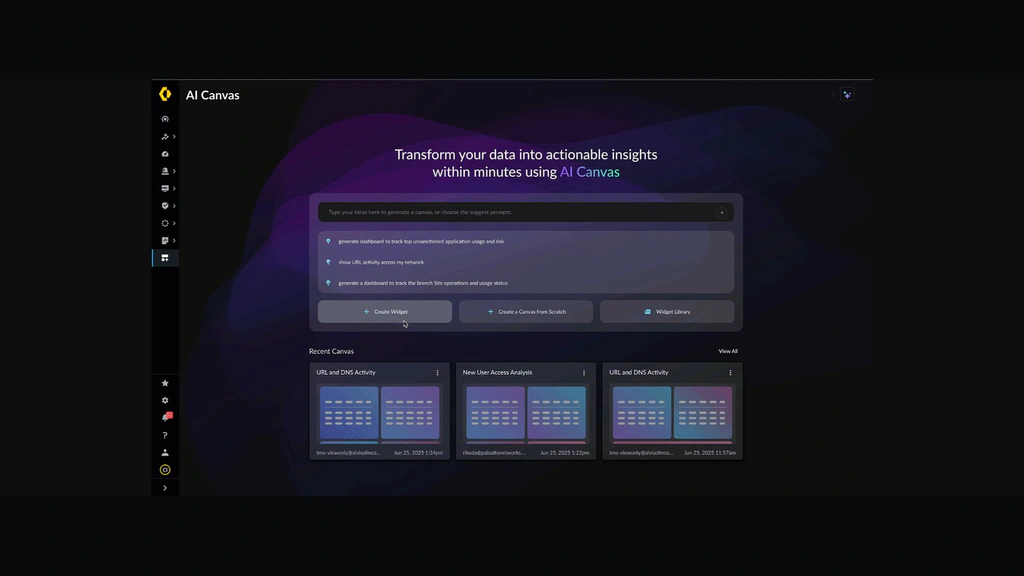
Strata Cloud Manager provides cloud-based management for NGFW and Prisma Access environments. It combines configuration, policy, operational health, incidents, best-practice guidance, reporting, and AI-assisted analysis in one interface.
The Essentials tier is included with supported NGFW and Prisma Access purchases. It covers core configuration management, basic operational health, support workflows, and selected dashboards. The paid Pro tier adds deeper capabilities such as deployment-specific incidents, anomaly detection, root-cause analysis, capacity analysis, policy optimization, compliance monitoring, AI Canvas, and one year of log retention through Strata Logging Service.
AI Canvas is particularly useful for teams that need to explore operational and security data without manually assembling every dashboard. You can use natural-language questions to investigate trends, visualize data, and create reporting views. Strata Copilot can also help administrators navigate configuration and operational questions.
These tools reduce friction, but they should not be treated as autonomous decision-makers. Recommendations still need change control, technical validation, and awareness of business exceptions. AI can help you identify risky rules or likely causes of disruption, but your team remains responsible for the final policy and operational impact.
5. SSL/TLS Decryption and Layer 7 Inspection
Encrypted traffic is a major visibility challenge. Strata can decrypt and inspect supported SSL/TLS and SSH traffic so threat prevention, URL controls, application identification, and data policies can evaluate content that would otherwise remain hidden.
This capability is powerful, but successful decryption is an organizational project rather than a single switch. You need certificate distribution, privacy exceptions, legal review, application testing, capacity planning, and a staged rollout. Some applications use certificate pinning or unusual authentication flows, while regulated data may require carefully documented exclusions.
Strata is strongest when your security team can pair advanced inspection with disciplined exception handling. Poorly planned decryption may cause application failures, user frustration, and emergency bypass rules that weaken the design.
6. Zero Trust, Segmentation, and Secure Remote Access
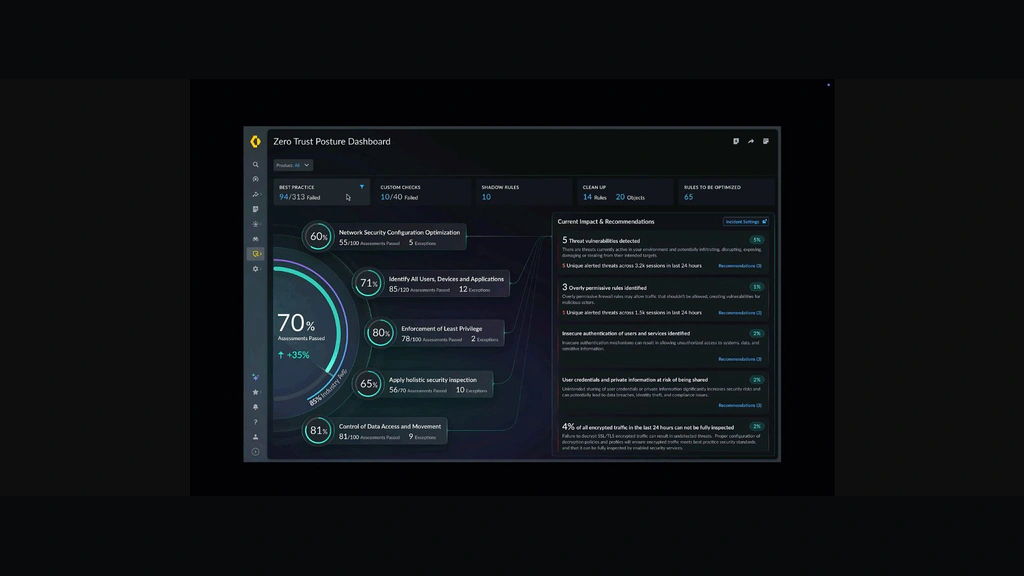
Strata supports Zero Trust principles by combining identity, application, device, and content context with granular access policies. You can segment networks, reduce broad trust zones, inspect east-west and north-south traffic, and apply least-privilege controls to users and workloads.
For remote access, Palo Alto Networks uses GlobalProtect with NGFW gateways or Prisma Access. This extends consistent application and threat policies to users outside the office. You can read our GlobalProtect review for a closer examination of the endpoint agent, device posture checks, and remote access experience.
Strata Cloud Manager Pro also includes a Zero Trust Posture Center that evaluates configurations, highlights risky areas, and recommends remediation. This is useful for finding drift, but the score should support your security program rather than replace architecture reviews and access recertification.
7. AI, IoT, and Specialized Security Controls
The Strata ecosystem extends into AI Access Security, data loss prevention, SaaS controls, and device security. These services can identify enterprise AI usage, inspect sensitive data, classify connected devices, and recommend IoT policies.
Strata can control AI application traffic and data exposure at the network layer, while specialized AI security tools may offer deeper model testing and runtime guardrails. Our Cisco AI Defense review examines that category.
Network visibility can identify SaaS applications, but configuration, permission, and OAuth risk may require an SSPM platform. See our AppOmni review and Grip Security review.
Pros and Cons
Advantages and Disadvantages
Strata is one of the strongest options for enterprises that want consistent Layer 7 security across complex hybrid environments. Its limitations are less about missing controls and more about cost, licensing design, specialist skills, and the operational discipline required to use the platform well.
Positive
✅ Consistent security across hybrid environments
✅ Excellent application and identity visibility
✅ Strong inline threat prevention
✅ Broad firewall deployment options
✅ Powerful cloud management and posture tools
✅ Deep enterprise ecosystem and integrations
Negative
❌ Quote-based and subscription-heavy pricing
❌ Requires experienced firewall administrators
❌ Full value depends on paid add-ons
❌ Migration and policy cleanup can be demanding
❌ May create strong vendor dependence
❌ Excessive for many small businesses
👍 Pros
✅ Consistent security across hybrid environments
Strata applies a common security model across physical locations, clouds, containers, and remote access, reducing policy gaps between environments.
✅ Excellent application and identity visibility
App-ID, User-ID, Device-ID, and Content-ID provide richer context than port-based rules and improve policy precision.
✅ Strong inline threat prevention
Local enforcement, cloud analysis, and updated threat intelligence help block malicious traffic before it reaches endpoints.
✅ Broad firewall deployment options
You can use hardware, virtual, container, cloud-native, or firewall-as-a-service enforcement within one architecture.
✅ Powerful cloud management and posture tools
Strata Cloud Manager combines policy, incidents, health, compliance, reporting, and AI-assisted analysis in one interface.
✅ Deep enterprise ecosystem and integrations
Strata integrates with Prisma Access, GlobalProtect, Cortex, Prisma Cloud, identity providers, ticketing systems, and cloud platforms.
👎 Cons
❌ Quote-based and subscription-heavy pricing
Firewall capacity, security services, management, logging, support, and implementation are combined through custom quotes.
❌ Requires experienced firewall administrators
Routing, NAT, decryption, identity, application policy, and troubleshooting require specialist knowledge.
❌ Full value depends on paid add-ons
Threat prevention, DNS, URL filtering, WildFire, DLP, IoT, premium management, and logging can materially increase cost.
❌ Migration and policy cleanup can be demanding
Rule conversion, object cleanup, application validation, routing tests, and staged cutover still require careful engineering.
❌ May create strong vendor dependence
Deep use of Strata Cloud Manager, Prisma Access, GlobalProtect, and Cortex makes later replacement more difficult.
❌ Excessive for many small businesses
A simpler firewall or managed service may offer better value for small companies with limited IT staff.
User Experience
Deployment and Daily Administration
Initial Design and Migration
Strata deployment begins with architecture, not installation. You need to map traffic flows, business applications, identity sources, trust boundaries, cloud networks, routing dependencies, decryption requirements, log destinations, and availability objectives before selecting appliances or software firewall capacity.
Migration tools can convert competing policies and move supported Panorama configurations into Strata Cloud Manager. Treat conversion as a starting point because legacy rules often contain duplicates, expired exceptions, and port-based logic that should not be copied directly.
Policy Workflow and Change Control
Daily administration is structured around objects, security rules, NAT, routing, security profiles, decryption, and device or folder hierarchy. The platform supports centralized templates and reusable configuration elements, which is important when you manage many sites.
The commit process encourages deliberate change control, but large rulebases can still create operational delays. Your team should use naming standards, rule ownership, expiration dates, testing, and rollback procedures. Strata Cloud Manager Pro’s policy optimizer, configuration cleanup, and compliance capabilities can help identify risky or inefficient configurations.
Monitoring and Troubleshooting
Strata provides rich traffic, threat, URL, application, system, and configuration data. Administrators can trace a session, inspect which rule matched, review App-ID classification, and determine whether a security profile blocked the connection.
The volume of data can overwhelm teams without a defined triage process. Pro adds anomaly detection, root-cause analysis, AI Canvas, and broader dashboards that work best when connected to ticketing and SOC workflows.
Licensing and Cost
Palo Alto Networks Strata Pricing
Palo Alto Networks uses quote-based pricing. There is no universal monthly fee because Strata can include physical appliances, software firewall credits, cloud consumption, feature subscriptions, management, logging, support, and professional services.
Strata Cloud Manager Essentials is included with supported NGFW and Prisma Access purchases. Strata Cloud Manager Pro is a paid upgrade and includes advanced operations, policy and compliance features, AI Canvas, and Strata Logging Service with one year of retention.
| Cost Area | What Affects Pricing | Buying Advice |
| Firewall platform | Model, throughput, interfaces, sessions, and redundancy | Size using security services and decryption enabled |
| Software firewall | Credits, vCPU capacity, cloud region, and deployment duration | Model steady-state and peak cloud consumption |
| Security services | Threat prevention, DNS, URL, WildFire, DLP, IoT, and AI controls | Price the full protection bundle, not only the firewall |
| Management and logs | Essentials or Pro, retention, forwarding, and data volume | Confirm which dashboards require logging or Pro |
| Support and services | Support tier, partner services, migration, and training | Include implementation and lifecycle operations in TCO |
Compare quotes using the same enabled services because throughput changes with prevention, decryption, inspection, and logging. Request a three-year total cost covering high availability, subscriptions, support, retention, training, and migration.
Strata is rarely the lowest-cost choice. Its value is strongest when consolidation reduces duplicated tools, inconsistent policies, operational effort, and incident impact. If your organization will only use basic firewalling and a small subset of subscriptions, the platform may be difficult to justify.
Security, Privacy and Compliance
How Secure Is Palo Alto Networks Strata?
Strata is designed as a security enforcement platform, but the security of your deployment depends on architecture, configuration, administrative access, update practices, and visibility into encrypted traffic. A powerful firewall can still be weakened by broad allow rules, unmanaged exceptions, stale accounts, or delayed software upgrades.
Administrative Security
Strata Cloud Manager supports role-based access control, scoped administration, trusted IP restrictions, audit logs, and tenant-based management. You should separate policy authors, approvers, auditors, and support administrators where possible. Privileged accounts should use strong multi-factor authentication and should not be shared.
Logging, Retention, and Data Location
Strata Logging Service centralizes logs for investigation, dashboards, reporting, and compliance workflows. The Pro management tier includes one year of retention, while Essentials can use logging as a separate add-on. Before deployment, confirm the storage region, retention period, forwarding requirements, and whether your SIEM needs complete or filtered logs.
Logging is also a privacy consideration. Traffic metadata, usernames, device context, URLs, and security events may contain sensitive information. Your retention and access policies should align with legal requirements, employee notices, and incident response needs.
Compliance and Security Posture
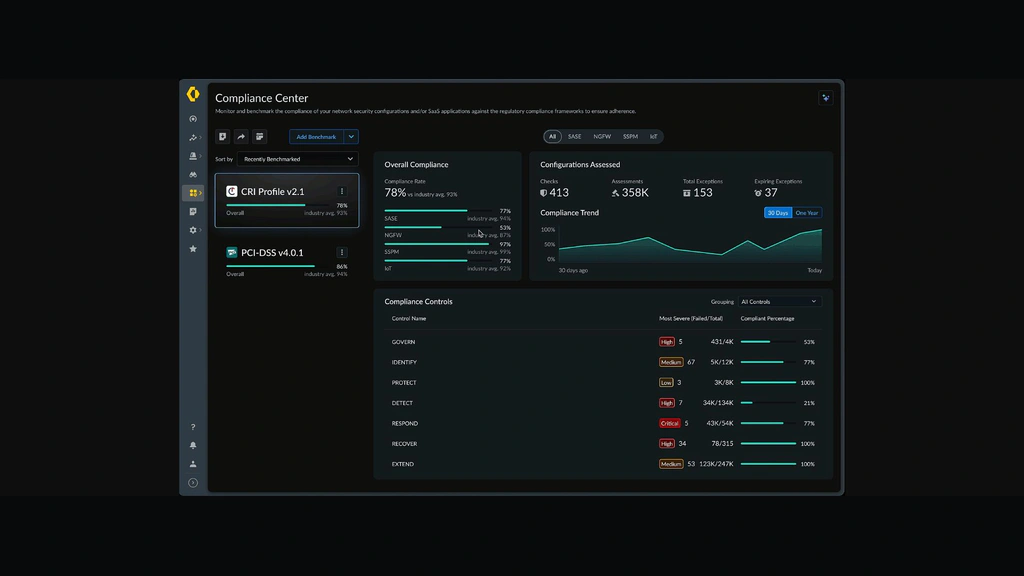
Strata Cloud Manager Pro includes Compliance Center for continuous configuration assessment against supported frameworks and custom controls. It can highlight failed checks, provide evidence, and guide remediation. Palo Alto Networks also maintains a public Trust Center with product-specific certifications and assurance documents.
These capabilities support compliance, but they do not make your organization compliant automatically. You still need documented ownership, access reviews, change records, risk acceptance, evidence retention, and controls outside the firewall.
Patch and Lifecycle Management
Firewalls are high-value targets, so software lifecycle management is critical. You should monitor advisories, test PAN-OS updates, maintain configuration backups, and define emergency patch procedures. High availability does not eliminate upgrade risk, and major releases should be validated against routing, VPN, decryption, authentication, and third-party integrations before broad deployment.
Who It’s Best For
Where Palo Alto Networks Strata Adds Value
Strata is best for organizations that need enterprise-grade prevention and consistent controls across a complex network estate. It is especially strong when network security is treated as a strategic platform rather than a basic internet gateway.
- Large enterprises benefit from centralized policy, multiple deployment models, high-performance appliances, and advanced operations.
- Hybrid and multicloud organizations can apply a common security model across physical and cloud environments.
- Regulated businesses gain detailed controls, logging, segmentation, compliance assessment, and audit support.
- Security-conscious data centers can use high-throughput Layer 7 inspection, decryption, and threat prevention.
- Organizations standardizing on Palo Alto Networks gain the greatest value from integration with Prisma Access, GlobalProtect, Cortex, and Prisma Cloud.
Strata is less suitable when you have a very small network, no dedicated security administrator, limited need for advanced inspection, or a strong preference for transparent public pricing. It may also be a weaker choice when your primary objective is replacing network infrastructure with a fully cloud-native SASE service and you do not want to manage firewall policy or appliances.
Competitor Comparison
Palo Alto Networks Strata Alternatives
Fortinet FortiGate
Fortinet FortiGate is a strong alternative when price-performance, integrated networking, SD-WAN, and a broad appliance range are major priorities. Fortinet often appeals to distributed enterprises and organizations that want networking and security in one operational stack. Strata is generally stronger when application-aware policy depth, cloud-delivered prevention, and Palo Alto’s wider security ecosystem matter more.
Check Point Quantum
Check Point Quantum is worth comparing when centralized policy management, mature threat prevention, and large-enterprise firewall administration are important. Check Point has a long history in policy-centric security and can be a good fit for organizations with established Check Point expertise. Strata may feel more cohesive when you want a common PAN-OS architecture across physical, virtual, cloud-native, and SASE deployments.
Cisco Secure Firewall
Cisco Secure Firewall is a logical option for organizations deeply invested in Cisco networking, identity, and security operations. It can reduce vendor fragmentation when switches, routers, ISE, SecureX-related workflows, and Cisco support relationships are already central to your environment. Strata is usually the stronger specialist firewall choice when advanced application control and consistent Palo Alto security services are the priority. For Cisco’s AI-specific security direction, read our Cisco AI Defense review.
Cato Networks
Cato Networks is the better comparison when you want a cloud-native SASE platform with global connectivity, security, SD-WAN, and remote access delivered as one service. Cato can simplify infrastructure by reducing appliance and policy-management overhead. Strata is more flexible for organizations that need high-performance data center firewalls, detailed local control, multiple enforcement models, or deeper integration with an existing Palo Alto Networks estate.
Conclusion
Is Palo Alto Networks Strata Worth It?
Palo Alto Networks Strata is worth considering when your organization needs consistent, high-quality network security across branches, campuses, data centers, clouds, containers, and remote access. Its strongest qualities are application-aware control, advanced inline prevention, flexible firewall form factors, rich telemetry, and a management platform that increasingly connects policy, operations, compliance, and AI-assisted analysis.
Evaluate the complete architecture and total cost, including subscriptions, management, logging, support, redundancy, migration, and staff skills. Strata reduces fragmentation only when you standardize policies and operating processes.
Our assessment is that Strata is one of the best enterprise choices for prevention-focused hybrid network security. Fortinet may offer stronger value for cost-sensitive distributed networks, Cato may be simpler for cloud-native SASE transformation, and Cisco may fit better in a heavily Cisco-standardized environment. Strata is the strongest choice when security depth, consistent PAN-OS policy, and broad deployment flexibility matter more than low cost or simplicity.
Frequently Asked Questions
Have more questions?
What is Palo Alto Networks Strata?
Palo Alto Networks Strata is an enterprise network security platform that combines physical, virtual, container, cloud-native, and firewall-as-a-service enforcement with PAN-OS, cloud-delivered security services, and centralized management.
Is Strata the same as a Palo Alto firewall?
No. A Palo Alto Networks firewall is one enforcement component within Strata. The wider platform also includes software and cloud firewalls, security subscriptions, Strata Cloud Manager, logging, SD-WAN, remote access, and related services.
What is Strata Cloud Manager?
Strata Cloud Manager is Palo Alto Networks’ cloud-based management and operations platform for supported NGFW and Prisma Access deployments. It provides configuration, policy, incidents, health insights, reporting, posture management, and AI-assisted analysis.
How much does Palo Alto Networks Strata cost?
Strata uses quote-based pricing. Your cost depends on firewall capacity, deployment model, security subscriptions, management tier, logging, support, redundancy, cloud consumption, and implementation services.
What is included with Strata Cloud Manager Essentials?
Essentials is included with supported NGFW and Prisma Access purchases. It provides core cloud configuration management, lifecycle management, operational health insights, best-practice guidance, support workflows, and selected security dashboards.
What does Strata Cloud Manager Pro add?
Pro adds advanced incident analysis, anomaly detection, root-cause analysis, capacity and upgrade guidance, policy optimization, compliance capabilities, AI Canvas, ADEM features, and Strata Logging Service with one year of retention.
Does Strata support Zero Trust security?
Yes. Strata supports Zero Trust through application, user, device, content, and threat context, granular segmentation, least-privilege policy, remote access controls, and posture analysis. Effective Zero Trust still requires sound architecture and governance.
Can Strata protect cloud and container environments?
Yes. VM-Series supports virtual and public cloud deployments, CN-Series protects container and Kubernetes environments, and Cloud NGFW provides cloud-native firewall services for supported cloud platforms.
What are the main disadvantages of Strata?
The main disadvantages are complex quote-based pricing, reliance on multiple subscriptions, the need for experienced administrators, demanding migrations, and increasing dependence on the Palo Alto Networks ecosystem.
Who should choose Palo Alto Networks Strata?
Strata is best for medium and large organizations with hybrid networks, advanced threat prevention needs, regulatory requirements, multiple locations, cloud workloads, or an existing investment in Palo Alto Networks products.