
Introduction
Push Security is a browser-based security platform designed to detect and stop identity attacks where employees actually access SaaS applications: inside the browser. Rather than replacing Chrome, Edge, Firefox, Safari, or another browser, it adds a security extension that observes authentication activity, SaaS usage, browser threats, and risky user behavior in real time.
That positioning matters because many modern attacks do not begin with malware running on the endpoint. They begin with a convincing login page, a stolen session token, a reused password, a malicious OAuth consent request, a compromised browser extension, or an employee pasting sensitive information into an unapproved AI tool.
Push Security gives security teams visibility into these browser-layer events and provides controls that can warn users, block risky activity, or send telemetry into existing SIEM and SOAR workflows. It also maps workforce identities across managed and unmanaged SaaS applications, helping you find ghost logins, MFA gaps, weak credentials, shadow SaaS, and other attack paths that may sit outside your identity provider.
This Push Security review examines its core features, browser deployment model, usability, pricing, security architecture, limitations, and the organizations that will benefit most from it.
What Is Push Security?
Push Security describes its platform as a secure enterprise browser extension. In practical terms, it is a browser detection and response layer that works alongside your existing endpoint, identity, network, and security operations tools.
Once deployed, the browser extension observes work-related logins and browser activity. The admin console then builds inventories of applications, employee accounts, login methods, OAuth integrations, browser extensions, and security findings. You can use those inventories to understand how employees access SaaS services, not just how access is supposed to work according to your identity provider.
This distinction is one of Push Security’s biggest strengths. An identity provider may show that an application supports SSO, but it may not reveal that employees still use local passwords through an older login path. Similarly, finance data may show paid applications but miss free trials, employee-created accounts, and AI tools adopted without approval.
Push Security fills that visibility gap from inside the browser session. It is best viewed as a complementary security layer for browser threats, identity exposure, shadow SaaS, AI governance, and browser-based data loss prevention.
Key Features
Browser Security Capabilities
Push Security combines several security categories in one extension-led platform. Its most valuable capabilities are not simply the number of features, but the ability to connect browser events, authentication behavior, SaaS identities, and policy enforcement in the same workflow.
1. Browser-Based Phishing and Account Takeover Protection
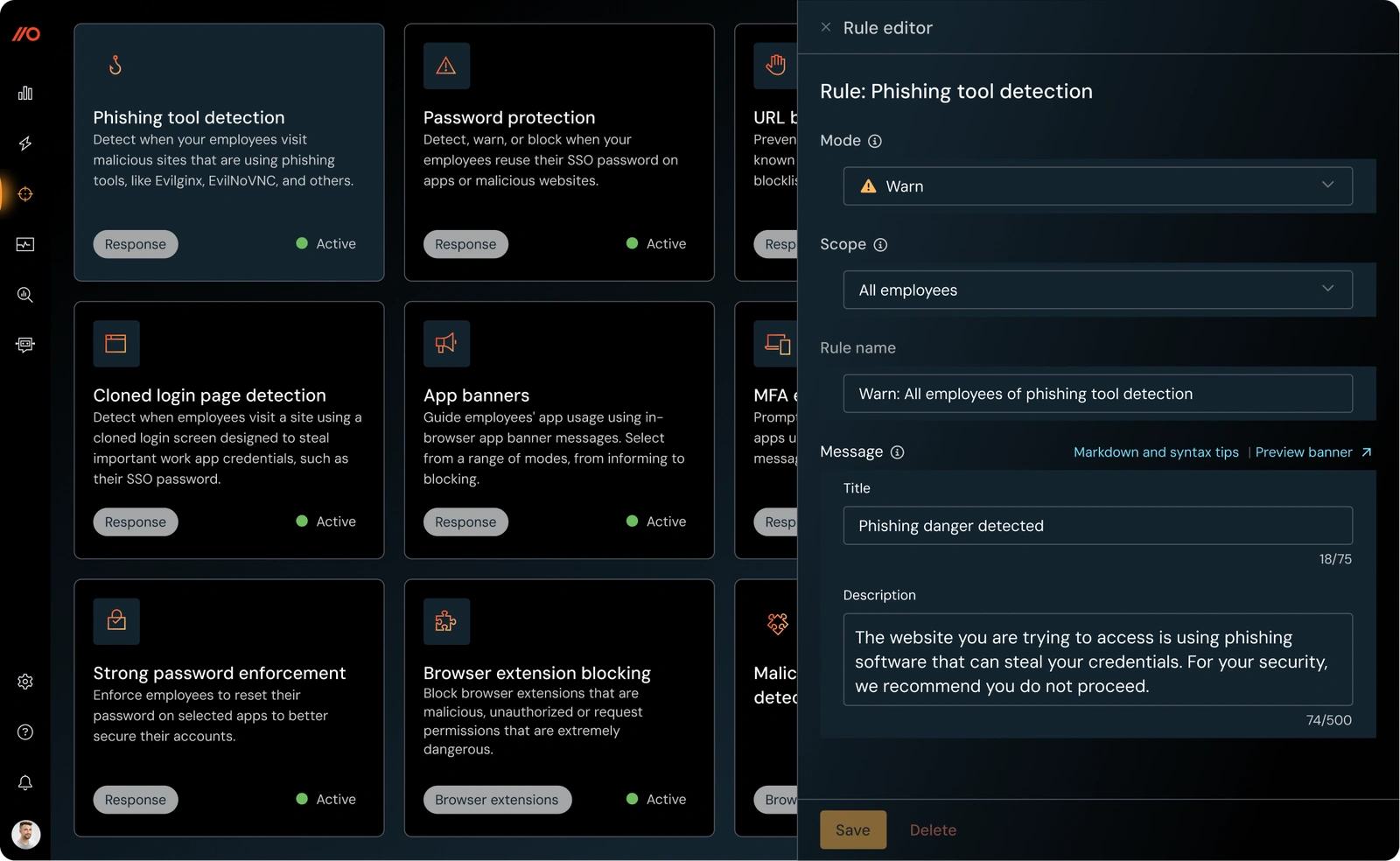
Push Security monitors browser behavior associated with phishing and account takeover rather than relying only on known malicious domains. This is important because attackers can rotate domains, clone legitimate login pages, deliver links through SMS or QR codes, and use adversary-in-the-middle toolkits to capture both credentials and session tokens.
The platform can detect or block attack techniques such as cloned login pages, adversary-in-the-middle phishing, credential harvesting, ClickFix-style social engineering, malicious copy-and-paste instructions, and suspicious session behavior. It can also protect an organization’s SSO password by preventing employees from entering it on websites that do not belong to the identity provider.
Why this capability is valuable
- Detection happens inside the browser session, where the user and attack page interact.
- Policies can warn or block users before credentials are submitted.
- Behavior-based signals can identify attacks that are not yet on blocklists.
- Detection timelines provide context for incident investigation.
For teams dealing with modern phishing, this is more useful than another URL reputation feed. Push Security focuses on what the page is doing and how the employee is interacting with it. You can also read this guide to the evolution of phishing attacks for broader context.
2. SaaS Identity Attack Surface Discovery
Push Security records how employees log into cloud applications, including password, SAML, OIDC, and social login methods. This creates an identity inventory that extends beyond applications formally connected to your identity provider.
The platform can expose ghost logins, local accounts that remain active even when SSO is configured, unmanaged accounts created with corporate email addresses, and applications that have never been reviewed by IT. It also shows which employees use each application and how those identities are authenticated.
This is particularly useful during identity hardening projects. Instead of assuming SSO coverage is complete, you can verify whether employees still use alternative login paths. You can then prioritize applications where local credentials, missing MFA, or exposed passwords create the greatest account takeover risk.
3. Password, MFA, and Login Method Controls
Push Security evaluates password and MFA posture across observed SaaS accounts. It can identify weak, reused, shared, leaked, or stolen credentials, as well as accounts without MFA or accounts using weaker MFA methods.
Password analysis is performed using a shortened salted fingerprint stored locally in the browser. The extension does not send the employee’s actual password to Push Security. This design allows the platform to compare password reuse, detect SSO password exposure, and identify credentials found in breach data without centrally collecting password values.
Administrators can also configure custom restricted terms, such as company names or team names, to identify predictable passwords. Employee-facing prompts can guide users to enable MFA or replace an insecure password directly within their normal workflow.
This user-guided remediation model can reduce manual tickets, but it still depends on policy design. If too many prompts appear, employees may treat them as background noise. A staged rollout with clear priority rules is more effective than enabling every control at once.
4. Shadow SaaS and OAuth Application Visibility
Traditional SaaS discovery methods often rely on expense records, SSO logs, email analysis, or network traffic. These sources can miss free applications, personal trials, social logins, and new tools employees adopt before procurement becomes involved.
Push Security discovers applications as employees sign up or log in through the browser. It can also observe OAuth consent flows for Microsoft 365 and Google Workspace integrations and enrich that information through identity provider integrations.
You can use app banners to inform employees about policy, request acknowledgment, ask them to provide a reason for using an application, or block access. This gives security teams a more flexible response than a simple allow-or-deny model.
Useful shadow SaaS workflows
- Identify newly adopted AI, file-sharing, and productivity tools.
- Find applications using corporate identities outside SSO.
- Review OAuth scopes and third-party integrations.
- Create approval, exception, or migration workflows through webhooks.
Push Security is strong at discovering user-driven SaaS adoption, but it is not a complete SaaS management platform. It does not replace procurement, license optimization, contract management, or deep configuration assessment across every major SaaS platform.
5. Browser Extension Inventory and Blocking
The platform can inventory browser extensions installed across supported employee browsers. Administrators can review extension names, IDs, versions, permissions, host access, deployment methods, ownership changes, and the employees or browser profiles using each extension.
Push Security can also disable malicious or unauthorized extensions when the browser and deployment method support enforcement. This is increasingly relevant because a browser extension can read page content, interact with websites, access session information, or become malicious after an ownership or code change.
The main limitation is browser consistency. Extension visibility and enable-or-disable controls vary by browser, and Safari does not support the full browser extension inventory and blocking feature set. Organizations with mixed browser environments should validate coverage before treating the control as universal.
6. AI Usage Governance and Browser Data Loss Prevention
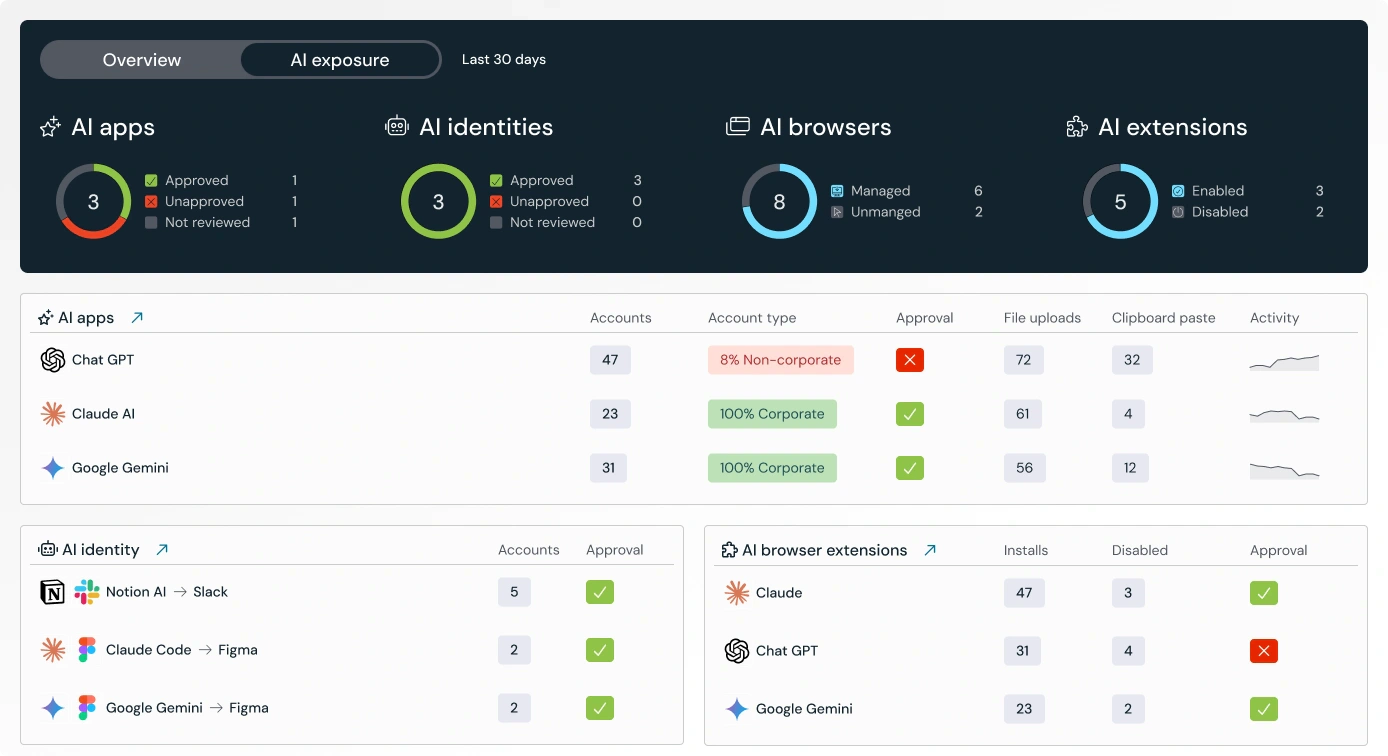
Push Security has expanded beyond identity protection into AI visibility and browser-based data controls. Because employees access most generative AI tools and AI-enhanced SaaS applications through the browser, the extension can identify which tools are being used and apply policy at the point of interaction.
The platform can monitor or control file uploads, file downloads, clipboard activity, form submissions, and other browser events, depending on the configured telemetry and control rules. This helps you identify employees submitting internal data to unapproved AI services, moving files to personal storage, or using shadow applications outside policy.
Controls can be scoped by employee, group, browser profile, destination, application status, file characteristics, and other conditions. You can warn users, require acknowledgment, request a business reason, or block the action.
This capability is promising because it combines AI discovery with enforcement, but it should not be described as a universal replacement for enterprise DLP. Mature DLP programs may need endpoint coverage, email controls, data classification, network inspection, and policies across non-browser applications. Push Security is strongest for data movement that occurs inside enrolled browser sessions.
7. Investigation, SIEM, SOAR, and ChatOps Integrations
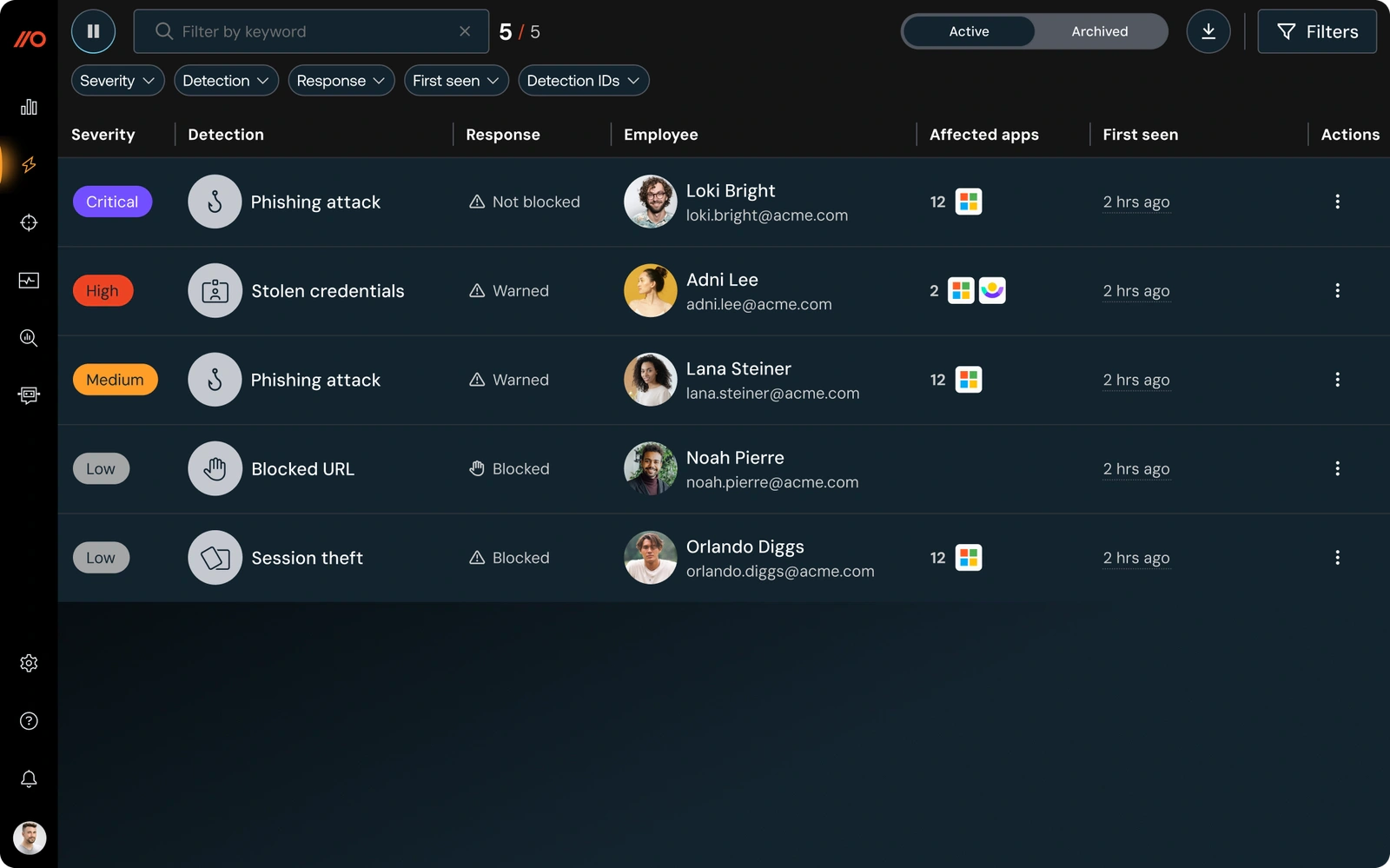
Push Security provides an admin console for detections, security findings, identities, applications, accounts, browser extensions, OAuth integrations, and employee activity. Detection records can include event timelines, URLs, enrichment, and optional screenshots, helping analysts reconstruct what happened in the browser.
The platform can send telemetry through REST APIs and webhooks to SIEM, SOAR, XDR, automation, and case management tools. Official documentation includes workflows for platforms such as Microsoft Sentinel, Splunk Cloud, Datadog, Panther, Cribl, SentinelOne, and Tines. Slack and Microsoft Teams notifications can also surface new detections and findings.
This integration model is a major advantage for teams that already have a mature security operations stack. Push Security contributes browser-native data without forcing analysts to abandon their existing incident queues and response processes.
Pros and Cons
Advantages and Disadvantages
Push Security has a differentiated approach and relatively transparent pricing, but it is not the right fit for every security program. Its value depends heavily on browser enrollment, employee coverage, and whether your most important risks occur in SaaS and browser sessions.
Positive
✅ Detects threats inside existing browsers
✅ Maps managed and unmanaged SaaS identities
✅ Combines detection with real-time controls
✅ Supports major browsers and multiple deployment methods
✅ Offers transparent per-employee pricing
✅ Integrates with existing security operations tools
Negative
❌ Requires browser extension deployment and broad enrollment
❌ Browser feature coverage is not identical across platforms
❌ Collects telemetry that requires privacy communication
❌ Does not replace EDR, SIEM, SSPM, or full enterprise DLP
❌ Some insights appear only after employees use applications
❌ Small independent review volume limits peer validation
👍 Pros
✅ Detects threats inside existing browsers
Push Security adds controls to the browsers employees already use, so you do not need to migrate the workforce to a dedicated enterprise browser. This reduces change-management friction while giving the security team visibility into page behavior, login flows, user interaction, and browser-session threats.
✅ Maps managed and unmanaged SaaS identities
The platform observes actual login activity instead of relying exclusively on SSO configuration. This helps you find local passwords, ghost logins, unmanaged accounts, and shadow applications that may not appear in identity provider logs.
✅ Combines detection with real-time controls
Many products generate findings but leave remediation to another system. Push Security can warn, request acknowledgment, require a reason, or block browser activity. It can also guide employees to enable MFA or improve weak passwords.
✅ Supports major browsers and multiple deployment methods
Managed deployment is available through tools such as Google Admin Console, Microsoft Group Policy, Intune, macOS device management, Island, and Prisma Access. Self-enrollment options are also available for supported browsers, making pilots straightforward.
✅ Offers transparent per-employee pricing
Push Security publishes standard monthly and annual pricing, which is uncommon in enterprise cybersecurity. This makes early budget estimates easier and allows smaller teams to evaluate the platform without beginning with a lengthy pricing negotiation.
✅ Integrates with existing security operations tools
REST APIs, webhooks, SIEM integrations, SOAR workflows, Slack, and Microsoft Teams notifications allow Push Security to become a browser telemetry source within your current operating model.
👎 Cons
❌ Requires browser extension deployment and broad enrollment
The platform only sees and enforces activity in enrolled browser profiles. If contractors, personal devices, secondary browsers, or unmanaged profiles are outside deployment scope, they can remain blind spots. Coverage planning is therefore central to the implementation.
❌ Browser feature coverage is not identical across platforms
Core enrollment supports a broad browser range, but features such as browser extension inventory, extension disabling, file telemetry, and enforcement vary. Safari has notable limitations compared with Chromium-based browsers and Firefox.
❌ Collects telemetry that requires privacy communication
Push Security can collect application URLs, usernames, login methods, MFA information, OAuth consent metadata, blocked-page events, and other browser telemetry. Even when password values are not collected, employees should receive a clear explanation of what is monitored, why it is required, and which personal profiles or domains are excluded.
❌ Does not replace the wider security stack
Push Security complements EDR, SIEM, secure web gateways, identity providers, SSPM, security awareness, and DLP. Organizations looking for one product to cover operating-system threats, network traffic, email security, SaaS configuration posture, and non-browser data movement will still need additional tools.
❌ Some insights depend on observed activity
Browser-based discovery becomes richer as employees log into applications and use their accounts. You may see immediate data from identity provider integrations, but a complete picture of long-tail SaaS usage develops over time.
❌ Independent peer review volume remains limited
Available peer ratings are positive, but the total number of verified public reviews is still small compared with mature enterprise browser and security vendors. Buyers should validate performance through a pilot rather than relying only on published testimonials.
Setup and Administration
Deployment and User Experience
Push Security is easier to deploy than a replacement enterprise browser because employees can continue using familiar browsers. The recommended approach is a managed deployment through your existing device or browser management platform.
The basic implementation involves installing the extension, enrolling browser profiles, configuring controls, connecting an identity provider, and enabling security notifications. Push Security supports API integrations with Microsoft 365, Google Workspace, and Okta to enrich employee, SSO, OAuth, and MFA data.
The vendor states that an initial setup can be completed quickly, but a production rollout requires more planning than installing the extension. You should define monitored domains, choose which browser profiles are in scope, test controls with a limited employee group, document privacy boundaries, and connect high-priority detections to your incident process.
Browser and Deployment Coverage
Push Security supports Chrome, Edge, Firefox, Safari, Opera, Brave, Arc, Island, Prisma Access, and several newer AI-focused browsers through managed or self-enrollment options. Exact deployment and control support differs by operating system and browser.
For a managed workforce, the extension can be force-installed and prevented from being removed. For contractors, BYOD, or small pilots, email and landing-page enrollment provide a lighter approach. The tradeoff is that self-enrolled browser profiles may be easier for users to disable or remove.
Admin Experience
The admin console is organized around detections, identities, applications, accounts, browser extensions, OAuth integrations, employees, browsers, and controls. This structure aligns well with security operations and identity teams because it separates urgent attacks from longer-term posture findings.
The most important usability challenge is policy tuning. App banners, password guidance, extension blocking, file controls, and phishing protections can all affect user behavior. A strong rollout begins in monitor mode, measures false positives and business exceptions, and gradually moves the highest-confidence controls into warning or blocking modes.
Pricing
Plans and Cost
Push Security publishes straightforward per-employee pricing. The Standard plan covers organizations with up to 500 employees, while larger deployments receive custom volume pricing.
| Plan | Organization Size | Price | Billing |
| Standard Annual | Up to 500 employees | $5 per employee/month | Billed in advance on a 12-month contract |
| Standard Monthly | Up to 500 employees | $6 per employee/month | Billed monthly in advance |
| Enterprise | More than 500 employees | Custom quote | Monthly or annual with volume discounts |
The annual price is competitive for a platform combining browser threat protection, identity exposure management, shadow SaaS discovery, AI governance, and browser controls. However, your total cost depends on how many employees require coverage and whether Push Security reduces spending on overlapping browser security, phishing, SaaS discovery, or identity posture tools.
A pilot is the best way to evaluate value. Measure the number of unknown SaaS accounts discovered, ghost logins identified, risky credentials remediated, phishing events blocked, browser extensions reviewed, and investigation hours saved. Pricing can change, so confirm current terms on the official Push Security pricing page.
Security and Privacy
How Secure Is Push Security?
Push Security holds a sensitive position because its extension observes browser and authentication activity. The platform’s own security architecture, data handling, and extension update process should therefore receive close scrutiny during procurement.
Security Certifications and Infrastructure
Push Security’s Trust Portal lists SOC 2 Type II, ISO/IEC 27001, ISO/IEC 27701, GDPR alignment, and Cyber Essentials. Product data is encrypted at rest using AWS-managed AES-256 encryption and in transit using TLS 1.2 or higher.
The platform operates on a serverless AWS architecture and publishes details about vulnerability management, annual penetration testing, secure development, extension publishing controls, tenant isolation, backups, and incident response. Production data is documented as being stored in European regions.
Password Privacy
Push Security does not collect or centrally store password values. When an employee enters a password, the extension creates a shortened salted SHA-256 fingerprint that remains local to the browser for comparison and analysis. This allows the extension to detect reuse and protect SSO passwords without sending the original password to the vendor.
Browser Telemetry and Employee Privacy
Depending on configuration, the extension can collect browser details, operating system information, application URLs, usernames, login methods, MFA status, OAuth consent metadata, policy interactions, blocked URLs, and security-event information. Optional browser event storage can retain metadata locally before suspicious events are sent for analysis.
This is not inherently inappropriate for an enterprise security tool, but it requires governance. You should restrict monitoring to work identities and approved browser profiles where possible, exclude personal domains or websites when necessary, define retention expectations, and communicate the monitoring scope to employees.
Security Assessment
Push Security demonstrates a mature security and privacy program for a vendor in this category. The most important risk is not that the product lacks controls, but that browser telemetry can be deployed too broadly without clear policy. Security teams should combine technical safeguards with legal, HR, privacy, and employee communication reviews.
Business Fit
Who Is Push Security Best For?
| Organization Type | Fit | Why |
| Cloud-first companies | Excellent | Strong visibility into browser-based SaaS identities and attacks |
| Security teams facing modern phishing | Excellent | Behavior-based in-browser detection and blocking |
| Organizations with shadow SaaS or shadow AI | Strong | Discovers application use and applies browser policy |
| Hybrid and BYOD workforces | Strong | Protection can follow the browser without a full endpoint agent |
| Companies needing deep SaaS configuration posture | Partial | Use alongside a dedicated SSPM platform |
| Primarily on-premises environments | Limited | Value is highest when work happens in browsers and SaaS |
Push Security is best for cloud-first organizations where employees rely heavily on browser-based SaaS. It is especially relevant if your security team is concerned about adversary-in-the-middle phishing, session hijacking, credential reuse, ghost logins, shadow SaaS, malicious browser extensions, or uncontrolled AI adoption.
It also fits teams that want browser protection without forcing every employee into a new enterprise browser. This can make Push Security easier to adopt in engineering, technology, financial services, professional services, education, and distributed organizations with mixed devices.
The platform is less suitable as a standalone solution for organizations seeking deep configuration monitoring inside Salesforce, Microsoft 365, ServiceNow, or other major SaaS platforms. It also does not provide full endpoint detection, email security, network access control, or non-browser DLP.
Alternatives
How Competing Platforms Differ
The best alternative depends on whether your priority is browser enforcement, SaaS discovery, configuration posture, identity threat detection, or a dedicated enterprise browser.
LayerX
LayerX is one of the closest direct alternatives because it also uses a browser extension to enforce policy across existing browsers. It is a strong option for organizations focused on browser DLP, SaaS access controls, and generative AI governance. Push Security is generally more differentiated around identity attack detection, phishing behavior, credential exposure, and browser-based incident response.
Grip Security
Grip Security focuses on SaaS discovery, SaaS identity risk, shadow applications, and governance across the SaaS estate. It may be a better fit when the primary objective is discovering and managing widespread SaaS adoption. Push Security is stronger when you need real-time browser threat detection and blocking. Read the full Grip Security review for a deeper comparison.
AppOmni
AppOmni is designed for deep SaaS security posture management, configuration assessment, compliance, and monitoring within connected enterprise applications. It is more suitable when configuration drift and excessive permissions inside major SaaS platforms are the main concern. Push Security provides broader visibility into how users access apps through the browser. See the complete AppOmni review.
Adaptive Shield
Adaptive Shield, now part of CrowdStrike Falcon Shield emphasizes SaaS security posture, identity exposure, misconfiguration management, and integration with the CrowdStrike ecosystem. It is a better choice for organizations that want SSPM inside a broader endpoint and XDR platform. Push Security remains more browser-native and easier to position as an additional detection layer. Read the Adaptive Shield review for more details.
Conclusion
Is Push Security Worth It?
Push Security is worth considering if browser sessions and SaaS identities are major parts of your attack surface. Its strongest advantage is the ability to observe real employee login behavior, detect modern browser attacks, and enforce policy without replacing the browser.
The platform offers an effective combination of phishing protection, account takeover detection, identity posture, shadow SaaS discovery, extension management, AI governance, and browser-based data controls. Transparent pricing and integrations with existing security operations tools make it accessible to both growing security teams and larger enterprises.
However, Push Security should be purchased for its browser-native strengths, not as a promise to replace the entire security stack. You will still need endpoint protection, identity infrastructure, SIEM or XDR, and potentially dedicated SSPM and DLP tools.
For cloud-first organizations, the best evaluation method is a controlled pilot across a representative employee group. If the platform uncovers unknown identities, blocks credible attacks, reduces investigation time, and improves SaaS policy enforcement without disrupting work, it can become a highly valuable layer in your security architecture.
Have more questions?
Frequently Asked Questions
What does Push Security do?
Push Security adds a security extension to employee browsers. It detects browser-based attacks, maps SaaS identities, finds risky credentials and MFA gaps, discovers shadow SaaS, controls AI use, and sends browser telemetry to security operations tools.
Is Push Security an enterprise browser?
Push Security is a secure enterprise browser extension, not a replacement browser. Employees can continue using supported browsers such as Chrome, Edge, Firefox, Safari, Brave, Arc, Island, and others while the extension provides visibility and controls.
Can Push Security stop phishing attacks?
Push Security can detect and block several phishing techniques inside the browser, including cloned login pages, adversary-in-the-middle toolkits, credential harvesting, SSO password misuse, and malicious copy-and-paste attacks such as ClickFix.
Does Push Security collect employee passwords?
No. Push Security states that it does not collect or store password values. The extension creates a shortened salted password fingerprint that remains locally in the browser and is used for password comparisons and security checks.
How much does Push Security cost?
The published Standard price is $6 per employee per month with monthly billing or $5 per employee per month on a 12-month annual contract. Organizations with more than 500 employees can request volume pricing.
Which browsers does Push Security support?
Push Security supports major browsers including Chrome, Edge, Firefox, Safari, Opera, Brave, Arc, Island, Prisma Access, and several AI-focused browsers. Deployment and enforcement capabilities vary by browser and operating system.
Can Push Security discover shadow SaaS?
Yes. The extension observes work-related signups and logins in the browser, helping security teams discover free applications, trials, social logins, unmanaged accounts, and other SaaS use that may not appear in SSO or procurement data.
Does Push Security replace EDR or SIEM?
No. Push Security complements EDR, SIEM, XDR, identity providers, secure web gateways, and other controls by adding browser-layer telemetry and enforcement. It can send events to existing SIEM and SOAR workflows through APIs and webhooks.
Is Push Security suitable for BYOD?
It can extend protection to supported browsers on personal or contractor devices without requiring a full endpoint agent. However, organizations must define enrollment, monitoring, privacy, and offboarding policies for unmanaged devices.
Who should use Push Security?
Push Security is best for cloud-first organizations concerned about browser phishing, account takeover, SaaS identity exposure, shadow SaaS, malicious extensions, AI governance, and data movement through employee browsers.