Introduction
Fathom is one of the most popular AI meeting assistants for professionals who want to stop taking manual notes and start turning conversations into searchable, shareable, and actionable meeting records.
If you spend your week in Zoom calls, Google Meet sessions, Microsoft Teams meetings, sales demos, customer onboarding calls, internal syncs, or interviews, you already know the problem. You want to stay present, ask better questions, and listen carefully, but you also need accurate notes, follow-up tasks, and a reliable record of what was discussed.
That is exactly where Fathom fits into the productivity stack.
Fathom started as a free AI note taker, but in 2026 it is better described as an AI meeting assistant for individuals and teams. It records meetings, creates transcripts, generates summaries, extracts action items, highlights important moments, and syncs meeting insights into tools like Slack, HubSpot, Salesforce, Asana, ChatGPT, and Claude.
Its strongest advantage is still its generous free plan. However, Fathom now also offers paid Premium, Team, and Business plans for users who need advanced summaries, AI action items, shared call search, CRM field sync, coaching features, SSO, and custom data retention policies.
That makes this Fathom review more than a simple “free AI note taker” overview. You need to understand where it performs well, where it has limits, and whether it is the right choice compared with alternatives like Fireflies, Otter, tl;dv, MeetGeek, Leexi, Granola, Avoma, and Gong.
If you want a meeting assistant that reduces admin work without adding friction to your day, Fathom deserves serious consideration.
Quick Overview
What is Fathom
Fathom is best for users who want accurate meeting notes without building a complicated workflow. It is especially strong for solo professionals, sales reps, consultants, customer success teams, remote teams, and managers who need meeting information to become searchable knowledge instead of forgotten call recordings.
| Category | Fathom Review Summary |
| Best For | Individuals, sales teams, customer success teams, consultants, managers, and remote teams |
| Main Strength | Generous free plan with unlimited recording, transcription, summaries, clips, playlists, and search |
| Main Limitation | Advanced AI, team collaboration, CRM field sync, coaching, and retention controls require paid plans |
| Supported Meeting Platforms | Zoom, Google Meet, and Microsoft Teams |
| Integrations | HubSpot, Salesforce, Close, Slack, Asana, Zapier, ChatGPT, Claude, and more |
| Security Positioning | SOC 2 Type II, GDPR, HIPAA, SSO, and SCIM support are listed by Fathom |
| Best Alternatives | Fireflies, Otter, tl;dv, MeetGeek, Granola, Avoma, Leexi, and Gong |
| Overall Rating | 9.1/10 |
My overall view is that Fathom is one of the strongest AI meeting assistants if you care about value, speed, and ease of use. It is not the deepest enterprise revenue intelligence platform, but it is one of the most practical tools for turning daily meetings into usable notes, follow-ups, and searchable context.
What Is Fathom?
Fathom is an AI-powered meeting assistant that records, transcribes, summarizes, and organizes your video meetings. Instead of splitting your attention between listening and typing notes, you can let Fathom capture the conversation and then review the transcript, summary, action items, and highlights afterward.
Fathom was launched in 2021 by Richard White, the founder and former CEO of UserVoice. The original idea was simple: people should be able to stay fully engaged in meetings without losing the details that matter later.
That idea still defines the product. Fathom captures the conversation, identifies important moments, creates structured summaries, and helps you push meeting outcomes into the tools where work actually happens.
In 2026, Fathom is no longer just a free transcription utility. It now sits between three software categories:
- AI note taking apps for transcripts, summaries, and meeting notes
- Meeting productivity tools for follow-ups, highlights, and accountability
- Lightweight meeting intelligence platforms for teams, sales, and customer-facing workflows
This positioning is important. If you only need basic transcription, Fathom may already be more than enough. If you manage a team or sell to customers, the paid plans give you stronger collaboration, CRM, and visibility features.
Who Should Use Fathom?
Fathom is a strong fit if your work depends on conversations. That includes client meetings, sales demos, interviews, onboarding calls, internal planning sessions, recurring team meetings, and customer success reviews.
Fathom is especially useful for:
- Consultants and freelancers who need clean client call notes
- Sales teams that want CRM notes and follow-up emails faster
- Customer success teams that need accurate customer history
- Remote teams that want shared meeting visibility
- Managers who need decisions, blockers, and next steps documented
- Students, researchers, and creators who record interviews or lectures
If your meetings often produce decisions, tasks, objections, feedback, or customer insights, Fathom can save time and reduce the risk of missing important details.
Key Features
Main Features Breakdown
Fathom’s feature set is built around one core workflow: capture the meeting, understand what happened, and move the important information into the right place.
That sounds simple, but it solves a real productivity problem. Many teams already record meetings, but recordings are rarely reviewed. Fathom makes the recording useful by turning it into summaries, highlights, action items, searchable transcripts, and synced updates.
Real-Time Transcription and Meeting Recording
Fathom can record and transcribe meetings across Zoom, Google Meet, and Microsoft Teams. Once your meeting is captured, you get a searchable transcript with speaker separation, timestamps, and replayable sections.
This is useful when you need to review a quote, check what a customer said, clarify a decision, or share a specific moment with a teammate.
The transcription quality is strong in clean meeting conditions. Like every AI transcription tool, it can struggle when people speak over each other, audio quality is poor, accents are heavy, or background noise is high. For important meetings, you should still review the summary before sending it externally.
AI Summaries and Action Items
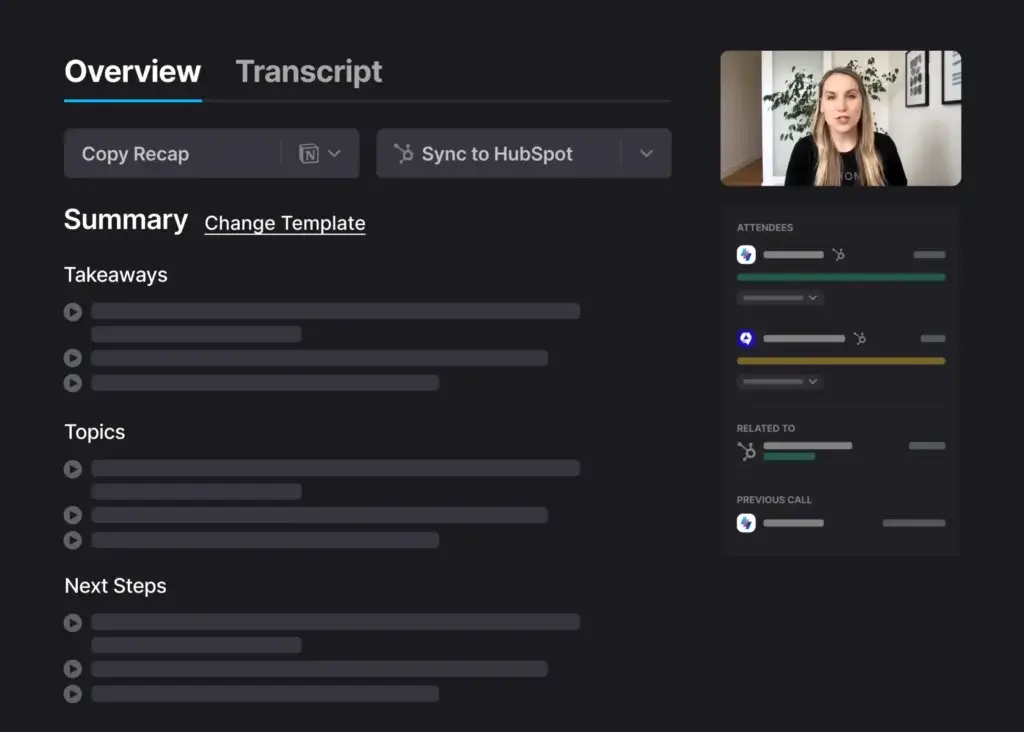
Fathom’s AI summaries are the main reason most users adopt it. After a meeting, Fathom creates a structured recap that can include key discussion points, decisions, next steps, follow-up items, and relevant timestamps.
This is where Fathom becomes more than a transcription tool. A transcript tells you what was said. A good summary tells you what matters.
On the Free plan, Fathom includes instant AI call summaries. Premium users get access to more advanced summary options, AI-generated action items, AI follow-up emails, custom AI summaries, and the Ask Fathom feature.
For sales, consulting, and customer-facing teams, these summaries can dramatically reduce the time spent writing recap emails and updating CRM records.
Highlights, Clips, and Playlists
Fathom lets you create highlights during meetings and review them afterward. This is valuable when a customer explains a pain point, a stakeholder confirms a decision, or a manager assigns an important task.
You can also use clips and playlists to organize important moments across calls. For example, a sales manager can collect objection examples, a customer success leader can track feature requests, and a product team can review customer feedback without watching entire recordings.
This is one of Fathom’s most underrated features. The more meetings you run, the more value you get from having a structured library of important moments.
Search Across Meetings
Fathom includes search across calls, which turns your meeting archive into a useful knowledge base. Instead of asking, “Where did we discuss that?”, you can search for a keyword, person, customer, topic, or decision.
For teams, this becomes more powerful on paid plans. The Team plan includes global search across shared calls, playlists of meeting highlights, folders, comments, keyword alerts, and customized transcription vocabulary.
If your team has many recurring calls, sales demos, onboarding meetings, or customer interviews, this shared search capability can reduce repeated questions and help people find context faster.
Bot-Free and Bot-Based Capture Options
One of Fathom’s biggest positioning updates is its capture flexibility. Instead of describing Fathom as simply “no bot,” it is more accurate to say that Fathom now supports bot-free and bot-based capture options, depending on your setup.
This matters because some users prefer a visible bot for transparency and recording consent, while others prefer a less disruptive meeting experience. Fathom’s current positioning gives you more flexibility, but you should test which capture option works best for your meeting platform, device, compliance requirements, and team policy.
For sensitive or client-facing meetings, I recommend being transparent with attendees and following your local recording consent rules. A smoother capture experience should never replace proper disclosure.
Integrations With Your Daily Tools
Fathom works best when it is connected to the tools you already use. It can send meeting insights into CRM systems, collaboration apps, task management tools, and AI assistants.
Important integrations include:
- Video meetings: Zoom, Google Meet, and Microsoft Teams
- CRM systems: HubSpot, Salesforce, and Close
- Collaboration: Slack and Google Docs
- Task management: Asana and other workflow tools
- Automation: Zapier and workflow automations
- AI assistants: ChatGPT and Claude
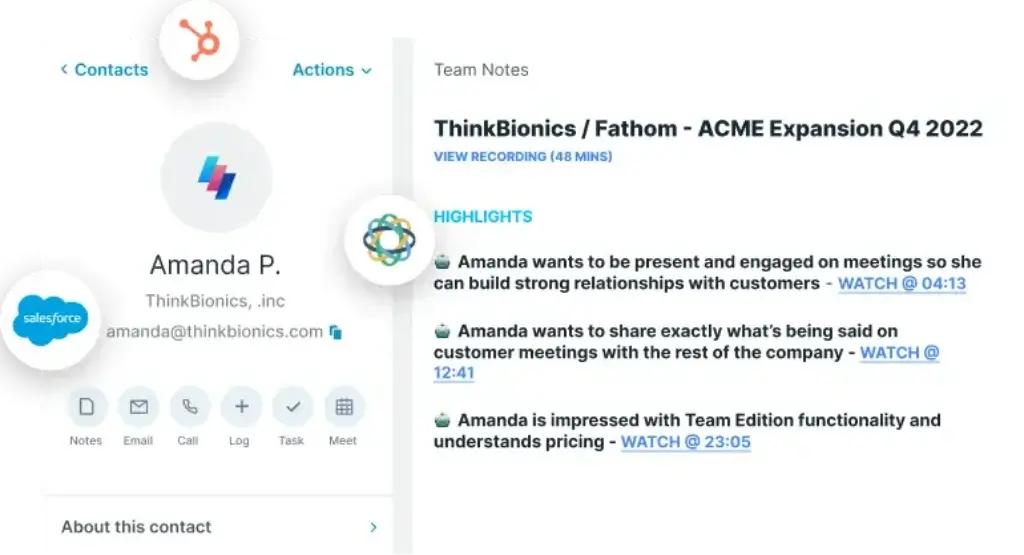
The CRM integrations are particularly important for sales and customer success teams. Instead of manually writing call notes, you can sync call summaries and highlights to relevant contacts, accounts, and opportunities.
Ask Fathom and AI Meeting Context
Fathom’s newer AI direction is especially interesting. With Ask Fathom and AI integrations, your meetings can become a source of context for future work.
For example, instead of searching manually through transcripts, you can ask questions about previous calls, customer concerns, decisions, or action items. Fathom also promotes meeting context inside ChatGPT and Claude, which can help you draft follow-up emails, summarize patterns, or prepare for the next meeting using real conversation history.
This is where AI meeting tools are heading. The value is no longer only in transcription. The value is in making meeting knowledge available when you need to act.
Privacy and Security
Fathom deals with sensitive information because it captures meeting recordings, transcripts, attendees, calendar context, and conversation content. That means security and privacy should be part of your buying decision, not an afterthought.
Fathom lists SOC 2 Type II, GDPR, HIPAA, SSO, and SCIM support. It also states that third-party AI subprocessors such as OpenAI, Anthropic, and Google are not permitted to use user data to train their models. Fathom may use de-identified customer data to improve its own proprietary AI models, but users can opt out in settings.
For individuals, this is reassuring. For teams, it still requires careful rollout. You should review recording consent, connected integrations, admin permissions, data retention, and whether sensitive meetings should be recorded at all.
User Experience and Interface
How Everyday Work With Fathom Looks
Fathom’s user experience is one of its strongest advantages. The interface is clean, fast, and easy to understand, which is important because meeting tools should reduce work rather than create another layer of admin.
You do not need a long onboarding process to understand the core workflow. Connect your calendar, configure your meeting preferences, join your call, and review the summary afterward.
Clean Dashboard Design
Fathom’s dashboard focuses on your meetings rather than unnecessary menus. You can access upcoming meetings, recent recordings, transcripts, summaries, highlights, and share options from a simple workspace.
The meeting page is also easy to navigate. You can jump between the summary, transcript, highlights, recording, and action items without feeling lost.
This makes Fathom practical for non-technical users. A freelancer can use it without training, while a sales team can roll it out without overwhelming reps.
Desktop, Web, and Browser Workflow
Fathom can be used through its web app, browser-based workflow, Zoom app, and desktop app. The right setup depends on how you run meetings.
The web app is best for reviewing summaries and searching past calls. The desktop app can offer more flexibility across Zoom, Google Meet, and Microsoft Teams. The Zoom app is useful for Zoom-based workflows, but Fathom now requires Zoom users to connect their Zoom account before Fathom can join Zoom calls.
This is an important setup detail for companies where multiple users share accounts, IT controls app permissions, or Zoom settings are centrally managed.
Mobile and Accessibility Considerations
Fathom is primarily a web, desktop, and video meeting workflow tool. It is not the best option if your main need is recording in-person meetings from a mobile phone.
That said, the interface is readable, clean, and easy to navigate. For most professionals using Fathom during online meetings, the user experience feels lighter than many competing tools.
Daily Workflow Example
A typical Fathom workflow looks like this:
- You join a scheduled Zoom, Google Meet, or Teams call
- Fathom records and transcribes the conversation
- You highlight important moments during the call if needed
- After the call, Fathom creates a summary and action items
- You review the summary before sharing it externally
- You sync notes to Slack, CRM, Asana, or another destination
The value is not just that Fathom writes notes for you. The value is that it turns meeting output into a repeatable workflow.
Fathom Pros and Cons
Real-World Advantages and Disadvantages
Fathom is one of the most compelling AI meeting tools because it combines a strong free plan with practical workflow automation. However, it is not perfect for every use case.
The pros and cons below reflect how Fathom performs in real productivity, sales, and team collaboration workflows.
Positive
✅ Generous free plan
✅ Fast AI summaries and transcripts
✅ Strong CRM and workflow integrations
✅ Bot-free and bot-based capture options
✅ Useful team search, playlists, and collaboration features
Negative
❌ Advanced AI features require paid plans
❌ Bot-free capture depends on setup
❌ Not a full Gong replacement
❌ No true offline-first workflow
❌ Sensitive meetings require clear consent policies
Fathom Pros
1. One of the best free plans in the AI note taker category
Fathom’s Free plan is still one of its biggest advantages. You get unlimited recordings and transcriptions, instant AI call summaries, clips, playlists, and search across calls.
That makes it attractive for solo users, consultants, founders, freelancers, students, and small teams that want to test AI meeting notes without committing to a paid plan immediately.
2. Fast summaries that save real admin time
Fathom’s post-meeting summaries are fast and easy to use. Instead of reviewing a full recording or transcript, you can quickly scan the key topics, decisions, and action items.
This is especially valuable when you have back-to-back meetings. You can send a follow-up, update a CRM, or prepare for the next conversation without spending 20 minutes rewriting notes.
3. Strong fit for CRM and customer-facing workflows
Fathom integrates with CRM systems like HubSpot, Salesforce, and Close. For sales and customer success teams, this can reduce manual CRM updates and improve the quality of call notes.
Instead of relying on memory after a call, reps can sync call summaries, highlights, and customer context into the systems where pipeline and account work happens.
4. Flexible capture options
Fathom now supports both bot-free and bot-based capture options. That flexibility matters because different meetings require different levels of visibility, disclosure, and workflow control.
For some internal meetings, bot-free capture may feel smoother. For external or regulated meetings, visible bot-based capture and explicit disclosure may be more appropriate.
5. Useful team features on paid plans
Fathom’s Team and Business plans add important collaboration features, including global search across shared calls, folders, comments, playlists, keyword alerts, custom vocabulary, SSO, CRM field sync, Deal View, coaching metrics, AI scorecards, and custom retention policies.
These features make Fathom more useful for teams that want a shared source of truth across customer conversations and internal meetings.
Fathom Cons
1. The Free plan is generous, but not unlimited in every advanced AI feature
Fathom’s Free plan is excellent, but advanced AI features are not fully unlimited. Premium adds unlimited advanced summaries, AI action items, AI follow-up emails, custom summaries, and Ask Fathom.
This is not a major problem, but the article should avoid saying that Fathom gives solo users the full paid feature set for free.
2. Bot-free capture needs to be tested before team-wide rollout
Bot-free capture is a major selling point, but it should not be described as universally available across every setup. Your experience can depend on your device, meeting platform, account settings, and Fathom configuration.
Before rolling it out across a team, test it with Zoom, Google Meet, and Microsoft Teams in the exact workflows your team uses.
3. It is not a complete revenue intelligence platform
Fathom is strong for meeting notes, summaries, CRM updates, and lightweight coaching workflows. However, it is not as deep as enterprise revenue intelligence platforms like Gong.
If you need forecasting, advanced deal risk scoring, pipeline analytics, manager coaching workflows, and enterprise-wide sales intelligence, Fathom may not be enough by itself.
4. Offline and in-person workflows are limited
Fathom is designed mainly for online meetings. If you need an offline-first transcription app or a mobile-first tool for in-person interviews, you may want to compare it with other options.
5. Privacy policies still matter
Any AI meeting assistant that records and processes meeting content requires careful review. Fathom has strong security positioning, but your team still needs clear rules for recording consent, storage, sharing, AI settings, and connected integrations.
This is especially important for HR, legal, healthcare, finance, leadership, and customer-facing teams.
Pricing
How Much Does Fathom Cost?
Fathom pricing has changed significantly from the older version of this review. The previous article described team plans as coming soon or in beta. That is no longer accurate.
Fathom now offers a Free plan, a Premium plan for individuals, and Team and Business plans for organizations. You can still use Fathom for free, but paid plans unlock more advanced AI, collaboration, CRM, and admin features.
| Plan | Best For | Monthly Price | Annual Price | Key Features |
| Free | Individuals who want basic meeting capture and summaries | $0 | $0 | Unlimited recordings and transcriptions, instant summaries, clips, playlists, search, bot-free or bot capture options |
| Premium | Individuals who want advanced AI meeting workflows | $20/user/month | $16/user/month | Advanced summaries, AI action items, AI follow-up emails, custom summaries, Ask Fathom, custom meeting bot |
| Team | Teams that need shared meeting visibility | $19/user/month | $15/user/month | Everything in Premium, global search across shared calls, playlists, folders, comments, keyword alerts, custom vocabulary, SSO |
| Business | Customer-facing teams and larger organizations | $34/user/month | $25/user/month | Everything in Team, CRM field sync, Deal View, coaching metrics, AI scorecards, custom data retention, professional services |
Fathom Free Plan
The Free plan is the best place to start if you are an individual user. It includes unlimited recordings and transcriptions, instant summaries, clips, playlists, and search across calls.
For freelancers, consultants, founders, and individual contributors, this is often enough to replace manual note-taking.
Fathom Premium Plan
Premium is best if you use Fathom every day and want more advanced AI features. It adds unlimited advanced summaries, AI action items, AI follow-up emails, custom AI summaries, Ask Fathom, and custom meeting bot options.
If you use meeting summaries for client follow-ups, internal reporting, or CRM notes, Premium is easier to justify.
Fathom Team Plan
The Team plan is built for shared visibility. It adds global search across shared calls, playlists, folders, comments, keyword alerts, custom transcription vocabulary, and SSO.
This plan is best for teams that want meeting knowledge to be accessible across departments instead of locked inside individual accounts.
Fathom Business Plan
The Business plan is built for more advanced customer-facing teams. It adds CRM field sync, Deal View, coaching metrics, AI scorecards, custom data retention policies, and professional services.
This plan is most relevant for sales teams, customer success teams, and organizations that want more control over how meeting data connects to pipeline, accounts, and team coaching.
Which Fathom Plan Should You Choose?
Choose Free if you need a simple and powerful AI note taker for your own meetings. Choose Premium if you want stronger AI output and better follow-up workflows. Choose Team if you need shared meeting visibility. Choose Business if you need CRM field sync, coaching features, and custom retention controls.
My recommendation is simple: start with Free, upgrade to Premium only when advanced AI features become part of your daily workflow, and move to Team or Business when meeting knowledge needs to become a shared organizational asset.
Who Is Fathom Best For?
Is Fathom The Right Fit For Your Workflow?
Fathom is flexible, but it is not equally valuable for every user. Its strongest use cases are online meetings where the output needs to become notes, follow-ups, tasks, CRM updates, or searchable knowledge.
Fathom for Solo Professionals and Freelancers
If you are a consultant, freelancer, coach, agency owner, or solo founder, Fathom can remove a lot of meeting admin from your week.
- Capture client calls without typing during the meeting
- Send cleaner recap emails after each call
- Search past conversations before follow-ups
- Keep a better record of scope, decisions, and next steps
Why it works: You get a strong free plan and a simple workflow without needing IT setup or team onboarding.
Fathom for Remote Teams
Remote teams often lose context because decisions are scattered across calls, chats, and follow-up emails. Fathom helps centralize what happened in meetings.
- Document recurring team meetings automatically
- Share summaries with people who could not attend
- Search meeting history by topic or keyword
- Reduce repetitive status update questions
Why it works: It turns meetings into a shared knowledge layer instead of isolated conversations.
Fathom for Sales Teams
Fathom is particularly valuable for sales teams that want faster CRM updates and better call follow-ups without paying for a full enterprise revenue intelligence suite.
- Capture objections, next steps, and buying signals
- Sync summaries to CRM records
- Create follow-up emails from meeting context
- Review highlights for coaching and training
Why it works: Sales reps can spend less time writing notes and more time moving opportunities forward.
Fathom for Customer Success Teams
Customer success teams need accurate customer history. Fathom helps capture onboarding calls, QBRs, renewal conversations, support escalations, and feature requests.
- Track customer pain points and requests
- Share call highlights with product or support teams
- Keep account history searchable
- Improve handoffs between team members
Why it works: Customer context becomes easier to retrieve and act on.
Fathom for Students, Researchers, and Creators
Fathom can also be useful for interviews, online lectures, research calls, and content planning sessions.
- Record and transcribe interviews
- Highlight useful quotes or insights
- Summarize long discussions quickly
- Export notes for research or content planning
Why it works: It helps you focus on the conversation instead of managing notes manually.
Security and Privacy
What Happens to Your Meeting Data?
Security is one of the most important parts of any AI meeting assistant review. Fathom may be easy to use, but it still handles sensitive meeting content, recordings, transcripts, attendee information, and calendar details.
Fathom lists SOC 2 Type II, GDPR, HIPAA, SSO, and SCIM support. It also states that third-party AI subprocessors are not authorized to use customer data to train their AI models.
What Meeting Data Fathom Handles
Fathom may process meeting recordings, transcripts, summaries, highlights, attendee information, calendar details, and other meeting-related content. That is expected for an AI meeting assistant, but it means you should treat Fathom as a system that touches potentially sensitive business information.
For general business meetings, this may be acceptable. For legal, HR, finance, healthcare, M&A, board, or customer-confidential discussions, you should review policies more carefully.
Does Fathom Use Meeting Data to Train AI Models?
Fathom says third-party AI providers such as OpenAI, Anthropic, and Google are not permitted to use user data to train their models.
Fathom may use de-identified customer data to improve its own proprietary AI models, but users can opt out in settings. Team accounts can also manage this at the organization level.
Recording Consent Still Matters
Fathom’s capture method does not remove your responsibility to follow recording laws and company policy. In many places, meeting participants need to be notified or give consent before a call is recorded.
My recommendation is to disclose recording clearly, especially in external meetings. If you work in a regulated industry, create a written policy that defines which meetings can be recorded, who can access recordings, how long they are retained, and how notes are shared.
Privacy Checklist Before Using Fathom
| Question | Why It Matters |
| Do participants need to consent? | Recording laws vary by location and meeting type |
| Is the meeting sensitive? | Some legal, HR, finance, or leadership meetings should not be recorded by default |
| Who can access the recording? | Sharing settings affect confidentiality |
| Is AI model improvement enabled? | Users and organizations may want to opt out of de-identified model improvement use |
| Which integrations are connected? | CRM, Slack, Asana, and AI integrations can move meeting content into other tools |
| What is your retention policy? | Business users may need custom data retention controls |
Fathom has a strong security story for a meeting assistant, but secure usage still depends on how your organization configures it.
Alternatives
Comparison With Other AI Note Takers
Fathom competes in a crowded category. The best alternative depends on whether you care most about free usage, live transcription, sales intelligence, team collaboration, CRM automation, or personal note-taking.
The older version of this article compared Fathom mainly with Leexi and Amie. Those tools are still worth mentioning, and I kept the original internal and external links below, but a stronger comparison should also include direct AI meeting assistant competitors.
| Tool | Best For | Main Advantage | Main Limitation |
| Fathom | Free AI meeting notes and lightweight meeting intelligence | Generous free plan, fast summaries, CRM integrations, team search | Not as deep as enterprise revenue intelligence tools |
| Fireflies | Teams that want broad integrations and meeting intelligence | Strong integration ecosystem and conversation workflows | Free plan is more limited than Fathom for regular users |
| Otter | Live transcription and collaborative notes | Strong live note-taking experience | Less compelling if you want generous free meeting summaries |
| tl;dv | Async meeting review and sharing | Good for reviewing and sharing recorded meeting moments | Can feel more complex for simple personal use |
| MeetGeek | Meeting insights and team productivity analytics | Strong analytics and summary workflows | Less attractive if your top priority is a free plan |
| Granola | Personal AI-enhanced notes | Great for users who want to write notes and let AI enhance them | Less suited to shared team meeting libraries |
| Avoma | Sales and customer-facing teams | Strong sales meeting workflows and revenue context | More structured and paid-plan oriented |
| Gong | Enterprise revenue intelligence | Deep coaching, pipeline, and sales analytics | Much more expensive and complex than Fathom |
| Leexi | B2B sales teams that need coaching and CRM analytics | Purpose-built for sales conversations and CRM-heavy workflows | Less attractive for free individual note-taking |
| Amie | Calendar, planning, and personal productivity | Better as a time management and planning tool | Not a dedicated AI meeting transcription platform |
When to Choose Fathom
Choose Fathom if you want a fast, affordable, and easy AI meeting assistant that works well for everyday meetings. It is especially strong if you want a useful free plan and do not need a heavy enterprise sales intelligence platform.
Fathom is the better choice if you need:
- A generous free AI note taker
- Fast transcripts and summaries
- CRM sync without excessive complexity
- Shared meeting search for teams
- Flexible bot-free or bot-based capture options
When Fireflies or Otter Might Be Better
Fireflies may be better if your priority is a broad integration ecosystem and conversation intelligence across many team workflows. Otter may be better if you care most about live transcription and collaborative notes during the meeting itself.
Fathom is usually stronger for users who want a clean experience, a generous free plan, and fast post-meeting summaries.
When Leexi Might Be Better
Leexi is a stronger fit for B2B sales organizations that want coaching, CRM analytics, and sales-focused conversation intelligence.
If your team is focused on pipeline conversations, rep coaching, and sales behavior analysis, Leexi may be worth comparing.
👉🏼 Read Full Leexi review here or visit Leexi website
When Amie Might Be Better
Amie is not a direct Fathom replacement. It is better understood as a calendar, task, and personal productivity app.
Choose Amie if you want a polished planning workspace, calendar workflow, and personal task management system. Choose Fathom if your main priority is recording, transcribing, summarizing, and searching meetings.
👉🏼 Read Full Amie review or visit Amie directly here
Overall, Fathom is one of the best choices for practical meeting productivity. Leexi, Avoma, and Gong are stronger for deeper sales intelligence. Amie is better for planning. Fireflies, Otter, tl;dv, and MeetGeek are worth comparing if your needs are more specific.
Setup Guide
Getting Started with Fathom
Getting started with Fathom is straightforward, but the setup depends on the meeting platform you use. Zoom users should pay special attention because Fathom now requires users to connect their Zoom account before Fathom can join Zoom calls.
Step 1: Sign Up and Connect Your Calendar
- Go to Fathom.
- Sign up using your Google, Microsoft, or email account.
- Connect your calendar so Fathom can detect upcoming meetings.
- Choose which meetings should be recorded automatically.
Calendar sync is highly recommended because it helps Fathom prepare for upcoming calls and reduce manual setup.
Step 2: Configure Your Meeting Platform
Fathom supports Zoom, Google Meet, and Microsoft Teams. Your setup may differ depending on whether you use the desktop app, Zoom app, browser workflow, or bot-based capture.
If you use Zoom, connect your Zoom account inside Fathom settings. This is required for Fathom to join Zoom calls. A Zoom account can only be connected to one Fathom account, so teams should avoid shared Zoom credentials when possible.
Step 3: Join a Meeting and Capture the Conversation
Once your setup is complete, join your meeting as usual. Fathom can capture the conversation, create a transcript, and let you highlight important moments while the meeting is happening.
You can choose the capture workflow that fits your meeting type. For internal calls, you may prefer a smoother capture experience. For external calls, you should be clear with attendees that the meeting is being recorded.
Step 4: Review the Summary After the Meeting
After the call, Fathom creates a meeting summary, transcript, highlights, and action items. You can review the summary, edit it for clarity, and share it with teammates, clients, or stakeholders.
For important meetings, always review AI-generated notes before sending them externally. This helps you avoid mistakes, missing context, or wording that could create confusion.
Step 5: Share, Export, or Sync Notes
Fathom can help you move meeting output into your workflow. You can share links, export notes, send updates to Slack, sync CRM notes, or create task workflows through integrations.
This final step is where Fathom delivers the most value. A summary is helpful, but a summary that updates your CRM, creates follow-up tasks, or informs your team is much more useful.
Tips and Best Practices
How To Get The Most Out of Fathom
Fathom works well out of the box, but a few habits can make it much more valuable. The goal is not only to record meetings. The goal is to create better follow-through after every conversation.
1. Use Clear Meeting Titles and Agendas
Clear meeting titles and agenda details help you organize meeting history later. If every call is named “Sync” or “Meeting,” your archive becomes harder to search.
- Use descriptive titles for recurring meetings
- Add agenda notes before important calls
- Use customer or project names consistently
2. Highlight Important Moments During the Call
Do not rely only on the AI summary. If someone says something important, highlight it during the call. This makes it easier to replay the exact moment later.
- Highlight decisions, objections, risks, and commitments
- Use highlights for customer quotes and feature requests
- Create playlists for training or internal review
3. Review Summaries Before Sharing
AI summaries are useful, but they are not perfect. Before sending a summary to a client, prospect, or executive, review the wording and confirm that the key points are accurate.
- Check names, dates, and commitments
- Remove sensitive internal notes before sharing externally
- Clarify action items and owners
4. Connect CRM and Task Tools Early
Fathom becomes more valuable when meeting output flows into your existing systems. If you use HubSpot, Salesforce, Close, Slack, Asana, or Zapier, configure integrations early.
- Sync sales call summaries to CRM records
- Push team updates to Slack
- Turn action items into tasks where possible
5. Build a Searchable Meeting Knowledge Base
Over time, Fathom can become a useful archive of customer feedback, internal decisions, project discussions, and recurring meeting outcomes.
- Search by customer, topic, feature, objection, or decision
- Use folders and playlists for recurring workflows
- Review patterns across meetings before planning priorities
If you use Fathom only as a recorder, you will get some value. If you use it as a searchable meeting knowledge system, you will get much more.
Conclusion
Final Thoughts – Is Fathom Worth It in 2026?
Fathom is worth using if you want an AI meeting assistant that is simple, fast, and genuinely useful in everyday work. Its Free plan remains one of the best in the category, and its paid plans now make it more serious for teams, sales organizations, customer success teams, and managers.
The biggest reason to choose Fathom is its balance. It is easier to use than many meeting intelligence tools, more generous than many AI note takers, and practical enough to support real workflows after the meeting ends.
Fathom is especially strong for:
- Transcribing and summarizing online meetings
- Creating action items and follow-up notes
- Searching past conversations
- Syncing customer call notes into CRM systems
- Sharing highlights and meeting context with teams
- Reducing manual admin after calls
It is not the best fit if you need a full enterprise revenue intelligence platform, offline transcription, mobile-first in-person recording, or strict local-only data processing. In those cases, you should compare Fathom with tools like Gong, Avoma, Fireflies, Otter, or Granola.
For most professionals, though, Fathom offers an excellent combination of usability, speed, AI summaries, integrations, and value.
Who Should Use Fathom?
You should consider Fathom if you are:
- A freelancer or consultant who needs better client notes
- A sales rep who wants faster CRM updates and follow-ups
- A customer success manager tracking customer conversations
- A manager who wants decisions and action items documented
- A remote team member who needs searchable meeting history
- A student, researcher, or creator recording online discussions
If your work depends on conversations, Fathom can help you stay focused during meetings and act faster afterward.
Try Fathom
If you want to stop taking notes manually and turn your meetings into summaries, action items, highlights, and searchable context, Fathom is one of the best tools to try first.
Start with the Free plan, test it across your regular meetings, and upgrade only if you need Premium, Team, or Business features.
Frequently Asked Questions
Have More Questions?
What is Fathom?
Fathom is an AI meeting assistant that records, transcribes, summarizes, and organizes online meetings. It helps you capture key points, action items, highlights, and searchable meeting history from Zoom, Google Meet, and Microsoft Teams calls.
Is Fathom free?
Yes. Fathom offers a Free plan with unlimited recordings and transcriptions, instant AI call summaries, clips, playlists, and search across calls. Paid plans add more advanced AI, collaboration, CRM, coaching, and admin features.
How much does Fathom cost?
Fathom has a Free plan at $0. Premium costs $20 per user per month, or $16 per user per month annually. Team costs $19 per user per month, or $15 annually, with a 2-user minimum. Business costs $34 per user per month, or $25 annually, with a 2-user minimum.
Does Fathom work with Zoom, Google Meet, and Microsoft Teams?
Yes. Fathom supports Zoom, Google Meet, and Microsoft Teams. Zoom users should connect their Zoom account inside Fathom settings so Fathom can join Zoom calls correctly.
Is Fathom bot-free?
Fathom supports both bot-free and bot-based capture options, depending on your setup. This gives users more flexibility, but teams should test capture behavior across their meeting platforms before rolling it out widely.
Does Fathom integrate with HubSpot and Salesforce?
Yes. Fathom integrates with CRM tools including HubSpot, Salesforce, and Close. It can help sync call summaries and highlights to relevant CRM records, which is useful for sales and customer success teams.
Is Fathom secure?
Fathom lists SOC 2 Type II, GDPR, HIPAA, SSO, and SCIM support. It also states that third-party AI subprocessors are not permitted to train their models on user data. Teams should still review consent, sharing, retention, and integration settings before using it for sensitive meetings.
Does Fathom use meeting data to train AI models?
Fathom says third-party AI providers such as OpenAI, Anthropic, and Google are not authorized to use user data to train their models. Fathom may use de-identified customer data to improve its own proprietary AI models, but users can opt out in settings.
What are the best Fathom alternatives?
The best Fathom alternatives include Fireflies, Otter, tl;dv, MeetGeek, Granola, Avoma, Leexi, and Gong. Fireflies is strong for integrations, Otter for live transcription, Granola for personal AI notes, Avoma and Gong for sales workflows, and Leexi for sales-focused call intelligence.
Is Fathom worth it in 2026?
Yes, Fathom is worth it if you want a simple AI meeting assistant with strong free features, fast summaries, searchable transcripts, CRM integrations, and useful team plans. It is especially strong for individuals and teams that want better meeting follow-through without complex setup.