
Introduction
If you are looking for an Amie review, you are probably trying to understand what Amie actually is now. Is it a calendar app? Is it an AI note taker? Is it a task planner? The answer is that Amie has become a hybrid productivity workspace that combines all three.
Amie started as a beautifully designed calendar and to-do app. In 2026, it is better understood as an AI calendar app with tasks, scheduling, email workflows, and bot-free meeting notes.
That makes it different from traditional AI meeting assistants. Tools like Fireflies, Otter, and MeetGeek focus mainly on recording and summarizing meetings. Amie goes further by helping you connect those meetings back to your calendar, tasks, follow-ups, and daily planning workflow.
The biggest difference is its bot-free recording experience. Instead of sending an extra participant into your Zoom, Google Meet, or Teams call, Amie records from your device through the desktop app. After the meeting, it creates transcripts, summaries, action items, and follow-up notes you can edit, share, or turn into tasks.
What you’ll get in this Amie review
In this detailed 2026 review, we’ll look at Amie from the perspective of someone who cares about productivity, not just transcription quality.
- What Amie is and how it works
- How its AI meeting notes compare with other note takers
- How useful it is as a calendar, task, and scheduling app
- Where Amie fits against Fireflies, Fathom, Krisp, and ClickUp Note Taker
- Amie pricing, pros, cons, privacy, and best-fit users
If you want one clean workspace for meetings, tasks, follow-ups, and calendar planning, Amie is one of the more interesting productivity tools to consider.
Core Features
Calendar, Tasks, AI Notes, and Scheduling
Amie’s feature set is wider than a standard AI meeting assistant. The product is built around your calendar first, then extends into tasks, meeting recordings, summaries, scheduling, and integrations.
Calendar and time blocking
Amie’s calendar is one of its strongest parts. The interface is clean, fast, and built for daily planning. You can connect calendars, view your schedule, manage events, and organize your work around time rather than disconnected task lists.
This matters because most meeting note takers only help after a meeting ends. Amie is useful before the meeting starts because it gives you a better view of your day and helps you prepare around your schedule.
Tasks and todos
Amie also includes todo lists, so you can manage tasks directly next to your calendar. This is helpful if you like time blocking because you can plan not only what needs to get done, but when it should happen.
For example, after a meeting ends, Amie can extract action items. You can then turn those action items into todos and manage them in the same workspace where you manage your calendar.
AI scheduling
Amie’s AI scheduling is built for users who want help placing tasks into open calendar slots. Instead of manually dragging every todo into your day, you can let Amie help schedule work based on your calendar availability, task priority, deadlines, and preferences.
This does not make Amie a full Motion replacement for every user, but it does make the app much more useful than a simple calendar or note-taking tool.
Bot-free AI meeting notes
Amie’s AI meeting notes are one of its main differentiators. Many AI note takers join calls as a visible bot participant. Amie takes another approach. With the desktop app, it records system audio locally and processes the recording after the meeting.
This creates a cleaner meeting experience. You do not need an extra participant in the room, and external guests are less likely to feel distracted by a bot name sitting in the participant list.
AI summaries and action items
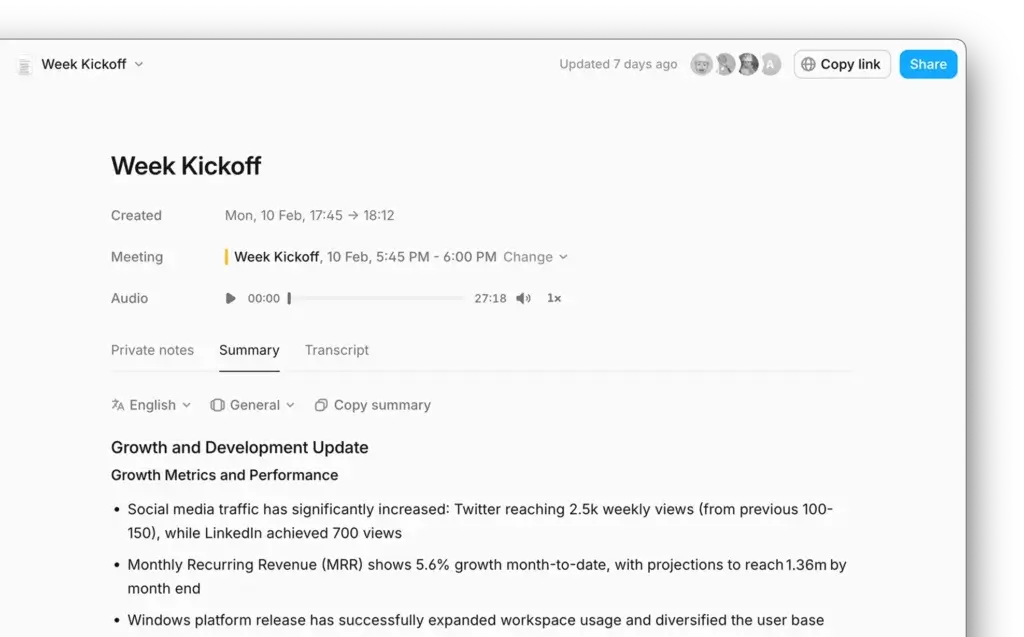
After the meeting, Amie creates a transcript, summary, and action items. The summary is designed to focus on key discussion points, decisions, next steps, and task ownership.
This is where Amie becomes useful for follow-up workflows. Instead of rewriting your own recap from memory, you can review Amie’s summary, edit anything that needs clarification, and share it with the relevant people.
Chat with notes
Amie also supports AI chat with meeting notes. This lets you ask questions about a meeting rather than manually scanning a long transcript.
For example, you could ask what a client said about pricing, what action items were assigned, or what objections came up during a demo. This is especially useful for sales calls, customer interviews, product discovery sessions, and internal planning meetings.
Integrations and workflow automation
Amie connects with the tools you already use for meetings, calendars, CRM, task management, and communication. Depending on your setup, this can include calendar tools, video meeting platforms, Slack, CRM systems, task tools, and documentation apps.
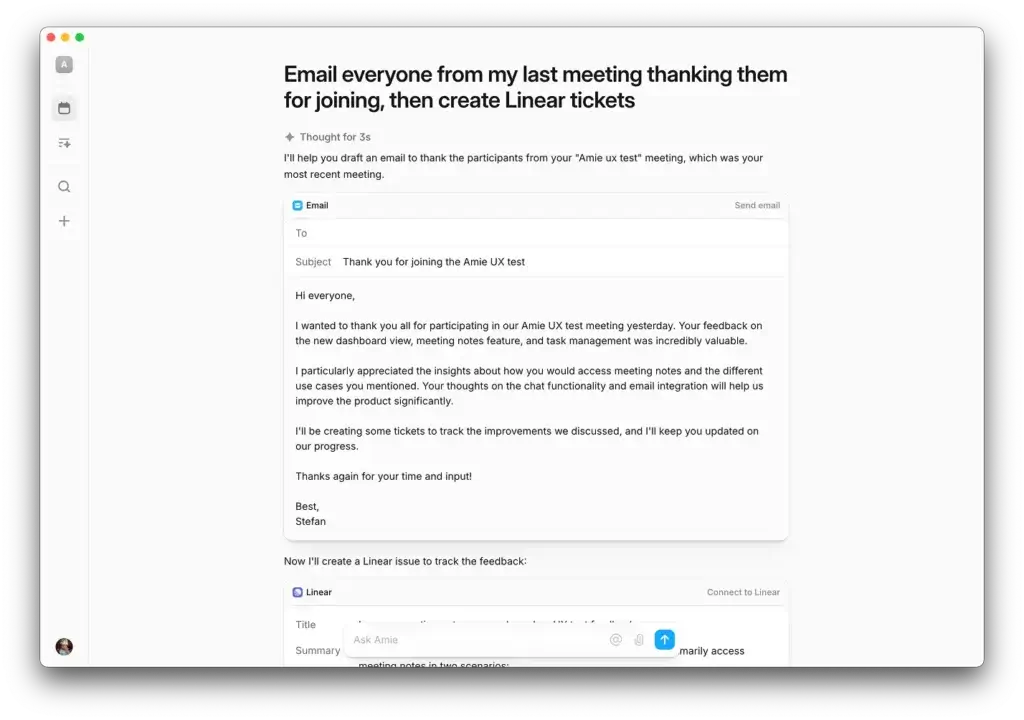
The most valuable use case is not just syncing data. It is reducing the gap between conversation and execution. A meeting summary should not sit in a separate note forever. It should become a follow-up email, CRM note, task, or project update.
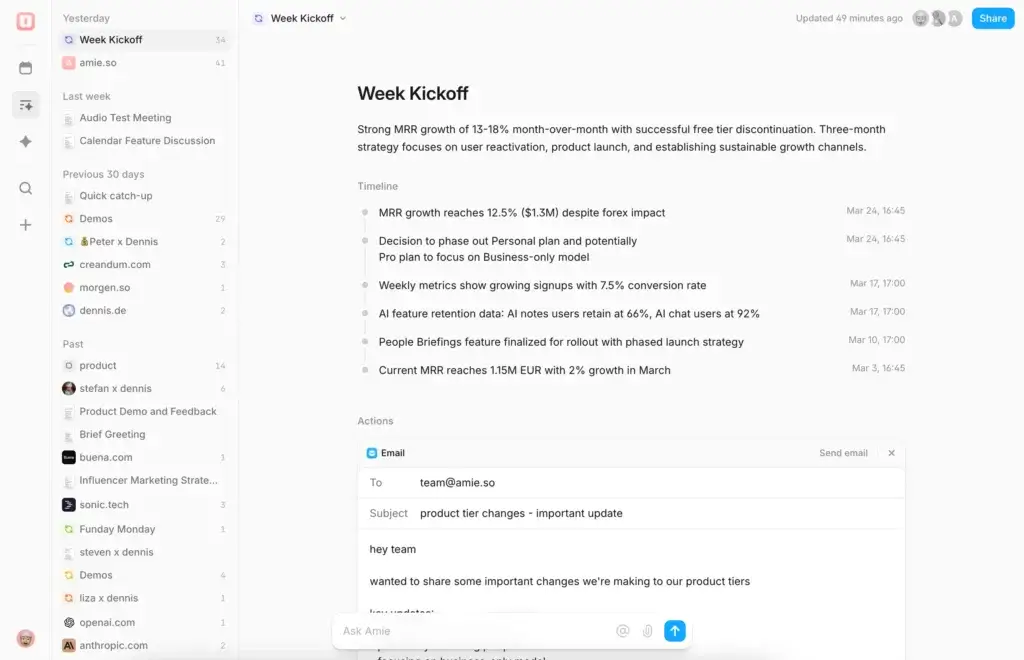
Amie AI Meeting Notes Review
Bot-Free Transcription, Summaries, and Actions
Amie’s AI meeting notes are the feature most likely to attract users who are comparing it with Fireflies, Fathom, Otter, or MeetGeek. The key difference is that Amie focuses on a bot-free recording workflow.
How Amie records meetings
With Amie’s desktop app, you join your meeting as usual, then record from your own device. Amie captures system audio locally, uploads the audio after the meeting, and then processes it into a transcript, summary, and action items.
This is an important distinction. Amie is bot-free, but that does not mean all AI processing happens only on your device. The recording workflow starts locally, then uses cloud-based transcription and AI processing after the call.
Transcription quality
Amie is designed to identify speakers, create a transcript, and separate meeting content into more useful notes. Like any AI transcription tool, quality can depend on audio clarity, microphone setup, background noise, accents, and overlapping speakers.
The practical benefit is that you can stop typing during meetings and stay focused on the conversation. After the call, you can review the transcript and clean up any small errors before sharing notes externally.
Summaries and decisions
Amie’s summaries are built around the information you usually need after a call: what was discussed, what was decided, what still needs clarification, and what should happen next.
This is more useful than a raw transcript because most teams do not need every spoken sentence. They need the outcome of the conversation.
Action items
Amie can extract action items from meetings and help you convert them into todos. That makes it more valuable than a standalone transcript tool because it connects meeting documentation with execution.
For managers, consultants, sales teams, and product teams, this is one of the most practical reasons to use Amie. It helps reduce the risk of missed follow-ups.
Where Amie’s meeting notes are strongest
Amie is strongest when your meetings create follow-up work. Examples include sales calls, client check-ins, team planning meetings, product discovery calls, interviews, and weekly operating meetings.
It is less compelling if you only want a cheap transcript archive. In that case, a simpler transcription tool may be enough.
User Experience and Interface
How Does Everyday Work with Amie Look?
The moment you open Amie, you can see why it gained attention as a productivity app. The interface is clean, modern, and much less intimidating than many project management or AI meeting tools.
Amie’s biggest UX advantage is that it does not feel like a separate meeting archive. It feels like a daily workspace where your calendar, tasks, and meetings belong together.
Clean design that supports focus
Amie’s design is minimal without feeling empty. Your calendar remains the center of the experience, while tasks, notes, and AI features support the planning workflow around it.
This is useful if you dislike productivity apps that feel too heavy. Amie is not trying to replace a full project management system like ClickUp, Asana, or monday.com. It is trying to help you manage your own day and meeting follow-ups more intelligently.
Available across devices
Amie can be used on the web and through native apps. The desktop app is especially important because it unlocks bot-free meeting recording and system audio capture.
Based on Amie’s current documentation, supported platforms include:
- Web app for modern browsers
- macOS desktop app
- Windows desktop app
- Linux app options
- iOS app
I would not present Android as supported unless Amie confirms it directly. If your audience includes Android-first users, this should be listed as a limitation.
Daily planning experience
Amie works best when you use it as the center of your workday. You can see meetings, plan tasks, capture notes, and review action items without constantly jumping between separate tools.
This is especially helpful for roles where your day changes quickly. A founder, operator, consultant, or product manager can move from meeting to meeting while still keeping track of follow-ups.
Accessibility and dark mode
Amie’s clean layout also makes it easier to scan. For users who spend hours inside calendars and notes, this matters more than it sounds. A cluttered interface creates friction, while a focused interface makes daily planning easier to maintain.
Pros And Cons
Advantages and Disadvantages
Amie has a strong product vision, but it is not the best fit for every user. Its main strength is the way it combines calendar, tasks, and AI meeting notes. Its main weakness is that some users may still need more specialized tools for project management, sales analytics, or enterprise controls.
Positive
✅ Combines calendar, tasks, and AI notes
✅ Bot-free meeting recording
✅ Clean and modern interface
✅ Strong meeting summaries and action items
✅ Useful AI scheduling features
✅ Good fit for follow-up-heavy workflows
Negative
❌ Not a full project management platform
❌ AI processing is not fully local
❌ Android support should not be assumed
❌ Advanced business features may require higher-tier plans
✅ Pros
- Combines calendar, tasks, and meeting notes
Amie reduces the need to jump between a calendar app, task manager, and AI note taker. - Bot-free meeting experience
Amie can record meetings without adding a visible bot participant, which feels cleaner for client and internal calls. - Excellent interface
The app feels modern, fast, and easier to use than many heavier productivity tools. - Strong summaries and action items
Amie helps turn conversations into clear next steps instead of leaving you with only a transcript. - Useful for time blocking
Calendar and todos work together, making it easier to plan your day around real availability. - Good fit for meeting-heavy professionals
Founders, consultants, salespeople, operators, and product managers can use Amie to connect meetings with follow-up work.
⚠️ Cons
- Not a complete project management system
Amie is not meant to replace ClickUp, Asana, monday.com, or Jira for complex team execution. - AI processing is not fully local
Amie records locally first, but meeting audio is uploaded for transcription and AI processing after the call. - Android support should not be assumed
Amie currently emphasizes web, desktop, and iOS availability in its documentation. - Some business features are plan-dependent
Features such as advanced integrations, audit logs, security controls, and custom branding may require Business-level access. - May be too broad for users who only need transcripts
If you only want basic transcription, Amie may offer more functionality than you need.
Pricing and Plans
How Much Does Amie Cost?
Amie’s pricing should be checked directly before you buy because SaaS plans can change. At the time of this review, Amie presents two main paid plans: Pro and Business, along with a 7-day free trial and yearly billing discount.
The important thing is not only the price. It is which workflow you need. Solo users may care most about unlimited calendars, todos, meeting notes, bot-free recordings, and AI scheduling. Teams may care more about advanced integrations, custom templates, branding, audit logs, security, and recording analytics.
Amie pricing comparison
| Plan | Best For | Key Features | Important Notes |
| Pro | Individuals, founders, consultants, and power users | Unlimited calendars, todo lists, meeting notes, bot-free recordings, chat with notes, AI scheduling, and uploaded audio files as AI notes | Best choice if you want Amie as your personal productivity and meeting follow-up system |
| Business | Teams and companies | Custom templates, custom branding on shared meeting notes, advanced ATS/CRM integrations, E2E encryption, audit log, advanced security, and recording analytics | Best choice if you need team workflows, security controls, and business-grade meeting operations |
Is there a free trial?
Yes. Amie currently promotes a 7-day free trial. This is the best way to test whether the app fits your actual workflow before committing to a paid plan.
During the trial, test Amie with real meetings. Do not only click around the interface. Record a call, review the summary, convert action items into todos, and see whether the follow-up workflow saves time.
Is Amie worth the price?
Amie is most worth the price if you use both sides of the product: the calendar and task planning side, plus the AI meeting notes side.
If you only need meeting transcription, you may find cheaper or more specialized tools. But if you want one workspace for planning your day, recording meetings, extracting action items, and managing follow-ups, Amie offers stronger value.
Security and Privacy
What You Should Know Before Recording Meetings
Privacy is one of the most important topics in any AI note taker review. Amie has a strong advantage because it does not need to send a bot into your meetings. However, bot-free does not mean fully offline or fully local.
Based on Amie’s workflow, the desktop app captures system audio locally, then uploads the audio after the meeting for transcription and AI processing. The generated transcript, summary, and action items are then available for review, editing, and sharing.
What this means in practice
| Privacy Question | How Amie Handles It | Why It Matters |
| Does a bot join the meeting? | No, Amie is designed for bot-free recording through the desktop app | This creates a cleaner experience for external and internal calls |
| Is the recording captured locally? | Yes, system audio is captured locally first | This is different from bot-based tools that join as participants |
| Is AI processing fully local? | No, audio is uploaded after the meeting for transcription and AI processing | Security-sensitive teams should review Amie’s privacy and data processing terms |
| Can notes be edited? | Yes, transcripts, summaries, and action items can be edited | This helps improve accuracy before sharing notes with clients or teams |
| Is Amie good for confidential meetings? | Potentially, but you should review its security controls, plan features, and internal policies first | Legal, healthcare, finance, and enterprise teams may need extra review |
The practical recommendation is simple: Amie is privacy-friendly from a meeting experience perspective because it avoids visible bots. But for highly confidential meetings, you should still review Amie’s security documentation, data processing terms, and plan-level controls before standardizing it across your organization.
Who Is It Best For?
Is Amie The Right Fit For Your Workflow?
Amie is not built for every workflow, and that is part of its strength. It works best for people who live in meetings, calendars, and follow-ups, but do not want a heavy project management platform controlling every part of their day.
Founders and operators
If you move between investor calls, hiring interviews, team syncs, customer calls, and planning sessions, Amie can act as your meeting memory and daily planning system.
You can use it to keep track of what was discussed, what needs to happen next, and where those follow-ups fit into your calendar.
Consultants and freelancers
Consultants and freelancers often need professional meeting notes without creating extra admin work. Amie helps you capture client discussions, summarize decisions, and prepare follow-up emails faster.
The bot-free recording style is also helpful when working with clients who may not want another participant added to the call.
Sales and customer-facing teams
Sales teams can use Amie to capture discovery calls, demos, onboarding sessions, objections, requirements, and next steps.
However, if your sales team needs advanced conversation intelligence, coaching analytics, deal risk scoring, or large-scale CRM reporting, Fireflies or another sales-focused tool may offer more depth.
Product managers and researchers
Product managers can use Amie for user interviews, internal planning, roadmap discussions, and stakeholder meetings. The ability to ask questions about past notes can be useful when reviewing feedback and decisions later.
Students, journalists, and creators
Amie can also work well for interviews, research calls, lectures, and content planning. The main benefit is that you can focus on the conversation instead of writing everything manually.
Who should not use Amie?
Amie may not be the best choice if you need a traditional project management system, a dedicated sales call analytics platform, or a basic free transcription tool.
It may also be less suitable for Android-first users unless Amie adds or confirms Android support.
Amie VS Alternatives
Comparison With Other AI Note Takers
If you are comparing Amie with other AI note takers, the most important question is what you want the tool to do after the meeting ends.
If you only need transcription, several tools can help. If you want meeting notes connected to your calendar, todos, scheduling, and follow-up workflow, Amie becomes more compelling.
| Tool | Best For | Amie Advantage | Where The Alternative May Win |
| Amie | Calendar, tasks, AI meeting notes, and follow-up workflows | Bot-free recording, clean interface, calendar-first productivity, and task conversion | Not as deep as dedicated sales analytics or project management tools |
| ClickUp Note Taker | Teams already using ClickUp for project execution | Amie is cleaner as a personal calendar and AI meeting assistant | ClickUp is stronger for turning notes into structured project work inside ClickUp |
| Krisp | Noise cancellation, audio clarity, and meeting audio quality | Amie is stronger for meeting summaries, transcripts, and action items | Krisp is better if audio cleanup is your main need |
| Fireflies.ai | Sales teams and meeting-heavy organizations that need mature AI notes | Amie offers a cleaner, bot-free, calendar-centered experience | Fireflies has stronger sales workflows, call analytics, and mature integrations |
| Fathom | Fast AI meeting summaries and follow-ups | Amie is broader because it combines calendar, tasks, scheduling, and notes | Fathom may feel simpler if you only need meeting summaries |
Amie vs ClickUp Note Taker
ClickUp Note Taker is most useful if your team already manages projects, tasks, docs, and workflows inside ClickUp. Its strength is not only note-taking, but the ability to connect meeting information directly to ClickUp tasks and documentation.
Amie is better if you want a lighter, cleaner tool for calendar planning, bot-free meeting notes, and personal productivity. It feels less like a project management system and more like a smart daily workspace.
Our recommendation: Choose ClickUp Note Taker if ClickUp is already your team’s operating system. Choose Amie if you want a calendar-first AI assistant for meetings, todos, and follow-ups.
👉🏼 Read Full ClickUp Note Taker review or visit ClickUp Note Taker directly here
Amie vs Krisp
Krisp is not primarily an AI note taker. It is best known for noise cancellation, voice clarity, and improving audio quality during calls.
Amie and Krisp can actually work well together because they solve different problems. Krisp improves how you sound. Amie helps you remember what was said and what needs to happen next.
Our recommendation: Choose Krisp if your main issue is background noise and audio quality. Choose Amie if your main issue is meeting documentation, summaries, action items, and follow-ups.
👉🏼 Read full Krisp review or visit Krisp here
Amie vs Fireflies.ai
Fireflies.ai is one of the most established AI meeting assistants. It is strong for teams that want meeting capture, search, CRM workflows, collaboration, and call analytics.
Amie’s advantage is its bot-free recording style and calendar-first experience. It feels cleaner and more personal. Fireflies feels more like a dedicated meeting intelligence platform.
Our recommendation: Choose Fireflies if your sales or customer-facing team needs mature call analytics and CRM workflows. Choose Amie if you want a cleaner AI calendar and meeting notes app without a bot joining your calls.
👉🏼 Read Full Fireflies AI review or visit Fireflies AI here
Amie vs Fathom
Fathom is a strong AI note taker for people who want fast meeting summaries, highlights, and follow-up support. It is simple, polished, and especially attractive if your main goal is to save time after calls.
Amie is broader. It includes meeting notes, but also calendar planning, tasks, AI scheduling, and daily productivity workflows.
Our recommendation: Choose Fathom if you want a focused AI meeting note taker. Choose Amie if you want your meeting notes connected to your calendar and todos.
👉🏼 Read Full Fathom review here or visit Fathom website
Setup Guide
Getting Started with Amie
Getting started with Amie is straightforward, especially if you already live inside a calendar. The most important setup step is connecting your calendar and installing the desktop app if you want bot-free meeting recording.
1. Sign up and connect your calendar
Head over to amie.so and create your account. Then connect the calendar accounts you use for work and meetings.
This gives Amie the context it needs to show your schedule, detect meetings, and help you manage todos around real availability.
2. Install the desktop app
You can use Amie on the web, but the desktop app is important if you want the full meeting notes experience. Bot-free recording depends on system audio capture, so desktop access matters.
For most users, the best setup is:
- Use the desktop app for recording meetings
- Use the web app for quick access from any browser
- Use the iOS app to review your calendar, todos, and notes on the go
3. Record your first meeting
Join your meeting normally, then record through Amie. You do not need to invite a bot or add a separate meeting participant.
After the call ends, Amie processes the recording and creates meeting notes that you can review, edit, and share.
4. Review the summary and turn actions into todos
The most important step happens after the meeting. Review the summary, check the action items, and convert anything important into todos.
This is where Amie can save real time. A meeting is only useful if the next steps are clear, assigned, and easy to follow.
Tips & Best Practices for Using
How To Get The Most Out of Amie
Amie becomes more valuable when you treat it as a workflow system, not only a recorder. The goal is not just to capture meetings. The goal is to turn meetings into decisions, tasks, and follow-ups.
1. Prepare meetings with clear agendas
Before your call starts, add a short agenda to the calendar event. This gives you and your attendees a clearer structure, and it also makes the post-meeting summary easier to review.
Keep agendas simple:
- Main discussion topics
- Decisions needed
- Questions to answer
- Expected next steps
💡 Tip: Use recurring agenda templates for weekly team meetings, client check-ins, and product reviews.
2. Review notes before sharing them
AI summaries are useful, but you should still review them before sending them to clients, executives, or cross-functional teams.
A quick review lets you fix speaker labels, clarify decisions, remove irrelevant details, and make sure sensitive information is not shared accidentally.
3. Convert action items into todos quickly
The best time to organize follow-ups is immediately after the meeting. If you wait, small commitments can get lost.
Use Amie’s action items as a starting point, then turn the right ones into todos and schedule them into your calendar if needed.
4. Use summaries as follow-up drafts
Amie’s summaries can speed up follow-up emails. You can use the TL;DR, decisions, and next steps as the base for a client recap or internal update.
For sales, customer success, consulting, and project management, this can save a lot of time each week.
5. Connect integrations early
Do not wait to connect your workflow tools. If Amie can send notes or action items to the systems you already use, you will get more value from it.
Useful workflows include sending summaries to Slack, syncing meeting notes with CRM records, pushing action items into task tools, and sharing notes with teammates after key meetings.
Final Recommendation
Is Amie Worth It in 2026?
Amie is worth trying if you want a productivity app that connects your calendar, tasks, AI meeting notes, and follow-up workflow in one clean interface.
Its biggest advantage is not just bot-free recording. It is the way Amie connects meeting outcomes with your daily planning. You can record a call, review the summary, extract action items, turn them into todos, and schedule them into your calendar.
Here’s what stands out
- Bot-free meeting notes that feel less intrusive than traditional meeting bots
- Calendar-first design that makes Amie useful before and after meetings
- AI summaries and action items that reduce manual follow-up work
- Task and scheduling features that help turn conversations into execution
- Modern user experience that feels lighter than many productivity platforms
Amie is not the right tool if you need a full project management system, advanced sales call analytics, or a simple low-cost transcription app. But if your workday revolves around meetings, calendar planning, and follow-ups, Amie offers a smart and polished workflow.
Bottom line: Amie is one of the best options for users who want an AI calendar app with bot-free meeting notes. It is especially strong for founders, consultants, sales professionals, product managers, and operators who want fewer tools and cleaner follow-through.
👉 Try Amie for free and see whether it fits the way you manage meetings, tasks, and your calendar.
Frequently Asked Questions
Have more questions?
What is Amie?
Amie is an AI productivity app that combines calendar management, todos, AI scheduling, and bot-free meeting notes. It helps you plan your day, record meetings, summarize conversations, and turn action items into tasks.
Is Amie a calendar app or an AI note taker?
Amie is both. It started as a calendar and task app, but now also includes AI meeting notes, summaries, action items, and workflow features. Its strongest use case is connecting meetings with calendar planning and follow-up tasks.
Is Amie bot-free?
Yes. Amie is designed to record meetings without adding a visible bot participant to the call. With the desktop app, it captures system audio locally and then processes the recording after the meeting.
Does Amie record meetings locally?
Amie captures system audio locally on your device through the desktop app. After the meeting ends, the audio is uploaded for transcription and AI processing, so it should not be described as a fully local AI meeting recorder.
Does Amie create AI meeting summaries?
Yes. Amie can create meeting summaries, transcripts, and action items after a call. You can review and edit the notes before sharing them with teammates, clients, or other stakeholders.
What platforms does Amie support?
Amie supports web access, macOS, Windows, Linux options, and iOS according to its documentation. The desktop app is important for bot-free meeting recording and system audio capture.
Does Amie work with Google Calendar?
Yes. Amie supports calendar workflows and can connect with Google Calendar. It can also help you manage calendar events, todos, meeting notes, and scheduling from one productivity workspace.
How much does Amie cost?
Amie currently lists Pro and Business plans, along with a 7-day free trial and yearly billing discount. Pricing and plan features can change, so you should check Amie’s official pricing page before subscribing.
What are the best Amie alternatives?
The best Amie alternatives depend on your use case. Fireflies is strong for sales meeting intelligence, Fathom is strong for simple AI meeting summaries, Krisp is better for audio clarity, and ClickUp Note Taker is useful if your team already works inside ClickUp.
Who is Amie best for?
Amie is best for founders, operators, consultants, sales professionals, product managers, and meeting-heavy knowledge workers who want calendar planning, tasks, AI notes, and follow-ups in one clean workspace.