

Introduction
💫 A Better Way to Stay Focused Remotely
If you work from home, study online, freelance, or manage creative work, you probably know the feeling: you sit down with good intentions, open your laptop, and somehow lose an hour to tabs, messages, and small distractions.
FLOWN is designed for exactly that problem.
Instead of giving you another to-do list, timer, or project management dashboard, FLOWN gives you a live virtual coworking environment where you can focus alongside other people. It uses body doubling, guided focus sessions, intention setting, and structured breaks to help you start work, stay accountable, and build a healthier rhythm.
That makes this FLOWN review especially relevant if you are looking for a virtual coworking app, a body doubling platform, or a focus tool that feels more human than a standard productivity app.
In this review, you will learn:
- How FLOWN works and what makes it different
- Which features are most useful for deep work and body doubling
- How much FLOWN costs and what each plan includes
- How FLOWN compares with Focusmate, Flow Club, and Caveday
- Who should use FLOWN and who should consider another option
By the end, you will know whether FLOWN fits your productivity style, budget, and daily work routine.
What Is FLOWN?
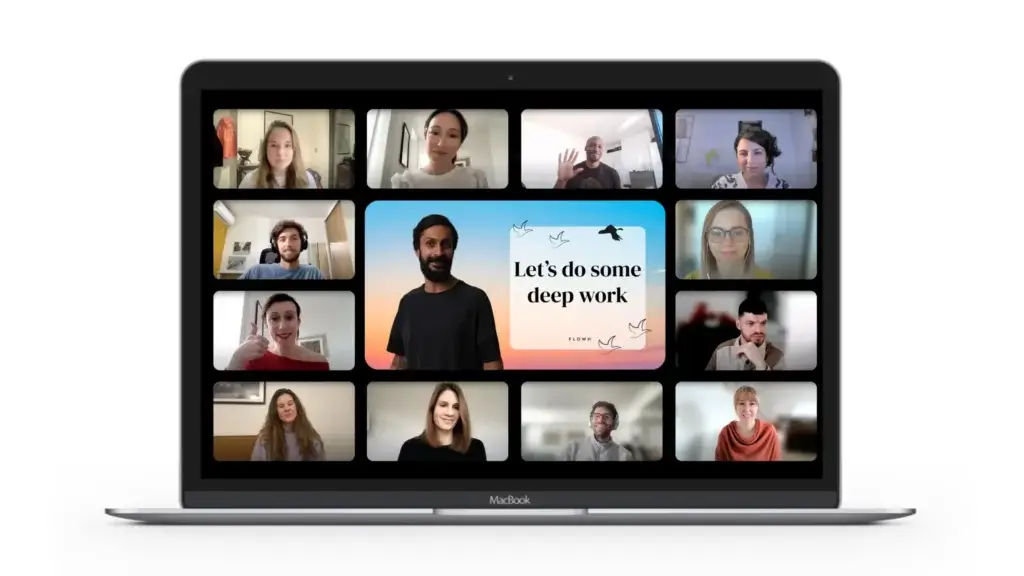
FLOWN is a virtual coworking platform built to help you focus through live online sessions, shared accountability, and structured work blocks. It is especially useful for remote workers, freelancers, students, writers, and people who struggle to stay consistent when working alone.
The platform is based around body doubling, a focus technique where you work in the presence of another person or group. The other person does not need to help with your task. Their presence simply creates accountability, reduces isolation, and gives your brain a clearer signal that it is time to work.
FLOWN was founded in London in 2020, when remote work and digital isolation were becoming major challenges for knowledge workers. Since then, it has developed into a global focus community with live sessions, recharge activities, private focus rooms, and community-led accountability.
Unlike standard productivity tools, FLOWN does not try to manage your tasks for you. It helps you create the conditions that make it easier to do the work you already know you need to do.
What Makes FLOWN Different?
Most productivity apps focus on planning, reminders, or tracking. FLOWN focuses on the environment around your work.
- Live coworking: You work alongside others in real time
- Guided structure: Sessions include intention setting and check-ins
- Body doubling: Shared presence helps you stay accountable
- Recharge sessions: Breaks include meditation, movement, and creative resets
- Community: You get a sense of support that solo timers cannot provide
Think of FLOWN as a virtual focus studio. You show up, declare what you plan to work on, work quietly with others, and leave with a clearer sense of progress.
Quick Decision Guide
FLOWN Review Summary
If you want the quick answer, FLOWN is best for people who need social accountability to focus. It is not a full task management system, and it will not replace tools like Asana, Todoist, ClickUp, or Notion. Instead, it helps you create focused work sessions so you can actually complete the tasks already on your list.
| Review Area | FLOWN Summary |
| Best For | Remote workers, freelancers, students, writers, creatives, and people who benefit from body doubling |
| Main Strength | Live virtual coworking with guided focus, accountability, and community support |
| Main Limitation | Less useful if you dislike live sessions, structured check-ins, or camera-based work environments |
| Pricing | Free plan, 30-day trial, monthly, annual, and lifetime options |
| Best Alternative | Focusmate for cheaper 1-on-1 accountability, Flow Club for many hosted sessions, Caveday for intensive deep work blocks |
| Overall Recommendation | Strong choice if you want a human-led focus system rather than another solo productivity app |
For a wider productivity stack, you can also compare FLOWN with other tools in our best productivity tools guide.
How FLOWN Works
Features That Power Your Focus
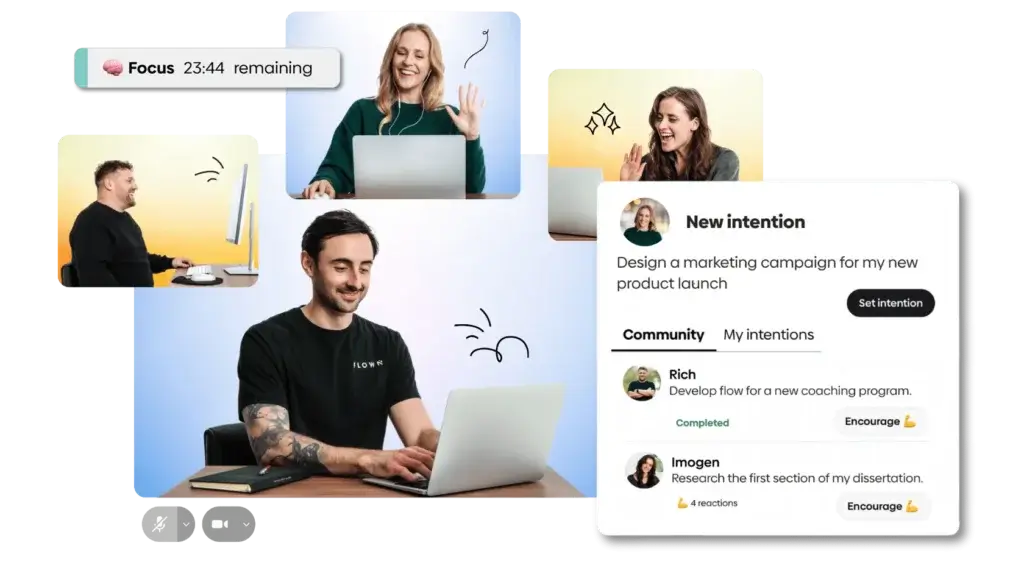
FLOWN is not just a timer app. It is a live focus environment that combines scheduled coworking, instant drop-in rooms, body doubling, and guided reset sessions.
The typical FLOWN session is simple:
- You choose a session or join a Drop-In room
- You set an intention for what you want to complete
- You work quietly alongside others
- You check in at the end and acknowledge your progress
- You return later to build the habit again
🎯 1. Drop-In Sessions for Instant Focus
Drop-In sessions are useful when you need to focus right away. Instead of waiting for motivation, you can enter a shared virtual room and start working with others who are also trying to get things done.
This is one of FLOWN’s strongest features because it reduces the friction between “I should work” and “I am working.” You do not need to design a complex system, invite a partner, or build a custom routine. You simply show up.
Drop-In sessions typically work well for:
- Email catch-up
- Writing and editing
- Studying
- Admin work
- Planning and weekly reviews
- Creative tasks that require uninterrupted attention
🧘 2. Facilitator-Led Deep Work Sessions
FLOWN also offers facilitator-led focus sessions. These sessions give you more structure than a simple silent coworking room.
A facilitator may guide the group through intention setting, a short focus ritual, work sprints, and closing reflection. This can be especially helpful if you know what you need to do, but you struggle to begin or stay with the task long enough to make progress.
This is where FLOWN feels different from basic accountability tools. The human guidance adds warmth, momentum, and a sense of rhythm. It also makes the experience less mechanical than using a Pomodoro timer alone.
🔄 3. Recharge Sessions for Better Work Rhythm
FLOWN is not only about pushing through more work. It also includes recharge sessions that help you reset between deep work blocks.
These sessions may include meditation, stretching, breathing, journaling, creative exercises, or gentle movement. That matters because focus is not just about effort. It is also about recovery.
If you often burn out after a few intense hours, this is one of FLOWN’s most practical advantages. It encourages a more sustainable work rhythm instead of treating productivity as constant output.
🧑🤝🧑 4. Private Focus Sessions for Teams and Groups
FLOWN can also work for private sessions. This is useful if you want to create a shared focus block with teammates, students, friends, or a small accountability group.
For remote teams, this can be a more productive alternative to another status meeting. Instead of talking about work for 30 minutes, the team can join a shared focus session and make visible progress together.
It is not a replacement for project management software, but it can complement tools like ClickUp, monday.com, Asana, or Notion by helping people execute the work already planned there.
🫂 5. Community and Body Doubling
FLOWN’s community is a major part of the product. The platform gives you a sense that other people are also showing up, working through resistance, and trying to make progress.
This is where body doubling becomes valuable. According to Cleveland Clinic, working alongside another person can improve focus, accountability, and motivation. FLOWN brings that principle into an online coworking format.
That said, FLOWN should not be described as a medical treatment for ADHD. A better way to frame it is as an ADHD-friendly productivity support tool that may help people who benefit from external structure and shared presence.
🎛️ 6. Built-In Productivity Tools
FLOWN also includes supporting tools that help you manage your focus sessions more easily.
- Timers: Keep each work sprint structured
- Goal setting: Clarify what you plan to complete
- Progress reflection: Help you recognize what you finished
- Session calendar: Make it easier to plan your week
- Sound and atmosphere: Create a calmer work environment
The result is a focused dashboard that keeps the experience simple. You do not need to manage a complicated workflow to benefit from FLOWN.
📱 7. FLOWN Web App and Mobile Access
One important update for 2026 is that FLOWN is available as a Progressive Web App. That means you can install it from a supported browser and use it more like an app on your computer or phone.
This is not the same as downloading a traditional iOS or Android app from an app store. However, it makes FLOWN more accessible than a purely browser-only experience. FLOWN’s help center recommends installing the web app through a Chromium-based browser such as Chrome or Edge.
Pros and Cons
FLOWN Benefits and Limitations
Benefits of Using FLOWN
FLOWN is valuable because it solves a common productivity problem: you may already know what you need to do, but you still struggle to start, focus, and stay consistent.
The platform helps by making focus feel social, structured, and easier to repeat. That gives it a different role from task management software, habit trackers, calendar apps, or distraction blockers.
- Instant accountability: Shared presence can make it easier to start work
- Less isolation: Live coworking makes remote work feel less lonely
- Better structure: Intention setting turns vague work into specific action
- Healthier rhythm: Recharge sessions encourage breaks and recovery
- ADHD-friendly format: Body doubling can support people with executive function challenges
- Simple setup: You can join a session without building a complex productivity system
Pros and Cons
FLOWN has a strong concept, but it is not the right fit for every user. The biggest question is whether live accountability helps you feel focused or makes you feel uncomfortable.
Positive
✅ Strong live accountability
✅ Useful for body doubling
✅ Warm facilitator-led sessions
✅ Good mix of focus and recharge
Negatives
❌ Not a task management tool
❌ Live sessions may not suit everyone
❌ Some guided sessions are schedule-based
❌ Traditional mobile app is not the main format
✅ FLOWN Pros
1. Live accountability helps you start faster
The biggest benefit of FLOWN is that it helps reduce procrastination. When you enter a session and state your intention, the task feels more concrete and easier to begin.
2. Body doubling is built into the experience
You do not need to find a friend, coworker, or accountability partner. FLOWN gives you an always-available environment where other people are already working.
3. Facilitators make the experience feel human
The guided sessions add a calm, supportive tone. This makes FLOWN feel less awkward than some 1-on-1 coworking tools and less isolated than solo timers.
4. Recharge sessions support sustainable productivity
FLOWN does not treat productivity as nonstop output. The platform includes breaks, movement, and mindfulness to help you avoid mental fatigue.
5. It is easy to use
The product is simple enough for beginners. You do not need to configure workflows, automations, boards, or templates before getting value.
🔴 FLOWN Cons
1. It is not a project management platform
FLOWN will not organize your tasks, assign work, track project status, or manage team workflows. You still need a separate system for planning and task management.
2. Live coworking is not for everyone
Some people feel energized by virtual presence. Others may feel self-conscious or distracted. If live sessions make you uncomfortable, FLOWN may not fit your work style.
3. Some sessions depend on schedule availability
Drop-In rooms provide flexibility, but guided sessions are still schedule-based. If your work hours are unusual, you may need to check whether the session calendar fits your routine.
4. It uses a Progressive Web App format
FLOWN can be installed as a web app, but users expecting a traditional native app from the App Store or Google Play may need to adjust their expectations.
5. The value depends on habit formation
FLOWN works best when you use it consistently. If you only join once or twice, you may not experience the full benefit of structured coworking.
User Experience
What People Say About FLOWN
User experience is where FLOWN performs well. The platform is designed to feel calm, welcoming, and low-pressure. This matters because many focus tools can feel rigid, clinical, or too focused on optimization.
FLOWN’s strongest user appeal is emotional as much as functional. It helps people feel less alone while working, which is important for freelancers, remote workers, and students who spend long hours without normal office cues.
🌟 What Users Tend to Like
1. Structure without harsh pressure
Many users like that FLOWN creates accountability without feeling aggressive. You are encouraged to show up, choose a task, and focus, but the tone is supportive rather than competitive.
2. A better way to handle procrastination
FLOWN is especially helpful when the hardest part is starting. The session format gives you a clear entry point: join, set an intention, begin the work.
3. A sense of coworking without commuting
For remote workers, FLOWN recreates part of what is missing from office life: the quiet social pressure of other people working nearby. You get the benefit of presence without needing to be in the same physical space.
4. A calmer productivity experience
The platform feels more human than many productivity tools. The combination of live sessions, gentle facilitation, and recharge options gives it a softer feel than tools built mainly around timers, analytics, or strict blocking.
Room for Improvement
FLOWN still has some limitations. Some users may want more session variety across every time zone, more control over break structure, or a more traditional app experience.
It can also take time to get used to the format. If you are new to virtual coworking, the first session may feel unusual. After a few sessions, the structure usually becomes easier and more natural.
Best User Experience Scenario
FLOWN is most enjoyable when you already have tasks prepared before joining a session. For example, you might use a planning tool to decide what needs to be done, then use FLOWN to create the focus environment needed to complete it.
This is why FLOWN works well alongside tools featured in our productivity software comparison, rather than replacing them.
What Does It Cost?
FLOWN Pricing and Plans
FLOWN offers a free plan, a 30-day trial, monthly and annual memberships, and a lifetime option. Pricing can change, so it is always worth checking the official FLOWN pricing page before subscribing.
Based on the current membership information, here is the practical pricing breakdown:
| Plan | Price | Best For | Key Features |
| Free Trial | Free for 30 days | Testing FLOWN before paying | Full access to sessions and features during the trial period, no credit card required |
| Free | $0 | Casual users | 4 community sessions per month, access to all sessions on Fridays, private community sessions |
| Monthly | $25/month | Flexible solo users | Unlimited access to FLOWN sessions and features with monthly billing |
| Annual | $225/year, around $19/month | Regular users | Same core access as monthly, with annual savings |
| Lifetime | $900 one-time payment | Long-term power users | Unlimited access to FLOWN forever, no renewals needed |
Quick Pricing Highlights
- Free trial: Best way to test FLOWN before committing
- Free plan: Useful if you only need occasional coworking
- Monthly plan: Best if you want flexibility
- Annual plan: Better value if you plan to use FLOWN regularly
- Lifetime plan: Only makes sense if FLOWN becomes part of your long-term routine
Is FLOWN Good Value?
FLOWN is not the cheapest virtual coworking tool. Focusmate is more affordable if you only need 1-on-1 accountability. However, FLOWN offers a broader experience that includes group focus sessions, facilitation, recharge sessions, and a stronger community feel.
If you use FLOWN several times per week, the paid plan can be easy to justify. If you only need occasional coworking, the free plan or a lower-cost alternative may be enough.
Does FLOWN Offer a Free Trial?
Yes. FLOWN offers a 30-day free trial with no credit card required. This is a major advantage because virtual coworking is personal. You need to experience the format before deciding whether it fits your work style.
Use the trial to test different session types, time slots, facilitators, and task categories. After a week or two, you should know whether FLOWN helps you focus more consistently.
Competitors
FLOWN vs Focusmate, Flow Club, and Caveday
FLOWN is part of a growing category of virtual coworking and body doubling tools. Its closest alternatives are Focusmate, Flow Club, and Caveday.
Each product solves a similar problem, but they do it in different ways. FLOWN is best if you want a balance of community, structure, and recharge. Focusmate is best if you want simple 1-on-1 accountability at a lower price. Flow Club is strong if you want many hosted sessions. Caveday is best if you prefer deeper guided work blocks.
Quick Comparison Table
| Feature | FLOWN | Focusmate | Flow Club | Caveday |
| Best For | Group coworking, body doubling, recharge, and guided focus | Simple 1-on-1 accountability | Hosted group sessions with many time options | Structured deep work blocks and longer sessions |
| Session Format | Group sessions, Drop-Ins, private sessions, recharge sessions | 1-on-1 virtual coworking | Hosted group coworking | Guided group focus sessions |
| Facilitator-Led | Yes, for many sessions | No, usually peer-based | Yes, hosted sessions | Yes, Cave Guides lead sessions |
| Free Access | 30-day trial, free plan, free access on Fridays | Free plan with limited sessions | Free trial available | 14-day free trial |
| Pricing | $25/month, $225/year, $900 lifetime | Free, or Plus from $8/month billed annually | $40/month, or $33.33/month billed annually | $35/month, billed quarterly at $105 every 3 months |
| Wellness and Recharge | Strong | Limited | Depends on host | Built into guided session flow |
| Best Reason to Choose It | You want focus, accountability, and a supportive community | You want the lowest-cost accountability option | You want frequent hosted sessions and variety | You want deeper guided work rituals |
FLOWN vs Focusmate
Focusmate is the best low-cost alternative to FLOWN. It pairs you with one person for a virtual coworking session. You quickly say what you plan to work on, work quietly, and check in at the end.
Choose Focusmate if you want a simple, affordable body doubling tool. Choose FLOWN if you want a warmer group environment, more guided sessions, recharge options, and a stronger community experience.
FLOWN vs Flow Club
Flow Club is closer to FLOWN because it also uses hosted group sessions. It is useful if you want many session options and a more active hosted coworking schedule.
FLOWN feels more wellness-oriented, while Flow Club may appeal more to users who want a larger variety of hosted productivity sessions. Pricing is also different, so the best choice depends on how often you plan to join sessions.
FLOWN vs Caveday
Caveday is a strong option for deep work rituals. Its guided “Caves” can be useful when you want longer, more intensive focus blocks with a structured group format.
FLOWN may be better if you want more variety across coworking, Drop-Ins, recharge sessions, and private focus options. Caveday may be better if you want a more retreat-like deep work experience.
Which FLOWN Alternative Should You Choose?
- Choose FLOWN if you want guided focus, community, and body doubling in one platform
- Choose Focusmate if you want affordable 1-on-1 accountability
- Choose Flow Club if you want many hosted group sessions
- Choose Caveday if you want longer guided deep work sessions
For most remote workers and freelancers, FLOWN is the most balanced option. It gives you accountability, structure, and emotional support without feeling too intense.
Who Is It For?
Is FLOWN Right for Your Needs?
FLOWN is best for people who need help creating the right conditions for focused work. It is not about advanced planning. It is about showing up and doing the work with support.
1. Remote Workers and Freelancers
If you work alone most of the day, FLOWN can make your work feel less isolated. The live sessions create a sense of presence that is often missing from remote work.
Why it works:
- Adds structure to unstructured workdays
- Creates a virtual coworking feeling
- Helps you stay accountable without a manager watching you
2. People with ADHD or Executive Function Challenges
FLOWN can be helpful for people who benefit from body doubling, external structure, and gentle accountability. Many people with ADHD struggle not because they lack goals, but because starting and sustaining attention can be difficult.
Why it works:
- Body doubling creates external accountability
- Timers and check-ins reduce ambiguity
- Guided sessions make transitions easier
FLOWN is not a medical treatment, but it can be a useful support tool within a broader productivity and self-management system.
3. Students and Lifelong Learners
Students often need long periods of focus without the structure of a physical classroom. FLOWN can create that structure virtually.
Why it works:
- Study sessions feel less lonely
- Check-ins help clarify study goals
- Recharge sessions reduce mental fatigue
4. Writers, Creatives, and Makers
Creative work often requires uninterrupted attention. FLOWN can help you protect that attention by creating a dedicated focus window.
Why it works:
- Quiet group momentum supports deep work
- Intention setting helps you choose one creative priority
- Recharge sessions can support idea flow
5. Small Teams and Remote Managers
FLOWN can also help small teams create shared focus time. This is useful when teams are meeting too often but still struggling to complete individual work.
Why it works:
- Private sessions help teams work in sync
- Focus blocks reduce meeting overload
- Shared accountability can improve follow-through
Who Should Avoid FLOWN?
FLOWN is not the best choice for everyone. You may want another tool if:
- You strongly dislike live sessions or camera-based environments
- You want a full task management or project management platform
- You prefer completely private solo productivity tools
- You need detailed team reporting, admin controls, or workflow automation
- You only want a free Pomodoro timer
If you mainly need planning, look at task management software first. If you mainly need execution support, FLOWN is much more relevant.
Is FLOWN Worth It?
Final Thoughts
FLOWN is worth considering if your biggest productivity challenge is not planning, but execution. If you often know what you need to do but struggle to start, stay focused, or work consistently on your own, FLOWN gives you a practical structure for showing up.
Its strongest advantage is the combination of body doubling, live accountability, guided focus, and recharge sessions. That mix makes it more supportive than a solo timer and more human than a typical productivity dashboard.
However, FLOWN is not for everyone. If you want a task list, project board, calendar planner, or automation platform, you will need another tool. FLOWN is best used alongside your existing productivity stack, not instead of it.
🏆 Overall Recommendation
FLOWN is a strong choice if you:
✅ Need accountability to start and finish tasks
✅ Work remotely and miss the structure of shared workspaces
✅ Like the idea of body doubling and virtual coworking
✅ Want focus sessions that include breaks and recovery
✅ Prefer a supportive productivity environment over a strict one
If that sounds like your work style, the 30-day free trial makes FLOWN easy to test before paying.
👉 Try FLOWN for free and see whether virtual coworking helps you build a better focus routine.
Have more questions?
Frequently Asked Questions
What is FLOWN?
FLOWN is a virtual coworking platform that helps you focus through live online sessions, body doubling, intention setting, and structured work blocks. It is designed for remote workers, freelancers, students, creatives, and anyone who wants more accountability while working alone.
How does FLOWN work?
FLOWN works by placing you in live virtual focus sessions with other people. You join a session, set an intention, work quietly during a focused block, and check in at the end. This shared structure helps reduce procrastination and makes it easier to stay on task.
Is FLOWN good for ADHD?
FLOWN can be helpful for people with ADHD or executive function challenges because it uses body doubling, external structure, timers, and gentle accountability. However, it is not a medical treatment for ADHD. It is best described as an ADHD-friendly productivity support tool.
How much does FLOWN cost?
FLOWN offers a free plan, a 30-day free trial, a monthly plan at $25/month, an annual plan at $225/year, and a lifetime membership at $900. Pricing may change, so you should check the official FLOWN pricing page before subscribing.
Does FLOWN have a free plan?
Yes. FLOWN has a free plan that includes 4 community sessions per month, access to all sessions on Fridays, and the ability to attend private community sessions. It also offers a 30-day free trial with full access and no credit card required.
Do I need to be on camera during FLOWN sessions?
FLOWN sessions are built around live presence and accountability, so camera use may be encouraged in some sessions. However, the experience is generally designed to feel low-pressure. If you are uncomfortable on camera, start with a session style that feels more private or less interactive.
What is the difference between FLOWN and Focusmate?
Focusmate focuses on 1-on-1 virtual coworking, while FLOWN offers group-based focus sessions, facilitator-led sessions, Drop-Ins, private sessions, and recharge activities. Focusmate is usually cheaper, but FLOWN provides a broader community and wellness-focused experience.
Does FLOWN have a mobile app?
FLOWN is available as a Progressive Web App, which means you can install it from a supported browser and use it on your computer or phone. It is not mainly positioned as a traditional native app from the App Store or Google Play.
Is FLOWN useful for remote teams?
Yes. FLOWN can be useful for remote teams that want shared focus blocks, private coworking sessions, and better accountability without adding more meetings. It works best as a focus support tool alongside your existing project management or task management software.
Is FLOWN worth it?
FLOWN is worth it if you benefit from live accountability, body doubling, structured focus sessions, and a supportive virtual coworking community. It may not be worth it if you prefer solo work, dislike live sessions, or only need a simple free timer app.









