
Introduction
If you are looking for a customer messaging platform that combines live chat, AI automation, and omnichannel support, Freshchat is one of the more practical options to consider in 2026.
Freshchat, built by Freshworks, helps support, sales, and customer success teams manage conversations across website chat, mobile app messaging, WhatsApp, Instagram, Facebook Messenger, email, and other digital channels from one workspace.
That makes it different from internal team chat tools like Slack, Zenzap, or ClickUp Chat. Freshchat is not mainly designed for employee messaging. It is built for customer-facing conversations, especially when your team needs faster responses, automated answers, better routing, and more context around every customer interaction.
In this Freshchat review, you will learn:
- What Freshchat does well for live chat and customer support
- How Freddy AI Agent and Freddy AI Copilot support automation
- What each Freshchat pricing plan includes
- Where Freshchat falls short compared with Intercom, Zendesk, Tidio, and Freshdesk
- Whether Freshchat is the right customer messaging software for your team in 2026
Overall, Freshchat is best for small and mid-sized businesses that want a clean, scalable, AI-assisted messaging platform without starting with a complex enterprise help desk. However, if you need advanced ticketing, deep service operations, or highly customized bot logic, you should compare it carefully with Freshdesk Omni, Zendesk, Intercom, and other customer support platforms before choosing.
Quick Overview
Freshchat Review Summary
Freshchat is a strong option if your team wants a modern customer messaging platform with live chat, AI chatbots, agent assistance, and support for popular messaging channels. It is especially appealing if you already use Freshworks products or want a tool that can later connect with Freshdesk, Freshsales, and other Freshworks apps.
| Category | Freshchat Review Summary |
| Best For | Small and mid-sized support, sales, and customer success teams |
| Starting Price | Free plan available, paid plans start at $19 per agent/month billed annually |
| Top Strength | Omnichannel customer messaging with AI automation |
| Main Limitation | Advanced routing, analytics, security, and AI usage may require higher plans or add-ons |
| Best Freshchat Alternatives | Intercom, Zendesk, Tidio, LiveChat, Crisp, LiveAgent, Freshdesk Omni |
| Editor Rating | 4.5 out of 5 |
Our recommendation: Choose Freshchat if you want a customer messaging platform that is easier to adopt than many enterprise help desk suites, but more customer-service focused than internal chat apps. Skip it if you only need internal team messaging or if your main priority is advanced ticket management rather than live customer conversations.
Overview
What is Freshchat?
Freshchat is an AI-powered customer messaging platform from Freshworks. It helps businesses communicate with prospects and customers across digital channels, including website chat, mobile app messaging, WhatsApp, Instagram, Facebook Messenger, and email.
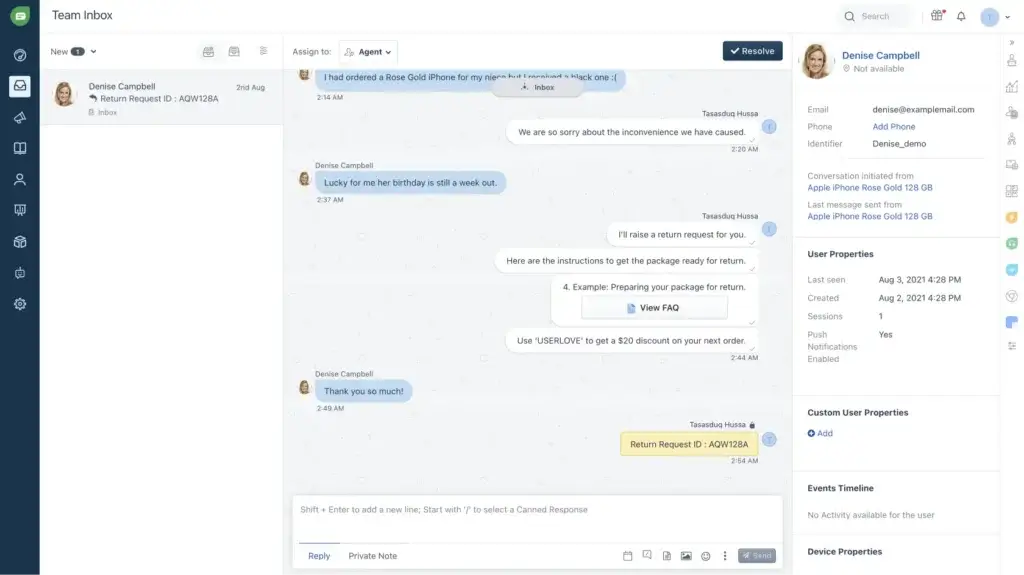
The platform gives your team a shared customer conversation workspace where agents can view messages, assign conversations, use private notes, add labels, access context, and resolve customer questions faster.
Freshchat is part of the broader Freshworks ecosystem, which includes Freshdesk for customer support ticketing, Freshsales for CRM, Freshmarketer for marketing automation, Freshservice for IT service management, and other business tools.
Company Background
Freshchat is developed by Freshworks Inc., a SaaS company known for building business software with a strong focus on usability, fast setup, and accessible pricing for growing teams.
Freshworks products are often used by small businesses, mid-market companies, customer support teams, sales teams, and service departments that want software with less implementation complexity than larger enterprise suites.
How Freshchat Fits Into the Freshworks Ecosystem
One of Freshchat’s biggest advantages is that it does not operate as a disconnected chat widget. You can use it as a standalone live chat platform, but it becomes more valuable when connected with Freshdesk, Freshsales, or other Freshworks products.
For example, support teams can use Freshchat to handle real-time customer conversations, then connect those conversations to help desk workflows when issues need deeper follow-up. Sales teams can use Freshchat to qualify website visitors and pass stronger leads into CRM workflows.
Freshchat vs Freshdesk: What is the Difference?
This is an important distinction because many buyers confuse Freshchat and Freshdesk.
- Freshchat is mainly for customer messaging, live chat, AI chatbots, and omnichannel conversations.
- Freshdesk is mainly for customer support ticketing, help desk workflows, knowledge base management, and service operations.
- Freshdesk Omni is better if you want a broader customer service suite that combines channels, ticketing, automation, and AI in a more complete support environment.
In simple terms, Freshchat is better when conversation speed and messaging channels matter most. Freshdesk is better when ticket tracking, SLA management, and full support operations are your priority.
Device and OS Compatibility
Freshchat is a cloud-based platform, so there is no heavy desktop installation required. Your team can access it through modern browsers and mobile apps.
- Browsers: Chrome, Firefox, Edge, and other modern browsers
- Mobile: iOS and Android apps for agents on the go
- Websites: Embeddable live chat widget for customer-facing pages
- Integrations: Freshdesk, Freshsales, Shopify, WordPress, Zendesk, Salesforce, HubSpot, and more
It is also useful if your team needs to connect chat data with CRM, help desk, e-commerce, or marketing systems.
Software Specification
Freshchat’s Core Features
Freshchat includes a wide set of features for customer messaging, support automation, team collaboration, and reporting. The strongest value comes from combining its live chat inbox with Freddy AI, automated routing, and omnichannel messaging.
Messaging and Channel Support
Freshchat goes beyond a basic website chat widget. It helps your team manage conversations across the channels your customers already use.
Key supported channels can include:
- Website live chat
- Mobile app messaging through SDKs
- WhatsApp Business
- Facebook Messenger
- Instagram messaging
- LINE and Google Business Messages, depending on configuration
This is valuable because customers rarely follow one support path. A buyer may start on your website, ask a follow-up question on WhatsApp, and later respond through email. Freshchat helps centralize these interactions so agents do not need to switch between disconnected inboxes.
Unified Agent Workspace
The agent workspace is where Freshchat becomes useful for daily support operations. Agents can manage incoming messages, view customer details, add internal notes, assign conversations, and collaborate with teammates from one place.
For support managers, this makes it easier to monitor workload and prevent conversations from falling through the cracks. For agents, it reduces the context switching that usually happens when messages come from different channels.
AI and Automation with Freddy AI
Freshchat uses Freshworks’ Freddy AI to help teams automate repetitive support conversations and improve agent productivity.
There are two important AI concepts to understand:
- Freddy AI Agent: A customer-facing AI agent that can answer common questions and automate support interactions.
- Freddy AI Copilot: An agent-facing assistant that helps human agents write, summarize, translate, and respond more efficiently.
Freddy AI Agent can help deflect repetitive questions, provide instant responses, and guide customers through common support journeys. Freddy AI Copilot is more useful for agent productivity because it assists the person handling the conversation.
This distinction matters because AI pricing and usage can affect your total cost. Freshworks currently provides a limited number of complimentary Freddy AI Agent sessions on certain paid plans, but additional AI usage may require add-ons.
No-Code Bot Builder
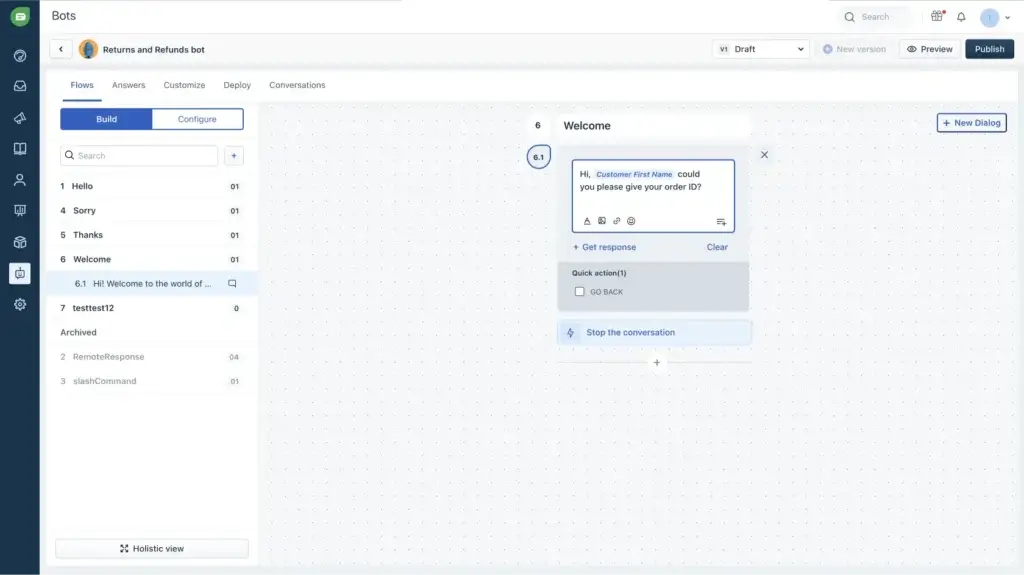
Freshchat includes bot-building tools that help teams automate common customer conversations without starting from scratch.
You can use bots for:
- Answering frequently asked questions
- Qualifying leads before routing them to sales
- Collecting order details or customer information
- Handling returns, refunds, and basic support flows
- Reducing repetitive work for agents
The bot builder is helpful for standard workflows, but complex logic may require more planning. If your support operation depends on advanced branching, custom data handling, or deep e-commerce automation, compare Freshchat with Intercom, Tidio, Zendesk, or a specialized chatbot platform.
Team Collaboration and Productivity Tools
Freshchat includes several features that help agents work together while supporting customers.
- Shared inbox: Manage incoming conversations from one workspace
- Private notes: Discuss issues internally without exposing comments to customers
- Assignments: Route conversations to the right teammate or group
- Canned responses: Reply faster to common questions
- Conversation labels: Organize messages by topic, issue type, or priority
- CSAT surveys: Measure customer satisfaction after interactions
These tools make Freshchat practical for growing teams that need structure but do not want the complexity of a full enterprise service desk from day one.
Proactive Customer Engagement
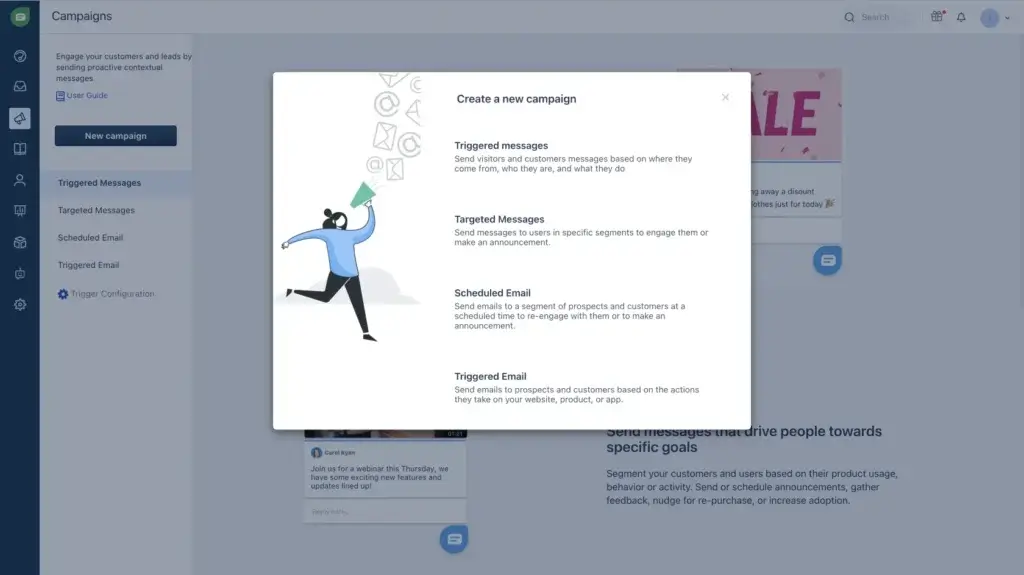
Freshchat can also support proactive engagement. Instead of waiting for visitors to ask for help, you can trigger messages based on customer behavior.
For example, you can reach out when a visitor spends time on a pricing page, views a product page, abandons a cart, or returns to your site after a previous conversation.
This is useful for sales and e-commerce teams because live chat becomes more than a support channel. It can also help increase conversions, reduce friction, and guide users toward the next step.
Analytics and Reporting
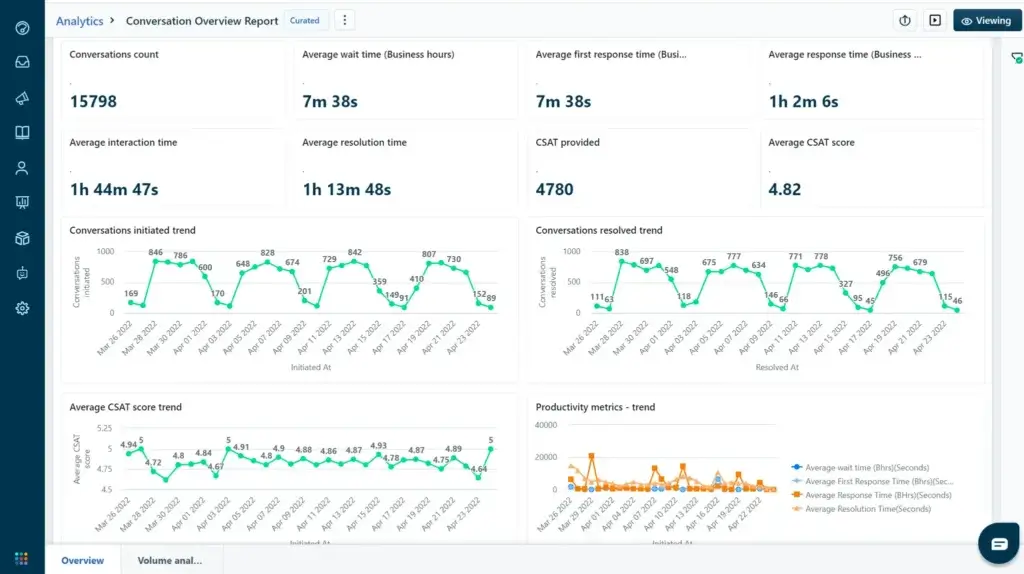
Freshchat includes reporting tools that help you understand team performance and customer conversation trends.
Depending on your plan, you can track:
- First response time
- Resolution time
- Conversation volume
- Agent productivity
- Customer satisfaction scores
- Bot performance
- Channel performance
Reporting becomes more valuable as your chat volume increases. Small teams may only need basic dashboards, while larger teams will likely need custom dashboards, routing insights, and more advanced analytics.
Pros and Cons
Advantages and Disadvantages
Freshchat has a strong feature set for customer messaging, but it is not the right fit for every team. The key is to understand whether you need a live chat and omnichannel messaging platform, or a deeper help desk and ticketing system.
Positive
✅ Strong omnichannel messaging
✅ Clean and easy-to-learn interface
✅ Useful Freddy AI automation
✅ Good Freshworks ecosystem fit
✅ Free plan for smaller teams
Negatives
❌ Advanced features require higher plans
❌ AI usage can add cost complexity
❌ Not a full ticketing system by itself
❌ Complex chatbot workflows may need workarounds
❌ Best value is inside the Freshworks ecosystem
✅ Pros
- Strong omnichannel support
Freshchat lets your team manage website chat, mobile messages, WhatsApp, Facebook Messenger, Instagram, and other customer conversations from one workspace. - Easy to use
The interface is clean enough for new agents, which helps reduce training time and makes adoption easier for small and mid-sized teams. - Useful AI automation
Freddy AI Agent can automate common customer questions, while Freddy AI Copilot can help agents respond faster and more consistently. - Good fit for Freshworks users
Freshchat works especially well if your team already uses Freshdesk, Freshsales, or other Freshworks products. - Free plan available
The free plan makes it easier for smaller teams to test live chat before committing to a paid subscription.
❌ Cons
- Advanced features are plan-gated
Features like advanced routing, custom dashboards, security controls, and higher-level reporting are more relevant on Pro or Enterprise plans. - AI costs require attention
The included AI sessions are useful for testing, but teams with high support volume should calculate additional Freddy AI costs before scaling. - Not a full help desk by itself
Freshchat is strong for messaging, but teams that need deeper ticketing, SLA workflows, and support operations may need Freshdesk or Freshdesk Omni. - Complex chatbot logic can be limiting
The no-code bot builder is useful, but advanced workflows may require APIs, integrations, or a more specialized automation setup. - Best value comes from ecosystem alignment
If you do not use Freshworks products, you should compare Freshchat closely with Intercom, Zendesk, Tidio, LiveChat, and Crisp.
User Experience
User Interface and Experience
Freshchat’s user experience is one of its stronger advantages. The platform feels more approachable than many older customer support tools, especially for teams that want a modern chat inbox without heavy configuration.
Setup and Onboarding
Freshchat is relatively simple to set up. You can add the web chat widget to your site, configure inbox settings, create basic routing rules, and start handling conversations without a long implementation project.
Within the first setup stage, most teams will focus on:
- Installing the website chat widget
- Connecting key messaging channels
- Creating canned responses
- Setting assignment rules
- Building basic bot flows
- Adding team members and roles
Technical help may be needed if you want custom APIs, advanced chatbot workflows, or deeper integrations with CRM, help desk, or e-commerce systems.
Agent Workspace
The agent workspace is clean and practical. Agents can see conversations, customer details, previous messages, notes, and assignments without jumping between too many screens.
This matters because chat support depends on speed. If agents need to search across different tools to understand the customer, response time suffers. Freshchat reduces that friction by keeping conversation context closer to the reply window.
Mobile App Usability
Freshchat’s iOS and Android apps help agents monitor and reply to conversations while away from their desks. This is useful for smaller teams, hybrid support teams, agencies, and businesses that need after-hours coverage.
Agents can typically use the mobile app to:
- Reply to customer conversations
- Review conversation history
- Add notes
- Assign chats
- Use saved replies
As with any support tool, teams should test notifications, routing, and handoff workflows during the trial before relying on mobile support for urgent customer issues.
Pricing and Packages
Pricing and Plans for Freshchat
Freshchat offers a free plan and several paid plans designed for growing support and customer engagement teams. Pricing is usually listed per agent, per month, with annual billing available.
The most important thing to understand is that Freshchat can look affordable at the entry level, but the total cost depends on your team size, plan level, messaging channels, AI usage, and whether you need advanced security or reporting features.
| Plan | Annual Price | Best For | Key Features |
| Free | $0 | Small teams testing live chat | Basic website chat, email, unified workspace, limited team features |
| Growth | $19 per agent/month | Growing teams that need more channels | Automation, WhatsApp and social messaging options, basic reporting, more support workflows |
| Pro | $49 per agent/month | Scaling support teams | Advanced routing, custom dashboards, multiple SLA policies, stronger analytics |
| Enterprise | $79 per agent/month | Larger teams with advanced control needs | Skills-based assignment, security controls, advanced admin features, enterprise-level workflows |
Freshchat Free Plan
The Free plan is useful if you want to test basic customer messaging without immediate cost. It is best for small businesses, early-stage startups, or websites that need a simple chat channel.
However, it is not the best long-term plan if you need advanced automation, WhatsApp, deeper analytics, or scalable support workflows.
Freshchat Growth Plan
The Growth plan is the first serious step for teams that want customer messaging across more channels. It is a better fit if your team needs automation, social messaging, and more control over customer conversations.
This is likely the most relevant starting point for many growing small businesses because it balances functionality and price.
Freshchat Pro Plan
The Pro plan is better for teams with higher chat volume, more agents, and stronger reporting needs. This is where Freshchat becomes more useful for structured support operations.
If you care about custom dashboards, advanced routing, multiple SLA policies, and more detailed performance tracking, Pro is likely the plan you should evaluate during the trial.
Freshchat Enterprise Plan
The Enterprise plan is designed for larger organizations that need more control, security, routing, and administrative flexibility.
It is most relevant if you have a larger agent team, multiple support groups, strict security requirements, or complex routing needs.
Freddy AI Pricing Considerations
Freshworks currently includes a limited number of one-time Freddy AI Agent sessions on Growth, Pro, and Enterprise plans. Once those sessions are used, additional sessions may need to be purchased.
This is important because AI can become a meaningful part of the total cost if you plan to automate a large number of customer interactions. Before upgrading, estimate your monthly chat volume, expected AI deflection rate, and how many conversations you want Freddy AI Agent to handle.
Freshchat Hidden Cost Triggers
Freshchat is transparent enough for basic plan comparison, but buyers should still watch for upgrade triggers.
- Adding more agents as your support team grows
- Using WhatsApp, social, or advanced messaging channels
- Requiring custom dashboards and deeper reporting
- Needing advanced routing or multiple SLA policies
- Scaling Freddy AI Agent sessions
- Adding Freddy AI Copilot for selected agents
- Requiring enterprise-level security or admin controls
The best approach is to trial Freshchat with your actual support workflows, not just a demo inbox. Test the channels, routing rules, bot flows, reporting, and AI usage patterns you expect to use after launch.
Customer Reviews
User Feedback and Reviews
Freshchat receives generally positive feedback from users who want an intuitive customer messaging platform with good live chat functionality and a manageable learning curve. Most positive reviews focus on ease of use, real-time chat visibility, and the ability to centralize conversations.
At the same time, user feedback is not perfect. Some teams report limitations around chatbot behavior, billing, support response time, and advanced customization.
What Users Like
- Easy interface: Many users like that agents can learn the platform quickly.
- Real-time chat visibility: Managers can monitor conversations and agent activity more easily.
- Customer context: Agents can see useful customer information while replying.
- Automation potential: Bots and AI can reduce repetitive support work.
- Freshworks connection: Teams using Freshdesk or other Freshworks tools benefit from ecosystem alignment.
What Users Complain About
- Bot limitations: Some users want more reliable or flexible chatbot behavior.
- Support responsiveness: Some reviews mention frustration with follow-up from Freshchat support.
- Pricing jumps: Moving from basic plans to more advanced functionality can increase costs.
- Customization limits: Complex workflows may need APIs or workarounds.
- Integration issues: Some teams report delays or friction when connecting third-party tools.
| Review Theme | Common Positive Feedback | Common Negative Feedback |
| Ease of Use | Clean interface and quick onboarding | Advanced setup can still require training |
| AI and Bots | Helpful for common questions and faster replies | Complex bot workflows can be limiting |
| Omnichannel Messaging | Useful for centralizing customer channels | Some channels and workflows require higher plans |
| Support Operations | Good shared inbox and agent visibility | Not a full ticketing platform by itself |
| Value for Money | Free plan and Growth plan are attractive for smaller teams | Costs can rise with Pro, Enterprise, and AI add-ons |
The balanced takeaway is clear: Freshchat is well-liked when teams use it for live chat, customer messaging, and simple automation. It becomes less straightforward when a business needs complex service operations, advanced AI workflows, or very predictable costs at scale.
Freshchat VS Alternatives
Freshchat Alternatives and Competitors
Freshchat competes most directly with customer messaging, live chat, chatbot, and customer support platforms. While tools like Zenzap and ClickUp Chat are useful for internal collaboration, they are not direct Freshchat replacements because Freshchat is built for customer-facing conversations.
If you are comparing Freshchat, the more relevant alternatives are Intercom, Zendesk, Tidio, LiveChat, Crisp, LiveAgent, Help Scout, and Freshdesk Omni.
| Tool | Best For | Key Difference vs Freshchat |
| Freshchat | Omnichannel customer messaging | Strong balance of live chat, AI, and Freshworks ecosystem value |
| Intercom | SaaS companies and product-led support | More advanced product messaging and AI-first customer engagement |
| Zendesk | Enterprise customer service teams | Deeper ticketing, admin controls, workflows, and marketplace depth |
| Tidio | Small businesses and e-commerce | Often easier for simple chatbot and e-commerce live chat use cases |
| LiveChat | Dedicated live chat teams | More specialized live chat experience with mature chat workflows |
| Crisp | Startups and SMBs | Simple shared inbox, campaigns, and customer messaging bundle |
| Freshdesk Omni | Freshworks users needing full support operations | Better when chat needs to connect with ticketing and help desk workflows |
Freshchat vs Intercom
Freshchat is usually the better fit if you want a more affordable Freshworks-connected messaging platform with strong omnichannel support. It works well for teams that want live chat, AI automation, and customer messaging without moving into a more expensive enterprise engagement platform.
Intercom is stronger for SaaS and product-led companies that need advanced in-app messaging, onboarding flows, product tours, customer engagement, and AI-powered support at scale. It can be more powerful, but it may also cost more depending on usage and configuration.
Freshchat vs Zendesk
Freshchat is easier to approach if your main need is live chat and customer messaging. Zendesk is stronger if you need enterprise-level ticketing, advanced workflow customization, large-scale support operations, and a broader app marketplace.
Choose Freshchat if speed, messaging channels, and Freshworks alignment matter most. Choose Zendesk if your team needs a mature customer service suite with deeper operational control.
Freshchat vs Tidio
Tidio is often attractive for small businesses and e-commerce teams that want live chat, basic help desk features, and AI chatbot automation in a simple package.
Freshchat is stronger if your team wants closer alignment with Freshworks products, broader support use cases, and a more structured customer messaging environment.
Freshchat vs Freshdesk Omni
This is one of the most important comparisons for Freshworks buyers.
Freshchat is best for customer messaging. Freshdesk Omni is better when you need customer messaging plus ticketing, help desk workflows, SLA management, and broader customer service operations.
If your team starts with chat but expects to scale into a full support desk, Freshdesk Omni may be the more future-proof Freshworks product to evaluate.
Freshchat vs Zenzap and ClickUp Chat
Freshchat, Zenzap, and ClickUp Chat solve different communication problems.
- Freshchat is for customer-facing support, sales, and service conversations.
- Zenzap is for internal team messaging and work communication.
- ClickUp Chat is for project teams that want chat connected to tasks, docs, and work management.
Use Freshchat if your customers are the people sending the messages. Use Zenzap or ClickUp Chat if your employees are the people who need better internal communication.
Conclusion
Is Freshchat the Right Fit for Your Business?
Freshchat is worth considering if your team wants a modern customer messaging platform that combines live chat, omnichannel communication, AI automation, and agent collaboration in one interface.
Its biggest strengths are ease of use, flexible messaging channels, Freddy AI capabilities, and its connection to the Freshworks ecosystem. This makes it especially useful for small and mid-sized businesses that want to improve customer response times without adopting a heavy enterprise support suite immediately.
✅ Ideal For:
- Small businesses that want to add live chat to their website
- Support teams managing conversations across web, email, and social channels
- E-commerce teams using WhatsApp, Instagram, and proactive messaging
- SaaS companies that need in-app support and customer onboarding conversations
- Freshworks users who want customer messaging connected to a broader support stack
⚠️ Not Ideal For:
- Teams that only need internal communication
- Organizations that need advanced help desk ticketing without Freshdesk or Freshdesk Omni
- Companies that need highly customized chatbot logic out of the box
- Buyers that want fully predictable AI costs at high conversation volume
- Enterprises that need deep workflow customization across multiple service departments
⭐ Editor’s Rating: 4.5 out of 5
Freshchat is a strong customer messaging platform, but not a universal support suite. It performs best when your main goal is to centralize digital conversations, respond faster, automate common questions, and give agents more context.
If your priority is customer-facing live chat, omnichannel messaging, and AI-assisted support, Freshchat is a smart option in 2026. If your priority is full ticketing, strict SLAs, and enterprise support operations, compare it with Freshdesk Omni, Zendesk, and Intercom before making a final decision.
Frequently Asked Questions
Have more questions?
What is Freshchat used for?
Freshchat is used for customer messaging, live chat, AI chatbot automation, and omnichannel support. It helps teams manage conversations from websites, mobile apps, WhatsApp, Instagram, Facebook Messenger, email, and other digital channels in one workspace.
Is Freshchat free?
Yes. Freshchat offers a free plan for small teams that need basic customer messaging and live chat. Growing teams will likely need a paid plan to access more channels, automation, reporting, routing, and AI features.
How much does Freshchat cost?
Freshchat has a free plan, while paid plans typically start at $19 per agent/month billed annually. Higher plans include Pro at $49 per agent/month and Enterprise at $79 per agent/month, depending on billing and feature needs.
Does Freshchat include Freddy AI?
Freshchat includes access to Freddy AI capabilities, but availability depends on your plan and configuration. Freddy AI Agent helps automate customer-facing conversations, while Freddy AI Copilot helps agents write, summarize, translate, and respond faster.
What is a Freddy AI Agent session?
A Freddy AI Agent session is a customer interaction handled by Freshworks’ AI agent within a defined usage period. Freshworks currently includes a limited number of one-time Freddy AI Agent sessions on eligible paid plans, and additional usage may require paid session packs.
Does Freshchat support WhatsApp?
Yes. Freshchat supports WhatsApp Business messaging on eligible plans and configurations. It can also support other customer messaging channels such as website chat, mobile app messaging, Instagram, Facebook Messenger, email, LINE, and Google Business Messages.
Is Freshchat better than Intercom?
Freshchat is usually better if you want an affordable Freshworks-connected messaging platform with strong omnichannel support. Intercom is often stronger for SaaS companies that need advanced in-app messaging, product engagement, and mature AI-first support workflows.
Is Freshchat better than Zendesk?
Freshchat is better for teams focused on live chat, customer messaging, and faster setup. Zendesk is better for larger support teams that need deeper ticketing, advanced workflows, enterprise admin controls, and broader customer service operations.
What is the difference between Freshchat and Freshdesk?
Freshchat is mainly for customer messaging, live chat, and AI-assisted conversations. Freshdesk is mainly for help desk ticketing, support workflows, SLA management, knowledge base management, and broader customer service operations.
Who should use Freshchat?
Freshchat is best for small and mid-sized businesses, support teams, SaaS companies, e-commerce brands, and Freshworks users that want to centralize customer conversations and automate repetitive support questions without adopting a complex enterprise suite immediately.