
Introduction
Survey software is most useful when it does more than collect answers. You need a platform that helps you ask better questions, reach the right respondents, analyze patterns, and move important feedback into the systems where your team works.
Zoho Survey approaches that problem with a broad feature set and comparatively accessible pricing. You can create surveys with advanced logic, distribute them online or offline, translate them for international audiences, buy targeted responses, build detailed reports, and connect the results with Zoho CRM, Zoho Analytics, Google Sheets, Salesforce, Zapier, and other applications.
However, advanced branding, integrations, automation, and administration require higher plans. The interface is practical rather than highly conversational, and large research teams may prefer a deeper enterprise platform.
In this Zoho Survey review, you will learn:
- How Zoho Survey performs across creation, distribution, analysis, and follow-up
- Which AI features save meaningful time and where human review remains essential
- How logic, multilingual surveys, offline collection, and research panels work
- What each pricing plan includes and which tier provides the strongest value
- When SurveyMonkey, Typeform, Jotform, or Qualtrics may be a better choice
Bottom line: Zoho Survey is one of the strongest value-focused survey platforms for small and midsized organizations, particularly when feedback needs to connect with the wider Zoho ecosystem. It is less suitable when your main priority is a highly distinctive conversational experience or an enterprise-wide experience-management program.
| Category | Zoho Survey Review Summary |
| Best For | Small and midsized businesses, Zoho customers, research teams, educators, nonprofits, field teams, and international survey programs |
| Free Plan | Available, with up to 10 questions and 100 responses per survey |
| Strongest Features | Survey logic, offline and kiosk collection, multilingual surveys, reporting, affordable plans, and Zoho ecosystem integrations |
| Main Limitation | Advanced branding, integrations, scripting, team administration, and some analysis capabilities require higher plans |
| Best Alternative | SurveyMonkey for broader research workflows, Typeform for conversational design, Jotform for operational forms, and Qualtrics for enterprise XM |
| Our Recommendation | Best for organizations that want capable survey software without premium enterprise pricing |
Who Is Zoho Survey Best For?
Identify whether Zoho Survey matches your feedback workflow
Zoho Survey serves a broad market, but it delivers the most value when surveys must be affordable, repeatable, and connected to other business data.
✅ Best For
- Zoho customers that want survey responses connected with CRM, marketing, support, recruitment, or analytics workflows
- Small and midsized businesses that need professional survey logic and reporting without enterprise-level pricing
- Field and event teams collecting responses through mobile devices, kiosk mode, QR codes, or offline apps
- International organizations publishing multilingual surveys and reviewing consolidated language reports
- Research, education, and nonprofit teams that need templates, panels, quotas, exports, and affordable recurring collection
❌ When It Might Not Be the Right Fit
- You want a highly conversational survey experience designed primarily for lead generation and visual engagement
- You need a complete enterprise XM platform covering sophisticated customer, employee, brand, and product experience programs
- You require complex transactional forms with approvals, document generation, signatures, and extensive payment workflows
- You expect every advanced integration on a low-cost plan without reviewing tier restrictions
- You need a large multi-user research environment with extensive governance included at the entry level
Real Scenarios Where Zoho Survey Performs Well
A SaaS company can send an onboarding survey after a CRM milestone, attach the response to the customer record, and alert the account owner when satisfaction falls below a threshold. A retailer can collect event feedback in kiosk mode when internet access is unreliable. A nonprofit can translate one questionnaire for several communities and analyze the combined results.
Key Features
Build professional questionnaires with logic, branding, and multilingual support
Zoho Survey combines a straightforward editor with enough structure for serious business research. You can start from scratch, use one of more than 250 templates, import questions, paste a question list into the Quick Editor, or generate a survey with AI.
Templates and Question Types
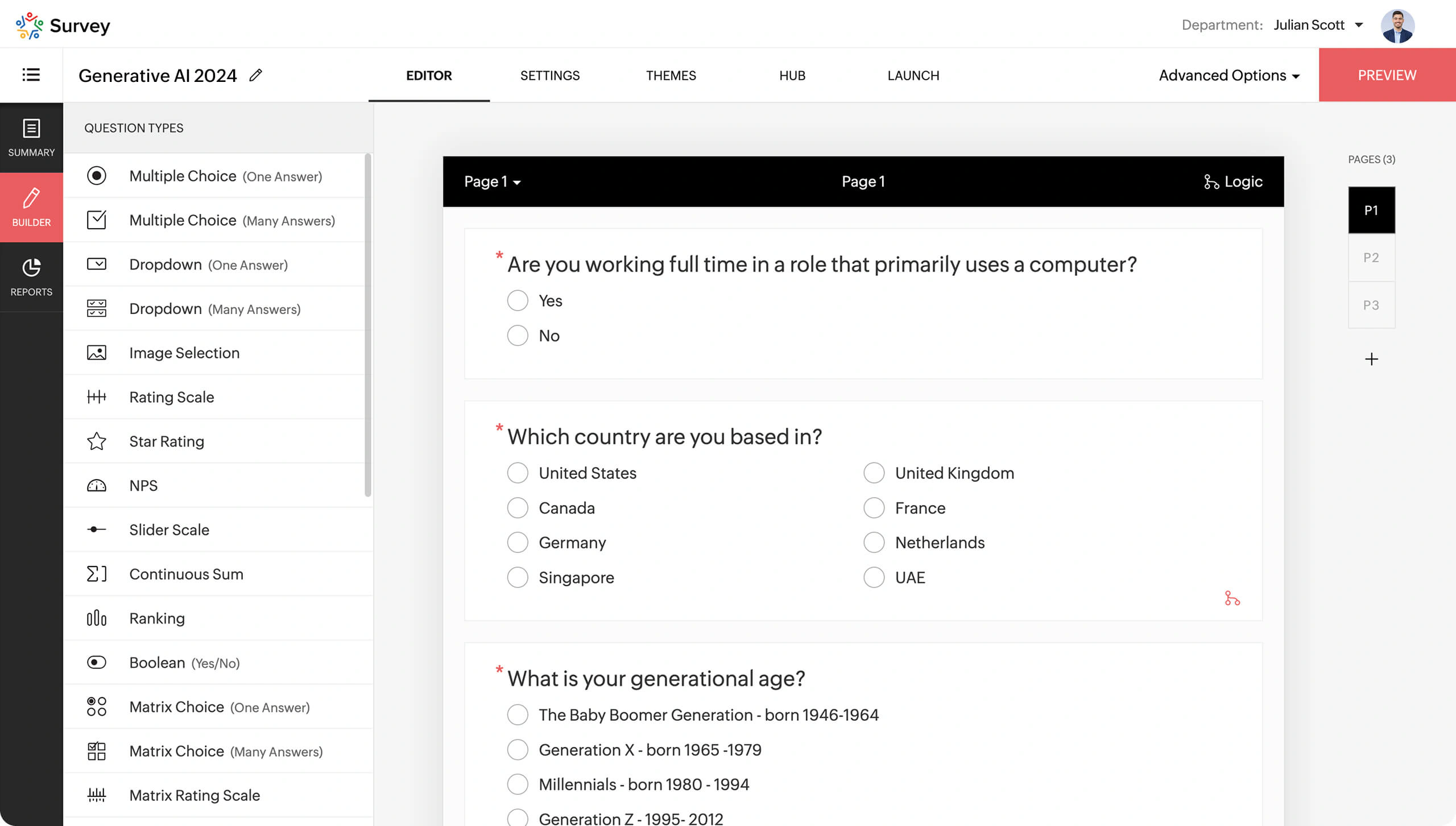
The template library covers customer satisfaction, employee engagement, events, education, healthcare, market research, product feedback, hospitality, nonprofit programs, and other common objectives. More than 30 question types support ratings, rankings, matrices, sliders, image choices, text responses, contact details, dates, signatures, and Net Promoter Score questions.
Survey Logic, Piping, and Personalization
Question display logic can show or hide questions based on earlier responses. Page logic can route respondents through different sections, while answer display logic narrows the choices they see. Piping reuses earlier answers inside later questions or descriptions, and custom variables can pass contextual information through the survey URL.
You can also disqualify respondents, prefill known details, randomize questions or answers, set quotas, and create unique encrypted links.
Branding and Survey Design
You can customize themes, colors, fonts, backgrounds, buttons, progress bars, end pages, logos, favicons, and survey URLs, depending on the plan. Higher tiers add white labeling and custom domains.
The design system supports professional branding, but it is less distinctive than one-question-at-a-time survey tools.
Multilingual Surveys
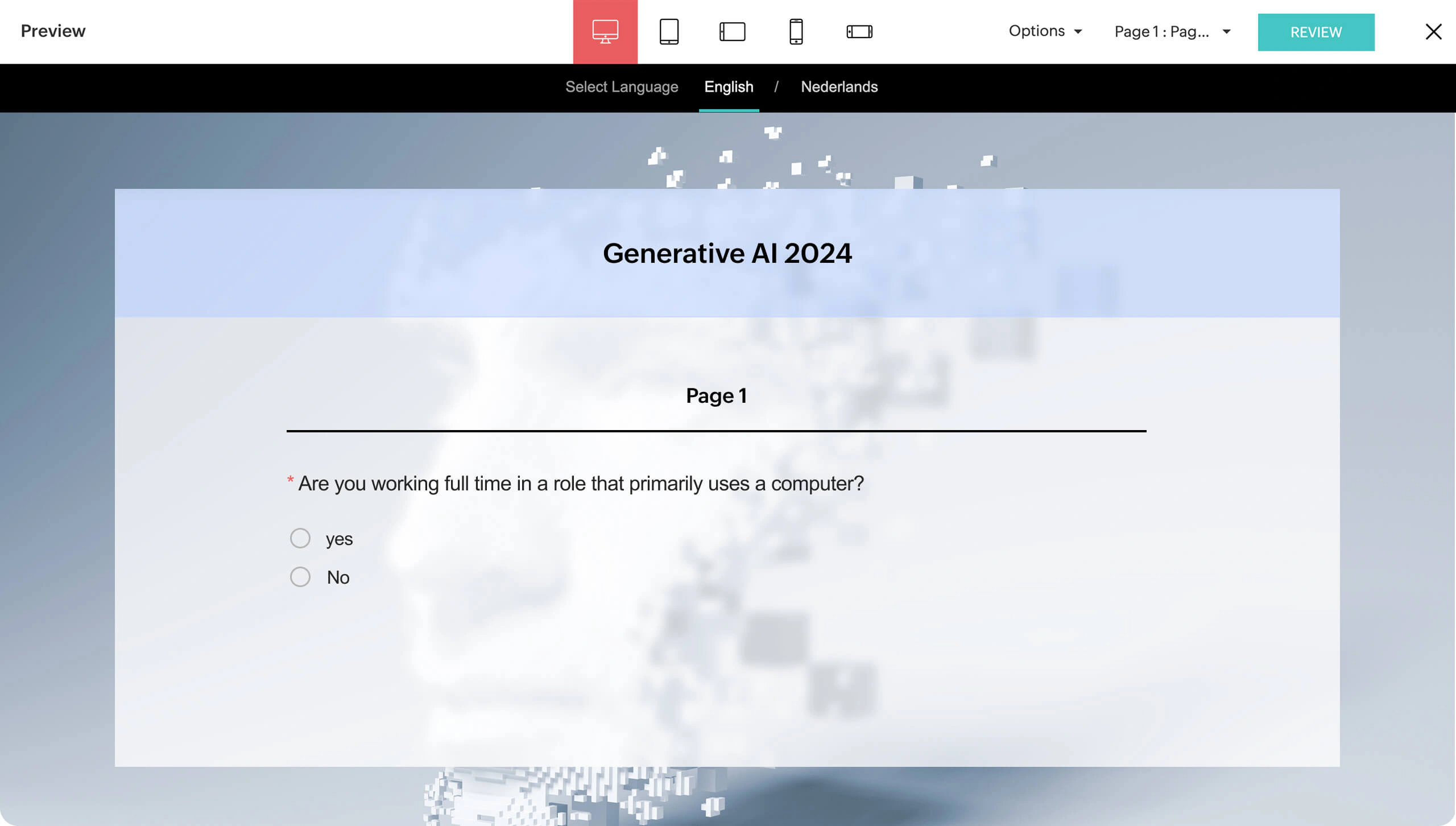
Higher plans can translate surveys into more than 90 languages, including right-to-left languages. You can edit translations, apply language-specific logic, and consolidate responses into multilingual reports rather than managing a separate survey for every market.
This is valuable for global feedback programs, although translations still require human review.
Quizzes, Scoring, and Assessments
Zoho Survey can support quizzes, tests, training assessments, candidate evaluations, and knowledge checks. You can assign scores, show results, randomize questions, restrict attempts, and create completion certificates or merged documents on supported plans.
AI Features
Determine whether AI improves research quality or only speeds up drafting
Zoho Survey uses AI primarily to reduce setup time and simplify qualitative analysis. The current feature set is practical, although it is not positioned as an autonomous research analyst.
AI Survey Creation
You can describe the survey you want to create and receive a ready-to-edit questionnaire with relevant questions and answer options. This is useful for familiar objectives such as customer satisfaction, event feedback, employee pulse surveys, onboarding research, and product validation.
You should still check whether questions are neutral, complete, and connected to a real decision.
Quick Editor and Question Import
The Quick Editor converts a rough list of questions into structured survey fields and selects likely question types. You can paste content from an email, document, meeting note, or AI chat rather than rebuilding every question manually.
Sentiment Analysis and Word Clouds
For open-ended responses, sentiment analysis identifies the emotional tone of written feedback, while word clouds surface frequently used terms. These tools help you scan a large volume of comments and locate recurring themes before deeper manual review.
Use these tools for triage, then verify important findings against the original responses.
Where Zoho Survey AI Is Still Limited
Zoho Survey does not remove the need for research design, sampling judgment, or statistical interpretation. It cannot fix a biased audience, a leading question, poor response options, or an insufficient sample.
Its AI is more focused than premium platforms with generative summaries and predictive recommendations.
Distribution and Respondent Experience
Collect responses through online, offline, embedded, and targeted channels
A survey platform becomes much more valuable when it can reach respondents in the context that suits them. Zoho Survey supports web links, email invitations, QR codes, website embeds, social sharing, SMS on eligible plans, offline apps, kiosk mode, and paid research panels.
Email, Web Links, QR Codes, and Embeds
You can send survey invitations from the platform, share a public or unique link, generate a QR code, place a survey inside a website, or distribute it through social channels. Collector settings let you separate traffic sources and apply different restrictions.
Email limits vary by plan. Unique links can track participation or reduce duplicate submissions.
Offline Surveys and Kiosk Mode
Offline collection is one of Zoho Survey’s most differentiating features. Mobile apps can gather responses without an internet connection and sync them when connectivity returns. Kiosk mode can reset the survey automatically after every submission, making it practical for exhibitions, reception areas, stores, airports, restaurants, and field research.
Research Panels and Purchased Responses
Zoho Survey includes access to research panels for purchasing responses from targeted audiences. You can define demographic or professional criteria, screen respondents, and collect feedback when your own database cannot provide a suitable sample.
Panel pricing depends on sample size, targeting, survey length, and incidence rate.
Mobile and Accessibility Experience
Surveys are responsive across desktop, tablet, and mobile devices. Progress indicators, page breaks, validation, save-and-resume options, and conditional logic can make longer questionnaires easier to complete.
The experience is clean and conventional. Typeform may be more distinctive for visual lead-generation campaigns.
Analytics and Reporting
Turn survey responses into segmented, shareable business evidence
Zoho Survey’s reporting goes well beyond automatic pie charts. You can review response summaries, individual submissions, custom reports, cross-tabs, trends, dashboards, text analysis, average ratings, NPS, CSAT, and advanced research outputs.
Real-Time Summary and Custom Reports
Results update as responses arrive, allowing you to monitor participation and question-level patterns without waiting for the survey to close. Summary reports show the overall distribution of answers, while custom reports let you include only the questions and segments relevant to a stakeholder.
You can customize charts, labels, tables, and report-sharing access.
Filters, Cross-Tabs, and Trend Reports
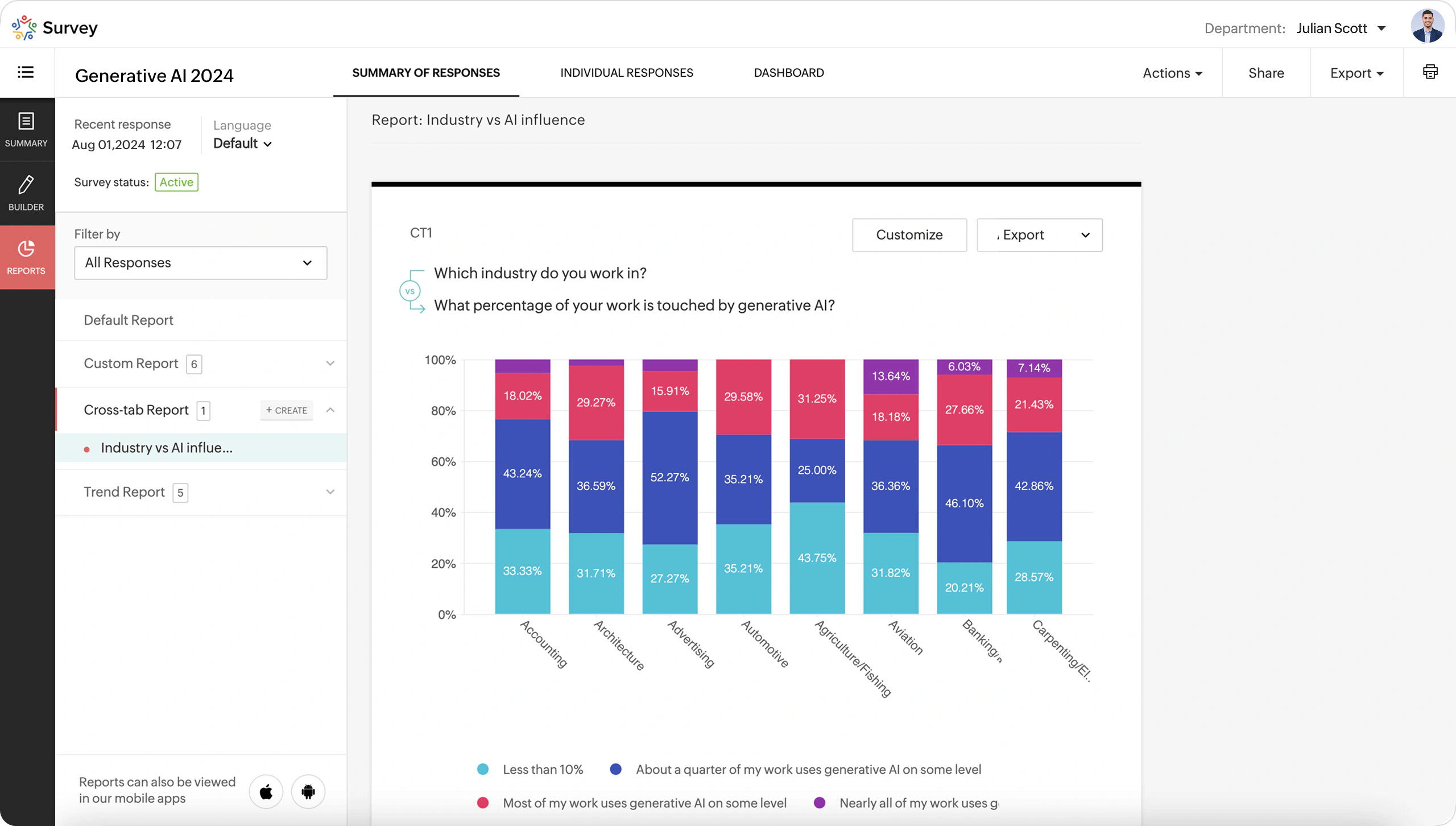
Filters isolate responses by collector, answer, status, date, demographic, custom variable, or other captured attributes. Cross-tab reports compare several variables to reveal relationships between segments. Trend reports show how response rates or answers change over time.
They help reveal whether an overall score hides a problem within a specific region, role, customer tier, or period.
Text Analysis, TURF, and Response Review
Sentiment analysis and word clouds help organize written feedback. TURF analysis can identify the combination of products, messages, channels, or features that reaches the largest share of respondents. You can also tag individual responses, add notes, edit incorrect entries, or remove invalid submissions.
Dashboards and Data Exports
Custom dashboards let you pin charts, cross-tabs, trend lines, sentiment views, and filtered widgets into a single monitoring page. Reports can be exported in formats such as PDF, XLS, CSV, and SPSS, depending on your plan.
For deeper analysis, connect results with Zoho Analytics, Google Sheets, Tableau, or Power BI on eligible plans.
Our assessment: Reporting is unusually capable for the price, although enterprise researchers may still need a specialist platform.
Pros and Cons
Balance strong value and flexibility against tier restrictions
Zoho Survey is praised for ease of use, value, customization, and ecosystem integration. Its main weaknesses are plan restrictions and a functional rather than premium design.
Positive
✅ Strong feature-to-price ratio
✅ Excellent Zoho ecosystem integrations
✅ Offline, kiosk, and multilingual collection
✅ Detailed logic, dashboards, and report types
Negative
❌ Advanced features are divided across plans
❌ Free plan is limited to 10 questions per survey
❌ Visual experience is less distinctive than Typeform
❌ Enterprise plan includes only three users by default
✅ What You Will Appreciate
Professional survey capabilities at a realistic price
You receive a substantial research toolkit without premium enterprise pricing.
Feedback can become part of an operational workflow
Zoho integrations connect responses with customer, employee, candidate, and campaign records.
Offline and international collection are first-class features
Offline surveys and multilingual reporting suit field, event, hospitality, education, and global research.
Reporting supports both quick decisions and deeper segmentation
Cross-tabs, trends, TURF, sentiment, dashboards, and SPSS exports support deeper analysis.
❌ What Could Be Better
Plan selection requires careful feature mapping
Advanced branding, integrations, scripting, automation, and governance are spread across higher tiers.
The free plan is useful for testing, not broad research
Ten questions and 100 responses suit testing, but not every business survey.
The front-end experience can feel conventional
Typeform provides a more visual storytelling format.
Collaboration becomes expensive for larger teams
Enterprise includes three users, so larger teams should price additional access.
Pricing and Plans
Compare billing cycles, response allowances, and feature thresholds
Zoho Survey offers Free, Basic, Plus, Pro, and Enterprise plans. Prices vary by region and currency. The public US structure also differs between annual and monthly billing, especially for response allowances, so confirm the exact checkout terms before purchasing.
Current Public Pricing Overview
| Plan | Annual Billing* | Monthly Billing* | Best For | Important Limits or Features |
| Free | $0 | $0 | Testing and small questionnaires | Up to 10 questions and 100 responses per survey, with limited advanced features |
| Basic | $7.42/month | $9/month | Individuals needing unlimited questions | 12,000 responses/year or 1,000/month, logic, branding, email distribution, and offline collection |
| Plus | $25/month | $35/month | Small businesses and regular research | Unlimited annual responses or 3,000/month, answer logic, SMS, purchased responses, and more integrations |
| Pro | $35/month | $49/month | Advanced researchers and branded programs | Unlimited annual responses or 5,000/month, multilingual surveys, white labeling, piping, custom variables, Tableau, CRM, Sheets, and Zapier |
| Enterprise | $75/month | $109/month | Organizations needing governance and multiple users | Three users, unlimited annual responses or 7,000/month, SSO, departments, user management, audit logs, premium support, and onboarding |
Free Plan Limitations
The free plan lets you create surveys with up to 10 questions and collect up to 100 responses per survey. It is useful for learning the editor, running a small internal poll, or validating a simple workflow.
Advanced logic, branding, analysis, integrations, and distribution controls require a paid tier.
Annual Billing Changes the Value Calculation
Annual subscriptions are not simply discounted monthly plans. Zoho’s comparison currently lists unlimited responses for Plus, Pro, and Enterprise when billed annually, while monthly billing lists defined monthly allowances. Basic includes 12,000 annual responses or 1,000 per month.
Annual billing can be attractive for high-volume programs, but confirm all current limits before purchase.
Which Plan Offers the Best Value?
Basic suits unlimited questions and core logic. Plus adds stronger distribution, integrations, panels, and reporting.
Pro offers the best balance for multilingual, branded, integrated programs. Enterprise adds SSO, departments, audit logs, administration, and onboarding.
Pricing assessment: Choose the lowest tier that includes every required integration, logic rule, report, and governance control.
Integrations, Collaboration, and Workflow Automation
Connect survey data with customer, marketing, analytics, and automation systems
Zoho Survey is most differentiated when you treat it as part of a business workflow rather than an isolated data-collection tool.
Zoho Ecosystem Integrations
Native connections include Zoho CRM, Campaigns, Analytics, Sheet, SalesIQ, Recruit, Desk, and other Zoho applications. A survey response can update a record, trigger follow-up, enrich a profile, or become part of a broader dashboard.
This is the platform’s strongest competitive advantage for existing Zoho customers.
Third-Party Integrations
The integration catalog includes Google Sheets, Mailchimp, Salesforce, Microsoft Teams, Power BI, Tableau, Eventbrite, Zendesk, Shopify, Google Analytics, Google Tag Manager, and Facebook Pixel, with availability depending on the plan.
Check plan eligibility because some integrations require Pro or Enterprise.
Zapier, Webhooks, and Custom Actions
Zapier expands the number of applications you can connect without code. Higher tiers also support webhooks, trigger functions, custom script conditions, JavaScript, and Deluge, allowing technical teams to create more specific actions.
Automations can create tickets, send alerts, generate documents, or update customer workflows.
Survey Review and Collaboration
You can share a review URL before launch so colleagues can test the questionnaire and leave comments. Reports can also be shared with controlled access, while Enterprise provides user management, roles, departments, SSO, and audit logs.
Implementation advice: Define ownership, approval, data access, and the action each critical response should trigger.
Security, Privacy, and Customer Support
Review the safeguards behind customer, employee, and research data
Survey responses can contain personal, employee, health, demographic, and customer information. Zoho provides several controls for protecting that data, but your configuration and collection practices remain part of the compliance responsibility.
Encryption and Access Controls
Survey links use HTTPS, and Zoho states that connections are protected with TLS 1.2 or 1.3. Higher plans add custom field encryption, while password protection, IP restrictions, CAPTCHA, unique links, response limits, and automatic closing dates help control access and reduce invalid submissions.
GDPR, HIPAA, and Sensitive Data
Privacy settings support GDPR and HIPAA-related survey requirements. You can mark eligible fields as electronic protected health information, control PII collection, disable IP or geolocation tracking, and apply encryption to sensitive fields.
Compliance also requires appropriate notices, retention, access, deletion, and internal approval practices.
Anonymous Survey Configuration
You can remove IP addresses and disable personal or location tracking when anonymity is required. The survey invitation method can still reveal identity, especially when you use unique links or synchronized CRM data.
Do not describe a survey as anonymous if a unique identifier still reveals the respondent.
Customer Support
All plans include online resources and email support, with the plan comparison listing response within 48 hours. Enterprise adds premium support, personalized training, and onboarding.
User feedback praises ease and value, while criticism focuses on customization limits and occasional interface issues.
Alternatives
Compare the closest options before selecting your survey platform
| Software | Best For | Where It Beats Zoho Survey | Where Zoho Survey Is Stronger |
| SurveyMonkey | Broad professional research and audience recruitment | More mature self-service research experience, AI analysis, benchmarks, and enterprise survey administration | Lower pricing, Zoho integrations, offline collection, and accessible multilingual capabilities |
| Typeform | Conversational surveys and lead-generation experiences | More distinctive one-question-at-a-time design and stronger visual engagement | Offline surveys, deeper traditional reports, lower-cost research features, and Zoho workflows |
| Jotform | Forms, payments, approvals, documents, and operational workflows | Broader form ecosystem with signatures, apps, tables, approvals, and payment use cases | More focused survey analytics, multilingual research, panels, and Zoho ecosystem integration |
| Qualtrics | Enterprise experience management and complex research | Deeper XM programs, advanced governance, sophisticated analytics, and large-scale organizational workflows | Transparent self-service entry, faster adoption, and substantially lower cost for common survey projects |
Zoho Survey vs SurveyMonkey
SurveyMonkey is the stronger choice when you want a mature survey specialist with broad templates, advanced AI-assisted analysis, audience recruitment, and enterprise administration. Zoho Survey is more attractive when budget, offline collection, multilingual workflows, or Zoho integrations are the deciding factors. Read our SurveyMonkey review for a complete comparison point.
Zoho Survey vs Typeform
Typeform is better for visually engaging, conversational questionnaires and lead-generation experiences. Zoho Survey is better for conventional business research, offline collection, multilingual programs, cross-tabs, trends, and ecosystem workflows. See our Typeform review for more detail.
Zoho Survey vs Jotform
Jotform is the better option when your project includes payments, approvals, signatures, documents, application building, or transactional forms. Zoho Survey is more research-focused and provides stronger survey segmentation, multilingual reporting, and panel access. Explore our Jotform review before choosing.
Zoho Survey vs Qualtrics
Qualtrics is designed for complex enterprise experience-management programs with larger budgets, specialist teams, and advanced governance requirements. Zoho Survey is easier to adopt and more cost-effective for organizations that need capable surveys rather than a complete XM transformation platform. Read our Qualtrics review for the enterprise perspective.
Conclusion
Final Recommendation
⭐ Overall Rating: 8.8/10
Zoho Survey balances affordability, logic, offline collection, multilingual support, reporting, integrations, and security controls.
Its greatest strength is connecting feedback with the broader Zoho ecosystem and the next business action.
The compromises are plan complexity, conventional design, and less depth than premium enterprise platforms.
Choose Zoho Survey if you need professional survey software with advanced logic, offline and multilingual collection, detailed reporting, and strong workflow integration at a reasonable price. Choose another platform when visual engagement, transactional forms, or enterprise-wide experience management is the primary requirement.
Frequently Asked Questions
Have More Questions?
What is Zoho Survey used for?
Zoho Survey is used to create, distribute, and analyze surveys, polls, quizzes, assessments, customer feedback forms, employee questionnaires, event evaluations, and market research studies.
Is Zoho Survey free?
Yes. The free plan supports surveys with up to 10 questions and 100 responses per survey. Advanced logic, branding, integrations, reporting, and higher response allowances require a paid plan.
How much does Zoho Survey cost?
Public US pricing starts with a free plan. Paid plans begin at $7.42 per month with annual billing, while Plus, Pro, and Enterprise add more responses, integrations, branding, reporting, and administration.
Can Zoho Survey create surveys with AI?
Yes. You can describe a survey objective and generate a questionnaire with suggested questions and answer options. You should review the draft for bias, clarity, completeness, and research relevance before publishing.
Does Zoho Survey work offline?
Yes. Zoho Survey provides mobile offline collection and kiosk mode on supported plans. Responses can be collected without an internet connection and synchronized when the device reconnects.
Can Zoho Survey create multilingual surveys?
Yes. Higher plans support translation into more than 90 languages, editable translations, right-to-left languages, language-specific logic, and consolidated multilingual reporting.
Does Zoho Survey integrate with Zoho CRM?
Yes. Zoho Survey can synchronize responses with Zoho CRM records and fields on eligible plans. It also integrates with other Zoho applications and third-party tools such as Google Sheets, Zapier, Tableau, and Power BI.
Is Zoho Survey secure?
Zoho Survey provides HTTPS and TLS protection, password controls, IP restrictions, CAPTCHA, optional IP removal, custom field encryption on higher plans, and features that support GDPR and HIPAA-related requirements.
What is the difference between Zoho Survey and Zoho Forms?
Zoho Survey focuses on questionnaires, feedback, research logic, segmentation, panels, and survey analysis. Zoho Forms is better suited to operational data collection, approvals, payments, and form-driven business workflows.
Is Zoho Survey worth paying for?
Zoho Survey is worth paying for when you need unlimited questions, advanced logic, offline collection, multilingual surveys, professional branding, detailed reports, integrations, or team governance. Basic polls may not require an upgrade.