
Introduction
AI agents are quickly becoming one of the most important categories in productivity software. Instead of only answering questions, they can research, create, summarize, browse, generate files, monitor changes, and automate multi-step digital tasks.
This is where Mulerun enters the conversation. Mulerun is not a classic project management tool, a standard workflow builder, or a simple chatbot. It is an AI agent marketplace where you can run ready-made agents, build your own, and use a cloud-based workspace to automate tasks across research, content, documents, websites, data, browser tasks, and more.
In this Mulerun review, you will learn how the platform works, what it does well, where it still feels early, how pricing is structured, and whether it is a practical tool for productivity-focused teams, creators, consultants, and businesses.
What Is Mulerun?
Mulerun is an AI agent platform designed to help you find, run, build, and monetize AI agents. You can think of it as a marketplace for specialized AI workers, where each agent is built to complete a specific task or workflow.
Instead of opening a general-purpose AI chatbot and writing every instruction from scratch, you can browse agents built for tasks such as market research, content generation, document processing, data extraction, SEO writing, image creation, browser automation, social media work, and operational monitoring.
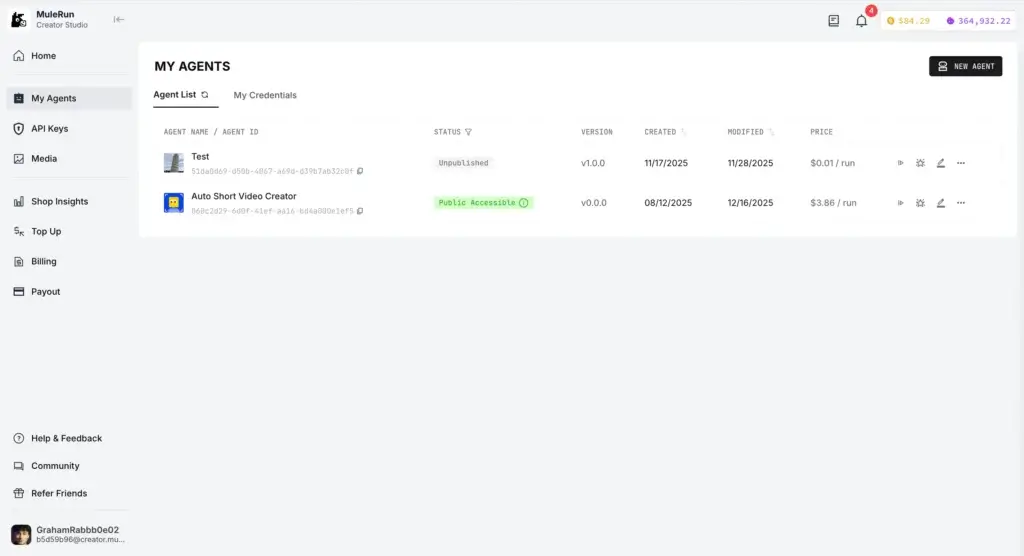
Mulerun also includes Creator Studio, which gives developers, no-code builders, and AI creators a way to publish their agents to the marketplace. The platform handles much of the commercial infrastructure, including hosting, distribution, user access, and payments.
That combination makes Mulerun different from many AI automation tools. It is both a user-facing productivity platform and a creator marketplace. You can use existing agents to complete work faster, or you can build agents that other users can run and pay for.
Key Features
How Mulerun Works
Mulerun is built around a simple idea: choose or create an AI agent, give it a task, and let it run work inside a managed AI environment. The platform is designed to reduce the technical setup typically required for using AI agents, APIs, cloud infrastructure, and workflow automation tools.
The most important thing to understand is that Mulerun is not only a prompt interface. It combines an agent marketplace, agent execution, cloud resources, file storage, browser-based work, and creator monetization into one ecosystem.
Mulerun Key Features
Mulerun’s value depends on how you plan to use it. For casual users, the marketplace is the main attraction. For creators, Creator Studio is the more strategic feature. For teams, the appeal is the ability to run AI tasks continuously without building infrastructure from scratch.
AI Agent Marketplace
The Mulerun marketplace lets you browse and run specialized agents built for different tasks. These agents can support categories such as research, writing, image creation, productivity, finance, business workflows, social media, document work, and technical tasks.
This marketplace model is useful because it lowers the barrier to using AI agents. Instead of designing a complex workflow yourself, you can start with an existing agent that already has a defined purpose.
For example, you might use one agent to research competitors, another to summarize a YouTube video, another to create a presentation outline, and another to generate content ideas for a marketing campaign. This makes Mulerun practical for people who want AI execution without becoming AI engineers.
Always-On Cloud Workspace
Mulerun also gives users access to a cloud-based environment where agents can run tasks. This matters because more advanced AI workflows often need storage, compute, browsers, files, and persistent execution.
With paid tiers, Mulerun adds personal virtual machine resources, more storage, more page deployments, and support for parallel task execution. This makes it more suitable for heavier workflows such as ongoing research, data processing, website deployment, and multi-agent experimentation.
The always-on angle is one of Mulerun’s stronger differentiators. Many AI tools stop once the chat response is complete. Mulerun is built around agents that can operate more like digital workers inside a cloud workspace.
Creator Studio
Creator Studio is Mulerun’s agent-building and monetization layer. It allows creators to publish agents through different technical paths, including no-code workflows, APIs, Docker-based integrations, and iframe-style agent interfaces.
This is particularly interesting if you build AI-powered workflows for a niche audience. Instead of only using an internal automation, you can package it as an agent and distribute it through Mulerun’s marketplace.
Mulerun handles much of the operational burden, including hosting, distribution, user access, payment processing, and commercial infrastructure. That gives creators a faster path from prototype to monetized product.
Browser Automation and Web Research
Many business workflows still happen inside web apps, forms, dashboards, search engines, portals, and browser-based systems. Mulerun is designed to support browser-oriented automation, which can help agents gather information, interact with websites, and complete digital tasks.
This is useful for competitor research, campaign monitoring, market analysis, lead research, price tracking, data extraction, and operational checks. If a process involves repetitive screen-based work, Mulerun may be able to reduce the manual effort.
Document, Content, and File Generation
Mulerun can also be used for productivity outputs such as content creation, document generation, presentations, spreadsheets, reports, images, and structured summaries.
For marketers, this can support campaign briefs, SEO drafts, competitor reports, content outlines, social media ideas, and research documents. For consultants, it can support client deliverables such as market summaries, strategy documents, and recurring business reports.
Page Deployment and Custom Domains
Mulerun’s pricing references include the ability to deploy pages, with higher plans supporting more deployed pages and custom domains. This suggests the platform is not only focused on task execution, but also on publishing agent-powered outputs or lightweight web experiences.
This can be valuable for creators who want to launch small AI tools, landing pages, demos, or agent interfaces without separately managing hosting infrastructure.
Mulerun Feature Overview
| Feature Area | What Mulerun Offers | Best For |
| AI Agent Marketplace | Browse, test, and run specialized AI agents | Users who want ready-made AI automation |
| Creator Studio | Build, publish, and monetize agents | Developers, no-code creators, and AI builders |
| Cloud Workspace | Storage, compute, VM resources, and task execution | Heavier AI workflows and persistent tasks |
| Browser Automation | Agents can support web-based research and actions | Research, monitoring, and repetitive browser tasks |
| Credits System | Usage-based credits for running AI tasks | Flexible usage across different task types |
| Page Deployment | Deploy pages, with higher limits on paid plans | Creators launching agent-powered outputs |
Overall, Mulerun is strongest when you use it as an AI work execution layer. It is less about managing projects and more about getting digital tasks completed by specialized agents.
Use Cases & Benefits
Who Should Use Mulerun?
Mulerun is not the right tool for every productivity workflow. It is best for users who want AI agents to perform work, not just provide suggestions.
You should consider Mulerun if you regularly deal with repetitive digital tasks, research-heavy workflows, content production, browser-based work, or agent building.
Best Use Cases for Mulerun
- Market and competitor research: Run agents that collect, summarize, and structure business intelligence.
- Content creation: Generate outlines, summaries, SEO drafts, captions, scripts, and creative assets.
- Document workflows: Create reports, presentations, spreadsheets, and structured deliverables.
- Browser-based automation: Reduce repetitive web research, monitoring, and data collection tasks.
- Creator monetization: Build AI agents and publish them to a marketplace.
- Startup operations: Automate lightweight research, reporting, and productivity workflows.
Who Gets the Most Value?
Mulerun will likely appeal most to marketers, founders, solopreneurs, AI creators, researchers, consultants, agencies, and technical builders who want to experiment with AI agents without building every part of the infrastructure themselves.
For example, a marketing manager could use Mulerun to research competitors, summarize customer reviews, generate campaign briefs, and draft content assets. A consultant could use it to produce repeatable research reports. A creator could build and monetize a niche agent that solves a specific problem.
However, Mulerun may feel less relevant if you only need a basic chatbot, a classic to-do list app, or a highly structured workflow automation platform with hundreds of deterministic app integrations.
Where Mulerun Fits in Your Software Stack
Mulerun can sit next to tools such as ChatGPT, Claude, Gumloop, Relevance AI, Lindy, Zapier, Make, Notion, ClickUp, Google Workspace, and Airtable. It does not necessarily replace all of them.
Instead, it gives you a marketplace and execution layer for AI agents. You may still use a project management tool to organize work, a CRM to manage customers, and a document workspace to store final assets.
The best way to look at Mulerun is as an AI workforce layer for tasks that are too repetitive for manual work, too flexible for simple automation rules, and not always worth building from scratch.
Pros and Cons
Benefits of Using Mulerun
Positive
✅ Large AI agent marketplace
✅ Useful for research and automation
✅ Creator monetization options
✅ Free plan available
Negative
❌ Credit-based pricing can be harder to predict
❌ Still an emerging product category
❌ Not a full project management tool
❌ Quality depends on the agent you choose
Mulerun’s biggest advantage is that it gives you access to specialized AI agents without requiring you to build the entire automation stack yourself. That makes it more approachable than many developer-first agent frameworks.
Still, it is important to understand its limitations. AI agents are not always perfectly predictable, and marketplace quality can vary from one agent to another.
✅ Pros
- Strong marketplace concept for discovering ready-made AI agents.
- Supports many productivity use cases, including research, writing, files, and browser work.
- Creator Studio gives builders a path to monetize agents.
- Cloud workspace and VM resources make heavier workflows more realistic.
- Free plan helps users test the platform before paying.
- Credit-based model can be flexible for users with changing workloads.
- Useful for creators, agencies, consultants, founders, and technical builders.
- Page deployment and custom domain support add extra creator value.
❌ Cons
- Credit-based pricing may be difficult to estimate before regular usage.
- The platform is not a replacement for structured project management software.
- Agent quality and reliability can vary depending on the specific agent.
- Some workflows may still need manual review, especially client-facing outputs.
- More advanced use cases may require technical understanding of APIs or agent logic.
- The category is still evolving, so documentation and packaging may change over time.
- Enterprise buyers may need clearer governance, admin, and compliance information.
My overall view is that Mulerun is a promising platform if you are actively exploring AI agents for real work execution. It is less compelling if you only need a clean AI writing assistant or a simple automation builder.
User Experience
User Interface and Experience
Mulerun is designed to make AI agents more accessible. The marketplace model helps because users do not need to start from a blank prompt or a blank automation canvas.
The experience is closer to browsing an app store. You select an agent, review its purpose, run it, and provide the input it needs. This is easier for non-technical users than manually connecting models, APIs, automation triggers, browser tools, and cloud resources.
Ease of Use
For basic use cases, Mulerun should feel approachable. If you are running a ready-made agent for content generation, research, or document creation, the learning curve is relatively low.
The learning curve becomes steeper when you move into creator workflows, custom APIs, Docker-based agents, monetization settings, or advanced automation logic. That is not a weakness by itself, but it does mean Mulerun serves two different audiences: everyday users and builders.
Agent Quality and Reliability
Because Mulerun is a marketplace, your experience will depend heavily on the quality of the agent you choose. Some agents may be polished, focused, and useful. Others may require testing, prompt adjustments, or manual review.
This is a common challenge across AI agent marketplaces. The more agents a platform offers, the more important discovery, ratings, documentation, and quality control become.
For business users, I would recommend testing each agent on low-risk tasks before relying on it for client-facing deliverables, financial analysis, legal research, or operational decisions.
Productivity Impact
Mulerun can save meaningful time when the task is repetitive, research-heavy, or output-driven. Examples include summarizing web pages, creating first drafts, monitoring competitor updates, generating structured reports, or assembling content briefs.
It is less useful when the task requires deep human judgment, internal context that is not available to the agent, or strict deterministic execution. In those cases, a traditional automation tool or internal workflow may still be better.
Pricing and Plans
How Much Does Mulerun Cost?
Mulerun uses a credit-based pricing model. In general, lighter tasks consume fewer credits, while more intensive workflows such as deep research, large document generation, video tasks, data-heavy work, or multi-step automation may consume more.
Pricing information can change quickly in this category, so you should always confirm the latest plan details on Mulerun’s official pricing page before purchasing. Based on current public pricing references, Mulerun commonly appears with Free, Plus, Super, Pro, and higher-scale team or enterprise options.
Mulerun Pricing Overview
| Plan | Typical Price | Best For |
| Free | $0 | Testing agents and light personal use |
| Plus | From about $16/month annually | Everyday users who need more credits and VM resources |
| Super | From about $32/month annually | Creators and power users running heavier workflows |
| Pro | From about $160/month annually | High-volume users needing more credits, storage, and performance |
| Team / Enterprise | Custom or marketplace-based | Organizations needing scale, support, governance, or dedicated environments |
Free Plan
The Free plan is best for testing Mulerun before committing to a paid plan. Public pricing references commonly mention sign-up credits, daily refreshed credits, limited storage, limited deployed pages, and a limit on simultaneous tasks.
This plan is useful if you want to explore the marketplace, test agent quality, and understand how credits are consumed in real workflows.
Plus Plan
The Plus plan is the most logical starting point for regular users. It typically includes monthly credits, daily bonus credits, more storage, a personal VM, more deployed pages, custom domain support, unlimited parallel tasks, and email support.
This plan makes sense if you want Mulerun to become part of your weekly workflow rather than a tool you only test occasionally.
Super Plan
The Super plan is more suitable for creators, heavier users, and people running more demanding workflows. Public references show higher monthly credits, stronger VM resources, more deployment capacity, and support for larger work volumes.
If you are building agents, publishing pages, or running frequent automation jobs, Super is likely the tier where Mulerun becomes more practical.
Pro Plan
The Pro plan is designed for high-volume use. It typically includes much higher monthly credits, stronger personal VM resources, significantly more storage, more page deployments, priority support, and early access to new features.
This plan is likely overkill for casual users, but it can make sense for agencies, AI creators, consultants, and teams using Mulerun as part of a production workflow.
Team and Enterprise Options
Mulerun may also offer higher-scale options through team or enterprise packaging, including organization-level needs, private agents, dedicated environments, or support commitments.
If you are evaluating Mulerun for a company, I would ask directly about admin controls, permission management, data handling, compliance documentation, support SLA, billing controls, and whether private agents can be restricted to your organization.
Pricing Takeaway
Mulerun’s pricing is flexible, but credit-based pricing requires testing. The monthly plan price does not tell the full story because actual cost depends on how many agents you run, what type of tasks they perform, and how resource-intensive your workflows are.
My recommendation is to start with the Free plan, run 5-10 realistic tasks, measure credit usage, and only then decide whether Plus, Super, or Pro matches your workload.
Integration & Compatibility
How Mulerun Integrates With Other Tools
Mulerun’s integration story is different from traditional automation platforms. Tools like Zapier, Make, and Gumloop usually emphasize prebuilt app connectors and visual workflow builders. Mulerun focuses more on agents, APIs, browser-based work, cloud execution, and creator-built agent experiences.
Agent Integration Methods
Mulerun supports multiple ways for creators to bring agents into the ecosystem. Public documentation and blog materials reference no-code workflows, API-based agents, Docker integrations, and iframe agent experiences.
This flexibility is important because different creators build agents in different ways. A no-code builder may connect a workflow tool, while a developer may prefer API or Docker-based logic.
APIs and Model Access
Mulerun also provides API-related documentation and references to model routing, which can help creators connect multiple models or external services without managing every provider account separately.
For technical users, this makes Mulerun more interesting than a basic marketplace. It can become a distribution layer for agents that rely on external models, APIs, or multimodal capabilities.
Browser and Cloud Compatibility
Because Mulerun is web-based, users can access it through a browser. Higher paid tiers include more cloud resources, which are useful for running tasks that need persistent execution, storage, deployed pages, or parallel activity.
There is no strong indication that Mulerun is meant to replace a desktop productivity suite. It is better understood as a cloud agent environment you access through the web.
How It Compares With Similar Tools
| Tool | Main Strength | Best Fit |
| Mulerun | AI agent marketplace and creator monetization | Users who want ready-made agents and agent publishing |
| Relevance AI | Enterprise AI workforce and agent operations | GTM teams and companies building structured AI workforces |
| Lindy | AI assistant for inbox, meetings, calendar, and follow-ups | Professionals who want an executive assistant-style agent |
| Gumloop | AI-native workflow automation with agents and flows | Teams building structured automations across apps |
| Zapier | Large app integration ecosystem | Rule-based app automation and simple workflows |
If your main need is app-to-app workflow automation, Gumloop, Zapier, or Make may feel more predictable. If your main need is an AI assistant for meetings and email, Lindy is more focused. If your main need is a marketplace of agents and a creator monetization path, Mulerun is more relevant.
Comparison
Mulerun Alternatives
Mulerun competes in a fast-moving AI agent and automation market. The right alternative depends on whether you want a marketplace, a personal AI assistant, a no-code automation builder, or an enterprise AI workforce platform.
Mulerun vs Relevance AI
Relevance AI is more enterprise-oriented. It focuses on AI workforces, integrations, governance, agent evaluations, analytics, and business use cases, especially for go-to-market teams.
Mulerun feels more marketplace-driven and creator-friendly. It is a better choice if you want to discover agents, run varied tasks, or monetize your own AI agents. Relevance AI is more suitable for companies building a structured internal AI workforce.
Mulerun vs Lindy
Lindy is more focused on personal productivity, inbox management, meetings, scheduling, and follow-ups. It works well if you want an AI executive assistant that helps with communication and calendar tasks.
Mulerun is broader. It can support productivity tasks, but it is not as narrowly focused on email and meetings. Choose Mulerun if you want an agent marketplace and creator ecosystem. Choose Lindy if you want a personal AI assistant for daily professional admin work.
Mulerun vs Gumloop
Gumloop is an AI-native workflow automation platform. It combines agents and workflows, with a stronger emphasis on building repeatable automations across business tools.
Mulerun is more marketplace-centered. It is easier to understand as a place to run or sell AI agents. Gumloop may be stronger for teams that want to build structured workflows. Mulerun may be more attractive for users who want plug-and-play agents and monetization.
Mulerun vs ChatGPT
ChatGPT is a general AI assistant. It is excellent for conversation, reasoning, drafting, ideation, coding help, and analysis. However, many users still need to guide every task manually.
Mulerun is more execution-oriented. Its value is in specialized agents, marketplace discovery, cloud execution, and agent monetization. If you only need an AI assistant, ChatGPT may be enough. If you want agents built for specific tasks, Mulerun is worth exploring.
Conclusion
Final Thoughts
Mulerun is a strong example of where productivity software is heading. The market is moving from simple AI chat interfaces toward AI agents that can perform tasks, run workflows, generate files, monitor information, and operate inside cloud environments.
The platform’s biggest strengths are its AI agent marketplace, creator monetization path, cloud workspace, and broad task coverage. It is especially interesting for marketers, creators, consultants, founders, and AI builders who want to experiment with agent-based work.
That said, Mulerun is not the best fit for every user. If you need predictable app integrations, traditional workflow automation, or enterprise-grade governance, you should compare it carefully against tools such as Gumloop, Relevance AI, Lindy, Zapier, and Make.
For most users, the smartest approach is to start with the Free plan, test the agents against real tasks, and track credit usage. If the results are reliable and the credit consumption makes sense, Mulerun can become a valuable AI productivity layer in your stack.
Overall, Mulerun is worth trying if you want to move beyond AI chat and test what agent-based automation can actually do for your work.
Frequently Asked Questions
Have more questions?
What is Mulerun?
Mulerun is an AI agent marketplace and automation platform. It lets you discover, run, build, and monetize AI agents for tasks such as research, content creation, document generation, browser automation, and workflow execution.
What is Mulerun used for?
Mulerun is used for running AI agents that can complete digital tasks. Common use cases include web research, competitor monitoring, content drafting, file generation, data analysis, browser-based automation, and creator-built AI tools.
Is Mulerun free?
Yes. Mulerun offers a free plan for testing the platform. Public pricing references mention free credits, daily refreshed credits, limited storage, deployed pages, and task limits. Paid plans add more credits, storage, VM resources, and support.
How much does Mulerun cost?
Mulerun uses credit-based pricing. Public references commonly list a Free plan, Plus from about $16 per month annually, Super from about $32 per month annually, and Pro from about $160 per month annually. Always check the official pricing page before purchasing.
How does Mulerun pricing work?
Mulerun pricing is based on plans and credits. Simple tasks may use fewer credits, while heavier workflows such as deep research, large file generation, video tasks, or multi-step automation may consume more credits.
Who should use Mulerun?
Mulerun is best for creators, marketers, consultants, researchers, founders, agencies, and AI builders who want ready-made agents, cloud-based task execution, or a way to monetize custom AI agents.
Can I build my own AI agent with Mulerun?
Yes. Mulerun Creator Studio is designed for users who want to build, publish, and monetize AI agents. It supports different creation methods, including no-code workflows, APIs, Docker-based integrations, and iframe-style agent experiences.
Is Mulerun better than ChatGPT?
Mulerun and ChatGPT serve different needs. ChatGPT is a general AI assistant for conversation, drafting, analysis, and reasoning. Mulerun is more focused on specialized AI agents, marketplace discovery, cloud execution, and creator monetization.
What are the best Mulerun alternatives?
The best Mulerun alternatives include Relevance AI, Lindy, Gumloop, Zapier, Make, and ChatGPT. Relevance AI is stronger for enterprise AI workforces, Lindy is better for inbox and meeting assistance, and Gumloop is stronger for structured AI workflows.
Is Mulerun worth it?
Mulerun is worth trying if you want AI agents that can perform real tasks rather than only generate chat responses. It is especially useful for research, content, browser automation, creator monetization, and experimental AI workflows. Start with the Free plan to measure credit usage before upgrading.