
Introduction
Most survey tools help you collect answers. Qualtrics is designed to help you build a research or experience-management system around those answers.
Qualtrics supports complex research and experience programs across marketing, customer service, HR, academia, healthcare, and government. It combines survey creation, qualitative and quantitative research, analytics, panels, AI, governance, and workflow automation.
However, this depth creates trade-offs. Qualtrics can feel excessive for a simple poll, many advanced capabilities require paid or enterprise licenses, and pricing is less transparent than most self-service survey tools. The platform is strongest when feedback influences important decisions, not when you only need a quick form.
In this Qualtrics review, you will learn:
- How the survey builder, Survey Flow, logic, and research methods work
- Which Qualtrics AI features provide practical value
- How panels, distribution, dashboards, and advanced analysis compare
- What the free account and paid Strategic Research plan include
- When SurveyMonkey, Typeform, SurveySparrow, Jotform, or Google Forms may be a better choice
Bottom line: Qualtrics is one of the strongest platforms for complex survey research and enterprise experience management. It is best for organizations that need methodological depth, sophisticated analytics, governance, and action workflows. Smaller teams running occasional surveys will usually get better value from a simpler alternative.
| Category | Qualtrics Review Summary |
| Best For | Enterprise customer experience, employee experience, market research, academic research, healthcare, government, and complex survey programs |
| Free Plan | Available with 3 active surveys, 30 questions per survey, 500 total responses, 8 question types, and basic logic |
| Strongest Features | Survey Flow, advanced research methods, Text iQ, Stats iQ, panels, dashboards, AI, governance, and workflow automation |
| Main Limitation | High cost, custom enterprise pricing, and a steeper learning curve than lightweight survey tools |
| Best Alternative | SurveyMonkey for easier professional surveys, Typeform for engagement, and SurveySparrow for recurring conversational feedback |
| Our Recommendation | Best for high-stakes research and experience programs that justify enterprise-level capabilities |
Who Is Qualtrics Best For?
Identify where enterprise research depth creates real value
Qualtrics serves individual researchers, universities, and large companies, but the platform makes the most sense when your survey program has meaningful methodological, analytical, operational, or compliance requirements.
✅ Best For
- Market research teams running concept tests, conjoint studies, MaxDiff exercises, pricing research, brand tracking, and audience studies
- Customer experience teams measuring NPS, CSAT, CES, journey feedback, contact-center quality, and closed-loop follow-up
- Employee experience teams managing engagement, lifecycle, pulse, onboarding, exit, and 360-degree feedback programs
- Academic and institutional researchers requiring complex logic, randomization, embedded data, exports, and controlled research workflows
- Regulated organizations that need stronger security, governance, approvals, identity controls, and enterprise data management
❌ When It Might Not Be the Right Fit
- You only need a simple poll or registration form and will not use advanced analysis or workflow capabilities
- You need predictable low-cost pricing without a sales process or interaction-based licensing
- You want the fastest possible learning curve for occasional survey creators
- You prioritize visual lead-generation forms over research methodology and enterprise controls
- You need payments, signatures, document generation, or approval-heavy form workflows
Real Scenarios Where Qualtrics Performs Well
A product team can randomize concepts and enforce quotas, while a CX team can turn a low score into a ticket and alert. Qualtrics earns its premium when feedback must support a controlled decision or follow-up process.
Key Features
Build sophisticated studies with logic, controls, and reusable methodology
The Qualtrics survey builder is approachable at a basic level, but its real strength appears when you open Survey Flow and start designing how data, conditions, quotas, randomization, and respondent paths work together.
Question Types, Blocks, and Reusable Content
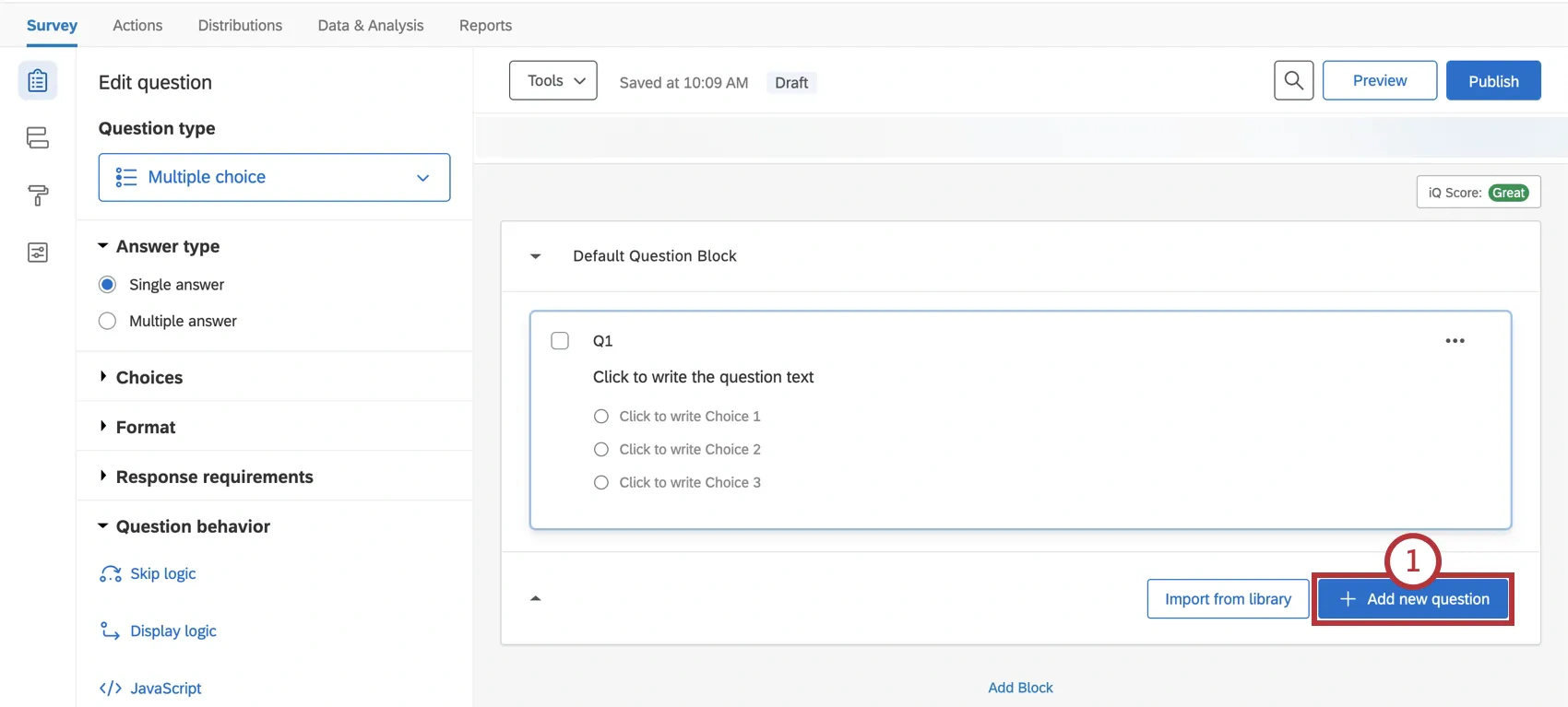
Depending on your license, question types range from multiple choice and matrices to file uploads, heat maps, and graphic sliders. Blocks and libraries help teams reuse approved questions, messages, and research components.
Survey Flow, Logic, and Embedded Data
Qualtrics supports display logic, skip logic, and branch logic. Display logic shows or hides individual questions. Skip logic moves a respondent forward based on an answer. Branch logic controls complete blocks and other Survey Flow elements.
Embedded data stores attributes such as customer tier or experimental condition. Piped text reuses earlier answers, while randomizers assign participants to different blocks or groups.
Quotas, Screening, and Research Quality
Quotas and screen-outs control sample composition. ExpertReview can flag design problems, estimate respondent burden, and identify suspicious patterns such as bots, duplicate responses, speeders, and straightlining.
Advanced Quantitative and Qualitative Methods
Strategic Research includes guided methods such as concept testing, conjoint analysis, MaxDiff, pricing studies, market landscape assessments, and other specialized projects. Qualitative options can include video feedback, audio feedback, video diaries, interviews, and focus-group-style research.
Customization, Languages, and Technical Flexibility
Paid plans add stronger branding, multilingual surveys, redirects, HTML, and JavaScript. Qualtrics offers exceptional control, but complex projects require documented logic, naming conventions, ownership, and testing.
Qualtrics AI and Research Automation
Separate useful automation from AI features that still require validation
Qualtrics applies AI to survey quality, text analysis, statistics, qualitative research, and experience workflows. Its strongest value is reducing repetitive analysis and surfacing patterns for review.
ExpertReview and Response Quality
ExpertReview checks question design, predicted duration, logic, quotas, and data quality before launch. Response Quality helps detect suspicious submissions and clean the dataset after collection.
Text iQ, Sentiment, and Topic Analysis
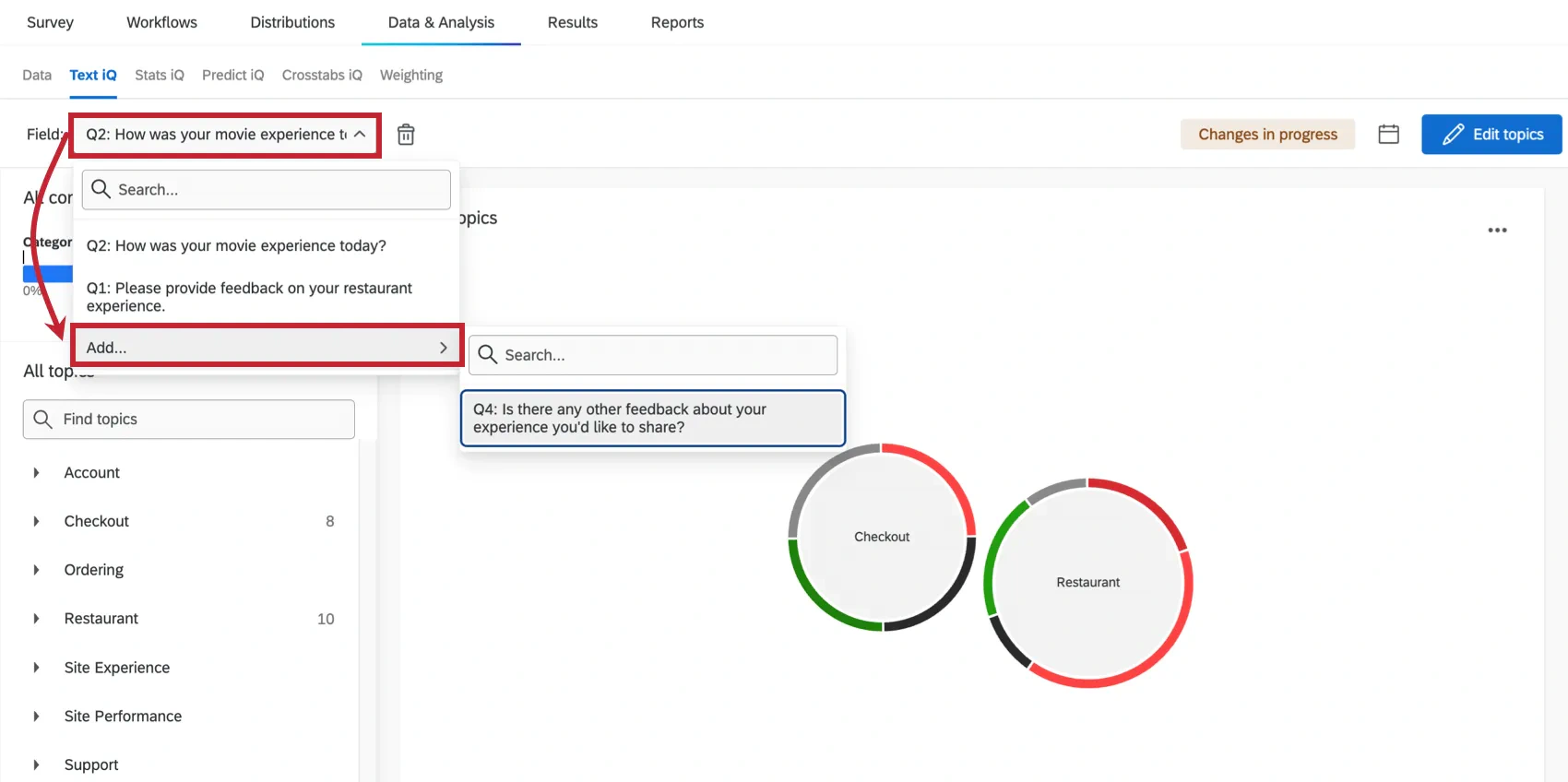
Text iQ organizes open-ended feedback into topics, themes, and sentiment. It can reveal repeated product issues, service complaints, employee concerns, and reasons behind low scores, although nuanced comments still need human review.
Stats iQ and AI-Assisted Analysis
Stats iQ helps users describe variables, compare groups, test relationships, run regression-related analysis, and identify meaningful patterns. Specialist analysts may still prefer R, Python, or SPSS for advanced modeling.
Synthetic Panels and Research Acceleration
Synthetic panels can provide fast directional insight for early concepts and messages. Use them to narrow options, then validate high-stakes decisions with human respondents.
Research Hub, Assist, and Experience Agents
Research Hub makes previous studies searchable, while Assist can summarize available data. Experience Agents extend AI toward recommendations and automated follow-up. Define which outputs are advisory and which actions require approval.
Distribution, Panels, and Respondent Experience
Reach owned audiences, purchased respondents, and feedback channels at scale
Qualtrics supports simple links and enterprise distribution connected to contact records, websites, messaging platforms, and research panels.
Anonymous Links, QR Codes, Email, SMS, and Websites
The free account supports anonymous links, social sharing, and QR codes. Paid licenses can add email distributions, SMS, website feedback, embedded surveys, intercepts, and other collection methods.
Email distributions can personalize surveys, monitor participation, and send reminders. Individually tracked surveys require clear privacy communication.
XM Directory and Contact Profiles
Enterprise programs can connect feedback with customer or employee profiles for segmentation and personalized follow-up. Document which data is joined, who can access it, and how long it is retained.
Online Samples and Human Research Panels
Qualtrics Online Sample helps you recruit respondents based on demographic, geographic, professional, and behavioral criteria. Research services can support sample design, fielding, panel management, and reporting.
This helps you reach representative or difficult audiences. Pricing depends on targeting, incidence rate, survey length, and sample requirements.
Mobile Experience and Survey Accessibility
Mobile performance still depends on survey design. Test every path on real devices, limit large matrices and media, and keep instructions focused.
Analytics, Dashboards, and Reporting
Move from basic charts to statistical and operational insight
Qualtrics ranges from automatic charts and individual responses to crosstabs, weighting, Text iQ, Stats iQ, exports, and enterprise dashboards.
Data and Analysis Workspace
The Data and Analysis area supports filtering, recoding, response-quality review, incomplete records, derived variables, and exports. Document data changes when several analysts share a project.
Results Reports and Experience Dashboards
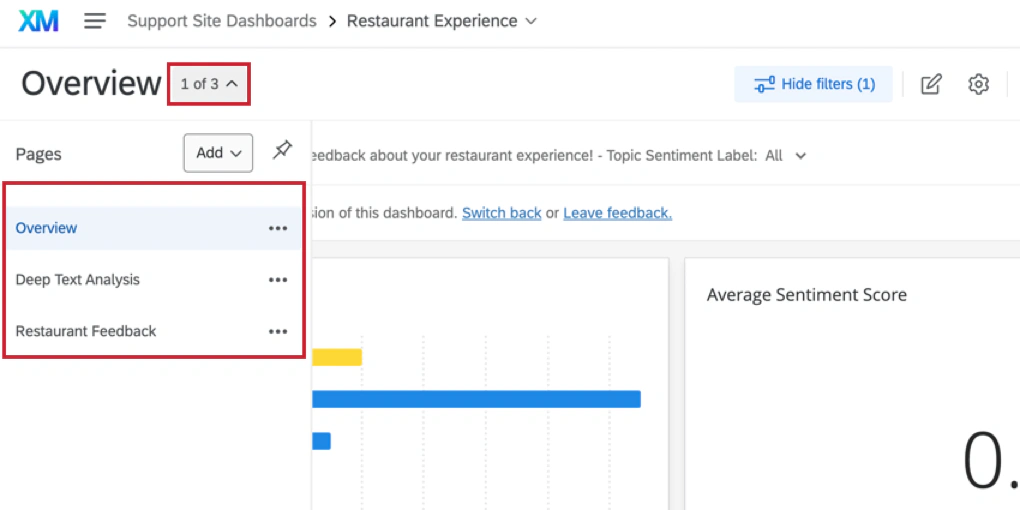
Results reports summarize one survey, while enterprise dashboards show trends, drivers, comments, alerts, and role-specific views for recurring programs.
Crosstabs, Weighting, and Statistical Analysis
Crosstabs compare segments, weighting adjusts sample representation, and Stats iQ explores relationships. These tools reduce handoffs between collection, cleaning, analysis, and presentation.
Exports and Business Intelligence Connections
Exports include CSV, TSV, Excel, XML, and SPSS. Extensions can connect feedback with Tableau, Adobe Analytics, Google Sheets, Salesforce, and other systems.
For organization-wide executive reporting, you may still want to combine Qualtrics data with revenue, product, support, and operational metrics. Review our guide to the best business intelligence software for broader dashboard options.
Our assessment: Qualtrics has one of the strongest native analysis stacks in the survey market. If your team only exports raw responses, you are unlikely to capture its full value.
Pros and Cons
Balance research power against cost, complexity, and administration
Qualtrics is praised for flexibility and analytics, while pricing and complexity remain its main disadvantages.
Positive
✅ Exceptional survey logic and research flexibility
✅ Advanced text, statistical, and dashboard analysis
✅ Strong enterprise governance and security controls
✅ Human panels, qualitative tools, AI, and workflows in one platform
Negative
❌ Paid plans can be expensive for small teams
❌ Enterprise pricing and packaging are not fully transparent
❌ Advanced projects have a meaningful learning curve
❌ Valuable integrations and controls may require license upgrades
✅ What You Will Appreciate
Research depth without assembling several tools
You can design studies, recruit respondents, analyze feedback, build dashboards, and automate follow-up in one ecosystem.
Logic that supports demanding studies
Survey Flow, quotas, randomization, and advanced methods support demanding research.
Analysis that can influence operations
Dashboards, analytics, alerts, and integrations move feedback into daily decisions.
Governance for large and regulated organizations
SSO, MFA, approvals, permissions, and admin controls support broader deployment.
❌ What Could Be Better
The buying experience can be difficult to forecast
Qualtrics publishes a self-service Strategic Research price, but many CX, EX, and enterprise packages require a quote based on interactions, products, and program scope.
Power creates configuration overhead
Complex Survey Flow logic, dashboards, directories, workflows, and permissions require planning. Without ownership and standards, the platform can become inconsistent across departments.
Small teams may pay for unused capability
If your workflow ends with downloading a CSV, a simpler platform may provide better value and faster adoption.
The free plan is useful but isolated
The free account includes logic and exports, but it excludes email and SMS distribution, integrations, workflows, advanced analytics, custom branding, and direct human support.
Pricing and Plans
Compare the public self-service plan with custom enterprise licensing
Qualtrics offers a free account, a publicly priced Strategic Research package, and custom enterprise products or suites.
Current Qualtrics Pricing Overview
| Plan or Product | Public Price* | Best For | Important Limits or Features |
| Qualtrics Surveys Free | $0 | Individuals testing the builder or running limited surveys | 1 user, 3 active surveys, 30 questions per survey, 500 total responses, 8 question types, basic logic, reports, and exports |
| Strategic Research Online | $420/month, billed $5,040 annually | Small research teams, consultants, and academics | Unlimited users, surveys, and questions; 1,000 shared responses; 23 question types; 20+ guided solutions; advanced analysis |
| Strategic Research Enterprise | Custom quote | Research teams needing 5,000+ responses and larger programs | Pricing based on interactions, including survey responses and video feedback minutes |
| Customer Experience | Custom quote | Organizations running multi-channel CX and closed-loop programs | Feedback collection, profiles, dashboards, text analytics, workflows, tickets, and enterprise integrations |
| Employee Experience | Custom quote | Organizations managing engagement and employee lifecycle programs | Engagement, pulse, lifecycle, 360, manager insights, action planning, and governance |
| Qualtrics XM Suites | Custom quote | Enterprises combining products and interaction types | Pooled interaction licensing, broader AI, administration, integration, and scalability options |
What the Free Account Includes
The free account includes 500 total responses, three active surveys, 30 questions per survey, eight question types, basic logic, reports, and exports. It excludes email and SMS, integrations, APIs, workflows, advanced analytics, multilingual surveys, quotas, custom code, and direct human support.
Is the $420 Strategic Research Plan Good Value?
The self-service plan includes unlimited users, surveys, and questions, but 1,000 shared responses. It is strongest when guided methods, video, crosstabs, Stats iQ, text analysis, and dashboards replace several separate tools.
What to Ask During an Enterprise Quote
Ask how interactions are counted, which integrations and support services are included, whether volume carries over, and how renewal pricing works. Confirm implementation, data residency, AI permissions, API limits, sample costs, SMS, and video charges.
Pricing assessment: Choose Qualtrics when the cost of weak research, fragmented data, or missed follow-up is higher than the software investment.
Integrations, Collaboration, and Workflow Automation
Connect feedback with systems that can resolve issues and change decisions
Qualtrics becomes more valuable when insights move into CRM, support, HR, analytics, and collaboration systems.
Workflows and Closed-Loop Actions
Workflows can turn a low score into a ticket, alert, record update, or follow-up survey. Use thresholds, ownership, escalation rules, and deduplication to avoid alert fatigue.
CRM, Service, and Collaboration Integrations
Available extensions include Salesforce, HubSpot, Microsoft Dynamics, ServiceNow, Zendesk, Freshdesk, Jira, Slack, Microsoft Teams, Marketo, Google Sheets, Tableau, Adobe Analytics, Twilio, WhatsApp, Zapier, and other systems.
Some extensions require upgrades. Confirm whether each integration supports the exact triggers, actions, and data direction you need.
APIs and Custom Development
The API can automate surveys, distributions, contacts, responses, and exports. Confirm license limits and build error handling, authentication, retries, field mapping, and monitoring.
Collaboration and Governance
Teams can share surveys, libraries, and dashboards, while administrators manage users, permissions, usage, approvals, and security. Define who can publish surveys, use sensitive data, purchase samples, activate AI, and build workflows.
Security, Privacy, and Customer Support
Evaluate enterprise protections alongside your own data responsibilities
Qualtrics is used for sensitive customer, employee, healthcare, government, and research data. Compliance still depends on your license, configuration, contracts, and survey design.
Security Certifications and AI Governance
Qualtrics security documentation lists ISO 27001, ISO 42001, SOC 2 Type 2, HITRUST, FedRAMP High, and IL4-related environments or certifications. Your organization must still define AI data access, review, and automation rules.
Encryption, Access, and Sensitive Data Controls
Data in transit is protected through HTTPS and HSTS. Enterprise controls can include SSO, MFA, permissions, approvals, PII controls, retention, and GDPR deletion workflows. Confirm plan-specific data residency, audit, backup, subprocessor, and incident terms.
Anonymous and Confidential Research
A survey is not automatically anonymous. Contact lists, unique links, IP addresses, embedded data, and integrated profiles can make responses identifiable. Verify metadata and access before launch.
Customer Support
Qualtrics provides documentation, an AI assistant, learning resources, and community support. Eligible paid licenses can access chat, email, and phone channels, while the free account does not include direct human support.
User feedback commonly praises flexibility and analytical depth while noting pricing and complexity. Qualtrics is easiest to justify with trained owners and a clear plan for acting on insight.
Alternatives
Compare research depth, usability, engagement, and total cost
The best alternative depends on whether you need professional surveys, conversational design, recurring feedback, operational forms, or a free collaboration tool.
| Software | Best For | Where It Beats Qualtrics | Where Qualtrics Is Stronger |
| SurveyMonkey | Professional surveys with easier self-service adoption | Simpler buying experience, faster setup, and lower entry cost for many teams | Broader enterprise XM, advanced research methods, governance, and analytics |
| Typeform | Conversational surveys and lead-generation experiences | More engaging one-question-at-a-time presentation | Research depth, complex logic, panels, statistics, and enterprise controls |
| SurveySparrow | Recurring conversational surveys and CX programs | Friendlier interface and more accessible recurring feedback workflows | Advanced methodology, research services, analytics, and institutional governance |
| Jotform | Forms, payments, approvals, signatures, and documents | Broader operational form workflows and template variety | Experience management, survey research, panels, and statistical analysis |
| Google Forms | Simple free surveys and internal collaboration | Ease of use, no-cost access, and direct Google Sheets collaboration | Logic, branding, research quality, analytics, governance, and automation |
Qualtrics vs SurveyMonkey
SurveyMonkey is easier to learn and buy. Qualtrics is stronger for advanced methods, enterprise XM, governance, and analysis. Read our SurveyMonkey review.
Qualtrics vs Typeform
Typeform is better for conversational lead and onboarding experiences. Qualtrics is stronger for complex studies, panels, statistics, and governance. Read our Typeform review.
Qualtrics vs SurveySparrow
SurveySparrow offers approachable conversational and recurring feedback workflows. Qualtrics is stronger for complex research and enterprise administration. Read our SurveySparrow review.
Qualtrics vs Jotform
Jotform is better for payments, approvals, signatures, and documents. Qualtrics is better for formal research, panels, and analysis. Read our Jotform review.
Qualtrics vs Google Forms
Google Forms is best for simple free surveys and Sheets collaboration. Qualtrics adds logic, quality controls, analytics, security, and workflows. See our best survey tools guide.
Conclusion
Final Recommendation
⭐ Overall Rating: 9.2/10
Qualtrics is one of the most capable survey research and experience-management platforms available. It combines flexible survey design, sophisticated logic, quantitative and qualitative methods, AI-assisted analysis, human and synthetic panels, dashboards, integrations, security, and enterprise governance.
Its weakness is not a lack of capability. It is the difficulty of matching that capability to a realistic budget and implementation plan. Small teams can easily buy more platform than they will use, while large organizations can create fragmented programs if every department builds surveys and dashboards differently.
Choose Qualtrics when research quality, cross-channel experience insight, governance, and automated action justify the investment. Choose SurveyMonkey for a more accessible professional survey platform, Typeform for engaging lead experiences, SurveySparrow for approachable recurring feedback, or Jotform for transactional forms and workflows.
Frequently Asked Questions
Have More Questions?
What is Qualtrics used for?
Qualtrics is used to create surveys, conduct market and academic research, manage customer and employee experience programs, analyze structured and unstructured feedback, build dashboards, recruit respondents, and automate follow-up actions.
Is Qualtrics free?
Yes. Qualtrics offers a free account with 3 active surveys, 30 questions per survey, 500 total responses, 8 question types, basic logic, reports, and data exports. Advanced features require a paid plan.
How much does Qualtrics cost?
Qualtrics Surveys has a free plan. The publicly priced Strategic Research package costs $420 per month, billed as $5,040 annually, for 1,000 shared responses. Enterprise CX, EX, and research packages use custom pricing.
What are the limitations of the Qualtrics free account?
The free account excludes email and SMS distribution, quotas, advanced analytics, multilingual surveys, APIs, integrations, workflows, custom JavaScript, advanced branding, and direct email, chat, or phone support.
Does Qualtrics use AI?
Yes. Qualtrics uses AI for survey quality checks, response-quality detection, text and sentiment analysis, statistical interpretation, video summaries, research search, recommendations, synthetic panels, and emerging agentic workflows.
Is Qualtrics better than SurveyMonkey?
Qualtrics is stronger for advanced research, enterprise experience management, governance, and complex analytics. SurveyMonkey is generally easier to adopt and more practical for teams that need professional surveys without a large XM implementation.
Can Qualtrics surveys be anonymous?
Yes, Qualtrics can support anonymous surveys, but anonymity depends on distribution and configuration. Unique links, contact lists, IP addresses, embedded data, cookies, and integrated profiles can make responses identifiable.
Is Qualtrics secure?
Qualtrics maintains enterprise security programs and certifications including ISO 27001, ISO 42001, SOC 2 Type 2, HITRUST, and specialized government environments. Available controls depend on the plan and contract.
Who is Qualtrics best for?
Qualtrics is best for research, customer experience, employee experience, academic, healthcare, government, and enterprise teams that need complex logic, rigorous analysis, security, governance, panels, and automated action.
Is Qualtrics worth the cost?
Qualtrics is worth the cost when its advanced research, analytics, governance, integrations, and closed-loop workflows support high-value decisions. It is usually excessive for simple forms, polls, and occasional low-stakes surveys.

- 1Who Is Qualtrics Best For?
- 2Key Features
- 3Qualtrics AI and Research Automation
- 4Distribution, Panels, and Respondent Experience
- 5Analytics, Dashboards, and Reporting
- 6Pros and Cons
- 7Pricing and Plans
- 8Integrations, Collaboration, and Workflow Automation
- 9Security, Privacy, and Customer Support
- 10Alternatives
- 11Conclusion
- 12Frequently Asked Questions