
Introduction
Survey tools look similar until you need recurring feedback, multiple channels, AI analysis, and a reliable way to turn negative responses into action.
SurveySparrow addresses that broader requirement. It combines conversational and classic surveys with CX metrics, offline collection, 360 assessments, research tools, dashboards, ticket management, integrations, and AI.
Its advantage is the feedback cycle: ask, clarify, analyze, assign, and follow up. The tradeoff is complex packaging across survey, CX, research, brand, document, and 360 products.
In this SurveySparrow review, you will learn:
- How its conversational surveys compare with traditional form layouts
- Which AI features improve collection, follow-up, and analysis
- How recurring, offline, NPS, research, and 360 workflows operate
- What the current plans and response limits mean for your budget
- When SurveyMonkey, Typeform, Jotform, Qualtrics, or QuestionPro may fit better
Bottom line: SurveySparrow is a strong choice for engaging, recurring feedback with operational follow-up. It is less suitable for high-volume free forms or specialist enterprise research.
| Category | SurveySparrow Review Summary |
| Best For | Customer experience, marketing, product, HR, research, and service teams running recurring feedback programs |
| Free Plan | Available with 1 user, 3 active classic surveys, 10 questions per survey, and 75 responses per quarter |
| Strongest Features | Conversational surveys, recurring automation, omnichannel distribution, Echo AI, CogniVue, offline surveys, and ticket management |
| Main Limitation | Pricing and product packaging become harder to compare once you need teams, CX, research, 360 assessments, or advanced AI |
| Best Alternative | Typeform for design-led forms, SurveyMonkey for general research depth, Jotform for operational form workflows |
| Our Recommendation | Best for organizations that need to collect feedback repeatedly and act on it, not merely store responses |
Who Is SurveySparrow Best For?
Identify when engagement and repeat feedback justify the platform
SurveySparrow can support simple surveys, but its strongest use cases involve repeated collection, multiple channels, or a defined follow-up process.
✅ Best For
- Customer experience teams running NPS, CSAT, CES, transactional feedback, and churn-prevention workflows
- Marketing and product teams collecting concept, website, onboarding, campaign, and product feedback
- HR and people teams managing pulse surveys, engagement checks, lifecycle surveys, and 360-degree assessments
- Field and event teams that need kiosk or offline surveys where connectivity is unreliable
- Growing organizations that want survey responses to create tickets, notifications, CRM updates, or automated follow-up
❌ When It Might Not Be the Right Fit
- You need a completely free high-volume tool for simple classroom, internal, or community surveys
- You mainly build operational forms involving documents, approvals, signatures, and complex payment workflows
- You want one simple price covering surveys, advanced CX, research, 360 assessments, documents, and AI at scale
- You require specialist research governance and sophisticated enterprise methodology across every project
- You only run one survey per year and will not use recurring distribution, automation, dashboards, or follow-up
Real Scenarios Where SurveySparrow Performs Well
A SaaS team can trigger NPS after onboarding, clarify a low score, create a success ticket, and monitor themes in CogniVue. HR can schedule pulse surveys, while retail teams collect offline feedback. The platform works best when feedback is recurring.
Survey Builder and Core Features
Create surveys that feel lighter without losing business logic
SurveySparrow supports conversational, classic, and single-page layouts, so you can match the experience to the audience and question type.
Conversational, Chat, and Classic Surveys
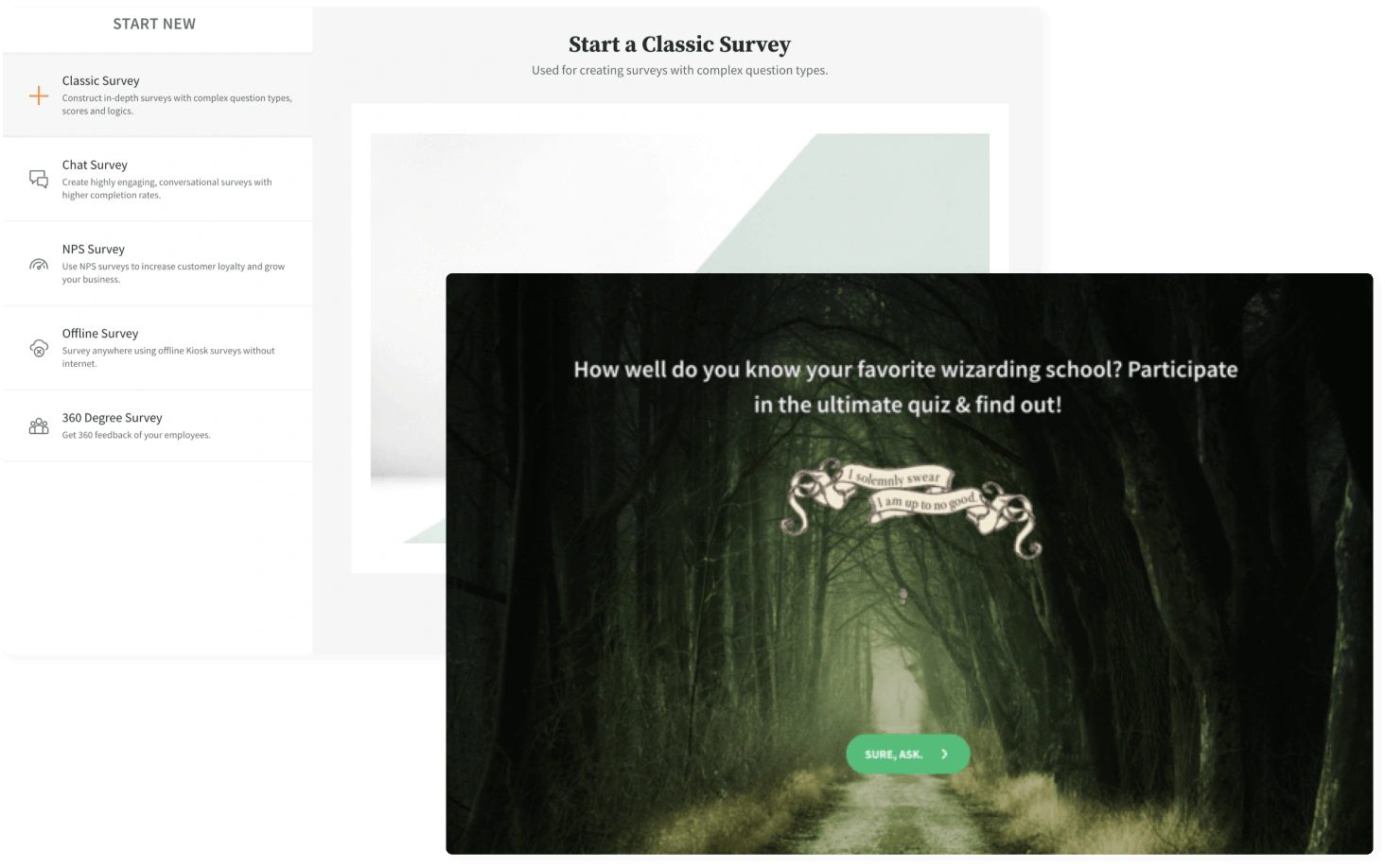
Conversational surveys present questions in a guided sequence that feels closer to messaging than a long questionnaire. This format works well for mobile respondents, lead qualification, customer check-ins, and short feedback flows.
Classic and single-page formats are better for structured applications, matrix questions, and studies where respondents need to scan the full form. Chat is not ideal for every project.
Question Types, Templates, and Branding
Available formats include multiple choice, ratings, rankings, matrices, sliders, uploads, signatures, dates, image choices, heat maps, and text fields. Templates cover CX, employee feedback, research, events, education, healthcare, forms, and quizzes.
Branding controls include themes, fonts, colors, logos, background media, custom domains, branded emails, and custom CSS on higher plans. SurveySparrow also supports video backgrounds and personalized thank-you pages.
Logic, Piping, Variables, and Visual Flow
Skip and display logic hide irrelevant questions, while piping reuses earlier answers. Variables, formulas, scoring, randomization, and a visual flow builder support adaptive journeys without code.
Preview every major path, especially when answers control workflows, redirects, scoring, or tickets.
Forms, Quizzes, Payments, and Documents
SurveySparrow also supports registrations, applications, payments through Stripe, quizzes, scoring, and conditional thank-you pages.
The platform has expanded into document generation, but Jotform remains broader for document-heavy operational forms, approvals, signatures, and app-like workflows.
AI Features
Separate useful automation from impressive AI labels
SurveySparrow applies AI to creation, distribution, follow-up, enrichment, analysis, and reporting. It improves a feedback process rather than replacing research judgment.
AI Survey Creation
Describe an objective and the AI builder generates up to ten questions for a classic survey. You can then edit wording, add logic, or expand it manually.
Review the draft for leading wording, weak scales, unnecessary questions, and research gaps.
Echo AI Agents
Echo AI is designed to ask contextual follow-up questions. Instead of accepting a vague comment such as “the setup was difficult,” the agent can probe for clarification and collect the reason behind the score.
This addresses a common gap: scores show that something is wrong, but static surveys often fail to explain why.
SmartReach and AI-Optimized Distribution
SmartReach chooses delivery channels and timing across email, SMS, and WhatsApp to avoid sending every contact the same message simultaneously.
Its value depends on contact history, channel access, and consent, so measure completion and unsubscribe rates.
CogniVue, Co-Pilot, and Enrich
CogniVue analyzes topics, sentiment, trends, and key drivers. Co-Pilot answers natural-language questions, while Enrich converts comments into tags, categories, and fields for workflows or reports.
Check AI credits, compatible sources, refresh schedules, and plan availability before purchasing for text analytics.
Where Human Review Still Matters
AI cannot fix poor sampling, biased questions, incomplete data, or misleading metrics. Human review remains essential.
Distribution, Recurring Surveys, and Respondent Experience
Reach respondents repeatedly across digital and offline touchpoints
Distribution options include links, email, QR codes, social media, embeds, pop-ups, SMS, WhatsApp, Slack, Teams, mobile SDKs, portals, and offline devices.
Recurring Surveys and Automated Reminders
Recurring surveys can be scheduled daily, weekly, monthly, quarterly, or around a custom date. This supports employee pulse checks, post-service follow-ups, relationship NPS, training evaluations, and other programs where consistency matters.
Automated invitations and reminders save time, while a standardized cadence makes trends more comparable than ad hoc collection.
Offline and Kiosk Surveys
Offline surveys let field teams gather responses on supported devices without an active internet connection and synchronize the data later. Kiosk mode is useful for retail counters, events, clinics, campuses, remote fieldwork, and visitor feedback.
Before deployment, test compatible questions, device permissions, synchronization, and duplicate controls.
WhatsApp, SMS, Email, and In-App Feedback
SurveySparrow supports both broad outreach and contextual micro-surveys. SpotChecks can trigger targeted website or app questions based on behavior, while WhatsApp and SMS provide lower-friction channels for audiences that do not respond to email.
Channel variety is useful, but message frequency, consent, and localization must be governed centrally. A better-looking survey does not compensate for poor targeting or excessive reminders.
Specialized Feedback Programs
Use the right product layer for CX, research, or employee feedback
SurveySparrow packages several specialist products around its survey foundation, which increases breadth and pricing complexity.
NPS, CSAT, CES, and Closed-Loop CX
The CX suite supports relationship and transactional NPS, customer satisfaction, and customer effort measurement. You can segment promoters, passives, and detractors, trigger workflows, create tickets, send alerts, and monitor performance through dashboards.
A low score can therefore become an assigned action instead of remaining a spreadsheet row.
Employee Pulse and 360-Degree Assessments
People teams can run lifecycle surveys, engagement checks, pulse programs, and multi-rater assessments. The 360 product includes competency frameworks, rating relationships, development reports, bell curves, and personalized outputs.
HR teams should define anonymity, minimum group sizes, report access, and communication before launch.
Market Research and Advanced Methods
SurveySparrow’s research offering includes MaxDiff, which asks respondents to choose the most and least preferred items from repeated sets. Reports can include utility scores, preference share, smart filters, and TURF simulation.
Enterprise researchers should still compare methodology, sample management, governance, and analyst controls with specialist platforms.
Audience and Respondent Recruitment
SurveySparrow Audience can recruit targeted respondents for concept, market, and category research. Evaluate screening, sample quality, incidence rates, and panel costs separately from the software subscription.
Analytics
Move from charts to priorities and accountable follow-up
SurveySparrow provides real-time reports, question-level analysis, smart filters, crosstabs, drop-off statistics, word clouds, comparisons, scheduled reports, and individual response views.
Reports and Executive Dashboards
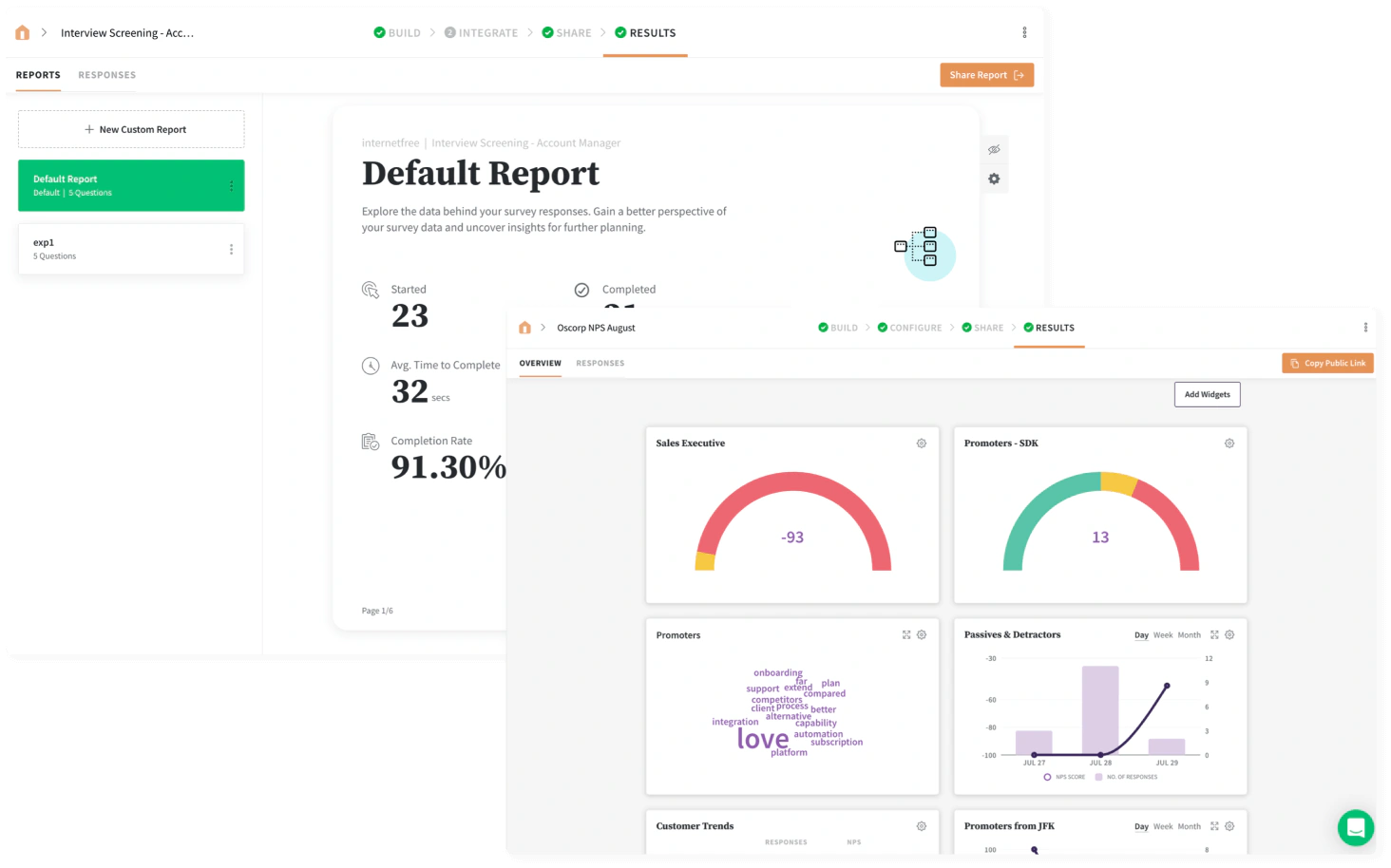
Executive dashboards combine survey metrics, funnels, journeys, heat maps, correlations, cross-tabs, ratings, text responses, and key drivers. Reports can be shared or scheduled.
For broader company analysis, SurveySparrow connects with Power BI, Tableau, BigQuery, Snowflake, Databricks, and Microsoft Fabric.
Exports and Deeper Analysis
Depending on the workflow, you can export reports and responses in formats including PDF, PowerPoint, CSV, XLSX, and SPSS. Google Sheets and Excel Online integrations can keep response data available for operational analysis.
For cross-department reporting that combines feedback with financial, product, and sales data, review the best business intelligence software.
Ticket Management and Closing the Loop
Responses can be converted into tickets, assigned, prioritized, tracked, and resolved. Automated rules can route a detractor to customer success, a product complaint to engineering, or an employee concern to an approved HR workflow.
This creates accountability, but you still need response targets, ownership, escalation rules, and policies for sensitive feedback.
Pros and Cons
Balance respondent engagement against packaging and cost complexity
Users often praise the builder and conversational experience, while criticizing pricing and lower-plan restrictions.
Positive
✅ Engaging conversational and flexible classic formats
✅ Strong recurring, offline, and omnichannel distribution
✅ AI follow-up and text analytics address real feedback gaps
✅ Tickets, workflows, and dashboards support closed-loop action
Negative
❌ Free plan supports only 75 responses per quarter
❌ Product suites and AI credits complicate cost comparisons
❌ Team expansion can become expensive at $49 per extra user
❌ Advanced analytics and integrations require higher plans
✅ What You Will Appreciate
Respondent experience is treated as a product feature
You can use conversational flows for short mobile surveys and classic formats for structured research, rather than forcing every project into one layout.
Recurring feedback is built into the workflow
Scheduling, reminders, NPS programs, and trend dashboards support ongoing measurement instead of one-off collection.
AI focuses on clarification and action
Echo asks follow-ups, CogniVue organizes feedback, and Enrich converts comments into structured data, addressing operational problems beyond drafting.
Feedback can become accountable work
Ticketing, webhooks, integrations, and workflows help you route issues to the right team and track resolution.
❌ What Could Be Better
The entry price does not describe the full platform cost
Product suites, AI credits, responses, contacts, users, and integrations all affect the final price.
The free plan is mainly a product test
Ten questions and 75 quarterly responses are useful for testing, but too restrictive for most business programs.
Advanced capability introduces administration
Advanced AI, tickets, dashboards, offline collection, and logic require ownership and governance.
Lower tiers restrict important business controls
Branding, advanced questions, integrations, CSS, key-driver analysis, HIPAA options, and dedicated support require higher plans.
Pricing and Plans
Calculate responses, seats, product suites, and AI before committing
SurveySparrow offers a free plan, a 14-day trial, and quarterly or annual billing. Compare the complete requirement, not only the headline price.
Current Survey Plan Pricing
| Plan | Public US Price* | Included Usage | Best For |
| Free | $0 | 1 user, 3 active classic surveys, 10 questions per survey, 75 responses per quarter | Testing the builder and running very small surveys |
| Basic | $19/month, billed yearly | 1 user, 2,500 annual responses, email surveys, partial responses, display and skip logic | Freelancers, students, and light recurring use |
| Starter | $39/month, billed yearly | 1 user, 15,000 annual responses, email embeds, translation, completion redirects | Solo creators and small organizations with higher volume |
| Business | Starts at $79/month, billed yearly | 3 users, 36,000 annual responses, custom branding, advanced question types, workflows, and webhooks | Teams running branded and automated feedback programs |
| Enterprise | Custom quote | Custom limits, advanced analytics, CSS, auto-translation, premium integrations, and dedicated CSM | Large or regulated organizations with governance needs |
What the Free Plan Actually Supports
The free plan includes one user, three active classic surveys, one active CX survey, ten questions per survey, and 75 quarterly responses. It is mainly for testing.
Additional Users, Responses, and API Usage
Additional users cost $49 per user per month. Extra responses and API capacity require an adjusted plan or quote, which can matter for cross-functional CX teams.
Separate Products Can Change the Real Cost
Pricing separates Surveys, CX Suite, Brand, Research, Documents, and 360 Assessment. Teams combining several products should request a consolidated quote.
Which Plan Offers the Best Value?
Basic fits light solo use. Starter offers better single-user volume. Business is the practical starting point for collaboration, branding, workflows, and advanced questions.
Pricing assessment: SurveySparrow can be cost-effective when it replaces disconnected tools and improves follow-up. It is harder to justify for simple forms or several specialist suites at enterprise scale.
Integrations, Collaboration, and Workflow Automation
Connect feedback with the systems where your team already works
Integrations span CRM, support, marketing, collaboration, analytics, and data platforms, including Salesforce, HubSpot, Zendesk, Freshdesk, Intercom, Slack, Teams, monday.com, Jira, Pipedrive, Google Sheets, Power BI, Tableau, Snowflake, BigQuery, and Databricks.
Native Integrations and Data Platforms
Native integrations can import contacts, trigger surveys, synchronize responses, update CRM fields, create support actions, or feed reporting. Lower plans provide fewer connections.
Workflows, Webhooks, API, and No-Code Automation
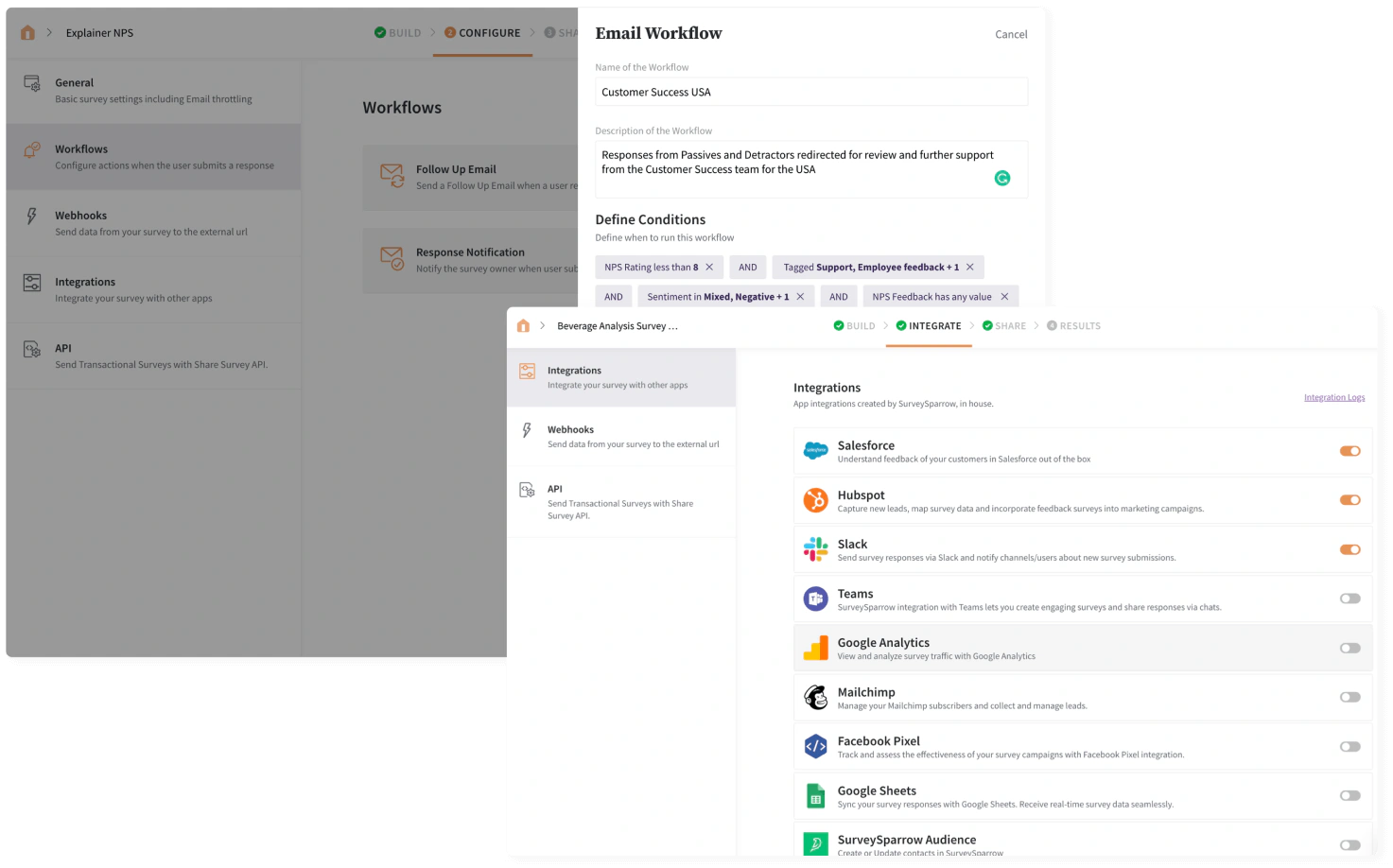
Custom workflows and webhooks can react to answers, scores, tags, or response properties. The API supports deeper application and data integration, while Zapier and n8n extend automation into additional tools. Read our Zapier review for a closer look at no-code workflow design.
Collaboration, Teams, Folders, and Roles
Business and Enterprise plans add folders, teams, roles, shared dashboards, and collaboration. Enterprise adds custom roles, SSO, audit logs, sandboxes, and stronger administration.
Implementation advice: Define who owns survey design, contact data, approval, reporting, AI interpretation, and ticket resolution. A flexible platform becomes harder to govern when every team creates its own metrics and follow-up rules.
Security, Privacy, Accessibility, and Support
Confirm compliance scope before collecting sensitive feedback
SurveySparrow’s Trust Center lists SOC 2, ISO/IEC 27001, GDPR, CCPA, HIPAA, Cyber Essentials, and CSA STAR. Verify the product, hosting, contract, and configuration in scope.
Survey and Account Security Controls
Available controls include SSL-protected surveys, password protection, IP restrictions, two-factor authentication, SSO, custom domains, audit logs, PII anonymization, response deletion controls, and role-based access. Enterprise plans can add stronger governance and HIPAA-related availability.
Privacy and Anonymous Feedback
Removing a name question does not ensure anonymity. Contact imports, tracking, device data, IP collection, variables, integrations, and tickets may still identify respondents.
Accessibility and Localization
SurveySparrow supports multilingual surveys and accessibility guidance. Enterprise includes automated translation to more than 130 languages, which should be human-reviewed for sensitive research.
Customer Support
Basic and Starter list 24×5 email support, Business adds 24×5 chat, and Enterprise includes a dedicated success manager. The Help Center covers setup and administration.
User reviews commonly praise ease of use and the conversational interface, while noting higher-tier restrictions, pricing, and occasional reporting limitations.
Alternatives
Compare engagement, research depth, and workflow breadth
Choose an alternative based on research depth, design, operational workflows, enterprise XM, or cost.
| Software | Best For | Where It Beats SurveySparrow | Where SurveySparrow Is Stronger |
| SurveyMonkey | Broad professional survey research | Mature general survey ecosystem, research workflows, and audience recruitment | Conversational collection, recurring automation, Echo AI follow-up, and closed-loop ticketing |
| Typeform | Design-led forms and lead generation | Highly polished form presentation and conversion-focused experience | NPS, offline surveys, 360 assessments, recurring programs, and feedback operations |
| Jotform | Forms, payments, approvals, and documents | Broader operational form ecosystem, app building, signatures, and workflow templates | Survey-centric CX analytics, recurring feedback, and AI text intelligence |
| Qualtrics | Large enterprise experience management | Research sophistication, enterprise governance, and broad XM depth | Faster self-service adoption and more accessible public entry plans |
| QuestionPro | Research, panels, academic, and community programs | Dedicated research tooling and established panel options | More conversational experience and stronger feedback-to-ticket workflows |
SurveySparrow vs SurveyMonkey
SurveyMonkey is stronger for broad survey research and audience recruitment. SurveySparrow stands out for conversational collection, recurring programs, AI follow-up, and ticket-based action. Read our SurveyMonkey review.
SurveySparrow vs Typeform
Typeform is better for brand presentation and lead conversion. SurveySparrow is broader for NPS, offline surveys, recurring schedules, 360 assessments, and ticket workflows. See our Typeform review.
SurveySparrow vs Jotform
Jotform is stronger for payments, documents, approvals, apps, and operational forms. SurveySparrow is better for repeated feedback, analysis, and follow-up. Read our Jotform review or the best online form builders.
SurveySparrow vs Qualtrics
Qualtrics is stronger for complex enterprise XM, advanced research, and governance. SurveySparrow is easier for mid-market teams to evaluate and deploy. Read our Qualtrics review for a detailed comparison of its research, analytics, AI, and enterprise capabilities.
SurveySparrow vs QuestionPro
QuestionPro suits research, panels, and communities. SurveySparrow fits teams that value conversational engagement and operational follow-up.
Conclusion
Final Recommendation
⭐ Overall Rating: 8.8/10
SurveySparrow combines an engaging respondent experience with recurring distribution, offline collection, CX metrics, 360 assessments, research tools, AI analysis, dashboards, integrations, and tickets.
Its strongest idea is that feedback should lead to action. Echo AI clarifies vague responses, CogniVue finds themes, and workflows route issues to accountable teams.
The tradeoff is packaging: the free plan is limited, extra users are expensive, and the platform spans separately priced products and AI capabilities.
Choose SurveySparrow when your organization needs to collect feedback repeatedly, understand why scores changed, and close the loop through workflows. Choose a simpler form builder for occasional surveys, or a specialist enterprise research platform when methodology and governance outweigh ease of adoption.
Frequently Asked Questions
Have More Questions?
What is SurveySparrow used for?
SurveySparrow is used to create conversational and classic surveys, collect customer and employee feedback, run NPS, CSAT, CES, offline and recurring surveys, manage 360 assessments, analyze text feedback, and automate follow-up.
Is SurveySparrow free?
Yes. SurveySparrow has a forever free plan with one user, three active classic surveys, ten questions per survey, and 75 responses per quarter. A 14-day trial is also available for paid features.
How much does SurveySparrow cost?
Public annual survey pricing starts at $19 per month for Basic and $39 per month for Starter. Business starts at $79 per month, while Enterprise and specialist products may require a custom quote.
What is the main advantage of SurveySparrow?
Its main advantage is the combination of engaging conversational surveys with recurring distribution, omnichannel delivery, AI follow-up, text analytics, dashboards, tickets, and workflow automation.
What is Echo AI in SurveySparrow?
Echo AI is a conversational agent that asks contextual follow-up questions. It helps uncover the reason behind a rating or vague comment instead of collecting only a surface-level response.
Can SurveySparrow work offline?
Yes. SurveySparrow supports offline and kiosk surveys for fieldwork, events, retail, clinics, and locations with unreliable internet. Responses can synchronize after the device reconnects.
Does SurveySparrow support NPS and 360 feedback?
Yes. SurveySparrow supports NPS, CSAT, CES, customer experience workflows, employee pulse surveys, and 360-degree assessments. These products may use separate plans or pricing.
Is SurveySparrow secure?
SurveySparrow lists SOC 2, ISO 27001, GDPR, CCPA, HIPAA, Cyber Essentials, and CSA STAR programs. Available controls include SSO, 2FA, SSL, IP restrictions, audit logs, and role-based access.
Is SurveySparrow better than Typeform?
SurveySparrow is better for recurring feedback, NPS, offline surveys, 360 assessments, AI text analysis, and ticket workflows. Typeform is often better for design-led forms and lead-generation experiences.
Is SurveySparrow worth paying for?
SurveySparrow is worth paying for when you will use recurring surveys, multiple channels, AI analysis, CX metrics, integrations, dashboards, or closed-loop follow-up. Simple one-off forms may not justify the cost.

- 1Who Is SurveySparrow Best For?
- 2Survey Builder and Core Features
- 3AI Features
- 4Distribution, Recurring Surveys, and Respondent Experience
- 5Specialized Feedback Programs
- 6Analytics
- 7Pros and Cons
- 8Pricing and Plans
- 9Integrations, Collaboration, and Workflow Automation
- 10Security, Privacy, Accessibility, and Support
- 11Alternatives
- 12Conclusion
- 13Frequently Asked Questions