Introduction
The modern workplace moves fast. Teams are spread across time zones, juggling remote work, hybrid schedules, and rising demands. Scattered emails, endless spreadsheets, and sticky-note chaos no longer cut it. The real question today is not whether you need project management tools, but which one actually fits the way your team works without adding new layers of frustration.
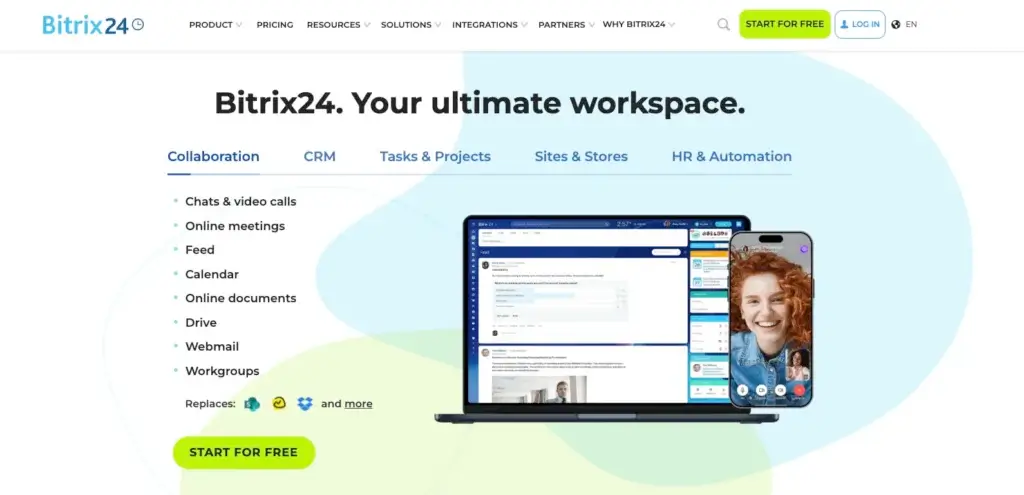
Bitrix24 stands out as a practical all-in-one solution that many teams rely on to bring order to the daily grind. It combines task and project management, CRM, team communication, file storage, and AI assistance into a single, unified platform, so you stop jumping between apps and start getting things done.
This guide walks through what project management tools really do, the main types available in 2026, the features that actually matter, how AI is changing the game, how to choose and roll out the right tool for your team with real-world examples of how Bitrix24 helps teams stay aligned and move faster.
What Are Project Management Tools?
At their best, project management tools act as a central nervous system for your team. They turn vague goals into clear tasks, show who owns what, track deadlines, and keep everyone on the same page — all in one place. No more digging through email threads or asking “Did you see my last message?”
Bitrix24 takes this idea and runs with it. Instead of forcing you to stitch together separate apps, it brings tasks, CRM contacts, chat, video calls, shared files, and automation together naturally. Data flows between sales pipelines, project boards, and team conversations without manual copying. It’s the kind of setup that feels obvious once you’re using it because everything finally lives where it belongs.
Types of Project Management Tools
Not every team needs the same level of firepower. Here’s how the landscape breaks down in 2026:
- Personal Task Managers. Lightweight tools for solo users or freelancers who need simple to-do lists and reminders. Great for individuals, but limited when collaboration kicks in.
- Team Collaboration Platforms. These blend task tracking with built-in messaging, file sharing, and calendars. Perfect for small and medium teams that need to stay connected without extra tools. Bitrix24 fits here perfectly: unlimited users even on the free plan, HD video calls, group chats, and a News Feed that quietly replaces internal email.
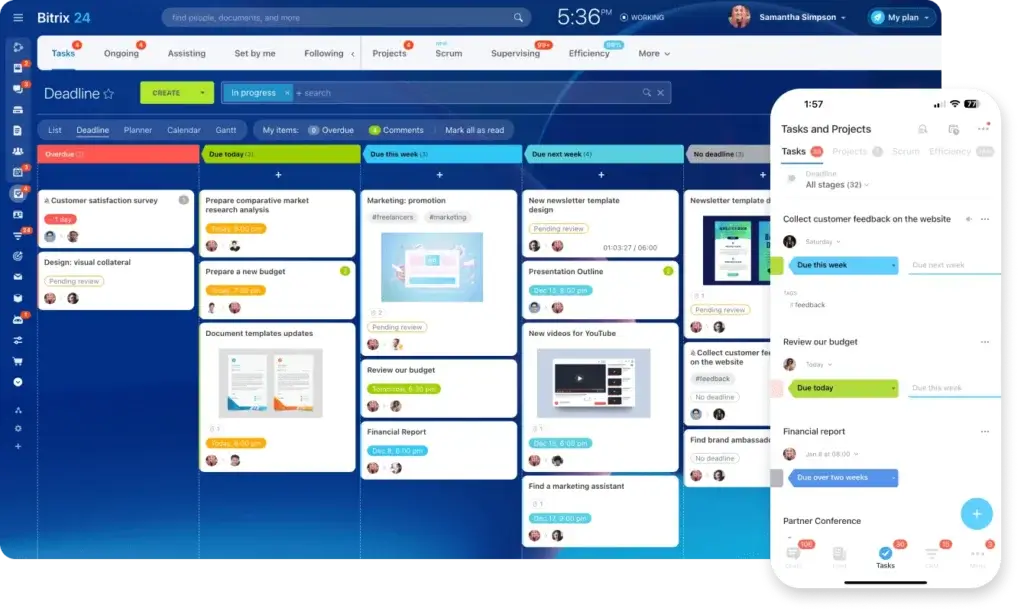
- Visual Workflow Systems. Built around Kanban boards, Gantt charts, timelines, and Scrum views to make progress visible and dependencies clear. Bitrix24 gives you all these views natively, flip between Kanban, Gantt, Scrum, and Calendar without losing a beat.
- Enterprise-Grade Solutions. Designed for large organizations with complex portfolios, resource planning, risk tracking, and strict compliance needs. Bitrix24 scales comfortably to the enterprise level with advanced permissions, audit logs, and unlimited storage on paid plans.
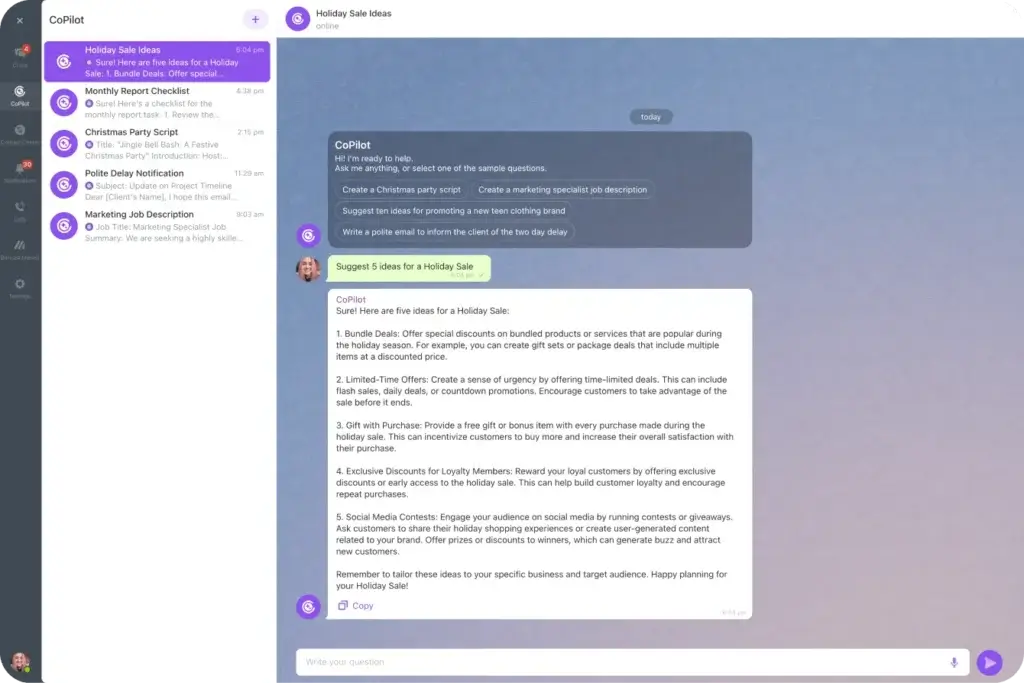
- AI-Powered Project Management Platforms. The fastest-growing category right now. These tools use artificial intelligence to handle repetitive work, spot risks early, suggest the right people for tasks, and turn raw data into useful insights. Bitrix24 CoPilot is a strong example; it summarizes long threads, drafts task descriptions, predicts delays, and lets you ask plain-English questions like “What’s overdue this week?”
Key features to look out for in 2026
In 2026 project management tools need to do more than hold tasks — they must actively reduce friction, keep everyone aligned, and free up mental space for actual work. The strongest platforms combine flexibility, visibility, and automation in a way that feels natural rather than forced. Here are the five features that consistently make the biggest difference for modern teams and how Bitrix24 delivers them in practice.
- Flexible task & workflow management. Tasks should be easy to create, assign, prioritize, and move with the ability to automate repetitive steps so work progresses without constant manual nudging. In Bitrix24, you can set up rules like “When task status changes to Completed → notify the manager and create a follow-up invoice automatically.” Once configured, these automations run silently in the background, eliminating the “I forgot to…” moments that slow teams down.
- Multiple views of the same live data. People see information differently: some want a Kanban board to track flow, others need a Gantt chart for timelines, and some prefer a calendar or list. The tool must offer all these views without duplicating data or forcing sync issues. Bitrix24 provides native Kanban, Gantt, Scrum, Calendar, and list views: all pulling from the same real-time database, so you can switch between them in seconds without losing context.
- Built-in, contextual communication Comments, mentions, files, and discussions should stay attached to the task or project — not scattered across email or separate chat apps. Bitrix24 includes instant messenger, HD video calls, group chats, and a News Feed that replaces internal email threads. Everything remains searchable and linked to the relevant task, so you never have to hunt for “that one decision from last week.”
- Secure, version-controlled file & document management. Centralized storage with permissions, version history, and locking is essential when multiple people touch the same files. Bitrix24 Drive offers unlimited storage (on paid plans), file locking, granular permissions, and direct integration with tasks and CRM, so the latest version is always one click away, and outdated attachments become a thing of the past.
- Powerful reporting & customizable dashboards. Teams need real-time visibility into progress, workload, bottlenecks, and overall health, not just for the manager, but for stakeholders too. Bitrix24 BI Builder lets you create custom dashboards pulling live data from tasks, CRM, time tracking, and more. One dashboard can show overdue items, resource overload, pipeline status, and team performance at a glance, turning raw numbers into clear, actionable stories.
These five areas — flexible workflows, consistent multi-view access, contextual communication, robust file handling, and insightful reporting form the foundation of any serious project management tool today. Bitrix24 brings all of them together in one platform without requiring separate logins or expensive add-ons, which is exactly why so many teams choose it to cut noise, stay aligned, and actually finish what they start.
The Rise of AI in Project Management
AI isn’t a gimmick anymore; it’s becoming a practical teammate. In 2026, the strongest tools use AI to cut admin time and surface insights you might otherwise miss.
Bitrix24 CoPilot, for instance, can:
- Condense long comment threads into key takeaways
- Draft task descriptions from short instructions
- Predict delays based on past patterns
- Suggest assignees according to workload and skills
- Answer natural-language questions like “Show me overdue tasks this week”
These small automations add up fast, freeing managers to focus on people and strategy instead of paperwork.
How to Choose the Right Tool for Your Team
Choosing well is half the battle. Follow this straightforward process:
- Start with Your Real Pain Points. Ask the team: What wastes the most time? Missed deadlines? Lost files? Confusing priorities? Write down must-haves vs. nice-to-haves.
- Match the Tool to Your Size and Complexity. A 5-person startup wants speed and simplicity. A 500-person company needs scalability and security. Bitrix24 supports both — a free plan with unlimited users for small teams, and enterprise-grade controls for larger ones.
- Prioritize Ease of Adoption. The best tool is the one people actually use. Look for intuitive design and quick-start templates. Bitrix24 includes ready-made templates for marketing campaigns, software development, HR onboarding, and more.
- Demand Strong Integrations.The tool must connect to email, calendars, telephony, and social channels. Bitrix24 integrates natively with Gmail, Outlook, WhatsApp, Facebook, Instagram, and over 100 other services.
- Think Long-Term Cost & Scalability. Look beyond the sticker price: factor in setup time, training, and future growth. Bitrix24 keeps pricing transparent with no hidden fees and scales smoothly.
Implementation Best Practices
Even the best tool fails without a smart rollout. Here’s what works:
- Run a Pilot First Pick one eager team to test for 2–4 weeks. Gather honest feedback and adjust before going wide.
- Map Your Processes Before You Build. Sketch workflows on a whiteboard first. Bitrix24 automation rules follow your logic exactly, so the tool supports your process, not the other way around.
- Invest in Hands-On Training. Run short, practical sessions and create quick-reference guides. Bitrix24 Academy offers free video courses and templates to speed onboarding.
- Start Simple, Then Grow. Begin with core tasks and views. Add automation, BI dashboards, and integrations as confidence builds. Small wins drive adoption faster than big overhauls.
Conclusion
The right project management tool doesn’t just organize work but also removes friction, aligns teams, and gives everyone room to focus on what matters. Bitrix24 delivers this balance: powerful task and project management, seamless communication, built-in CRM, secure file storage, and AI assistance, all in one platform that grows with you.
Teams using it report clearer priorities, faster delivery, and far less “Where are we on this?” stress. If you’re ready to replace scattered tools with something that actually fits the way you work, Bitrix24 is worth trying.
Start your free Bitrix24 account today, no credit card required, and see how much smoother your projects can run.
Frequently Asked Questions
What are project management tools and why do teams need them?
Project management tools help teams organize tasks, track progress, assign responsibilities, and collaborate in one place. Instead of relying on scattered emails or spreadsheets, teams can manage deadlines, files, and communication within a single platform. Solutions like Bitrix24 combine task management, communication, and CRM features so teams stay aligned and projects move forward more efficiently.
What features should modern project management tools include?
Modern project management platforms should include task management, collaboration tools, workflow automation, reporting dashboards, and multiple project views such as Kanban boards, timelines, and calendars. Many platforms now also include AI capabilities, file storage, and integrations with other business apps to reduce manual work and improve visibility across teams.
How does AI improve project management?
AI helps automate repetitive tasks and provide useful insights for teams. AI-powered tools can summarize discussions, suggest task assignments, predict delays, and generate reports automatically. For example, the AI assistant in Bitrix24 can analyze conversations, draft task descriptions, and highlight overdue work so managers can focus on strategy rather than administrative tasks.
What types of project management tools exist?
Project management tools generally fall into several categories: personal task managers, team collaboration platforms, visual workflow systems like Kanban or Gantt tools, enterprise project management platforms, and AI-powered solutions. The best option depends on team size, project complexity, and the level of collaboration required.
Are project management tools useful for remote and hybrid teams?
Yes. Project management tools are especially valuable for remote and hybrid teams because they centralize communication, tasks, and documents in one place. This makes it easier for distributed teams to collaborate across time zones, track progress in real time, and stay aligned without relying on constant meetings.
How do you choose the right project management tool for your team?
Start by identifying the main challenges your team faces, such as missed deadlines, unclear priorities, or poor communication. Then evaluate tools based on ease of use, integrations, scalability, and automation features. Platforms like Bitrix24 are popular because they combine multiple business tools in one system, reducing the need for separate apps.
Can small businesses benefit from project management software?
Absolutely. Small teams often benefit the most from project management tools because they simplify coordination and reduce manual processes. Many platforms offer free or affordable plans with features like task boards, chat, and file sharing, allowing growing teams to organize their work without a complex setup.
What makes Bitrix24 different from other project management tools?
Bitrix24 stands out because it combines project management, team communication, CRM, document storage, and automation in one platform. Instead of switching between multiple tools, teams can manage tasks, collaborate, track customer relationships, and automate workflows from a single workspace.