Introduction
Taskade has changed a lot since it first gained attention as a lightweight task management app. In 2026, it is better described as an AI-native workspace that combines task management, collaboration, automation, and app building in one platform.
If you are looking for a tool that can handle personal tasks, team projects, AI workflows, and even simple internal tools, Taskade offers a broader platform than many traditional to-do list apps. That wider scope is exactly what makes this review worth a closer look.
What is Taskade?
Taskade is a work management platform built around projects, AI agents, automations, and multiple project views. You can use it to manage tasks, build workflows, organize team knowledge, collaborate in real time, and create AI-powered apps such as dashboards, client portals, booking pages, and internal tools.
That means it no longer competes only with classic to-do list apps. It now sits somewhere between task management software, AI productivity software, and no-code workflow tools.
If you want to compare it with more traditional options, take a look at our guide to the best task management software.
Software specification
Core Features of Taskade
Core Features – What Taskade Does Best in 2026
Taskade’s biggest strength is that it goes beyond simple task tracking. Instead of giving you only lists and checkboxes, it gives you a connected workspace where projects, AI agents, automations, and apps all work together.
That makes the platform especially interesting for teams that want to manage work and also automate parts of it.
1. Taskade Genesis and AI app building
Taskade Genesis is now one of the most important parts of the platform. You can turn a prompt into a working app, such as a dashboard, client portal, CRM, approval workflow, booking page, or internal tool, without writing code.
For small teams, this can replace a surprising amount of manual setup. Instead of stitching together separate tools, you can create a lightweight system inside the same workspace where your tasks already live.
2. AI agents that do more than answer questions
Taskade’s AI agents are designed to act like specialized teammates. You can train them on your files, projects, links, and knowledge sources, then assign them roles for research, planning, writing, support, or operations.
This is where Taskade feels more advanced than a classic to-do list app. The agents are not just chat assistants. They can become part of real workflows.
3. Multi-agent workflows and automation
Automation is another area where Taskade has improved. You can connect triggers, actions, AI agents, and projects into multi-step workflows that run in the background.
If your team spends too much time on repetitive admin work, this feature can matter more than the task list itself. It is especially useful for lead routing, content workflows, recurring updates, and client onboarding.
4. Multiple project views for different working styles
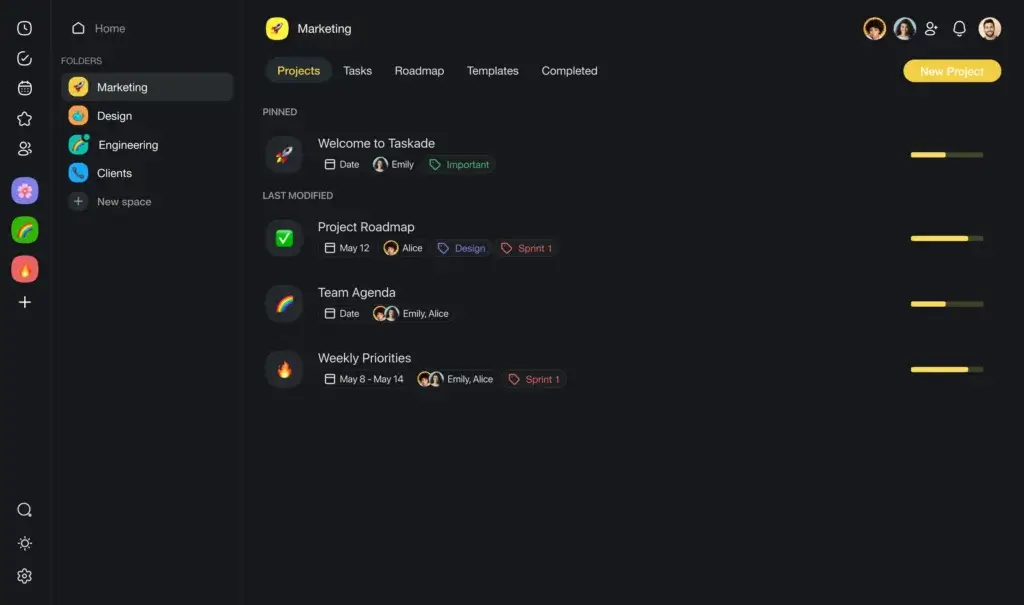
Taskade supports several ways to view the same work. You can switch between list, board, calendar, table, mind map, and other views depending on how your team prefers to plan and execute.
That flexibility is valuable in real project environments. Managers often want structure, while contributors want clarity and speed. Having multiple views helps both sides work from the same source of truth.
5. Real-time collaboration built into the workspace
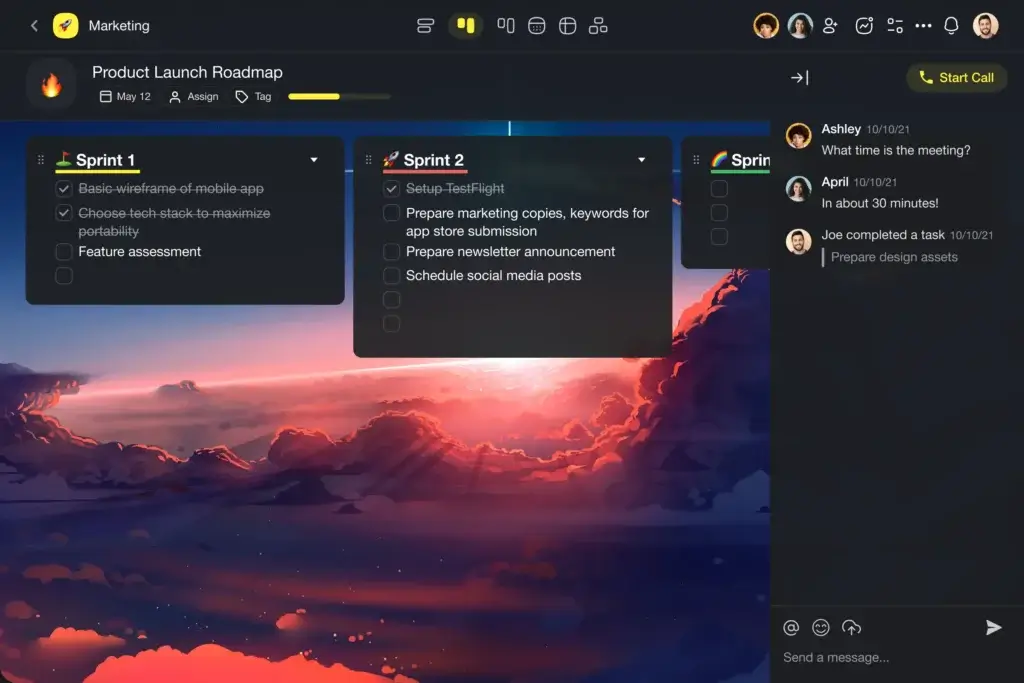
Taskade includes live collaboration features such as chat, commenting, and shared editing. This keeps project context closer to the work itself.
That may sound simple, but it matters. The fewer times your team has to jump between tools, the lower the friction in daily execution.
6. 100+ integrations and external connections
Integrations are now a much more meaningful part of the platform. Taskade supports 100+ integrations and can connect with tools such as Gmail, Google Calendar, Slack, Microsoft Teams, HubSpot, Salesforce, GitHub, Notion, Zapier, Make, n8n, Google Drive, Dropbox, and OneDrive.
This makes the platform more practical for real work management. It can connect to the systems your team is already using instead of forcing another isolated workspace.
7. Broad AI model support
Taskade also supports multiple AI models, including GPT, Claude, and Gemini. Higher plans let you choose the model per agent, which is more useful than it sounds if your team handles different types of tasks.
For example, one agent can focus on fast replies while another handles deeper research or reasoning-heavy work.
8. Cross-platform access
Taskade runs on web, desktop, and mobile, which keeps the experience consistent across devices. That matters if your workday moves between office, home, and phone.
In practice, this makes it easier to keep projects active without relying on a single device or location.
Overall, Taskade’s feature set makes the most sense if you want one workspace for planning, collaboration, automation, and AI-powered execution. If you only need a very simple to-do list, it may feel broader than necessary. If you want a more modern work hub, the extra depth is a real advantage.
Benefits of Using Taskade
Advantages and Disadvantages
Positive
✅ Strong AI-native workflow design
✅ Flexible project views and collaboration
✅ 100+ integrations and automation options
✅ Good value for small teams on Pro
Negatives
❌ Less ideal for advanced portfolio management
❌ Reporting is not as mature as enterprise PM tools
❌ Broad feature set can feel busy at first
❌ Power users may outgrow lower-tier AI credits
Taskade’s benefits are no longer limited to simple productivity gains. The platform now creates value in three main ways: it helps you organize work, automate repeated processes, and build lightweight systems around your workflows.
Pros:
- AI-native from the ground up: Taskade feels more integrated than many tools that added AI later. Agents, automations, projects, and app building are part of the same system.
- Very flexible for modern teams: It works for personal planning, small-team collaboration, content workflows, operations, and lightweight CRM or client portal use cases.
- Strong integration and automation story: With 100+ integrations and support for tools like Slack, Gmail, HubSpot, GitHub, and Zapier, it fits more naturally into an existing stack.
- Competitive value on Pro: The Pro plan includes 10 users, which makes it more appealing than many per-user task management tools for small teams.
Cons:
- Not the best choice for heavy PMO needs: If your team needs advanced portfolio controls, resource planning, deep reporting, or enterprise-grade project governance, other platforms go further.
- Can feel broad for simple users: If you only want a straightforward personal to-do list, the platform may offer more than you need.
- Learning curve is moderate now: The interface is still approachable, but the wider product scope means it can take longer to understand than older versions of Taskade.
- AI usage limits matter more now: Because the platform relies heavily on credits for AI generation, fast-growing teams may need to watch usage closely or move up plans.
In short, Taskade is strongest when you want more than task tracking. It becomes much more compelling when you use its AI agents, automations, and app-building features together.
User Experience
User Interface and Operational Simplicity
Taskade still does well in the area that first made it popular: it is approachable. The interface is modern, fast, and easier to understand than many enterprise-heavy work management tools.
At the same time, the experience has become broader. That is both a strength and a tradeoff.
Intuitive design, but no longer minimal
Taskade still feels cleaner than many project management platforms. Navigation is clear, projects are easy to open, and switching between views is straightforward.
However, the product is no longer just a simple task app. Because it now includes Genesis, agents, automations, apps, and integrations, there is more going on than in older versions. New users may need a bit more time to understand the full system.
Multiple views improve execution
One of the best parts of the user experience is the ability to change how work is displayed. Teams can move between list, board, calendar, table, and mind map views without rebuilding the same project from scratch.
That matters because different teams work differently. A content team may want a board view, while an operations team may prefer tables and workflows.
Strong collaboration inside the workspace
Taskade’s collaborative experience is practical. Shared editing, in-context communication, and real-time collaboration reduce the usual mess of switching between project tools and chat tools.
For remote or hybrid teams, this makes the product easier to adopt. Work stays visible, and communication stays closer to the actual tasks.
Useful for AI-assisted work, not just project tracking
What makes the experience different in 2026 is how closely the AI features are tied to the workspace. You are not just chatting with AI in a side panel. You are using AI to create apps, generate workflows, structure tasks, and support ongoing execution.
That gives Taskade a more future-facing feel than traditional task management software. It also means the platform is more engaging for teams willing to experiment with AI-driven workflows.
Mobile and desktop consistency
Taskade is available on web, desktop, and mobile. The cross-platform experience is one of its stronger usability points, especially for users who need to check work on the go.
It is not just a desktop-first product with a weak mobile app. The experience stays practical across devices.
Where the interface still falls short
If you are managing very large or highly structured operations, the interface can start to feel less precise than dedicated project portfolio tools. It is good at flexible work, but less specialized in enterprise control.
In other words, Taskade is easier to use than many traditional PM suites, but it is not always the strongest choice for teams that care more about control layers than flexibility.
Pricing and Plans
How much does Taskade cost?
Taskade’s pricing now reflects its wider product scope. You are no longer paying only for task management. You are paying for AI generation, app building, agents, automations, and collaboration.
That makes the pricing more interesting for teams, but it also means you should choose a plan based on how heavily you expect to use AI and automation.
- Free: Best for solo users who want to test the platform. It includes 1 user, up to 3,000 one-time AI credits, and up to 3 hosted apps.
- Starter ($6/month billed annually): Best for individuals or very small teams. It includes 3 users, 10,000 credits per month, unlimited apps, and unlimited workspaces.
- Pro ($16/month billed annually): Best for small teams that want real value. It includes 10 users, 50,000 credits per month, broader AI capabilities, and access to 100+ integrations.
- Business ($40/month billed annually): Best for growing teams that need unlimited users, 150,000 credits per month, multi-agent workflows, advanced analytics, and stronger controls.
- Max ($200/month billed annually): Best for power users and high-volume AI operations that need much higher generation capacity.
- Enterprise ($400/month billed annually): Best for larger organizations that need SSO, custom SLA, and organization-wide support.
For most readers, the real decision is between Starter, Pro, and Business. Pro looks like the pricing sweet spot if you want team collaboration plus serious AI usage. Business makes more sense when you need unlimited users and more advanced automation at scale.
Pricing can change, so it is worth checking the official page before choosing a plan.
Comparison Table: Taskade Pricing Plans
| Plan | Who It’s Best For | Users Included | AI Credits | Main Highlights |
| Free | Testing the platform solo | 1 user | Up to 3,000 one-time credits | 3 hosted apps, basic access to Taskade AI |
| Starter | Solo pros and very small teams | 3 users | 10,000/month | Unlimited apps, unlimited workspaces, AI knowledge base |
| Pro | Small teams that want the best value | 10 users | 50,000/month | 100+ integrations, broader AI tools, pay-as-you-go credits |
| Business | Growing teams and departments | Unlimited users | 150,000/month | Unlimited AI teams, multi-agent workflows, analytics |
| Max | High-volume AI builders | Unlimited users | Maximum capacity | Designed for heavy Genesis app and agent usage |
| Enterprise | Larger organizations | Unlimited users | Enterprise-scale capacity | SSO, custom SLA, dedicated support, stronger admin controls |
Security and Compliance
Enhanced Security Features in Taskade
Security is one area where you should be careful not to rely on generic marketing language. The good news is that Taskade now provides more specific information than many smaller productivity tools.
That makes it easier to judge what the platform actually offers and where it is still evolving.
Core security protections
- Encryption in transit and at rest: Taskade documents SSL/TLS encrypted connections and AES-256 backup encryption, along with message-level protection for real-time collaboration.
- Defense-in-depth architecture: The company outlines layered security across the application, database, and network stack.
- WAF and DDoS protection: The security page also references web application firewall protection and DDoS mitigation.
Authentication and identity management
- SSO support: Enterprise authentication supports SAML 2.0 with providers such as Okta, Azure AD, and Google Workspace.
- OIDC and SCIM: Taskade also documents OpenID Connect support and SCIM-based user provisioning for larger environments.
- MFA enforcement: Multi-factor authentication is part of its enterprise authentication approach.
Auditing and administrative controls
- Activity logging: Taskade says it provides complete activity logging across user actions.
- Immutable audit logs: It also documents immutable audit logs with tamper detection and exportable compliance reports.
- Security event monitoring: Real-time monitoring is part of the compliance and auditing layer.
Compliance status
- SOC 2 Type II: This is still listed as in progress, which is important to state clearly.
- CASA certification: Taskade says it is Google Cloud Application Security Assessment certified.
- GDPR, CCPA, and ISO 27001: The platform says its practices are aligned with these standards, but some areas are still described as in progress rather than fully certified.
What this means in practice
For small and mid-sized teams, Taskade’s security posture will likely be strong enough, especially if your main priorities are access control, secure collaboration, and modern authentication options.
If your organization has strict procurement or regulated compliance requirements, you should still validate the latest documentation directly with Taskade before making a final decision.
Overall, this is a better security story than many lightweight productivity tools offer. The main thing to remember is that some compliance items are still in progress, so accuracy matters when presenting them.
Taskade alternatives
What to consider before you choose
If Taskade sounds close to what you need but not quite perfect, it helps to compare it with a few alternatives. The right choice depends on whether you care more about AI workflows, classic task management, or lightweight personal productivity.
Taskade vs Todoist
If you want a cleaner and simpler task management experience, Todoist is usually easier to adopt. Taskade is the better fit if you want AI agents, more collaboration, and broader workflow possibilities.
Taskade vs TickTick
TickTick is a stronger option for personal productivity, habits, and daily planning. Taskade is more suitable for teams that want collaboration and automation in the same workspace.
Taskade vs Any.do
Any.do keeps things simple and consumer-friendly. Taskade offers more depth for project work and team-based execution.
Taskade vs OmniFocus
OmniFocus is better for advanced personal task planning on Apple-centric setups. Taskade is the stronger choice if you need shared workspaces, AI, and cross-team collaboration.
If you are still undecided, our roundup of the best task management tools gives you a broader side-by-side view.
Conclusion
Final thoughts
Taskade has evolved far beyond a traditional to-do list app. It now combines task management, collaboration, AI agents, automations, and app building in a single workspace, which makes it one of the more interesting productivity platforms to watch in 2026.
What makes it stand out is not just that it helps you organize work. It also helps you create systems around that work, whether that means automating a client flow, building a small dashboard, or giving your team AI agents that actually support execution.
Is Taskade Worth It?
Taskade is a strong option for teams that want a more modern kind of work management software. It stands out for its:
- AI-native product design that connects projects, agents, automations, and apps in one workspace.
- Flexible project views that suit both structured teams and more creative workflows.
- Good collaboration experience with real-time editing and in-context communication.
- Strong value on Pro for small teams that want more than a simple task manager.
However, it is not the perfect fit for every organization. Teams that need advanced portfolio management, deep analytics, or more mature enterprise reporting may find better options elsewhere. And if you only want a basic personal task list, the platform may feel broader than necessary.
Who Should Choose Taskade?
- Small teams that want task management plus AI agents and automation.
- Remote or hybrid teams that benefit from shared workspaces and real-time collaboration.
- Users who want to build lightweight internal tools, dashboards, or client portals without code.
Who Should Consider Alternatives?
- Users who want the simplest possible personal to-do list experience.
- Organizations that need advanced reporting, portfolio oversight, or resource planning.
- Teams with strict enterprise requirements that need fully mature compliance programs across the board.
Have more questions?
Frequently Asked Questions
What is Taskade best used for?
Taskade is best used for managing tasks, team collaboration, AI-assisted workflows, and building lightweight internal apps such as dashboards, client portals, and simple workflow tools.
Is Taskade a task management app or an AI workspace?
It is now both. While it still handles task management well, the platform has expanded into an AI-native workspace with agents, automations, and app-building capabilities.
Does Taskade offer a free plan?
Yes. Taskade offers a free plan that is suitable for testing the platform, with limited user access, a small amount of AI capacity, and a limited number of hosted apps.
Which Taskade plan is best for small teams?
For most small teams, the Pro plan is the strongest option because it includes up to 10 users and offers a better balance of AI capacity, integrations, and collaboration features.
Does Taskade integrate with other tools?
Yes. The platform supports 100+ integrations, including tools for communication, calendars, CRM, file storage, automation, and development workflows.
Can Taskade build apps without coding?
Yes. Taskade Genesis allows you to create dashboards, workflows, client portals, websites, and other lightweight apps from prompts, without writing code.
Is Taskade good for remote teams?
Yes. Its real-time editing, shared workspaces, cross-platform access, and built-in collaboration features make it well suited for remote and hybrid teams.
How secure is Taskade?
Taskade documents encryption, layered security controls, SSO support, MFA policies, audit logging, and additional compliance work in progress. Teams with strict requirements should still verify current documentation directly with the vendor.
What are the main limitations of Taskade?
Its main limitations are around advanced portfolio management, enterprise-grade reporting depth, and the fact that heavy AI use can push teams into higher pricing tiers.
What are the best Taskade alternatives?
That depends on your needs. Todoist, TickTick, Any.do, and OmniFocus are all worth considering if you want a simpler or more specialized task management experience.