
Introduction
Choosing the right ERP system can define how efficiently your company manages finance, inventory, procurement, order management, reporting, ecommerce, and customer data. In this NetSuite ERP review, you will get a practical breakdown of what the platform offers, where it performs well, where it can become complicated, and which types of businesses are most likely to benefit from it in 2026.
NetSuite ERP is a cloud-based enterprise resource planning platform owned by Oracle. It is designed to help businesses manage core operations from one connected system, including financial management, accounting, inventory, order management, procurement, CRM, warehouse operations, project accounting, ecommerce, and analytics.
The biggest value of NetSuite is its unified suite approach. Instead of connecting multiple tools for accounting, inventory, sales, ecommerce, and reporting, you can manage these functions in one cloud ERP environment. That makes NetSuite especially attractive for growing companies that have outgrown QuickBooks, spreadsheets, legacy accounting systems, or disconnected operational tools.
What Is NetSuite ERP?
NetSuite ERP is a cloud-based business management platform that centralizes financial data, operational workflows, customer information, reporting, and business processes. It helps companies automate accounting, manage orders, control inventory, track procurement, support multiple subsidiaries, and improve visibility across departments.
Unlike lightweight accounting software, NetSuite is built for companies that need broader operational control. It can support multi-entity businesses, international operations, multiple currencies, inventory-heavy companies, wholesale distribution, manufacturing, ecommerce, software companies, professional services firms, and fast-growing mid-market organizations.
Background and Positioning
NetSuite is often positioned as a cloud ERP system for growing and mid-market companies, although it can also support larger organizations. Its core strength is the combination of finance, operations, CRM, inventory, and reporting in one platform.
Because NetSuite was designed as a cloud ERP suite, it does not require the same on-premise infrastructure that older ERP systems often needed. This gives companies a more flexible way to manage ERP functionality across locations, subsidiaries, and distributed teams.
Target Users and Use Cases
NetSuite ERP is especially relevant for several buyer types:
- Growing businesses – Companies moving beyond QuickBooks or spreadsheets.
- Inventory-based companies – Wholesalers, distributors, retailers, and ecommerce brands.
- Multi-entity organizations – Companies with subsidiaries, currencies, and regions.
- Finance-led teams – Businesses needing stronger accounting, close, and reporting.
- Mid-market companies – Teams that need scalable ERP without managing servers.
NetSuite is not the best fit for every business. If your company only needs basic bookkeeping, simple invoicing, or lightweight task management, it may be more ERP than you need. It becomes more compelling when your finance, inventory, sales, fulfillment, and reporting workflows are too complex for entry-level systems.
Core ERP Features
How Does NetSuite ERP Work?
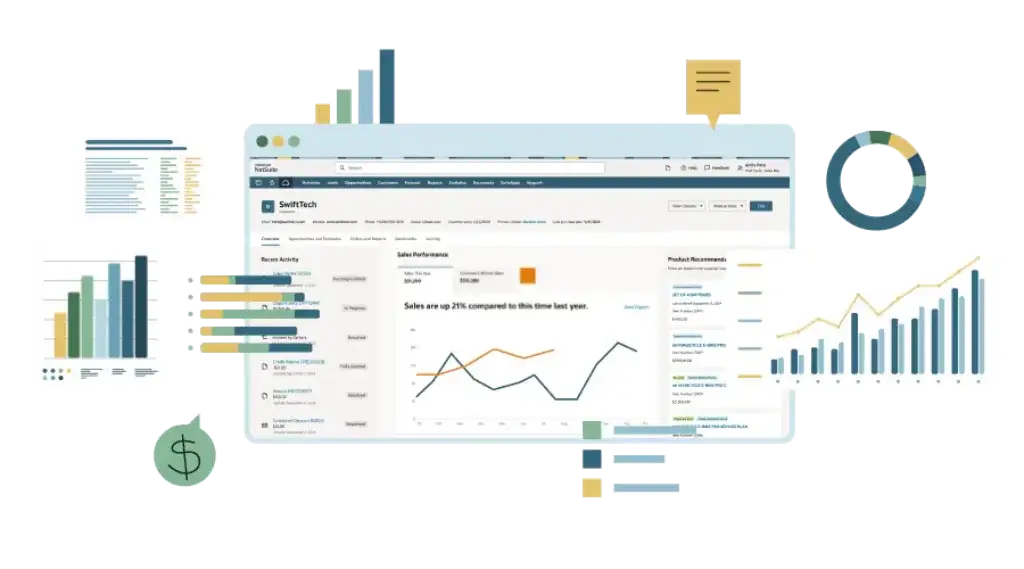
NetSuite ERP works by bringing your main business processes into one cloud system. Finance, procurement, inventory, orders, customers, projects, ecommerce, and reporting can all operate from shared data instead of separate tools.
This is important because many growing companies reach a point where disconnected systems create manual reconciliation work. Finance teams export reports from one system, operations teams manage inventory in another, sales teams use a separate CRM, and leadership struggles to trust the numbers. NetSuite helps reduce that fragmentation by creating a central business platform.
Financial Management
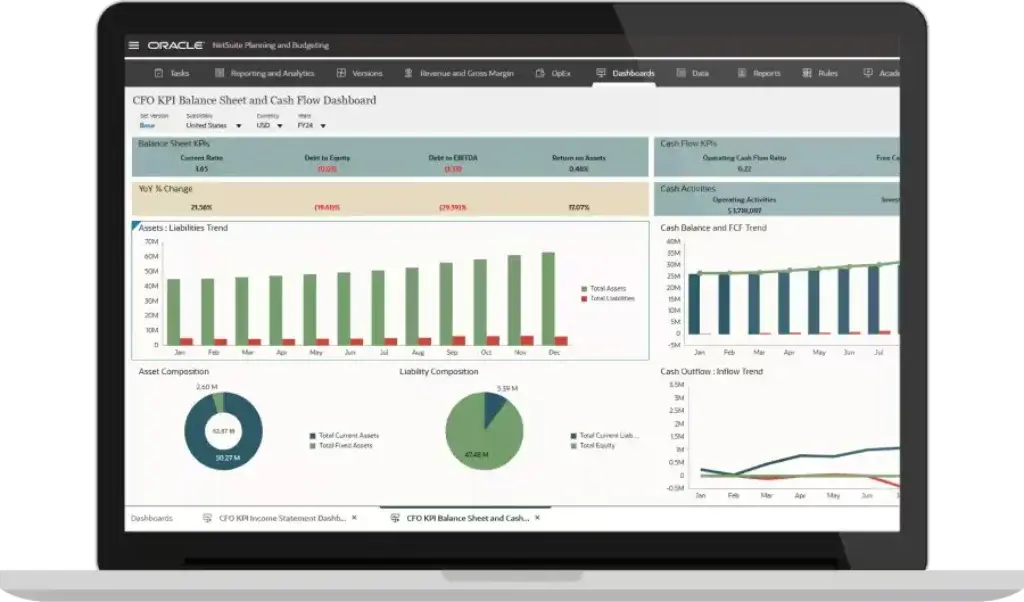
Financial management is one of NetSuite’s strongest areas. The platform supports general ledger, accounts payable, accounts receivable, cash management, fixed assets, budgeting, revenue recognition, financial consolidation, billing, reporting, and period close management.
For finance teams, the main benefit is visibility. You can track financial performance at the company level, subsidiary level, department level, or transaction level. This is useful for companies that need stronger reporting, faster close cycles, and better control over financial operations.
NetSuite is especially valuable when finance is no longer just recording transactions. If your finance team needs to support forecasting, compliance, multi-entity reporting, board reporting, operational analysis, or investor communication, NetSuite offers more depth than basic accounting tools.
Accounting and Close Management
NetSuite helps finance teams manage recurring accounting workflows such as journal entries, account reconciliation, approvals, intercompany transactions, and financial close tasks. These capabilities can reduce manual spreadsheet work and improve control over month-end and year-end close processes.
The platform is not automatically simple. Finance teams still need a clean chart of accounts, clear approval workflows, reliable data migration, and strong configuration. However, once implemented properly, NetSuite can create a much stronger accounting foundation for scaling businesses.
Inventory Management
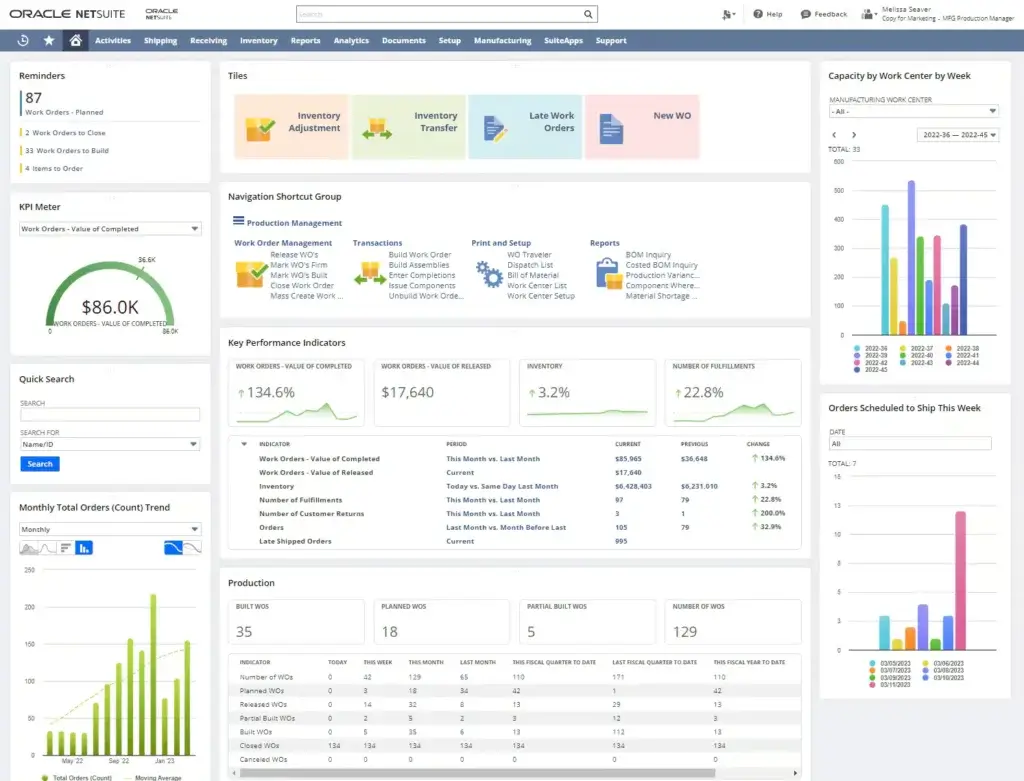
NetSuite ERP includes inventory management capabilities that help companies track items, stock levels, locations, replenishment, demand, transfers, and fulfillment. This is a major advantage for product-based companies that need better control over stock across warehouses, stores, or distribution centers.
Inventory visibility is one of the key reasons companies move to NetSuite. When finance, purchasing, sales, and fulfillment share the same inventory data, your team can make better decisions around purchasing, stock availability, customer commitments, and cash tied up in inventory.
Order Management
NetSuite supports the order-to-cash process, including sales orders, pricing, approvals, fulfillment, invoicing, billing, returns, and revenue tracking. This helps companies connect customer demand with inventory, warehouse activity, accounting, and reporting.
For businesses with high order volume, multiple channels, or complex fulfillment workflows, order management can be one of NetSuite’s biggest strengths. It reduces the need to manually move order data between ecommerce platforms, sales systems, warehouse tools, and accounting software.
Procurement and Purchasing
NetSuite helps companies manage procurement workflows such as purchase requests, purchase orders, vendor records, approvals, receiving, bills, and purchasing reporting. This gives finance and operations teams better visibility into spend and supplier activity.
Procurement becomes especially valuable when your company needs purchasing discipline. Instead of allowing teams to buy through informal processes, NetSuite can support structured approvals, vendor management, and better control over purchasing commitments.
Warehouse Management
NetSuite can support warehouse workflows such as receiving, bin management, picking, packing, shipping, and fulfillment. Companies with more advanced warehouse needs can extend NetSuite with warehouse management functionality and related modules.
This matters for distributors, wholesalers, ecommerce brands, and companies that need more accurate fulfillment. Strong warehouse processes can reduce shipping errors, improve inventory accuracy, and give customer-facing teams better information about order status.
Manufacturing and Production
NetSuite supports manufacturing use cases through modules and editions built for production, work orders, bills of materials, routing, demand planning, shop floor control, and supply planning. It can be a good fit for manufacturers that need finance, inventory, production, procurement, and reporting connected in one system.
That said, manufacturing ERP selection should be done carefully. NetSuite can work well for many light and mid-market manufacturing environments, but more complex production models may require deeper evaluation, partner expertise, and possibly industry-specific configuration.
CRM and Customer Management
NetSuite includes CRM capabilities for managing customer records, sales activity, opportunities, quotes, forecasts, interactions, and customer support data. This can be helpful if your company wants customer and financial data inside the same ERP environment.
NetSuite CRM is useful for companies that want sales and customer information tied directly to orders, invoices, inventory, and revenue. However, if your sales team needs a highly specialized CRM experience, you should compare NetSuite CRM against dedicated CRM platforms before making it your main sales system.
SuiteCommerce and Ecommerce
NetSuite can support ecommerce through SuiteCommerce, which connects online selling activity with inventory, order management, customer records, pricing, fulfillment, and financial data. This is especially valuable for brands that want ecommerce and ERP to operate from one shared data model.
For ecommerce companies, the key benefit is operational alignment. Orders, stock, customer data, pricing, and revenue can be connected without as much manual reconciliation between storefront, warehouse, and accounting systems.
AI and Automation Features
NetSuite has been expanding AI and automation across the suite. AI-related capabilities can support tasks such as content generation, bill capture, analytics, pricing narratives, and business insights, depending on the enabled features and modules.
AI in NetSuite should be viewed as an efficiency layer, not a replacement for ERP discipline. It is most useful when your company has clean data, structured workflows, and users who understand how to validate system outputs.
Reporting and Analytics
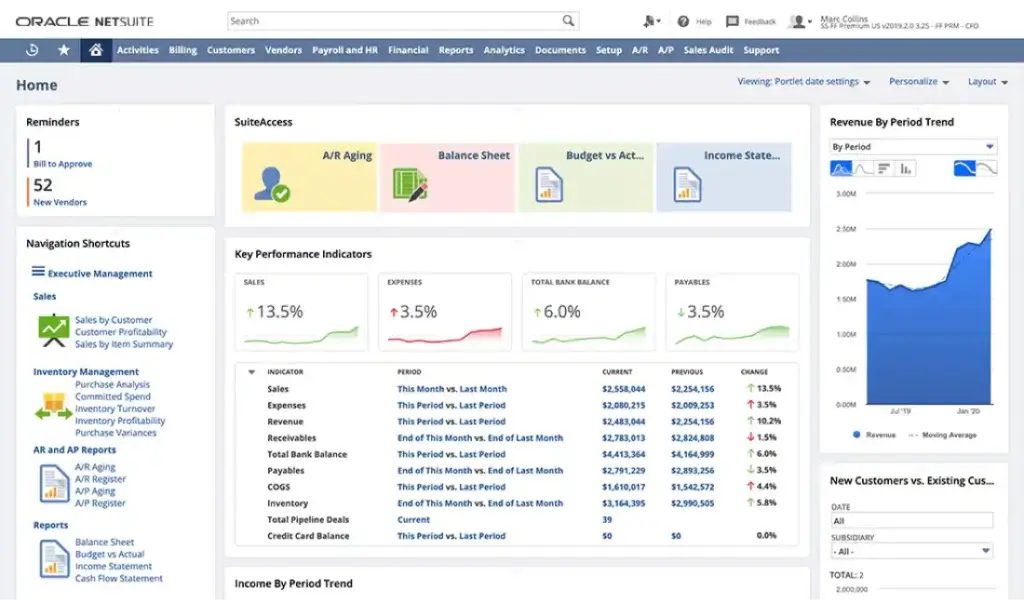
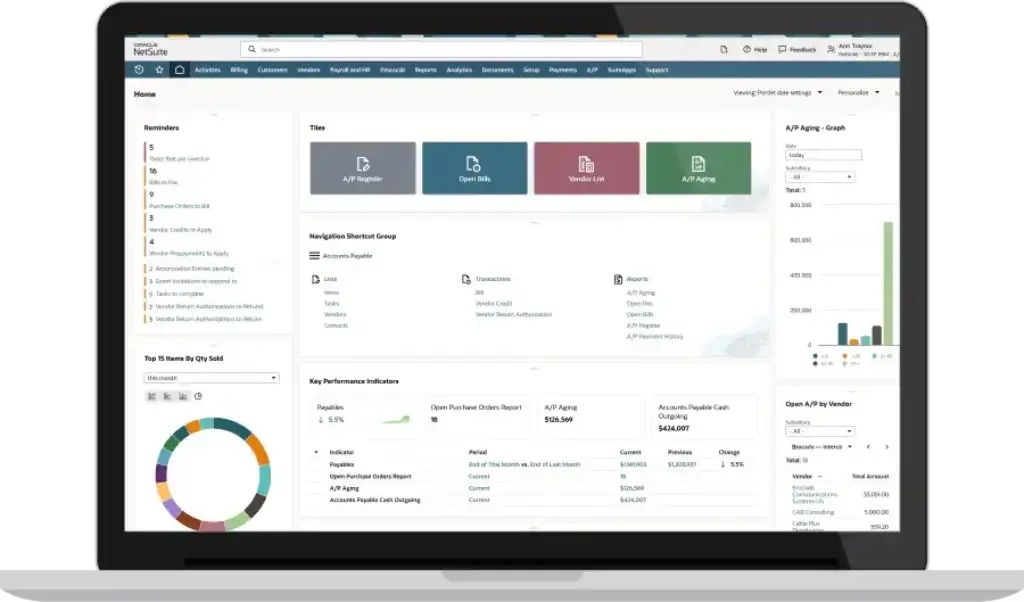
NetSuite provides reporting, saved searches, dashboards, KPIs, and analytics capabilities that help companies monitor financial and operational performance. Executives can track metrics across finance, inventory, sales, purchasing, and fulfillment.
Reporting is one of the most important reasons to invest in ERP. A system like NetSuite can help leadership move from delayed spreadsheet reporting to more current business visibility. However, reporting quality depends heavily on implementation quality, data structure, role permissions, and dashboard design.
Modules
NetSuite ERP Modules and Platform Structure
NetSuite is modular, which means the platform can be expanded as your business requirements grow. Most buyers start with core ERP and then add modules based on industry, operational complexity, and internal priorities.
This modular structure is one of NetSuite’s strengths, but it also makes the buying process more complex. You need to understand which modules are essential, which are optional, and which can be added later.
Core ERP
Core ERP includes the foundation for financial management, accounting, order management, purchasing, reporting, and operational control. This is usually the starting point for companies replacing basic accounting systems or disconnected tools.
If your main goal is to centralize finance and operations, core ERP is where the evaluation should begin. You can then decide whether inventory, warehouse, ecommerce, manufacturing, CRM, or professional services functionality is required from the start.
Financial Management
Financial management supports accounting, reporting, consolidation, billing, revenue recognition, budgeting, and financial control. This module area is especially important for CFOs, controllers, accounting teams, and companies with multi-entity financial operations.
Inventory and Order Management
Inventory and order management help companies connect stock availability, customer orders, fulfillment, purchasing, and revenue. This is a critical module area for distributors, wholesalers, ecommerce companies, and product-based businesses.
Warehouse Management
Warehouse management supports more advanced warehouse activity, including receiving, picking, packing, shipping, and inventory movement. It is best suited for companies that have warehouse complexity beyond basic stock tracking.
Manufacturing
Manufacturing functionality supports production planning, work orders, bills of materials, routing, demand planning, and supply planning. It is relevant for manufacturers that want production activity connected to finance and inventory.
CRM
NetSuite CRM supports sales force automation, customer records, opportunity tracking, quotes, forecasting, and service-related workflows. It is useful when customer-facing activity needs to connect directly with ERP data.
SuiteCommerce
SuiteCommerce connects ecommerce workflows with NetSuite’s ERP database. It can help ecommerce companies manage products, customers, orders, inventory, and fulfillment from one environment.
Professional Services Automation
Professional Services Automation supports project-based businesses that need resource management, project accounting, time tracking, expenses, billing, and profitability analysis.
Human Capital Management
NetSuite can also support HR-related workflows through SuitePeople and related workforce management functionality. This may be useful if your company wants employee data connected to broader business operations.
NetSuite Module Comparison
The table below summarizes the main NetSuite module areas and where they are most relevant.
| Module Area | Best For | Main Capabilities |
| Core ERP | Growing companies replacing disconnected systems | Finance, accounting, purchasing, orders, reporting |
| Financial Management | Finance teams and multi-entity companies | GL, AP, AR, close, consolidation, revenue, reporting |
| Inventory Management | Product-based businesses | Stock tracking, replenishment, locations, item visibility |
| Order Management | Sales, ecommerce, and distribution teams | Sales orders, fulfillment, invoicing, returns, billing |
| Warehouse Management | Distributors and fulfillment-heavy companies | Receiving, picking, packing, shipping, warehouse workflows |
| Manufacturing | Manufacturers and production teams | Work orders, BOMs, routing, planning, production control |
| CRM | Sales and customer-facing teams | Leads, opportunities, quotes, forecasts, customer data |
| SuiteCommerce | Ecommerce and omnichannel brands | Online selling, product data, orders, inventory connection |
| PSA | Project-based service companies | Projects, resources, time, expenses, billing, profitability |
Pros and Cons
Benefits and Limitations of NetSuite ERP
Positive
✅ Strong financial management
✅ Unified cloud ERP
✅ Strong inventory control
✅ Scales with growth
Negative
❌ Quote-based pricing
❌ Implementation can be costly
❌ Steep learning curve
❌ Customization requires expertise
Strengths & Benefits
NetSuite ERP has several strong advantages, especially for companies that need more than accounting software.
- Unified data – Finance, inventory, orders, CRM, and reporting work together.
- Cloud ERP – Users can access the system without on-premise infrastructure.
- Financial depth – Strong support for accounting, close, revenue, and consolidation.
- Inventory control – Useful for product-based and fulfillment-heavy businesses.
- Scalability – Modules and editions can expand as requirements grow.
NetSuite’s biggest advantage is not one single feature. It is the way the suite connects operational and financial data. This is where NetSuite becomes more powerful than standalone accounting, CRM, inventory, or ecommerce tools.
Limitations & Drawbacks
NetSuite is powerful, but it is not the simplest ERP system to buy, implement, or maintain.
- Pricing complexity – Costs depend on users, modules, edition, and contract terms.
- Implementation effort – Setup requires planning, migration, testing, and training.
- Learning curve – New users may need time to understand workflows.
- Customization cost – Advanced changes may require consultants or developers.
- Partner dependency – Implementation quality depends heavily on expert support.
My opinion is that NetSuite is one of the strongest ERP systems for growing companies with serious operational complexity. However, it should not be treated as a quick accounting upgrade. The platform works best when you have clear requirements, executive sponsorship, clean data, and a realistic implementation budget.
Operational Fit
NetSuite ERP User Experience, Support, and Security
The NetSuite user experience depends heavily on configuration, role design, dashboards, saved searches, and user training. A well-configured NetSuite environment can give teams strong visibility and process control. A poorly configured environment can feel complex and overwhelming.
Ease of Use
NetSuite is not as simple as entry-level accounting tools. It is an ERP system, which means users need to understand workflows, roles, records, transactions, approvals, dashboards, and reporting structures.
For finance and operations teams, this learning curve is often worth it. Once users understand the system, they can access much deeper information than they could in lightweight tools. For casual users, however, NetSuite may feel heavy unless dashboards and permissions are configured carefully.
Implementation Experience
Implementation is one of the most important parts of the NetSuite buying decision. A typical NetSuite implementation involves business process review, system configuration, data migration, integrations, testing, user acceptance, training, and go-live planning.
NetSuite offers SuiteSuccess, a methodology designed to help companies adopt industry-specific functionality in phases. This can speed up deployment for businesses that fit standard use cases. However, companies with unusual workflows, legacy integrations, or complex data migration needs may still require a more customized implementation.
Customer Support and Partner Network
NetSuite has a large ecosystem of implementation partners, consultants, developers, and managed service providers. This is helpful because most companies need outside expertise during implementation or optimization.
The partner you choose can have a major impact on your experience. A strong NetSuite partner can help you control scope, configure workflows correctly, design reports, train users, and avoid unnecessary customization. A weak partner can make the project slower, more expensive, and harder to adopt.
Security and Permissions
NetSuite includes role-based access controls, permissions, audit trails, and administrative controls that help companies protect sensitive data. This is essential because ERP systems contain financial, customer, supplier, inventory, employee, and operational information.
Security should be part of the implementation plan. You should define who can view, create, approve, edit, export, and delete different types of records. This is especially important for finance, procurement, payroll-related data, customer records, and executive reporting.
AI Governance Considerations
As NetSuite expands AI functionality, companies should define how AI-enabled features are used. AI can support productivity, but ERP data is sensitive. You should review user permissions, data access, approval workflows, and output validation before relying on AI-supported recommendations.
The best approach is to treat AI as a controlled assistant inside the ERP environment. It can help users work faster, but it should not replace finance controls, human review, or formal approval processes.
Pricing
NetSuite ERP Pricing & Plans
NetSuite ERP pricing is quote-based. The final cost depends on the edition, number of users, selected modules, subsidiaries, implementation scope, integrations, customizations, support needs, and contract terms.
This is an important point for buyers. NetSuite is not usually evaluated like a simple SaaS tool with three public plans and a fixed monthly price. You should review NetSuite pricing as total cost of ownership, including software subscription, implementation, migration, training, integrations, support, and future optimization.
Software Subscription
The software subscription usually depends on your edition, user count, and modules. A smaller company may need core ERP and a limited number of users. A larger company may need advanced financials, inventory, warehouse management, ecommerce, manufacturing, or professional services functionality.
Because modules can change the cost significantly, it is important to separate must-have requirements from nice-to-have functionality. Buying too many modules too early can increase cost and slow adoption.
User Licensing
User licensing is another major cost factor. Full-access users usually cost more than limited-access users. You should map who needs to create transactions, approve workflows, view dashboards, run reports, manage inventory, or administer the system.
This mapping helps prevent over-licensing. Not every employee needs the same level of access, and role-based licensing discussions can materially affect your ERP budget.
Implementation Cost
Implementation can be one of the largest cost components. It may include discovery, configuration, data migration, integrations, custom workflows, testing, training, project management, and go-live support.
Implementation cost depends on complexity. A focused financial implementation is very different from a multi-subsidiary ERP rollout with inventory, warehouse, ecommerce, manufacturing, revenue recognition, and multiple integrations.
Customization and Integrations
NetSuite can be customized through workflows, scripts, SuiteApps, integrations, and partner-developed solutions. This flexibility is valuable, but it can also increase cost and long-term maintenance requirements.
Before approving custom work, ask whether the process can be handled with standard NetSuite functionality. Customization should solve a clear business need, not recreate old legacy workflows inside a new ERP system.
Pricing Table
The table below summarizes the main cost areas you should evaluate when budgeting for NetSuite ERP.
| Cost Area | How It Works | What to Check |
| Base subscription | Quote-based ERP subscription | Edition, entities, business size, required functionality |
| User licenses | Cost varies by user type and access level | Full users, limited users, administrators, approvers |
| Modules | Optional functionality can increase cost | Inventory, WMS, manufacturing, CRM, ecommerce, PSA, HR |
| Implementation | One-time or phased project cost | Configuration, migration, integrations, testing, training |
| Customization | Additional workflows, scripts, or SuiteApps | Business case, maintenance impact, partner support |
| Ongoing support | Internal admin, partner support, optimization | Post-launch fixes, training, reporting, improvements |
For most companies, the safest pricing approach is to request a scoped quote based on real requirements. Ask vendors and partners to separate license costs, implementation costs, optional modules, integrations, and ongoing support so you can compare the full investment.
Use Cases
Who Should Use NetSuite ERP?
NetSuite ERP is best for companies that need a scalable cloud ERP system and have outgrown basic accounting or disconnected operational tools. It is most compelling when financial data, inventory, orders, customers, ecommerce, and reporting need to work together.
Growing Small and Mid-Sized Businesses
NetSuite is a strong fit for growing SMBs that need more control than QuickBooks, Xero, spreadsheets, or standalone inventory tools can provide. If your team is spending too much time reconciling data between systems, NetSuite can help centralize operations.
This is especially relevant when your business is preparing for faster growth, new entities, new sales channels, international expansion, or more complex financial reporting.
Wholesale and Distribution Companies
NetSuite is a strong option for wholesale and distribution businesses that need inventory, purchasing, order management, warehouse visibility, fulfillment, and financial reporting in one system.
For distributors, the value is in connecting stock availability, supplier activity, customer orders, fulfillment, and profitability. This can reduce manual work and improve decision-making around inventory and cash flow.
Ecommerce and Omnichannel Brands
Ecommerce companies can benefit from NetSuite when order volume, inventory complexity, and fulfillment requirements become too large for basic ecommerce back-office tools.
NetSuite becomes more valuable when ecommerce operations need to connect with accounting, purchasing, warehouse management, customer records, and multi-channel reporting.
Software and Subscription Businesses
Software companies may consider NetSuite for financial management, subscription billing, revenue recognition, reporting, and multi-entity operations. It can help finance teams manage more complex revenue models than basic accounting tools support.
This is useful for SaaS businesses that need stronger financial controls, investor reporting, deferred revenue management, and scalability as customer contracts become more complex.
Manufacturing Companies
Manufacturers can use NetSuite to connect production, inventory, procurement, finance, and reporting. It can support bills of materials, work orders, demand planning, supply planning, and production-related workflows.
However, manufacturing buyers should evaluate fit carefully. The more complex your shop floor, routing, costing, quality, or production requirements are, the more important it becomes to work with a partner that understands manufacturing ERP.
Professional Services Firms
Professional services firms can use NetSuite PSA capabilities to manage projects, resources, time, expenses, billing, and profitability. This is useful when project delivery needs to connect directly with financial performance.
If your company only needs task management, NetSuite may be too heavy. If you need project accounting, billing, resource utilization, and margin visibility, it becomes more relevant.
When NetSuite Might Not Be Right
NetSuite may not be the best option if your company wants a very low-cost system, a self-service setup, or a simple tool for basic accounting. It may also be too much if your business processes are still informal and your team is not ready for structured ERP workflows.
You should also be careful if your company lacks internal ownership. ERP projects need executive support, process owners, clean data, and user training. Without those, even a strong ERP system can become difficult to adopt.
User Feedback
NetSuite ERP Customer Reviews
User feedback for NetSuite commonly highlights the same pattern. Buyers often like the centralized data model, financial management capabilities, reporting visibility, scalability, and ability to manage multiple business processes in one ERP system.
What Users Like Most
Positive feedback often focuses on NetSuite’s ability to create a single source of truth. Finance teams can track accounting and reporting, operations teams can manage inventory and orders, and leadership can access more consistent business data.
Users also tend to value the platform’s scalability. Companies can start with core ERP functionality and expand into modules such as inventory, warehouse management, ecommerce, CRM, professional services automation, or manufacturing as their needs grow.
Common Complaints
Common complaints usually focus on cost, implementation complexity, customization effort, support experience, and the learning curve. These are not unusual for ERP software, but they are important to consider before buying.
Some users find NetSuite powerful but difficult to configure without expert help. Others mention that reporting, dashboards, or workflows need careful setup before they deliver the expected value.
My Take on the Review Pattern
The review pattern suggests that NetSuite works best for companies that are operationally ready for ERP. If your business has clear processes, committed stakeholders, and a realistic implementation plan, NetSuite can become a long-term operating system.
If your company expects a plug-and-play tool, NetSuite may feel expensive and complex. The difference is not only the software. It is the level of preparation behind the ERP project.
Competitors
Competitor Alternatives to NetSuite ERP
NetSuite competes with ERP systems such as Microsoft Dynamics 365, SAP S/4HANA Cloud, Oracle Fusion Cloud ERP, Acumatica, Sage Intacct, Odoo, Infor CloudSuite, Epicor, and SYSPRO. The best alternative depends on your company size, industry, budget, implementation resources, and operational requirements.
| Feature Type | NetSuite ERP | Microsoft Dynamics 365 | SAP S/4HANA Cloud | Odoo |
| Core angle | Unified cloud ERP suite for growing companies | Microsoft-based ERP and CRM ecosystem | Enterprise ERP for complex global operations | Modular business apps with flexible pricing |
| Best for | Mid-market finance, inventory, ecommerce, and multi-entity operations | Microsoft-first SMBs, mid-market, and enterprise teams | Large enterprises with complex process standardization | Cost-conscious teams wanting modular ERP |
| Pricing style | Quote-based subscription and modules | Published app pricing plus implementation | Quote-based enterprise pricing | Published app-based pricing options |
| Implementation complexity | Moderate to high | Moderate to high | High | Low to high depending on scope |
| Reporting strength | Strong native dashboards and SuiteAnalytics | Strong with Power BI | Strong enterprise analytics | Good, but setup-dependent |
| Overall fit | Best for unified cloud ERP growth | Best for Microsoft ecosystem alignment | Best for large global enterprises | Best for modular flexibility |
Compared with Microsoft Dynamics 365, NetSuite can feel more unified as a cloud ERP suite. Dynamics 365 is stronger if your company is deeply committed to Microsoft 365, Power BI, Teams, Azure, and the wider Microsoft ecosystem.
Compared with SAP S/4HANA Cloud, NetSuite is often more approachable for growing mid-market companies. SAP is usually a stronger fit for very large enterprises that need global process standardization and highly complex enterprise operations.
Compared with Odoo, NetSuite offers stronger mature ERP depth for finance-led and inventory-heavy companies. Odoo may be more attractive if you want a lower-cost modular starting point and are comfortable with more configuration choices.
Compared with Acumatica, NetSuite has broader market recognition and a strong cloud ERP suite position. Acumatica may appeal to companies that prefer flexible user licensing and industry editions for specific mid-market needs.
Best Practices
Getting Started with NetSuite ERP
Getting started with NetSuite ERP requires planning. The platform can create significant value, but only if you define scope, clean data, choose the right modules, and prepare your team for a structured implementation.
Start with Business Requirements
Before buying NetSuite, map your finance, inventory, procurement, order management, CRM, ecommerce, manufacturing, project, and reporting requirements. This helps you understand what must be included in phase one and what can wait.
A focused ERP rollout usually performs better than a rushed project that tries to solve every problem at once. Start with the processes that create the most operational pain or financial risk.
Choose the Right Modules
NetSuite’s modular structure is powerful, but it can also increase cost. You should identify the modules that are required for go-live and separate them from future expansion needs.
For example, a distributor may need financials, inventory, order management, and warehouse workflows early. A professional services firm may prioritize project accounting, billing, time tracking, and revenue visibility.
Select the Right Implementation Partner
Partner selection is critical. Look for a NetSuite partner with experience in your industry, business model, company size, and required modules.
Ask about implementation methodology, data migration, integrations, reporting setup, training, scope control, and post-launch support. ERP implementation is not only a technical project. It is a business transformation project.
Prepare Your Data
Data migration is one of the most common ERP challenges. Before moving to NetSuite, clean your customer records, vendor records, item records, chart of accounts, open transactions, inventory balances, and historical financial data.
Bad data can damage user trust. If teams do not trust the data after go-live, adoption becomes harder even if the system is technically working.
Train Users by Role
NetSuite training should be role-based. Finance users, warehouse users, sales users, executives, project managers, and administrators need different workflows and dashboards.
Good training focuses on real daily work. Users should understand how to complete transactions, find information, run reports, approve workflows, and avoid common mistakes.
Plan a Phased Rollout
A phased rollout is often the safest approach. You may start with core financials and order management, then expand into warehouse management, ecommerce, manufacturing, PSA, or advanced reporting later.
This approach reduces risk and gives your company time to stabilize processes before adding more complexity.
Conclusion
Final Thoughts
NetSuite ERP is one of the strongest cloud ERP systems for growing companies that need finance, inventory, order management, procurement, CRM, ecommerce, reporting, and multi-entity control in one platform.
Its biggest strengths are financial management, unified data, scalability, inventory visibility, reporting, and the ability to support multiple business models. It is especially strong for companies that have outgrown basic accounting software and need a more serious system to manage growth.
However, NetSuite is not the easiest or cheapest ERP system. Pricing is quote-based, implementation requires planning, and customization can become expensive if the scope is not controlled. The platform delivers the most value when your company has clear processes, clean data, executive support, and the right implementation partner.
Overall, NetSuite ERP is easy to recommend for growing mid-market companies, finance-led organizations, distributors, ecommerce brands, software companies, and multi-entity businesses that need a scalable cloud ERP foundation in 2026. If your business is ready for a serious ERP investment, NetSuite should be on your shortlist.
Frequently Asked Questions
Have more questions?
What is NetSuite ERP?
NetSuite ERP is a cloud-based enterprise resource planning platform from Oracle. It helps companies manage financials, accounting, inventory, order management, procurement, CRM, ecommerce, reporting, and operational workflows from one connected system.
Is NetSuite a good ERP system?
Yes. NetSuite is a strong ERP system for growing companies that need cloud financial management, inventory control, order management, multi-entity reporting, and scalable business operations. It is most valuable when your company has outgrown basic accounting software or disconnected tools.
Who is NetSuite ERP best for?
NetSuite ERP is best for growing small and mid-sized businesses, distributors, ecommerce brands, software companies, manufacturers, professional services firms, and multi-entity organizations that need finance and operations connected in one cloud ERP platform.
How much does NetSuite ERP cost?
NetSuite ERP pricing is quote-based. The final cost depends on your edition, number of users, selected modules, subsidiaries, implementation scope, integrations, customizations, support needs, and contract terms. Buyers should evaluate total cost of ownership, not only license cost.
Does NetSuite ERP include CRM?
Yes. NetSuite includes CRM capabilities for customer records, opportunities, quotes, sales activity, forecasts, and customer interactions. However, companies with advanced sales requirements should compare NetSuite CRM against dedicated CRM platforms before choosing it as their main sales system.
Does NetSuite support inventory management?
Yes. NetSuite supports inventory management, item tracking, stock visibility, locations, replenishment, transfers, purchasing, order fulfillment, and related warehouse workflows. This makes it a strong option for distributors, ecommerce companies, wholesalers, and product-based businesses.
Does NetSuite ERP support manufacturing?
Yes. NetSuite can support manufacturing workflows such as work orders, bills of materials, routing, production planning, demand planning, and supply planning. Manufacturing buyers should evaluate fit carefully, especially if they have complex shop floor, costing, quality, or production requirements.
Is NetSuite easy to use?
NetSuite is powerful, but it has a learning curve. It becomes easier to use when dashboards, roles, workflows, and permissions are configured properly. Most companies should plan for user training, administrator ownership, and post-launch optimization.
What are the best NetSuite alternatives?
The best NetSuite alternatives include Microsoft Dynamics 365, SAP S/4HANA Cloud, Oracle Fusion Cloud ERP, Acumatica, Sage Intacct, Odoo, Infor CloudSuite, Epicor, and SYSPRO. The right alternative depends on company size, industry, budget, and ERP requirements.
Is NetSuite worth it?
NetSuite is worth considering if your company needs a scalable cloud ERP system for financials, inventory, order management, reporting, and multi-entity operations. It may not be worth it for very small companies that only need simple bookkeeping or basic invoicing.