Introduction
If your team is struggling with scattered messages, missed updates, and too many disconnected tools, Slack is probably one of the first platforms you will consider.
Slack is one of the most recognizable business communication tools in the world. It helps teams organize conversations into channels, reduce internal email, collaborate with external partners, and connect daily communication with the apps your company already uses.
But Slack has changed. It is no longer only a team chat app.
With Slack AI, Lists, Canvas, Workflow Builder, Huddles, Slack Connect, and deeper Salesforce integrations, Slack now positions itself as a broader work hub for teams that want faster communication and more connected workflows.
That makes this Slack review more important than a simple feature overview. The real question is whether Slack is still worth the price in 2026, especially when alternatives like Microsoft Teams, Google Chat, ClickUp Chat, Pumble, and Zenzap compete for the same space.
In this review, you will learn:
- What Slack does well for team communication
- Where Slack becomes expensive or noisy
- How Slack AI changes the value of each plan
- Whether Slack can support project management workflows
- How Slack compares with ClickUp Chat, Zenzap, and other alternatives
By the end, you will know whether Slack is the right business chat tool for your team, or whether a more focused alternative would fit your workflow better.
Overview
Best For, Limits, and Recommendations
Slack is best for teams that need fast internal communication, searchable conversations, strong integrations, and flexible collaboration across departments.
It is especially strong for remote teams, software teams, marketing teams, agencies, startups, and enterprise organizations that want communication to happen in shared channels rather than long email threads.
However, Slack is not always the best fit for every company. If your main need is structured project management, low-cost messaging, or advanced video meetings, another platform may be more practical.
| Category | Slack Review Summary |
| Best for | Teams that need organized chat, channels, integrations, and AI-powered collaboration |
| Not ideal for | Teams that need full project management, advanced video meetings, or the lowest-cost chat tool |
| Best plan for most teams | Pro for small teams, Business+ for AI, security, and admin controls |
| Biggest strength | Fast communication connected to thousands of business apps |
| Biggest weakness | Notification overload and rising cost as teams grow |
| Best alternatives | Microsoft Teams, Google Chat, ClickUp Chat, Pumble, and Zenzap |
My recommendation is simple: Slack is still one of the best business chat platforms if your team will actively use channels, integrations, search, Huddles, and workflow automation. If your team only needs basic messaging, Slack may feel expensive compared with simpler alternatives.
What Is Slack?
Slack is a business messaging and collaboration platform that helps teams communicate in organized workspaces. Instead of relying on long email chains or scattered direct messages, teams use Slack channels to keep conversations grouped by project, department, client, topic, or workflow.
At its core, Slack works as a digital headquarters for communication. Your team can send messages, share files, start quick audio or video conversations, automate repetitive work, and connect apps like Google Drive, Zoom, Jira, Asana, Salesforce, GitHub, Trello, and ClickUp.
Slack was launched in 2013 and was later acquired by Salesforce. Since then, it has become more than a workplace chat tool. Slack now includes AI summaries, AI search, Canvas docs, Lists for project tracking, Workflow Builder automations, Slack Connect for external collaboration, and enterprise-grade security features.
Why Teams Use Slack
- Centralized communication: Channels keep project and team conversations organized.
- Faster collaboration: Huddles, messages, and threads reduce slow internal email.
- Flexible workflows: Teams can connect Slack with thousands of business apps.
- Async-friendly updates: Threads, scheduled messages, recaps, and search help distributed teams stay aligned.
- External collaboration: Slack Connect lets teams work with clients, vendors, and partners.
Slack is popular because it fits how modern teams actually communicate. You can use it for quick decisions, project updates, company announcements, troubleshooting, client collaboration, internal support, and cross-functional work.
Still, Slack works best when teams use it intentionally. Without clear channel rules, notification settings, and workflow discipline, Slack can quickly become another noisy app.
Software Specification
Slack Core Features
Slack’s greatest value lies in how its features work together. Messaging, channels, Huddles, Canvas, Lists, search, and integrations create a connected workspace that can support everyday communication and lightweight work management.
Channels and Direct Messages
Channels are the foundation of Slack. A channel is a dedicated space for a topic, project, team, customer, department, or workflow.
You can create public channels for transparent company-wide discussions and private channels for sensitive work. Direct messages are available for one-on-one or small group communication.
- Public channels help everyone follow relevant company updates.
- Private channels support leadership, HR, finance, or client-sensitive discussions.
- Threads keep replies attached to the original message.
- Mentions notify the right person or group when action is needed.
This structure makes Slack much more organized than a traditional group chat app. Instead of one long stream of mixed conversations, your team can build communication around how work actually happens.
Slack Huddles
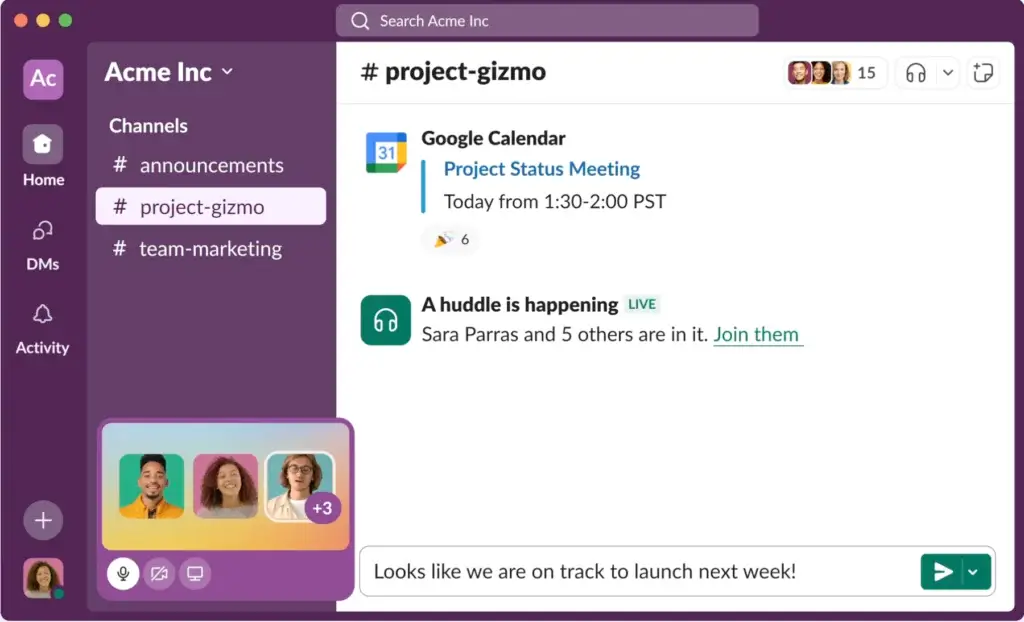
Slack Huddles are lightweight audio or video conversations that can start inside a channel or direct message. They are useful when a written conversation becomes too slow or too complicated.
You can use Huddles for quick standups, troubleshooting, brainstorming, and informal check-ins. Huddles are not a full replacement for Zoom or Google Meet, but they are convenient for fast collaboration without scheduling another meeting.
Slack Clips
Clips let users record short audio, video, or screen updates. This is useful for async teams because someone can explain an idea, share a walkthrough, or give a project update without requiring everyone to join a live meeting.
For remote teams, Clips can reduce unnecessary calls while still giving communication more context than text alone.
Slack Connect
Slack Connect allows your team to collaborate with people outside your company. This can include clients, agencies, vendors, contractors, and partner organizations.
Instead of pushing every external conversation into email, Slack Connect lets approved external users join shared channels or direct messages. For agencies, sales teams, partnerships teams, and customer success teams, this can make external communication faster and easier to track.
Canvas
Canvas is Slack’s lightweight documentation feature. You can use it to create project briefs, meeting notes, onboarding guides, checklists, links, and shared resources inside Slack.
Canvas is helpful because documentation lives next to the conversation. If a channel is used for a marketing campaign, the canvas can hold the campaign brief, launch checklist, key links, and decisions.
Canvas will not replace a full knowledge base for every company, but it is a practical way to keep lightweight documentation close to daily work.
Lists
Lists are one of Slack’s most important newer features because they move Slack closer to work management. With Lists, teams can track tasks, requests, approvals, project updates, and action items directly inside Slack.
This is useful for simple workflows such as campaign checklists, content calendars, bug triage, customer requests, onboarding tasks, and internal operations.
However, Lists should not be confused with a full project management platform. If you need dependencies, workload management, Gantt charts, time tracking, portfolio reporting, or advanced project dashboards, a dedicated tool like ClickUp, monday.com, Asana, or Jira will usually be a better fit.
Workflow Builder
Workflow Builder allows teams to automate repetitive work without code. You can create workflows for approvals, intake forms, reminders, onboarding, daily check-ins, handoffs, and routine requests.
Slack now also includes AI-assisted workflow generation in some plans, which makes it easier to build automations from plain-language instructions.
This is one of Slack’s strongest productivity features because it turns the platform from a chat tool into a workflow layer.
Integrations
Slack’s app ecosystem is one of its biggest advantages. Slack connects with more than 2,600 apps, including tools for project management, file storage, sales, development, automation, customer support, analytics, and AI.
- Project management: Asana, Trello, Jira, ClickUp, monday.com
- File storage: Google Drive, Dropbox, OneDrive, Box
- Meetings: Zoom, Google Calendar, Outlook Calendar
- Sales and CRM: Salesforce, HubSpot, Pipedrive
- Development: GitHub, GitLab, PagerDuty, Jira
The practical benefit is context. Instead of jumping between multiple tools to understand what changed, your team can receive updates, alerts, comments, and workflow triggers directly in Slack.
Search and Message History
Slack search helps users find messages, files, links, conversations, and app updates. On paid plans, message history is fully searchable, which makes Slack more useful as a long-term knowledge archive.
On the Free plan, search access is limited to recent message history. This is one of the main reasons growing teams eventually upgrade.
Slack AI Features
AI Search, Summaries, Recaps, and Slackbot
Slack AI is now one of the most important reasons to reconsider Slack in 2026. The platform is moving beyond messaging and into AI-assisted work, with features that help teams summarize conversations, search company knowledge, generate workflows, and reduce the time spent catching up.
AI Conversation Summaries
Slack AI can summarize conversations and threads so you do not need to read every message manually. This is especially useful in busy channels where decisions, blockers, and updates happen throughout the day.
For managers, sales teams, support teams, and project leads, summaries can reduce the friction of catching up after meetings, time off, or focused work sessions.
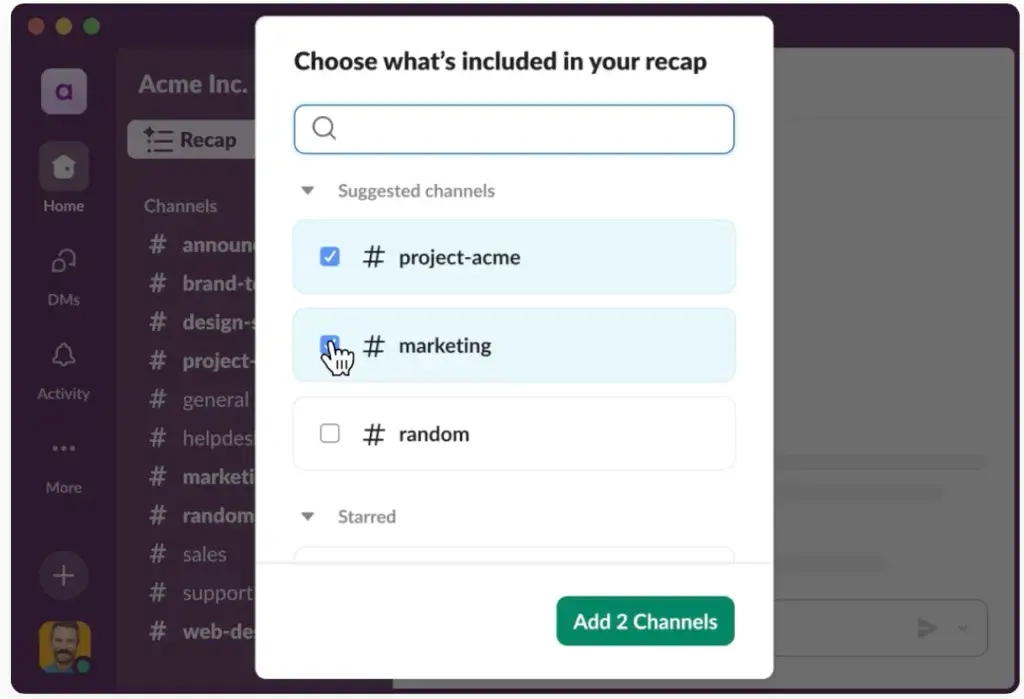
AI Daily Recaps
Daily recaps help users stay informed about selected channels. Instead of checking every channel individually, you can get a summarized view of important updates.
This feature is particularly useful for leadership, operations, and cross-functional teams that need visibility without constant notifications.
AI Search Answers
Slack’s AI search can help users ask questions in natural language and receive answers based on accessible workspace content.
This is a major improvement over traditional keyword search because users do not always remember the exact phrase, file name, or channel where information was shared.
AI File Summaries
Slack AI can summarize files shared in Slack, helping users understand documents faster. This is useful when teams share briefs, reports, proposals, technical notes, meeting documents, and client materials.
AI Workflow Generation
Workflow Builder can use AI to help create automations faster. Instead of manually building every step, users can describe what they want to automate and use Slack to generate a workflow.
This can help non-technical teams automate routine processes such as approvals, request collection, project updates, reminders, and onboarding steps.
Slackbot as an AI Assistant
Slackbot is becoming more useful as a personal AI assistant inside Slack. It can help users find answers, summarize information, and interact with work happening across Slack and connected systems.
This matters because many teams already spend a large part of their workday inside Slack. When AI is built into the communication layer, users do not need to open another tool to get help.
Important AI Limitation
Slack AI is most valuable when your team already uses Slack heavily and keeps important work inside channels, files, canvases, lists, and integrations.
If your team barely uses Slack, or if most of your knowledge lives in separate tools without proper integrations, the AI features may feel less powerful.
Pros and Cons
Advantages and Disadvantages
Slack is a strong collaboration platform, but it is not perfect. Its biggest strengths are speed, integrations, and flexibility. Its biggest weaknesses are cost, noise, and the need for good internal communication rules.
Positive
✅ Excellent channel-based communication
✅ Large app integration ecosystem
✅ Useful AI summaries and search
✅ Strong support for remote and hybrid teams
✅ Flexible workflows with Canvas, Lists, and automation
✅ Scalable security and admin controls
Negative
❌ Can become noisy without clear rules
❌ Paid plans get expensive at scale
❌ Not a full project management platform
❌ Video meetings are lighter than Zoom or Teams
❌ Free plan is limited for long-term knowledge
❌ Advanced AI and enterprise controls require higher plans
Slack Pros
1. Slack is easy to adopt
Slack has a clean interface that most users understand quickly. Channels, direct messages, mentions, reactions, and threads feel familiar, which makes onboarding easier than many enterprise collaboration tools.
2. Channels keep communication organized
Slack’s channel structure is one of its biggest advantages. Teams can create dedicated spaces for projects, departments, clients, announcements, support, sales deals, product launches, and internal operations.
3. Slack has one of the best integration ecosystems
Slack connects with thousands of tools, which makes it useful as a communication layer across your existing software stack. This is where Slack often beats smaller chat apps.
4. Slack AI makes busy workspaces easier to manage
AI summaries, recaps, file summaries, search answers, and workflow generation can help teams reduce time spent catching up and searching for context.
5. Slack supports remote and hybrid teamwork
Scheduled messages, threads, Huddles, Clips, Canvas, and flexible notification settings make Slack practical for distributed teams across different time zones.
6. Slack can support lightweight work management
With Lists, Canvas, templates, and Workflow Builder, Slack can now support simple task tracking, project coordination, and process automation.
Slack Cons
1. Slack can become noisy
Slack is powerful, but it can create too many notifications if your team does not manage channels carefully. Large workspaces need clear rules around mentions, announcements, threads, and channel ownership.
2. Slack can get expensive
The Free plan is useful for testing Slack, but most serious teams eventually need a paid plan. As your team grows, per-user pricing becomes a meaningful budget consideration.
3. Slack is not a full project management tool
Lists are useful, but Slack does not replace a dedicated project management platform for complex workflows, workload planning, dependencies, advanced reporting, or portfolio-level visibility.
4. Huddles are not as advanced as dedicated meeting tools
Slack Huddles are excellent for quick calls, but teams that need webinars, advanced recording controls, large meetings, breakout rooms, or deep meeting administration may still prefer Zoom, Google Meet, or Microsoft Teams.
5. Free plan limitations matter
The Free plan limits searchable message history and app usage. For teams that rely on Slack as a knowledge base, those limits can become a problem quickly.
User Experience
User Interface and Experience
Slack’s user experience is one of the main reasons it became so widely adopted. It feels lightweight enough for quick conversations, but flexible enough for advanced teams that want shortcuts, automation, integrations, and multi-workspace navigation.
Desktop and Web Experience
The desktop and web versions of Slack are almost identical. The left sidebar shows your workspaces, channels, direct messages, apps, and saved sections. The central area displays the active conversation, canvas, list, or workflow.
The interface is easy to understand, but it can become crowded in large teams. That is why custom sidebar sections, channel naming rules, and notification discipline are important.
Mobile App Experience
Slack’s mobile app is strong for quick replies, notifications, approvals, Huddles, and urgent updates. It syncs well with desktop activity and makes it easy to stay connected while away from your desk.
That said, mobile is not ideal for deep searching, long threaded conversations, or heavy file review. For serious work, the desktop experience remains better.
Notifications and Focus
Slack gives users control over notifications, keywords, do-not-disturb settings, channel alerts, and mentions. These controls are important because Slack can become distracting if every update feels urgent.
For best results, teams should define when to use channels, when to use threads, when to mention people, and which channels should be treated as high-priority.
Search and Navigation
Slack’s search experience is useful, especially on paid plans with full message history. Users can search by keyword, person, channel, file, and date range.
AI search improves this further by helping users ask questions and find answers without remembering exact keywords.
Pricing and Packages
Slack Pricing and Plans
Slack offers a Free plan and several paid plans for growing teams, larger businesses, and enterprise organizations. The main paid plans are Pro, Business+, and Enterprise+.
The most important pricing update is that Business+ now costs more than it used to, and Slack has introduced Enterprise+ for organizations that need advanced AI, Salesforce integrations, governance, and security capabilities.
Pricing can vary by region and billing method, so you should always check Slack’s official pricing page before purchasing. The table below summarizes the main plan differences for business buyers.
| Plan | Typical Price | Best For | Key Features |
| Free | $0 | Very small teams testing Slack | 90-day searchable message access, one-to-one Huddles, limited app integrations, basic AI access |
| Pro | Starts around $7.25 per user/month annually | Small teams that need full history and more integrations | Unlimited message history, unlimited app integrations, group Huddles, Slack Connect, Canvas, Lists |
| Business+ | Starts around $15 per user/month annually | Growing businesses that need AI, admin, and security features | Advanced AI, SSO, SCIM, audit logs, data exports, priority support, advanced workflow features |
| Enterprise+ | Custom pricing | Large organizations with complex governance and AI needs | Enterprise AI, Enterprise Search, advanced Salesforce integrations, governance, compliance, admin controls |
Slack Free Plan
The Free plan is best for very small teams, freelancers, or companies that want to test Slack before committing to a paid plan.
You get channels, direct messages, one-to-one Huddles, file sharing, limited app integrations, and access to recent message history. However, the Free plan is not ideal if Slack will become your long-term knowledge archive.
If your team needs complete message history, more integrations, or serious collaboration workflows, the Free plan will likely feel limited.
Slack Pro Plan
Pro is the best starting point for most small teams that use Slack every day. It unlocks full message history, unlimited app integrations, group Huddles, Slack Connect features, and stronger collaboration tools.
For agencies, startups, remote teams, and growing departments, Pro often provides the best balance between cost and functionality.
Slack Business+ Plan
Business+ is designed for teams that need stronger administration, security, support, and AI-powered work features. It is a better fit for mid-sized organizations, regulated teams, and companies that need more control over users, access, and data.
Business+ is also where Slack’s newer AI and Salesforce-related value becomes more important. If your team uses Salesforce heavily, Business+ may be more attractive than it used to be.
Slack Enterprise+ Plan
Enterprise+ is built for large companies that need advanced AI, governance, security, compliance, admin controls, and enterprise search across connected systems.
This plan is most relevant for organizations with multiple departments, complex permissions, security requirements, external collaboration needs, and a large amount of knowledge spread across Slack and connected tools.
Which Slack Plan Should You Choose?
Choose Free if you only need basic chat for a small team. Choose Pro if Slack is becoming part of daily work. Choose Business+ if you need AI, stronger admin controls, and better support. Choose Enterprise+ if Slack is becoming a company-wide collaboration platform with governance, compliance, and enterprise search requirements.
For most business teams, Pro is the practical entry point. Business+ is better when Slack becomes mission-critical.
Security and Compliance
Is Slack Safe for Business Use?
Security is one of the most important parts of any Slack review because team chat often contains sensitive internal conversations, customer details, files, product plans, sales updates, and operational decisions.
Slack includes enterprise-grade security features, but the exact controls available depend on your plan. Larger organizations will usually need Business+ or Enterprise+ to access advanced administration, identity management, compliance, and governance features.
Core Security Features
- Encryption at rest and in transit
- Administrative access controls
- SAML-based single sign-on on higher plans
- SCIM user provisioning on higher plans
- Audit logs and data exports on advanced plans
- Data loss prevention and enterprise controls on enterprise plans
Compliance and Data Governance
Slack provides resources for privacy and compliance programs, including GDPR, CCPA, FedRAMP, data residency, and other enterprise requirements.
For healthcare and regulated industries, Slack can be configured to support HIPAA-compliant message and file collaboration on Enterprise plans. However, compliance is not automatic. Your organization still needs the right plan, configuration, policies, permissions, and internal controls.
Enterprise Key Management
Slack Enterprise Key Management gives eligible enterprise customers more visibility and control over how organizational data is accessed. This is especially relevant for companies with strict security, compliance, or legal requirements.
Slack AI and Permissions
Slack AI is designed to respect user permissions. That means users should only receive AI-generated answers from information they are allowed to access.
This is important for enterprise trust, especially when AI search and summaries are used across channels, files, and connected systems.
Common Praise and Complaints
User Feedback and Reviews
User feedback around Slack is generally positive, especially from teams that rely on real-time communication, integrations, and remote collaboration.
The most common praise is that Slack reduces internal email, keeps teams aligned, and makes communication easier to search. The most common complaints are notification overload, cost, and the feeling that important information can still get lost in busy channels.
| User Feedback Theme | What Users Like | Common Concern |
| Ease of use | Simple interface and fast onboarding | Large workspaces can feel cluttered |
| Collaboration | Channels, threads, reactions, Huddles, and Slack Connect | Too many messages can create distraction |
| Integrations | Strong app marketplace and workflow connections | Too many integrations can create noisy alerts |
| AI and search | Summaries and search help teams catch up faster | Best value depends on plan and workspace usage |
| Pricing | Free and Pro plans are accessible for small teams | Business+ and enterprise costs can add up quickly |
What Users Love About Slack
Easy communication
Many teams like Slack because it feels faster and more natural than email. Channels make conversations easier to follow, while reactions and quick replies reduce unnecessary back-and-forth.
Strong integrations
Users often value Slack because it brings updates from other tools into one place. This is especially helpful for development, support, sales, marketing, and operations teams.
Useful for remote teams
Remote and hybrid teams benefit from async updates, Huddles, scheduled messages, and searchable context.
Common Complaints
Notification overload
Slack can become distracting if every channel feels urgent. Teams need clear communication rules to avoid burnout.
Cost at scale
Slack is affordable for small teams, but costs rise quickly when you add many users across departments.
Information can still get buried
Even with search and AI, important updates can disappear inside busy channels if teams do not use threads, pins, canvases, lists, and naming conventions properly.
Slack for Project Management
Lists, Canvas, and Workflow Builder
Slack can support project management, but it should be viewed as a lightweight project coordination tool rather than a full project management platform.
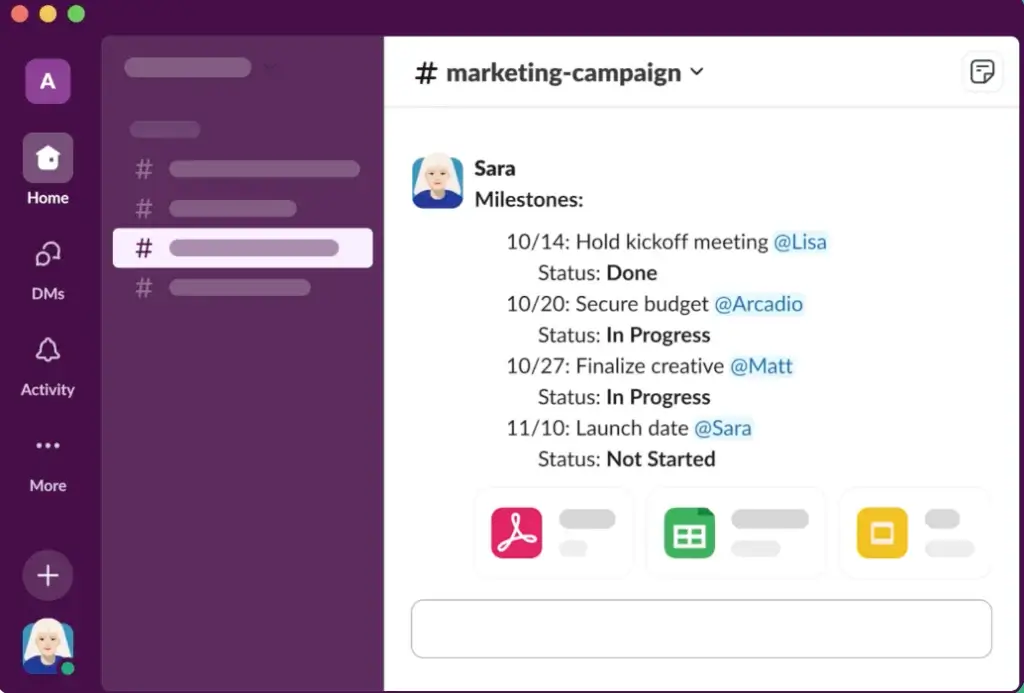
For simple workflows, Slack can work very well. Teams can discuss work in channels, track action items in Lists, document briefs in Canvas, automate requests with Workflow Builder, and connect dedicated project management apps through integrations.
When Slack Works for Project Management
- Simple campaign tracking
- Internal request intake
- Small team task lists
- Client communication channels
- Bug triage and support coordination
- Meeting notes and lightweight project briefs
Where Slack Falls Short
Slack is not the best standalone project management tool if your team needs advanced planning. It does not offer the same depth as ClickUp, Asana, monday.com, Jira, Teamwork, or Wrike for structured work management.
If you need timelines, dependencies, workload capacity, advanced dashboards, time tracking, approvals, budget management, or portfolio reporting, Slack should be used alongside a dedicated project management system.
The best setup for many teams is to use Slack for communication and a project management platform for structured execution.
Slack VS Alternatives
Comparison with Other Software
Slack is one of the strongest business chat tools, but it is not always the best choice. The right alternative depends on your tech stack, budget, communication style, and whether you want chat to be separate from project management.
If you want a broader view of the market, you can also read our best Slack alternatives guide.
| Tool | Best For | Where It Beats Slack | Where Slack Is Stronger |
| Microsoft Teams | Microsoft 365 organizations | Meetings, Office apps, bundled value | Channel flexibility, integrations, user experience |
| Google Chat | Google Workspace teams | Gmail, Drive, Docs, and Meet integration | App ecosystem, automation, team culture |
| ClickUp Chat | Project-based teams | Chat connected directly to tasks and docs | Dedicated communication, integrations, external collaboration |
| Zenzap | Teams that want less noise | Focused communication and AI-driven clarity | Maturity, integrations, enterprise readiness |
| Pumble | Budget-conscious teams | Lower-cost business messaging | Advanced AI, integrations, workflow depth |
Slack vs Microsoft Teams
Microsoft Teams is the strongest Slack alternative for companies already using Microsoft 365. It combines chat, meetings, file collaboration, calendars, and Office apps in one environment.
Teams is usually better for companies that care most about video meetings, Microsoft Office files, and bundled pricing. Slack is usually better for teams that prefer flexible channels, a cleaner chat experience, stronger app integrations, and a more open collaboration ecosystem.
Slack vs Google Chat
Google Chat is a practical choice for companies that already work inside Gmail, Google Drive, Docs, Sheets, and Google Meet.
Google Chat is simpler and may be easier to justify if your team already pays for Google Workspace. Slack is stronger if you want more advanced integrations, richer channel culture, workflow automation, and a larger app marketplace.
Slack vs ClickUp Chat
ClickUp Chat is built into the broader ClickUp platform. That makes it especially useful for teams that want conversations connected directly to tasks, docs, goals, and project dashboards.
Slack is chat-first. ClickUp Chat is work-management-first.
If your team already lives in ClickUp, ClickUp Chat can reduce app switching. If your team needs a dedicated communication hub across many tools, Slack is more mature and flexible.
👉🏼 Read the FULL ClickUp Chat Review here
Slack vs Zenzap
Zenzap is a newer team communication tool focused on reducing noise and helping teams communicate with more clarity.
Zenzap may appeal to teams that feel Slack is too busy or overwhelming. Slack is stronger for larger organizations, advanced integrations, external collaboration, security controls, and enterprise workflows.
If you want a calmer communication experience, Zenzap is worth considering. If you need a mature collaboration ecosystem, Slack is still ahead.
👉🏼 Read the FULL Zenzap Review here
Best Use Cases
Who Should Use Slack?
Slack is a strong choice for teams that want communication to be fast, searchable, structured, and connected to daily work.
Slack Is Best For
- Remote and hybrid teams that need async-friendly communication
- Startups that move quickly and rely on fast decision-making
- Software and product teams that need Jira, GitHub, and incident alerts
- Marketing teams managing campaigns, approvals, and creative feedback
- Agencies collaborating with clients and external partners
- Sales teams that use Salesforce and need deal collaboration
- Enterprise teams that need secure, governed communication
Slack is especially valuable when your team uses many tools and wants one communication layer to connect them.
Conclusion
Is Slack the Right Fit for Your Business?
Slack remains one of the strongest business communication platforms in 2026. It is fast, flexible, easy to use, and powerful when your team takes advantage of channels, integrations, Huddles, Canvas, Lists, Workflow Builder, and Slack AI.
Its biggest advantage is not just messaging. It is the way Slack brings people, conversations, files, automations, and business apps into one shared workspace.
For teams that rely on collaboration across departments, locations, clients, and tools, Slack is still one of the best options available.
However, Slack is not the cheapest choice, and it is not a full project management platform. If your team only needs basic messaging, or if you already work entirely inside Microsoft 365, Google Workspace, or ClickUp, another tool may offer better value.
Final Recommendation
Choose Slack if your team needs a mature, scalable, integration-rich communication hub. It is especially strong for remote teams, fast-moving companies, agencies, product teams, and Salesforce-connected organizations.
Choose an alternative if your main priorities are lower cost, built-in project management, advanced video meetings, or a quieter async communication experience.
Overall, Slack is still worth considering in 2026, but it delivers the most value when your team uses it as a structured collaboration hub, not just another group chat app.
Frequently Asked Questions (FAQs)
Have more questions?
What is Slack used for?
Slack is used for team communication, internal messaging, channel-based collaboration, file sharing, workflow automation, lightweight project coordination, and integrations with business tools. It helps teams reduce internal email and keep work conversations organized.
Is Slack free to use?
Yes. Slack has a Free plan that includes channels, direct messages, one-to-one Huddles, file sharing, and limited searchable message history. It is useful for testing Slack, but most growing teams eventually need a paid plan.
How much does Slack cost?
Slack has a Free plan, a Pro plan that starts around $7.25 per user/month annually, a Business+ plan that starts around $15 per user/month annually, and an Enterprise+ plan with custom pricing. Pricing can vary by region and billing method.
What is the difference between Slack Free and Slack Pro?
Slack Free is limited in message history, integrations, and collaboration features. Slack Pro adds full message history, unlimited app integrations, group Huddles, Slack Connect features, Lists, Canvas, and stronger collaboration options for growing teams.
Does Slack include AI features?
Yes. Slack includes AI features such as conversation summaries, recaps, AI search, file summaries, Slackbot assistance, and AI workflow generation. Availability depends on the plan, with more advanced AI features available on higher tiers.
Can Slack replace email?
Slack can replace many internal email conversations, especially for quick updates, project discussions, and team collaboration. However, it does not fully replace email for formal external communication, contracts, client records, or long-form correspondence.
Can Slack replace project management software?
Slack can support lightweight project coordination with channels, Lists, Canvas, and Workflow Builder. However, it does not fully replace dedicated project management tools like ClickUp, Asana, monday.com, Jira, or Teamwork for complex planning and reporting.
Is Slack better than Microsoft Teams?
Slack is usually better for flexible team chat, integrations, channel culture, and app-based workflows. Microsoft Teams is often better for companies already using Microsoft 365 that want meetings, Office files, and chat in one bundled platform.
Is Slack secure for business use?
Yes. Slack includes encryption, admin controls, SSO on higher plans, audit logs, data governance features, and enterprise compliance options. Regulated teams should review plan availability and configure Slack properly before using it for sensitive data.
What are the best Slack alternatives?
The best Slack alternatives include Microsoft Teams for Microsoft 365 users, Google Chat for Google Workspace teams, ClickUp Chat for project-based teams, Pumble for budget-conscious teams, and Zenzap for teams that want a calmer async communication experience.