
Introduction
Choosing the right PSA and RMM software can directly affect how quickly you resolve tickets, manage endpoints, bill clients, and scale your service operations. SuperOps is built for MSPs and IT teams that want to bring service desk, remote monitoring, patching, automation, documentation, and client operations into one platform.
This SuperOps review looks at the platform from a practical buyer’s perspective. You will see where it performs well, where it may feel limited, and how it compares with alternatives such as Atera, NinjaOne, ConnectWise, N-able, and Datto.
SuperOps is no longer just a PSA-RMM tool for MSPs. Its current positioning is broader, with separate messaging for managed service providers and internal IT teams. For MSPs, it focuses on unified PSA, RMM, ticketing, billing, contracts, projects, and client management. For IT teams, it now positions itself around AI-native endpoint management, service desk operations, and unified IT workflows.
If you are comparing ITSM software, RMM tools, or MSP platforms, SuperOps deserves attention because it combines modern usability with automation and AI-assisted workflows. Still, it is not the right platform for every environment. Larger MSPs with very complex integrations may prefer more mature ecosystems, while very small teams may need to calculate whether the pricing model fits their endpoint volume.
Here is what this review covers:
- SuperOps PSA, RMM, service desk, and endpoint management features
- Pricing for MSPs and IT teams
- AI capabilities, including Monica AI
- Security, compliance, and integrations
- Pros, cons, alternatives, and best-fit use cases
Platform Overview
What Is SuperOps?
SuperOps is an AI-native IT management platform that combines professional services automation, remote monitoring and management, service desk, asset management, patching, automation, documentation, and reporting. It is mainly used by MSPs, but the platform has also expanded toward internal IT teams that need endpoint management and service desk capabilities in one system.
The key appeal is consolidation. Instead of running a separate ticketing tool, RMM platform, documentation system, billing workflow, and reporting layer, you can manage the core operational lifecycle from one place.
SuperOps for MSPs
For managed service providers, SuperOps focuses on unifying client support and device management. You can monitor endpoints, trigger alerts, create tickets, track billable time, manage contracts, send invoices, document client environments, and automate repetitive technician work.
This makes it especially useful if you are moving away from disconnected tools or trying to replace a legacy MSP stack that feels too complex for your team.
SuperOps for Internal IT Teams
For internal IT teams, SuperOps is positioned more around endpoint management, service desk operations, patch compliance, automation, and IT visibility. The platform can help you centralize device data, reduce manual ticket handling, and give technicians a single place to manage support requests and endpoint activity.
This does not mean every IT department should choose it over a dedicated ITSM platform such as Freshservice or ManageEngine ServiceDesk Plus. If your primary need is full ITIL service management, change management, and enterprise service workflows, you should compare it carefully with broader ITSM platforms.
Software Specification
SuperOps Core Features
Unified PSA and RMM Platform
The strongest reason to consider SuperOps is its unified PSA-RMM structure. Your technicians can move from an alert to a ticket, from a ticket to a time entry, and from a time entry to billing without jumping between several systems.
That matters because MSP work is usually connected. A device issue may create an alert, the alert may become a ticket, the ticket may require remote access, the technician may log time, and the client may need to be billed under a contract. SuperOps keeps these workflows connected.
Key unified platform capabilities include:
- RMM: Endpoint monitoring, asset visibility, patching, scripting, alerts, and remote troubleshooting.
- PSA: Ticketing, projects, time tracking, contracts, billing, and client management.
- Shared records: Client, site, user, contact, asset, and ticket data stay connected.
- Automation: Rules can create tickets, assign technicians, run scripts, and standardize workflows.
Remote Monitoring and Endpoint Management
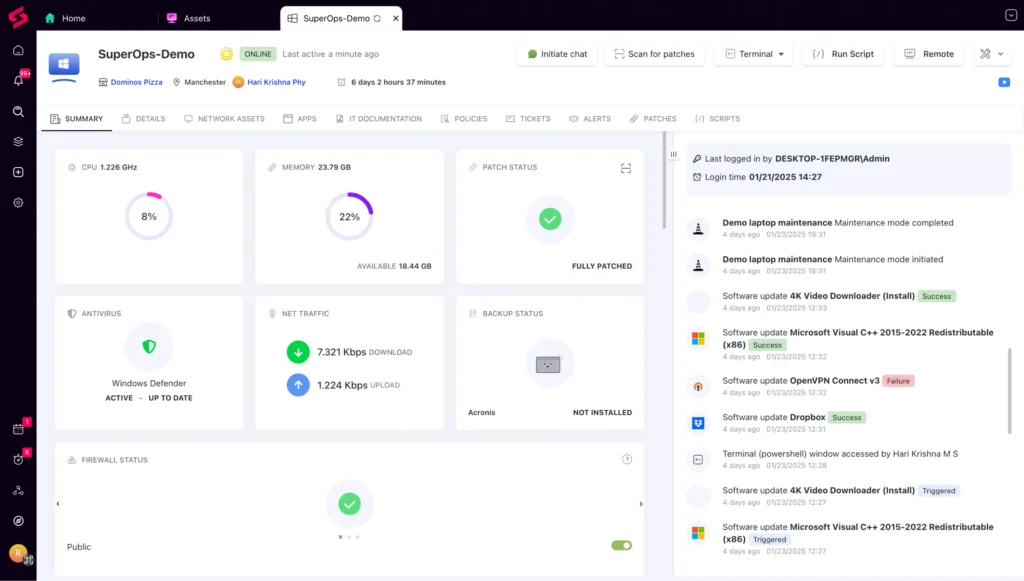
SuperOps gives you visibility into managed endpoints, including device health, software inventory, hardware information, alerts, and performance conditions. For MSPs, this helps technicians monitor client environments proactively instead of waiting for users to report every issue.
The RMM module is strongest when you need everyday operational control rather than only high-level dashboards. You can view assets, organize devices by clients or sites, set monitoring policies, and trigger actions when thresholds are crossed.
SuperOps supports common RMM needs such as:
- Device inventory: Track endpoints, operating systems, hardware, and installed software.
- Monitoring policies: Configure thresholds for disk space, CPU, memory, and device availability.
- Remote support: Launch remote sessions through supported remote access integrations.
- Technician actions: Run scripts, review alerts, and troubleshoot from one workspace.
Patch Management
Patch management is one of the most important RMM features because it directly affects security, stability, and client trust. SuperOps lets you create patch policies, schedule deployments, manage approvals, and apply updates across managed devices.
You can apply policies globally, then adjust them for specific clients, sites, or devices. This is useful when different clients require different maintenance windows or approval processes.
For example, you may want critical updates installed quickly for most clients while delaying feature updates for sensitive environments. This level of control helps you maintain security without disrupting business operations.
Patch management capabilities include:
- Policy-based patching: Define how and when updates should be deployed.
- Approval controls: Review or delay updates based on client requirements.
- Maintenance windows: Schedule patching during approved service periods.
- Patch visibility: Track device status and identify missing updates.
Service Desk and Ticketing
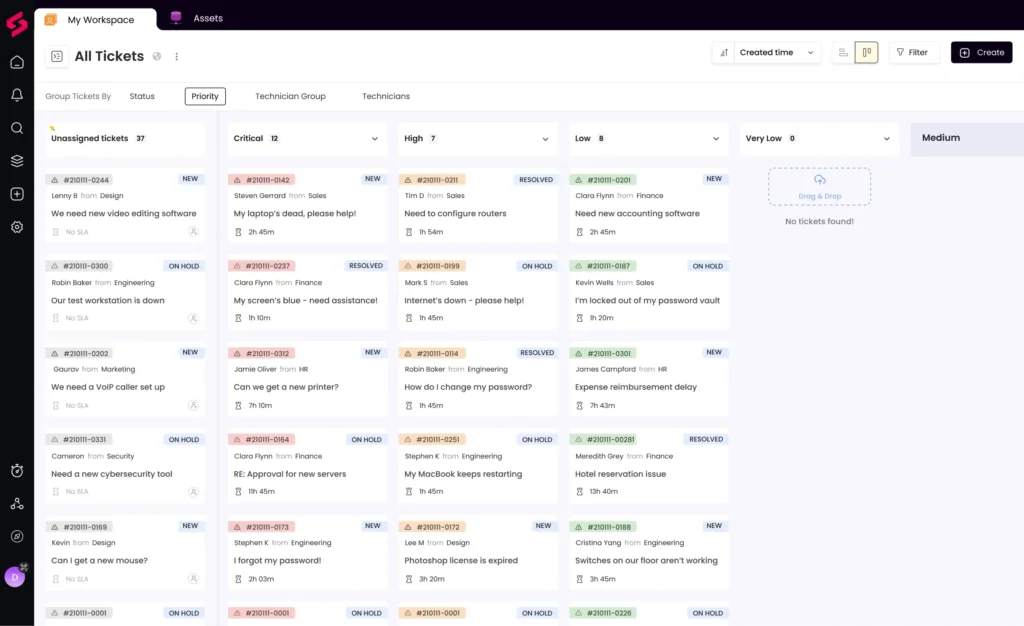
The service desk is the operational center of SuperOps’ PSA module. Clients and end users can submit tickets through multiple channels, and your team can manage requests from a centralized ticket queue.
Tickets can be assigned manually or routed through automation rules. You can track communication, status changes, time entries, internal notes, and client updates in one ticket timeline. This helps technicians understand what happened before they take action.
For MSPs, the value is not only ticket management. The real benefit is how the ticketing module connects with clients, assets, contracts, time tracking, and invoicing.
Important service desk capabilities include:
- Multi-channel ticket intake: Accept requests through portal, email, chat, and device tray options.
- Ticket automation: Route, assign, prioritize, and update tickets based on rules.
- SLA tracking: Monitor response and resolution targets for client commitments.
- Time tracking: Log technician work directly against tickets and projects.
Projects and Work Management
SuperOps includes project management functionality for teams that handle onboarding, migrations, infrastructure changes, website projects, or client implementation work. You can break larger initiatives into phases and tasks, assign owners, and track time against each activity.
This is a useful addition for MSPs because not all work is ticket-based. Some work is planned, billable, and deadline-driven. Connecting projects with clients, technicians, and billing gives you a clearer view of profitability.
The project module is not meant to replace a dedicated project management platform for every use case. However, for MSP service delivery, it gives you enough structure to manage client projects inside the same system you use for support and operations.
Automation and Intelligent Alerting
Automation is one of the most important reasons to consider SuperOps. The platform helps reduce manual work by letting you create rules for alerts, tickets, assignments, scripts, and recurring operational tasks.
Instead of asking technicians to review every alert manually, you can create rules that filter, classify, and route issues based on priority or type. You can also run scripts for common remediation tasks, such as clearing temporary files, restarting services, or collecting diagnostic details.
Automation can help your team:
- Reduce alert noise: Focus technicians on issues that need attention.
- Standardize workflows: Apply the same process across clients and sites.
- Improve response time: Trigger tickets and assignments automatically.
- Lower repetitive work: Use scripts and rules for common maintenance tasks.
IT Documentation
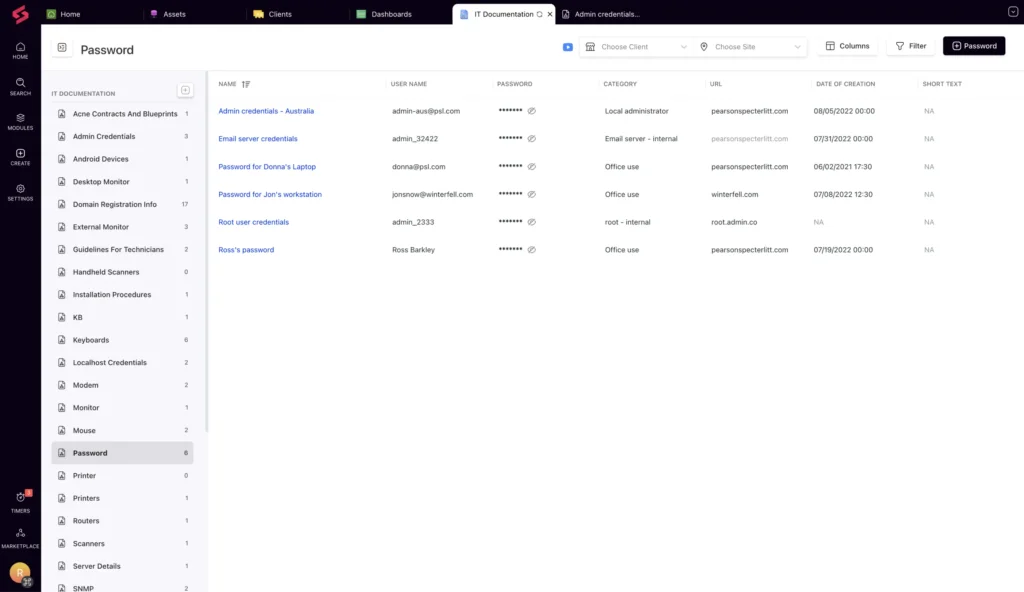
SuperOps includes IT documentation features that help you store client information, asset records, procedures, notes, and operational knowledge. This is important for MSPs because technician efficiency often depends on how quickly they can find the right client context.
When documentation is disconnected from tickets and assets, technicians waste time searching through external tools or asking teammates for context. SuperOps helps reduce that friction by connecting documentation with operational workflows.
Use this feature to document:
- Client environments: Sites, assets, contacts, and service details.
- Procedures: Repeatable steps for common support or maintenance tasks.
- Credentials and access details: Store sensitive information with proper controls.
- Internal knowledge: Keep technician notes and support processes organized.
Monica AI and Agentic AI Capabilities
SuperOps has been leaning heavily into AI-native positioning, and Monica AI is a central part of that strategy. Monica is designed to assist with repetitive support work, ticket handling, suggested responses, workflow insights, and automation opportunities.
For MSPs and IT teams, the practical value of AI depends on ticket volume, data quality, and how standardized your workflows are. If your team has recurring requests, clean ticket categories, and documented processes, AI-assisted triage can become useful. If your workflows are messy, you may need to clean up your service desk before AI delivers meaningful value.
Useful AI areas include:
- Ticket classification: Help categorize and prioritize incoming requests.
- Suggested responses: Speed up technician replies for common issues.
- Knowledge recommendations: Surface relevant articles and documentation.
- Automation suggestions: Identify repetitive patterns that could be turned into rules.
The key is to treat AI as an operational assistant, not a replacement for skilled technicians. SuperOps can help reduce repetitive work, but your team still needs strong processes, accurate documentation, and clear escalation rules.
Reporting and Dashboards
SuperOps includes reporting and dashboards for visibility into tickets, alerts, technician activity, asset health, and operational trends. This is important for both service quality and profitability.
MSPs should use reporting to understand ticket volume by client, response times, billable hours, recurring issues, patch status, and technician workload. Internal IT teams can use dashboards to monitor endpoint health, service demand, and operational bottlenecks.
Reporting is helpful, but very mature MSPs may still want to compare the depth of analytics against ConnectWise, Kaseya, or specialized business intelligence tools. SuperOps is strong for operational visibility, but complex custom reporting needs should be tested during the trial.
Integrations and Marketplace
SuperOps connects with tools across remote access, accounting, endpoint security, collaboration, documentation, and billing workflows. This makes it easier to keep your MSP stack connected without manually moving data between systems.
Common integration categories include:
- Remote access: Splashtop, TeamViewer, ConnectWise Control, and similar tools.
- Accounting: QuickBooks Online, QuickBooks Desktop, and Xero.
- Security: Webroot, SentinelOne, and other endpoint security options.
- Collaboration: Microsoft Teams, Outlook, and email-based workflows.
- Documentation: External documentation tools where supported.
The integration ecosystem is improving, but it is still not as deep as mature MSP ecosystems such as ConnectWise, Kaseya, and N-able. If your business relies on niche tools, check the integration marketplace before committing.
Pros and Cons
Benefits and Limitations of Using SuperOps
Positive
✅ Unified PSA-RMM workspace
✅ Modern interface
✅ Strong automation options
✅ Useful AI-assisted workflows
Negatives
❌ Smaller ecosystem than legacy tools
❌ Not ideal for every small team
❌ Setup requires process planning
❌ Advanced reporting may feel limited
✅ SuperOps Pros
- Unified PSA and RMM: Tickets, alerts, assets, contracts, projects, and billing can work together in one system.
- Modern user experience: The interface feels cleaner than many legacy MSP platforms.
- Strong automation: Rules, scripts, and alert workflows help reduce repetitive technician work.
- AI-assisted service desk: Monica AI can support ticket classification, response suggestions, and workflow insights.
- Good fit for growing MSPs: The platform gives smaller and mid-sized teams a more consolidated operating model.
- Transparent MSP pricing: Public plan pricing makes early comparison easier than quote-only platforms.
❌ SuperOps Cons
- Integration ecosystem is still maturing: ConnectWise, Kaseya, and N-able still offer deeper MSP ecosystems.
- Not always ideal for very small environments: Small teams should calculate technician count, endpoints, and minimum commitments carefully.
- Implementation requires planning: PSA-RMM workflows, policies, scripts, and billing rules need careful setup.
- Reporting may not satisfy every mature MSP: Larger teams may want deeper customization or external analytics.
- AI value depends on workflow quality: Monica AI is more useful when your ticket categories, documentation, and automations are well organized.
User Experience
User Interface and Operational Simplicity
Interface and Ease of Use
SuperOps has a modern interface compared with many traditional MSP platforms. The left-side navigation helps you move between clients, assets, tickets, projects, automation, reports, and documentation without feeling buried in menus.
The dashboard experience is useful because MSP technicians often need quick context. You can review open tickets, alerts, mentions, assignments, and operational priorities from one place. This helps reduce the mental load that comes from switching between disconnected tools.
Key interface strengths include:
- Clean navigation: Core modules are easy to locate.
- Custom dashboards: Surface alerts, tickets, approvals, and technician activity.
- Ticket views: Organize work by status, priority, ownership, and workflow stage.
- Mentions and notifications: Keep technicians aware of relevant updates.
- Mobile access: Support technicians who need to manage work away from the desk.
The platform is easier to approach than many older MSP tools, but that does not mean setup is effortless. A unified PSA-RMM platform includes many moving parts. You should expect to spend time configuring ticket categories, SLAs, contracts, patch policies, automations, scripts, users, and reporting views.
Onboarding and Support
Getting started with SuperOps usually begins with configuring your organization, adding technicians, creating clients or sites, and deploying agents to devices. From there, you can build monitoring policies, create service desk workflows, and connect integrations such as accounting or remote access tools.
The best onboarding approach is to avoid turning on everything at once. Start with your core workflows, then expand into advanced automation and reporting after your team understands the basics.
A practical onboarding sequence includes:
- Set up clients and sites: Build your account structure before importing too much data.
- Deploy agents: Install monitoring agents on a test group before broad rollout.
- Create ticket workflows: Define categories, priorities, SLAs, and assignment rules.
- Configure patch policies: Start with conservative maintenance windows and approval rules.
- Test automations: Run scripts on limited devices before applying them widely.
Pricing and Plans
How Much Does SuperOps Cost?
SuperOps pricing depends on whether you are buying for an MSP use case or an internal IT use case. This distinction matters because SuperOps now presents different product paths for MSPs and IT teams.
For MSPs, pricing is generally structured around technician-based PSA and RMM plans. For IT teams, SuperOps promotes endpoint-based pricing through its IT-focused plans. Pricing can change based on billing term, plan, endpoint count, and add-ons, so you should always verify the current quote before purchasing.
SuperOps Pricing for MSPs
The MSP pricing model is useful if you want predictable technician-based costs and you manage enough endpoints to justify the plan. It is especially attractive for growing MSPs that want PSA and RMM under one subscription instead of paying for multiple separate tools.
| Plan Name | Starting Price | Endpoint Allowance | Best For | Key Features |
| Standard PSA | $79 per technician/month, billed annually | Not RMM-focused | Teams that need service desk and billing | Ticketing, projects, invoicing, contracts, automation, client management |
| Standard RMM | $99 per technician/month, billed annually | 150 endpoints per technician | Teams focused on endpoint monitoring and patching | Asset management, monitoring, patching, alerts, scripting, remote troubleshooting |
| Pro, Unified Basic | $129 per technician/month, billed annually | 150 endpoints per technician | MSPs that need PSA and RMM together | Unified PSA-RMM, ticketing, monitoring, automation, documentation |
| Super, Unified Advanced | $159 per technician/month, billed annually | 150 endpoints per technician | Teams needing deeper automation and advanced functionality | Advanced reporting, AI-assisted workflows, extended automation, service operations |
SuperOps Pricing for IT Teams
SuperOps also offers IT-focused plans for internal teams. These are positioned around endpoint management and service desk needs rather than the traditional MSP technician model. Public pricing for IT teams is endpoint-based, with plans such as Prime and Prime Plus promoted on the SuperOps pricing page.
This is important because internal IT teams should not evaluate SuperOps only through MSP pricing. If you are managing internal endpoints rather than client environments, calculate your cost by endpoint count, required service desk features, mobile device management needs, and automation depth.
Is SuperOps Pricing Good Value?
SuperOps can be good value when you want to replace separate PSA, RMM, documentation, ticketing, and automation tools. The unified model reduces overlap and may lower tool-switching costs.
However, the value depends heavily on your environment. A small team with limited endpoints may find the platform more than it needs. A growing MSP with several technicians and a large endpoint base may find the per-technician model easier to forecast than per-device pricing.
Before choosing SuperOps, compare your total cost against:
- Atera: Strong option if unlimited endpoints per technician are a priority.
- Syncro: Useful for MSPs that want combined PSA-RMM with simple pricing.
- NinjaOne: Stronger if RMM and endpoint management depth matter most.
- ConnectWise: Better for large MSPs needing a mature ecosystem.
Trust and Data Protection
Security and Compliance
Security is especially important when you are choosing RMM or PSA software. These platforms can access client endpoints, sensitive tickets, user information, scripts, credentials, and business-critical service data.
SuperOps states that it is hosted on Amazon Web Services and references compliance with SOC 2 Type 2, GDPR, ISO 27001, and HIPAA. The platform also supports security controls such as two-factor authentication, role-based access, encryption, and administrative controls.
Important security areas to review include:
- Compliance: SOC 2 Type 2, GDPR, ISO 27001, and HIPAA references.
- Hosting: AWS-based infrastructure.
- Access control: Role-based permissions and technician access management.
- Authentication: Two-factor authentication and password controls.
- Operational security: Logs, auditability, and controls around scripts and sensitive actions.
For MSPs, security should also be evaluated from a client-facing perspective. If your clients ask about vendor risk, healthcare compliance, or data handling, request SuperOps’ latest security documentation before signing.
SuperOps vs Alternatives
How SuperOps Compares to Competitors
The RMM and PSA market is competitive. SuperOps is a strong modern option, but it competes with vendors that have deeper ecosystems, more mature endpoint management, or different pricing models.
| Platform | Best For | Main Strength | Compared With SuperOps |
| SuperOps | Growing MSPs and IT teams | Unified PSA-RMM with modern UX and AI-assisted workflows | Best when you want one cleaner platform for service, endpoint, and client operations |
| Atera | MSPs and IT teams that want per-technician pricing | Unlimited endpoint model and strong AI messaging | Often better if unlimited devices are more important than PSA depth |
| NinjaOne | Endpoint management and RMM-heavy teams | Strong RMM, patching, device management, and usability | Often stronger for pure endpoint operations, while SuperOps gives more native PSA coverage |
| ConnectWise | Large and mature MSPs | Deep ecosystem, advanced MSP workflows, broad marketplace | More powerful for complex MSPs, but harder to implement and manage |
| N-able | MSPs needing mature monitoring and security workflows | Established RMM, monitoring, backup, and MSP security ecosystem | More mature ecosystem, but SuperOps is cleaner and more unified for many growing teams |
| Datto/Kaseya | MSPs already invested in Kaseya ecosystem | Broad MSP stack across RMM, PSA, backup, and security | Better for ecosystem consolidation, but SuperOps may feel lighter and easier to adopt |
SuperOps vs Atera
Atera is one of the closest alternatives because it also serves MSPs and IT teams. Its biggest appeal is the per-technician pricing model with unlimited endpoints, which can be very attractive for teams managing many devices.
SuperOps is stronger if you want a more PSA-centered MSP workflow with ticketing, client operations, contracts, projects, and RMM connected in one platform. Atera is often better if unlimited endpoint coverage and AI-powered IT operations are your top priorities.
SuperOps vs NinjaOne
NinjaOne is a strong endpoint management and RMM platform. It is widely known for patching, device monitoring, remote management, and an accessible user experience.
If your main priority is RMM depth, NinjaOne may be the stronger option. If you want native PSA and RMM together, SuperOps may be a better operational fit.
SuperOps vs ConnectWise
ConnectWise is one of the most established MSP platforms. It offers broad functionality across PSA, RMM, quoting, billing, cybersecurity, and marketplace integrations.
ConnectWise is often better for larger MSPs with mature processes and complex integration requirements. SuperOps is more appealing for growing MSPs that want a cleaner interface and faster path to unified operations.
SuperOps vs N-able
N-able has a long history in remote monitoring, backup, security, and MSP operations. It can be a better fit for teams that want mature RMM capabilities and a broad MSP-focused ecosystem.
SuperOps feels more modern and consolidated, while N-able may offer deeper specialized capabilities for established MSP environments.
Business Fit
Who Should Use SuperOps?
Best Fit Use Cases
SuperOps is best for growing MSPs and IT teams that want to reduce tool fragmentation. If your team is switching between separate systems for ticketing, endpoint monitoring, documentation, billing, and reporting, SuperOps can simplify daily work.
It is also a strong fit when your technicians need a modern interface and automation support but you do not want the complexity of a larger legacy platform.
SuperOps is a good fit for:
- Growing MSPs: Teams that need PSA and RMM in one place.
- Tool consolidation: Organizations replacing separate ticketing, RMM, and billing tools.
- Automation-focused teams: MSPs that want rules, scripts, and smarter alert handling.
- Internal IT teams: Departments that need endpoint visibility and service desk operations.
- Modernization projects: Teams moving away from older, heavier MSP platforms.
When to Consider Other Options
SuperOps may not be the best fit if you need the largest integration ecosystem, the most advanced RMM specialization, or a platform already proven across very large MSP operations.
You should compare alternatives if you need:
- Very deep integrations: ConnectWise, Kaseya, or N-able may be stronger.
- Pure endpoint management depth: NinjaOne may be a better match.
- Unlimited endpoint pricing: Atera may be easier to forecast.
- Full ITIL service management: Freshservice or ManageEngine may fit better.
- Very small operations: Simpler tools may cost less and be easier to manage.
Setup and Implementation
Getting Started with SuperOps
Implementation Checklist
SuperOps implementation should be treated as an operational project, not just a software signup. Because the platform touches ticketing, endpoints, patching, automation, billing, and client management, setup quality has a major impact on long-term value.
Start with your most important workflows. Do not try to rebuild every process on day one. Focus first on ticket intake, client structure, endpoint visibility, patch policies, and technician assignments.
Recommended setup steps include:
- Define your structure: Create clients, sites, users, and technician roles.
- Deploy agents carefully: Start with a test group before a full rollout.
- Build ticket workflows: Configure categories, priorities, SLAs, and routing rules.
- Create patch policies: Set maintenance windows, approval rules, and reboot behavior.
- Connect integrations: Link accounting, remote access, security, and collaboration tools.
- Test automation: Validate scripts and remediation rules on limited devices first.
Migration Tips
If you are switching from another PSA or RMM platform, migration planning is critical. Export client records, contacts, contracts, ticket categories, documentation, asset records, and billing rules before making changes.
You should also review existing scripts and policies before importing them. Some may be outdated, duplicated, or no longer aligned with your current service model.
For smoother migration:
- Audit your current stack: Identify what should be migrated, rebuilt, or retired.
- Clean client data: Remove duplicates before importing records.
- Rebuild policies intentionally: Do not blindly copy old RMM settings.
- Run parallel testing: Compare old and new workflows during the trial period.
- Train technicians: Make sure the team understands ticket, asset, and automation flows.
Conclusion
Final Thoughts
SuperOps is a strong option for MSPs and IT teams that want a modern, unified platform for PSA, RMM, service desk, patching, documentation, automation, and reporting. Its biggest strength is operational consolidation. You can manage alerts, tickets, assets, projects, time tracking, and client data from one connected environment.
The platform is especially appealing if your team feels slowed down by disconnected tools or legacy MSP software. The interface is clean, the automation capabilities are practical, and Monica AI adds useful support for repetitive service desk workflows.
However, SuperOps is not the best choice for every buyer. Large MSPs that depend on a deep marketplace may still prefer ConnectWise, Kaseya, or N-able. Teams focused mainly on endpoint management may prefer NinjaOne. Buyers who want unlimited endpoint pricing should compare Atera carefully.
Overall, SuperOps is worth considering if you are a growing MSP or IT team that wants a cleaner way to manage service delivery and endpoint operations. Use the free trial to test your actual workflows, especially ticket routing, patch policies, scripts, integrations, reporting, and billing.
Have more questions?
Frequently Asked Questions
What is SuperOps used for?
SuperOps is used for PSA, RMM, ticketing, patch management, asset tracking, IT documentation, automation, reporting, and client service operations. MSPs use it to manage customer environments, while internal IT teams can use it to manage endpoints and service requests.
Is SuperOps a PSA or RMM tool?
It is both. SuperOps combines professional services automation and remote monitoring and management in one platform. You can buy PSA-only, RMM-only, or unified PSA-RMM plans depending on your needs.
How much does SuperOps cost?
MSP pricing starts at $79 per technician per month for the Standard PSA plan and $99 per technician per month for the Standard RMM plan, billed annually. Unified plans start at $129 per technician per month. IT-team pricing is endpoint-based, so you should check the current pricing page before buying.
Does SuperOps offer a free trial?
Yes. SuperOps offers a 14-day free trial, which gives you time to test ticketing, RMM, patching, automation, integrations, reporting, and service workflows before choosing a paid plan.
Is SuperOps good for MSPs?
Yes, SuperOps is a strong option for growing MSPs that want PSA and RMM in one modern platform. It is especially useful if you want to reduce tool switching, automate service workflows, and centralize tickets, assets, contracts, and billing.
Can internal IT teams use SuperOps?
Yes. SuperOps now offers IT-focused positioning for internal teams that need endpoint management, service desk, automation, patch visibility, and operational reporting. However, teams needing full ITIL workflows should also compare dedicated ITSM tools.
What integrations does SuperOps support?
SuperOps supports integrations across remote access, accounting, security, collaboration, and documentation workflows. Common examples include remote support tools, QuickBooks, Xero, Microsoft tools, and endpoint security platforms. Always check the current marketplace if you rely on niche software.
Is SuperOps secure?
SuperOps states that it is hosted on AWS and references SOC 2 Type 2, GDPR, ISO 27001, and HIPAA compliance. It also supports security controls such as two-factor authentication, role-based access, encryption, and administrative controls.
What are the best SuperOps alternatives?
The best SuperOps alternatives include Atera, NinjaOne, Syncro, ConnectWise, N-able, Datto/Kaseya, and HaloPSA. Atera is strong for unlimited endpoints, NinjaOne is strong for endpoint management, and ConnectWise is strong for large MSP ecosystems.
Is SuperOps better than Atera or NinjaOne?
SuperOps is better if you want unified PSA and RMM workflows in one modern MSP platform. Atera may be better if unlimited endpoint pricing is your priority. NinjaOne may be better if your main focus is advanced RMM and endpoint management.