
Introduction
Selecting the right remote monitoring and management platform is one of the most important decisions you can make as an MSP, IT service provider, or internal IT leader.
You are not only choosing a tool for device monitoring. You are choosing the system your team will use to detect issues, deploy patches, automate maintenance, secure endpoints, support users, and prove service quality to clients or stakeholders.
N-able is one of the more established names in the RMM and IT management space. It is best known for N-able N-central, N-able N-sight, Cove Data Protection, Take Control, Passportal, and a wider ecosystem of backup, automation, cloud, and security tools.
The main question is not whether N-able is powerful. It is.
The better question is whether it is the right fit for your team, your endpoint volume, your client base, and your operational maturity.
In this N-able review, you will learn how the platform works, where it performs well, where it feels more complex, how N-central compares with N-sight, and which alternatives may be better if you want a simpler or more transparent RMM solution.
For a broader view of the market, you can also compare N-able with other tools in our guide to the best RMM software and our list of top ITSM tools.
Platform Overview
What Is N-able?
Quick Summary
If you want the short version, N-able is best for MSPs and IT teams that need deep endpoint control, scalable monitoring, policy-based patching, automation, remote support, and security add-ons.
It is not the simplest RMM platform on the market, and pricing is not as transparent as tools like Atera. However, if you manage complex environments, multiple clients, or regulated users, the depth can be a major advantage.
| Category | N-able Review Summary |
| Best For | MSPs and IT teams managing complex endpoint environments |
| Main Products | N-central, N-sight, Cove Data Protection, Take Control, Passportal |
| Key Strengths | Automation, patch management, security, remote access, reporting |
| Main Limitations | Learning curve, quote-based pricing, add-on complexity |
| Best Alternatives | NinjaOne, Atera, Datto RMM, ConnectWise Automate |
Overview
N-able is an IT management software company focused on tools for managed service providers and internal IT operations. Its platform is built around remote monitoring and management, endpoint support, backup, automation, cloud administration, password management, and cybersecurity.
The important thing to understand is that N-able is not one single product. It is a broader ecosystem.
For many buyers, the decision starts with N-able N-central or N-able N-sight. From there, you can expand with products like Cove Data Protection, Take Control, Passportal, Cloud Commander, EDR, XDR, and MDR services.
N-able N-central
N-central is the more advanced RMM product. It is designed for mature MSPs and larger IT departments that need multi-tenant endpoint management, policy-based automation, network visibility, patch management, reporting, and security workflows.
This is usually the better fit when your team manages many customers, complex networks, strict SLAs, or regulated environments.
N-able N-sight
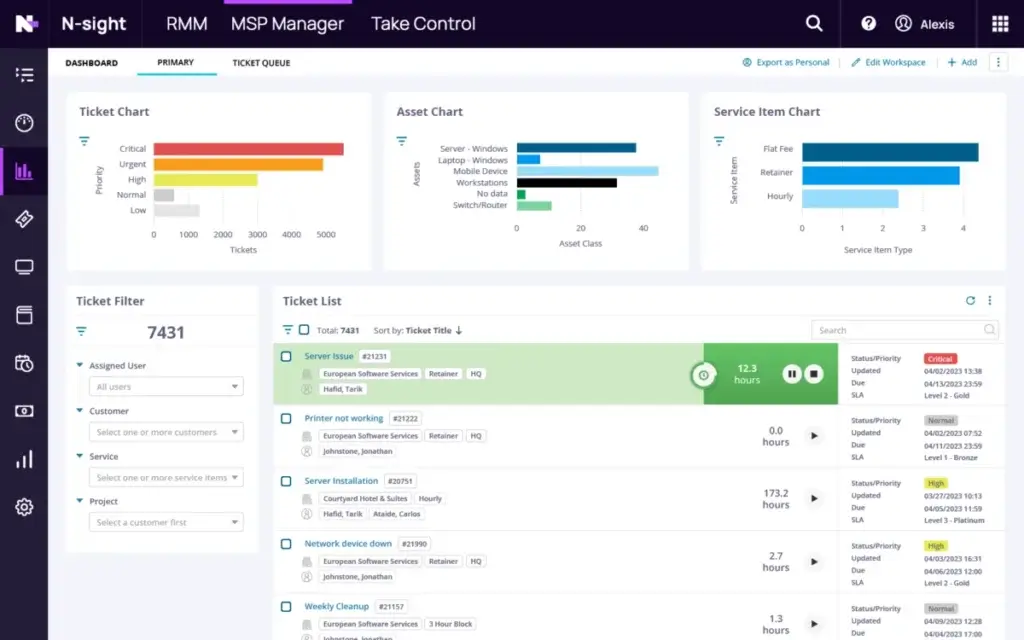
N-sight is the more approachable option. It combines RMM, remote access, MSP service workflows, monitoring, patching, automation, and ticketing in a more streamlined package.
If your MSP is growing and you want a complete endpoint management platform without the heavier complexity of N-central, N-sight may be the more practical starting point.
Cove Data Protection
Cove Data Protection is N-able’s cloud-first backup and disaster recovery product. It is designed to protect endpoints, servers, Microsoft 365 data, and business-critical workloads.
For MSPs, Cove can become an additional managed backup service. For internal IT teams, it can help centralize recovery workflows across distributed users and systems.
Take Control
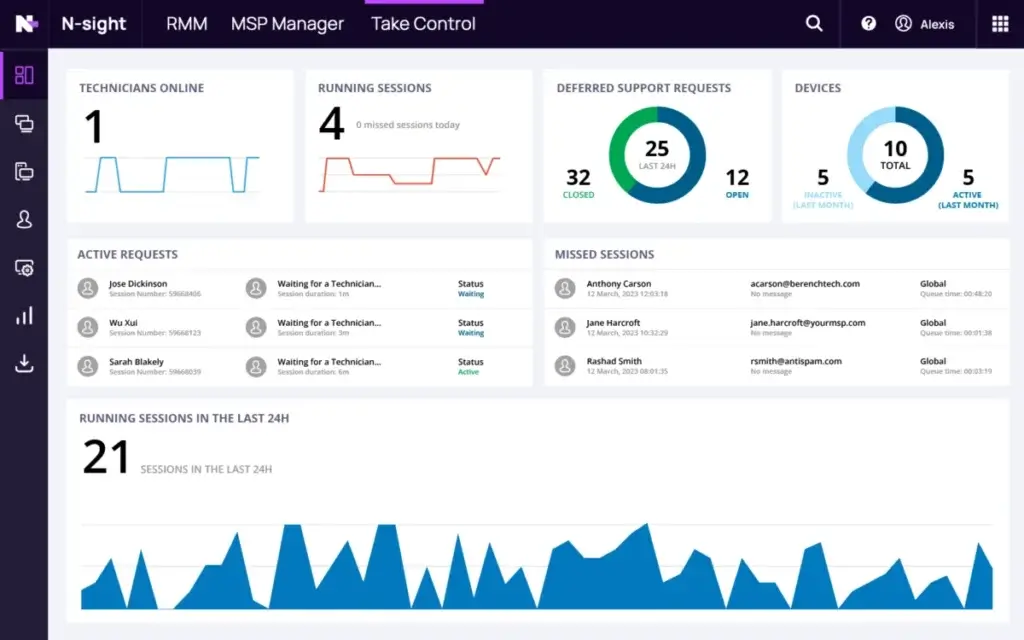
Take Control provides remote support functionality for technicians. It supports remote desktop sessions, file transfers, chat, session recording, and visibility into technician performance.
This is especially useful when your team needs fast troubleshooting without sending a technician on site.
Passportal
Passportal focuses on password and documentation management. It helps technicians store credentials, manage client access, and reduce the risk of weak or shared passwords.
For MSPs, this is valuable because credential control is one of the most sensitive parts of client service delivery.
Which Product Should You Choose?
N-able N-central vs N-sight
One of the biggest mistakes you can make when reviewing N-able is treating N-central and N-sight as the same product.
They overlap, but they are built for different levels of operational complexity.
N-central is the stronger fit when you need advanced automation, deeper policy control, stronger multi-tenant management, and more sophisticated security workflows. N-sight is better when you want a simpler endpoint management experience with RMM, remote access, ticketing, patching, and automation in one easier package.
| Comparison Area | N-able N-central | N-able N-sight |
| Best For | Medium to large MSPs and complex IT environments | Smaller MSPs and growing IT teams |
| Core Focus | Advanced RMM, automation, compliance, security, scalability | Unified endpoint management with RMM, patching, support, and ticketing |
| Automation | Deeper scripting, policies, workflows, and remediation options | More approachable automation for common technician tasks |
| Security | Supports EDR, XDR, MDR, vulnerability management, and compliance workflows | Supports endpoint resilience, vulnerability management, and security add-ons |
| Ease of Use | Powerful but more complex | Easier to adopt for growing teams |
| Best Choice If | You manage many clients, complex networks, and strict service requirements | You want a complete RMM package without heavy configuration overhead |
Our recommendation is simple: choose N-sight if your priority is faster adoption, and choose N-central if your priority is long-term control, automation depth, and scalability.
Software Specification
Core Features of N-able
Remote Monitoring and Endpoint Management
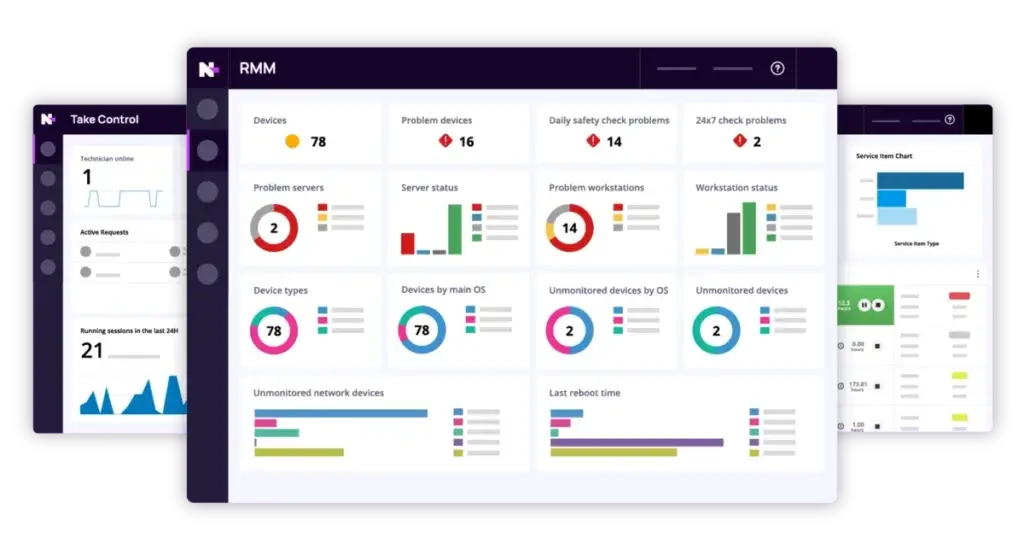
N-able gives you centralized visibility across endpoints, servers, networks, and user devices. You can monitor device health, service status, resource usage, availability, and performance trends from one dashboard.
For MSPs, the most important benefit is multi-tenant visibility. You can manage multiple clients without losing separation between environments.
For internal IT teams, the value is operational consistency. You can apply policies across distributed offices, remote workers, and mixed endpoint groups.
Key benefits
- Unified visibility: Monitor endpoints, servers, and network devices from one console.
- Policy-based alerts: Define thresholds for CPU, memory, disk, services, and availability.
- Multi-tenant control: Manage different clients or business units separately.
- Faster response: Detect performance issues before users report them.
Patch Management and Vulnerability Management
Patch management is one of the strongest reasons to consider N-able. The platform helps you identify missing updates, schedule deployment windows, approve or block specific updates, and track patch compliance.
This matters because patching is not only an IT maintenance task. It is one of the core controls in endpoint security.
N-able is also investing in broader multi-OS patching and vulnerability management improvements across its product roadmap. That is important if you manage Windows, macOS, Linux, and cloud-connected endpoints in the same environment.
Patch management highlights
- Policy control: Apply different patch rules by client, site, role, or device type.
- Maintenance windows: Schedule updates around business needs.
- Compliance reports: Identify missing updates and vulnerable endpoints.
- Security alignment: Connect patching with vulnerability reduction.
To compare patching and service workflows across other platforms, see our guide to ITSM software for small businesses.
Automation, Scripting, and AI Assistance
Automation is where N-able becomes especially valuable for mature MSPs.
You can automate recurring technician tasks such as disk cleanup, software deployment, service restarts, user account actions, device checks, and remediation workflows. This reduces manual work and helps your team standardize service delivery.
N-able has also been modernizing its scripting experience. The newer Script Repository and on-demand script execution experience is designed to help technicians create, upload, edit, and run scripts across Windows, macOS, and Linux devices more efficiently.
That matters because script management can easily become messy as your MSP grows. A centralized script workflow gives your team better governance and faster remediation.
Reasons to automate
- Less repetitive work: Automate common maintenance and remediation tasks.
- Faster troubleshooting: Run scripts on demand from device-level views.
- Better consistency: Standardize actions across clients and technicians.
- AI support: Use AI-assisted guidance to speed up script creation.
Remote Access and Support
When users need help, technicians need secure and reliable remote access. N-able supports remote control workflows through built-in tools and Take Control.
You can start remote sessions, transfer files, chat with users, record sessions, and troubleshoot without being physically present. For MSPs, this can reduce travel time and improve first-response resolution.
Remote support tools
- Remote sessions: Connect to supported endpoints for troubleshooting.
- File transfer: Move files during support sessions securely.
- Session recording: Improve accountability and training.
- Technician visibility: Review support activity and performance.
Network Discovery and Asset Tracking
You cannot manage what you cannot see. N-able helps you discover devices, collect asset information, track installed software, and organize assets by customer, site, role, or device type.
This is useful for everyday operations, but it also supports compliance, budgeting, warranty planning, and lifecycle management.
Why it matters
- Asset visibility: Track hardware, software, and device status.
- Client grouping: Organize devices by customer, department, or location.
- Lifecycle planning: Identify aging devices and license risks.
- Policy alignment: Apply monitoring and patch rules by asset group.
Backup and Disaster Recovery
N-able Cove Data Protection adds backup and recovery capabilities to the wider N-able ecosystem. It is especially relevant for MSPs that want to offer managed backup as part of a broader endpoint and security service.
Cove can help protect endpoints, servers, and Microsoft 365 data. It is cloud-first, which reduces the need for you to manage separate local backup infrastructure in every environment.
For clients concerned about ransomware, accidental deletion, hardware failure, or Microsoft 365 retention gaps, Cove strengthens the overall N-able value proposition.
Backup advantages
- Cloud-first backup: Reduce dependence on local backup hardware.
- Microsoft 365 protection: Add backup for key collaboration data.
- Recovery options: Support restores after deletion, failure, or attack.
- MSP packaging: Offer backup as a managed service add-on.
Security and Compliance
Security is a major part of the N-able story. The platform supports role-based access, two-factor authentication, encryption, audit trails, endpoint security add-ons, and compliance-focused reporting.
N-able’s Trust Center also highlights compliance and assurance areas such as SOC 2 Type II, HIPAA Type 1 compliance for Cove Data Protection, N-central, and N-sight, ISO/IEC 27001 certification, GDPR support, CCPA support, and CMMC-related positioning.
For MSPs serving healthcare, finance, legal, public sector, or other regulated clients, this can be a meaningful advantage.
Security highlights
- Role-based access: Control what each technician can view or change.
- Audit trails: Track user activity for accountability.
- Endpoint security: Add EDR, XDR, MDR, and vulnerability workflows.
- Compliance support: Strengthen reporting for regulated environments.
Reporting and Analytics
N-able includes dashboards and reports for endpoint health, patch status, alerts, tickets, service activity, and compliance. These reports help you move from reactive support to measurable service delivery.
For MSPs, reporting is not only an internal tool. It is also part of client retention. Clear reports help you prove value, show what your team resolved, and explain why clients should continue investing in managed IT services.
What you can track
- Device health: Monitor endpoint performance and availability.
- Patch compliance: Show which devices are protected or behind.
- Service activity: Track technician actions and support outcomes.
- Client reporting: Create reports for reviews and compliance discussions.
Integrations, APIs, and Extensibility
N-able integrates with many common MSP and IT operations tools, including PSA systems, documentation platforms, backup tools, endpoint security products, and reporting workflows.
It also offers API access and developer resources, which matters if your team wants to connect N-able with custom systems or automate workflows across your wider stack.
This is useful for larger MSPs, but it can also create more implementation work. If you need a very large plug-and-play integration marketplace, you should compare N-able carefully with ConnectWise and other ecosystem-heavy platforms.
Integration essentials
- PSA connections: Connect monitoring alerts with ticketing workflows.
- Security ecosystem: Extend protection with endpoint security tools.
- API access: Build custom connections for internal systems.
- Workflow automation: Reduce manual handoffs between platforms.
Mobile and Cloud Management
N-able supports mobile access and cloud administration use cases, which is helpful when technicians need to act quickly away from their desks.
Cloud Commander also expands the ecosystem into Microsoft 365, Intune, and Azure administration. If you manage hybrid environments, this can reduce the need to switch between separate admin portals for routine cloud tasks.
Mobile and cloud benefits
- Remote alerts: See urgent notifications when away from your desk.
- Quick actions: Respond to common issues faster.
- Microsoft cloud management: Support Microsoft 365, Intune, and Azure workflows.
- Hybrid administration: Manage endpoints and cloud services more consistently.
Pros and Cons
Benefits and Limitations of Using N-able
Positive
✅ Strong automation depth
✅ Advanced RMM controls
✅ Security and compliance focus
✅ Scalable MSP architecture
Negatives
❌ Learning curve
❌ Quote-based pricing
❌ Add-on complexity
❌ Less simple than newer RMM tools
N-able is powerful, but it is not the easiest RMM platform for every buyer. The strengths are most visible when you have enough endpoint volume, technician capacity, and operational complexity to benefit from the platform’s depth.
Pros
- Strong automation capabilities: Useful for reducing repetitive technician work.
- Scalable MSP architecture: Built for multi-client and multi-site environments.
- Advanced patch management: Supports policy-based deployment and compliance reporting.
- Security ecosystem: EDR, XDR, MDR, backup, and compliance tools expand protection.
- N-central and N-sight options: Lets you choose based on complexity and maturity.
- Remote support tools: Take Control helps resolve issues without onsite visits.
- Reporting depth: Useful for client reviews, SLA visibility, and audit support.
Cons
- Learning curve: New users may need structured onboarding and training.
- Pricing is not fully transparent: You often need to request a quote.
- Add-ons can increase cost: Backup, cloud, and security modules may expand the budget.
- Interface can feel dense: The dashboard prioritizes control over simplicity.
- May be too much for small teams: Lightweight tools may be easier for basic use cases.
User Experience
User Interface and Operational Simplicity
Interface Design and Customization
N-able’s interface is built for IT professionals who want control. You can create dashboards, filter by client or device group, review alerts, check patch status, and access device-level actions.
The trade-off is density. Compared with newer tools like NinjaOne or Atera, N-able can feel more technical and less visually simple.
That is not necessarily a weakness. If you manage complex environments, you may prefer the extra depth. But if your team wants a tool that feels easy from the first login, you should plan for onboarding time.
Design takeaways
- Custom dashboards: Build views around clients, roles, or technician needs.
- Granular filters: Focus on specific environments quickly.
- Detailed data: See more operational information than lighter RMM tools.
- Learning period: Expect setup and training before the platform feels natural.
Mobile Accessibility and Remote Work
N-able supports mobile and browser-based access so technicians can monitor alerts and take basic actions when they are away from their main workstation.
For complex work, the desktop console remains the better experience. Still, mobile access is useful when you need to respond quickly to urgent alerts or review endpoint status outside normal desk work.
Customer Support and Community Resources
N-able offers documentation, training materials, product resources, support channels, and community access. This matters because successful implementation depends on more than software features.
If you plan to use automation, scripting, advanced patching, or multi-client policies, your team should invest in training early. The platform becomes more valuable when technicians understand how to standardize and automate their work.
Training and Onboarding
Because N-able is feature-rich, onboarding should be structured. I would not recommend simply activating the platform across all clients without a pilot.
A better approach is to start with one controlled environment, define monitoring policies, test patching, build dashboards, validate alert thresholds, then expand to more devices or clients.
- Start small: Pilot N-able with a limited set of devices.
- Define policies: Standardize alerts, patch rules, and access permissions.
- Train technicians: Make automation and reporting part of onboarding.
- Review results: Adjust thresholds before scaling deployment.
Pricing and Plans
How Much Does N-able Cost?
Pricing Model and Free Trial
N-able generally uses quote-based pricing across its main products. This means you will usually need to contact sales to get a specific price based on your endpoint count, product selection, add-ons, contract terms, and support needs.
This pricing model can work well for larger MSPs because it allows negotiation and bundling. It is less convenient for smaller teams that want to compare costs quickly.
N-able offers free trial options for products such as N-sight and Take Control, which helps you test the platform before committing. Still, you should confirm the exact trial length, product scope, and contract terms directly with N-able before making a decision.
Cost Differences Between N-central and N-sight
N-central is typically positioned as the more advanced platform, so it is usually the better fit for teams that are willing to invest in deeper capabilities.
N-sight is usually the more approachable package for smaller MSPs and growing IT teams that want RMM, remote access, patching, ticketing, and automation in a simpler experience.
Some third-party directories list public starting prices for N-sight, but N-able’s official pricing is still best treated as quote-based. Your final cost can vary depending on users, endpoints, add-ons, and contract structure.
Value for Money and ROI Considerations
N-able can deliver strong ROI when you use it to reduce repetitive technician work, standardize service delivery, improve patch compliance, add managed backup, and strengthen endpoint security.
However, you should not evaluate the platform only by the license price. You should also include onboarding, technician training, add-on modules, reporting requirements, and the time required to configure policies correctly.
- Endpoint volume: Larger environments can benefit more from automation.
- Security needs: EDR, XDR, MDR, and backup can increase value and cost.
- Technician maturity: Skilled teams can extract more from scripting and policies.
- Client reporting: MSPs can use reporting to prove service value.
- Alternative tools: Compare against Atera, NinjaOne, Datto, and ConnectWise.
N-able vs. Alternatives
How N-able Compares to Competitors
Comparing N-able to other RMM tools helps clarify its position. N-able is best when you need automation depth, multi-tenant control, compliance reporting, and scalable MSP workflows.
It is less ideal if you want the simplest interface or the most transparent pricing model.
Comparison Table
| Feature Category | N-able N-central | NinjaOne | Atera | Datto RMM | ConnectWise Automate |
| Best For | Mid-sized and large MSPs | Teams wanting modern endpoint management | Small MSPs wanting simple pricing | MSPs in the Kaseya ecosystem | Mature MSPs needing deep customization |
| Ease of Use | Powerful but dense | Modern and intuitive | Simple and approachable | Moderate learning curve | Complex and highly configurable |
| Automation Depth | Strong scripting and policy control | Strong for common endpoint workflows | Good, with AI assistance | Strong MSP automation | Very deep but requires expertise |
| Pricing Transparency | Quote-based | Quote-based | More transparent technician pricing | Quote-based | Quote-based |
| Security Ecosystem | EDR, XDR, MDR, backup, compliance | Endpoint security and backup options | Security integrations and add-ons | Strong backup and MSP security ecosystem | Broad security and PSA ecosystem |
| Best Fit | Complex MSP operations | Usability-focused MSPs and IT teams | Cost-conscious smaller teams | MSPs already using Datto/Kaseya tools | Large MSPs with technical resources |
N-able vs Atera
Atera is easier to adopt and more pricing-friendly for smaller MSPs. Its per-technician pricing model can be attractive when you manage many endpoints with a lean team.
N-able is stronger when you need deeper endpoint control, more advanced RMM workflows, and a broader security and compliance ecosystem.
Choose Atera if you want simplicity and predictable pricing. Choose N-able if you need more operational depth.
N-able vs NinjaOne
NinjaOne is one of the strongest alternatives if ease of use is a priority. It offers modern endpoint management, patching, remote access, backup, and ticketing in a cleaner interface.
N-able is better suited for teams that want more advanced multi-tenant management, deeper compliance workflows, and a more expandable MSP ecosystem.
Choose NinjaOne if technician experience matters most. Choose N-able if scale and control matter more.
N-able vs Datto RMM
Datto RMM is a strong MSP-focused alternative, especially if you already use Datto backup or other Kaseya ecosystem tools.
N-able competes well on RMM depth, scripting, security options, and N-central’s multi-tenant capabilities. Datto may be more attractive if your service stack is already built around Kaseya and Datto products.
N-able vs ConnectWise Automate
ConnectWise Automate is known for deep customization and a broad MSP ecosystem. It can be powerful, but it often requires more configuration and technical expertise.
N-able still has a learning curve, but many MSPs may find it more approachable than a heavily customized ConnectWise Automate deployment.
Business Fit
Who Should Use N-able?
Best for Medium and Large MSPs
N-able is a strong fit if you manage many endpoints across multiple clients and need more than basic monitoring.
It works especially well when your team wants to automate repetitive tasks, standardize patching, offer managed backup, add endpoint security, and produce reports for clients.
Best for Regulated Environments
If you support clients in healthcare, finance, legal, public sector, or other compliance-sensitive industries, N-able’s security and reporting capabilities are especially relevant.
The ability to combine RMM, patching, audit trails, access controls, backup, and security add-ons can help you build a more defensible managed service offering.
Best for Internal IT Teams With Complex Endpoint Needs
N-able is not only for MSPs. Internal IT teams can also benefit if they manage a distributed workforce, multiple offices, mixed operating systems, or strict endpoint security requirements.
However, smaller internal teams should compare N-able against simpler endpoint management tools before committing.
Who Should Avoid N-able?
N-able may not be the best fit if you manage only a small number of endpoints, need instant transparent pricing, or want a lightweight tool that works with minimal setup.
In that case, Atera, NinjaOne, Syncro, or ManageEngine may feel easier to evaluate and implement.
Setup
Getting Started with N-able
N-able Implementation Checklist
A successful N-able rollout starts with planning. The platform can do a lot, but you should avoid configuring everything at once.
- Define your endpoint scope: List devices, operating systems, users, and sites.
- Choose N-central or N-sight: Match the product to your operational complexity.
- Map patch policies: Separate server, workstation, and critical system rules.
- Set alert thresholds: Avoid noisy alerts that overwhelm technicians.
- Configure permissions: Use role-based access for technician control.
- Connect PSA tools: Test ticket creation and workflow routing.
- Pilot automation: Run scripts on a small device group first.
- Review reports: Build dashboards for clients, managers, and technicians.
Tips for Maximizing N-able
To get the most value from N-able, treat it as an operational platform, not only as a monitoring tool.
- Standardize first: Build reusable policies before scaling.
- Automate carefully: Test scripts before deploying across clients.
- Use reports commercially: Show clients the value your MSP delivers.
- Review add-ons: Choose backup, EDR, XDR, MDR, or cloud tools based on real needs.
- Train technicians: Make automation, reporting, and security workflows part of daily practice.
Conclusion
Final Thoughts
N-able is a strong RMM and IT management ecosystem for MSPs and IT teams that need more than basic endpoint monitoring.
Its biggest strengths are automation depth, scalable endpoint management, patching, remote support, backup options, and a security-focused product ecosystem. The platform is especially valuable when you manage complex environments, multiple clients, or regulated users.
The trade-off is complexity. N-able requires onboarding, policy planning, and a clear understanding of which products and add-ons you actually need.
If you want the easiest RMM platform with transparent pricing, Atera or NinjaOne may be a better fit. If you want a more scalable MSP platform with stronger control, deeper automation, and expandable security capabilities, N-able deserves serious consideration.
For most mature MSPs, the best way to evaluate N-able is to compare N-central and N-sight directly, test your key workflows in a trial, and calculate value based on technician time saved, patching consistency, reporting quality, and security coverage.
Have more questions?
Frequently Asked Questions
What is N-able used for?
N-able is used for remote monitoring and management, endpoint support, patch management, automation, backup, reporting, and security workflows. It is mainly built for MSPs and IT teams that manage multiple devices, users, clients, or locations.
Is N-able the same as N-central?
No. N-able is the company and product ecosystem. N-central is one of its main RMM products. N-able also offers N-sight, Cove Data Protection, Take Control, Passportal, Cloud Commander, and security add-ons.
What is the difference between N-central and N-sight?
N-central is the more advanced RMM platform for larger MSPs and complex IT environments. N-sight is a more streamlined endpoint management platform for growing MSPs and teams that want monitoring, patching, remote access, automation, and ticketing in a simpler package.
Does N-able publish pricing?
N-able generally uses quote-based pricing for its main products. Your cost can vary based on endpoint count, users, modules, add-ons, support needs, and contract terms. You should contact N-able directly for a current quote.
Is N-able good for small MSPs?
N-able can work for small MSPs, especially through N-sight, but it may be more complex than some lightweight RMM tools. Small teams that want transparent pricing and fast onboarding may also compare Atera, NinjaOne, or Syncro.
Does N-able include backup?
Backup is available through N-able Cove Data Protection. Cove helps protect endpoints, servers, Microsoft 365 data, and business workloads with cloud-first backup and recovery capabilities.
Does N-able support Microsoft 365 backup?
Yes. N-able Cove Data Protection supports Microsoft 365 backup use cases, which can help protect email and collaboration data beyond native Microsoft retention settings.
Does N-able include EDR?
N-able offers endpoint security options, including EDR and broader security services such as XDR and MDR. These may be add-ons depending on the product bundle and contract you choose.
Is N-able secure?
N-able supports security controls such as role-based access, two-factor authentication, encryption, audit trails, and endpoint security add-ons. Its Trust Center also highlights SOC 2 Type II, ISO 27001, HIPAA Type 1, GDPR, CCPA, and related compliance initiatives.
What are the best N-able alternatives?
The best N-able alternatives include NinjaOne, Atera, Datto RMM, ConnectWise Automate, Syncro, and ManageEngine. NinjaOne is strong for usability, Atera is strong for transparent pricing, and ConnectWise Automate is strong for deep customization.