
Introduction
GoDaddy is one of the most recognized names in the website industry. Many people know it first as a domain registrar, but the company also sells shared hosting, managed WordPress hosting, VPS hosting, website builder tools, business email, security products, and digital marketing features. In this GoDaddy review, you will get a practical look at what the platform does well, where it falls short, and which type of user should seriously consider it. The goal is not just to describe the product line, but to help you decide whether GoDaddy is actually the right place to build and host your website in 2026.
What Is GoDaddy?
GoDaddy is a website services company that combines domain registration, web hosting, managed WordPress, website building, email, security products, and online marketing tools in one ecosystem. Its biggest appeal is convenience. Instead of piecing together different providers for your domain, hosting, SSL, email, and website setup, you can run much of it from one account.
Background and Evolution
GoDaddy began as a domain-focused company, but over the years it expanded into a broad online presence platform. Today, it is no longer just the place where people buy domains. It has evolved into a full website infrastructure provider for beginners, small businesses, freelancers, and online sellers. In 2026, GoDaddy is also pushing AI-assisted site creation more aggressively through Airo, which shows that the company is trying to simplify the launch process for non-technical users while keeping traditional hosting options available for users who want more control.
Target Users and Use Cases
GoDaddy appeals to several different audiences:
- Beginners and first-time site owners – You can buy a domain, hosting, email, and even a website builder from one provider, which keeps setup simple.
- Small businesses – GoDaddy is strong for local businesses that want a domain, branded email, a brochure-style website, and basic marketing tools in one place.
- WordPress users – Managed WordPress plans make setup easier, especially for users who want less server-level maintenance.
- Freelancers and agencies – GoDaddy can work for smaller client projects when convenience matters more than highly specialized hosting performance.
- Users who prioritize brand familiarity – Some buyers prefer well-known, mainstream providers, and GoDaddy benefits from that trust factor.
That said, GoDaddy is not the strongest value choice in every category. If pure hosting performance per dollar is your top priority, some competitors can be more compelling. GoDaddy is strongest when convenience, bundling, and ease of purchase matter as much as raw hosting specs.
How Does It Work?
Key Features of GoDaddy
GoDaddy is best understood as a bundled website platform rather than just a host. Its feature set is designed to help users launch quickly, manage fewer vendors, and add related products without leaving the ecosystem.
Shared Hosting for Conventional Websites
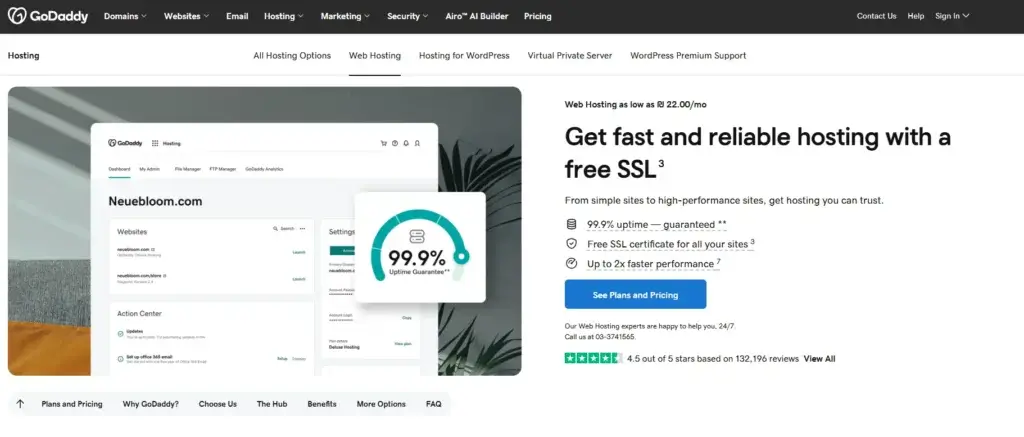
GoDaddy’s traditional web hosting plans are aimed at users who want a familiar hosting setup with cPanel. This is important because many beginners and intermediate users still prefer the flexibility and familiarity of cPanel over a fully custom dashboard. GoDaddy also positions these plans as NVMe-based hosting, which helps modernize the performance conversation compared to older shared hosting setups.
For smaller websites, brochure-style business sites, and standard WordPress projects, shared hosting can be enough. But it is worth noting that GoDaddy’s shared hosting strength is convenience more than category-leading value. If you are comparing raw specs against lower-cost competitors, GoDaddy does not always win on price-to-resources.
Managed WordPress Hosting
GoDaddy is much more interesting when you look at its managed WordPress offering. This is where the company tries to reduce technical friction through automated updates, backups, security handling, migration tools, staging-oriented workflows, and a more WordPress-specific experience. For users who want WordPress without wanting to manage every technical detail themselves, this is one of the more relevant parts of the GoDaddy ecosystem.
The inclusion of Airo for WordPress also shows that GoDaddy is trying to simplify site creation and optimization with AI-assisted tools. That is useful for non-designers and non-developers, especially if they want help with page generation, SEO suggestions, or getting a site live faster.
Website Builder and AI-Assisted Creation
Not every user wants hosting in the traditional sense. Some just want to build a website quickly. GoDaddy’s Website Builder is built for that audience. It is designed for people who would rather launch fast than spend time dealing with WordPress themes, plugins, or hosting settings. For local businesses, service providers, personal brands, and very small online operations, this approach can be attractive.
The AI layer strengthens this positioning. GoDaddy’s Airo tools can help generate site structure, content suggestions, SEO guidance, logo assets, and other marketing materials. This makes GoDaddy stronger for beginners than many older hosting brands that still assume the user will do everything manually.
Domains, Email, and Business Tools
One of GoDaddy’s biggest strengths is its bundled ecosystem. You can register a domain, connect branded email, manage DNS, host a site, add SSL, buy security tools, and access marketing products from one provider. That is not the cheapest way to build a site in every case, but it is one of the simplest.
This matters because many users do not want the operational complexity of managing five different vendors. If your goal is convenience and centralization, GoDaddy becomes much more appealing.
Support and Mainstream Accessibility
GoDaddy has long positioned itself as an accessible, mainstream provider. The onboarding, upsell paths, and support materials all reflect that. This makes it easier for beginners to understand what to buy, but it also means the buying journey can feel more sales-heavy than some users prefer. You should expect more product recommendations and add-on offers than you might get from a leaner hosting-first competitor.
VPS and Higher-Control Hosting
If shared hosting is too limited, GoDaddy also offers VPS hosting. This gives the platform a broader appeal, because users can start small and move to more configurable infrastructure later. However, GoDaddy is not typically the first brand advanced users think of when they want the best developer-focused VPS environment. It is more of a practical mainstream option than a specialist favorite.
Pros and Cons
Benefits and Limitations of Using GoDaddy
Positive
✅ Strong all-in-one ecosystem
✅ Beginner-friendly buying journey
✅ Brand familiarity and scale
✅ Useful for small business launch workflows
Negative
❌ Upsells can be aggressive
❌ Renewal pricing needs attention
❌ Not the best pure-value host
❌ Some products feel more mainstream than premium
Strengths & Benefits
GoDaddy has real advantages, especially if you value convenience over squeezing every last bit of value from a hosting plan.
- Strong all-in-one ecosystem – Domains, hosting, email, security, and website tools are tightly bundled, which simplifies management.
- Beginner-friendly buying journey – The platform is designed for users who want a guided, mainstream experience.
- Managed WordPress is more compelling than basic shared hosting – If you want easier WordPress maintenance and a cleaner onboarding path, this is one of GoDaddy’s better offerings.
- Brand familiarity and scale – Some users feel more comfortable buying from a provider they already know and trust.
- Useful for small business launch workflows – A local business can register a domain, build a site, activate email, and start marketing without stitching together multiple services.
Limitations & Drawbacks
GoDaddy is not a weak platform, but it is one that requires a more careful buyer.
- Upsells can be aggressive – The checkout and account journey often present extra products, which some users find distracting or annoying.
- Renewal pricing needs attention – The entry point may look attractive, but long-term cost can rise enough that the value equation changes.
- Not the best pure-value host – GoDaddy is convenient, but competitors like Hostinger often deliver stronger raw value for hosting alone.
- Some products feel more mainstream than premium – GoDaddy serves many audiences, but that can make parts of the platform feel less focused than best-in-class niche providers.

Use Cases
Who Should Use GoDaddy?
GoDaddy is best for users who want convenience, recognizable branding, and a broad product catalog under one roof.
Beginners Launching a First Website
If you are new to websites and want a familiar company with a guided setup path, GoDaddy is a reasonable option. It reduces complexity by keeping the major pieces in one place, and that alone can remove a lot of beginner friction.
Small Businesses That Want One Vendor
GoDaddy is especially appealing for local businesses and service businesses that want a website, domain, email, and basic marketing tools without using separate providers. This is one of its best real-world use cases.
WordPress Users Who Prefer Managed Simplicity
If you want WordPress but do not want to manage everything manually, GoDaddy’s managed WordPress plans make more sense than its cheapest generic hosting tiers. This is where the product experience feels more deliberate.
Freelancers Building Straightforward Client Sites
For smaller client projects, GoDaddy can work well when ease of launch and centralized billing matter more than squeezing maximum server value out of every dollar.
When GoDaddy Might Not Be the Right Fit
GoDaddy is less compelling for buyers who are highly price-sensitive, performance-obsessed, or looking for the most specialized WordPress hosting experience. If you care primarily about getting the strongest hosting value for the money, Hostinger usually looks better. If you want a more performance-first premium feel, SiteGround may be the stronger choice. If you want highly specialized managed WordPress, there are providers more focused on that niche than GoDaddy.
Pricing
GoDaddy’s Pricing & Plans
GoDaddy’s pricing needs to be evaluated carefully because the platform sells multiple hosting categories, and each one serves a different kind of buyer. The company has traditional shared hosting, managed WordPress hosting, website builder plans, and VPS products. That broad range is useful, but it can also make comparison less straightforward than with a hosting company that focuses on one main path.
Shared Web Hosting
GoDaddy’s shared hosting is the most conventional option. It is appropriate for smaller sites, early-stage business websites, portfolio sites, and users who want cPanel-based hosting. The main consideration here is value. GoDaddy’s shared hosting is serviceable and easy to understand, but it is not always the most aggressive option on the market in terms of specs versus price.
Managed WordPress Hosting
This is the more appealing choice for many readers. Managed WordPress plans are better suited to users who want easier setup, automated maintenance, security handling, backups, and a more WordPress-focused experience. If your site is content-driven and you want to spend less time managing technical details, this is usually a better fit than entry-level shared hosting.
Website Builder Plans
For users who do not want hosting complexity at all, GoDaddy’s Website Builder is the simplest route. It is best for local businesses, simple websites, and users who care more about launching quickly than about deep customization. The tradeoff is flexibility. You gain simplicity, but you give up some of the extensibility you would get with WordPress or a more open hosting environment.
VPS Hosting
VPS plans are relevant when shared hosting becomes too restrictive. This is the tier for users who need more resources, more control, or more predictable capacity. It is not where most beginners should start, but it becomes relevant for more serious technical projects.
Pricing Table
The table below summarizes how the major GoDaddy product categories fit different types of users.
| Plan Type | Shared Hosting | Managed WordPress | Website Builder |
| Best for | Basic websites and cPanel users | Content sites and easier WordPress management | Fast small business site launches |
| Ease of setup | Good | Very good | Excellent |
| Flexibility | Moderate | Strong for WordPress | More limited |
| Maintenance burden | Higher | Lower | Lowest |
| Best value segment | Simple sites | Most readers | Non-technical beginners |
| Main caution | Specs versus price | Long-term cost | Less extensible |
| Recommended for | Traditional hosting users | Serious WordPress users who want convenience | Local businesses and solo operators |
For most readers, managed WordPress is the strongest part of the GoDaddy hosting lineup. Shared hosting works, but it is less compelling in direct value comparisons. Website Builder makes sense when speed and simplicity matter more than customization depth.
Competitors
Competitor Alternatives to GoDaddy
GoDaddy competes with several major hosting brands, but the best alternative depends on what matters most to you.
| Feature Type | GoDaddy | Hostinger | SiteGround |
| Core focus | All-in-one website ecosystem | Value-driven hosting | Performance and premium feel |
| Main strength | Convenience and bundling | Low-cost value | Stronger hosting reputation |
| Best for | Beginners and small businesses | Budget-conscious users | Growing websites |
| Hosting dashboard style | Mixed ecosystem experience | Custom hPanel | Custom Site Tools |
| WordPress positioning | Mainstream managed option | Strong budget WordPress option | More premium WordPress feel |
| Domain integration | Excellent | Good | Good |
| Value for pure hosting | Moderate | Strong | Moderate to strong |
| Overall recommendation | Best for convenience | Best for value | Best for premium shared hosting |
If your priority is all-in-one simplicity, GoDaddy is easy to justify. If your priority is saving money while still getting strong hosting fundamentals, Hostinger is usually the better deal. If your site is more business-critical and you want a stronger premium hosting feel, SiteGround is often the more compelling choice. My view is that GoDaddy is a good mainstream platform, but not usually the best-value hosting platform in a direct comparison.
Best Practices
Getting Started with GoDaddy
If you choose GoDaddy, the biggest mistake is treating every plan as equally good for every type of project. The right setup depends heavily on what you are trying to build.
Choose the Product Type Before Comparing Price
Do not compare a Website Builder plan to a managed WordPress plan as if they are interchangeable. One is optimized for simplicity, the other for a more flexible content platform. Decide on the workflow first, then compare pricing.
Use Managed WordPress If You Want the Strongest Hosting Experience on GoDaddy
For many readers, managed WordPress is the best balance of usability and functionality inside the GoDaddy ecosystem. It is usually the tier where the platform feels most aligned with modern website management needs.
Watch Add-ons During Checkout
GoDaddy is well known for cross-selling related products. Some of those add-ons can be useful, but you should review them carefully so you only pay for what you actually need.
Think About Long-Term Cost, Not Only Intro Pricing
Like many hosting providers, GoDaddy can look more attractive at the start than at renewal. Make sure you understand the renewal cycle and the total ownership cost before committing.
Use the Ecosystem to Your Advantage
If you are going to choose GoDaddy, one of the best reasons is the convenience of managing domains, email, hosting, and related tools together. The more you value centralization, the more sense the platform makes.
Conclusion
Final Thoughts
GoDaddy is not the most exciting hosting provider on the market, but it is still a very relevant one. Its biggest strengths are convenience, brand familiarity, broad product coverage, and the ability to handle domains, hosting, email, and website creation from one account. That makes it particularly attractive for beginners and small businesses that want to move fast and avoid technical complexity.
Where GoDaddy becomes harder to recommend without qualification is pure hosting value. If your main goal is to get the strongest performance and resource value for the money, there are usually better alternatives. Hostinger generally offers better value for budget-conscious buyers, while SiteGround often feels stronger for premium shared hosting. GoDaddy wins when convenience matters more than optimizing every hosting detail.
Overall, GoDaddy is a solid choice for users who want a mainstream, all-in-one website platform and are comfortable paying a bit more for familiarity and simplicity. For traditional hosting alone, I would not call it the category leader. For bundled website management, it remains one of the strongest recognizable options in the market.
Have more questions?
Frequently Asked Questions
Is GoDaddy good for beginners?
Yes. It is one of the easier platforms for beginners because domains, hosting, email, and website tools can all be managed in one place.
Is GoDaddy good for WordPress?
Yes, especially its managed WordPress plans. Those are more compelling than its cheapest generic hosting tiers for users who want an easier WordPress experience.
Is GoDaddy a good value hosting provider?
It depends on what you mean by value. For convenience and bundling, yes. For pure hosting resources per dollar, there are usually stronger alternatives.
What is GoDaddy best for?
It is best for beginners, small businesses, and users who want domains, hosting, email, and website tools from one vendor.
Is GoDaddy better than Hostinger?
For convenience and mainstream brand familiarity, GoDaddy can be attractive. For lower-cost hosting value, Hostinger is usually the stronger choice.
Is GoDaddy better than SiteGround?
Usually not if your focus is premium hosting feel and stronger hosting-first value. SiteGround is often the better choice for more demanding websites.
Does GoDaddy offer website builder tools?
Yes. It offers a Website Builder designed for users who want a fast, low-friction launch experience without dealing with a more traditional hosting setup.
Can GoDaddy handle domains and email too?
Yes. That is one of its biggest strengths. It is one of the more convenient platforms for centralizing domains, email, and hosting together.
Is GoDaddy good for small business websites?
Yes. It is especially relevant for local businesses and service companies that want a simple website, branded email, and a familiar provider.
Is GoDaddy worth it overall?
Yes, for the right buyer. It is worth it if you want convenience, a broad product ecosystem, and a mainstream setup experience. It is less compelling if your goal is maximizing hosting value alone.