
Introduction
Choosing an ecommerce platform is not only about launching a product catalog. It affects how you manage hosting, checkout, payments, shipping, taxes, SEO, performance, integrations, data ownership, and long-term growth.
In this WooCommerce review, you will get a practical look at what WooCommerce offers in 2026, where it performs best, where it becomes more complex, and which types of businesses should choose it over platforms like Shopify, Wix, Squarespace, and BigCommerce.
WooCommerce is one of the most flexible ecommerce platforms available because it runs on WordPress. That gives you strong ownership over your store, content, hosting, design, plugins, checkout experience, and customer data.
It is not the easiest ecommerce platform for every beginner. However, if you want control, content-driven SEO, customization, and the ability to build a store around your exact business model, WooCommerce remains one of the strongest choices.
What Is WooCommerce?
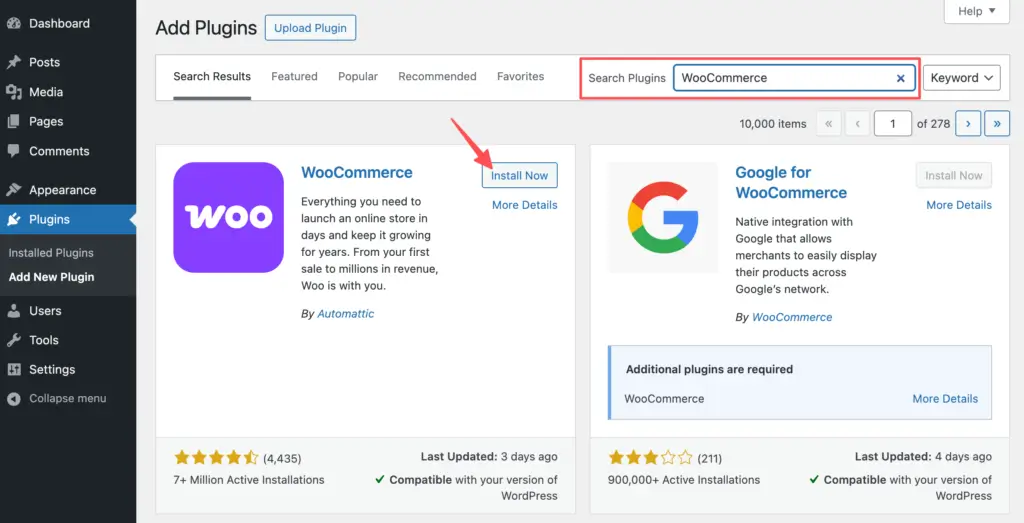
WooCommerce is a free, open-source ecommerce plugin for WordPress. It turns a WordPress website into an online store with product pages, cart functionality, checkout, payments, shipping, tax settings, order management, customer accounts, coupons, and reporting.
Unlike hosted ecommerce platforms, WooCommerce does not bundle everything into one fixed monthly plan. You choose your hosting provider, theme, payment gateway, extensions, security stack, and development approach.
Background and Evolution
WooCommerce started as a WordPress ecommerce plugin, but it has grown into a full commerce ecosystem. You can use it for physical products, digital downloads, subscriptions, bookings, memberships, wholesale stores, marketplaces, B2B catalogs, online courses, and content-heavy ecommerce websites.
That flexibility is its biggest advantage. WooCommerce can support a simple online store, but it can also become the ecommerce layer of a complex WordPress site with deep content, custom functionality, advanced SEO, and industry-specific workflows.
Target Users and Use Cases
WooCommerce fits several ecommerce profiles very well:
- WordPress users – You can add ecommerce to an existing WordPress site.
- Content-driven brands – You can combine blogs, guides, landing pages, and product pages.
- SEO-focused stores – You get strong control over site structure, content, schema, and plugins.
- Custom ecommerce projects – Developers can build highly tailored store experiences.
- Cost-conscious sellers – You avoid fixed platform tiers and choose your own stack.
WooCommerce is less ideal if you want a fully managed ecommerce system with minimal maintenance. In that case, Shopify or Wix may feel easier. But if ownership and flexibility matter more than simplicity, WooCommerce is one of the best platforms you can choose.
Key Features of WooCommerce
How Does WooCommerce Work?
WooCommerce works by adding ecommerce functionality to WordPress. Once installed, it creates the core store structure you need, including products, cart, checkout, orders, customers, coupons, tax settings, shipping zones, payment options, and analytics.
The main advantage is control. You are not locked into one hosting environment, one payment system, one design framework, or one app marketplace. You can build your store around your business needs.
Storefront and Website Control
WooCommerce runs inside WordPress, which gives you strong control over your store’s pages, menus, blog, landing pages, categories, media, plugins, URLs, and SEO setup.
This is where WooCommerce stands out from most hosted ecommerce platforms. You can build a complete content and commerce experience, not just a product catalog with a blog attached.
Product and Catalog Management
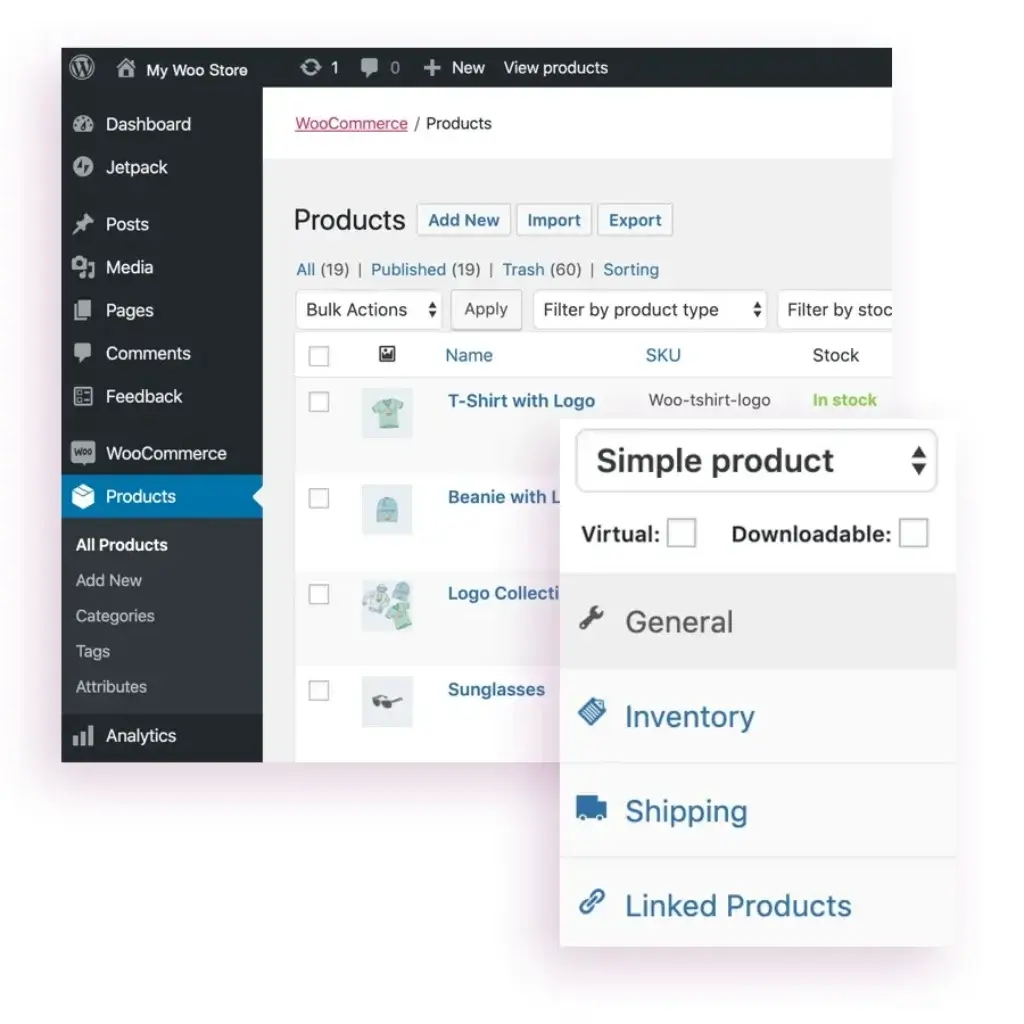
WooCommerce supports physical products, digital downloads, product variations, SKUs, categories, tags, sale pricing, inventory tracking, downloadable files, product images, galleries, and product attributes.
For many stores, the built-in product management tools are enough. For more advanced needs, you can add extensions for subscriptions, bundles, bookings, memberships, wholesale pricing, product add-ons, custom fields, or marketplace functionality.
Cart and Checkout
WooCommerce includes cart and checkout functionality out of the box. You can accept orders, collect customer details, apply coupons, calculate shipping, charge taxes, and send transactional emails.
The checkout can be customized much more deeply than many hosted platforms, especially with the right theme, blocks, plugins, or developer support. This is valuable if your store has unique checkout requirements.
Shipping, Taxes, and Fulfillment
WooCommerce includes shipping zones, shipping classes, flat rates, free shipping, local pickup, tax settings, and order management tools. With WooCommerce Shipping, you can create shipping labels directly inside your store for supported carriers.
For advanced operations, WooCommerce can connect with multi-carrier shipping tools, fulfillment providers, warehouse management systems, dropshipping apps, print-on-demand platforms, and accounting software.
Payments and WooPayments
WooCommerce lets you choose your payment provider. You can use WooPayments, Stripe, PayPal, Square, bank transfers, cash on delivery, regional gateways, or industry-specific payment plugins.
WooPayments is the most integrated option because it lets you manage transactions, payouts, refunds, and disputes from the WordPress dashboard. It also supports popular payment methods depending on your country and configuration.

AI Features
WooCommerce AI Capabilities
WooCommerce does not have the same centralized native AI layer as some hosted platforms. Instead, its AI capabilities come mainly from the wider WordPress and WooCommerce plugin ecosystem.
This approach has advantages and drawbacks. You get more choice and flexibility, but you also need to choose tools carefully to avoid plugin bloat, duplicated features, or performance issues.
AI Product Descriptions
Many WooCommerce store owners use AI plugins to generate product descriptions, short descriptions, SEO titles, meta descriptions, image alt text, FAQs, and category copy.
This is especially useful if you manage a large catalog. AI can help you create first drafts faster, but you should still edit the content for accuracy, differentiation, brand voice, and search intent.
AI SEO and Content Optimization
Because WooCommerce runs on WordPress, you can combine it with SEO plugins that include AI writing, keyword suggestions, schema guidance, internal linking suggestions, and content optimization workflows.
This gives WooCommerce a practical advantage for content-heavy ecommerce sites. You can optimize buying guides, comparison pages, product collections, tutorials, and blog content around commercial search intent.
AI Chatbots and Customer Support
WooCommerce stores can use AI chatbot plugins to answer product questions, recommend items, explain shipping policies, help customers navigate the catalog, and reduce repetitive support tickets.
For small teams, this can improve support coverage. However, AI chatbots should be trained carefully and monitored because inaccurate answers can create customer trust issues.
AI Limitations
WooCommerce AI depends heavily on the plugins and services you choose. That means quality, pricing, privacy, and performance vary significantly.
My recommendation is to start with one clear AI use case, such as product descriptions or support automation. Measure the impact before adding more AI tools to your stack.
Pros and Cons
Benefits and Limitations of Using WooCommerce
Pros
✅ Best for WordPress ecommerce
✅ Excellent SEO and content flexibility
✅ Free open-source core platform
✅ Strong customization and plugin ecosystem
Cons
❌ Requires hosting and maintenance
❌ Plugin costs can add up
❌ More technical than hosted platforms
❌ Performance depends on your setup
Strengths and Benefits
WooCommerce’s biggest advantage is that it gives you ecommerce ownership without forcing you into a closed platform model.
- Open-source flexibility – You can customize the store, data, code, hosting, and integrations.
- Excellent content SEO – WooCommerce benefits from WordPress’s publishing and SEO ecosystem.
- No fixed platform tiers – The core plugin is free, and you pay for the stack you choose.
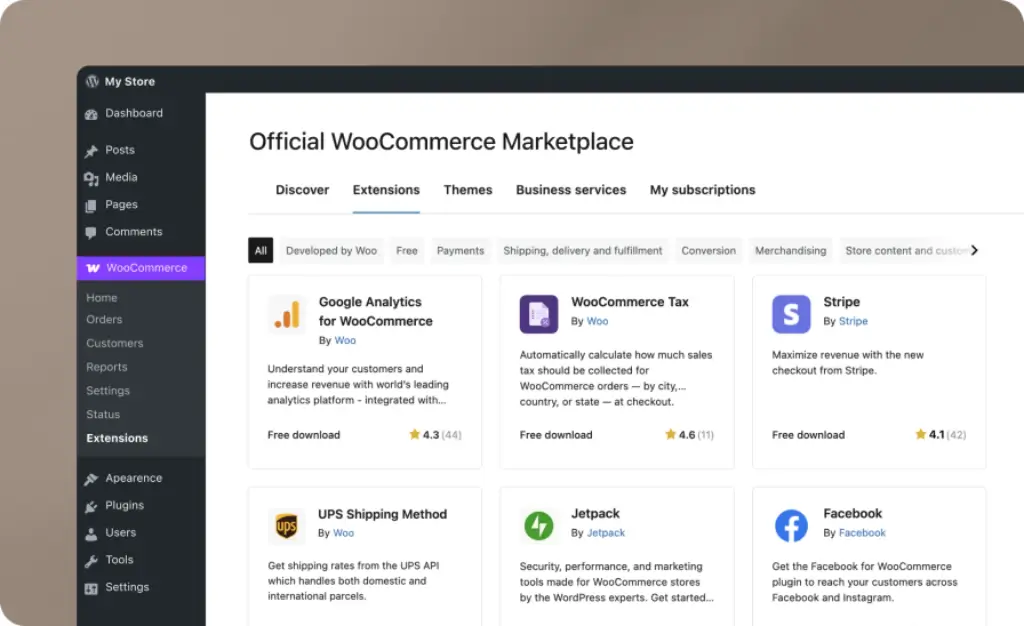
- Large extension ecosystem – You can add features for payments, shipping, subscriptions, analytics, and marketing.
Limitations and Drawbacks
WooCommerce gives you control, but that control comes with responsibility.
- Maintenance is on you – Hosting, updates, backups, security, and performance need attention.
- Setup can become complex – The more plugins you add, the more testing and management you need.
- Costs are variable – Hosting, extensions, themes, developers, and maintenance can increase total cost.
- Support is distributed – You may need help from hosting providers, plugin developers, or agencies.
Growth Features
WooCommerce SEO, Marketing, and Conversion Tools
WooCommerce is one of the best ecommerce platforms for SEO-focused businesses because it sits on top of WordPress. That means you can combine ecommerce pages with strong editorial content, technical SEO plugins, schema tools, internal linking, and conversion-focused landing pages.
Ecommerce SEO Features
WooCommerce lets you optimize product titles, product descriptions, category pages, URLs, breadcrumbs, product images, alt text, metadata, structured data, and internal links.
With the right SEO plugin, you can go further with schema markup, XML sitemaps, canonical controls, redirects, robots settings, content analysis, and advanced metadata.
Product and Category SEO
WooCommerce is especially strong when your SEO strategy includes product categories, comparison guides, buying guides, tutorials, review content, and long-tail product searches.
You can create content clusters around your products, then internally link commercial pages with helpful content. This is one of the main reasons WooCommerce can outperform simpler ecommerce builders for organic search.
Email Marketing and Automations
WooCommerce integrates with email marketing, SMS, CRM, loyalty, review, abandoned cart, and lifecycle marketing tools.
This allows you to create automations for abandoned carts, post-purchase follow-ups, win-back campaigns, replenishment reminders, product recommendations, and customer segmentation.
Analytics and Reporting
WooCommerce Analytics provides reports for revenue, orders, products, categories, coupons, taxes, downloads, stock, and customers. You can filter reports, export data, and monitor key store metrics from the dashboard.
For deeper analysis, WooCommerce can connect with GA4, Looker Studio, CRM platforms, BI tools, and ecommerce analytics plugins.
Online Selling
WooCommerce Ecommerce Capabilities
WooCommerce can support a wide range of ecommerce models. It is not limited to basic product catalogs, which makes it useful for businesses that need more control than a hosted store builder can provide.
Physical and Digital Products
WooCommerce supports physical products, digital downloads, variable products, grouped products, affiliate products, and downloadable files.
This makes it suitable for stores selling apparel, accessories, software files, templates, ebooks, courses, home goods, niche products, and many other product types.
Subscriptions and Memberships
With extensions, WooCommerce can support recurring payments, subscription boxes, memberships, gated content, customer portals, renewal workflows, and recurring billing.
This is a strong fit for brands that want to combine content, community, and ecommerce under one WordPress site.
Bookings, Appointments, and Services
WooCommerce can also support bookings and appointment-based sales through extensions. This is useful for consultants, service businesses, classes, rentals, events, and appointment-based commerce.
Hosted ecommerce platforms can also support services, but WooCommerce gives more flexibility if your booking workflow needs custom fields, conditional logic, or content-heavy pages.
B2B and Wholesale Selling
WooCommerce can work well for B2B and wholesale when configured correctly. You can add role-based pricing, private catalogs, quote requests, bulk ordering, tax-exempt customers, company accounts, and payment terms through extensions.
However, B2B WooCommerce stores often need careful planning. You should avoid building a complex wholesale operation with too many overlapping plugins.
Marketplaces and Multi-Vendor Stores
WooCommerce can support marketplace functionality with multi-vendor plugins. This allows multiple sellers to list products, manage orders, and receive commissions.
This is possible, but it is more complex than a standard store. Marketplace projects usually require stronger hosting, developer support, payment planning, and ongoing maintenance.
Pricing
WooCommerce Pricing and Total Cost
WooCommerce pricing is different from Shopify, Wix, or BigCommerce because the core WooCommerce plugin is free. You do not pay a standard WooCommerce monthly subscription to use the platform.
However, a real WooCommerce store is not usually free to run. Your total cost depends on hosting, domain, theme, payment processing, premium plugins, security, backups, performance tools, development, maintenance, and marketing software.
Core WooCommerce Cost
The core WooCommerce plugin is free to download and use. This gives you product management, cart, checkout, orders, coupons, basic shipping, basic tax settings, customer accounts, and store reporting.
This makes WooCommerce attractive if you want to start lean, but you should still budget realistically for the full store stack.
Hosting and Domain Costs
Hosting is one of the most important WooCommerce costs. Small stores can start with affordable WordPress hosting, while growing stores should use managed WooCommerce hosting or performance-focused cloud hosting.
Your hosting choice affects speed, uptime, security, checkout reliability, and how well your store handles traffic spikes.
Themes and Design Costs
You can build a WooCommerce store with a free theme, a premium WordPress theme, a block theme, or a custom design.
Premium themes are usually a practical middle ground for small and mid-sized stores. Custom design is best when brand differentiation, conversion optimization, or unique layouts are important.
Extensions and Plugin Costs
Extensions are where WooCommerce costs can grow. Common paid plugin categories include subscriptions, bookings, product add-ons, advanced shipping, tax automation, email marketing, search, filtering, reviews, analytics, wholesale pricing, and security.
The key is to keep the stack focused. Every plugin should solve a clear problem, support revenue, or reduce operational workload.
Pricing Table
The table below gives a practical view of WooCommerce cost categories. Always confirm live pricing before publishing because hosting, plugins, payment fees, and extension prices change over time.
| Cost Type | Typical Range | What It Covers | Best Practice |
| WooCommerce Core | $0 | Core ecommerce plugin | Use the free core as your foundation |
| Hosting | About $25-$350/month for many stores | Server performance, uptime, security, scalability | Choose managed WooCommerce hosting as you grow |
| Domain | Usually annual | Your store address | Use a clean brandable domain |
| Theme | Free to premium annual cost | Store design and layout | Pick a fast WooCommerce-ready theme |
| Extensions | Often $29-$299/year each | Advanced ecommerce features | Add only plugins with clear business value |
| Payment Processing | Varies by provider | Card, wallet, and local payment fees | Compare fees by region and sales volume |
| Development | Optional, varies widely | Custom design, features, integrations | Budget for expert help when scaling |
My recommendation is simple: WooCommerce is cost-effective when you manage the stack carefully. It becomes expensive when you add plugins without a clear strategy or underinvest in hosting and maintenance.
Use Cases
Who Should Use WooCommerce?
WooCommerce is best for businesses that want more control than a hosted ecommerce platform can provide.
Best for WordPress Users
If your website already runs on WordPress, WooCommerce is the natural ecommerce choice. You can add product pages, checkout, payments, and order management without moving to another platform.
Best for SEO-Focused Stores
WooCommerce is excellent for businesses that rely on organic traffic. You can build product pages, category pages, comparison content, educational guides, reviews, and landing pages within the same WordPress environment.
Best for Custom Ecommerce Projects
If you need unique product fields, unusual checkout logic, custom user roles, special pricing rules, or integrations with internal systems, WooCommerce gives you the flexibility to build around those requirements.
Best for Content and Commerce Together
WooCommerce is strong when your site needs more than a store. If you publish guides, tutorials, blog posts, courses, resources, product comparisons, or educational content, WordPress gives you a strong content foundation.
When WooCommerce Might Not Be Right
WooCommerce may not be the best fit if you want the simplest possible setup, bundled hosting, centralized support, built-in maintenance, and fewer technical decisions.
In those cases, Shopify, Wix, or Squarespace may feel easier. WooCommerce is better when flexibility and ownership matter more than convenience.
Competitors
Competitor Alternatives to WooCommerce
WooCommerce competes with hosted ecommerce platforms and website builders, including Shopify, Wix, Squarespace, Webflow, and BigCommerce.
The right choice depends on whether you prioritize ownership, simplicity, content SEO, ecommerce depth, scalability, or design freedom.
| Feature Type | WooCommerce | Shopify | Wix | BigCommerce |
| Core focus | WordPress ecommerce plugin | Hosted ecommerce platform | All-in-one website builder | Hosted ecommerce platform |
| Best for | Control, SEO, and customization | Ecommerce-first stores | Simple SMB websites | Larger product catalogs |
| Ease of use | Moderate | High | High | Moderate |
| Hosting | You choose your host | Included | Included | Included |
| SEO flexibility | Excellent for content and ecommerce | Strong for ecommerce | Good basics | Strong ecommerce SEO |
| Customization | Very strong | Good but more controlled | Beginner-friendly | Good but structured |
| Best overall angle | Best for WordPress ownership | Best hosted ecommerce choice | Best for simple websites | Best Shopify alternative for built-in ecommerce features |
WooCommerce vs Shopify
WooCommerce gives you more control over hosting, site structure, data, checkout customization, plugins, and content SEO. Shopify gives you a more managed ecommerce experience with hosting, security, checkout infrastructure, and support built into the platform.
Choose WooCommerce if you want ownership and flexibility. Choose Shopify if you want a cleaner managed experience with fewer technical responsibilities.
WooCommerce vs Wix
Wix is easier for beginners and simple business websites. WooCommerce is stronger for users who want advanced SEO, WordPress flexibility, larger content sections, and more control over the ecommerce stack.
WooCommerce vs Squarespace
Squarespace is strong for polished design and smaller ecommerce needs. WooCommerce is better when ecommerce needs to connect with deeper content, advanced SEO, custom functionality, or a larger WordPress site.
WooCommerce vs BigCommerce
BigCommerce is a strong hosted ecommerce platform with many built-in features. WooCommerce is better if you want WordPress ownership, full content flexibility, and a more customizable technical stack.
If your team wants fewer plugins and a more structured hosted platform, BigCommerce may be worth considering. If you want more freedom, WooCommerce is usually the better fit.
Best Practices
Getting Started with WooCommerce
WooCommerce is flexible, but the best results come from planning the technical stack before you start adding plugins.
Choose Reliable WooCommerce Hosting
Hosting is one of the most important decisions you will make. A cheap shared hosting plan may work for a small test store, but a growing store needs better performance, backups, security, caching, staging, and support.
Choose hosting that is optimized for WordPress and WooCommerce, especially if you expect traffic spikes, many plugins, or a large product catalog.
Use a Lightweight Theme
Your theme affects speed, mobile experience, product presentation, and conversion. Choose a WooCommerce-ready theme that is fast, maintained, and compatible with your core plugins.
Avoid heavy themes that include too many features you do not need. A clean theme with the right plugins is usually better than an overloaded theme.
Keep Plugins Under Control
WooCommerce plugins are powerful, but too many plugins can slow down your site, create conflicts, and make maintenance harder.
Before installing a plugin, ask whether it improves revenue, reduces manual work, improves customer experience, or solves a real operational issue.
Secure and Maintain the Store
Because WooCommerce is self-hosted, you need a clear maintenance routine. That includes updates, backups, malware protection, uptime monitoring, SSL, user permissions, and testing after major plugin updates.
For serious stores, use a staging environment before updating important plugins on the live site.
Plan SEO from the Beginning
Set clean URLs, optimize product and category pages, write unique product descriptions, use internal links, add alt text, configure schema, and create helpful content around buying intent.
WooCommerce gives you excellent SEO potential, but it does not replace a clear search strategy.
Conclusion
Final Thoughts
WooCommerce remains one of the best ecommerce platforms in 2026 for businesses that want flexibility, ownership, SEO control, and deep WordPress integration.
Its biggest strengths are its open-source foundation, strong content and SEO capabilities, customization options, large extension ecosystem, flexible payments, and ability to support many ecommerce models.
Its main weaknesses are maintenance responsibility, plugin dependency, variable costs, performance sensitivity, and a steeper learning curve than fully hosted ecommerce platforms.
Overall, WooCommerce is a strong recommendation if you already use WordPress or want full control over your ecommerce website. It is especially valuable for content-driven stores, SEO-focused brands, custom ecommerce projects, and businesses that do not want to be locked into a closed platform.
If your top priority is simplicity, Shopify may be easier. If your top priority is ownership, customization, and content-led ecommerce growth, WooCommerce is often the better long-term choice.
Frequently Asked Questions
Have more questions?
What is WooCommerce?
WooCommerce is a free, open-source ecommerce plugin for WordPress. It adds product pages, cart functionality, checkout, payments, shipping, tax settings, order management, coupons, and analytics to a WordPress website.
Is WooCommerce free?
Yes. The core WooCommerce plugin is free to download and use. However, a real store usually has costs for hosting, domain, premium themes, payment processing, extensions, security, development, and maintenance.
Is WooCommerce good for beginners?
WooCommerce can work for beginners, especially if they already know WordPress. However, it is more technical than hosted platforms because you need to manage hosting, updates, plugins, security, and performance.
Is WooCommerce worth it in 2026?
Yes. WooCommerce is worth it if you want WordPress flexibility, SEO control, ownership, and deep customization. It is less ideal if you want a fully managed ecommerce platform with minimal maintenance.
How much does WooCommerce cost?
WooCommerce core is free, but total cost depends on hosting, domain, theme, extensions, payment processing, security, and development. Small stores can start lean, while larger stores need stronger hosting and maintenance budgets.
Is WooCommerce good for SEO?
Yes. WooCommerce is very strong for SEO because it runs on WordPress. You can optimize product pages, category pages, blog content, metadata, URLs, schema, internal links, and long-tail ecommerce content.
What payments does WooCommerce support?
WooCommerce supports many payment options, including WooPayments, Stripe, PayPal, Square, bank transfers, cash on delivery, local gateways, and regional payment methods depending on your country and plugin setup.
Can WooCommerce handle large stores?
Yes, WooCommerce can handle large stores when it is built on strong hosting, optimized code, careful plugin selection, caching, database optimization, and proper maintenance. Poor hosting and plugin bloat can limit performance.
Is WooCommerce better than Shopify?
WooCommerce is better if you want WordPress control, customization, and content SEO. Shopify is better if you want a hosted ecommerce platform with less technical maintenance and a more managed setup.
Who should use WooCommerce?
WooCommerce is best for WordPress users, SEO-focused ecommerce brands, content-heavy stores, custom ecommerce projects, and businesses that want control over hosting, plugins, checkout, data, and site structure.