
Introduction
Choosing an ecommerce platform is not just about creating a good-looking online store. It affects how you manage products, process payments, handle shipping, sell across channels, optimize for search, use AI, and scale your business over time.
In this Shopify review, you will get a practical look at what Shopify offers in 2026, where it performs best, where it can become expensive, and which types of businesses should choose it over alternatives like WooCommerce, Wix, Squarespace, and BigCommerce.
Shopify is one of the most complete commerce platforms available. It is especially strong for online stores that want a hosted, reliable, conversion-focused system without managing hosting, security, checkout infrastructure, or ecommerce plugins separately.
What Is Shopify?
Shopify is a hosted ecommerce platform that helps you build an online store, sell products, accept payments, manage inventory, process orders, connect sales channels, and run your commerce operations from one dashboard.
Unlike WordPress and WooCommerce, Shopify is not a general-purpose content management system first. It is commerce-first. That means most of its core experience is built around selling, checkout, order management, inventory, payments, shipping, and store operations.
Background and Evolution
Shopify started as a platform for online stores, but it has evolved into a broader commerce operating system. You can now use it for direct-to-consumer ecommerce, social selling, marketplace selling, retail point of sale, B2B selling, international commerce, dropshipping, print-on-demand, subscriptions, and enterprise commerce.
That evolution matters because Shopify is no longer just a beginner-friendly online store builder. It is a scalable commerce platform that can support solo entrepreneurs, growing brands, retail teams, and enterprise merchants through different plans and add-ons.
Target Users and Use Cases
Shopify fits several ecommerce profiles very well:
- New online sellers – You can launch a store without managing hosting or complex technical setup.
- Growing ecommerce brands – You get strong checkout, inventory, shipping, reporting, and sales-channel tools.
- Retail and omnichannel sellers – Shopify POS helps connect in-person and online sales.
- DTC brands – Shopify is strong for branded stores, product catalogs, promotions, and repeat purchases.
- International sellers – Higher-tier plans support more advanced global selling workflows.
Shopify is less ideal if your website is mainly a publishing business, a media site, a complex content hub, or a highly customized web application. In those cases, WordPress or Webflow may give you more flexibility. But if your main goal is selling products, Shopify is one of the safest choices you can make.
Key Features of Shopify
How Does Shopify Work?
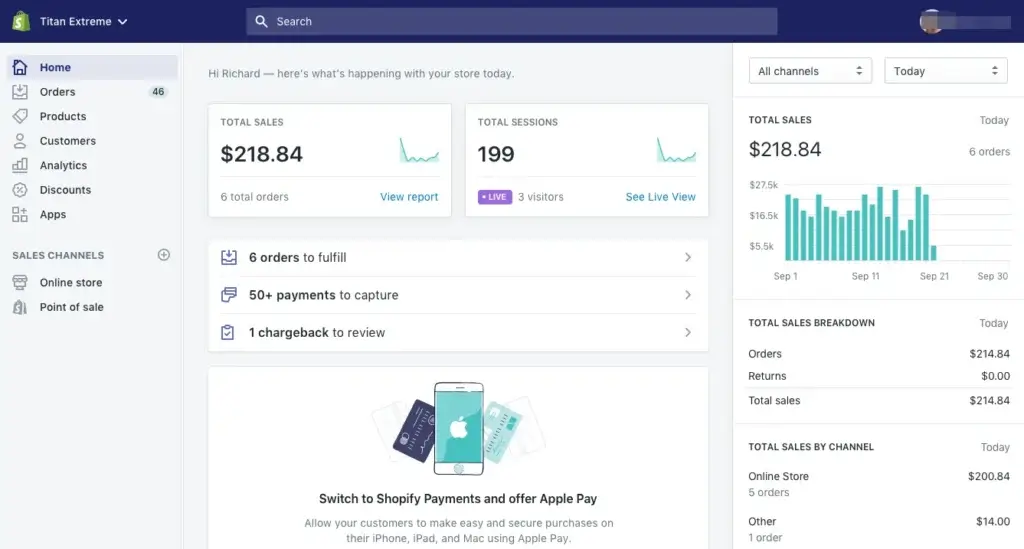
Shopify works as a centralized commerce platform. You build your storefront, add products, set up payments, configure shipping and taxes, connect sales channels, and manage orders from the Shopify admin.
The main advantage is simplicity at scale. You do not need to patch together hosting, checkout security, ecommerce plugins, payment gateways, shipping labels, and inventory tools from different systems. Shopify brings the core ecommerce stack into one managed environment.
Online Store Builder
Shopify gives you a hosted online store with customizable themes, product pages, collections, navigation, checkout, and content pages. You can start with a pre-built theme, adjust sections visually, and use the editor to build a polished storefront without coding.
Its design flexibility is good for most ecommerce stores, but it is not unlimited. Shopify is more structured than Webflow and less open-ended than WordPress. That structure is helpful for merchants who want speed and stability, but it can feel restrictive for advanced designers.
Product and Inventory Management
Shopify makes it easy to manage physical products, digital products, variants, SKUs, inventory levels, collections, pricing, discounts, product media, and product descriptions.
This is one of the places where Shopify feels more mature than general website builders. Product management is part of the platform’s core, not an add-on that was built later.
Checkout and Payments
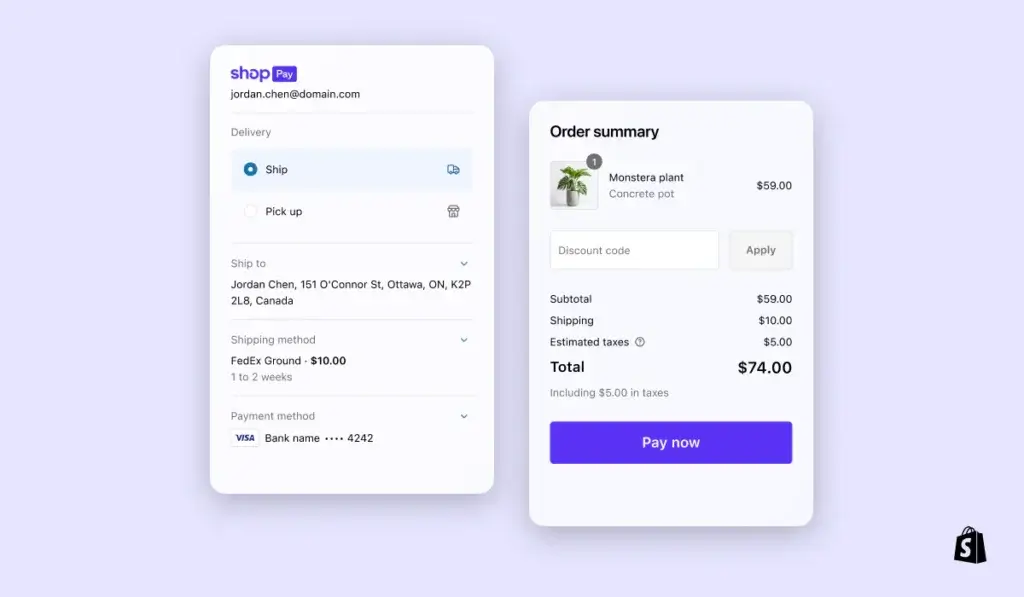
Shopify’s checkout is one of its biggest strengths. It is fast, secure, mobile-friendly, and built specifically to reduce friction during purchase.
You can use Shopify Payments in supported countries or connect third-party payment providers. The tradeoff is that third-party transaction fees may apply if you do not use Shopify Payments, so payment costs should be part of your buying decision.
Shipping, Taxes, and Fulfillment
Shopify includes practical tools for shipping setup, label printing, rates, order tracking, fulfillment workflows, and tax configuration. For smaller stores, these built-in tools can reduce the need for extra software.
For larger brands, Shopify can also connect to third-party logistics providers, multi-carrier shipping tools, warehouse systems, and fulfillment apps. This is where the App Store becomes important.
Sales Channels and Omnichannel Commerce
Shopify is designed to help you sell beyond your website. You can connect social channels, marketplaces, in-person sales, and other commerce touchpoints depending on your region, integrations, and plan.
This makes Shopify especially valuable for brands that do not want their website to be the only sales channel. If you sell through Instagram, TikTok, marketplaces, retail locations, and your own online store, Shopify can centralize a large part of that operation.
AI Features
Shopify AI Capabilities
Shopify has moved quickly into AI, but its AI features are most useful when you treat them as commerce productivity tools rather than a replacement for strategy.
The platform’s AI direction is built around helping merchants create content faster, improve product pages, generate visuals, work inside the admin more efficiently, and make better decisions with less manual effort.
Shopify Magic
Shopify Magic helps with AI-generated content and creative work inside Shopify. You can use it for tasks such as product descriptions, blog content, page copy, email content, suggested replies, image adjustments, and theme-related assistance.
This is useful if you have many products to describe, frequent campaigns to launch, or limited copywriting resources. It can speed up execution, but you should still review outputs carefully for accuracy, tone, and brand consistency.
Sidekick AI Assistant
Sidekick is Shopify’s AI commerce assistant. It is designed to answer questions, help with store tasks, surface insights, and guide merchants through Shopify workflows using natural language.
For store owners, this can reduce the learning curve. Instead of searching through settings or documentation, you can ask questions and receive task-oriented support inside the Shopify environment.
AI Theme and Content Generation
Shopify also supports AI-assisted theme generation and theme block generation. This can help you move faster when building sections, landing pages, promotional areas, or store layouts.
For most sellers, the biggest value is not that AI builds the entire business. It is that AI helps reduce repetitive work, especially around product content, page building, customer messaging, and campaign assets.
AI Limitations
Shopify’s AI tools are helpful, but they do not remove the need for merchandising strategy, keyword research, conversion optimization, product photography, or brand positioning.
If your product catalog is competitive, you should treat AI output as a draft. The best stores will still rely on strong positioning, original visuals, thoughtful product pages, and clear buying reasons.
Pros and Cons
Benefits and Limitations of Using Shopify
Pros
✅ Best for ecommerce-first websites
✅ Strong checkout and payments
✅ Excellent app ecosystem
✅ Good POS and multichannel selling
Cons
❌ Apps can increase monthly costs
❌ Less flexible than WordPress
❌ Transaction fees may apply
❌ Advanced customization can require developers
Strengths and Benefits
Shopify’s biggest advantage is that it gives merchants a reliable ecommerce foundation without forcing them to manage the technical stack themselves.
- Commerce-first platform – Shopify is built around products, checkout, payments, shipping, and orders.
- Strong checkout experience – The checkout is fast, secure, and optimized for ecommerce conversion.
- Large app ecosystem – You can extend Shopify with apps for marketing, reviews, subscriptions, fulfillment, analytics, and more.
- Good omnichannel support – Shopify supports online selling, social selling, marketplaces, and POS workflows.
Limitations and Drawbacks
Shopify is strong, but it is not the cheapest or most flexible option for every business.
- App costs add up – Many stores need paid apps for advanced reviews, subscriptions, filtering, upsells, or fulfillment.
- Design control has limits – Shopify themes are flexible, but not as open-ended as WordPress or Webflow.
- Payment costs matter – Third-party payment providers may add transaction fees depending on your setup.
- Advanced changes may need experts – Custom themes, checkout changes, and complex integrations can require developers.
Growth Features
Shopify SEO, Marketing, and Conversion Tools
Shopify is solid for ecommerce SEO and marketing, but its strength is different from WordPress. WordPress is stronger for deep publishing and complex content hubs. Shopify is stronger when SEO and marketing are directly connected to products, collections, landing pages, and checkout.
Ecommerce SEO Features
Shopify lets you edit page titles, meta descriptions, URLs, alt text, redirects, product pages, collections, and blog content. It also handles many technical basics like SSL, mobile-friendly themes, and structured ecommerce pages.
For most ecommerce brands, Shopify gives enough SEO control to compete. However, technical SEO flexibility is more limited than WordPress because Shopify is a hosted platform with a more controlled architecture.

Product and Collection SEO
Shopify works well when your SEO strategy is built around product categories, commercial search intent, product comparison pages, buying guides, and high-converting collection pages.
You can build strong category structures, optimize collection descriptions, add internal links, create blog content, and connect product pages to relevant buying journeys.
Email, Automations, and Campaigns
Shopify includes marketing tools and integrates with many email marketing, SMS, loyalty, referral, and advertising platforms. This matters because ecommerce growth is not only about attracting traffic. You also need abandoned cart recovery, repeat purchase campaigns, lifecycle messaging, and customer segmentation.
Analytics and Reporting
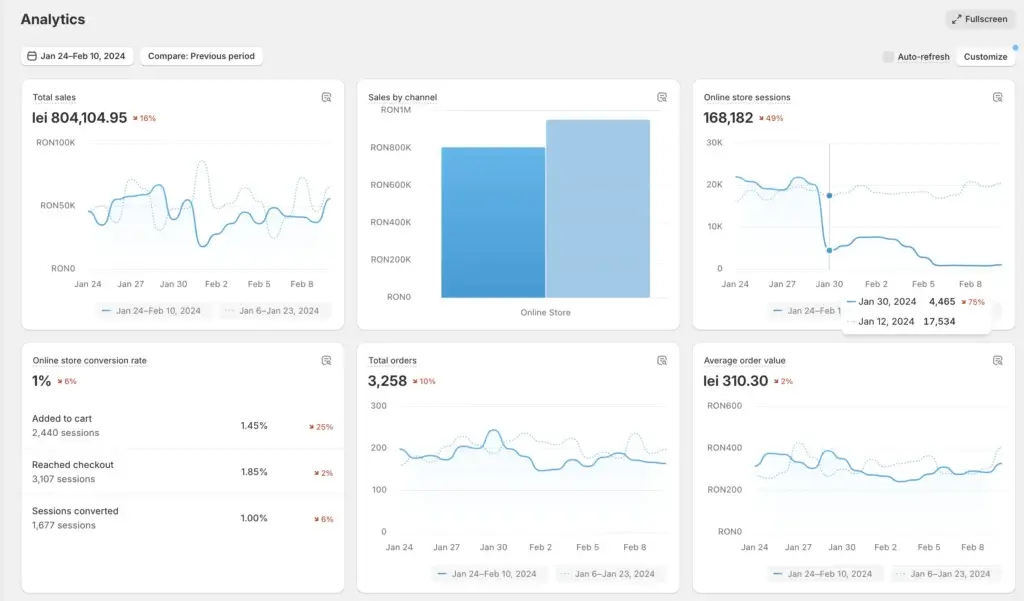
Shopify reporting helps you monitor sales, conversion, traffic, product performance, customer behavior, and marketing performance. Higher-tier plans provide more advanced analytics and reporting flexibility.
For most small and mid-sized stores, the built-in reporting is enough to guide day-to-day decisions. Larger brands may still connect Shopify to external analytics, BI, or attribution tools.
Online Selling
Shopify Ecommerce Capabilities
Shopify’s core strength is ecommerce. It is one of the best platforms if your store is central to your business model, not just a small section of your website.
Product Catalogs and Variants
Shopify supports product catalogs, product variants, inventory tracking, collections, discounts, gift cards, and product media. This makes it practical for stores selling apparel, beauty products, home goods, accessories, digital products, and many other categories.
For very complex catalogs, you may need apps or custom development. But for most ecommerce businesses, Shopify’s product structure is straightforward and easy to manage.
Shopify POS
Shopify POS is a major advantage for businesses that sell both online and in person. You can manage retail orders, customer profiles, inventory, and sales activity through Shopify.
This is especially useful for brands with pop-up shops, physical retail locations, markets, events, or hybrid selling models. Instead of running disconnected systems, you can connect online and offline operations.
International Selling
Shopify supports international commerce through markets, localized experiences, currencies, domains, duties, import taxes, and region-specific settings depending on plan and setup.
This makes Shopify attractive for brands that want to expand beyond one domestic market. That said, international commerce can still require careful planning around taxes, shipping, returns, payment methods, and localization.
B2B and Wholesale
Shopify has become more capable for B2B and wholesale, especially on higher-tier plans. You can support buyer-specific catalogs, company profiles, pricing rules, and more advanced commerce workflows depending on your plan.
If B2B is a major part of your business, Shopify Plus is usually the more serious option. For smaller wholesale needs, apps may be enough.
Dropshipping and Print-on-Demand
Shopify is popular for dropshipping and print-on-demand because it integrates with many supplier, sourcing, and fulfillment apps. This makes it easy to test product ideas without owning inventory from day one.
However, dropshipping success depends heavily on product selection, margins, shipping times, supplier reliability, branding, and customer experience. Shopify gives you the platform, but it does not solve the business model for you.
Pricing
Shopify Pricing and Plans
Shopify pricing depends on your country, billing cycle, payment provider, apps, POS needs, and whether you need advanced features. The monthly plan is only part of the cost.
For many businesses, the real Shopify cost includes your subscription, payment processing, paid apps, premium themes, POS hardware, custom development, and possibly third-party fulfillment or shipping tools.
Shopify Starter
Shopify Starter is the lowest-cost option for selling through social media, messaging apps, and simple links. It is not the best option if you want a full ecommerce website.
Use Starter only if you want basic selling without building a complete branded online store.
Shopify Basic
Basic is the most relevant starting point for most new ecommerce businesses. It includes the core online store, product management, checkout, payments, inventory, and essential ecommerce tools.
If you are building your first serious ecommerce store, Basic is usually the right place to start before upgrading.
Shopify Grow
Grow is designed for small teams that need more staff access, better rates, and stronger operational support. It makes sense when your store is moving beyond a solo operation.
If you have team members managing products, orders, customer service, marketing, or reporting, Grow becomes more practical than Basic.
Shopify Advanced
Advanced is better for scaling brands that need more detailed reporting, more staff accounts, stronger shipping options, and more advanced international selling support.
This plan is usually overkill for a new store, but it becomes valuable once reporting, shipping, and operational complexity start affecting profitability.
Shopify Plus
Shopify Plus is Shopify’s enterprise-level plan for high-growth and complex businesses. It is designed for brands that need more advanced checkout customization, B2B features, automation, permissions, support, and scalability.
Plus is not necessary for most small businesses, but it can be the right fit for larger DTC, retail, B2B, and global commerce operations.
Pricing Table
The table below gives a practical view of the main Shopify plan structure. Always confirm live pricing in your region before publishing, because pricing and features can vary by location and billing cycle.
| Plan | Best For | Typical Starting Price | Key Notes |
| Starter | Social selling and simple product links | From about $5/month | Not a full online store builder |
| Basic | New ecommerce stores | About $39/month or lower with annual billing | Good starting point for most sellers |
| Grow | Small teams and growing stores | About $105/month or lower with annual billing | Adds more team and operational flexibility |
| Advanced | Scaling brands and international selling | About $399/month or lower with annual billing | Better reporting and advanced shipping options |
| Plus | Enterprise and complex commerce | From about $2,300/month | Advanced checkout, B2B, automation, and support |
My recommendation is simple: start with Basic if you are launching a serious store, upgrade to Grow when team access and operational volume justify it, and consider Advanced only when reporting, global selling, or shipping complexity creates a clear business case.
Use Cases
Who Should Use Shopify?
Shopify is not the cheapest way to sell online, but it is one of the most practical options if ecommerce is your main business.
Best for Ecommerce-First Businesses
Shopify is best when your website’s primary job is to sell products. If your business depends on product pages, checkout, order management, inventory, and repeat purchases, Shopify fits naturally.
Best for DTC and Retail Brands
Direct-to-consumer brands benefit from Shopify’s checkout, themes, customer profiles, integrations, marketing tools, and app ecosystem.
Retail brands also benefit from Shopify POS, especially when they need online and offline inventory to work together.
Best for Multichannel Sellers
If you sell through your store, social platforms, marketplaces, and in person, Shopify can reduce operational friction by centralizing core commerce workflows.
Best for Growing Teams
Shopify becomes more valuable as your team grows. Store managers, marketers, fulfillment teams, customer support reps, and agencies can all work around the same commerce system.
When Shopify Might Not Be Right
Shopify may not be the best fit if your main goal is content publishing, complex editorial SEO, full design freedom, or minimizing subscription and app costs.
If content is more important than commerce, WordPress may be better. If design control is the main priority, Webflow may be stronger. If you need a very simple brochure site, Wix or Squarespace may be easier.
Competitors
Competitor Alternatives to Shopify
Shopify competes with several website and ecommerce platforms, but the closest alternatives are WordPress with WooCommerce, Wix, Squarespace, Webflow, and BigCommerce.
The right choice depends on whether you prioritize ecommerce depth, content flexibility, design freedom, simplicity, or lower long-term cost.
| Feature Type | Shopify | WooCommerce | Wix | BigCommerce |
| Core focus | Hosted ecommerce platform | WordPress ecommerce plugin | All-in-one website builder | Hosted ecommerce platform |
| Best for | Serious online stores | Content and commerce together | Simple stores and SMB websites | Growing product catalogs |
| Ease of use | High | Moderate | High | Moderate |
| Design flexibility | Good | Very strong with the right stack | Good for beginners | Good but more structured |
| SEO flexibility | Strong for ecommerce | Excellent for content SEO | Good basics | Strong ecommerce SEO |
| App ecosystem | Excellent | Excellent plugin ecosystem | Good | Good |
| Best overall angle | Best ecommerce-first choice | Best for control and content | Best for simplicity | Best Shopify alternative for complex catalogs |
Shopify vs WooCommerce
Shopify is easier to operate because hosting, checkout, security, and platform maintenance are handled for you. WooCommerce gives you more ownership and flexibility because it runs on WordPress.
Choose Shopify if you want a managed commerce platform. Choose WooCommerce if you want full control, deep content SEO, and more flexibility over hosting and site structure.
Shopify vs Wix
Wix is easier for general small business websites, but Shopify is stronger for serious ecommerce. Wix can handle simple online stores, but Shopify is better when selling products becomes the core business.
Shopify vs Squarespace
Squarespace is strong for elegant, design-led websites with lighter ecommerce needs. Shopify is better for larger catalogs, more serious store operations, sales channels, POS, and ecommerce apps.
Shopify vs BigCommerce
BigCommerce is one of Shopify’s closest ecommerce competitors. It can be attractive for businesses that want strong built-in ecommerce features and fewer dependency points on apps.
Shopify, however, usually has the stronger ecosystem, broader app marketplace, and more recognizable merchant experience.
Best Practices
Getting Started with Shopify
Shopify is easy to start with, but you should still make several decisions carefully before launching your store.
Choose the Right Theme
Your theme affects mobile experience, speed, product presentation, filtering, merchandising, and conversion. Start with a clean, reliable theme that fits your catalog size and brand style.
Avoid choosing a theme only because it looks impressive in a demo. A good ecommerce theme should make products easy to browse, compare, filter, and buy.
Keep Apps Under Control
Shopify apps are powerful, but too many apps can increase costs, slow down your site, and create operational complexity.
Add apps only when they solve a real business need. Reviews, email marketing, subscriptions, upsells, loyalty, fulfillment, and analytics are common categories, but not every store needs all of them immediately.
Set Up Payments and Shipping Early
Before driving traffic, test payment methods, shipping rates, tax settings, checkout flow, order notifications, and fulfillment workflows.
This is especially important if you sell internationally or use multiple warehouses, fulfillment partners, or shipping carriers.
Build Product Pages for Conversion
Your product pages should answer customer objections quickly. Include strong images, clear descriptions, sizing or specifications, shipping details, return policy information, reviews, and trust signals.
Shopify gives you the structure, but conversion depends on how well you communicate product value.
Plan SEO from the Start
Set clean URLs, write unique product descriptions, optimize collection pages, add alt text, create internal links, and build helpful content around buying intent.
Shopify SEO is good, but it still needs deliberate work. Do not rely only on product uploads and paid ads.
Conclusion
Final Thoughts
Shopify remains one of the best ecommerce platforms in 2026 because it focuses on the parts of online selling that matter most: checkout, payments, products, inventory, shipping, multichannel selling, analytics, apps, and operational reliability.
Its biggest strengths are its commerce-first design, strong checkout, hosted infrastructure, excellent app ecosystem, POS support, AI tools, and ability to scale from small stores to enterprise commerce.
Its main weaknesses are cost growth, app dependency, design limitations compared with more flexible platforms, and the fact that advanced customization can require technical help.
Overall, Shopify is a strong recommendation if your business is ecommerce-first. If your store is the center of your business, Shopify is usually a better choice than general website builders. If your website is mainly content-driven and ecommerce is secondary, WordPress with WooCommerce may give you more flexibility.
Frequently Asked Questions
Have more questions?
What is Shopify?
Shopify is a hosted ecommerce platform that helps you build an online store, accept payments, manage products, process orders, connect sales channels, and run commerce operations from one dashboard.
Is Shopify good for beginners?
Yes. Shopify is one of the better ecommerce platforms for beginners because it includes hosting, checkout, payments, themes, product management, and order tools in one system.
Is Shopify worth it in 2026?
Yes, Shopify is worth it if your main goal is selling products online or across multiple channels. It is less ideal if you mainly need a content-heavy website with ecommerce as a small add-on.
How much does Shopify cost?
Shopify pricing depends on your country, billing cycle, apps, payment provider, and plan. Common plans include Starter, Basic, Grow, Advanced, and Plus. Always check live pricing before choosing a plan.
Does Shopify take transaction fees?
Shopify may charge third-party transaction fees if you use an external payment provider instead of Shopify Payments. Payment processing fees also vary by plan and region.
Is Shopify good for SEO?
Yes. Shopify is good for ecommerce SEO, especially product pages, collection pages, metadata, redirects, image alt text, and mobile-friendly stores. WordPress still offers more flexibility for deep content SEO.
Can you use Shopify for in-person selling?
Yes. Shopify POS lets you sell in person, manage retail transactions, and connect online and offline inventory. It is useful for pop-ups, retail stores, markets, and omnichannel brands.
What are Shopify Magic and Sidekick?
Shopify Magic is Shopify’s AI feature set for content, images, theme assistance, and store tasks. Sidekick is Shopify’s AI commerce assistant for guidance, insights, and workflow support.
Is Shopify better than WooCommerce?
Shopify is usually better for merchants who want a managed ecommerce platform. WooCommerce is better for users who want more control, WordPress flexibility, and stronger content-first site ownership.
Who should use Shopify?
Shopify is best for ecommerce-first businesses, DTC brands, retail sellers, multichannel merchants, and growing teams that want a reliable hosted commerce platform with strong apps and checkout tools.