
Introduction
Choosing a hosting provider affects far more than where your website lives. It shapes your site speed, uptime, security posture, support experience, and how easily you can scale when traffic grows. In this Bluehost review, you will get a detailed look at what the platform offers, where it performs well, where it falls short, and which type of user will benefit most from it. By the end, you should have a clear understanding of whether Bluehost is the right fit for your next website.
What Is Bluehost?
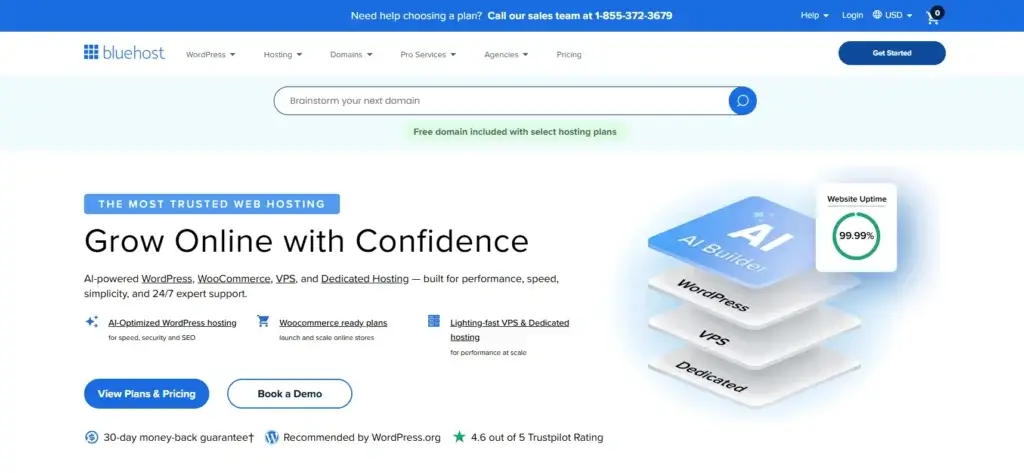
Bluehost is a web hosting provider focused heavily on WordPress and beginner-friendly website creation. It offers shared hosting, managed WordPress hosting, VPS hosting, dedicated hosting, domains, email hosting, security add-ons, and AI-assisted website creation tools. It is best known for its mainstream brand recognition, strong WordPress positioning, guided onboarding, and an ecosystem designed to help you launch a website without too much technical friction.
Background and Evolution
Bluehost has been a well-known name in hosting for years, and in 2026 it continues to position itself as a WordPress-first provider with broader appeal for small businesses, bloggers, creators, and first-time site owners. Its current platform emphasizes easier setup, AI-powered website creation tools, managed WordPress updates, bundled security features, and plan-based scalability. Rather than competing as a bare-bones commodity host, Bluehost now presents itself as a more complete website platform for users who want hosting, domains, email, and WordPress tools under one roof.
Target Users and Use Cases
Bluehost appeals to several different audiences:
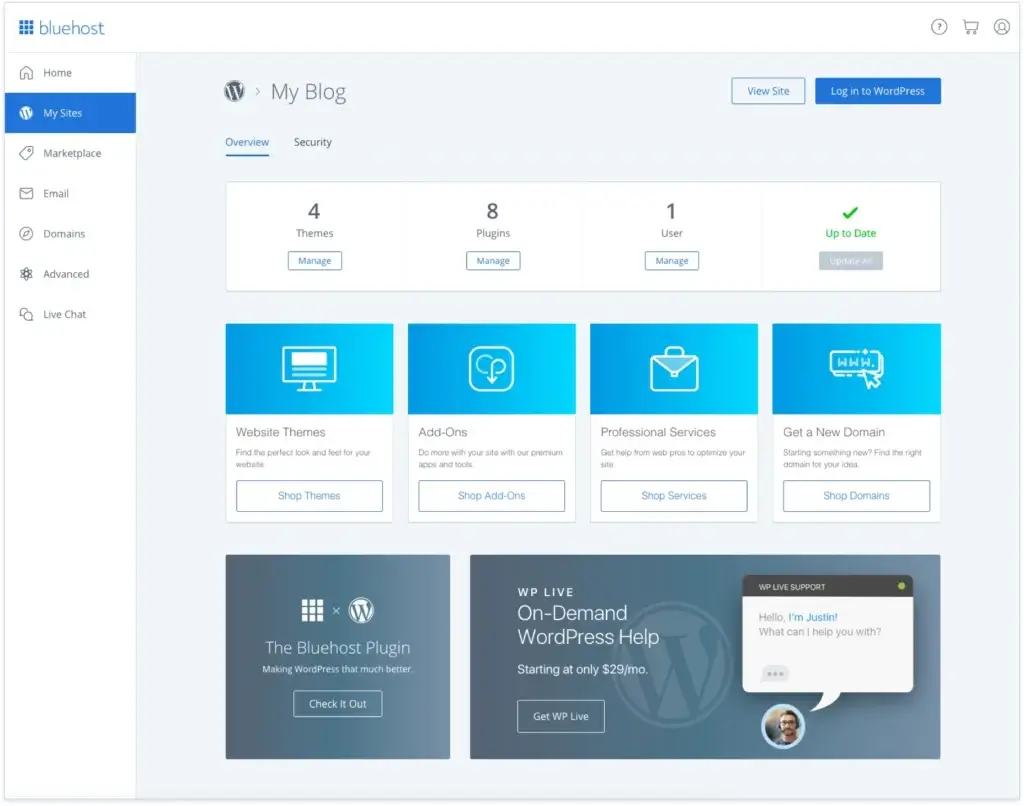
- Beginners and first-time website owners – You get guided setup, AI creation tools, and a dashboard built to reduce the learning curve.
- WordPress users – The platform is tightly aligned with WordPress and includes managed updates, staging, and WordPress-specific tools on higher plans.
- Small businesses – You can run a business website, connect a branded domain, use email, and manage most essentials in one account.
- Bloggers and affiliate marketers – Bluehost works well for content sites that need simple setup, reasonable performance, and a recognizable hosting brand.
- Growing websites – Multiple tiers make it easier to upgrade from a starter site to a more capable business or performance-focused plan.
That said, Bluehost is not equally strong for every user. It is more compelling for beginners and WordPress-focused site owners than for advanced developers who want maximum control, highly transparent performance benchmarks, or premium managed hosting support.
How Does It Work?
Key Features of Bluehost
Bluehost is no longer just a basic shared host. Its current feature set is built around making WordPress setup easier while giving you enough room to grow into stronger plans as your website becomes more demanding.
Hosting Plans for Different Stages
Bluehost’s biggest strength is that it gives you a progression path inside the same ecosystem. You can start with an entry-level shared hosting plan, move to a Business plan when you need more websites, stronger security, and better support, and then go further into Pro, managed WordPress, VPS, or dedicated hosting when performance or control becomes more important.
This matters because many site owners start with a simple website or blog and only later realize they need more storage, better backups, or stronger support. Bluehost is built to make that upgrade path relatively straightforward.
WordPress-First Experience
Bluehost is especially relevant if you plan to build on WordPress. The company positions WordPress as a core part of the platform, not just another app you install on top of generic hosting. You get WordPress-focused onboarding, AI site creation tools, managed updates, and access to staging and developer features on higher tiers.
That makes Bluehost more appealing than low-cost hosts that offer WordPress only as a one-click extra with little real optimization around it.
AI Site Creation and Guided Setup
One of Bluehost’s most notable modern additions is its AI-assisted onboarding and website creation layer. This is designed to help new users move from a blank WordPress install to a usable site much faster. If you are not comfortable starting from an empty dashboard, this can make a real difference in the early setup phase.
For beginners, that guided experience is one of Bluehost’s strongest selling points. For advanced users, it is useful but less essential.
Performance Features and Infrastructure
Bluehost’s plans now emphasize NVMe storage, CDN access, stronger CPU allocation, and global data center positioning. On paper, that gives the service a stronger performance story than older Bluehost reviews may suggest. Entry plans are still designed for smaller websites, but higher tiers are built for larger traffic volumes and more demanding use cases.
You should still keep expectations realistic. Bluehost is not trying to be a premium managed WordPress host at the top end of the market. It is better viewed as a capable mainstream host with improved infrastructure and a strong balance between usability and performance.
Security and Backups
Security is another area where Bluehost has become more competitive. Core plans include SSL, malware scanning, firewall coverage, and DDoS protection, with better protection and stronger feature depth on higher plans. Weekly backups are also part of the package on qualifying tiers, which is important for reducing risk if your site breaks or gets compromised.
Like every host, Bluehost gives you the tools, but you are still responsible for site-level security best practices such as strong passwords, clean plugins, safe admin habits, and update discipline.
Support Structure
Bluehost offers 24/7 support, but there is an important detail many buyers miss. Entry-level plans are more limited, with chat support available while phone support is not included on the most basic shared tier. Higher plans include both chat and phone support.
This is one of the most important practical differences between plans, especially if you want real-time phone help during urgent situations.
Pros and Cons
Benefits and Limitations of Using Bluehost
Positive
✅ Strong beginner experience
✅ WordPress-focused platform
✅ Good feature depth on higher plans
✅ Clear upgrade path
Negative
❌ Renewal pricing is much higher
❌ Phone support is not universal
❌ Starter plans are limited
❌ Better value alternatives exist
Strengths & Benefits
Bluehost does a lot well, especially if you are looking for a mainstream hosting provider that removes complexity from the launch process.
- Strong beginner experience – Bluehost is built to help first-time site owners launch faster with guided setup and AI-assisted onboarding.
- WordPress-focused platform – WordPress is central to the product experience, not just an add-on.
- Good feature depth on higher plans – Business and above become much more attractive with better support, stronger security, and more resources.
- Clear upgrade path – You can begin small and move up inside the same platform as your site grows.
Limitations & Drawbacks
Bluehost is good, but it comes with tradeoffs you should understand before buying.
- Renewal pricing is much higher – The promo price looks appealing, but the long-term cost is much higher once the first term ends.
- Phone support is not universal – Buyers often assume all plans include the same support channels, but that is not the case.
- Starter plans are limited – Entry-level plans are fine for basic projects, but they are not ideal for more serious business use.
- Better value alternatives exist – For price-sensitive buyers, some competitors offer better long-term economics.
Use Cases
Who Should Use Bluehost?
Bluehost is not the best host for every situation, but it is a strong fit for several common audiences.
Beginners Launching a First WordPress Site
If this is your first website, Bluehost is one of the easier platforms to start with. The dashboard is designed to reduce friction, the AI tools help you move faster, and the WordPress onboarding is more approachable than what you get from many generic hosting providers.
Small Businesses That Want Simplicity
If you want a website, domain, email, hosting, and support from a single provider, Bluehost is a practical option. It is especially relevant for small businesses that care more about convenience and brand familiarity than about highly technical hosting customization.
Bloggers, Creators, and Content Sites
Bluehost works well for many content-driven websites. If you are launching a blog, personal brand site, affiliate project, or informational business website, the platform gives you a simple starting point and room to grow into a stronger tier later.
Users Who Want Guided WordPress Setup
Not everyone wants to build a site from scratch with a raw WordPress install. Bluehost is more appealing when you want help getting from zero to live site quickly without assembling everything manually.
When Bluehost Might Not Be the Right Fit
Bluehost may not be the best fit if you care most about long-term value pricing, want premium managed WordPress support, need advanced developer flexibility, or dislike heavy pricing differences between promo and renewal terms. It is also less ideal if you want the strongest performance possible for the money rather than the easiest onboarding.
Competitors
Competitor Alternatives to Bluehost
Bluehost competes with several strong hosting providers, but the right alternative depends on what matters most to you: price, WordPress ease of use, support, or performance.
| Feature Type | Bluehost | Hostinger | SiteGround |
| Core focus | Beginner-friendly WordPress hosting | Value and low-cost growth | Premium shared and WordPress hosting |
| Best for | First WordPress website | Budget-conscious users | Growing business sites |
| Onboarding | Highly guided | Easy and modern | Cleaner but less guided |
| WordPress positioning | Very strong | Strong | Very strong |
| Starting appeal | Easy setup and brand trust | Lower pricing value | Performance and support quality |
| Renewal sensitivity | High | High | High |
| Support structure | Plan-based phone support | No phone support | Strong support reputation |
| Overall feel | Mainstream and beginner-oriented | Value-focused and modern | More premium |
For most beginners, Bluehost is the easier choice if you want a guided WordPress setup and a mainstream brand that feels approachable. Hostinger is usually the better buy when you care more about raw value and long-term pricing logic. SiteGround is the better option when you are comfortable paying more for a more premium environment and stronger support perception. In my view, Bluehost is strongest as a beginner host, Hostinger is the better value host, and SiteGround is the better premium shared host.
Pricing
Bluehost’s Pricing & Plans
Pricing is one of Bluehost’s most important selling points, but also one of the areas where you need to read carefully. The promotional entry price can look very attractive, while the renewal price is much higher. That does not automatically make Bluehost poor value, but it does mean you should evaluate total ownership cost instead of focusing only on the first term.
Starter Plan
The Starter plan is built for a basic website, small blog, or first project. It includes support for up to 10 websites, 10 GB NVMe storage, free CDN, free domain for the first year, AI site creation tools, and chat support. This plan is appealing if your main goal is to get online cheaply and quickly.
The tradeoff is that phone support is not included at this level, and the resource limits make it more suitable for simple sites than serious business projects.
Business Plan
The Business plan is the better fit for most serious users. It supports more websites, more storage, stronger security coverage, weekly backups, and includes phone support. If you are running a business site, monetized blog, or a more important WordPress project, this is usually the tier where Bluehost starts to feel more complete.
For many readers, this is the real sweet spot in Bluehost’s lineup.
Pro Plan
The Pro plan is more suitable for users who want more resources, stronger performance positioning, and a larger cushion before running into plan limits. If your site is growing and you want to stay in shared or managed-style hosting without stepping into VPS, this is the logical next move.
Managed WordPress Hosting
Bluehost also offers managed WordPress tiers with similar naming conventions and renewal logic. These plans are more focused on WordPress-specific usability and are relevant if you want more direct WordPress optimization rather than choosing a standard shared hosting plan.
Pricing Table
The table below summarizes the most practical differences between the main Bluehost tiers.
| Plan | Starter | Business | Pro |
| Best for | Simple starter sites | Small businesses and serious blogs | Growing sites needing more headroom |
| Websites | Up to 10 | Up to 50 | Higher-capacity tier |
| Storage | 10 GB NVMe | 50 GB NVMe | More generous resources |
| Support | 24/7 chat | 24/7 chat + phone | 24/7 chat + phone |
| Backups | Weekly | Weekly | Stronger overall positioning |
| Security depth | Core protection | Improved protection | Better suited for demanding sites |
| Renewal price monthly term | $15.99/mo | $20.99/mo | $24.99/mo |
| Renewal price 12-month term | $11.99/mo | $15.99/mo | $18.99/mo |
| Renewal price 36-month term | $9.99/mo | $13.99/mo | $16.99/mo |
For most readers, the Business plan is the smartest overall choice. The Starter plan is attractive if you want the lowest barrier to entry, but it is easy to outgrow. Business is usually the better long-term setup if your website matters to your business, traffic, or income.
Best Practices
Getting Started with Bluehost
To get the most value from Bluehost, you should approach the setup strategically instead of just taking the cheapest plan available.
Choose a Plan Based on Real Site Importance
If your site is just a hobby project, Starter may be enough. If it supports your brand, business, or revenue, you should seriously consider Business from the beginning. That gives you a stronger foundation and reduces the chance that you will need to upgrade too quickly.
Use the WordPress-Focused Setup Properly
Bluehost is strongest when you use it the way it was designed to be used, with WordPress at the center. If you lean into its onboarding, AI setup tools, and managed features, the platform feels much more useful than if you treat it like anonymous server space.
Enable Security and Backup Features Early
Do not wait until something goes wrong. Make sure SSL is active, backups are configured, and your security settings are reviewed as soon as you launch. A lot of hosting issues become much less damaging if you prepare before a problem appears.
Watch the Renewal Timeline
Bluehost’s promo pricing is appealing, but renewal pricing can change the economics of the platform significantly. Keep track of your renewal window and review whether the plan still makes sense for your traffic, budget, and support needs before the first term ends.
Avoid Buying Add-ons You Do Not Need
During checkout, many buyers add extras they do not actually need right away. Keep the setup focused. You can always add services later once you know your real requirements.
Conclusion
Final Thoughts
Bluehost remains a relevant hosting provider in 2026, especially for beginners and WordPress users who want a guided, recognizable, and relatively easy way to launch a website. Its biggest strengths are ease of use, WordPress alignment, plan variety, and a setup experience that feels less intimidating than many traditional hosting platforms.
The biggest caution is long-term value. Bluehost can look very attractive at the point of purchase, but renewal pricing and plan limitations matter more than the headline promo price. If you are comfortable with that tradeoff, Bluehost is a solid option. If your top priority is long-term affordability or premium shared hosting performance, stronger alternatives may suit you better.
Overall, Bluehost is a strong recommendation for first-time WordPress site owners, small businesses, and content creators who want a simpler start. It is less compelling for advanced users and highly price-sensitive buyers, but for the right audience, it still does a lot of things well.
Have more questions?
Frequently Asked Questions
Is Bluehost good for beginners?
Yes. Bluehost is one of the better beginner-focused hosting providers because it combines guided setup, WordPress-focused onboarding, and a relatively approachable dashboard.
Is Bluehost officially recommended by WordPress.org?
Yes. Bluehost is listed on WordPress.org’s hosting page, which is one reason it remains highly visible among WordPress beginners.
What is the difference between Bluehost Starter and Business?
Starter is designed for basic websites and includes chat support only, while Business gives you more websites, more storage, stronger security value, and phone support.
Does Bluehost include free SSL?
Yes. Bluehost includes SSL, which is essential for trust, security, and modern website standards.
Does Bluehost offer phone support?
Not on every plan. The most basic shared tier does not include phone support, while higher tiers include both chat and phone support.
Is Bluehost good for WordPress?
Yes. Bluehost is particularly relevant for WordPress users because the whole platform is built around WordPress onboarding, updates, and usability.
Does Bluehost have an uptime guarantee?
Yes. Bluehost states a 99.99% uptime guarantee for shared hosting, although the policy includes exclusions and specific conditions.
Does Bluehost offer a money-back guarantee?
Yes. Bluehost offers a 30-day money-back guarantee for qualifying hosting purchases, but the details and exclusions should always be reviewed before buying.
Is Bluehost worth it long term?
It can be, but you need to look beyond the intro price. Bluehost is more attractive in the first term than it is at renewal, so long-term value depends on your budget and priorities.
What is the best Bluehost plan for most users?
For most serious users, the Business plan is the best overall choice because it offers a better balance of support, storage, security, and long-term practicality than the entry-level tier.