
In this Bluehost AI Website Builder review, you will get a practical assessment of how the platform handles those priorities. The focus is not only on how quickly it can generate a website, but also on whether the resulting site provides enough control, flexibility, and business functionality to remain useful after launch.
Bluehost has traditionally been known as a web hosting provider with a strong WordPress focus. Its current website-building ecosystem extends beyond basic hosting by combining AI-assisted site generation, conversational editing, domains, security, SEO tools, and publishing services within one account.
That bundled approach makes Bluehost particularly relevant to beginners and small business owners who do not want to select a separate host, content management system, design tool, security solution, and SEO plugin before they can publish their first page.
What Is Bluehost AI Website Builder?
Bluehost AI Website Builder is an AI-powered website creation platform that generates a website from information you provide about your business, audience, services, visual preferences, and goals. Instead of making you begin with a blank template, it uses a guided conversation to understand what you want to build.
The agentic version of the builder can improve your initial description and ask targeted follow-up questions before producing the site. This is an important distinction because many basic AI builders generate a generic layout after receiving only a business category and company name.
Bluehost also offers a WordPress-focused website-building experience. This includes guided onboarding, customizable themes, block patterns, built-in help, and e-commerce tools. Therefore, you may encounter two related Bluehost experiences:
- Bluehost AI Website Builder – A conversational, prompt-driven builder designed for rapid website generation and editing.
- Bluehost WordPress Website Builder – A WordPress-based environment with guided setup, themes, blocks, and access to the wider WordPress ecosystem.
The newer AI Website Builder is the simpler option when your priority is generating and publishing a standard business website quickly. The WordPress path is more appropriate when you want a content management system with themes, plugins, blogging tools, and deeper long-term customization.
Bluehost’s Evolution From Hosting to Website Creation
Bluehost started primarily as a hosting provider, and hosting remains central to the product. However, its website-building tools have evolved from basic WordPress installation assistance into a more complete creation environment.
The platform previously promoted its WordPress toolset under names such as WonderSuite, WonderStart, WonderTheme, WonderBlocks, and WonderHelp. These capabilities continue to appear within Bluehost’s broader WordPress Website Builder experience, although some product naming and interfaces have changed over time.
The practical change is more important than the branding. Bluehost is attempting to manage the entire journey from an initial business idea to a hosted, secured, and published website. That makes it a direct competitor to all-in-one builders such as Wix, Hostinger Website Builder, Squarespace, and GoDaddy.
Target Users and Website Types
Bluehost AI Website Builder is primarily designed for people who need a professional website but do not want to learn web design, coding, hosting administration, or WordPress configuration before getting started.
It is particularly relevant for:
- Local businesses – Create service pages, contact forms, testimonials, and location information.
- Independent professionals – Build websites for consulting, coaching, accounting, legal, or freelance services.
- Content creators – Launch a blog, personal brand site, newsletter hub, or resource center.
- Small online stores – Create product pages and add commerce functionality through Bluehost’s e-commerce tools.
- First-time website owners – Combine domain registration, hosting, design, security, and support in one account.
The builder is less suitable for complex web applications, highly customized marketplaces, advanced membership platforms, or projects that require proprietary database workflows. AI can generate the public-facing structure, but it cannot replace custom development for every business model.
Website Creation Process
How Does Bluehost AI Website Builder Work?
Bluehost attempts to simplify website creation by replacing many manual setup decisions with a guided AI conversation. You still need to review and personalize the result, but you do not have to define every page, section, color, and content block independently.
Step 1: Describe Your Website
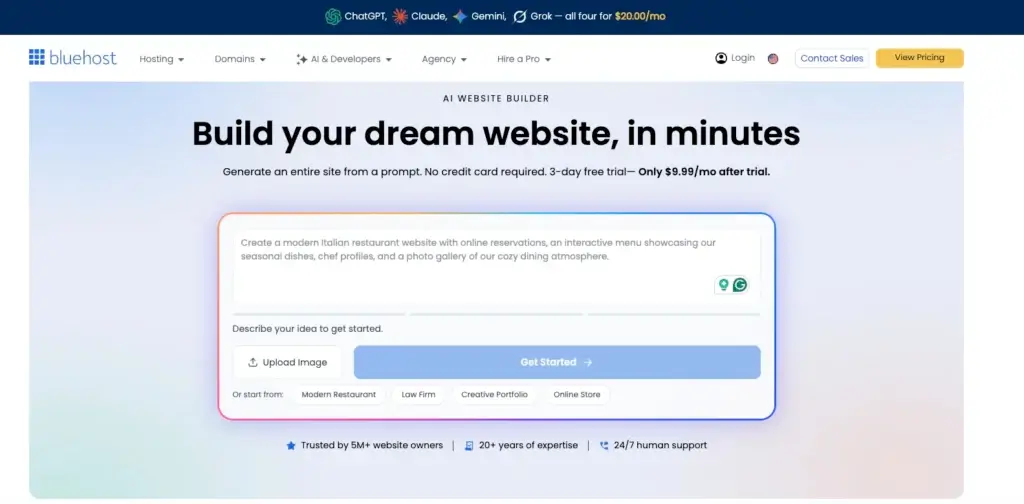
You begin by describing the business or project you want the website to represent. A useful prompt should cover your services, audience, location, brand personality, preferred visual style, and the main action you want visitors to take.
You can begin with a ready-made prompt or write your own description. The more specific your information is, the more relevant the generated site should be.
Step 2: Refine the Website Brief
One of Bluehost’s more valuable AI features is its attempt to improve the brief before creating the site. The agent can analyze your description and ask additional questions about your industry, goals, brand, or design preferences.
This gives the builder a better chance of producing an appropriate page structure. A local dental clinic, for example, needs different navigation and calls to action than a freelance photographer or software consultant.
Step 3: Generate the Website
The AI creates the initial site structure, design, content, and imagery based on your answers. The result is intended to be closer to a publishable website than a disconnected set of page mockups.
You should still treat generated copy as a draft. Review service descriptions, contact details, claims, testimonials, policies, and calls to action before making the site public.
Step 4: Edit With Natural Language
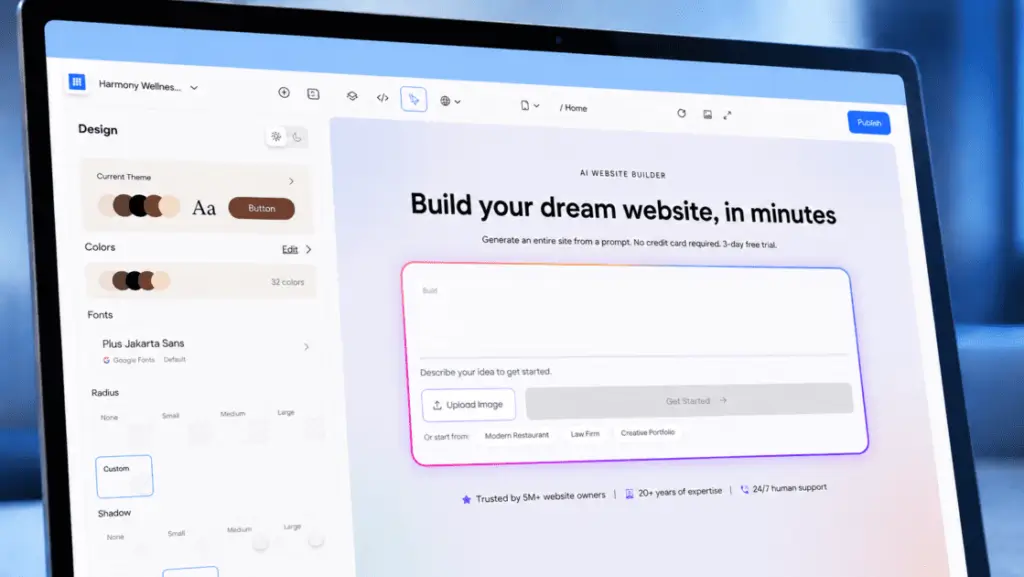
After the first version appears, you can request changes by describing what you want. For example, you may ask the builder to replace an image, rewrite a section, adjust a color, change the tone, or modify part of the page.
This conversational editing process is easier for beginners than learning a visual design interface immediately. Manual controls remain important, however, because precise spacing, typography, mobile layout, and branding decisions are not always easy to communicate through a prompt.
Step 5: Select a Domain and Publish
Bluehost brings the domain, hosting, SSL certificate, security, backups, and publishing process into the same environment. This reduces the technical coordination normally required when purchasing hosting and connecting a domain separately.
The bundled setup is one of Bluehost’s most compelling benefits. You are buying an operational website environment rather than only an AI page generator.
AI Capabilities
Bluehost Agentic AI and Editing Tools
Bluehost’s most meaningful improvement is not simply that it can generate a website. Many competing products already do that. Its stronger idea is to keep the AI involved throughout briefing, creation, refinement, and post-generation editing.
Agentic Brief Development
A basic AI generator reacts to one prompt. An agentic system attempts to determine what additional information it needs and then guides you toward a more complete result.
Bluehost can ask up to five targeted questions before generating the site. This helps reduce generic output, especially when your original request does not include enough detail about the audience or intended conversion path.
Conversational Website Editing
You can continue using natural language after the site has been created. This lowers the learning barrier for tasks such as changing an image, shortening a paragraph, updating a heading, or altering a visual preference.
Conversational editing is most useful for broad changes. Precise design work may still require manual adjustment, particularly when you need exact spacing, responsive behavior, detailed component placement, or strict brand guidelines.
AI Content Generation
The builder can generate starter copy for common website sections, including hero areas, service explanations, company information, calls to action, and contact pages.
This is valuable when you are struggling with the blank page, but AI copy should not be published without review. Generic wording, unsupported claims, repeated phrases, or inaccurate details can weaken credibility and organic performance.
AI Image and Design Assistance
Bluehost can select or modify visual elements during the website generation process. This helps create a coherent first draft without requiring you to source every image beforehand.
You should replace generic imagery with authentic product screenshots, staff photographs, location images, portfolio work, or original brand assets wherever possible. Real visual evidence generally creates more trust than polished but interchangeable AI imagery.
AI Domain Name Assistance
Bluehost also provides AI-assisted domain suggestions. This can be useful when your preferred business name is unavailable or when you need ideas that reflect your niche.
Before registering a suggestion, check whether the name is easy to spell, easy to pronounce, free from trademark conflicts, and broad enough to support future growth.
Where the AI Still Needs Human Oversight
The AI builder can accelerate production, but it cannot independently verify every legal, factual, brand, or accessibility requirement. You remain responsible for checking:
- Business names, prices, contact details, and service descriptions
- Privacy, cookie, refund, shipping, and legal policy requirements
- Accessibility factors such as image alt text and heading order
- Originality and accuracy of generated website copy
- Mobile layouts, forms, links, and conversion tracking
This does not make the AI ineffective. It simply means that Bluehost is best treated as a capable production assistant rather than an autonomous replacement for business judgment.
Pros and Cons
Benefits and Limitations of Bluehost AI Website Builder
Positive
✅ Guided agentic AI setup
✅ Hosting and domain included
✅ Easy conversational editing
✅ WordPress growth path
Negatives
❌ Short free trial
❌ AI output needs editing
❌ Pricing can be confusing
❌ Less mature than Wix
Strengths and Benefits
Bluehost AI Website Builder provides a strong combination of website creation and operational simplicity.
- Guided agentic AI setup – Follow-up questions help produce a more specific website than a single generic prompt.
- Integrated website infrastructure – Hosting, domains, SSL, security, backups, and publishing are managed together.
- Conversational editing – You can request changes without learning code or a complex visual editor first.
- WordPress expansion options – Bluehost remains useful if you eventually need plugins, blogging tools, or deeper CMS control.
- Beginner-friendly workflow – Technical setup is less fragmented than assembling hosting and website software independently.
Limitations and Drawbacks
The platform also has limitations that should influence your decision.
- Short free trial – Three days is enough to test generation, but limited for evaluating a complete business website.
- Generated copy needs review – You still need to improve accuracy, originality, tone, and conversion messaging.
- Product overlap can be confusing – Bluehost’s AI builder, WordPress builder, hosting plans, and older WonderSuite naming may be difficult to distinguish.
- Less mature builder ecosystem – Wix currently provides a broader set of native business applications and design options.
- Renewal costs require attention – Promotional hosting prices may change when the initial term ends.
Customization
Design Flexibility and WordPress Integration
Bluehost’s design flexibility depends partly on which building experience you choose. The conversational builder prioritizes speed and simplicity. The WordPress builder provides a broader path for customization through themes, patterns, plugins, and the WordPress editor.
Generated Layouts and Visual Direction
The AI produces an initial design based on your brief. This is effective for common business websites that use familiar structures such as a hero section, service overview, trust signals, testimonials, company information, and a contact form.
The initial output is a foundation rather than a finished identity system. You should refine typography, spacing, imagery, colors, and calls to action so the site does not look like a generic industry template.
Manual Editing Controls
Although conversational editing is the easiest starting point, manual controls remain available for users who want more direct involvement. This is important because design quality often depends on small adjustments that are easier to make visually.
A practical workflow is to use AI for the first structure, use conversational instructions for major revisions, and then complete the final details manually.
WordPress Website Builder Blocks
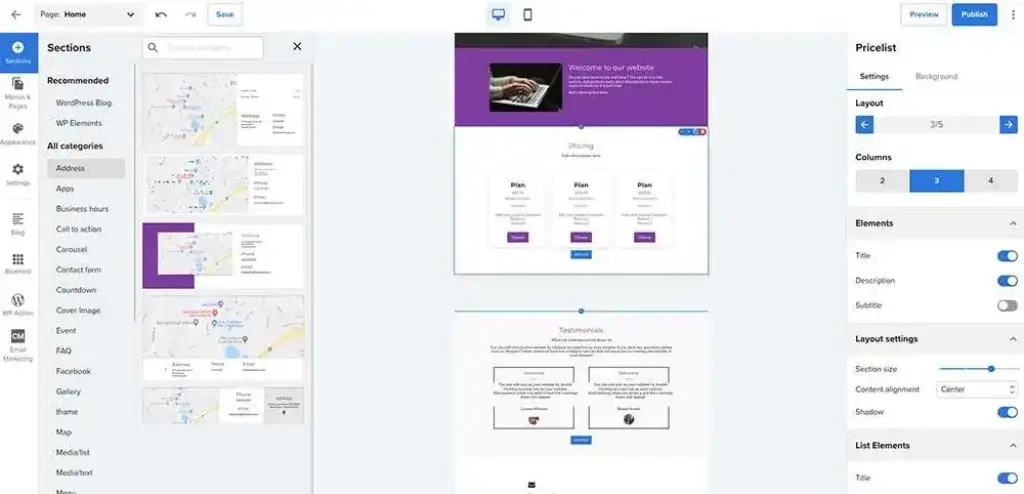
Bluehost’s WordPress Website Builder includes pre-designed sections such as hero banners, service highlights, testimonials, and other reusable patterns. These can be inserted and customized within the WordPress block editor.
This gives you more flexibility than a completely closed AI builder. You can continue building new pages with WordPress rather than depending entirely on the original AI generation workflow.
Theme and Plugin Compatibility
The WordPress route gives you access to the wider ecosystem of themes and plugins. You can add SEO tools, forms, analytics, memberships, multilingual functionality, booking systems, learning management features, and advanced e-commerce extensions.
That extensibility is a major differentiator. Wix and Squarespace are often easier at the beginning, but WordPress provides a wider range of long-term expansion options when configured carefully.
Growth Features
Bluehost SEO, Marketing, and Analytics Tools
A fast website launch is useful only when visitors can find the site and take meaningful action. Bluehost provides a reasonable foundation for SEO, but the platform cannot create an effective search strategy automatically.
Yoast SEO Premium
Bluehost states that Yoast SEO Premium is pre-installed with paid AI Website Builder plans. Yoast can help you manage page titles, meta descriptions, XML sitemaps, canonical settings, readability suggestions, and other on-page SEO tasks.
This is a meaningful inclusion for beginners, but it should not be confused with guaranteed rankings. You still need useful content, keyword research, strong page architecture, internal links, authoritative references, and competitive differentiation.
SEO-Friendly Website Structure
The AI builder can create common page structures and starter metadata. This reduces the likelihood that a new site launches without basic headings or page organization.
Before publishing, check that every important page has one clear topic, a descriptive URL, a unique title, a useful meta description, logical headings, optimized images, and relevant internal links.
Content Marketing With WordPress
Bluehost becomes more compelling for SEO-focused businesses when paired with WordPress. WordPress provides established tools for blog posts, categories, authors, editorial workflows, landing pages, and content-heavy resource centers.
If organic traffic is central to your business, the WordPress path will usually provide more room to scale than relying entirely on a simple AI-generated brochure site.
Analytics and Conversion Tracking
Bluehost’s WordPress Website Builder documentation references integrated analytics and performance insights. You can also connect external platforms such as Google Analytics, Google Search Console, advertising pixels, CRM systems, and conversion tracking plugins.
Do not launch without testing your forms and defining the actions you want to measure. A visually polished site provides limited business value when you cannot determine whether it generates calls, leads, bookings, purchases, or subscriptions.
Email and Business Integrations
Depending on your plan and setup, you can connect professional email, lead forms, email marketing services, appointment tools, customer relationship management systems, and automation platforms.
The WordPress ecosystem offers the most integration flexibility, but it also adds maintenance. Every plugin should solve a clear requirement because unnecessary extensions can affect performance and security.
Online Selling
Bluehost E-commerce Capabilities
Bluehost can support online stores, particularly through its WordPress and WooCommerce hosting options. However, you should distinguish between building a simple product website and operating a complex retail business.
WooCommerce Integration
WooCommerce adds products, checkout, payments, shipping, taxes, discounts, order management, and a large extension marketplace to WordPress. This provides significantly more e-commerce flexibility than a basic AI website generator alone.
The combination is well suited to small and midsized businesses that want content marketing and online selling within the same WordPress environment.
Bluehost Website Builder Cart Tools
Bluehost’s WordPress Website Builder includes commerce-oriented tools for online store plans. These can support promotional discounts, cross-selling, and upselling within the store experience.
These features can increase average order value, but they do not replace good product information, clear delivery policies, reliable payment processing, and a streamlined checkout.
Suitable E-commerce Use Cases
Bluehost is a practical option for small product catalogs, digital products, service payments, content-led stores, and businesses that want WooCommerce flexibility.
Shopify remains easier for many store-first businesses that prioritize inventory operations, multichannel commerce, retail integrations, and a more standardized e-commerce environment. Bluehost is stronger when WordPress content and customization matter as much as selling.
Plans and Costs
Bluehost AI Website Builder Pricing
Bluehost pricing requires careful interpretation because the company offers a dedicated AI Website Builder alongside several hosting and WordPress plans. Prices can also depend on billing length, location, promotion, taxes, and renewal terms.
Free AI Website Builder Trial
Bluehost offers a three-day free trial for its AI Website Builder without requiring a credit card. The trial includes a limited number of AI credits and allows you to see what the builder can generate before selecting a paid plan.
This build-before-buying model is useful because you can evaluate the initial design and content before committing. However, three days provides limited time for a detailed test involving SEO settings, integrations, mobile refinement, and stakeholder review.
Paid AI Website Builder Plan
At the time of research, Bluehost listed its dedicated AI Website Builder at $15.99 per month, with an annual option equivalent to approximately $9.99 per month. Pricing may change, so you should confirm the current checkout rate and renewal terms directly with Bluehost.
The paid plan packages the builder with hosting and website infrastructure rather than charging only for AI generation.
Bluehost Hosting Plans
Bluehost also offers separate shared, WordPress, and e-commerce hosting plans. Entry-level hosting prices may appear lower than the dedicated AI Website Builder plan, especially when purchased for a long initial term.
Before choosing, determine whether the selected hosting package includes the specific AI creation experience, WordPress Website Builder tools, backups, domain privacy, email, SEO software, and e-commerce features you expect.
Introductory Pricing and Renewals
Bluehost commonly displays promotional pricing tied to a defined subscription period. The monthly equivalent may look inexpensive, but you may need to pay for the complete term upfront.
Review the regular renewal price, contract duration, refund terms, included domain period, backup coverage, email costs, and optional add-ons. Your second-term cost can be more important than the initial promotional rate.
Pricing Comparison
The table below summarizes the main purchasing paths. Exact prices and inclusions should be verified before checkout.
| Option | Free AI Trial | AI Website Builder | WordPress Hosting | Online Store Hosting |
| Starting price | $0 for 3 days | About $15.99/mo or $9.99/mo annually | Varies by term and promotion | Varies by term and promotion |
| Best for | Testing AI generation | Fast small business websites | Blogs and flexible business sites | WooCommerce stores |
| AI site generation | Yes, limited credits | Yes | Available on eligible plans | Available on eligible plans |
| Hosting included | Trial environment | Yes | Yes | Yes |
| WordPress flexibility | Limited evaluation | Depends on selected workflow | High | High |
| E-commerce focus | No | Basic to moderate | Available through WooCommerce | Strongest Bluehost option |
Bluehost provides reasonable value when you want hosting, website creation, SEO tools, support, and domain management together. Hostinger may be cheaper for a basic AI-generated website, while Wix may justify its higher cost when you need a broader native business toolset.
Best Use Cases
Who Should Use Bluehost AI Website Builder?
Bluehost AI Website Builder is most useful when speed and reduced technical setup matter more than complete creative freedom.
Small Business Owners Launching Their First Site
If you need a credible online presence but do not have a designer or developer, Bluehost can help you move from an idea to a working site quickly.
The combination of AI generation, domain tools, hosting, security, and support removes several technical decisions that often delay first-time website owners.
Service Businesses and Independent Professionals
Consultants, freelancers, coaches, tradespeople, and local service providers can use the builder to create common lead-generation pages without developing every section manually.
You should spend most of your refinement time on service positioning, proof, local relevance, customer outcomes, and clear contact options.
WordPress Beginners
Bluehost is particularly relevant when you want WordPress flexibility but find the initial setup intimidating. Its guided tools can create a starting structure while hosting handles much of the technical environment.
You can gradually learn WordPress after the site is online rather than confronting every theme, plugin, and configuration decision at the beginning.
Content-Led Businesses
Businesses that expect to publish guides, articles, case studies, and other search-focused content may benefit from Bluehost’s connection to WordPress.
The initial AI builder can accelerate the launch, while WordPress supports the longer-term content operation.
Who Should Choose Another Platform?
Bluehost may not be the strongest option when you want pixel-level visual design without WordPress, a highly polished portfolio template, an advanced native business application ecosystem, or a commerce-first platform.
Wix is generally more mature as an all-in-one business builder. Squarespace offers a more curated design experience. Hostinger is attractive for lower-cost simplicity, while Shopify remains stronger for many dedicated e-commerce operations.
Competitor Comparison
Bluehost AI Website Builder Alternatives
The most relevant Bluehost alternatives are Wix, Hostinger Website Builder, Squarespace, and WordPress.com. Each platform approaches AI website creation differently.
Wix
Wix is the stronger alternative when you want a mature visual editor, a large template library, built-in business tools, and an extensive application marketplace.
It offers more design control and native functionality than Bluehost, but the interface can feel busier and the platform is usually more expensive than entry-level hosting-based options. Read our complete Wix review for a closer comparison.
Hostinger Website Builder
Hostinger Website Builder is a compelling alternative for budget-conscious beginners. It combines hosting with AI site creation, content generation, image tools, and other guided features.
Hostinger is often less expensive and particularly easy to use, but Bluehost offers a clearer path toward the wider WordPress ecosystem when your site becomes more content-heavy or technically demanding.
Squarespace
Squarespace is better suited to portfolios, creative businesses, restaurants, personal brands, and service companies that prioritize curated visual presentation.
Its design system feels more polished from the beginning, but Bluehost and WordPress offer greater plugin flexibility. Read our complete Squarespace review to examine its templates, commerce tools, and limitations.
WordPress.com
WordPress.com is a suitable alternative when you want managed WordPress without buying hosting from Bluehost. It combines hosting, site management, and WordPress publishing within one service.
Bluehost may offer more attractive introductory hosting packages, while WordPress.com provides a more direct managed WordPress relationship. Read our WordPress review for a broader explanation of WordPress.org and WordPress.com.
| Feature Type | Bluehost | Wix | Hostinger | Squarespace |
| Core strength | AI creation with hosting and WordPress options | Complete all-in-one business builder | Affordable AI website creation | Curated design and branding |
| Best for | Beginners who want a WordPress growth path | Small businesses needing broad native tools | Budget-conscious beginners | Creative and visual websites |
| AI approach | Agentic prompts and conversational edits | Advanced AI generation and editing | Fast AI generation with supporting tools | Guided AI design system |
| Ease of use | High | High, but feature-heavy | Very high | High |
| Design flexibility | Good, stronger through WordPress | Excellent | Good for basic sites | Strong within curated layouts |
| SEO potential | Strong with Yoast and WordPress | Strong built-in toolkit | Good essentials | Strong essentials |
| E-commerce | Strong with WooCommerce plans | Good for SMB stores | Good for smaller stores | Good for design-led stores |
| Overall angle | Best hosting and WordPress combination | Best native business ecosystem | Best budget value | Best curated visual experience |
My recommendation depends on your intended growth path. Choose Bluehost when you want fast AI creation now and the possibility of deeper WordPress expansion later. Choose Wix when you want the broadest no-code business environment. Choose Hostinger for lower-cost simplicity, or Squarespace when visual polish is the primary consideration.
Best Practices
Getting Started With Bluehost AI Website Builder
The quality of your result depends heavily on how you use the AI and how carefully you refine its first version.
Write a Detailed Initial Prompt
Describe what your business does, who you serve, where you operate, which services matter most, what makes you different, and what action visitors should take.
Include the desired tone and design direction. “Professional accounting website” is less useful than “a trustworthy, modern website for a small accounting firm serving local construction businesses, with consultation booking as the primary call to action.”
Review the Page Structure Before the Styling
Check whether the AI created all necessary pages before spending time on colors and images. Most business sites need a home page, service pages, an about page, contact information, and appropriate legal pages.
Depending on the business, you may also need pricing, case studies, locations, frequently asked questions, resources, product categories, booking, or support pages.
Replace Generic AI Content
Use the generated copy as a starting point, then add genuine expertise, customer problems, service details, proof, and brand language.
Specific content improves trust and gives search engines more useful information than generic claims such as “high-quality solutions tailored to your needs.”
Add Authentic Visual Evidence
Replace generic stock or AI images with original photographs, product screenshots, before-and-after examples, team images, credentials, or completed work.
Authentic visuals help visitors understand that a real organization exists behind the website.
Optimize for Mobile Visitors
Review every page on a phone-sized screen. Check whether headings wrap correctly, buttons remain visible, forms are easy to complete, images load efficiently, and important information appears early enough.
Do not assume that an AI-generated responsive layout is automatically conversion-ready.
Complete the SEO and Tracking Setup
Connect Google Search Console and your analytics platform. Optimize page titles, descriptions, headings, internal links, image alt text, and URLs.
Define conversion events for contact forms, phone clicks, bookings, purchases, and other actions that indicate business value.
Conclusion
Final Thoughts
Bluehost AI Website Builder is a strong option for beginners, independent professionals, and small businesses that want to create a website without coordinating several separate tools. Its greatest strength is the combination of guided AI creation and the infrastructure required to publish the result.
The agentic workflow improves on simple prompt-to-template builders by refining your description and asking targeted questions before generating the site. Conversational editing also makes common revisions more approachable when you do not have design or coding experience.
Bluehost becomes even more interesting when you consider its WordPress connection. You can begin with guided website creation and move toward a more extensible content management environment as your needs develop. That is a meaningful advantage over builders that keep you inside a more restricted proprietary system.
The platform is not the strongest choice for every user. Wix provides a broader native business ecosystem and more mature visual editing. Hostinger can be more economical for simple websites, while Squarespace offers a more curated design experience. Shopify remains preferable for many commerce-first businesses.
Overall, Bluehost AI Website Builder is best for users who want a fast launch, integrated hosting, accessible AI editing, and a credible path into WordPress. It does not eliminate the need to review content, improve branding, test mobile layouts, and complete the SEO setup, but it substantially reduces the effort required to reach a professional starting point.
Have more questions?
Frequently Asked Questions
What is Bluehost AI Website Builder?
Bluehost AI Website Builder is an AI-powered platform that creates a website from information about your business, audience, goals, and design preferences. It combines site generation with hosting, domain tools, security, and publishing.
Is Bluehost AI Website Builder free?
Bluehost offers a three-day free trial without requiring a credit card. The trial includes limited AI credits, while publishing and continued use require a paid plan.
Does Bluehost AI Website Builder use WordPress?
Bluehost offers both a conversational AI Website Builder and a WordPress-focused Website Builder experience. The WordPress option provides access to themes, blocks, plugins, blogging tools, and WooCommerce.
Can beginners use Bluehost AI Website Builder?
Yes. The builder is designed for beginners and guides you through the website brief, generation, editing, domain selection, hosting setup, and publishing process without requiring coding skills.
Can you edit a Bluehost AI-generated website?
Yes. You can request changes through natural language and use manual controls to refine content, images, colors, sections, and other design elements after the website is generated.
Is Bluehost AI Website Builder good for SEO?
It provides a useful SEO foundation, and Bluehost states that Yoast SEO Premium is pre-installed on paid AI Website Builder plans. You still need keyword research, original content, internal links, and technical optimization.
Can you create an online store with Bluehost AI Website Builder?
Yes. Bluehost supports e-commerce through its store hosting options and WooCommerce. It is suitable for small and midsized stores, especially when content and WordPress flexibility are important.
Is Bluehost AI Website Builder better than Wix?
Bluehost is better when you want integrated hosting and a WordPress growth path. Wix is generally stronger for visual editing, native business tools, templates, and app integrations.
How much does Bluehost AI Website Builder cost?
At the time of research, the dedicated plan was listed at about $15.99 per month or approximately $9.99 per month with annual billing. Promotions, taxes, and renewal pricing may change.
Is Bluehost AI Website Builder worth using?
Yes, particularly for beginners and small businesses that want AI website generation, hosting, domain management, security, support, and potential WordPress expansion within one provider.