
Introduction
Web scraping used to force you to choose between manual copy-and-paste work and a technical setup involving selectors, scripts, proxies, and ongoing maintenance. Thunderbit tries to remove that tradeoff. It uses AI to inspect a webpage, suggest useful fields, structure the results, and export them into the tools where you already work.
In this Thunderbit review, you will see where that approach works well, where the credit model can become difficult to predict, how the platform handles subpages and recurring extraction, and which alternatives make more sense for complex or developer-led projects.
What Is Thunderbit?
Thunderbit is an AI-powered web scraping platform available through a Chrome extension, Edge extension, web app, API, CLI, and MCP server. Its main product is designed for non-technical users who want to turn websites, directories, marketplaces, PDFs, and images into structured tables without building CSS selectors or writing code.
The company was founded in 2024 and positions the product as a scraper for sales, marketing, ecommerce, real estate, research, and operations teams. Its clearest differentiator is the AI Suggest Fields workflow. You open a page, let the AI recommend columns, review the structure, and start scraping.
Who Thunderbit Is Built For
Thunderbit makes the most sense when your goal is practical business data rather than a custom scraping infrastructure. It is particularly relevant for:
- Sales teams – Build prospect lists from directories and public business pages.
- Ecommerce teams – Collect product, pricing, review, and availability data.
- Marketers – Research competitors, content, offers, and search results.
- Real estate professionals – Aggregate property listings and contact details.
- Researchers and operators – Convert repetitive web research into structured datasets.
It is less suitable when you need complete control over proxies, browser fingerprints, custom code, complex authentication, large distributed crawls, or enterprise-grade data engineering pipelines.
Key Features
How Thunderbit Works
Thunderbit replaces the traditional selector-building process with an AI-assisted workflow. That makes the first scrape much faster, but the quality of the result still depends on the page, the fields you request, and how carefully you validate the output.
AI Suggest Fields
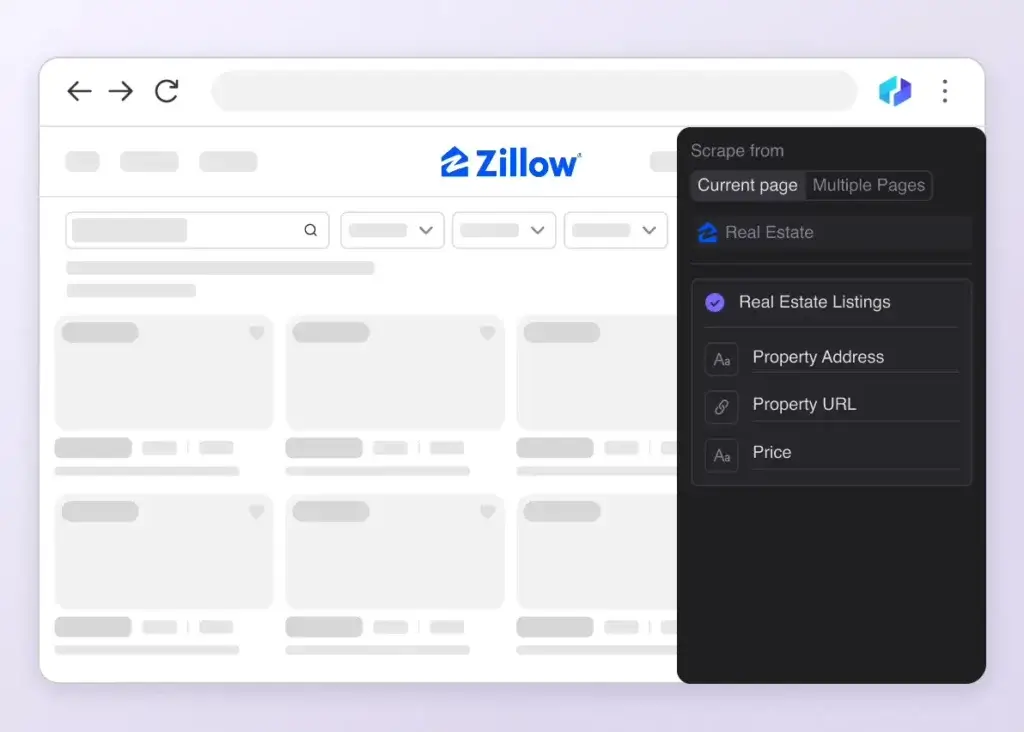
When you open a webpage and run AI Suggest Fields, Thunderbit analyzes the page and recommends columns such as company name, product title, price, rating, email, phone number, image URL, or profile link. You can rename columns, change field types, and add natural-language instructions before running the scrape.
This is the strongest part of the product. You do not need to inspect HTML, build XPath rules, or teach a robot by clicking every element. For common business pages, you can often move from page to spreadsheet in a few minutes.
Subpage Scraping and Data Enrichment
Listing pages rarely contain every detail you need. Thunderbit can follow links from each row into product pages, company profiles, property listings, or other detail pages, then append additional fields to the original table.
This makes it useful for workflows such as scraping a company directory first, then visiting each company page for industry, employee count, description, and contact data. Subpage extraction is powerful, but it can consume credits faster because the tool performs more work for every row.
Pagination, Infinite Scroll, and Bulk URLs
Thunderbit can move through paginated lists, load-more buttons, and infinite-scrolling pages. It also supports bulk scraping from a supplied URL list. Cloud mode is useful for public pages and parallel processing, while browser mode is better when a site depends on your active login session.
Pre-Built Scraper Templates
The platform includes templates for popular directories, marketplaces, ecommerce sites, and listing pages. Templates reduce setup time when the target site is already supported, although you should still review the selected fields and test a small sample before starting a large job.
PDF, Image, Email, Phone, and Image Extraction
Thunderbit can extract tables and text from PDFs and images, while its dedicated utilities can collect emails, phone numbers, and images. These tools are helpful when the source is not a clean webpage or when you need quick contact extraction without building a complete scraping workflow.
AI Features
Thunderbit AI Extraction and Automation
Thunderbit uses AI for more than detecting page elements. You can add instructions that tell the platform how to classify, clean, translate, summarize, or reformat each field as the data is extracted.
Natural-Language Field Instructions
A field prompt can ask Thunderbit to normalize phone numbers, classify companies by industry, extract a value from unstructured text, convert currencies, summarize a description, or return a specific output format. This can reduce spreadsheet cleanup after the scrape.
Scheduled Scraping and Monitoring
You can schedule recurring runs for price monitoring, inventory checks, listing updates, and competitor tracking. Scheduling turns Thunderbit from a one-time extraction tool into a lightweight monitoring system, although you should watch credit usage carefully when a job runs frequently.
API, CLI, and MCP Options
Thunderbit also offers a web scraping API, command-line interface, and MCP server. These options broaden the product beyond the browser extension and make it more relevant for internal tools and AI workflows. Developers may still prefer platforms with deeper proxy, runtime, and code controls, but the additional interfaces give teams a path to automate successful browser-based workflows.
Pros and Cons
Thunderbit Strengths and Limitations
Positive
✅ Extremely fast setup
✅ Strong subpage enrichment
✅ Broad export options
✅ Useful AI formatting
Negatives
❌ Credits can be hard to predict
❌ Reliability varies by site
❌ Enterprise controls lack detail
❌ Support feedback is mixed
Strengths & Benefits
- Extremely fast setup – AI field suggestions remove much of the configuration required by selector-based tools.
- Strong subpage enrichment – You can extend listing data with information collected from linked detail pages.
- Broad export options – Results can move into Excel, CSV, JSON, Google Sheets, Airtable, and Notion.
- Useful AI formatting – Field prompts can clean, classify, translate, summarize, and standardize data during extraction.
Limitations & Drawbacks
- Credits can be hard to predict – Large result sets, enrichment, and repeated runs can use allowances faster than expected.
- Reliability varies by site – Dynamic layouts, anti-bot systems, inconsistent pages, and login flows can still cause errors.
- Enterprise controls lack detail – Public information gives limited visibility into SSO, audit logs, formal certifications, and advanced governance.
- Support feedback is mixed – Some public reviewers praise the time saved, while others report billing, refund, credit, and response-time concerns.
Output and Integrations
Data Quality, Exports, and Workflow Fit
Thunderbit is most valuable when the final destination is a spreadsheet, lightweight database, or business workflow. You can export directly to Google Sheets, Airtable, and Notion, or download files for Excel and data analysis.
What the Output Gets Right
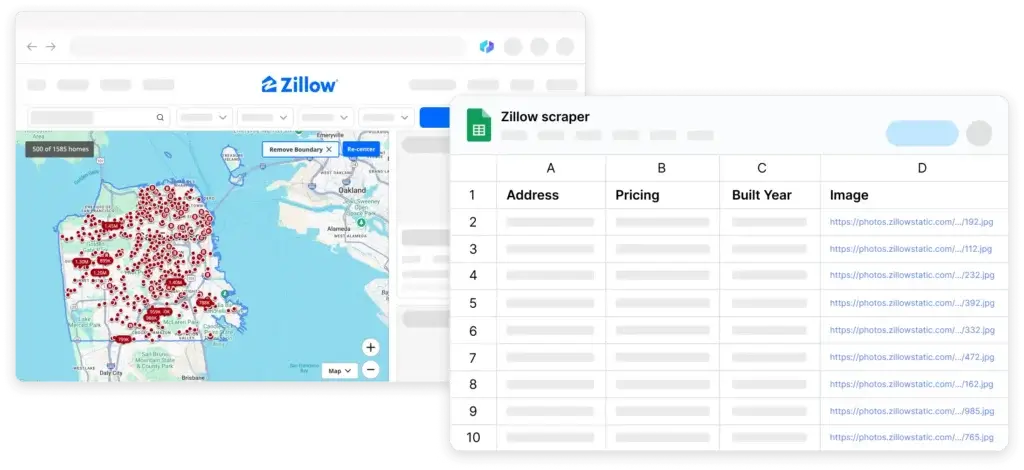
The platform structures data into named columns, preserves source links, and can format fields during extraction. This is much more useful than copying raw page text because the output is already close to a working prospect list, product catalog, research dataset, or monitoring sheet.
Where Human Validation Still Matters
AI field detection is not the same as guaranteed accuracy. Before scraping thousands of rows, review missing values, duplicate records, currency formats, pagination coverage, and whether subpages match the intended row. Sensitive workflows should also include a second validation step before data is imported into a CRM, campaign, or reporting system.
For lead-generation projects, use Thunderbit to collect and organize public data, then validate contact details with a dedicated platform from our guide to the best email finder tools. Scraping and contact verification solve different problems.
Pricing
Thunderbit Pricing and Credit Usage
Thunderbit uses a credit-based model. One credit generally represents one output row, while more advanced actions can increase consumption. The free tier is useful for testing, but ongoing business use normally requires a paid plan.
How the Credit Model Affects Value
The pricing looks affordable at the entry level, but the important number is not only the monthly fee. You need to estimate the number of output rows, the frequency of each job, and whether subpage enrichment is included.
A 500-credit plan can be enough for occasional research. It can feel restrictive if one scrape returns hundreds of rows or if you run recurring monitoring. Annual plans provide a lower effective monthly price, but the credits are provided as an annual pool, so review the billing amount and allowance before completing checkout.
Thunderbit Pricing Table
| Plan | Monthly Price | Annual Price Per Month | Credit Allowance | Best For |
| Free | $0 | $0 | 6 pages | Testing simple extraction |
| Starter | $15 | $9 | 500 monthly or 5,000 annually | Occasional small projects |
| Pro 1 | $38 | $16.50 | 3,000 monthly or 30,000 annually | Regular business research |
| Pro 2 | $75 | $33.80 | 6,000 monthly or 60,000 annually | Growing operational use |
| Pro 3 | $125 | $68.40 | 10,000 monthly or 120,000 annually | High-volume teams |
| Pro 4 | $249 | $137.50 | 20,000 monthly or 240,000 annually | Power users and larger workloads |
| Business | Custom | Custom | Custom credits and limits | Organizations needing tailored terms |
Pricing can change, so check the official Thunderbit pricing page before subscribing. The best practice is to run a representative test, record the credits used, and calculate a cost per usable row.
Ease of Use
Thunderbit User Experience and Public Feedback
The Chrome extension is the easiest entry point. You browse to a target page, open Thunderbit, generate field suggestions, adjust the columns, and start the scrape. This is more approachable than visual sitemap builders and far easier than maintaining scripts.
Learning Curve
Basic extraction has a low learning curve. The real skill is learning how to define fields, test pagination, choose between cloud and browser mode, and avoid wasting credits on a poorly scoped job.
What Public Reviews Suggest
At the time of research in July 2026, the Chrome Web Store listing showed 200,000 users and a 4.2 rating from 186 ratings. Public feedback on Trustpilot was more divided.
Positive reviewers commonly describe faster research and useful extraction from product or contact pages. Critical reviewers mention unexpected credit consumption, incomplete runs, annual billing confusion, refund disputes, and slow support. The review volume is small relative to the user base, so treat it as a risk signal rather than a complete measure of product quality.
Use Cases
Who Should Use Thunderbit?
Sales Prospecting and Lead Research
Thunderbit is well suited to collecting company names, websites, locations, public contact details, profile URLs, and other prospect attributes from directories. Subpage scraping helps when the directory page provides only basic information.
Ecommerce Price and Product Monitoring
You can scrape product names, SKUs, prices, ratings, availability, seller details, and product URLs. Scheduling can support recurring competitor checks, although you need to control the number of pages and rows to keep costs predictable.
SEO and Competitive Research
Marketing teams can collect titles, headings, metadata, content topics, pricing pages, reviews, and competitor offers. Thunderbit is useful for assembling the raw dataset, while your SEO or analytics tools should handle ranking, traffic, and performance interpretation.
Real Estate and Local Market Research
Agents and investors can aggregate addresses, prices, bedrooms, listing status, agent details, and listing links. Browser mode may help when a site requires an active session, but you should review the target platform’s rules and applicable privacy requirements.
When You Should Choose Another Tool
Choose a more technical platform when you need custom scripts, large-scale crawling, detailed proxy controls, advanced anti-bot infrastructure, complex browser automation, or production-grade data pipelines. Thunderbit is optimized for accessibility, not unlimited engineering control.
Competitors
Thunderbit Alternatives Compared
Thunderbit competes with no-code scrapers, browser automation tools, and developer platforms. The best alternative depends on whether you prioritize setup speed, recurring monitoring, complex workflows, or technical control.
| Tool | Best For | How It Compares With Thunderbit | Links |
| Thunderbit | Fast AI-assisted business scraping | Lowest setup friction for field detection and subpage enrichment | Official site |
| Browse AI | Recurring monitoring with trained robots | More workflow-oriented, but normally requires more setup and robot training | Official site |
| Octoparse | Complex no-code scraping workflows | Deeper visual workflow control, but a steeper learning curve | Official site |
| Apify | Developer-led scraping and automation | Far more technical control and scale, but less approachable for business users | Official site |
| Mulerun | Broader browser agents and web tasks | Better for agent-style execution, while Thunderbit is more focused on structured extraction | Official site | Mulerun review |
Thunderbit vs Browse AI
Browse AI is a better fit when you want to train reusable robots and monitor the same websites repeatedly. Thunderbit is easier when you need to open a page, detect fields, and get a structured table quickly.
Thunderbit vs Octoparse
Octoparse provides more control over multi-step workflows, selectors, and cloud extraction. Thunderbit is more accessible for sales, marketing, and operations users who do not want to learn a visual scraping designer.
Thunderbit vs Apify
Apify is the stronger choice for developers, custom actors, APIs, proxy configuration, and larger production workloads. Thunderbit is better when the user building the dataset is a business operator rather than an engineer.
Thunderbit vs Mulerun
Mulerun is closer to a marketplace for AI agents that can research and perform browser tasks. Thunderbit is more focused and predictable when the desired output is a structured table. Read our full Mulerun review for a closer look at the broader agent workflow.
Security
Thunderbit Security, Privacy, and Compliance
Thunderbit’s privacy policy states that data is encrypted in transit with TLS 1.2 or higher and encrypted at rest with AES-256. It also describes access controls, HTTPS communication for the extension, and local storage for form auto-fill data.
Data Processing and Retention
The policy says webpage content sent for AI processing is discarded after extraction, while extracted data remains in your account until you delete it or close the account. Usage and analytics information may be retained in aggregated or anonymized form for up to 24 months.
Thunderbit says its servers and operations are based in the United States and that Standard Contractual Clauses are used for relevant transfers from the EEA, UK, and Switzerland. The company also says it does not sell user data or train its models on private workspaces.
What Business Buyers Should Confirm
Public pages do not provide enough detail for a complete enterprise security review. Before using Thunderbit with sensitive or regulated data, ask about a data processing agreement, subprocessors, SSO, role-based access, audit logs, incident response, security testing, deletion workflows, and any current security certifications.
Because Thunderbit operates through the browser, it is also worth reviewing our guide to why browser security matters before deploying extensions across a team.
Responsible and Legal Web Scraping
A scraping tool does not automatically make every scraping project lawful or permitted. Review website terms, robots instructions, copyright and database rights, privacy laws, rate limits, and the nature of the data you collect. Avoid sensitive personal information, do not bypass access controls, and use legal advice for high-risk projects.
Best Practices
Getting Better Results with Thunderbit
Test a Small Sample First
Start with one page or a small URL set. Confirm field accuracy, pagination, duplicate handling, and subpage matching before expanding the job.
Calculate Cost per Usable Row
Track the credits consumed and the number of records that survive validation. This gives you a more useful cost measure than the subscription price alone.
Use Clear Field Prompts
Describe the required format directly, such as “return the price as a number without the currency symbol” or “classify the company into one of these five industries.”
Separate Collection from Verification
Use Thunderbit to gather and structure information, then validate emails, phone numbers, product identifiers, and critical business fields with appropriate specialist tools.
Keep Human Approval in the Workflow
Review data before importing it into your CRM, contacting leads, changing prices, publishing research, or making decisions that affect customers.
Conclusion
Final Thoughts on Thunderbit
Thunderbit is one of the more accessible options for turning web pages into structured business data. Its AI field suggestions, subpage enrichment, document extraction, scheduling, and broad exports remove much of the friction associated with traditional scraping tools.
The main tradeoffs are credit predictability, site-dependent reliability, mixed support feedback, and limited public detail for enterprise governance. It is a strong recommendation for non-technical teams running well-defined research, lead, ecommerce, or monitoring workflows. Developers and large data operations will usually get more control from Apify, custom code, or a dedicated scraping infrastructure.
Start with a real sample project, measure usable output rather than raw rows, and review the annual billing terms carefully before committing.
Have more questions?
Frequently Asked Questions
What is Thunderbit?
Thunderbit is an AI-powered web scraper that turns webpages, directories, PDFs, and images into structured tables without requiring code or CSS selectors.
Is Thunderbit free?
Yes. Thunderbit has a free tier that lets you test basic scraping on a limited number of pages. Paid plans add larger credit allowances and higher-volume use.
How do Thunderbit credits work?
One credit generally represents one output row. Subpage extraction, enrichment, and larger recurring jobs can increase usage, so test a representative workflow before choosing a plan.
Does Thunderbit require coding?
No. The Chrome and Edge extensions are designed for non-technical users. Thunderbit also offers API, CLI, and MCP options for more technical workflows.
Can Thunderbit scrape subpages and pagination?
Yes. Thunderbit can follow links into detail pages and can work with pagination, load-more buttons, infinite scroll, and bulk URL lists.
Can Thunderbit extract data from PDFs and images?
Yes. Thunderbit can extract structured information from PDFs and images, including tables, text, contact details, and image links.
Where can Thunderbit export data?
Thunderbit supports exports to Excel, CSV, JSON, Google Sheets, Airtable, and Notion, depending on the workflow and interface you use.
Is Thunderbit safe to use?
Thunderbit publishes encryption and data-handling measures, but organizations should still review permissions, retention, subprocessors, governance controls, and contractual requirements before deployment.
Is web scraping with Thunderbit legal?
Legality depends on the website, data, jurisdiction, purpose, and collection method. Review site terms, privacy laws, copyright, database rights, and access restrictions before scraping.
Who should use Thunderbit?
Thunderbit is best for sales, marketing, ecommerce, real estate, research, and operations teams that need structured web data without building a technical scraping stack.