
Introduction
Managing restaurant schedules can quickly become complicated when staffing needs shift, employees request time off, labour costs change, and managers need to keep service levels high. 7shifts is a restaurant-focused scheduling and workforce management platform designed to simplify this process. It brings together scheduling, team communication, time tracking, labour forecasting, tip management, and payroll tools in one system built specifically for hospitality teams.
This in-depth review will help you decide if 7shifts is the right fit for your restaurant, café, bar, or hospitality business. You’ll learn about its core features, pricing, user experience, and how it compares with competing solutions. By the end, you’ll have a clearer understanding of whether 7shifts fits your workflow, budget, and staffing needs.
Overview
What is 7shifts
7shifts positions itself as a restaurant-specific scheduling and workforce platform. Unlike general employee scheduling tools, it is built for hospitality businesses that need to manage changing demand, labour budgets, tip pooling, shift coverage, and team communication from one place. After signing up for a free trial or free plan, you can add team members, create schedules, connect your POS system, and explore the main modules:
- Staff Scheduling: Build rotas with drag-and-drop shifts, templates, open shifts, and shift swap tools. Labour forecasting and sales data help managers schedule with cost control in mind.
- Time & Attendance: Employees clock in and out through 7punches, with tools for tracking hours worked, monitoring breaks, and reducing time theft.
- Employee Availability & Absences: Staff can set availability, request time off, and pick up open shifts, helping managers avoid conflicts and reduce manual coordination.
- Labour Forecasting: POS integrations pull in sales data so managers can compare labour costs against projected demand and optimise staffing levels.
- Team Communication: Managers can message staff, send announcements, and keep shift-related communication inside the platform instead of relying on separate apps.
- Payroll & Tip Tools: Higher-tier plans add payroll, tip pooling, and tip payouts, making the platform more useful for restaurants that want deeper workforce management in one system.
The platform is cloud-based and accessible on desktop and mobile devices. It is best suited to restaurants, cafés, bars, breweries, pizzerias, franchises, and other hospitality businesses that need more than just a basic scheduler.
Key Features
7shifts Software Specification
Staff Scheduling
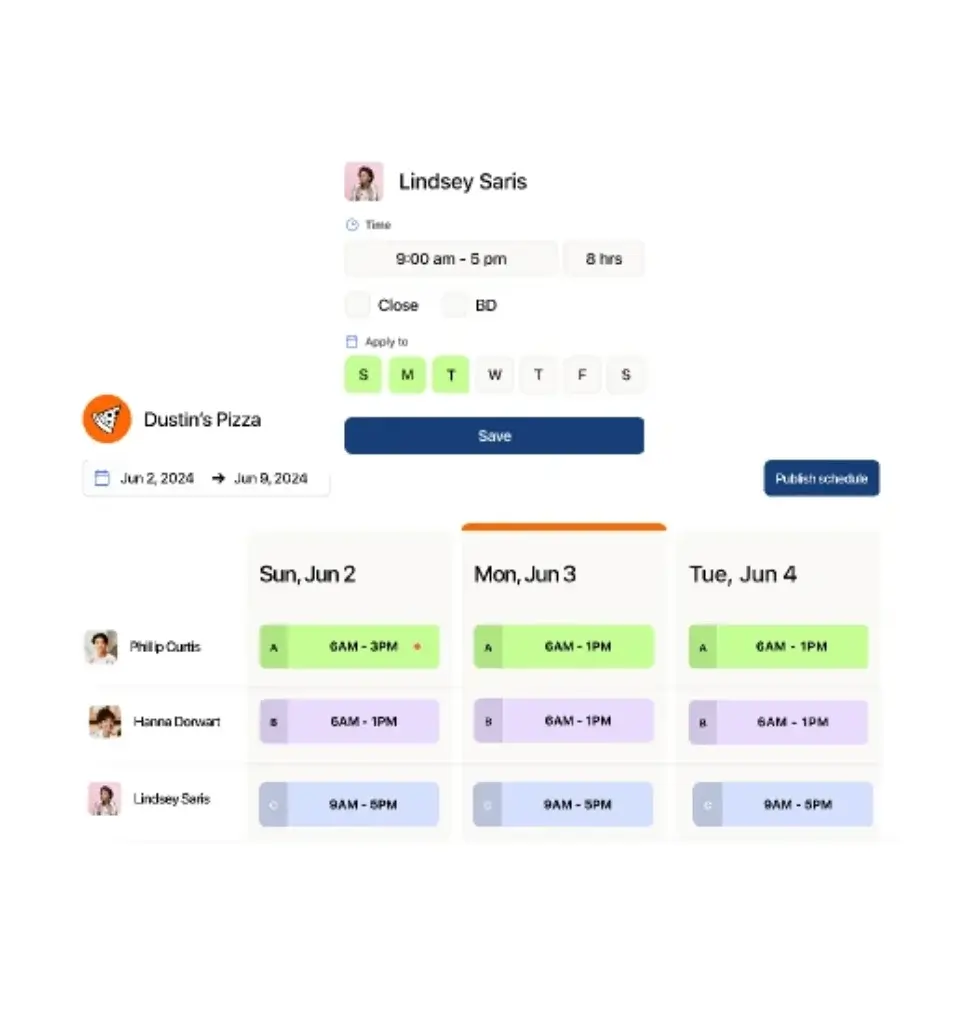
Scheduling is where 7shifts stands out most. The platform is built to help restaurant managers create schedules quickly while keeping labour costs visible. Instead of relying on spreadsheets or separate messaging apps, you can build weekly schedules, publish them instantly, and let employees manage swaps and open shifts directly in the app. Key capabilities include:
- Schedule Templates: Save recurring shift patterns and reuse them for future weeks, reducing scheduling time for stable teams.
- Open Shifts & Shift Pool: Publish unassigned shifts for available employees to claim, helping cover gaps faster.
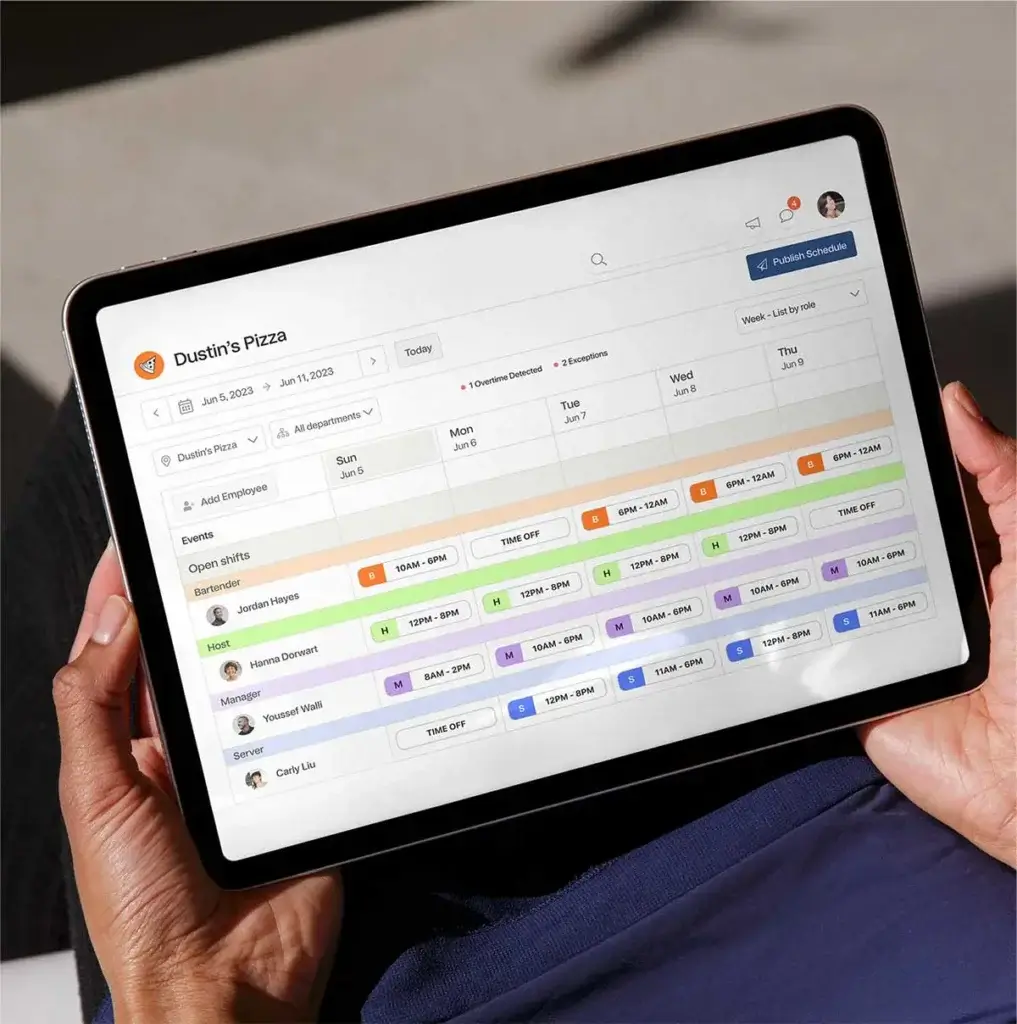
- Drag-and-Drop Builder: Adjust shift times, roles, and assignments quickly from the calendar interface.
- Labour Forecasting: Compare projected labour costs against sales forecasts pulled from POS integrations.
- Compliance Alerts: Get notifications for issues such as overtime risks, missed breaks, and scheduling conflicts.
- Auto-Scheduling Support: Use built-in tools to generate schedules faster based on labour targets, roles, and team availability.
Time & Attendance Tracking
Accurate time tracking is critical for payroll, labour compliance, and cost control. 7shifts supports this through its connected time clock system, 7punches, which is designed to track restaurant shifts more accurately:
- Clock-In/Out Tracking: Employees can clock in and out digitally, reducing manual entry and improving payroll accuracy.
- Break Monitoring: The system can help track breaks and support compliance with labour regulations.
- Live Workforce Visibility: Managers can see who is currently working and make staffing decisions in real time.
- Timesheet Support: Worked hours feed into digital timesheets that can be reviewed before payroll processing.
Employee Availability
Availability management is a major strength for any shift scheduling platform, and 7shifts gives staff several ways to keep schedules updated without constant manager involvement:
- Self-Service Availability: Employees can update their availability directly in the app, reducing scheduling confusion.
- Time-Off Requests: Team members can submit requests for leave, and managers can review them against staffing needs.
- Shift Swaps: Staff can offer shifts, swap them, or pick up extra shifts through the shift pool with manager oversight.
Team Communication
Restaurants often rely on texts, calls, and scattered chat threads to manage schedules. 7shifts helps centralise communication inside the platform:
- Built-In Messaging: Staff and managers can communicate directly within the app about schedule changes and shift coverage.
- Announcements: Managers can send updates to individuals, departments, or the full team.
- Fewer Communication Gaps: Housing shift conversations in one place reduces missed messages and confusion.
Labour Forecasting
One of 7shifts’ strongest differentiators is labour forecasting tied to restaurant sales data:
- POS Integrations: Connect systems like Toast, Square, and Clover to compare labour against sales data.
- Budget Awareness: Managers can build schedules with projected labour costs in mind.
- Better Staffing Decisions: Forecasting helps reduce overstaffing during slower periods and understaffing during busy shifts.
Payroll & Tips
Higher-tier plans make 7shifts more than a scheduler by adding payroll and tip tools:
- Tip Pooling: Restaurants can automate tip calculations and distributions more efficiently.
- Payroll Tools: Premium plans add payroll functionality for restaurants that want to manage scheduling and pay from one system.
- Fewer Manual Steps: Integrating schedules, timesheets, tips, and payroll can reduce back-office admin work.
Team Management & HR
7shifts includes lightweight workforce management features that support restaurant operations:
- Employee Profiles: Store contact information, roles, wage details, and team assignments in one place.
- Document Storage: Keep certifications, policies, and employee records accessible for managers.
- Role-Based Access: Assign permissions so managers and staff only see the tools relevant to them.
Reporting & Analytics
7shifts offers reporting tools focused on labour, attendance, and operations:
- Sales vs Labour Reports: Review staffing performance relative to projected or real sales data.
- Workforce Insights: Monitor hours worked, labour cost trends, and scheduling efficiency across locations.
Integrations
7shifts offers one of its strongest advantages through restaurant-specific integrations. It connects with many popular POS systems, payroll tools, and hospitality workflows, making it easier to sync sales, labour, and staffing data in one place.
Mobile & Web Accessibility
7shifts is available across desktop and mobile, giving restaurant teams flexible access whether they are scheduling from the office or checking shifts on the go:
- Mobile Access: Employees can view schedules, request time off, swap shifts, and message managers from the mobile app.
- Manager Flexibility: Restaurant managers can publish schedules and review requests from anywhere.
- Multi-Device Access: The platform works across desktops, tablets, and smartphones for easier team coordination.
Pros and Cons
Advantages and Disadvantages
Positive
✅ Built specifically for restaurants
✅ Strong Scheduling Tools
✅ Useful Integrations
✅ Good mobile experience
✅ Team Communication
Negative
❌ Best features locked behind higher tiers
❌ Costs Can Rise
❌ Less suitable outside hospitality
✅ Advantages
- Built specifically for restaurants: 7shifts is built for hospitality, which makes its workflows more relevant than general workforce tools.
- Strong Scheduling Tools: Templates, open shifts, shift swaps, and drag-and-drop scheduling help managers build rotas faster.
- Useful Integrations: POS and payroll integrations add real operational value for restaurant teams.
- Good mobile experience: Employees can check shifts, swap shifts, request leave, and communicate through the app.
- Team Communication: Built-in messaging reduces the need for scattered scheduling discussions over text and other apps.
❌ Disadvantages
- Best features locked behind higher tiers: Important tools such as payroll, tip management, and deeper compliance features are reserved for higher plans.
- Costs Can Rise: Restaurants that need payroll and advanced tools may find the total price less budget-friendly over time.
- Less suitable outside hospitality: Businesses outside restaurants and hospitality may find the platform too specialised for their needs.
User Experience
User Experience and Ease of Use
One of 7shifts’ strongest qualities is that it feels purpose-built for restaurant managers. The interface focuses on scheduling, labour, and communication rather than trying to be a generic all-purpose HR platform. Here’s how the user experience stands out:
Onboarding & Setup
Getting started is relatively straightforward. You create your account, add your restaurant details, define departments and roles, and invite employees. 7shifts also encourages you to connect POS and payroll tools early so you can unlock more accurate labour forecasting and smoother workflows from the start. The setup process is easier than many broader workforce platforms because it is focused on hospitality use cases.
Intuitive Interface
The scheduling interface is clean and practical. Managers can move shifts around quickly, compare staffing against labour targets, and publish schedules without much friction. Staff also benefit from a mobile experience that makes it easy to check shifts, submit requests, and respond to changes. This keeps routine scheduling tasks more efficient for both managers and hourly employees.
Device Compatibility
Because 7shifts supports both web and mobile access, it works well across desktops, tablets, and smartphones. That flexibility is especially valuable for restaurants where managers may need to adjust schedules on short notice and employees often rely on their phones rather than desktop access.
Pricing
How Much Does 7shifts Cost?
7shifts offers four main pricing tiers, allowing restaurants to start for free and upgrade as they need more advanced tools. Plans are generally priced per location, with more advanced workforce features appearing in higher tiers.
Comp
The free Comp plan is designed for very small teams and includes:
- Basic employee scheduling
- Availability tracking
- Time-off requests
- Basic team communication
Essentials
The Essentials plan starts at around $39.99 per month per location and includes everything in Comp, plus:
- More advanced scheduling tools
- Stronger communication features
- More control over permissions
Pro
The Pro plan starts at around $79.99 per month per location and adds:
- PTO tracking and balances
- Compliance tools
- Advanced time clock features
- Manager log book functionality
Premium
The Premium plan starts at around $134.99 per month per location and is aimed at restaurants that need deeper workforce management. It adds:
- Payroll functionality
- Tip management
- Task management
- Advanced forecasting and permissions
For restaurants comparing workforce software, 7shifts pricing can look attractive at entry level, but the real cost depends on which features your business actually needs. Teams that need payroll, stronger compliance tools, or advanced labour forecasting should expect to move beyond the lower tiers.
7shifts Pricing Comparison Table
| Feature / Plan | Premium | Pro | Essentials | Comp |
| Employee Scheduling | Included | Included | Included | Included |
| Availability Management | Included | Included | Included | Included |
| Team Communication | Included | Included | Included | Basic |
| Time Clock Tools | Included | Included | Limited / plan dependent | Not included |
| Compliance Features | Included | Included | Not included | Not included |
| Payroll | Included | Not included | Not included | Not included |
| Tip Management | Included | Not included | Not included | Not included |
Common Use Cases
Best Use Cases and Industries
Because 7shifts is purpose-built for hospitality, it performs best in industries where staffing changes frequently and labour costs directly affect profitability:
- Restaurants & Full-Service Dining: Great for managing front-of-house and back-of-house schedules, labour targets, and team communication.
- Cafés & Coffee Shops: Useful for managing smaller teams with changing peak-hour demand.
- Bars & Breweries: Helpful for late shifts, role-specific scheduling, and shift swaps.
- Pizzerias: Strong fit for fast-paced operations that need labour forecasting and simple mobile coordination.
- Franchise Groups: Multi-location restaurants can use it to improve consistency and oversight across sites.
- Hospitality Teams: Restaurants inside hotels or broader hospitality venues may also benefit from the restaurant-first scheduling model.
Compare with Others
Alternatives to 7shifts
Choosing restaurant scheduling software usually comes down to how well a platform balances usability, forecasting, communication, pricing, and operational depth. 7shifts is one of the strongest restaurant-specific tools on the market, but it is not the only option worth considering.
Below is a clearer look at how 7shifts compares to Connecteam, Shiftie, and QuickBooks Time.
| Parameter | 7shifts | Connecteam | Shiftie | QuickBooks Time |
| Core Purpose | Restaurant scheduling and workforce management | All-in-one workforce platform for frontline teams | General shift scheduling and HR for SMBs | Time tracking and payroll-focused workforce tool |
| User Experience | Restaurant-specific and easy to follow | Robust but broader and more complex | Simple and clean scheduling-first UX | Straightforward, with stronger focus on time tracking |
| Scheduling Strength | Strong, with labour forecasting and shift tools | Strong, with broader workforce modules | Good for teams that want simplicity | Scheduling is not the main focus |
| Time Tracking | Available with 7punches and higher-tier tools | Strong built-in time tracking | Built-in clock and attendance tools | One of the strongest GPS time tracking options |
| Industry Focus | Restaurants, cafés, bars, hospitality | Cross-industry frontline teams | Retail, hospitality, attractions, healthcare | Field services, mobile teams, payroll-driven workflows |
| Integrations | Strong POS and restaurant ecosystem | Broad integrations across operations | More limited integrations | Strong QuickBooks ecosystem |
| Best For | Restaurants that want scheduling plus labour visibility | Teams needing a wider all-in-one employee app | Businesses that want simpler scheduling and HR | Teams prioritising time tracking and payroll sync |
7shifts vs Connecteam
Connecteam is one of the most popular all-in-one workforce apps for frontline teams. It includes scheduling, communication, training, forms, time tracking, and HR features.
How 7shifts compares:
7shifts is more focused and more relevant for restaurants. It offers stronger hospitality-specific features like labour forecasting, POS connections, and restaurant scheduling workflows. Connecteam offers more breadth across industries, but can feel broader than necessary for restaurant-only teams.
Who should choose which:
- 7shifts: restaurants and hospitality teams that want a restaurant-first platform
- Connecteam: businesses that need a broader operational and workforce suite
7shifts vs Shiftie
Shiftie is a simpler scheduling and HR platform for small to medium-sized businesses across different industries. It focuses on rota management, attendance, leave, and employee records.
How 7shifts compares:
7shifts goes deeper for restaurants by offering labour forecasting, restaurant-specific workflows, stronger hospitality integrations, and tip-related tools. Shiftie may feel simpler for general use cases, but it does not provide the same hospitality depth.
Who should choose which:
- 7shifts: restaurants, cafés, bars, and hospitality businesses
- Shiftie: general shift-based teams that want simpler scheduling and HR tools
7shifts vs QuickBooks Time
QuickBooks Time is strongest when accurate time tracking, GPS, and payroll alignment matter most. It is particularly strong for field services and mobile teams.
How 7shifts compares:
7shifts offers a more complete experience for restaurant scheduling and shift coordination, while QuickBooks Time is more time-tracking centric. If your workflow depends on restaurant labour planning and scheduling, 7shifts is usually the stronger fit.
Who should choose which:
- 7shifts: restaurants that want scheduling, labour visibility, and team coordination
- QuickBooks Time: businesses that prioritise GPS time tracking and payroll workflows
🎯 Overall Takeaway
7shifts is one of the strongest workforce platforms for restaurants and hospitality teams that need more than just basic scheduling. It blends scheduling, labour forecasting, communication, and deeper operational tools into one restaurant-focused system.
Compared to its alternatives, 7shifts stands out for:
- Restaurant-specific scheduling workflows
- Strong POS and labour forecasting support
- Good mobile access for staff and managers
- Built-in communication and shift coordination
- Stronger hospitality fit than general scheduling tools
Setup and Support
Get Started & Tips for Best Use
Getting Started
Getting started with 7shifts is relatively simple. You create an account, add your restaurant details, define positions and departments, invite employees, and begin building your schedules. To get the most value from the platform, it helps to connect your POS system early so labour forecasting becomes more useful from the beginning.
Customer Support
7shifts offers support resources such as a help centre, onboarding materials, and contact options depending on your plan level. Like many SaaS tools, support depth improves on higher-tier plans, so restaurants with more complex operational needs may want to factor support access into their pricing decision.
Tips for Maximising Your Use of 7shifts
To get the most out of 7shifts, consider these best practices:
- Connect Your POS Early: Labour forecasting becomes far more useful once 7shifts can compare schedules against real sales data.
- Use Templates: Save recurring schedules and reuse them to speed up scheduling each week.
- Encourage Staff Adoption: Ask employees to manage availability, shift swaps, and time-off requests inside the platform.
- Watch Labour Reports: Use labour and sales reporting regularly to fine-tune schedules and control staffing costs.
- Choose the Right Plan: Review whether you actually need payroll and premium features before moving to higher tiers.
- Centralise Communication: Use built-in messaging to reduce the confusion that comes from separate texts and group chats.
Conclusion
Final Thoughts
7shifts brings together scheduling, team communication, labour forecasting, time tracking, and higher-tier payroll tools in one restaurant-focused platform. Its strongest value lies in how well it serves hospitality businesses that need scheduling software tailored to the realities of shift-based restaurant operations.
While the platform becomes more powerful on paid plans, that also means costs can increase once you need advanced features such as payroll, tip management, and deeper compliance support. Still, if your business is in restaurants or hospitality and you want more than a basic scheduler, 7shifts is one of the most relevant tools to consider. Its strong restaurant focus, useful integrations, and practical mobile experience make it a solid option for teams that want to improve staffing efficiency and day-to-day coordination.
Have more questions?
Frequently Asked Questions
How does 7shifts pricing work?
7shifts offers a free plan for very small teams and paid plans that scale based on the features your restaurant needs. As you move up tiers, you unlock more advanced scheduling, labour, compliance, payroll, and tip tools.
Can my team clock in from their phones?
Yes. 7shifts supports digital clock-in and clock-out workflows through its connected time clock tools, helping restaurants track hours more accurately.
Is 7shifts available as a mobile app?
Yes. 7shifts offers mobile access so employees can check schedules, request time off, swap shifts, and receive updates on the go.
Does 7shifts handle payroll?
Yes, but payroll is generally tied to higher-tier plans. Businesses should check current plan details to confirm exactly which payroll features are included.
What industries is 7shifts best for?
7shifts is best for restaurants, cafés, bars, breweries, pizzerias, franchises, and similar hospitality businesses that rely on shift-based scheduling.
Can employees request leave through the system?
Yes. Employees can submit time-off requests, update availability, and participate in shift swaps through the platform.
Is there a free trial?
Yes. 7shifts offers a free entry point and trial options so restaurants can test the platform before committing to a paid plan.
How do I import existing schedules and staff data?
You can usually add employees during setup and configure scheduling structure from the onboarding flow. Some restaurants also connect POS tools early to improve forecasting.
What support options are available?
7shifts provides support resources such as help documentation and contact options, though support access may differ depending on your plan.
Does 7shifts integrate with other business software?
Yes. One of 7shifts’ strongest advantages is its ability to connect with restaurant POS systems and other hospitality-related software, making sales and labour data more useful inside the scheduling workflow.