Introduction
Tracking employee hours sounds simple until you need to manage mobile crews, approve timesheets, control overtime, prepare payroll, and keep an accurate record of where work actually happened. QuickBooks Time, formerly TSheets, is designed to solve that problem by combining time tracking, scheduling, GPS tools, timesheets, and payroll-friendly reporting in one cloud-based platform.
In this review, you’ll get a practical look at what QuickBooks Time does well, where it falls short, who it is best for, and whether its pricing makes sense for your business. If you already use QuickBooks for accounting or payroll, this review will be especially useful because the platform’s strongest value often comes from that ecosystem connection.
Overview
What is QuickBooks Time
QuickBooks Time is a web-based employee time tracking and scheduling platform built for businesses that need accurate hour tracking across office, remote, and field environments. It is part of the Intuit ecosystem and is positioned as a flexible solution for industries such as construction, landscaping, home healthcare, retail, restaurants, nonprofits, and professional services.
The platform’s core value is straightforward: it helps employees clock in and out from mobile devices or on-site kiosks, gives managers visibility into who is working, simplifies approvals, and sends cleaner time data into payroll and invoicing workflows. Compared with shift-first workforce tools, QuickBooks Time is more time-tracking-centric, with scheduling as a useful supporting feature rather than the main event.
- Time Tracking: Employees can log hours from web or mobile devices.
- GPS Tools: Location tracking works while users are on the clock.
- Scheduling: Managers can create and share job or shift schedules.
- Time Kiosk: Teams can clock in on-site from a shared device.
- Payroll Sync: Time data can flow into payroll and invoicing workflows.
- Project Tracking: Elite adds deeper project and budget visibility.
Key Features
QuickBooks Time Software Specification
Time Tracking
Time tracking is the heart of QuickBooks Time. Employees can clock in and out from the QuickBooks Workforce app, a browser, or an on-site kiosk, while managers can review, edit, and approve timesheets from anywhere. This makes it a strong fit for businesses that want to replace paper timesheets or manual spreadsheet-based approvals.
- Mobile and web clock-ins: Staff can track time from almost any connected device.
- Digital timesheets: Hours are recorded in one place for review and approval.
- Admin approvals: Managers can approve multiple timesheets quickly.
- Photo attachments: Teams can attach photos to timesheets when needed.
GPS Tracking and Geofencing
QuickBooks Time is especially attractive for field teams because of its location-based controls. GPS tracking works while employees are on the clock, which can improve accountability without turning the platform into an all-day employee surveillance tool. That balance is one of the better aspects of the product.
Geofencing is available only on the Elite plan. It can trigger reminders for employees to clock in and out when they arrive at or leave a job site, which is particularly useful for construction, home services, and distributed crews.
- On-the-clock GPS: Location is recorded only while employees are working.
- Geofencing reminders: Elite can prompt job-site clock-ins and clock-outs.
- Field accountability: Useful for mobile teams and service businesses.
Scheduling
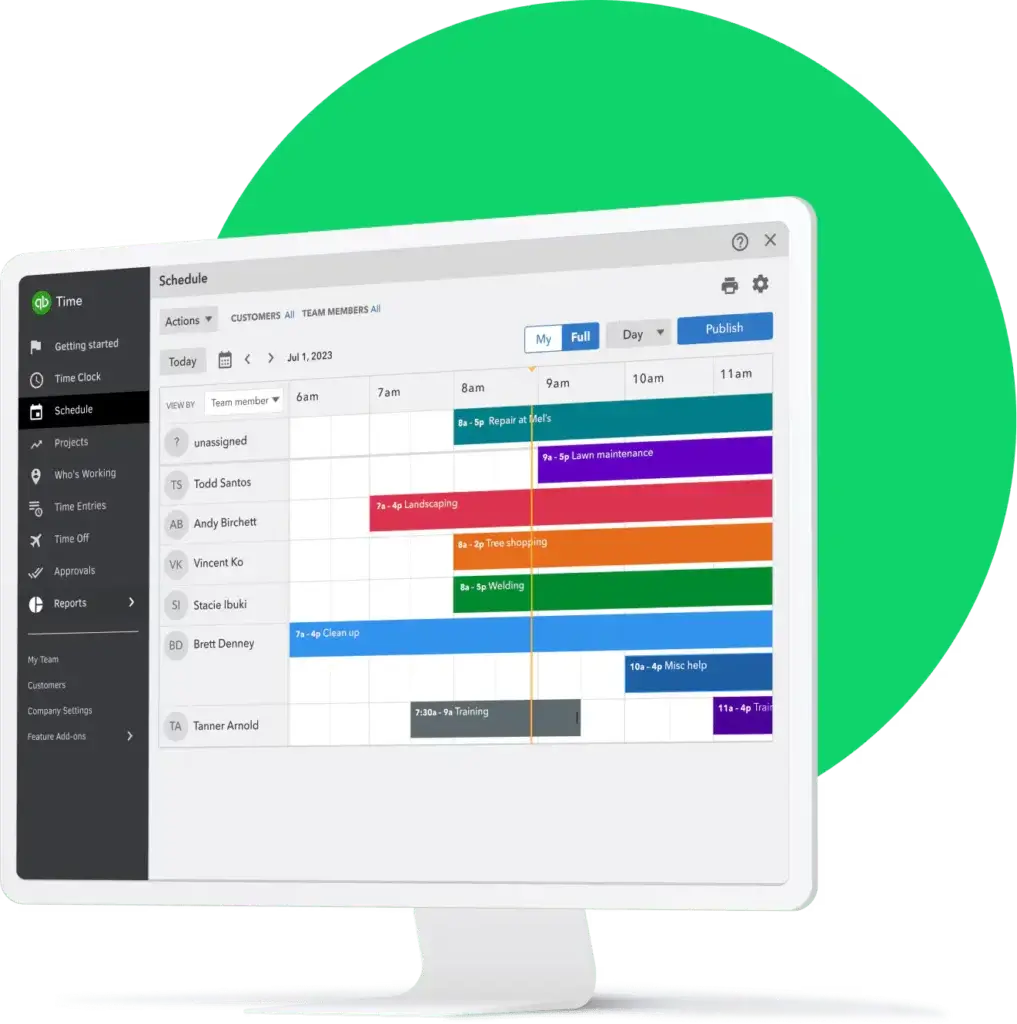
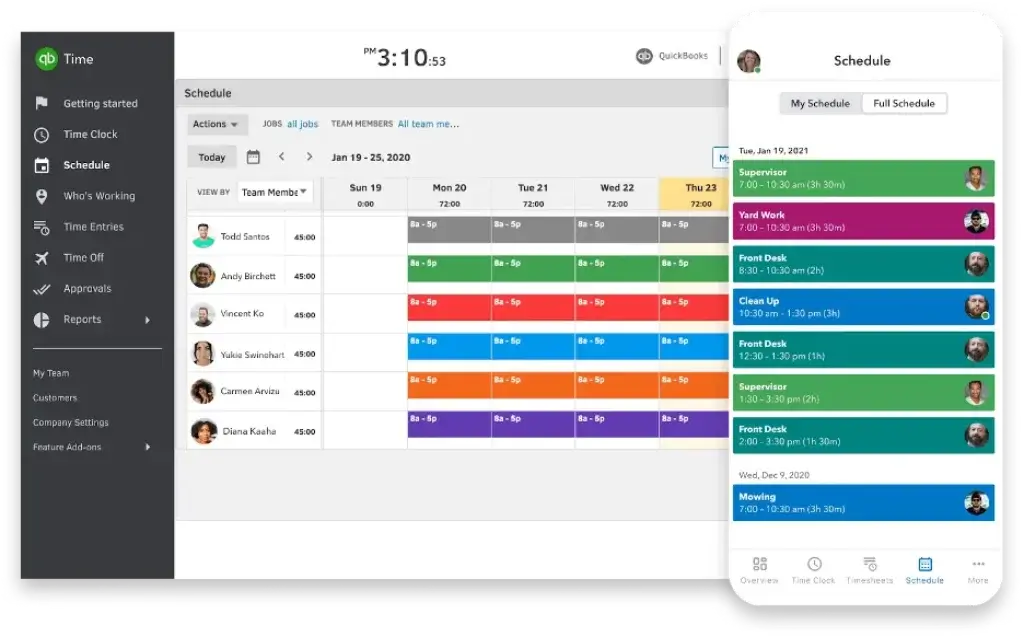
Scheduling is included on all QuickBooks Time plans, which adds real value because many lower-cost time tracking tools charge extra for it. Managers can create schedules by jobs or shifts and share them with employees inside the same system used for time tracking.
That said, QuickBooks Time’s scheduler is functional rather than advanced. It covers the basics well, but if scheduling is your primary workflow, dedicated workforce scheduling platforms may offer deeper labor planning, forecasting, and communication tools.
- Job and shift scheduling: Build and share schedules from the same platform.
- Centralized visibility: Employees can see when and where they are working.
- No extra scheduling fee: Included in both Premium and Elite.
Time Kiosk
QuickBooks Time offers a Time Kiosk mode for shared on-site clock-ins, which is useful for warehouses, restaurants, shops, clinics, and other workplaces where employees start from one location. This reduces the need for each worker to use a personal device for clocking in.
The kiosk approach is simple, familiar, and practical, especially for teams with mixed levels of tech comfort. It also gives smaller businesses a cleaner alternative to traditional punch clocks without requiring specialized hardware.
Payroll and Invoicing Workflows
One of the platform’s strongest selling points is its connection to QuickBooks. Businesses already using QuickBooks Online, QuickBooks Payroll, or QuickBooks Desktop can streamline time-to-payroll workflows and reduce duplicate entry. Intuit also says QuickBooks Time integrates with more than 50 accounting and payroll apps.
This is where QuickBooks Time often outperforms general-purpose time tracking tools. It is not just about recording hours, it is about making those hours usable for payroll, job costing, invoicing, and administrative reporting.
Project and Mileage Tracking
QuickBooks Time Elite adds more project-focused functionality, including project tracking, project estimates versus actuals, and activity feeds. Elite also includes mileage tracking, which can matter for businesses with travel between customer sites, deliveries, inspections, or mobile service routes.
If you manage projects with budgets and deadlines, Elite is the more compelling plan. Premium is solid for standard attendance and time logging, but Elite is better for businesses that want more operational visibility.
Pros and Cons
Advantages and Disadvantages
Positive
✅ Strong for mobile and field teamsv
✅ Scheduling included on all plans
✅ Excellent QuickBooks ecosystem fit
✅ Clear payroll benefit
✅ Broad industry fit
Negative
❌ Pricing can add up fast
❌ Geofencing locked to Elite
❌ Not a full HR suite
❌ Mixed app feedback exists
✅ Advantages
- Strong for mobile and field teams: GPS tools, kiosk mode, and remote approvals are valuable in real-world operations.
- Scheduling included on all plans: You do not need a separate scheduling add-on to start planning shifts.
- Excellent QuickBooks ecosystem fit: It fits naturally if you already use Intuit accounting or payroll products.
- Clear payroll benefit: Digital timesheets and approvals reduce payroll friction.
- Broad industry fit: Useful across construction, services, healthcare, retail, and office-based teams.
❌ Disadvantages
- Pricing can add up fast: Base fees plus per-user pricing may feel high for smaller teams.
- Geofencing locked to Elite: Geofencing and deeper project features are not on the entry plan.
- Not a full HR suite: It is not designed to replace broader HR, communications, or training platforms.
- Mixed app feedback exists: Third-party user reviews are generally positive, but some complaints focus on pricing and occasional mobile issues.
User Experience
User Experience and Ease of Use
QuickBooks Time is easier to understand than many workforce tools because the product is built around a clear central task: capture time accurately and move it into operational workflows. That focused scope helps keep the interface approachable.
Onboarding and Setup
Intuit describes QuickBooks Time as a web-based solution that can be customized during setup and onboarding. Administrators can configure the product for office, remote, or mobile teams and invite workers into the system without a heavy implementation process. For most small and midsize businesses, setup should be relatively manageable.
Daily Use for Employees
For employees, the experience is straightforward. They can clock in, view schedules, submit time, and use the workforce app without navigating an overloaded interface. This matters because adoption tends to drop when hourly teams find a system annoying or unclear.
Manager Experience
Managers benefit most from the approval workflow, schedule sharing, reporting, and visibility into who is currently working. The platform is practical rather than flashy, which is often the right tradeoff in time tracking software.
Pricing
How Much Does QuickBooks Time Cost?
QuickBooks Time uses a base fee plus per-user monthly pricing model. At the time of research, Intuit lists two main plans in the US:
QuickBooks Time Premium
Premium starts at $20 per month base fee plus $8 per user per month. It includes the workforce app, payroll and invoicing support, scheduling, reports, visibility into who is working, time-off management, alerts, photo attachments, Time Kiosk, and customer support.
QuickBooks Time Elite
Elite starts at $40 per month base fee plus $10 per user per month. It includes everything in Premium plus mileage tracking, project tracking, project estimates versus actuals, and project activity feeds. Geofencing is also tied to Elite.
QuickBooks also promotes a 30-day free trial. If your business has more than 50 employees, Intuit says discounted pricing may be available through sales. One more detail worth noting is that QuickBooks Online Payroll Premium and Elite include time tracking, which can improve value if you are already committed to that payroll stack.
QuickBooks Time Pricing Comparison Table
| Feature / Plan | Premium | Elite |
| Base price | $20/month | $40/month |
| Per-user price | $8/user/month | $10/user/month |
| Mobile and web time tracking | Included | Included |
| Scheduling | Included | Included |
| GPS tracking | Included | Included |
| Time Kiosk | Included | Included |
| Time-off management | Included | Included |
| Mileage tracking | Not included | Included |
| Project tracking | Not included | Included |
| Estimates vs actuals | Not included | Included |
| Geofencing | Not included | Included |
Common Use Cases
Best Use Cases and Industries
QuickBooks Time is not limited to one vertical, but it makes the most sense when accurate time capture, mobile tracking, and payroll-ready records are more important than advanced shift optimization.
- Construction and field services: Strong fit because GPS and job-site controls matter.
- Home healthcare and mobile teams: Useful when employees travel between locations.
- Retail and restaurants: Good for time tracking, though not the deepest scheduling option.
- Professional services: Helpful for project time, billable work, and approvals.
- Small businesses already on QuickBooks: Often the clearest use case overall.
Compare with Others
Alternatives to QuickBooks Time
QuickBooks Time competes with tools that come from different angles. Some emphasize workforce scheduling, some focus on employee operations, and others concentrate on affordable time tracking. The best alternative depends on whether your main priority is payroll accuracy, mobile accountability, or broader workforce management.
| Parameter | QuickBooks Time | Connecteam | 7shifts | Deputy |
| Core strength | Time tracking and payroll-friendly workflows | All-in-one frontline operations | Restaurant scheduling and labor tools | Scheduling and shift coverage |
| GPS tools | Strong, especially for mobile teams | Strong | More limited focus | Available, but less central to the product story |
| Scheduling depth | Good, but not best-in-class | Strong | Very strong for hospitality | Strong |
| Payroll ecosystem fit | Excellent for QuickBooks users | Good | Good for restaurant operations | Good |
| Best for | Businesses that want accurate hours and QuickBooks sync | Teams needing a broader employee management hub | Restaurants and hospitality groups | Businesses focused on shift planning and compliance |
QuickBooks Time vs Connecteam
Connecteam is broader. It goes beyond time tracking into communications, tasks, HR, forms, and training. QuickBooks Time is narrower, but also more focused. If you mainly want accurate hours, approvals, GPS support, and QuickBooks connectivity, QuickBooks Time is often the better operational fit. If you want an all-in-one app for frontline staff, Connecteam may offer more value.
QuickBooks Time vs 7shifts
7shifts is more specialized for restaurants. It is the stronger option for hospitality scheduling, labor planning, and restaurant-specific workflows. QuickBooks Time is the better choice when payroll integration, time capture, and location-aware attendance are more important than restaurant-specific scheduling depth.
QuickBooks Time vs Deputy
Deputy leans more heavily into employee scheduling and shift operations. QuickBooks Time has the edge for businesses already using QuickBooks and for teams where GPS-based time accountability is the main need. Deputy is often the better fit if scheduling is the center of your daily workflow.
Setup and Support
Get Started & Tips for Best Use
Getting Started
The best QuickBooks Time rollout starts with clean job, customer, team, and permissions setup. If you skip that step, the product can feel more expensive than it should because you will not be using the reporting and payroll efficiencies that justify the cost.
Customer Support
Paid QuickBooks Time subscriptions include customer support, and Intuit also provides onboarding content and setup guides. For smaller teams without an internal operations manager, that support layer is important because time tracking software tends to touch payroll, compliance, and employee adoption all at once.
Tips for Maximising Your Use of QuickBooks Time
- Use scheduling and time tracking together: The combination improves approvals and attendance accuracy.
- Set clear clock-in rules: This matters even more for mobile teams.
- Use Elite if projects matter: Premium is enough for basic hours, not advanced job costing.
- Train employees on the app: A small amount of upfront training prevents avoidable payroll issues.
- Review total cost early: Base fees and user fees can scale quickly.
Conclusion
Final Thoughts
QuickBooks Time is one of the better time tracking tools for small and midsize businesses that care about payroll accuracy, mobile accountability, and integration with QuickBooks. Its strongest advantages are practical, not flashy: reliable time capture, GPS support, kiosk mode, scheduling included on all plans, and a natural workflow into payroll and invoicing.
It is less compelling if your main priority is advanced workforce scheduling or a broader employee operations platform. In those cases, tools like Deputy, Connecteam, or 7shifts may be better aligned. But if you want a time tracking product that is mature, business-friendly, and especially strong inside the QuickBooks ecosystem, QuickBooks Time remains a very credible option.
Have more questions?
Frequently Asked Questions
Is QuickBooks Time included with QuickBooks Payroll?
Yes. Intuit says time tracking is included with QuickBooks Online Payroll Premium and Elite.
Does QuickBooks Time include scheduling?
Yes. Scheduling is included on all QuickBooks Time plans, so you do not need a separate scheduling add-on.
Does QuickBooks Time track employee location?
Yes. GPS tracking works while employees are on the clock, and QuickBooks says it does not save GPS points when users are off the clock.
Does QuickBooks Time have geofencing?
Yes, but geofencing is limited to the Elite plan.
Can employees clock in on-site from one device?
Yes. QuickBooks Time offers a Time Kiosk feature for shared on-site clock-ins.
Is QuickBooks Time good for construction and field teams?
Yes. It is one of the stronger use cases because of GPS tracking, mobile clock-ins, and job-site accountability.
What is the difference between Premium and Elite?
Elite adds mileage tracking, project tracking, project estimates versus actuals, activity feeds, and geofencing.
Does QuickBooks Time work on mobile?
Yes. It supports iPhone, iPad, Android phones, and tablets, though some features may vary by device.
Is QuickBooks Time expensive for small teams?
It can be. The base fee plus per-user pricing may feel high if you only need simple clock-in and clock-out tracking.
Who should choose QuickBooks Time?
You should consider it if your business values accurate time tracking, payroll-friendly workflows, and strong alignment with the QuickBooks ecosystem.