
Introduction
Pallyy is one of those social media management tools that can surprise you. At first glance, it looks like a lightweight scheduler built mainly for Instagram. But when you dig deeper, you find a broader platform that combines publishing, analytics, engagement, and a bio link builder in one interface. In this Pallyy review, you will get a clear look at what the tool does well, where it falls short, how much it costs, and which types of users will get the most value from it in 2026.
Key Features
Pallyy’s Software Specification
Pallyy focuses on the parts of social media management that matter most to smaller teams, freelancers, agencies, and creators. Its platform is built around content scheduling, analytics, social inbox capabilities, and a separate bio link feature. The result is a practical toolkit that feels more streamlined than many enterprise-heavy alternatives.
Publishing and Scheduling
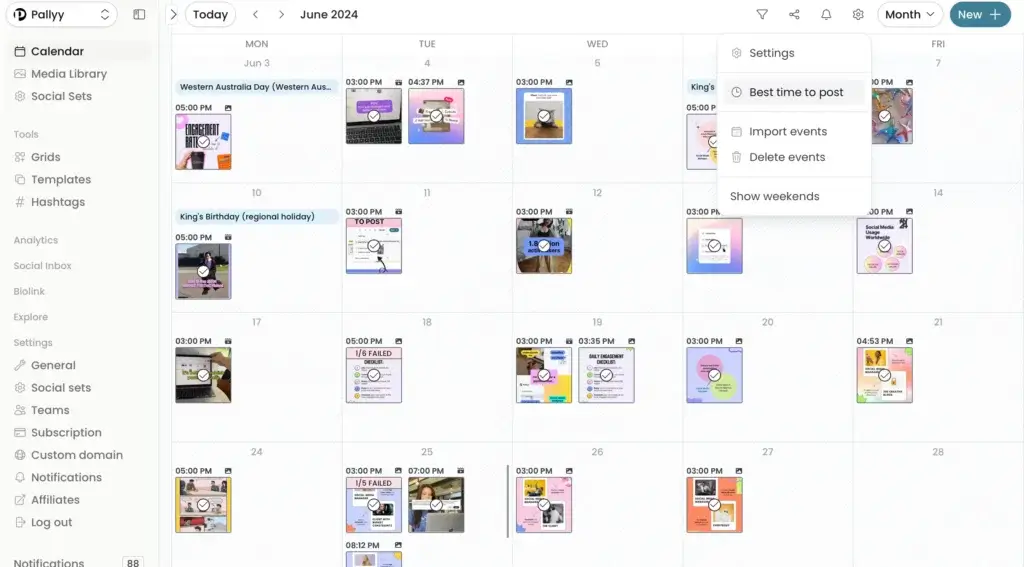
Pallyy’s strongest area is content scheduling. The publishing interface is built to help you draft posts quickly, organize content visually, and manage a posting calendar without unnecessary complexity. If your main goal is staying consistent across several social channels, this is where Pallyy makes the best first impression.
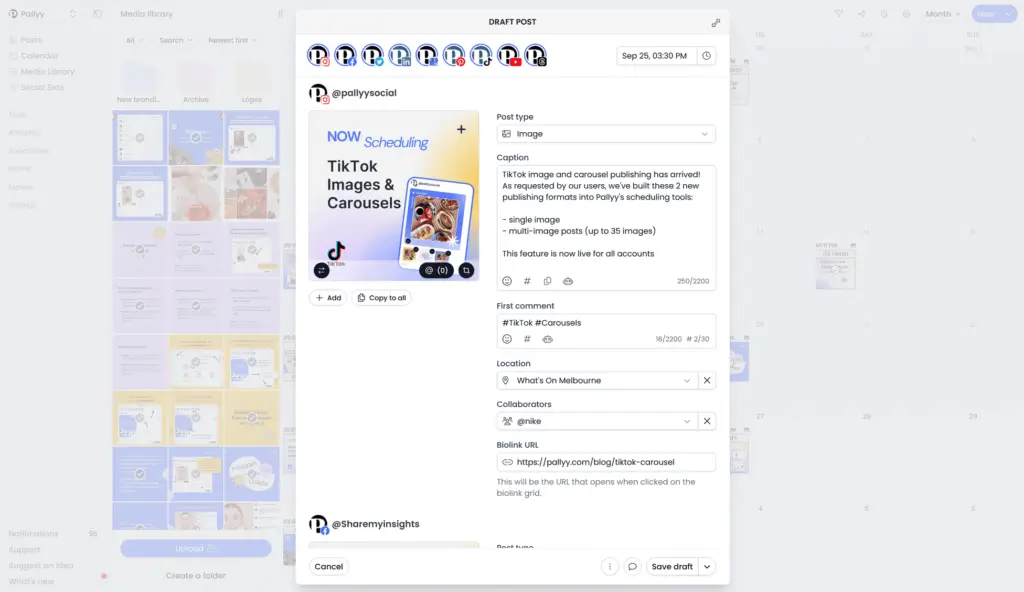
- Multi-platform publishing: Schedule content across Instagram, Facebook, X, LinkedIn, Google Business Profile, Pinterest, TikTok, Threads, and YouTube.
- Visual calendar: Plan campaigns in a calendar view and keep posting schedules organized across brands or clients.
- Queue scheduling: Add timeslots and push content into a queue to simplify repeat publishing workflows.
- Instagram grid preview: Preview and rearrange posts in a grid format before publishing.
- Approvals and post comments: Review workflows help teams or clients approve content before it goes live.
- Media library: Upload and organize assets into folders for easier reuse.
- Image cropping: Prepare visual assets for square, portrait, landscape, or story formats inside the workflow.
- Shared calendar: Share a content calendar externally, which is useful for client visibility.
Analytics and Reporting
Pallyy includes analytics, but it is more focused than what you get from analytics-first platforms. The company positions analytics as a way to drill into content performance and understand what is working, rather than as a huge enterprise reporting engine.
- Post-level performance tracking: Review engagement rate, likes, comments, and other key post metrics.
- Historical data: Track account performance over time for trend analysis.
- Custom reports: Build reports with widgets and export them as PDFs.
- Competitor tracking: Monitor up to 10 Instagram competitors.
- Audience demographics: View follower insights such as gender, age, and location.
- Basic vs advanced analytics: Lower plans include basic analytics, while higher plans unlock more reporting depth.
Social Inbox and Engagement
Pallyy also includes a social inbox, which helps you manage engagement without jumping between platforms. This is especially useful if you want one place to handle comments, direct messages, and reviews.
- Comments and direct messages: Receive and reply from a unified inbox where supported.
- Reviews management: Respond to reviews, including Google Business and Facebook review activity.
- Labels and organization: Tag incoming threads to keep the inbox manageable.
- Assignments: Route conversations to team members.
- Resolve workflows: Mark conversations as resolved to keep the inbox tidy.
- Inbox automations: Use automations to apply actions to incoming content.
Bio Link and Creator Utilities
One of Pallyy’s more appealing extras is that it includes a bio link builder. That makes the platform more useful for creators, personal brands, and social-first businesses that want a simple way to send traffic from profile links to multiple destinations.
- Custom bio link pages: Build landing pages with buttons, images, and other blocks.
- Useful for Instagram and TikTok: The feature fits naturally into creator and small-brand workflows.
- Free utility tools: Pallyy also offers free tools on its website for captions, alt text, bios, and related social media tasks.
Team Collaboration and Workflow
Pallyy is not trying to be a large enterprise governance platform, but it does include practical collaboration tools for smaller teams and agencies.
- Approvals: Move content through pending, denied, or approved states.
- Shared calendars: Give internal teams or clients a clearer view of what is scheduled.
- Post comments: Leave feedback directly inside the content workflow.
- Extra users on higher tiers: Team support scales with the larger plans.
Pros and Cons
Benefits and Limitations of Pallyy
Pallyy has a clear value proposition, but it is not a perfect fit for every team. Its strengths are ease of use, visual planning, and affordable social media management. Its weaknesses tend to appear when you need deeper listening, broader analytics coverage, or more advanced enterprise controls.
Positive
✅ Easy visual scheduler
✅ Affordable pricing
✅ Strong visual planning
✅ Useful built-in approvals
Negative
❌ Not analytics-first
❌ Listening is limited
❌ Less enterprise governance
❌ Pricing documentation can be confusing
✅ Pros
- Easy visual scheduler: Pallyy is easier to learn than many larger social media management tools.
- Affordable pricing: The entry pricing is appealing if you want scheduling, analytics, inbox, and bio link in one product.
- Strong visual planning: The grid preview and calendar views are especially useful for Instagram-focused workflows.
- Useful built-in approvals: Agencies and freelancers can get client sign-off without needing a separate process.
❌ Cons
- Not analytics-first: Pallyy includes analytics, but it is not as deep as platforms built primarily around reporting and benchmarking.
- Listening is limited: You do not get full social listening depth on the level of enterprise social monitoring tools.
- Less enterprise governance: Large organizations may outgrow the workflow controls and role complexity.
- Pricing documentation can be confusing: That means you should verify the current package structure before publishing a recommendation or making a purchase decision.
User Experience
User Interface and Experience
Onboarding and Learning Curve
Pallyy is one of the easier social media tools to get started with. You connect your accounts, create a social set, and begin scheduling content from a clean calendar interface. Most users should be able to get comfortable quickly, especially if they have used tools like Buffer, Later, or Planoly before. The platform does not overload you with too many advanced menus up front, which helps new users ramp faster.
Interface and Navigation
The interface is modern, visual, and oriented around practical tasks. Scheduling is front and center, while analytics and inbox functions sit as supporting modules. That makes the platform feel efficient for day-to-day execution. In my view, this is one of Pallyy’s biggest selling points. It does not try to look like an enterprise dashboard when most users really just need to plan, publish, and reply.
Support and Documentation
Pallyy offers a help center with documentation around social sets, scheduling, teams, and inbox use. The support footprint feels suitable for SMB and agency buyers rather than heavyweight enterprise procurement teams. For most users, that is enough. For large organizations that require deeper onboarding or service layers, other vendors may be a better fit.
Pricing and Plans
How Much Does Pallyy Cost?
Pallyy’s pricing is one of its most attractive qualities. The current public pricing page uses four plans, with costs that are relatively accessible compared with many established social media suites.
| Plan | Price | Main Highlights |
| Starter | $15/month | 1 social set, up to 2 social accounts per set, 20 posts/month, 1 user, bio link, basic analytics |
| Pro | $25/month | 1 social set, up to 10 social accounts per set, unlimited posts, social inbox, ideas, queue, approvals, shared calendar, advanced analytics |
| Agency | $99/month | 10 social sets, up to 10 social accounts per set, 3 users, custom reports, advanced analytics, approvals, inbox |
| Scale | $199/month | 30 social sets, up to 10 social accounts per set, 10 users, advanced analytics, custom reports, inbox, approvals |
Pallyy also offers a 14-day free trial on its public pricing page. One thing worth noting is that some help-center documentation still references an older pricing structure, so you should verify the live pricing page before making a final recommendation in your published review.
From a value perspective, Pallyy is competitively positioned. It is not the cheapest option in the market if you compare only basic publishing, but it becomes more attractive when you factor in approvals, inbox, analytics, and bio link under one product.
Use Cases & Suitable Users
Who Should Use Pallyy
Pallyy is a better fit for some users than others. The tool makes the most sense when your needs center on practical publishing and engagement rather than enterprise analytics or advanced social listening.
- Freelancers and social media managers: Pallyy is a strong fit if you manage multiple accounts and want a visual, affordable workflow.
- Instagram-first brands: The grid planner, competitor tracking, and visual content planning make it particularly attractive here.
- Small agencies: Shared calendars, approvals, and social sets work well for client-based operations.
- Creators and personal brands: The combination of publishing, inbox, and bio link is useful without feeling bloated.
- Small businesses: Businesses that need scheduling plus light analytics and engagement management can get solid value.
Pallyy is less ideal for large enterprise teams that need extensive permissions, deep listening, broad benchmarking, or highly advanced reporting across every major social network.
Comparison with Alternatives
How Does Pallyy Compare to the Alternatives
Pallyy competes in a crowded market, so context matters. It is not trying to beat every competitor on every feature. Instead, it wins by combining usability, strong visual planning, and sensible pricing.
Pallyy vs Buffer
Buffer is one of the easiest alternatives to compare because both tools appeal to users who want a simpler social media workflow. Buffer remains one of the best choices for lightweight publishing and collaboration. It also offers a free plan and per-channel pricing. Pallyy, however, feels more visually oriented for content planners and brings extras like the Instagram grid view, social inbox, and bio link into a more unified experience. If you want simplicity above all, Buffer is excellent. If you want a more visual and creator-friendly workflow, Pallyy has the edge.
Pallyy vs Later
Later is often a better fit for creator brands, influencer workflows, and visual campaign management, especially if your strategy leans heavily into Instagram, TikTok, and creator commerce. Later has a stronger brand presence and broader platform positioning around social management plus influencer marketing. Pallyy is usually more straightforward and more affordable for users who mainly want publishing, inbox, and reporting without the extra complexity. For lean teams, I would often favor Pallyy on value. For creator-led brand ecosystems, Later can make more sense.
Pallyy vs SocialBee
SocialBee is the stronger option if AI assistance, content categorization, evergreen recycling, and multi-workspace content strategy matter most to you. SocialBee leans further into strategic publishing workflows and AI-assisted content operations. Pallyy, by contrast, feels cleaner and more execution-focused. If your team wants an elegant day-to-day publishing experience, Pallyy is easier to like. If you want a richer content system with stronger AI and recycling logic, SocialBee is the more capable choice.
My overall take is simple: Pallyy is one of the better options for users who care more about getting social media work done smoothly than about buying the most feature-heavy platform in the category.
Best Use Tips
Tips and Best Practices When Using Pallyy
- Build your calendar around recurring slots: The queue becomes more useful when you define a repeatable posting rhythm.
- Use approvals even with small teams: A lightweight review process can prevent errors and keep brand consistency tight.
- Take advantage of the Instagram grid preview: This is one of the easiest ways to keep your feed visually coherent.
- Use labels in the inbox: This helps you stay organized when engagement volume starts to rise.
- Create client-friendly reports: PDF reports can help agencies communicate results without needing separate reporting tools.
- Test the bio link tool: If you are already paying for Pallyy, this can reduce the need for a separate link-in-bio subscription.
- Validate analytics needs early: If your team needs broader benchmarking or deeper listening, confirm that Pallyy covers enough before scaling usage.
Conclusion
Final thoughts
Pallyy is a smart, focused social media management tool with a clear audience. It is best for freelancers, creators, small teams, and agencies that want a cleaner way to schedule content, manage engagement, and review performance without paying enterprise-level prices. Its combination of visual publishing, inbox features, analytics, and bio link functionality makes it a well-rounded option in a part of the market where many tools either feel too basic or too bloated.
It is not the best option for every use case. If your priority is advanced AI content operations, large-scale governance, or deep social listening, other tools may fit better. But if you want an affordable and practical platform that helps you manage social media efficiently, Pallyy is easy to recommend. For Instagram-first workflows in particular, it is one of the more appealing tools in its class.
Overall, Pallyy stands out because it understands what many users actually need: a social media tool that is capable, efficient, and not overloaded with unnecessary friction.
Have more questions
Frequently Asked Questions
1. What is Pallyy best used for?
Pallyy is best used for scheduling social media content, managing a visual content calendar, replying to engagement from one inbox, and tracking performance across connected accounts.
2. Is Pallyy good for Instagram?
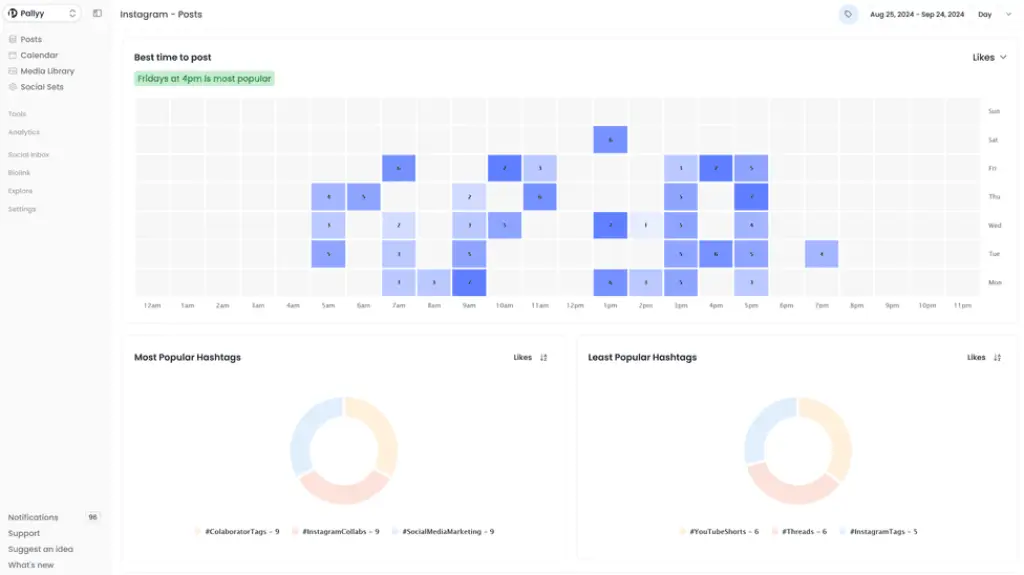
Yes. It is especially strong for Instagram-focused workflows because it includes grid planning, visual scheduling, competitor tracking, and best-time-to-post support.
3. Does Pallyy support multiple social media platforms?
Yes. Pallyy supports Instagram, Facebook, X, LinkedIn, Google Business Profile, Pinterest, TikTok, Threads, and YouTube for publishing.
4. Does Pallyy include analytics?
Yes. Pallyy includes analytics with post tracking, historical data, audience insights, and PDF reporting, though the depth depends on your plan.
5. Does Pallyy have a social inbox?
Yes. The inbox supports comments, direct messages, reviews, labels, assignments, and thread resolution for supported networks.
6. Can agencies use Pallyy?
Yes. Agencies are one of the clearest target audiences because Pallyy includes social sets, shared calendars, approvals, and reporting features that support client work.
7. Does Pallyy have a free plan?
Pallyy’s live pricing pages have shown different packaging over time, so it is best to verify the current public pricing page directly before publishing a fixed statement about a free plan.
8. How much does Pallyy cost?
Its public pricing page currently lists Starter at $15/month, Pro at $25/month, Agency at $99/month, and Scale at $199/month, with a 14-day trial available.
9. How does Pallyy compare with Buffer?
Pallyy is more visual and includes extras like an inbox and bio link, while Buffer is often the better choice if you want the simplest possible publishing workflow and flexible per-channel pricing.
10. Who should avoid Pallyy?
Teams that need enterprise-grade listening, highly advanced analytics, or complex governance may be better served by larger social media management platforms.