
Introduction
AI agents are becoming more ambitious, but very few products actually move beyond chat and into real execution. In this Manus review, you will get a practical look at what Manus offers, where it stands out, where it still has limits, and which type of user is most likely to get real value from it.
Manus positions itself as an autonomous general AI agent, not just an AI assistant. That distinction matters. Instead of only answering prompts, Manus is designed to plan, take action, operate browsers, work with connected apps, generate deliverables, and complete multi-step workflows. In 2026, that makes it one of the more ambitious products in the agent software category.
What Is Manus?
Manus is an AI agent platform that can execute tasks on your behalf inside a sandboxed virtual computer, a cloud browser, your connected apps, and now even your own desktop through its desktop app. The product is designed to help you delegate work such as research, automation, slide creation, data analysis, email-based workflows, and browser actions instead of handling everything manually yourself.
Its broader appeal comes from range. Manus is not limited to one narrow use case like AI writing, AI search, or AI image generation. It is trying to become an execution layer across research, content, browser automation, internal tools, and business workflows.
Background and Evolution
Manus launched as a fast-rising autonomous agent platform, and by late December 2025 the company announced that it was joining Meta while continuing to operate its subscription product through its app and website from Singapore. The company says the product will keep operating and iterating rather than being discontinued. That matters because a current Manus review should not treat it like an abandoned AI experiment. It is still being actively expanded.
The product has also evolved meaningfully beyond its early research-agent identity. Current official documentation shows a much broader platform that includes Wide Research, Manus Slides, scheduled tasks, Mail Manus, Manus Collab, integrations, Browser Operator, a cloud browser, a desktop app, and an API.
Target Users and Use Cases
Manus appeals to several different audiences:
- Researchers and analysts – You can use it for structured research, comparison work, and large-scale information gathering.
- Operators and founders – It can automate recurring workflows, browser tasks, reporting, and administrative work.
- Marketers and consultants – It can generate slides, summarize data, support research, and coordinate work across apps.
- Teams – Team plans add collaboration, SSO, usage analytics, access controls, and shared slide templates.
- Developers and technical users – The API, files, agents, skills, and browser capabilities make it more extensible than a simple chat tool.
That said, Manus is not automatically the best fit for everyone. It looks strongest when you want an action-oriented AI product that can handle multi-step work across tools. It is less compelling if you only need a simple chatbot, a lightweight writing assistant, or a low-cost single-purpose AI app.
Key Features of Manus
How Does It Work?
Manus stands out because it is built around action, not just response generation. The platform gives the agent its own working environment, lets it access the web, connects it to apps, and enables it to return finished outputs rather than partial suggestions.
Autonomous Task Execution
The core Manus proposition is autonomous execution. Official documentation describes Manus as a virtual colleague with its own computer, able to plan, execute, and deliver complete work products from start to finish. That puts it in a different category from standard AI chat interfaces that require constant step-by-step prompting.
Cloud Browser
One of Manus’s most important capabilities is its cloud browser. This is a dedicated browser environment that can visit websites, click buttons, fill forms, extract data, and complete multi-step workflows. It can also log into personal or work accounts when authorized, which expands the product from passive research into real browser-based execution.
Browser Operator
Manus also offers Browser Operator, a browser extension that lets the agent work inside your local browser using your existing logins and sessions. This is especially useful for authenticated workflows, internal systems, or websites where a cloud session would create friction.
Desktop Access with My Computer
A major newer development is the Manus Desktop app and its My Computer capability. Manus says this brings the agent onto your own machine so it can work with local files, tools, applications, and terminal commands. For practical workflows, this makes Manus more useful than cloud-only agents because it can bridge local work and cloud actions.
Integrations and Workflow Orchestration
Manus now connects with tools such as Gmail, Notion, Stripe, HubSpot, Slack, Google Calendar, Google Drive, GitHub, and more through integrations and connectors. That is important because it turns Manus into more than a self-contained AI app. It becomes an orchestration layer across your existing stack.
API and Developer Extensibility
For more technical users, Manus also provides an API that supports tasks, projects, files, webhooks, skills, agents, and connectors. That makes the platform more credible for teams that want to embed it into internal workflows rather than only use the consumer-facing app.

AI Features
Manus AI Capabilities
Manus is strongest when you look at it as a multi-capability AI agent platform rather than a single AI assistant. The product now includes distinct feature modules that each target a meaningful workflow category.
Wide Research
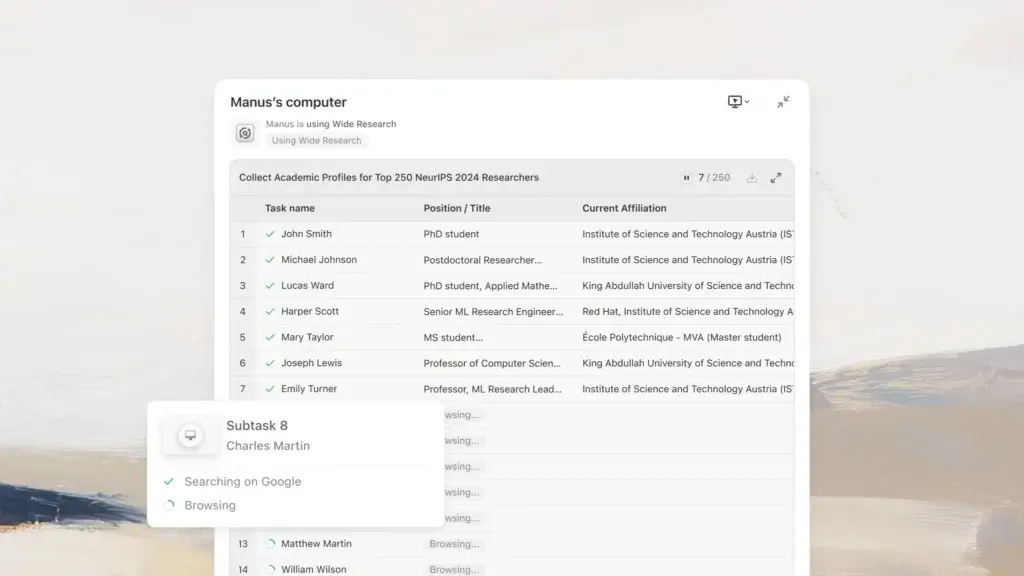
Wide Research is one of Manus’s most differentiated capabilities. According to the documentation, it uses hundreds of agents in parallel to process many similar items at scale, such as researching dozens of companies or comparing large lists of products. That architecture is designed to avoid the quality drop that happens when a single model processes too many items in one long context.
In practical terms, this is one of the strongest reasons to take Manus seriously. Many AI tools can research one thing fairly well. Fewer tools are explicitly built to maintain consistency across 50, 100, or 250 parallel work items.
Data Analysis and Visualization
Manus also positions itself as a tool for actual analysis rather than a summary only. Its documentation says it can identify patterns, extract insights, and present findings in formats suitable for client meetings, executive presentations, or strategic decisions. That is especially appealing if you want a single agent to go from raw inputs to decision-ready output.
Mail Manus
Mail Manus is a smart workflow addition. It gives each user a unique Manus email address, allowing tasks to be triggered by forwarding or copying emails. Results can then be returned directly by email. This makes Manus easier to fit into real work habits without forcing you to live in the app interface all day.
Scheduled Tasks
Scheduled Tasks let Manus run recurring workflows such as daily reports, weekly research, or monthly analysis. This is one of the features that makes Manus feel more like an operations tool than a novelty AI assistant.
Collaboration
For teams, Manus Collab adds a shared workspace where multiple people can prompt, edit, and refine work together through one link. That can reduce version chaos and make team adoption more realistic.
Design View
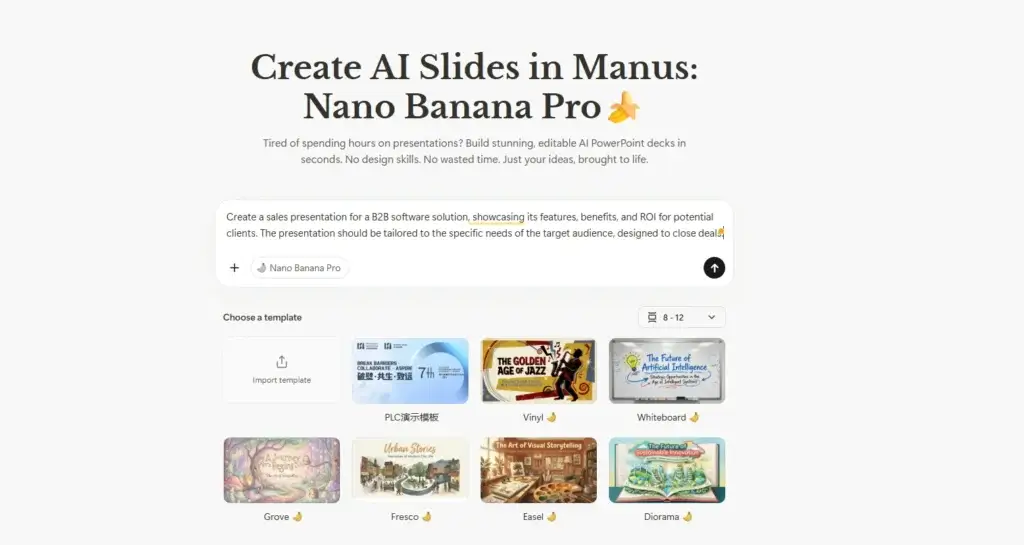
Manus also includes Design View, an integrated image workflow that supports iterative image generation and precise edits to existing visuals. The docs say it is powered by Google’s Nano Banana Pro model. This feature is useful, but it feels more like an added capability than the central reason to choose Manus.
Manus Slides
Manus Slides creates presentations from a simple description, including research, slide structure, visuals, design, and speaker notes. It can also apply uploaded PowerPoint templates and export to PowerPoint or PDF. For consultants, marketers, founders, and internal teams, this is one of the more commercially useful parts of the platform.
Pros and Cons
Benefits and Limitations of Using Manus
Positive
✅ Strong autonomous workflow execution
✅ Broad feature set beyond chat
✅ Excellent for research-heavy work
✅ Good momentum in product expansion
Negative
❌ Credit-based pricing can feel unpredictable
❌ Still needs supervision on important tasks
❌ Not the cheapest option for heavy use
❌ Early reliability concerns still affect perception
Strengths & Benefits
Manus gets a lot right for users who want an AI tool that actually does work instead of only discussing it.
- Action-first architecture – Manus is built around execution environments, not only conversation.
- Broad product depth – Research, slides, browser automation, integrations, scheduled tasks, collaboration, and API access all sit under one platform.
- Strong fit for operational work – It can reduce repetitive admin, research, and cross-tool coordination.
- Impressive scale for research tasks – Wide Research is one of the clearest points of differentiation.
- Growing team readiness – Team plans add collaboration, SSO, analytics, and data training opt-out.
Limitations & Drawbacks
Manus is promising, but you should not treat it as frictionless magic.
- Usage is credit-based – Complex tasks consume more credits, which can make cost planning less intuitive.
- Autonomy still needs oversight – High-stakes outputs still require human review.
- Heavy users can spend quickly – Pro plans help, but intensive workflows will not feel cheap.
- Market trust is still catching up – Early independent testing reported crashes and failed workflows, which means some buyers will still approach it cautiously.
- Feature breadth creates complexity – New users may need time to understand which mode or tool is best for which task.
Growth Features
Manus Productivity, Automation, and Business Value
Manus is not best understood as a writing assistant. It is better understood as a productivity platform for delegated work. That framing is important because it changes how you evaluate the product. The question is not only whether it writes well. The question is whether it can reduce the real multi-step workload.
Where Manus Creates Real Efficiency
Manus looks most useful in workflows that combine research, analysis, formatting, browser interaction, and app coordination. Examples include competitor analysis, report creation, sales research, workflow automation, recurring monitoring, presentation prep, and inbox-driven task handling.
Better for Workflows Than Single Outputs
Many AI tools are strongest at one artifact, such as a paragraph, image, or summary. Manus is more compelling when the job involves multiple stages, multiple apps, or multiple deliverables. That is where its agent architecture makes more sense.
A Good Fit for Teams with Repetitive Knowledge Work
Teams that repeatedly build reports, decks, research packs, or structured analyses may get more value from Manus than teams that only want occasional brainstorming. In my view, Manus is most attractive when time savings come from repeated process delegation, not from novelty use cases.

Pricing
Manus Pricing & Plans
Manus uses a credit-based pricing model, and that matters because task cost depends on complexity and resource usage. Official documentation says credits are consumed based on the complexity and resources required for each task, which means pricing is not as predictable as flat unlimited-use tools.
Free Plan
The Free plan costs $0 per month. It includes Chat Mode, Manus 1.6 Lite in Agent Mode, 300 daily refresh credits, support for 1 concurrent task, and 2 scheduled tasks. This is enough to test the product, but it is clearly limited for sustained business use.
Pro Plan
Manus currently lists Pro pricing starting from $20 per month, with another Pro option starting from $40 per month and a 7-day free trial. According to the help center, the lower Pro tier starts with 4,000 monthly credits, while the higher Pro tier starts with 8,000 monthly credits. Pro also includes access to Manus 1.6 Max, Manus 1.6, and Manus 1.6 Lite in Agent Mode, plus advanced research, website deployment, slide generation, Wide Research, 20 concurrent tasks, 20 scheduled tasks, and beta feature early access.
Team Plan
The Team plan starts from $20 per seat per month and includes Pro features plus SSO, data training opt-out, team usage analytics, internal access control, and shared slide templates. This is the plan that makes Manus more credible for organized team adoption.
Pricing Table
The table below gives a practical view of how Manus plans compare.
| Plan | Free | Pro | Higher Pro | Team |
| Starting price | $0/month | From $20/month | From $40/month | From $20/seat/month |
| Credits | 300 daily refresh credits | From 4,000 monthly credits | From 8,000 monthly credits | Based on team plan allocation |
| Agent access | Manus 1.6 Lite | 1.6 Lite, 1.6, 1.6 Max | 1.6 Lite, 1.6, 1.6 Max | 1.6 Lite, 1.6, 1.6 Max |
| Concurrent tasks | 1 | 20 | 20 | Team-level usage |
| Scheduled tasks | 2 | 20 | 20 | Team-level usage |
| Best for | Testing and simple use | Individual professionals | Heavier professional use | Collaboration and admin control |
| Recommended for | Curious first-time users | Freelancers and operators | Power users | Teams and organizations |
For most buyers, the real starting point is Pro. The free plan is helpful for evaluation, but it is too constrained to represent what Manus feels like in serious usage. The key decision is whether your workflows justify the credit spend.
Use Cases
Who Should Use Manus?
Manus is not the right AI product for everyone, but it fits several user profiles very well.
Researchers and Analysts
If your work involves comparisons, large-scale information gathering, structured research, or recurring analysis, Manus is one of the more interesting tools in the market. Wide Research alone makes it more relevant than standard chatbots for heavy research workloads.
Solo Operators and Founders
If you run many repetitive workflows yourself, Manus can help reduce manual browser work, data gathering, email follow-up, and presentation prep. This is one of its strongest practical fits.
Marketing, Strategy, and Consulting Teams
Manus is attractive for teams that regularly build decks, research summaries, reporting packs, and operational documents. The collaboration layer and slide capabilities make it more useful here than many AI tools focused only on chat or generation.
Technical Teams That Want Extensibility
If your team wants to automate tasks programmatically, the API, connectors, projects, files, skills, and agents make Manus more promising than lightweight consumer AI tools.
When Manus Might Not Be Right
Manus may not be the best choice if you only want a simple chatbot, have a tight AI budget, or need absolute reliability on every long-running task without review. It is a powerful agent platform, but it is still a platform you should supervise thoughtfully.
Competitors
Competitor Alternatives to Manus
Manus competes less with traditional chatbots and more with the broader category of action-oriented AI tools. The best alternative depends on whether your priority is deep research, coding, automation, or simple AI assistance.
| Feature Type | Manus | ChatGPT | Perplexity | Cursor |
| Core focus | Autonomous AI agent platform | General AI assistant | Answer-first AI research tool | AI coding environment |
| Best for | Delegated multi-step work | Broad general use | Fast research and source discovery | Developer productivity |
| Workflow execution | Strong | Moderate | Low | Moderate |
| Research depth | Strong, especially at scale | Good | Strong for fast lookup | Limited outside coding |
| Browser action | Yes | Varies by setup | No meaningful agent execution | No core browser automation |
| Team features | Growing | Strong ecosystem | Lighter | Engineering-focused |
| Overall angle | Best for agentic task completion | Best general AI platform | Best quick-answer research tool | Best coding-focused AI option |
Compared with a standard chatbot, Manus is more interesting when you need execution rather than conversation. Compared with Perplexity, it is far more action-oriented. Compared with Cursor, it is much broader but less specialized for serious code-centric workflows. My view is that Manus is most compelling when your pain point is repeated multi-step digital work, not isolated questions.
Best Practices
Getting Started with Manus
To get the most out of Manus, you should approach it like a delegated workflow tool, not a one-shot answer machine.
Start with One Clear Workflow
Do not begin with the broadest possible task. Start with one concrete workflow such as researching ten competitors, creating a sales deck, processing a recurring inbox pattern, or building a scheduled report. That will show you where Manus creates real value in your work.
Use the Right Mode for the Job
Cloud Browser is best for general web tasks, Browser Operator is better for logged-in browser sessions, and the desktop app is best when local files or local apps matter. Choosing the right environment early makes a big difference.
Connect the Apps You Actually Use
Manus becomes more valuable when connected to Gmail, Notion, Slack, Google Calendar, Google Drive, GitHub, or other core tools in your workflow. Its strongest use cases come from orchestration, not isolation.
Watch Credit Consumption
Because Manus is credit-based, it is important to monitor which tasks are worth automating at scale. Real-time usage tracking and usage history are built into the dashboard, and they matter if you plan to use the platform frequently.
Review Important Outputs
Even strong AI agents should be supervised on client work, business decisions, and sensitive tasks. Manus can save time, but your judgment is still the quality control layer.
Conclusion
Final Thoughts
Manus is one of the more interesting AI products in the market because it is trying to solve a more important problem than chat. It is built to execute. That makes it more valuable than a standard assistant when your work involves research, browser actions, recurring tasks, connected apps, deliverables, and cross-tool workflows.
Its biggest strengths are workflow breadth, action-oriented design, strong research capability, and rapidly expanding feature depth. Its biggest limitations are credit-based pricing, the need for human review on serious tasks, and some lingering trust concerns from early reliability issues. Still, the official product today is broader and more mature than many people realize.
Overall, Manus is a strong option if you want an AI agent platform that can do more than answer prompts. It is not the cheapest or simplest AI tool, but for the right workflow-heavy user, it can be one of the more compelling AI productivity platforms to evaluate in 2026.
Have more questions?
Frequently Asked Questions
1. What is Manus AI?
Manus is an autonomous AI agent platform designed to complete tasks and deliver finished results, not just chat responses. It can work through browsers, integrations, files, and desktop environments.
2. Is Manus better than ChatGPT?
That depends on your goal. Manus is more compelling for delegated multi-step workflows, while ChatGPT is stronger as a general-purpose AI interface with a broader mainstream ecosystem.
3. What makes Manus different from other AI tools?
The main difference is execution. Manus is built to operate environments, coordinate tools, and complete workflows, whereas many AI tools still focus mainly on content generation or answers.
4. Does Manus have a free plan?
Yes. Manus offers a free plan with 300 daily refresh credits, 1 concurrent task, 2 scheduled tasks, Chat Mode, and Manus 1.6 Lite in Agent Mode.
5. How much does Manus cost?
Official help documentation lists Free at $0, Pro starting from $20 per month, a higher Pro option from $40 per month, and Team from $20 per seat per month, though the company notes that final pricing is subject to what appears on the live pricing page.
6. Can Manus browse websites and take actions?
Yes. Manus includes both a Cloud Browser and Browser Operator, which allow it to visit websites, click, fill forms, extract data, and work within authenticated sessions when authorized.
7. Can Manus work with local files and apps?
Yes. Through the Manus Desktop app and My Computer capability, Manus can work with local files, terminal commands, and local applications on Windows and macOS.
8. Does Manus support integrations?
Yes. Manus supports integrations with tools including Gmail, Notion, Stripe, HubSpot, Slack, Google Calendar, Google Drive, GitHub, and more.
9. Is Manus good for research?
Yes, especially for large-scale research. Wide Research is designed to deploy many agents in parallel so Manus can process large sets of items with more consistent depth.
10. Is Manus worth it overall?
Yes, for the right user. If you want an AI platform that can delegate multi-step digital work across research, automation, presentations, and connected tools, Manus is worth serious consideration. If you only need a lightweight chatbot, it may be more than you need.