Introduction
HR software should do more than store employee records. It should help you run onboarding without bottlenecks, keep people data accurate, give managers better visibility, and reduce the admin load that slows HR teams down. In this Shapes review, you will get a practical look at what Shapes offers, where it stands out, where it still needs to mature, and which kind of company is most likely to benefit from it.
Shapes is not trying to look like a traditional HRIS. It presents itself as an AI-native PeopleOS, which is a more flexible and modern way of saying it wants to become the operating layer for people management. Instead of locking you into rigid workflows, Shapes is built around adaptability, automation, and a broad set of people operations tools that cover everything from core HR data to performance, documents, time off, attendance, and analytics.
That positioning is ambitious, but it is also what makes Shapes one of the more interesting HR platforms to watch in 2026. It is especially compelling if you want a modern system with transparent pricing, AI-driven workflows, and a cleaner user experience than many older HR platforms still deliver.
What Is Shapes?
Shapes is an AI-native people management platform designed to centralize employee data, automate HR processes, and give companies a flexible system for running people operations their own way. You can use it for employee records, org charts, onboarding, performance management, surveys, time off, attendance, analytics, docs, e-signatures, and workflow automation.
The platform’s biggest differentiator is its promise of flexibility without the usual complexity tax. Many HR tools either stay simple and limited or become powerful but difficult to configure. Shapes is clearly trying to sit in the middle, modern enough for fast-moving teams, but broad enough to replace several disconnected HR tools.
Background and Positioning
Shapes previously operated under the DreamTeam name and now brands itself as an AI-native PeopleOS. The company’s messaging focuses heavily on adaptability, AI agents, and the idea that organizations should not have to bend their processes around rigid HR software. That matters because it tells you exactly how the product wants to compete, not as a legacy HR suite, but as a more flexible layer that can evolve with your business.
Target Users and Use Cases
Shapes is especially relevant for several buyer profiles:
- Growing SMBs and mid-sized companies – You get a broad HR feature set without enterprise-heavy complexity.
- HR teams replacing spreadsheets and disconnected tools – Shapes is strongest when you want one source of truth for people data.
- Companies that value flexibility – The platform is designed to adapt to different workflows and structures.
- Teams interested in AI-enabled HR operations – Shapes places AI and automation at the center of its value proposition.
- Organizations that want transparent pricing – The vendor’s public pricing is a real advantage versus many HR competitors.
That said, Shapes may not be the best choice if you want the deepest enterprise-grade HCM stack, a massive global payroll engine built entirely natively, or a long-established platform with a huge ecosystem and years of product maturity behind every module.
Core Features of Shapes
How Does Shapes Work?
Shapes brings together a surprisingly wide set of HR capabilities under one platform. The real appeal is not just the number of features, but the fact that the product is trying to make those features feel connected through automation, AI, and one central people data layer.
People Directory and Org Chart
At the core of Shapes is its employee data system. You can centralize employee records, organizational information, documents, history, and reporting relationships in one place. This is one of the most important parts of the platform because it gives companies a single source of truth instead of spreading people’s data across spreadsheets, folders, email threads, and separate HR tools.
The org chart is also a meaningful strength. It helps managers and employees understand reporting lines and company structure quickly, which is especially useful for growing teams, remote businesses, and organizations with more fluid roles.
Onboarding Automation
Onboarding is one of Shapes’ better use cases. The platform includes automated onboarding flows that help HR teams standardize tasks, assign responsibilities, and reduce the usual manual follow-up work that comes with new hires. For smaller HR teams, this matters because onboarding admin is often one of the first areas that becomes too time-consuming as headcount grows.
Performance Management
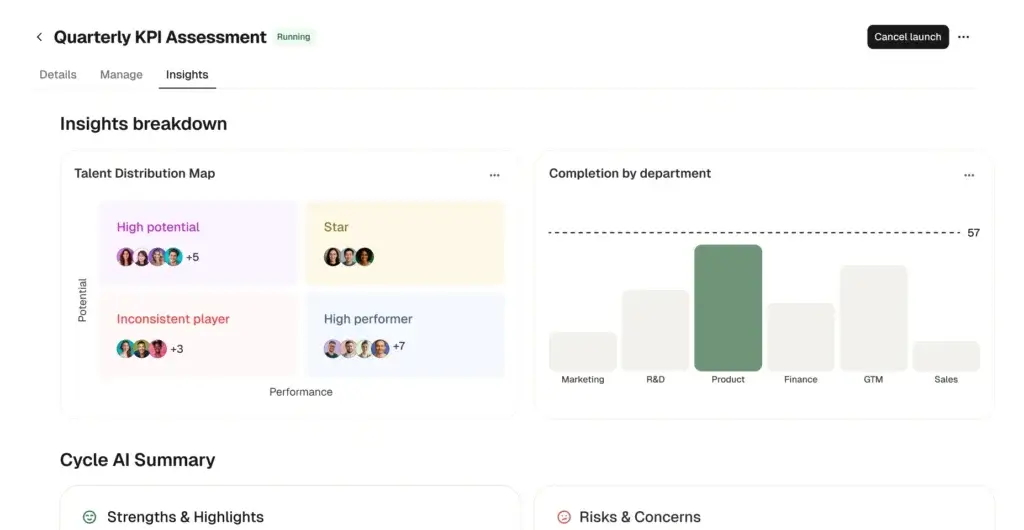
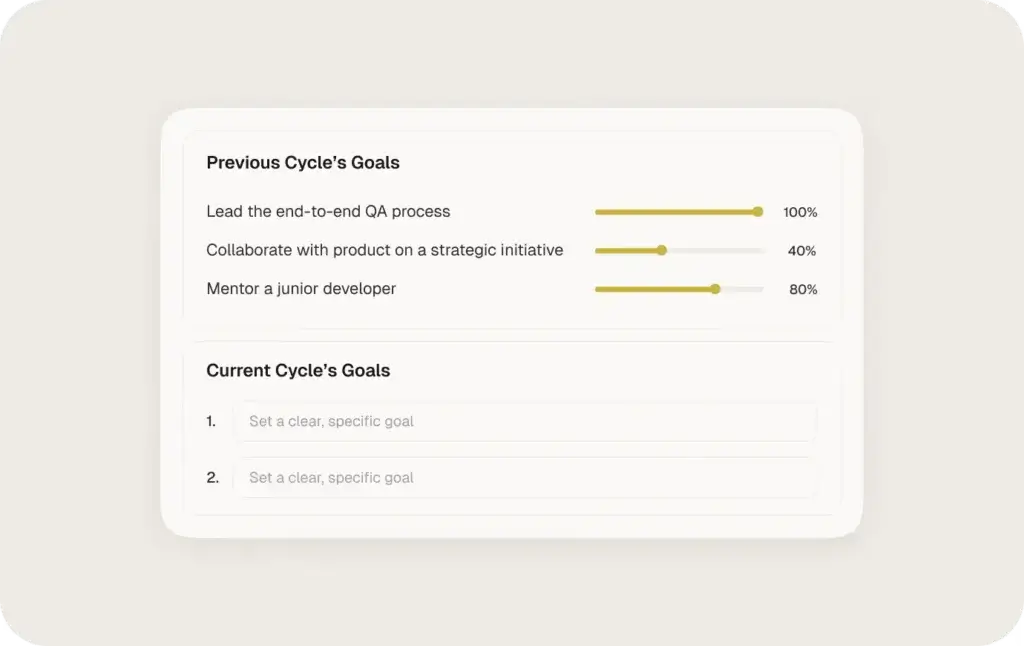
Shapes includes performance management as part of the core platform, rather than treating it as a separate premium add-on. That gives you a more unified way to run performance cycles, gather feedback, and keep performance workflows closer to employee records and broader people operations.
This is valuable if you want one platform for daily HR management and performance processes. Still, if performance management is your single top buying priority, a more specialized platform like Leapsome may still offer deeper maturity in some talent-specific workflows.
Surveys and Employee Feedback
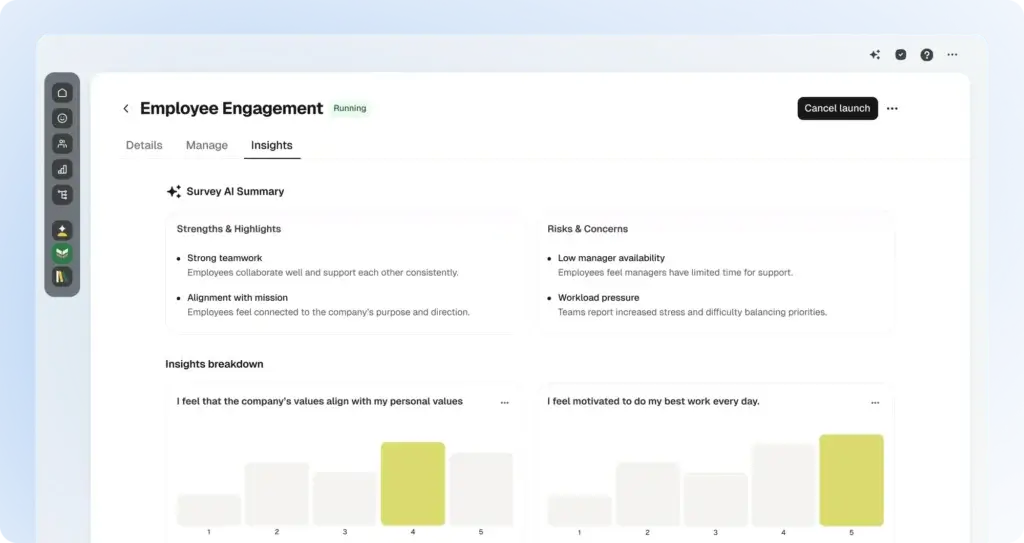
Employee feedback is another area where Shapes tries to differentiate itself. The platform supports surveys and positions itself as a tool that helps HR teams turn feedback into actionable insight. For companies focused on engagement, manager effectiveness, or culture, this helps move Shapes beyond basic administration and into more strategic HR territory.
Time Off and Attendance
Shapes includes both leave management and attendance tracking, which makes it more operationally useful than HR tools that stop at employee records and onboarding. Employees can request time off, managers can approve it, and the platform is designed to automate policies, flag anomalies, and sync relevant data into connected systems.
The attendance layer adds more day-to-day workforce value, especially for organizations that want an HR system that handles both people data and practical employee activity workflows.
People Analytics
Analytics is one of the more compelling elements in Shapes’ positioning. The platform emphasizes dashboards, insight generation, and visually shareable reporting. That is especially useful for HR leaders who want to move away from reactive administration and toward more informed decision-making around trends, structure, and team performance.
Docs, eSign, and Knowledge Base
Shapes also includes document storage, a knowledge base, and e-sign capabilities. This is more important than it may sound. Policies, handbooks, templates, signed forms, and internal HR documentation often sit in too many places. Keeping them inside the HR platform creates a cleaner employee experience and reduces context switching for HR teams.
The addition of AI chat on top of the documentation layer is especially interesting because it hints at a future where employees can self-serve answers from internal people policies more easily.
Business Operations Features
AI, Workflows, and Integrations
Shapes is clearly building around the idea that modern HR software should not just store information. It should automate processes, connect systems, and reduce the amount of admin work that normally eats up HR time.
AI-Native Positioning
AI is central to Shapes’ positioning. The company describes the product as AI-native and increasingly talks about AI agents that can handle HR busywork, surface insights, and support process execution. This is an important part of the product story because Shapes is not presenting AI as a side feature. It is presenting AI as the operating logic of the platform.
From a buyer perspective, that is promising, but it should also be evaluated carefully. The concept is strong, yet the value will depend on how consistently these AI features perform in real workflows, not just how well they read in product marketing.
Workflow Automation
Workflow automation is one of Shapes’ biggest practical strengths. The product is designed to help teams standardize people processes without building everything from scratch. That is a meaningful advantage for lean HR teams that want operational consistency but do not have time for complex systems design.
Integrations and Ecosystem
Shapes supports a useful list of integrations across payroll, recruiting, identity, finance, calendars, and document workflows. The current ecosystem includes tools such as ADP, Deel, Remote, Papaya Global, BrightPay, Sage, QuickBooks, Teamtailor, Greenhouse, Lever, Ashby, Workable, Google Calendar, Outlook, JumpCloud, OneLogin, and DocuSign.
This gives Shapes more real-world flexibility than a closed HR platform. It also makes the product more practical for organizations that already have payroll, ATS, or finance systems in place and want their HR platform to fit into an existing stack rather than replace everything at once.
Mobile App
Shapes also offers a mobile app, which is relevant because some older reviews mentioned the lack of one. The current app supports time off requests, assigned tasks, people directory access, and profile review. That does not make the mobile experience as broad as the desktop platform, but it does remove one of the more visible earlier product gaps.
Pros and Cons
Benefits and Limitations of Using Shapes
Positive
✅ Public pricing with no module-based surprises
✅ Wide feature coverage
✅ Modern user experience
✅ Solid integrations
Negative
❌ Product maturity is still developing
❌ Feature gaps still appear in reviews
❌ AI value may vary by team
❌ Enterprise complexity may outgrow it
Strengths & Benefits
Shapes gets several important things right, especially for companies that want a modern HR platform without the usual pricing opacity.
- Public pricing with no module-based surprises – Public pricing is refreshing in an HR market full of custom quotes and hidden add-ons.
- Wide feature coverage – Core HR, onboarding, performance, surveys, attendance, docs, and analytics come together in one platform.
- Modern user experience – The product clearly prioritizes usability and adoption.
- Solid integrations – Payroll, ATS, identity, finance, and calendar integrations improve fit for real-world stacks.
Limitations & Drawbacks
Shapes also has some constraints you should take seriously before buying.
- Product maturity is still developing – It is promising, but not as battle-tested as larger HR platforms.
- Feature gaps still appear in reviews – Some customers still describe the product as a work in progress.
- AI value may vary by team – The AI story is compelling, but you should validate practical value during a demo.
- Enterprise complexity may outgrow it – Very large or highly regulated organizations may still prefer more mature enterprise suites.
Operational Fit
Shapes User Experience, Support, and Security
Feature breadth matters, but operational fit matters just as much. HR systems are only valuable when employees use them, managers trust them, and IT is comfortable with the security posture behind them.
Ease of Use
Ease of use is one of the strongest recurring themes in Shapes feedback. Public reviews consistently highlight the user-friendly interface, helpful support, and intuitive experience. This is important because adoption problems are one of the biggest hidden costs in HR software. A broad platform that feels simple can be more valuable than a deeper platform that nobody enjoys using.
Implementation Experience
Shapes also positions itself as fast to implement, with messaging that most teams can get up and running in days rather than weeks. That is a strong advantage for smaller and mid-sized businesses that do not want a long, consultancy-heavy rollout. Still, the real implementation effort will depend on how complex your workflows, integrations, policies, and migration needs are.
Customer Support
Support is another consistent positive in review data. Reviewers often mention responsiveness and helpfulness, which gives Shapes a practical advantage over tools that may be powerful but harder to work with after the contract is signed.
Security and Compliance
Shapes makes a credible case on security and compliance. The company highlights GDPR readiness, SOC 2 Type II, ISO 27001, and ISO 42001, alongside strict access controls, formal change management, and asset management practices. For HR buyers handling sensitive employee data, those are meaningful trust signals.
Responsible AI
Shapes also puts real emphasis on AI governance. The company states that customer data is not used to train off-the-shelf models, is not shared across tenants, and is not exposed without explicit permission. That is the right direction for AI in HR, where data sensitivity is far higher than in many other SaaS categories.
Pricing
Shapes Pricing & Plans
Shapes pricing is one of the easiest parts of the buying process to understand, which already sets it apart from a large part of the HR software market.
Public Pricing
Shapes publicly lists pricing at $8 per employee per month, billed annually. The company also says setup and onboarding are included, although a minimum subscription applies. That is a strong value signal because many competitors still require a sales conversation just to understand basic pricing.
What Is Included
According to the pricing page, the published price includes all features, with no pay-per-module surprises. Listed inclusions include people directory and org chart, onboarding automation, performance management, surveys, time off, attendance and time tracking, insights and analytics, knowledge base, eSignature, integrations, AI features and agents, mobile app, unlimited permissions, unlimited custom fields, dedicated CSM and training, and compensation management.
Why This Matters
That pricing model is one of Shapes’ biggest advantages. HR buyers are often frustrated by platforms that look affordable at first, then become expensive once you add performance, workflows, analytics, surveys, or implementation. Shapes is clearly trying to compete against that pattern.
Pricing Table
| Feature Type | Shapes | What it means for buyers |
| Pricing model | $8/employee/month billed annually | Simple public pricing instead of custom quote-only sales |
| Implementation | Setup and onboarding included | Reduces the risk of surprise rollout fees |
| Feature packaging | All features included | No extra module charges for core capabilities |
| Best fit | SMBs and mid-sized teams | Most attractive for growing companies that want value and flexibility |
| Potential caveat | Minimum subscription applies | Very small teams should confirm effective total cost |
If you are comparing HR tools on value for money, Shapes is one of the more appealing options on paper. The only real caution is that a transparent price does not automatically mean the platform is the best fit. You still need to confirm depth, maturity, and workflow fit for your team.
Use Cases
Who Should Use Shapes?
Shapes is not for every HR buyer, but it does fit several specific use cases especially well.
Growing Companies That Want One HR Platform
If your business is moving beyond spreadsheets and disconnected HR tools, Shapes makes a lot of sense. It gives you central employee data, onboarding, performance, time off, attendance, surveys, docs, and analytics in one place.
HR Teams That Value Flexibility
Shapes is a strong option for teams that want software to adapt to how they work, not the other way around. Its positioning around customizable workflows and modular people operations is one of the clearest reasons to consider it.
Organizations Interested in AI for HR Operations
If your team wants AI to reduce admin work, surface insights, and support employee self-service, Shapes deserves a close look. The platform is one of the few in this segment building its identity so directly around AI-native HR operations.
Budget-Conscious Buyers Who Still Want Breadth
Shapes is also attractive if you want broad HR coverage but dislike opaque enterprise pricing. The public all-in pricing is especially appealing for teams that want more predictability in software budgeting.
When Shapes Might Not Be the Right Fit
Shapes may not be the best choice if you need the deepest enterprise HCM controls, very large-scale international complexity, or a highly mature best-of-breed platform in one specialized HR category. In those cases, a more established vendor may fit better.
User Feedback
Shapes Customer Reviews
Shapes currently has a positive but still relatively small public review footprint. On G2, it holds a 4.6 out of 5 rating from 35 reviews. That is encouraging, but it is still a much smaller sample than what you see with category leaders like BambooHR, HiBob, or Leapsome.
What Users Like Most
The most common themes in public feedback include ease of use, intuitive design, helpful customer support, and flexibility. Users often describe the platform as easy to navigate and adaptable to different HR needs, which lines up closely with the product’s positioning.
Common Complaints
The most frequent criticisms are also clear. Some reviewers still describe Shapes as a work in progress, pointing to missing features, integration gaps, and earlier lack of mobile functionality. None of those issues are unusual for a younger platform, but they do matter if you need every workflow to be fully mature today.
My Take on the Review Pattern
The feedback pattern suggests that Shapes is getting the fundamentals right. Users seem to like the experience, the support, and the flexibility. The bigger question is not whether the product is promising. It is whether it is mature enough for the complexity level your company needs right now.
Competitors
Competitor Alternatives to Shapes
Shapes is most naturally compared with platforms like HiBob, BambooHR, and Leapsome. Each alternative serves a slightly different buyer profile.
| Feature Type | Shapes | HiBob | BambooHR | Leapsome |
| Core angle | AI-native PeopleOS with flexible workflows | Modern HR platform for scaling companies | Simple HR software for SMBs | People enablement and performance platform |
| Best for | Growing teams wanting breadth and transparent pricing | Mid-market and multinational businesses | Smaller businesses wanting simplicity | Teams prioritizing performance and development |
| Pricing style | Public all-in pricing | Custom pricing | Quote-based pricing | Quote-based pricing |
| AI positioning | Central to product identity | Growing AI layer | More traditional HR software approach | Strong AI in people development workflows |
| HR breadth | Strong for SMB and mid-market use | Broader and more mature HR depth | Simpler and lighter overall | More talent-focused than HR admin-focused |
| Overall angle | Best value play for modern flexible HR | Best for scaling complexity | Best for straightforward HR basics | Best for talent and performance depth |
Compared with HiBob, Shapes is more price-transparent and feels more aggressively AI-first, but HiBob is still the more proven option for scaling and multinational HR complexity. Compared with BambooHR, Shapes offers a more flexible and forward-looking product story, while BambooHR remains the safer simplicity-first choice for smaller businesses. Compared with Leapsome, Shapes is more all-around HR operations-oriented, while Leapsome is often stronger when talent development and performance management are the main focus.
To summarize it simply, Shapes is one of the more compelling modern HR platforms for companies that want flexibility, all-in pricing, and AI-driven workflow potential without jumping into a large enterprise suite.
Best Practices
Getting Started with Shapes
To get the best results from Shapes, you should approach implementation with a few priorities in mind.
Define Your Highest-Value Workflows First
Shapes is broad enough that you should not try to optimize everything on day one. Start with the workflows that create the most HR friction today, such as onboarding, time off, employee records, or performance cycles.
Validate the AI Use Cases in a Demo
Because AI is such a central part of the product pitch, make sure you test real use cases in your demo. Ask the vendor to show exactly how AI improves your day-to-day work, not just how it sounds in theory.
Map Your Existing Stack Early
If you already use payroll, recruiting, finance, or identity tools, confirm integration coverage early. Shapes has a strong integration list, but you should still make sure your required connectors and data flows are supported in practice.
Use the Knowledge Base Strategically
One of the easiest ways to improve value quickly is to centralize handbooks, policies, and employee docs inside the platform. That makes self-service easier and gives the AI chat layer more useful internal context.
Think Beyond Current Headcount
Shapes is most attractive when you evaluate it not only for your company today, but for how you expect your people processes to evolve over the next stage of growth.
Conclusion
Final Thoughts
⭐ Overall Rating: 8.3/10
Shapes is one of the more interesting HR platforms in 2026 because it tackles several common buyer frustrations at once. It offers public pricing, broad HR coverage, a modern interface, workflow flexibility, and a clear AI-native product vision.
Its biggest strengths are pricing transparency, ease of use, feature breadth, integrations, and the fact that it feels built for modern HR teams rather than older enterprise habits. Its main drawbacks are product maturity, smaller review volume, and the reality that some buyers may still need deeper, more proven functionality in certain areas.
Overall, Shapes is a strong option for growing companies that want an affordable, modern, and flexible HR platform with real AI ambition. If your team wants one system for people data, onboarding, attendance, performance, surveys, docs, and analytics, without dealing with the usual pay-per-module pricing mess, Shapes is well worth evaluating.
Have more questions?
Frequently Asked Questions
What is Shapes best used for?
Shapes is best used for managing employee data, onboarding, performance, surveys, time off, attendance, analytics, and internal HR documentation in one platform.
How much does Shapes cost?
Shapes publicly lists pricing at $8 per employee per month, billed annually, with setup and onboarding included, although a minimum subscription applies.
Does Shapes include performance management?
Yes. Shapes includes performance management as part of its all-in platform, making it easier to connect performance workflows with broader people operations.
Does Shapes offer time off and attendance tracking?
Yes. Shapes includes both time off management and attendance features, making it more operationally useful than HR tools focused only on employee records.
Is Shapes good for small businesses?
Yes, especially for growing small businesses that want more flexibility and broader HR coverage than basic HR software usually provides.
Does Shapes have a mobile app?
Yes. Shapes now offers a mobile app for tasks like time off requests, assigned tasks, people directory access, and profile viewing.
What integrations does Shapes support?
Shapes supports integrations across payroll, recruiting, finance, identity, calendars, and document workflows, including ADP, Deel, Remote, QuickBooks, Google Calendar, Outlook, Greenhouse, Lever, JumpCloud, and more.
Is Shapes secure?
Shapes highlights GDPR readiness, SOC 2 Type II, ISO 27001, and ISO 42001, along with access controls and AI governance commitments.
What are the main Shapes alternatives?
The main alternatives usually include HiBob, BambooHR, and Leapsome, depending on whether you prioritize scaling HR depth, simplicity, or talent development.
Is Shapes worth it overall?
Yes, for the right buyer. If you want a modern HR platform with transparent pricing, broad features, and strong AI-focused positioning, Shapes is worth serious consideration.