
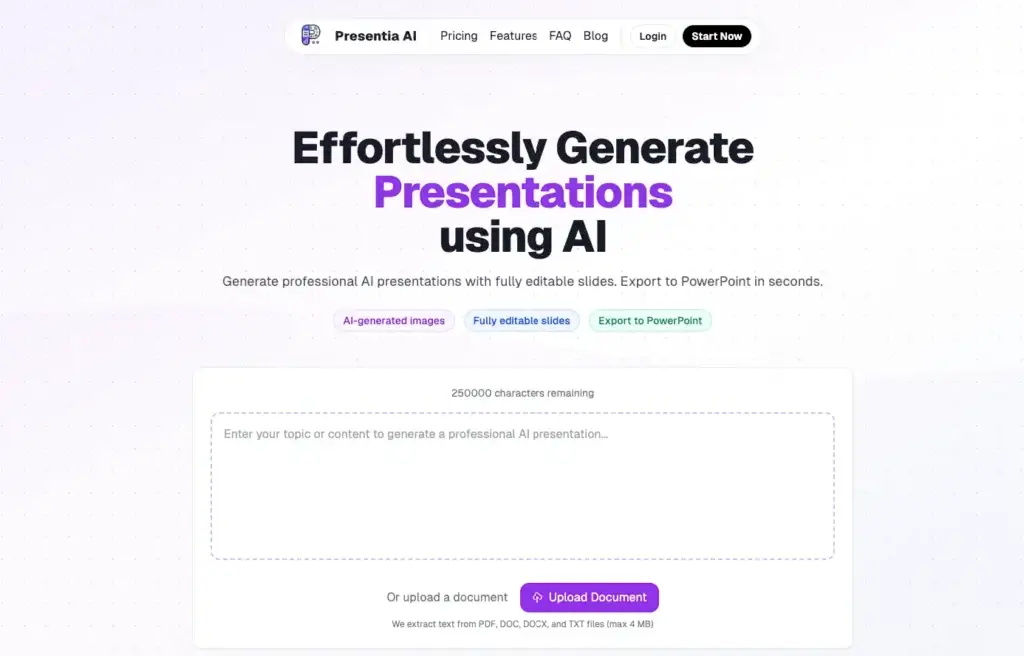
Presentia AI approaches presentation creation as a fast AI-to-PowerPoint workflow. Instead of asking users to build every slide manually, it turns prompts, outlines, text, and uploaded documents into structured presentations with layouts, visuals, and editable slide content already in place.
What makes Presentia AI stand out is its emphasis on practical PowerPoint output. The platform is built to help users move from a topic, report, webpage, or document to an editable .pptx deck quickly, which makes it especially appealing for business presentations, school projects, internal reports, client decks, and other cases where speed matters more than advanced storytelling effects or deep design control.
In this review, you will get a full overview of Presentia AI’s core features, pricing, strengths and weaknesses, ideal use cases, and how it compares to other presentation tools. You will also see where Presentia AI performs especially well, and where tools like Gamma, Prezi, or Pitch may still be the better fit, depending on your workflow.
Software Specification
Presentia AI’s Core Features
AI-generated presentations from prompts or pasted content
Presentia AI is built around quick AI slide generation. You can enter a topic, paste content, or describe what kind of presentation you need, and the platform turns that input into a structured deck with headings, key points, layouts, and visuals already in place. For users who need a first draft fast, this is one of its biggest strengths.
Document-to-presentation workflow
One of Presentia AI’s more practical advantages is that it supports document-based creation. You can upload PDF, DOC, DOCX, and TXT files, and the platform extracts the content to generate a presentation automatically. This makes it especially useful for turning reports, notes, academic material, or business documents into slides without starting from scratch.
Editable PowerPoint export
Presentia AI is clearly designed with PowerPoint compatibility in mind. The platform lets users export presentations as fully editable .pptx files, which is a major benefit for anyone who still needs to finalize, present, or share decks inside Microsoft PowerPoint. This makes the tool more practical than AI presentation makers that produce polished output but lock users into their own format.
Built-in browser editor with AI batch editing
After generating a deck, users can continue editing directly in the browser. Presentia AI also supports natural-language editing commands, which means you can adjust multiple slides with instructions like changing title sizes, updating styles, or modifying layouts across the deck. That gives it a useful middle ground between full automation and manual slide editing.
AI-generated images matched to each slide
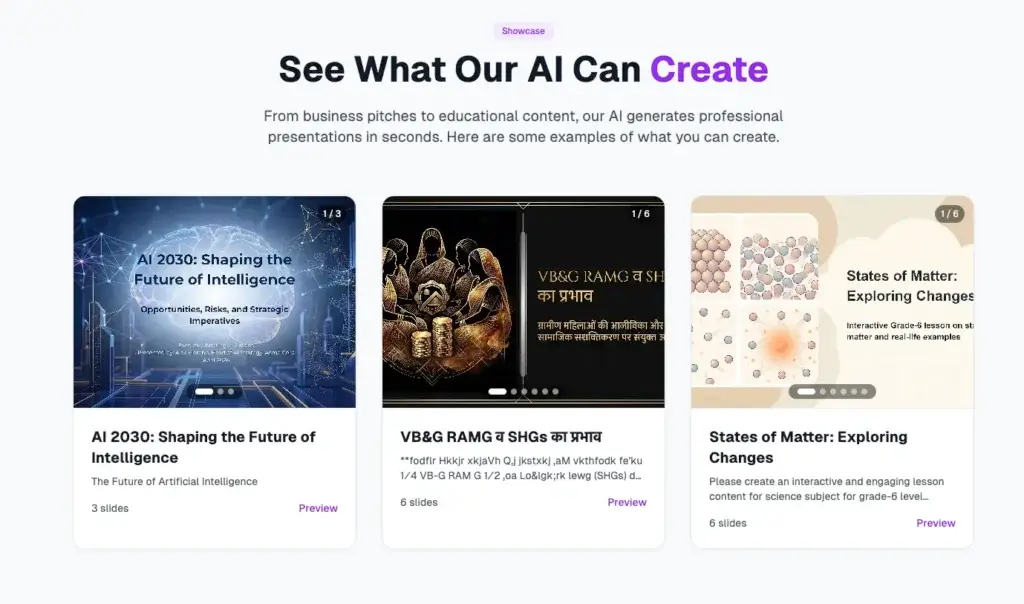
Presentia AI adds context-aware visuals as part of the generation workflow. Instead of relying only on generic stock imagery, it creates AI-generated images tailored to the presentation topic, theme, and slide type. In practice, this helps make first drafts look more complete and presentation-ready right away.
Templates, themes, and structured deck options
The platform includes multiple presentation templates and theme choices, with options ranging from short decks to much larger presentations. This is useful for users who want more guidance about presentation length and style rather than starting from a completely blank canvas. It also helps keep output more consistent across different use cases.
Useful conversion workflows for different content types
Presentia AI goes beyond basic prompt-based generation. Its workflow pages highlight conversions such as webpage to PPT, outline to PPT, report to PPT, and Word to PPT, which shows that the product is positioned as a broader content-to-presentation tool rather than just a slide generator for short prompts.
Multilingual support and theme customization
Presentia AI also includes multilingual support and presentation theme customization. These features are valuable for users who need to create decks for different audiences or adapt AI-generated output to a more specific style before exporting and presenting.
Pros and Cons
Advantages and Disadvantages
Positive
✅ Fast document-to-deck workflow
✅ Editable PowerPoint export
✅ Useful AI image generation
✅ Easy for non-designers to use
Negative
❌ Collaboration is still limited
❌ Fewer enterprise controls than rivals
❌ Less distinctive for live storytelling
❌ Pricing is not the cheapest for frequent use
Pros
✅ Fast document-to-deck workflow
Presentia AI is particularly useful when you already have source material and want slides quickly. Its ability to turn PDFs, Word files, outlines, reports, and even webpages into presentations makes it more practical than tools that work best only from short prompts.
✅ Editable PowerPoint export
A major advantage is that Presentia AI exports to editable PowerPoint files. That matters because many professionals still need to make final changes in PowerPoint or send decks to clients and stakeholders who expect .pptx output. This makes Presentia easier to fit into common business workflows.
✅ Useful AI image generation
The platform’s context-aware AI-generated visuals help presentations feel more complete right from the first draft. For users who often lose time looking for images or building visual support manually, this can make the tool much more efficient.
✅ Easy for non-designers to use
Presentia AI is a good fit for users who care more about speed and clarity than design experimentation. The workflow is straightforward, the editing model is approachable, and the product removes much of the formatting work that usually slows presentation creation down.
Cons
❌ Collaboration is still limited
Presentia AI mentions team sharing as coming soon, which suggests that collaboration is not yet as mature as what you get in more established team presentation platforms. If real-time teamwork, comments, shared libraries, and brand governance are core requirements, this is an important limitation.
❌ Fewer enterprise controls than rivals
Presentia AI looks much more focused on generation speed and editable output than on enterprise administration, governance, or advanced presentation analytics. Larger organizations may find Gamma, Pitch, or other mature business tools more complete for broader team workflows.
❌ Less distinctive for live storytelling
Presentia AI is effective for quickly generating practical slide decks, but it does not stand out as a storytelling-first presentation platform. If you want more movement, cinematic narrative flow, or a more memorable live delivery experience, Prezi remains the more specialized option.
❌ Pricing is not the cheapest for frequent use
While the annual Max plan is more attractive on a per-year basis, the monthly Pro plan is not the lowest-cost option in the category. Users comparing AI presentation tools closely may find Gamma’s entry pricing or other alternatives more flexible depending on how often they create decks.
User Experience
Fast, Practical, and PowerPoint-Oriented
Presentia AI delivers a user experience built around speed, simplicity, and PowerPoint-ready output. Instead of acting like a design playground, it feels more like a productivity tool for getting from content to presentation with less manual effort.
Prompt-first and file-first creation
The workflow starts in a very approachable way. You can either type a topic, paste content, or upload a source file, and the platform takes over much of the structure and formatting work. This makes Presentia AI especially appealing for users who already know what they want to say but do not want to spend time turning that material into slides.
Structured AI output
Presentia AI tends to position itself around structured slide generation rather than highly experimental presentation design. That is often a good thing for business users. It means the output is more likely to feel organized, readable, and presentation-ready, even if it may not look as visually distinctive as tools built more around storytelling or design exploration.
Editing without too much friction
The built-in editor gives users room to refine decks after generation, and the ability to use natural-language instructions for broader edits adds convenience. This makes the product more flexible than one-click generators that produce a deck and then leave you with limited control.
PowerPoint remains part of the workflow
One of the biggest practical advantages of Presentia AI is that it does not ask users to abandon PowerPoint. Because export is centered around editable .pptx files, the platform feels compatible with existing presentation habits rather than trying to replace them completely.
Best for speed, less for collaborative depth
Where the user experience feels lighter is collaboration and advanced workspace functionality. Presentia AI looks best suited to solo creators, consultants, students, educators, marketers, and professionals who want a faster route to a usable deck, rather than teams that need deep review, governance, and shared presentation systems.
Best Use Cases
Who Should Use Presentia AI
Presentia AI is not the best fit for every presentation workflow, but it is a strong option for users who want fast, editable slide output from existing content or simple prompts.
Business professionals
Presentia AI works well for users creating pitch decks, project updates, internal reports, quarterly reviews, and proposal presentations. It is especially useful when speed matters and when the end result still needs to live in PowerPoint.
Educators and students
The tool is also a good fit for lesson slides, thesis presentations, class projects, and research summaries. The document-to-presentation workflow is particularly valuable here because it can turn existing notes or papers into presentation drafts quickly.
Marketers and sales teams
For campaign recaps, client presentations, product updates, and simple sales decks, Presentia AI can save real time. It is not as collaboration-heavy as Pitch, but for solo or lightweight workflows, it is efficient and practical.
Consultants and freelancers
Consultants, agency professionals, and freelancers who regularly need presentable decks from source material can get a lot of value from Presentia AI. It helps shorten production time while still leaving room to refine slides before delivery.
Users who still rely on PowerPoint
In my opinion, Presentia AI is most attractive for people who want AI help without moving away from PowerPoint-based workflows. If your final deck still needs to be shared, edited, or delivered as a PPTX file, this is one of the product’s clearest advantages.
Compare with Others
Alternatives to Presentia AI
Presentia AI is a useful option for fast content-to-deck creation, but it sits in a competitive part of the presentation software market. The better choice depends on whether you care most about editable PowerPoint output, web-native sharing, dynamic live presentation delivery, or collaborative team workflows. Gamma is stronger for modern web-style presentations and async sharing, Prezi remains the standout for motion-driven storytelling, and Pitch is one of the best options for teams that want on-brand collaboration and analytics built into the presentation workflow.
| Feature Type | Presentia AI | Gamma | Prezi | Pitch |
| Best for | Fast AI slide generation with editable PowerPoint output | Fast web-native decks and async sharing | Dynamic storytelling and more engaging live presentations | Collaborative, on-brand team deck creation |
| Core format | AI-generated slide deck with PPTX export | Card-based, web-native presentations | Zoomable, motion-driven presentation format | Traditional slide-based collaborative workspace |
| AI strength | Strong for prompts, documents, outlines, and reports to slides | Excellent for fast first drafts and link-ready presentation output | Strong for turning prompts or files into visually dynamic presentations | Strong for on-brand generation, rewriting, refinement, and image enhancement |
| Editing style | Built-in editor plus editable PowerPoint export | Browser-based editing with strong sharing flow | AI-assisted editing with strong visual storytelling control | Flexible editing with templates, brand assets, and AI actions |
| Collaboration | Currently limited compared with major rivals | Good workspace sharing and analytics on higher plans | Good, but more presentation-style specific | Excellent real-time collaboration, comments, statuses, and assignees |
| Best tradeoff | Speed plus PowerPoint practicality | Speed plus modern web delivery | Storytelling plus audience engagement | Collaboration plus brand control |
When to choose another tool
- Choose Gamma if you want a more web-native presentation experience and care about sharing decks through links, exporting to multiple formats, and presenting content in a modern card-based format. Gamma is the better fit when async delivery and sleek online presentation flow matter more than PowerPoint-first output.
- Choose Prezi if your priority is making live presentations more memorable. Prezi remains stronger when you want movement, cinematic pacing, and a format that grabs attention better than conventional slide progression.
- Choose Pitch if your team builds presentations together and needs stronger brand control, collaboration, analytics, and presentation management. Pitch is more mature for team-based deck workflows and repeated business use across an organization.
- Choose Presentia AI if your main goal is turning prompts, documents, or source content into editable PowerPoint decks quickly. In my opinion, Presentia AI is the better fit for users who want AI speed and practical PPTX output without needing a heavier collaborative platform.
Pricing & Plans
Simple Plans with a PowerPoint Focus
Presentia AI has a relatively simple pricing structure compared with some presentation competitors. The plans are based more on slide generation allowance and presentation usage than on deep team feature segmentation.
Pro plan
- Pro – Starts at $20 per month. This plan includes up to 110 slides per month and includes AI-generated images, saved presentations, presentation theme customization, multilingual support, and a 7-day free trial.
Max Yearly plan
- Max Yearly – Starts at $199 per year. This plan includes up to 1500 slides per year and adds priority support and commercial use on top of the Pro feature set.
Team collaboration status
- Team sharing – Presentia AI references team sharing as coming soon, which suggests collaboration features are still developing rather than being a fully mature team platform today.
Refund policy and free trial
Presentia AI offers a 7-day free trial on the Pro plan. Its refund policy is more limited than some SaaS products, since it states that refunds are generally only available if you have not yet created a presentation with the current subscription. That is worth noting for buyers who want more flexibility after initial use.
| Plan | Starting Price | Best For | Key Benefits |
| Pro | $20/month | Individuals and frequent creators | 110 slides per month, AI images, saved presentations, theme customization, multilingual support |
| Max Yearly | $199/year | Heavier annual usage | 1500 slides per year, all Pro features, priority support, commercial use |
| Trial | 7 days | Evaluation | Try the full core workflow before committing |
| Team sharing | Coming soon | Future team use | Indicates collaboration features are still developing |
How to Use Presentia AI
A Step-by-Step Guide
Presentia AI is relatively easy to start using, especially for users who want a faster route from content to presentation. A typical process looks like this:
Start with a topic or upload source material
- Open a new presentation and choose whether to begin with a typed topic, pasted content, or an uploaded document.
- Upload a file such as PDF, DOC, DOCX, or TXT if you already have source material you want turned into slides.
- Let the AI generate the deck with structured layouts, key points, themes, and visuals based on your content.
Choose a template or theme
Once the content is processed, select a theme or let the system apply one automatically. Presentia AI supports multiple templates and professional themes, which makes it easier to match the deck to a business, academic, or marketing context.
Edit in the browser
After generation, review the slides in the built-in editor. You can refine content, update wording, change images, adjust layout choices, and use AI commands for broader deck-wide edits when needed.
Polish the presentation
This is the stage where most users will tighten the messaging, remove weaker slides, add any missing business or academic context, and make sure the presentation fits the audience. Presentia AI helps create the first draft quickly, but the best results still come from thoughtful review.
Export to PowerPoint
When the deck is ready, export it as an editable PowerPoint file. This is one of the platform’s most useful workflow advantages, especially for users and teams that still rely on PowerPoint as the final delivery format.
Conclusion
Final Thoughts
Presentia AI earns its place in the AI presentation market by focusing on a very practical use case. It helps users turn ideas, documents, and source material into editable PowerPoint presentations quickly, without demanding much design skill or manual slide building.
Its strongest advantage is not that it tries to reinvent presentations. It is that it makes presentation creation faster while still respecting the reality that many users need a final PPTX file they can edit, share, or present elsewhere. That makes the platform especially attractive for professionals, educators, students, marketers, consultants, and anyone who still works inside PowerPoint-based workflows.
At the same time, Presentia AI is not the most advanced option for collaboration, enterprise presentation governance, or visually distinctive live storytelling. Teams that need stronger on-brand collaboration may prefer Pitch, and presenters who want a more memorable delivery format may still get more from Prezi. Users who prefer a web-native presentation style may also find Gamma more compelling.
In my opinion, Presentia AI is best for users who want speed, practicality, and editable output more than experimental design freedom. If your priority is creating solid presentations fast from prompts or files, then refining them in PowerPoint when needed, Presentia AI is a strong tool to consider.
Have more questions?
Frequently Asked Questions
What is Presentia AI?
Presentia AI is an AI-powered presentation maker that helps you turn prompts, pasted text, and uploaded documents into structured slide decks. It is designed to create editable presentations quickly and export them as PowerPoint files.
What file types can Presentia AI use as input?
Presentia AI supports PDF, DOC, DOCX, and TXT files as input sources. This makes it useful for turning reports, notes, papers, and other written content into presentation drafts.
Can Presentia AI export to PowerPoint?
Yes. Presentia AI lets you export presentations as editable .pptx files, which makes it practical if you still want to review, present, or finalize your deck in Microsoft PowerPoint.
Are Presentia AI presentations fully editable?
Yes. Presentia AI presentations can be edited inside the platform’s built-in editor, and the exported PowerPoint files are also editable after download.
Does Presentia AI generate images too?
Yes. Presentia AI includes AI-generated images that are matched to the topic and context of your slides, which helps make presentations look more complete right from the first draft.
Is Presentia AI good for teams?
Presentia AI is currently better suited for individual users and lighter presentation workflows. It mentions team sharing as a future capability, but it does not yet appear as collaboration-focused as tools like Pitch.
How much does Presentia AI cost?
Presentia AI’s Pro plan starts at $20 per month and includes up to 110 slides per month. Its Max Yearly plan starts at $199 per year and includes up to 1500 slides annually, along with priority support and commercial use.
Does Presentia AI offer a free trial?
Yes. Presentia AI offers a 7-day free trial on its Pro plan, which gives you a chance to test the core presentation creation workflow before subscribing.
Who should use Presentia AI?
Presentia AI is a strong fit for professionals, educators, students, consultants, and marketers who want to turn prompts or existing documents into editable presentation decks quickly.
What are the main limitations of Presentia AI?
Presentia AI’s main limitations are lighter collaboration features, fewer advanced team controls than more established presentation platforms, and less emphasis on dynamic storytelling than tools like Prezi. It is strongest when speed and editable PowerPoint output matter most.