

Introduction
Creating a strong presentation is rarely just about putting text on slides. Teams also need brand consistency, fast collaboration, clear storytelling, and a way to share decks that actually help move work forward. Pitch is built around that exact need. Rather than functioning as a basic slide editor, it positions itself as a modern presentation platform for teams that want to create, collaborate on, share, and analyze presentations in one workspace.
What makes Pitch especially interesting is that it combines polished design tools with practical business features. You can start with AI, use one of its professionally designed templates, import a PowerPoint file, collaborate in real time, embed interactive content, and then share the result through a link that can also provide engagement insights on higher plans. That makes Pitch feel closer to a presentation workflow system than a simple alternative to PowerPoint.
In this review, you will get a full overview of Pitch’s core features, pricing, advantages and disadvantages, best use cases, and how it compares with other presentation tools. You will also see where Pitch stands out, and where more traditional tools like PowerPoint or more design-driven tools like Canva may still be the better fit.
Software Specification
Pitch’s Core Features
AI-assisted slide creation and editing
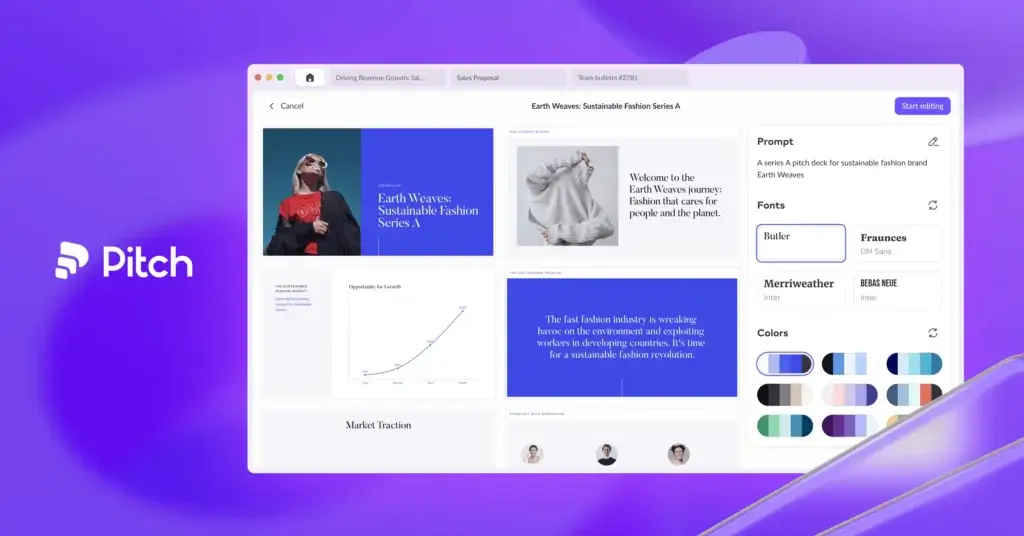
Pitch has expanded well beyond templates and manual editing. Its AI tools now help users generate draft content, refine tone, proofread copy, personalize slides for different audiences, generate summaries and speaker notes, and even improve visuals. In practice, this makes Pitch more useful for teams that want help accelerating the actual writing and presentation-building process, not just the design layer.
Professionally designed templates and on-brand creation
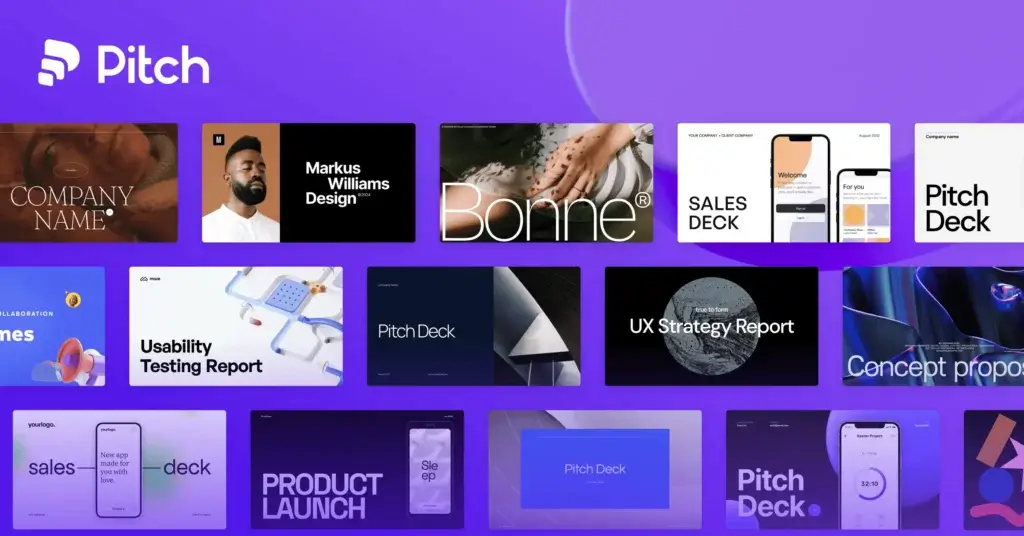
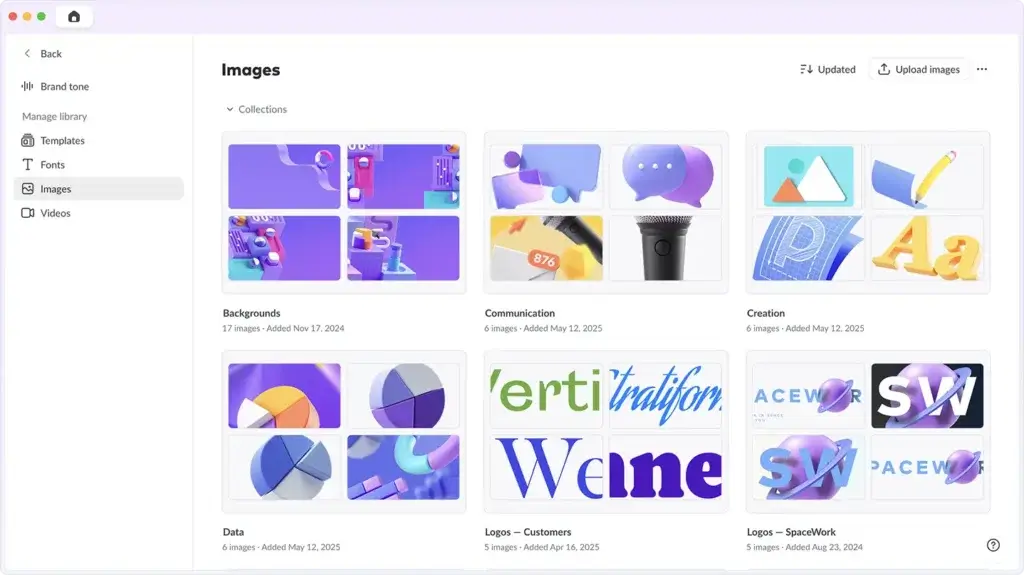
One of Pitch’s strongest areas is design quality. The platform offers a large gallery of presentation templates that feel more modern than what many teams are used to in PowerPoint or Google Slides. You can also create your own templates, upload fonts, use brand colors, and manage visual consistency across a team. For companies that care about polished decks but do not want to rely on a designer for every update, this is a major advantage.
Real-time collaboration built for teams
Pitch is clearly designed for collaborative work. Multiple people can edit slides together, leave comments, assign work, and manage progress directly inside the deck. This makes it especially useful for sales teams, startup teams, agencies, and internal business teams where presentations are often created by more than one contributor. Compared with older desktop-first tools, Pitch feels much more natural for shared presentation workflows.
Advanced sharing, analytics, and pitch rooms
Pitch is not only about creating slides. It also helps teams distribute presentations more effectively. Higher-tier plans include advanced links, engagement analytics, optional email capture, passcode protection, PDF download controls, and shared pitch rooms for sending decks and related resources together. That gives Pitch a real advantage for client-facing teams that want to know whether a proposal or sales deck was actually viewed and how people interacted with it.
Interactive embeds and integrations
Pitch supports a range of integrations and embeds that make decks more dynamic. Teams can embed content from tools such as Figma, Airtable, Calendly, Loom, YouTube, Vimeo, Notion, Slack, HubSpot, and Google Drive, among others. This makes Pitch more flexible than static presentation software, especially when presentations need to include live content, demos, forms, or scheduling elements.
PowerPoint export and offline access
Unlike some newer web-first presentation tools, Pitch does support offline editing through its desktop app, which is a meaningful practical advantage. It also supports PowerPoint export on paid plans. That said, not every Pitch element translates perfectly into PPTX. Animations, uploaded videos, and recordings may not export as expected, so Pitch still works best when it remains inside its native environment for creation, collaboration, and sharing.
Workspace controls for growing teams
Pitch becomes significantly more capable as you move into team-focused plans. Features such as workspace roles, shared private folders, version history, custom domains, library collections, and enterprise options like SAML-based SSO make it increasingly viable for structured team use. In my view, this is one of Pitch’s biggest differentiators. It bridges the gap between presentation software and a more organized go-to-market content workspace.
Pros and Cons
Advantages and Disadvantages
Positive
✅ Excellent collaborative workflow
✅ Strong template and branding tools
✅ Useful analytics for shared decks
✅ Offline editing through desktop app
Negative
❌ Best features are on paid plans
❌ PPTX export has some limitations
❌ Less universally standard than PowerPoint
❌ Can be more than casual users need
Pros
✅ Excellent collaborative workflow
Pitch is one of the better presentation platforms for teams that actually work together on decks. Real-time editing, comments, assignees, statuses, and shared workspaces make it far more practical than a presentation tool that still depends on sending files back and forth.
✅ Strong template and branding tools
The platform does a very good job balancing design quality with business usability. Teams can use polished templates, upload custom fonts, save reusable templates, and keep presentations aligned with brand guidelines without needing a designer involved in every project.
✅ Useful analytics for shared decks
Pitch becomes especially compelling when presentations are used in sales, fundraising, business development, or client communication. Advanced links, engagement analytics, pitch rooms, and optional email capture make it more actionable than a simple shared PDF or slide attachment.
✅ Offline editing through desktop app
Unlike some newer browser-first presentation makers, Pitch does support offline work through its desktop app. That is an underrated benefit for professionals who travel often, present on the go, or need access without a reliable internet connection.
Cons
❌ Best features are on paid plans
Pitch’s free plan is useful, but many of the features that make the platform stand out most, such as PowerPoint export, custom fonts, advanced links, stronger guest access, and richer analytics, are locked behind paid tiers. That makes the free version better for testing than for serious business use.
❌ PPTX export has some limitations
Pitch supports PowerPoint export, but not every element translates perfectly. Animations, uploaded videos, and recordings may not export cleanly, so teams that depend on flawless PowerPoint handoff should expect occasional cleanup.
❌ Less universally standard than PowerPoint
Even though Pitch is strong, PowerPoint remains the default presentation format for many organizations. If your stakeholders insist on native Microsoft workflows or expect every detail to be editable in Office, Pitch may create some friction compared with staying fully inside PowerPoint.
❌ Can be more than casual users need
Pitch is designed for teams that care about collaboration, branding, and presentation performance. For someone who only creates occasional personal slides, the platform may feel more feature-rich than necessary, especially once pricing enters the picture.
User Experience
A Smarter Workflow for Team Presentations
Pitch’s user experience is one of its biggest strengths. The editor feels modern, clean, and intentionally designed for team workflows rather than just individual slide creation. In my opinion, Pitch is one of the best examples of presentation software that feels built for current business use instead of older file-based habits.
Fast start with templates or AI
Getting started in Pitch is straightforward. You can begin with a professional template, import an existing PowerPoint file, or use AI to generate and refine content. This removes some of the friction of starting from a blank presentation while still giving you enough control to shape the result properly.
Editing experience
Editing in Pitch feels smoother than many traditional slide tools, especially for teams. The interface makes it easy to add text, visuals, tables, videos, and embeds without making the workflow feel cluttered. Animations are also easier to create than in many older tools, which helps teams make decks feel more polished without requiring advanced design skill.
Collaboration experience
This is where Pitch stands out most clearly. Teammates can collaborate in real time, leave feedback, assign slides, and manage revisions without the confusion that often comes from duplicate files and version mismatches. For presentation-heavy teams, this can create real efficiency gains.
Sharing and presentation delivery
Pitch is strong both when presenting live and when sharing asynchronously. Links are cleaner and more useful than static file attachments, and analytics on higher plans add real visibility into how people engage with your deck. If your presentations are meant to win deals, secure buy-in, or move a process forward, this matters a lot.
Best Use Cases
Who Should Use Pitch
Pitch is not the best fit for every kind of user, but for presentation-driven teams it is one of the strongest options available.
Sales and business development teams
Pitch is especially strong for sales teams that need proposal decks, prospect presentations, shared collateral, and engagement insights. Advanced links, pitch rooms, and analytics make it more useful for revenue workflows than standard slide software.
Startups and founders
Founders can use Pitch for investor decks, fundraising updates, strategy presentations, and business overviews. The combination of strong design, AI support, and sharing tools makes it very well suited for fast-moving startup environments.
Marketing teams and agencies
Marketing teams benefit from Pitch’s brand controls, templates, embeds, and collaborative editing. Agencies can also use it to create client presentations, campaign recaps, proposals, and internal decks without constant version-control headaches.
Internal business teams
Operations, product, and leadership teams can use Pitch for board decks, quarterly reviews, team updates, and project presentations. It is a particularly good fit when multiple stakeholders need to contribute to one polished deck.
Teams that want more than a slide editor
If your organization sees presentations as active business assets rather than static files, Pitch makes a lot of sense. It combines creation, collaboration, publishing, and analysis in a way that few traditional presentation tools do as cleanly.
Compare with Others
Alternatives to Pitch
Pitch is one of the strongest presentation platforms for collaborative business use, but it is not the only good option in this category. The best alternative depends on whether you care most about fast AI generation, dynamic storytelling, design automation, or team collaboration. Gamma is stronger for web-native AI drafting, Prezi stands out for motion-based storytelling, and Beautiful.ai is especially good for automated slide design and brand consistency.
| Feature Type | Pitch | Gamma | Prezi | Beautiful.ai |
| Best for | Collaborative team presentations with analytics and brand control | Fast AI-generated decks and async sharing | Dynamic storytelling and live presentation impact | Automated slide design and consistent branded decks |
| Format | Modern slide-based collaborative workspace | Card-based, web-native presentations | Zoomable canvas presentation format | Traditional slide format with smart automated layouts |
| AI strength | Strong for writing, refining, and team presentation workflows | Excellent for fast full-draft generation from prompts or files | Good for AI-assisted structure and storytelling | Strong for AI-assisted slide creation and layout automation |
| Collaboration | Excellent for real-time teamwork and shared presentation workflows | Good for shared editing and link-based collaboration | Good, but more presentation-focused than workflow-focused | Strong for teams that need on-brand slide consistency |
| Sharing | Excellent advanced links, analytics, and pitch rooms | Excellent live-link sharing and async viewing | Strong for live presentation delivery and viewer engagement | Strong for business sharing and team presentation creation |
| Offline editing | Yes, via desktop app | No | Yes, via desktop app | No true offline-first workflow |
| PowerPoint compatibility | Exports to PPTX on paid plans, with some limitations | Exports to PPTX, but may need cleanup | Less PowerPoint-centered workflow | Exports to PowerPoint, focused on native smart-slide editing |
When to choose another tool
- Choose Gamma if speed is your top priority. Gamma is better when you want to turn prompts, notes, PDFs, or PowerPoint files into a polished draft quickly, especially for link-based sharing and async communication.
- Choose Prezi if your goal is more dynamic storytelling. Prezi is the stronger option for presenters who want motion, zooming, and a more memorable live presentation style instead of a standard slide-by-slide flow.
- Choose Beautiful.ai if you want design automation more than presentation flexibility. Beautiful.ai is especially strong for teams that want clean, consistent, on-brand slides with less manual formatting and more layout guidance built into the editor.
- Choose Pitch if your team collaborates heavily on presentations and needs better workflow control after the deck is created. In my opinion, Pitch is the best option here for teams that want polished presentations, strong collaboration, structured sharing, and analytics in one platform.
Pricing & Plans
Find the Right Fit for Your Team
Pitch currently offers a cleaner pricing structure than many presentation platforms, with plans designed for solo users, small teams, larger teams, and enterprise organizations. The jump between plans is mainly about AI credits, branding, guest access, analytics, pitch rooms, workspace controls, and scale.
Free plan
- Free – Costs $0 and supports up to 5 workspace members. It includes unlimited presentations, custom templates, branded sharing links, branded PDF exports, a one-time allocation of AI credits, and 2 external guests. This is a good entry point for testing the platform, but it is not where Pitch shows its full value.
Individual paid plan
- Plus – Starts at $15 per month monthly or $13 per month billed yearly for a single-member workspace. It adds 3,000 AI credits per year, 5 external guests, custom fonts, video uploads, branding removal, and PowerPoint export. For solo professionals, this is the first plan that feels fully business-ready.
Team plans
- Team – Starts at $23 per seat per month monthly or $19 per seat per month billed yearly. It supports up to 25 workspace members and adds 6,000 AI credits per seat per year, 25 external guests, 25 advanced links, 2 shared pitch rooms, custom domain support, interactive embeds, co-presenting, content variables, workspace roles, and 30-day version history.
- Business – Starts at $30 per seat per month monthly or $25 per seat per month billed yearly. It supports up to 200 workspace members and adds 9,000 AI credits per seat per year, unlimited guests, unlimited advanced links, unlimited shared pitch rooms, batch presentation creation, asset library collections, and unlimited version history.
Enterprise plan
- Enterprise – Custom pricing for organizations that need larger-scale deployment. It includes SAML-based SSO, tailored onboarding and training, invoiced billing, priority support, and a dedicated success manager.
In practical terms, Plus is the right starting point for serious individual use, while Team is where Pitch begins to justify itself as a collaborative business platform rather than just a presentation editor.
| Plan | Starting Price | AI Credits | Key Benefits |
| Free | $0 | 100 one-time credits | Unlimited presentations, custom templates, branded sharing links, branded PDF exports, 2 external guests |
| Plus | $15/month or $13/month yearly | 3,000 per year | Custom fonts, video uploads, remove Pitch branding, PowerPoint export, 5 external guests |
| Team | $23/seat/month or $19/seat/month yearly | 6,000 per seat/year | 25 advanced links, 2 pitch rooms, custom domain, co-presenting, interactive embeds, workspace roles, 30-day version history |
| Business | $30/seat/month or $25/seat/month yearly | 9,000 per seat/year | Unlimited advanced links, unlimited pitch rooms, unlimited guests, asset library collections, unlimited version history |
| Enterprise | Custom | Custom | SAML SSO, onboarding, priority support, invoiced billing, dedicated success manager |
How to Use Pitch
A Step-by-Step Guide
Pitch is relatively easy to start using, especially if you already know how presentation workflows work. A typical workflow looks like this:
Start with a template, import, or AI
- Create a new presentation and decide whether you want to start from a blank deck, a template, an imported PPTX, or AI assistance.
- Build the first draft by adding content manually or using AI to help write, refine, summarize, or personalize slides.
- Apply your brand styling with colors, fonts, templates, and approved visual assets.
Collaborate with your team
Invite teammates to edit, comment, review, or contribute to specific parts of the deck. You can assign slides, gather feedback, and refine the story in one place rather than relying on scattered file versions.
Enhance the deck
Add charts, tables, images, videos, recordings, and interactive embeds. Pitch is especially effective when decks need to feel more engaging than a standard static presentation.
Present or share
Once the deck is ready, decide whether you want to present live, send a share link, create an advanced analytics-enabled link, or bundle materials into a pitch room. If needed, you can also export to PDF or PPTX, keeping in mind that some elements are better preserved in Pitch than in PowerPoint.
Review engagement
On qualifying plans, check engagement data such as visits, slide views, and time spent. This is particularly useful for sales decks, proposals, investor materials, and externally shared presentations where follow-up timing matters.
Conclusion
Final Thoughts
Pitch has developed into one of the strongest modern presentation platforms for teams. Its biggest advantage is not just that it helps users make attractive slides. It is that it turns presentations into a more organized, collaborative, and measurable part of business communication.
That is what separates Pitch from many older tools. It combines strong template quality, real-time teamwork, AI support, advanced sharing, and useful analytics in a way that feels genuinely built for modern sales, marketing, startup, and internal communication workflows.
At the same time, Pitch is not always the best choice for every use case. If you need perfect Microsoft Office compatibility, highly detailed offline export workflows, or a universally expected enterprise default, PowerPoint may still be the safer option. And if your priority is broad visual creativity beyond presentations, Canva may feel more flexible.
Still, in my opinion, Pitch is one of the best presentation makers for teams that want polished decks, smoother collaboration, and more visibility into how presentations perform after they are shared. For businesses that use presentations as a serious working asset, Pitch is absolutely worth considering.
Have more questions?
Frequently Asked Questions
What is Pitch Presentation Maker?
Pitch is a collaborative presentation platform designed for teams that want to create, edit, share, and analyze slide decks in one workspace. It combines presentation design, AI assistance, collaboration tools, and engagement analytics.
Is Pitch free to use?
Yes. Pitch offers a free plan that includes unlimited presentations, custom templates, branded sharing links, branded PDF exports, limited AI credits, and a small number of external guest collaborators.
Can Pitch export to PowerPoint?
Yes. Pitch supports PowerPoint export on paid plans. However, some elements such as animations, uploaded videos, and recordings may not export perfectly, so PowerPoint handoff can sometimes require cleanup.
Does Pitch work offline?
Yes, to a degree. Pitch supports offline editing through its desktop app, and some work is also possible in the browser while offline. However, features such as PDF or PowerPoint export, public sharing, some integrations, and version history are not available while offline.
How does Pitch compare to PowerPoint?
Pitch is stronger for modern collaboration, template quality, sharing by link, and engagement analytics. PowerPoint is stronger for universal compatibility, precise slide control, and organizations that rely heavily on Microsoft workflows.
How does Pitch compare to Gamma?
Pitch is better for collaborative team workflows, presentation analytics, and structured sharing. Gamma is stronger for fast AI-generated drafts, web-native presentations, and async link-based communication.
Can teams collaborate in Pitch?
Yes. Pitch is built for collaboration and supports real-time editing, comments, slide assignments, workspace roles, guests, shared folders, and version history depending on plan level.
Is Pitch secure?
Pitch states that it follows GDPR requirements, provides a data processing agreement, hosts infrastructure in European AWS regions, and uses encryption for stored data. Enterprise-oriented access controls such as SAML-based SSO are also available on higher plans.
Who should use Pitch?
Pitch is best for sales teams, startups, marketing teams, agencies, and business teams that regularly create presentations together and want stronger collaboration, better branding control, and more visibility into how decks are consumed.
What is Pitch best at?
Pitch is best at combining polished presentation design with modern teamwork and sharing features. It is especially strong for proposals, fundraising decks, sales presentations, board updates, and other business presentations that need collaboration and measurable engagement.








