Introduction
Zoho CRM is one of the most established CRM platforms for businesses that want to manage leads, automate sales work, track customer relationships, and improve visibility across the sales pipeline.
It is especially appealing if you want a CRM that gives you more control than a basic contact database, but does not require the same budget or implementation complexity as some enterprise-first platforms.
This Zoho CRM review gives you a practical, buyer-focused look at the platform. You will see where it performs well, where it can feel challenging, which plan makes the most sense, and whether it is the right fit for your business.
My view is simple: Zoho CRM is one of the strongest value-for-money CRM systems for small and mid-sized teams that need customization, automation, and scalability. It is not the simplest CRM on the market, but it can become a powerful sales command center if you set it up correctly.
Zoho CRM at a Glance
If you are comparing CRM software, you do not always want a long feature list first. You want to know whether the platform fits your business, your budget, and your team’s working style.
| Category | Zoho CRM Review Summary |
| Best For | Small and mid-sized businesses that need flexible CRM automation, reporting, and customization |
| Not Ideal For | Teams that want the simplest possible CRM with almost no setup |
| Free Plan | Available for up to 3 users |
| Starting Paid Price | From $14/user/month when billed annually |
| Best Feature | Strong customization with Canvas, workflow automation, Blueprint, and Zia AI |
| Main Drawback | Advanced setup can take time, especially for teams new to CRM systems |
| Best Plan for Most Teams | Professional for growing teams, Enterprise for AI and advanced customization |
Bottom line: Zoho CRM is a strong choice if you want a scalable CRM with serious functionality at a reasonable price. It is best for teams willing to spend time configuring the platform properly.
Key Features
Zoho CRM’s Software Specification
When choosing a CRM, you need more than a place to store names and phone numbers. You need a system that helps you capture demand, qualify leads, automate repetitive work, and understand what is happening across your sales pipeline.
Here are the features that matter most.
1. Lead and Contact Management
Lead and contact management is where Zoho CRM starts strong. You can capture leads from web forms, emails, calls, campaigns, social channels, and third-party integrations.
Once those leads enter the system, you can organize them by source, score, territory, sales owner, industry, deal stage, or custom fields.
- Capture leads from forms, email, chat, social media, and integrations
- Track every call, email, meeting, note, and activity in one timeline
- Use lead scoring to prioritize prospects based on behavior and fit
- Assign leads using rules based on geography, workload, or sales team
This is especially useful if your team is moving from spreadsheets. Instead of chasing scattered notes and missed follow-ups, you get a centralized record of every customer interaction.
2. Sales Automation and Blueprint Workflows
Automation is one of the biggest reasons to use a CRM. Zoho CRM gives you workflow rules, approvals, assignment rules, scoring rules, and Blueprint, which is its structured process automation tool.
Blueprint is especially valuable because it lets you define exactly how a deal should move from one stage to the next. You can require specific actions, fields, approvals, or follow-ups before a rep moves forward.
- Automate follow-up tasks after lead creation
- Trigger emails based on deal stage or customer behavior
- Create approval flows for discounts, quotes, or custom requests
- Standardize sales processes with Blueprint
For managers, this improves consistency. For sales reps, it reduces manual work. For the business, it creates a cleaner, more predictable sales process.
3. Mobile CRM for Field and Remote Teams
The mobile app is useful for sales reps, consultants, real estate agents, field teams, and managers who need access outside the office.
You can update deals, log calls, view records, check dashboards, add notes, scan business cards, and use voice commands in supported workflows.
- Access leads, contacts, deals, and tasks from mobile
- Log calls and notes after meetings
- Receive alerts and reminders on the go
- Work offline and sync updates later
This gives your team fewer excuses for delayed updates. When mobile CRM is used properly, managers get cleaner pipeline data and reps spend less time catching up after meetings.
4. Analytics, Reports, and Dashboards
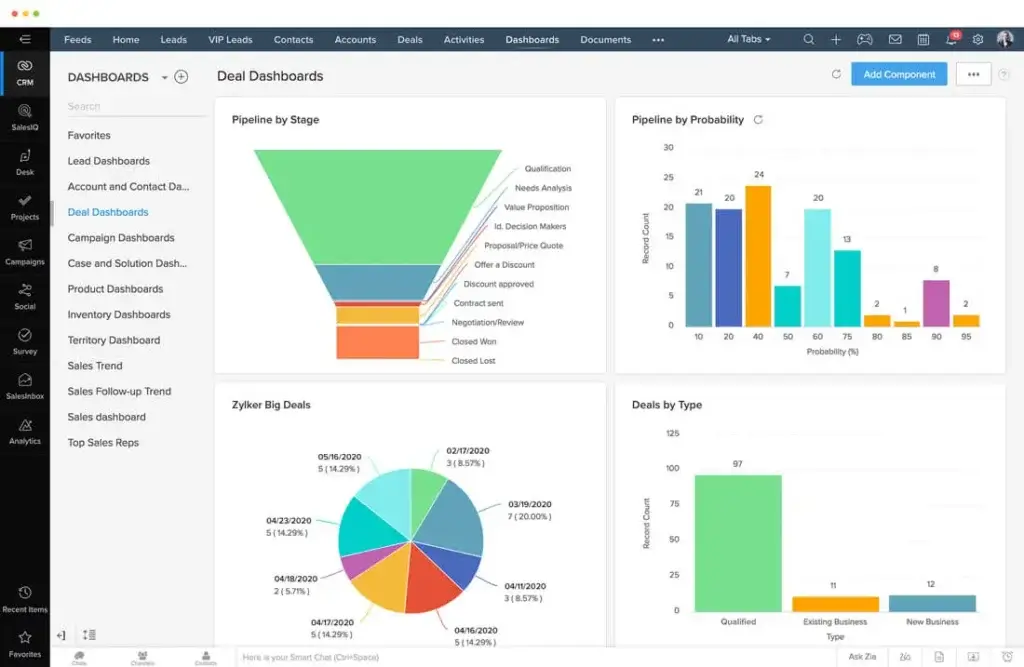
Zoho CRM gives you built-in reports and dashboards to track sales performance, deal movement, conversion rates, forecast accuracy, activity volume, and team productivity.
This is where the platform becomes more strategic. Instead of relying on gut feeling, you can monitor what is happening in your pipeline and spot issues earlier.
- Track pipeline value, win rates, and sales cycle length
- Create custom dashboards for sales managers and executives
- Monitor rep activity and deal progress
- Use reports to identify bottlenecks and revenue risks
For growing teams, reporting is not just a nice add-on. It is how you move from reactive sales management to data-driven revenue operations.
5. Advanced Customization with Canvas
One of the strongest parts of Zoho CRM is customization. You can customize fields, layouts, modules, workflows, permissions, validation rules, scoring models, and dashboards.
Canvas takes customization further by letting you redesign how CRM records look. This means you can create cleaner screens for sales reps, account managers, support teams, or managers without changing the underlying data structure.
- Customize modules and fields around your sales process
- Create role-specific layouts for different teams
- Use Canvas to design cleaner record views
- Build validation rules to improve data quality
This is a major advantage for businesses with unique processes. The tradeoff is that too much customization without planning can create complexity. Start with your core workflow, then expand gradually.
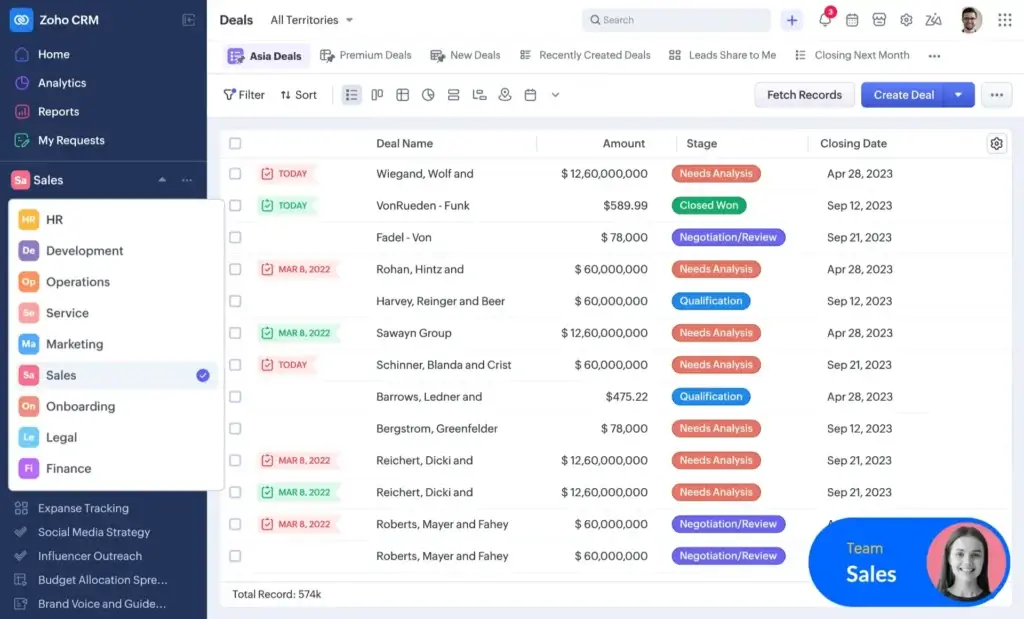
6. Zoho CRM for Everyone and Team Users
One of the more important updates is the broader “CRM for Everyone” approach. Instead of making the CRM useful only for sales, Zoho now supports team-specific workspaces and Team Users.
This matters because customer relationships rarely belong to one department. Marketing, onboarding, finance, legal, fulfillment, and customer success may all need customer context, but not every user needs full CRM access.
- Create team spaces for different departments
- Let non-sales teams work in specific team modules
- Reduce unnecessary full-user license costs
- Keep customer-facing teams aligned around shared data
This makes the platform more practical for businesses that want CRM data to support the entire customer journey, not only the sales pipeline.
7. Seamless Integration with the Zoho Ecosystem
If you already use Zoho apps, this CRM becomes even more valuable. It connects naturally with tools such as Zoho Books, Zoho Desk, Zoho Campaigns, Zoho Projects, Zoho Analytics, and Zoho Forms.
That ecosystem is a major advantage if you want to reduce app switching and connect sales, finance, support, marketing, and reporting.
- Connect CRM data with accounting, support, marketing, and analytics
- Use Zoho Desk for customer support visibility
- Use Zoho Books for invoicing and finance workflows
- Use Zoho Campaigns for email marketing alignment
The platform also integrates with popular third-party tools such as Google Workspace, Microsoft 365, Slack, Zoom, Mailchimp, WhatsApp providers, and many apps available through Zoho Marketplace.
8. Zoho Marketplace and Developer Flexibility
Zoho Marketplace lets you expand the CRM with extensions for communication, finance, ecommerce, SMS, telephony, productivity, and industry-specific workflows.
If you have technical resources, you can also use APIs and developer tools to connect the CRM with internal systems or build custom extensions.
This flexibility matters if your CRM needs to sit at the center of a broader business system rather than work as a standalone sales database.
9. Zia AI for Sales Intelligence
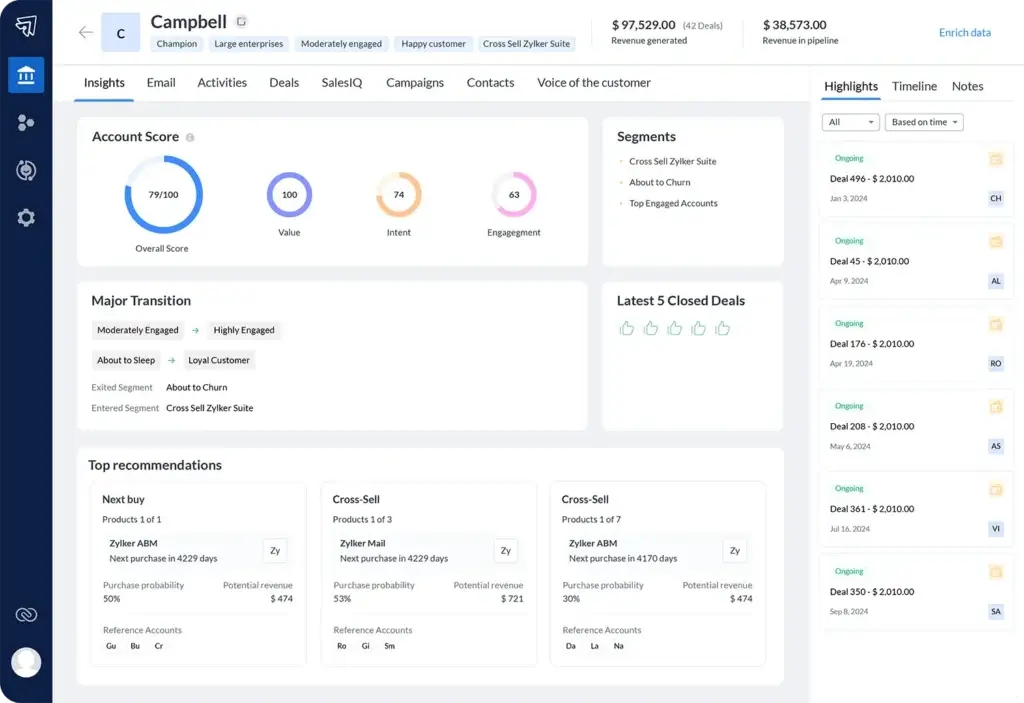
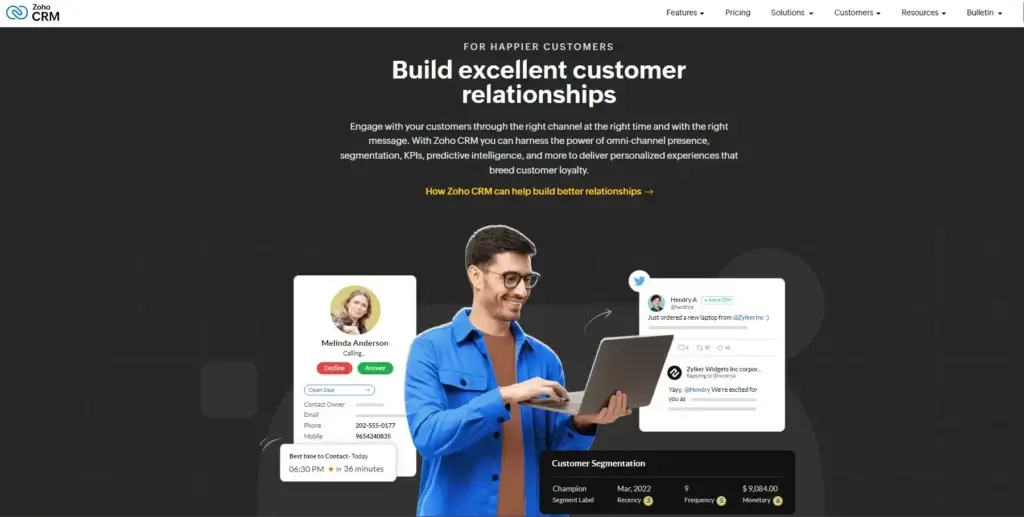
Zia is Zoho’s AI assistant, and it has become much more than a basic chatbot. Depending on your plan and configuration, it can support predictions, recommendations, forecasting, anomaly detection, call intelligence, email assistance, workflow suggestions, and customer insights.
In practical terms, Zia helps your sales team focus on the right opportunities. It can highlight leads that are more likely to convert, identify unusual changes in sales activity, suggest next actions, and help managers understand forecast gaps.
- Predict lead and deal outcomes
- Identify anomalies in sales performance
- Suggest the best time or method to contact customers
- Support call transcription and customer sentiment analysis
- Help create reports, workflows, and CRM components faster
The main point to remember is that advanced AI is most useful when your CRM data is clean. If your team does not log calls, update deal stages, or maintain accurate records, AI recommendations will be less reliable.
Key Benefits
Benefits of Using Zoho CRM
When implemented correctly, Zoho CRM does more than organize customer records. It helps your team build a more structured sales operation.
More Sales with Less Manual Work
Sales reps often lose time to data entry, task creation, lead routing, and manual follow-ups. Automation can reduce that admin load.
You can route leads automatically, create tasks after specific actions, trigger follow-up emails, and enforce sales steps through Blueprint.
Smarter Decisions with Better Data
Dashboards and reports give you a clearer view of your pipeline. You can track conversion rates, deal velocity, rep activity, lost reasons, and forecast movement.
This helps you manage sales based on evidence rather than assumptions.
Better Collaboration Across Teams
Customer relationships often involve sales, support, marketing, onboarding, and finance. With the right setup, teams can access shared customer context without working from disconnected tools.
This improves handoffs and reduces the risk of customers repeating information across departments.
Stronger Control Over Customer Data
Role-based permissions, audit logs, field controls, and access rules help protect sensitive information.
This is especially important as your team grows and more people need access to customer records.
Pros and Cons
Advantages and Limitations of Using Zoho CRM
Every CRM has strengths and weaknesses. The key is knowing whether those tradeoffs match how your team sells, collaborates, and manages customer data.
Positive
✅ Highly customizable
✅ Strong value for the price
✅ Useful automation and AI tools
✅ Broad Zoho ecosystem
✅ Good mobile app
✅ Scales from small teams to larger organizations
Negative
❌ Advanced setup takes time
❌ Some UI areas feel less modern
❌ Support quality can vary by plan
❌ Reporting needs configuration
❌ Best AI features are higher-tier focused
❌ Too much customization can create complexity
✅ Pros
1. Strong customization options
You can adapt the system around your sales stages, modules, fields, user roles, dashboards, and workflows. This is valuable if your business has a specific process that generic CRMs do not support well.
2. Excellent value for growing teams
The platform offers a broad set of CRM features at a lower entry price than many enterprise-focused alternatives. This makes it attractive for budget-conscious businesses that still need serious CRM functionality.
3. Useful automation for repeatable sales work
Workflow rules, Blueprint, approvals, scoring, and assignments help reduce manual admin. Your team can spend more time selling and less time managing repetitive tasks.
4. Deep connection with the Zoho ecosystem
If you use Zoho Books, Desk, Campaigns, Projects, or Analytics, the CRM becomes part of a larger business operating system.
5. Mobile app supports real sales work
The mobile app is not just for viewing records. You can update deals, log calls, manage tasks, and access customer information while working remotely.
6. Scales well across business sizes
You can start with basic contact and deal management, then move into automation, advanced reporting, AI, portals, and team-based workspaces as your needs grow.
❌ Cons
1. Advanced setup requires planning
The platform is flexible, but that flexibility can become overwhelming. If you start customizing before defining your process, the CRM can become messy.
2. Learning curve for new CRM users
Basic use is manageable, but workflows, Blueprints, permissions, reporting, and integrations take time to understand.
3. Some parts of the interface feel less modern
Canvas helps improve layouts, but some areas still feel more traditional compared with design-forward platforms like HubSpot or monday CRM.
4. Support experience can vary
Zoho offers support resources, but response speed and depth may depend on your plan and support package.
5. Reporting is powerful but not instant
You need clean data, clear KPIs, and well-built dashboards before reporting becomes truly useful.
6. Higher-value features may require higher plans
Advanced AI, deep customization, sandboxing, portals, and business intelligence features are more relevant on upper-tier plans.
User Experience
User Interface and Experience
Choosing a CRM is not only about features. It is also about whether your team will actually use it every day.
A CRM can be powerful on paper, but if sales reps avoid it, managers lose visibility and the data becomes unreliable.
Clean Interface with Room for Customization
The interface is fairly straightforward once you understand the main modules: Leads, Contacts, Accounts, Deals, Tasks, Activities, Reports, and Dashboards.
The navigation is logical, but the experience can feel dense at first because the platform includes many features. This is why customization matters.
With Canvas and custom layouts, you can simplify views for different roles. A sales rep may need deal status, next action, lead source, and last activity. A manager may need pipeline value, probability, forecast category, and expected close date.
The best user experience comes from removing clutter. Do not show every field to every user. Show the information each role needs to do their job.
Mobile App That Supports Real Field Work
The mobile app is useful for reps who work outside the office. You can update records, log calls, add notes, check tasks, and view customer information after meetings.
- Update leads and deals from mobile
- Log calls and notes quickly
- Scan business cards
- Receive reminders and alerts
- Work offline and sync later
This matters because CRM adoption often fails when reps delay updates. Mobile access helps keep data fresh while conversations are still recent.
Support and Learning Resources
Zoho offers a Help Center, documentation, webinars, community forums, onboarding resources, and paid support options.
For a simple setup, the self-service materials may be enough. For complex workflows, integrations, migrations, or enterprise rollouts, it is worth considering implementation support.
The platform is powerful, but it rewards preparation. If you want fast adoption, train your team around daily workflows rather than showing every feature at once.
Reliability and Performance
Zoho CRM is cloud-based and designed for everyday sales operations. For most teams, performance is stable across desktop and mobile.
However, like any CRM, performance can depend on how much data you store, how complex your workflows are, how many integrations you run, and how well your account is configured.
For larger teams, it is smart to review automation rules, data hygiene, field usage, and duplicate records regularly. This keeps the CRM cleaner and easier to manage.
What Users Commonly Like
User feedback often highlights value, customization, automation, and the depth of the Zoho ecosystem.
- Strong feature set for the price
- Flexible customization options
- Useful lead and deal tracking
- Good fit for growing teams
- Helpful integrations with other Zoho apps
What Users Commonly Complain About
The most common complaints are usually connected to setup complexity, interface learning curve, and support consistency.
- Advanced customization can feel complex
- Some UI areas are not as polished as newer CRMs
- Support can vary depending on plan and region
- Reporting requires clean data and thoughtful setup
- New users may need structured onboarding
Best Practice for Getting Started
Start small. Do not configure every feature on day one.
Begin with leads, contacts, deals, activities, email templates, and basic dashboards. Once your team is comfortable, add automation, Blueprint, advanced reporting, and custom modules.
This approach improves adoption and prevents your CRM from becoming too complicated too quickly.
Business size fit
Zoho CRM for Different Business Sizes
Zoho CRM can work for different business sizes, but the way you use it should change as your company grows.
Small teams should keep the setup simple. Mid-sized businesses should focus on automation and reporting. Larger organizations should pay closer attention to permissions, governance, integrations, and process control.
| Business Size | How It Fits Your Needs | Recommended Features |
| 🏠 Small Businesses and Startups | Useful for moving from spreadsheets to a structured sales pipeline without overpaying. | Lead management, contacts, deals, email templates, basic workflows |
| 🏢 Medium-Sized Teams | Strong fit for teams that need automation, reporting, and repeatable sales processes. | Blueprint, dashboards, scoring rules, role-based access, integrations |
| 🏢🏢 Large Organizations | Suitable when you need advanced customization, multi-team controls, portals, and governance. | Zia AI, CommandCenter, Canvas, sandbox, portals, advanced analytics |
Zoho CRM Use Cases by Industry
Zoho CRM is flexible enough to support different industries, but it works best when you customize modules, fields, and workflows around your specific sales process.
Real Estate
Real estate teams can use the platform to track buyers, sellers, properties, viewings, offers, follow-ups, and referral sources.
With custom modules, you can build property records, match buyers with listings, and automate follow-up reminders after showings.
SaaS and Technology Companies
SaaS teams can use the CRM to manage trial users, demo requests, onboarding tasks, renewals, upsells, and customer expansion opportunities.
When connected with marketing and support tools, it can give revenue teams a stronger view of the full customer lifecycle.
Agencies and Professional Services
Agencies can manage leads, proposals, client accounts, retainers, project handoffs, and renewal conversations.
This is useful when your sales cycle involves multiple stakeholders and long follow-up periods.
Financial and B2B Services
Service-based businesses can use the CRM to qualify leads, manage consultations, track client documentation, and maintain clear account history.
For regulated industries, it is important to configure permissions, field access, and data retention policies carefully.
Pricing and Plans
How much does Zoho CRM cost?
Zoho CRM pricing is one of its biggest advantages. The platform offers a free plan for very small teams and paid plans that scale by feature depth.
The best plan depends on how much automation, reporting, AI, and customization you need. In most cases, Professional is the better starting point for growing sales teams, while Enterprise is better if you want Zia AI and more advanced customization.
| Plan | Annual Price | Monthly Price | Best For | Key Features |
| 🆓 Free | $0 | $0 | Very small teams | Leads, contacts, deals, basic workflows, reports, mobile app |
| ⚙️ Standard | $14/user/month | $20/user/month | Small sales teams | Scoring rules, custom reports, dashboards, mass email |
| 🚀 Professional | $23/user/month | $35/user/month | Growing sales teams | Blueprint, validation rules, inventory, advanced automation |
| 🧠 Enterprise | $40/user/month | $50/user/month | Teams needing AI and deeper control | Zia AI, Canvas, CommandCenter, portals, advanced customization |
| 🏢 Ultimate | $52/user/month | $65/user/month | Data-heavy and enterprise teams | Advanced BI, enhanced limits, sandbox, deeper analytics |
Potential Extra Costs to Consider
The subscription price is only one part of the total cost. Before choosing a plan, consider the full implementation picture.
- Monthly billing costs more than annual billing
- Some Marketplace apps may have separate fees
- Premium support may cost extra
- Complex migration may require professional services
- Advanced AI and analytics are more useful on higher tiers
- Third-party tools may require separate paid accounts
Which Plan Should You Choose?
If you are a freelancer or a very small team, the Free plan can help you get organized. If you are a small sales team, Standard may be enough to manage a basic pipeline.
For most growing businesses, I would look closely at Professional because it unlocks stronger process control. If AI, portals, Canvas, and advanced customization matter, Enterprise is the more strategic choice.
Comparison
Zoho CRM vs Other CRM Software
Zoho CRM competes with several well-known CRM platforms. The best choice depends on whether you care more about simplicity, customization, ecosystem depth, automation, or enterprise scalability.
| Comparison | Where Zoho CRM Wins | Where the Competitor May Win |
| Zoho CRM vs Salesforce | Lower cost, easier entry point, strong customization for SMBs | Salesforce is stronger for very large enterprise ecosystems and highly complex deployments |
| Zoho CRM vs HubSpot | More CRM depth and customization at a lower starting cost | HubSpot offers a cleaner interface and strong marketing-led workflows |
| Zoho CRM vs Pipedrive | More automation, reporting, ecosystem depth, and customization | Pipedrive is simpler and easier for pipeline-only sales teams |
| Zoho CRM vs monday CRM | More traditional CRM depth and mature sales features | monday CRM is more visual and easier for workflow-style collaboration |
If you want a broader comparison, you can also review our best CRM software guide.
What to Expect
Setup and Implementation
The biggest mistake businesses make is customizing the CRM before they understand their process.
Before you build automations, dashboards, and custom modules, map how leads become customers. Then configure the CRM around that journey.
- Define your sales stages before importing data
- Clean your leads and contacts before migration
- Decide which fields are truly required
- Set user roles and permissions early
- Start with simple workflows before advanced automation
- Create dashboards around your most important KPIs
- Train reps on daily usage, not only admin settings
A good implementation should make the CRM easier to use, not more complicated. The goal is to improve adoption, data quality, and sales visibility.
Security and Compliance
Protection for Your Data
When you store customer data in a CRM, security is not optional. You need access controls, encryption, monitoring, and privacy features that help protect sensitive information.
Zoho provides a strong security foundation for cloud-based CRM operations. This includes infrastructure safeguards, access management, audit controls, and privacy-focused features.
- Encryption at rest and in transit helps protect stored and transferred data
- Multi-factor authentication adds another layer of login protection
- Role-based access controls help limit what each user can view or edit
- Logging and auditing support visibility into user activity
- Single sign-on can simplify secure access for larger teams
- Data center redundancy supports availability and continuity
- Privacy controls help manage personal data more responsibly
Zoho also lists compliance support and certifications such as ISO 27001, ISO 27017, ISO 27018, SOC 2 Type II, and GDPR.
For regulated industries, you should still review your legal and compliance requirements before deployment. The CRM can support stronger data governance, but your configuration, policies, and user behavior also matter.
Conclusion
Final thoughts
⭐ Overall Rating: 8.7/10
If you’ve made it this far, you’re clearly serious about choosing the right CRM for your business. That is a smart move.
Picking a platform like Zoho CRM is not just about storing contacts. It is about building a system that supports your workflow, improves team consistency, and gives you clearer visibility across the customer journey.
🔍 What You’re Really Getting
Here’s a quick recap of what Zoho CRM brings to the table:
- A centralized hub for leads, contacts, deals, accounts, and activities
- Automation tools that reduce manual work and improve follow-up consistency
- AI capabilities through Zia for predictions, insights, and prioritization
- Custom dashboards and reports for tracking sales performance
- Strong customization through modules, fields, layouts, Canvas, and workflows
- A scalable structure that can support small teams and larger organizations
Once you tailor it to your process, Zoho CRM becomes more than a contact database. It becomes a command center for your revenue operation.
👥 Is Zoho CRM the Right Fit for You?
If you are a very small business with basic needs, the platform may feel like more than you need at first. But if you plan to grow, that extra depth can become an advantage.
If you already manage a complex sales process, multiple pipelines, cross-functional handoffs, or detailed reporting needs, Zoho CRM gives you enough flexibility to support that growth.
Still comparing options? Explore our best CRM software guide to see how it compares with Salesforce, HubSpot, Pipedrive, monday CRM, and other leading tools.
🧠 Final Word from a CRM Expert
After working with many CRM platforms, here is what stands out: the best CRM is not always the flashiest one. It is the one your team uses consistently.
Zoho CRM can take time to master, especially if you want advanced automation and deep customization. But once configured well, it offers excellent value, strong scalability, and enough flexibility to support serious sales operations.
My recommendation: choose Zoho CRM if you want a powerful, customizable, and cost-effective CRM that can grow with your business. Choose a simpler alternative if your team wants the fastest possible setup and does not need advanced automation or customization.
Frequently Asked Questions
Have more questions?
Is Zoho CRM worth it for small businesses?
Yes. Zoho CRM is worth considering for small businesses that want affordable lead management, sales tracking, automation, and reporting. It may feel advanced at first, but you can start with basic modules and expand as your process becomes more mature.
Which Zoho CRM plan is best for growing sales teams?
The Professional plan is often the best starting point for growing sales teams because it unlocks stronger automation and process controls. If you need Zia AI, Canvas, portals, and deeper customization, the Enterprise plan is usually the better fit.
Does Zoho CRM include AI features?
Yes. Zoho CRM includes AI capabilities through Zia, including predictions, recommendations, forecasting, anomaly detection, data enrichment, call intelligence, and workflow assistance. Advanced AI capabilities are more relevant on higher-tier plans.
What is Zoho CRM for Everyone?
Zoho CRM for Everyone expands CRM usage beyond the sales team. It allows departments such as marketing, onboarding, finance, operations, and customer success to work in team-specific spaces while keeping access controlled.
What are Team Users in Zoho CRM?
Team Users are limited-access users who work mainly inside specific team modules. They are useful when non-sales users need customer context but do not need full access to the entire CRM system.
Is Zoho CRM better than HubSpot?
Zoho CRM is usually better if you want deeper customization, lower-cost CRM features, and stronger control over modules and workflows. HubSpot may be better if you want a cleaner interface and a marketing-first platform with very easy adoption.
Is Zoho CRM better than Salesforce?
Zoho CRM is often better for small and mid-sized businesses that want strong functionality without Salesforce-level cost or implementation complexity. Salesforce is still stronger for very large enterprises with complex ecosystems and specialized requirements.
Can Zoho CRM replace marketing automation software?
Zoho CRM includes useful marketing features such as web forms, segmentation, lead scoring, email templates, and campaign tracking. For advanced marketing automation, you may still want to connect it with Zoho Campaigns or Zoho Marketing Automation.
How long does Zoho CRM take to implement?
A basic setup can take a few days for a small team. A more advanced implementation with migration, workflows, reports, permissions, integrations, and training can take several weeks or longer, depending on complexity.
What are the main limitations of Zoho CRM?
The main limitations are the learning curve, setup complexity, inconsistent support experiences on some plans, and the need for clean data before reporting and AI become truly useful. It is powerful, but it works best when configured carefully.