
Introduction
Outbound sales becomes difficult when prospecting, enrichment, verification, inbox warm-up, campaign sending, LinkedIn activity, replies, and CRM updates are split across separate tools.
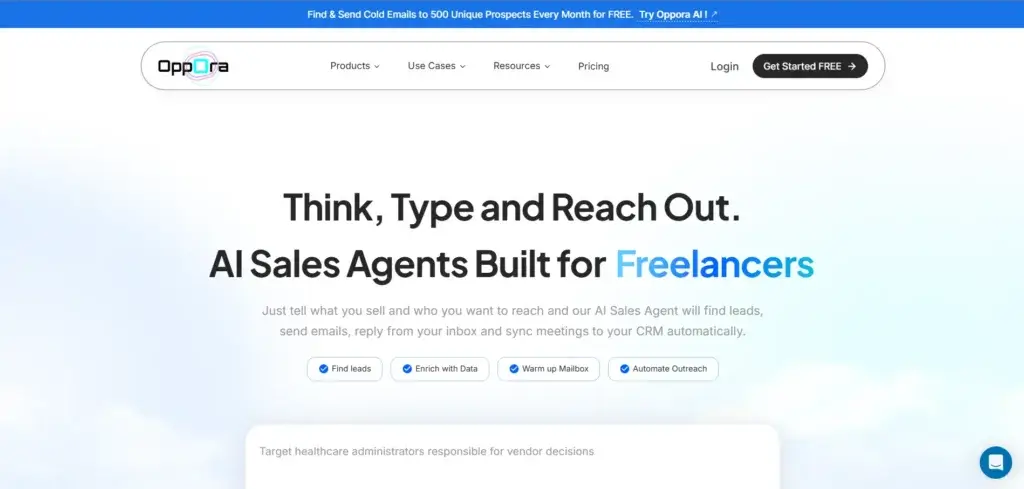
Oppora.ai is an agentic outbound sales platform that combines those workflows. You can define an ideal customer profile, find companies and decision-makers, enrich and verify contacts, build automated campaigns, manage replies with AI, and move interested prospects into a sales pipeline.
In this Oppora.ai review, you will learn how its lead database, workflow builder, Outreach Engine, Reply Ora agent, deliverability tools, integrations, pricing, security, and lightweight CRM work. You will also see how it compares with Apollo.io, Instantly.ai, Smartlead, and lemlist.
Oppora.ai is a strong option if you want an affordable, integrated outbound system. It is less suitable if you need a mature enterprise CRM, extensive independent proof, or specialist depth in every part of the outbound stack.
Quick Summary
Oppora.ai is best for founders, SDR teams, agencies, recruiters, and B2B growth teams that want to automate the prospect-to-reply workflow. Its main advantage is consolidation. Its main risk is that the platform is comparatively new and asks you to trust AI across several revenue-critical steps.
| Category | Oppora.ai Review Summary |
| Best For | Startups, agencies, recruiters, SDR teams, and B2B companies that want integrated prospecting and outbound automation |
| Starting Price | Free plan available; paid self-service plans start at $34 per month |
| Core Strength | Connects ICP creation, lead discovery, enrichment, verification, outreach, replies, and CRM activity in one workflow |
| Main Limitation | Newer platform with a smaller review base and less enterprise proof than established competitors |
| Best Use Case | Building a repeatable outbound pipeline without paying for several separate prospecting and email tools |
| Best Alternative | Apollo.io for database depth, Instantly.ai for outbound scale, Smartlead for agency infrastructure, lemlist for personalization |
Oppora.ai can reduce tool fragmentation, but you still need disciplined targeting, responsible sending limits, human review, and clear CRM ownership.
Key Features
Oppora.ai Software Specification
Oppora.ai covers most of the outbound pipeline before a sales conversation becomes an active opportunity. The platform is most valuable when you use its features as one connected workflow rather than as isolated utilities.
ICP Builder and Smart Finder
The ICP Builder turns a product description or website into an editable ideal customer profile covering industries, company sizes, locations, buyer titles, technologies, and buying signals. The same profile can guide search, scoring, workflows, and campaigns.
Smart Finder lets you describe an audience in plain English. Oppora.ai translates the prompt into search criteria, runs a multi-source search, and ranks results by ICP fit. This is easier than configuring long filter forms, but AI interpretation can be imperfect, so review a sample before scaling.
- Generate an editable ICP from product context.
- Search for people and companies in natural language.
- Rank prospects against your saved ICP.
- Use hiring, funding, role-change, and technology signals.
Lead discovery, enrichment, and email verification
Oppora.ai combines company discovery, contact search, enrichment, phone lookup, and email verification. Its official materials reference more than one billion leads, more than 60 million companies, and over 50 data points, although database size does not guarantee accuracy in every market.
The waterfall approach can search several sources, identify decision-makers, and verify emails before a campaign begins. Recent G2 reviewers often praised contact quality, while one reported slower email finding. Validate a representative sample in each geography and segment.
Agentic workflow automation
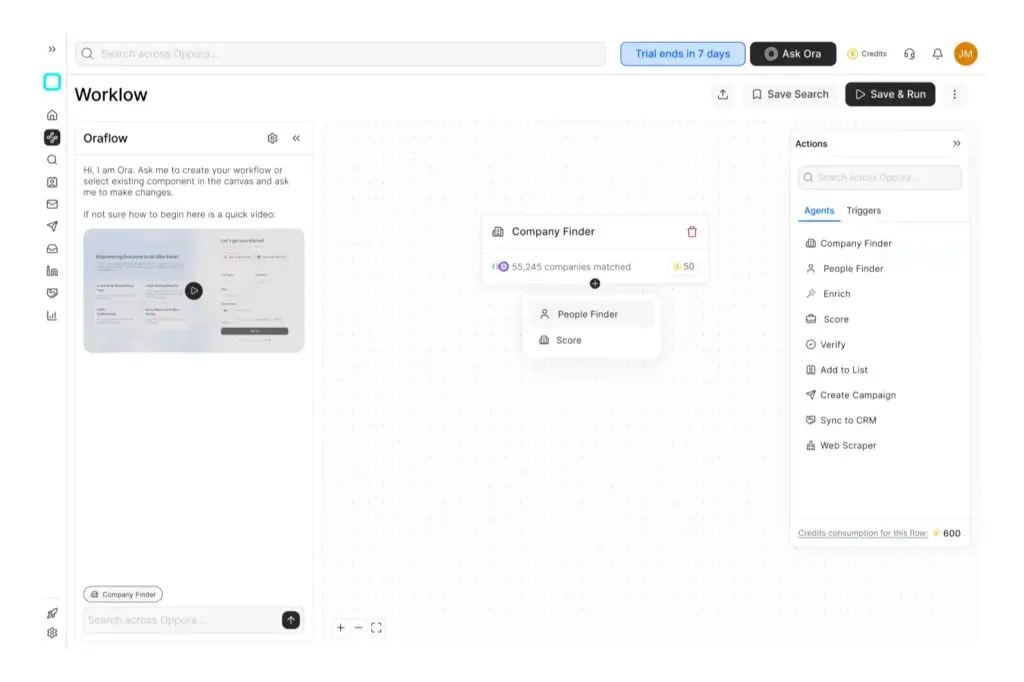
The visual workflow builder connects specialized agents for discovery, enrichment, filtering, lead search, verification, scoring, campaign generation, and outreach. Each agent can have its own prompt and rules.
A workflow can run on a schedule, find matching companies, identify decision-makers, verify contacts, score prospects, and launch a campaign. This reduces manual exports, but automation also scales weak targeting quickly. Start with small batches and human approval.
Outreach Engine and AI personalization
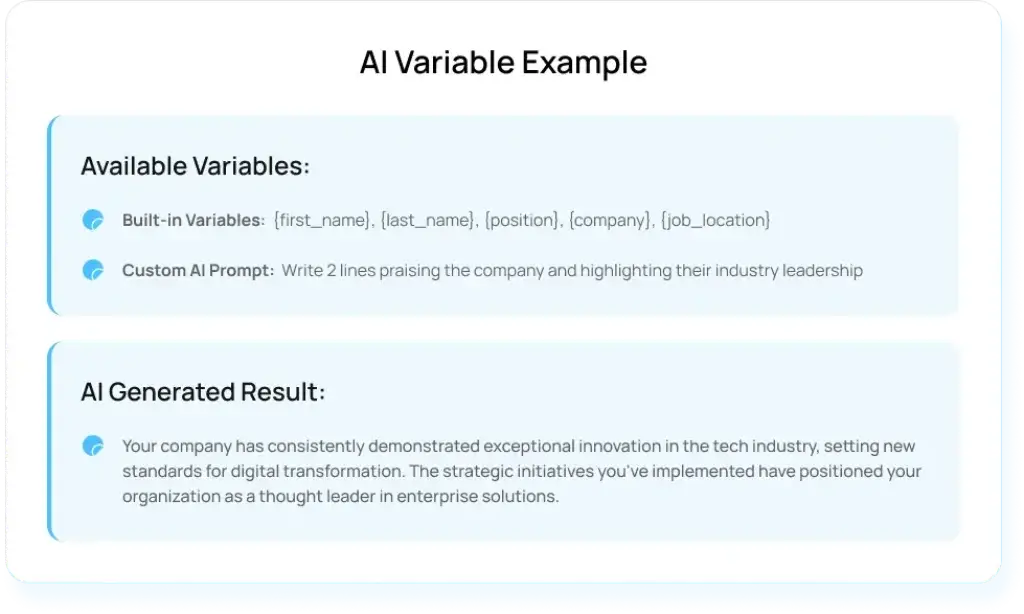
The Outreach Engine supports campaign creation, AI-assisted templates, standard and custom variables, follow-up sequences, multiple sending accounts, A/B testing, and analytics.
Custom AI variables can add company or role context to each message. They consume credits and should be used selectively. The strongest use is one credible, relevant detail, not longer automated copy. Human review helps prevent fabricated observations.
Email and LinkedIn outreach
Oppora.ai supports email and LinkedIn actions in connected campaigns. Its extension can capture profiles from LinkedIn and Sales Navigator and support connection and follow-up steps.
Use conservative activity limits. LinkedIn automation can create account risk when teams prioritize volume over relevance or ignore platform rules.
Reply Ora and unified reply handling
Reply Ora classifies responses, drafts or sends replies, works toward campaign goals, shares calendar links, and can include attachments. You can enable automatic sending or keep replies in draft mode.
Draft mode is the safer starting point. Escalate pricing, legal, security, complex objections, and strategic accounts to a salesperson. A unified inbox helps teams manage replies across connected mailboxes.
Email warm-up and deliverability controls
Oppora.ai includes mailbox warm-up, reputation scoring, adaptive volume, mailbox rotation, recovery logic, and integration with the Outreach Engine. It promotes rotation across up to 50 mailboxes.
These tools support deliverability, but no platform can guarantee inbox placement. Domain authentication, list quality, complaints, content, and sending behavior still matter. The privacy policy also says Gmail warm-up is not performed through the Gmail API, so confirm the connection method for your provider.
Sales CRM and pipeline tracking
Oppora.ai includes accounts, opportunities, tasks, customizable stages, a Kanban pipeline, team collaboration, and reports. Interested replies can move into the CRM for follow-up.
This is sufficient for a small outbound team, but not for advanced forecasting, territories, service, renewals, or complex post-sale workflows.
CRM integrations, REST API, and MCP
Oppora.ai supports CRM synchronization with HubSpot, Salesforce, and Pipedrive. It also offers a REST API and Model Context Protocol access for company discovery, enrichment, email finding, verification, phone lookup, bulk jobs, lists, and campaigns.
Documented examples include Clay, n8n, Make, Zapier, Claude, ChatGPT, Cursor, and Claude Code. API access is listed for Pro and Max plans, with rate limits and endpoint credit costs varying by plan.
Pros and Cons
Advantages and Limitations of Using Oppora.ai
Positive
✅ End-to-end outbound workflow automation
✅ Prospecting, verification, outreach, and replies in one platform
✅ Affordable entry pricing and free plan
✅ Useful AI workflow builder and reply agent
✅ REST API, MCP, CRM, and automation integrations
Negative
❌ Smaller independent review base than established competitors
❌ AI targeting and generated content require human validation
❌ Credit limits can complicate cost forecasting
❌ Lightweight CRM is not suitable for complex customer operations
❌ Deliverability results still depend heavily on your setup and practices
Oppora.ai offers unusually broad functionality at a low starting price. The tradeoff is maturity. You are adopting a fast-moving platform rather than a product with years of enterprise deployment evidence, hundreds of independent reviews, and a deeply established partner ecosystem.
Advantages of Oppora.ai
- Connected workflow: Data, verification, campaigns, replies, and CRM activity can run in one system.
- Agentic automation: Specialized agents handle more than message writing.
- Accessible pricing: Free, $34, $79, and smaller feature packages lower the barrier.
- Flexible integrations: REST, MCP, CRM sync, and automation tools extend the platform.
- Human controls: AI replies can remain in draft mode.
Limitations of Oppora.ai
- Limited market proof: The public review sample is smaller than established competitors.
- AI precision: ICPs, scoring, and generated content require validation.
- Credit management: Data, AI, phone, and outreach allowances require planning.
- Uneven depth: Specialist tools may be stronger in individual categories.
- Light CRM: Complex revenue teams still need a dedicated CRM.
User Experience
User Interface and Daily Workflow
Oppora.ai is designed to reduce the number of interfaces you need to manage. Search, lists, workflows, campaigns, inboxes, and CRM activity live inside one platform, while Ask Ora provides a conversational entry point for tasks.
Setup and onboarding
Several G2 reviewers described setup as easy, and the free plan lets you test search and AI assistance before connecting production mailboxes.
The harder work is strategic. You still need a reliable ICP, authenticated domains, qualified lists, conservative limits, useful reply rules, and a process for interested prospects.
Daily use
Users can search prospects, enrich records, launch campaigns, monitor inbox health, manage replies, and move interested leads into the pipeline. Oppora.ai creates the most value when recurring workflows run consistently, not when it is used only for one-time exports.
Learning curve and control
Oppora.ai is easier to start than a general automation platform because its agents are built for sales tasks. You still need to understand prompts, credits, data sources, sending limits, and approval settings. Begin with one workflow and a small prospect volume.
User feedback
At the time of research, G2 showed a 4.4 out of 5 rating from 19 reviews. Users commonly praised the interface, lead accuracy, time savings, and all-in-one structure.
The sample is small and many reviews were invitation-sourced. One reviewer reported average email-finding speed and weaker ICP interpretation. Test the platform with your own data rather than relying only on aggregate ratings.
Business Size Fit
Oppora.ai for Different Business Types
Oppora.ai is strongest for lean B2B teams that want automation without a large software budget.
| Business Type | Fit | Why |
| Solo founders | Excellent | Can automate research, prospecting, outreach, and early pipeline work without hiring a full SDR team |
| Small B2B sales teams | Excellent | Combines several tools at a manageable monthly cost |
| Lead generation agencies | Strong | Supports repeatable workflows, multiple mailboxes, reply handling, and done-for-you services |
| Recruitment and staffing firms | Strong | Useful for hiring signals, decision-maker discovery, multichannel outreach, and contact enrichment |
| Mid-market revenue teams | Good | Works well as an outbound layer connected to an established CRM |
| Large enterprises | Conditional | Requires careful review of governance, support, security evidence, permissions, and scalability |
Best for founders and lean sales teams
Founders and small teams can replace several prospecting and outreach subscriptions with one platform. The $34 and $79 plans make this consolidation attractive.
Best for agencies and recruiters
Agencies can duplicate workflows and manage several mailboxes, while recruiters can use hiring and role-change signals. Confirm client separation, reporting, and white-label requirements before purchase.
Best for mid-market teams with an existing CRM
Mid-market teams should use Oppora.ai as a pipeline-generation layer and synchronize qualified contacts, replies, and opportunities into their main CRM.
Who should not use Oppora.ai?
Oppora.ai may not be the best choice when you need:
- A deeply mature enterprise sales engagement ecosystem.
- Advanced account management, service, renewals, or forecasting.
- Hundreds of independent reviews across many industries.
- The largest sending infrastructure with highly specialized agency controls.
- A fully manual, relationship-led sales process with minimal automation.
- Strictly documented security certifications before a pilot can begin.
Pricing and Plans
How Much Does Oppora.ai Cost?
Oppora.ai offers a free plan, Pro and Max self-service plans, Enterprise pricing, done-for-you services, and smaller feature packages. Annual billing is advertised with a 17% saving.
Estimate total usage across data lookups, AI variables, phone searches, emails, mailboxes, and API calls, not only the monthly fee.
| Plan | Price | Published Allowances | Best For |
| Free | $0/month | Limited data, AI, phone, verification, and outreach credits | Testing search quality and the interface |
| Pro | $34/month | 10,000 data credits, 500 AI credits, 200 phone credits, and campaign capacity | Founders and small outbound teams |
| Max | $79/month | 25,000 data credits, 1,000 AI credits, 600 phone credits, and higher outreach limits | Agencies and higher-volume teams |
| Enterprise | From $499/month | Custom limits, support, security, and team requirements | Larger organizations with negotiated needs |
| Mini Plans | From $7 | Feature-specific access for lead search, verification, or outreach | Teams that need one function instead of the full platform |
Free plan
Use the free plan to test the interface, data quality, and credit consumption. It is not designed for sustained volume.
Pro plan
Pro is the best starting point for founders and small teams running a controlled outbound pilot.
Max plan
Max raises data, phone, AI, mailbox, and outreach capacity for agencies and higher-volume teams.
Enterprise and done-for-you services
Enterprise pricing depends on users, limits, support, security, integrations, and API demand. The managed service targets a reply-rate range, but results still depend on your market, offer, list, copy, and sender reputation.
Potential extra costs
Total cost may include extra credits, domains, mailboxes, data providers, CRM software, and implementation support. Measure cost per verified prospect, positive reply, meeting, and opportunity.
Security and Compliance
How Oppora.ai Protects Sales and Email Data
Oppora.ai processes account details, lead data, campaign activity, connected mailbox information, CRM records, and AI-generated content. Security review is therefore essential, especially when Reply Ora can read and respond to prospect conversations.
Published security controls
The privacy policy states that Oppora.ai uses encryption, security assessments, penetration testing, access controls, monitoring, backups, and disaster recovery. Enterprise buyers should request evidence, subprocessors, retention terms, and incident-response commitments.
Google and Microsoft mailbox permissions
Gmail connections use read-only and send scopes, without the modify scope, and Gmail warm-up is not performed through the Gmail API. Outlook connections use Mail.Read, Mail.Send, and Mail.ReadWrite. Confirm the exact permissions required for your workflow.
GDPR and privacy rights
Oppora.ai states that it supports GDPR rights including access, portability, erasure, restriction, objection, and rectification. Vendor compliance does not make every campaign lawful, so maintain a clear legal basis, suppression lists, opt-out handling, and data-minimization practices.
Security questions to ask before purchase
- Is a current SOC 2 or ISO report available under NDA?
- Where is customer data stored and processed?
- Which subprocessors receive campaign or AI prompt data?
- Can administrators enforce role-based access and audit activity?
- How long are emails, replies, lead records, and deleted accounts retained?
- How are API keys, OAuth tokens, and mailbox credentials protected?
Setup and Best Practices
How to Implement Oppora.ai Successfully
Oppora.ai can make outbound faster, but the goal is a repeatable process that creates qualified conversations, not maximum message volume.
1. Define one narrow ICP
Start with one industry, company-size range, geography, buyer role, and business problem. Remove criteria that do not improve fit.
2. Validate data before scaling
Manually verify a small sample for company relevance, current roles, email quality, and signal accuracy.
3. Protect sending domains
Use separate outreach domains, configure SPF, DKIM, and DMARC, warm mailboxes gradually, and keep daily volume conservative.
4. Keep AI replies in draft mode
Review AI replies and escalate pricing, security, legal, and strategic conversations to a human.
5. Connect the CRM carefully
Define which system owns contacts, opportunities, tasks, and campaign activity. Test field mapping and deduplication.
6. Measure business outcomes
Track bounce rate, positive replies, meetings, opportunities, cost per opportunity, and revenue influenced. Improve targeting before volume, then refine the offer, personalization, and reply process.
Comparisons
Oppora.ai Alternatives and Competitors
Oppora.ai is compelling when you want one affordable platform for agentic prospecting and outbound execution. The best alternative depends on whether your priority is database depth, mailbox scale, agency controls, or personalized multichannel engagement.
| Platform | Best For | Where It Beats Oppora.ai | Where Oppora.ai Is Stronger |
| Apollo.io | Database-led B2B prospecting | Larger market footprint, mature data filters, calling, and established workflows | More agentic workflow automation and lower entry pricing |
| Instantly.ai | High-volume cold email operations | More established deliverability ecosystem and sending infrastructure | Broader built-in ICP, workflow, enrichment, and reply-agent model |
| Smartlead | Agencies managing many mailboxes and clients | Stronger agency workspaces, deliverability testing, and mailbox infrastructure | Simpler all-in-one prospecting and AI workflow proposition |
| lemlist | Personalized multichannel outreach | More mature personalization, visual content, and multichannel campaign design | Lower price and more unified agentic automation |
Oppora.ai vs Apollo.io
Apollo.io offers a more mature database, search experience, calling, and sales engagement environment. Oppora.ai is more affordable and more explicit about agentic workflow orchestration.
Choose Apollo.io for database depth and market maturity. Choose Oppora.ai for lower-cost, end-to-end automation. Read our Apollo.io review.
Oppora.ai vs Instantly.ai
Instantly.ai is more established for cold email deliverability and multi-inbox operations. Oppora.ai offers a broader ICP, workflow, enrichment, and reply-agent model.
Choose Instantly.ai for sending scale. Choose Oppora.ai for broader prospect-to-pipeline automation. Read our Instantly.ai review.
Oppora.ai vs Smartlead
Smartlead is stronger for agencies managing many mailboxes, clients, and deliverability workflows. Oppora.ai provides a simpler all-in-one targeting and automation proposition.
Choose Smartlead for agency infrastructure. Choose Oppora.ai for integrated AI prospecting and outreach. Read our Smartlead review.
Oppora.ai vs lemlist
lemlist is more mature for personalized multichannel campaigns, conditional sequences, and visual content. Oppora.ai is less expensive and more focused on connected agentic execution.
Choose lemlist for sophisticated personalization. Choose Oppora.ai for lower-cost workflow automation. Read our lemlist review.
Conclusion
Is Oppora.ai Worth Using?
Oppora.ai is an interesting emerging outbound platform because it connects ICP creation, lead discovery, enrichment, verification, scoring, outreach, replies, and pipeline management.
Its strongest advantage is value. The Pro and Max plans give founders, agencies, recruiters, and small sales teams access to a broad outbound stack at a price below many specialist products.
The tradeoff is maturity. The public review base is small, several performance claims come primarily from the vendor, and AI-driven targeting or replies can be wrong. Its CRM is lightweight, and deliverability tools do not replace responsible sending practices.
Oppora.ai is a strong choice in 2026 if you are comfortable piloting an emerging platform and want to replace a fragmented stack with one agentic workflow. Start with a narrow market, validate data manually, keep replies in draft mode, protect your domains, and measure opportunities rather than activity.
Frequently Asked Questions
Have More Questions?
What is Oppora.ai?
Oppora.ai is an agentic outbound sales platform that combines ICP creation, company and lead discovery, data enrichment, email verification, campaign automation, LinkedIn outreach, AI reply handling, and lightweight CRM tools.
What is Oppora.ai best used for?
Oppora.ai is best used for building repeatable B2B outbound workflows. It can help you identify prospects, verify contact data, launch personalized campaigns, manage replies, and synchronize interested leads with a CRM.
How much does Oppora.ai cost?
Oppora.ai offers a free plan. Published self-service pricing starts at $34 per month for Pro and $79 per month for Max. Enterprise pricing starts at a higher custom level, while Mini plans begin at $7 for selected functions.
Does Oppora.ai have a free plan?
Yes. Oppora.ai offers a free plan with limited data, AI, phone, verification, and outreach credits. It is most useful for testing the interface and validating data quality before purchasing a paid plan.
Can Oppora.ai replace Apollo.io and a cold email tool?
Oppora.ai can replace a separate prospecting database and cold email platform for some small teams. Larger organizations may still prefer Apollo.io for mature data workflows or a specialist sending platform for advanced deliverability infrastructure.
Does Oppora.ai include email warm-up?
Yes. Oppora.ai includes mailbox warm-up, reputation monitoring, adaptive volume, mailbox rotation, and recovery controls. Warm-up does not guarantee inbox placement, so you still need authenticated domains, verified lists, and conservative sending limits.
What is Reply Ora?
Reply Ora is Oppora.ai’s AI reply agent. It can classify responses, draft or send replies, work toward campaign goals, share meeting links, and include attachments. You can keep it in draft mode for human approval.
Does Oppora.ai integrate with CRM software?
Yes. Oppora.ai lists CRM synchronization with HubSpot, Salesforce, and Pipedrive. It can also connect with automation and AI tools through REST API and Model Context Protocol.
Is Oppora.ai secure?
Oppora.ai states that it uses encryption, access controls, monitoring, security assessments, penetration testing, backups, and disaster recovery. Enterprise buyers should request current security reports, subprocessors, retention terms, and certification evidence before purchase.
Who should use Oppora.ai?
Oppora.ai is best suited to founders, small B2B sales teams, recruiters, lead generation agencies, and revenue teams that want to automate prospecting and outbound execution without buying several separate tools.