
Introduction
Most website visitors leave without completing a form, booking a call, or starting a checkout. LeadPost is designed to recover part of that lost demand by matching anonymous website activity with contact data that your sales or marketing team can use.
This LeadPost review 2026 examines B2B and B2C visitor identification, behavioral tracking, enrichment, integrations, retargeting, privacy, pricing, and agency use cases. LeadPost is not a general analytics platform or complete CRM. Its purpose is to identify part of your anonymous US traffic and help you activate it through sales and marketing channels.
What Is LeadPost?
LeadPost is website visitor identification and retargeting software for businesses and agencies. It uses a tracking pixel, identity-resolution signals, and third-party data sources to turn some anonymous visits into contactable leads.
The platform supports two distinct identification models. Its B2B product can return contact and company information for business visitors, while its B2C product can match consumer visits with details such as names, verified email addresses, and mailing addresses.
That person-level approach is an important difference because many competing tools stop at the company level. LeadPost aims to provide a more actionable record, although fields are not guaranteed for every match.
How LeadPost Works
You begin by adding a LeadPost pixel to your website and creating an identification campaign. The platform then evaluates eligible visitors using deterministic and probabilistic matching methods, including cookie-based signals, IP patterns, and device or browser characteristics.
Matched records can include pages viewed, visit timing, referral source, UTM parameters, and repeat activity. You can review, export, or send them to a connected CRM or marketing platform.
LeadPost requires at least 1,000 unique monthly website visitors for its visitor identification service. It also currently identifies visitors in the United States only, making traffic geography one of the first factors you should evaluate.
Key Features
Visitor Identification and Activation
LeadPost covers more than anonymous visitor matching. Its value comes from connecting identity, behavior, enrichment, filtering, delivery, and retargeting in one workflow.
1. B2B Website Visitor Identification
The B2B product is built for companies that want to know which individual business contacts are visiting high-intent pages. Depending on data availability, a matched lead may include a name, job title, work or personal email, phone number, company, website, LinkedIn profile, social profiles, and mailing details.
This helps sales teams prioritize people who repeatedly visit pricing, integration, migration, or comparison pages instead of contacting a random list of employees from the visitor’s company.
The main caveat is match variability. LeadPost states that fields may not be populated on every lead, so you should evaluate usable record quality during the trial rather than focusing only on the total number of identified visitors.
2. B2C Website Visitor Identification
LeadPost also supports consumer-focused businesses, which is less common among B2B visitor identification tools. The B2C product can provide verified personal email addresses, first and last names, and verified home mailing addresses based on your campaign priorities and available match data.
This can support high-consideration purchases in automotive, home services, education, financial services, and premium retail, where visitors often research before converting.
However, person-level B2C identification creates greater privacy and brand-sensitivity concerns than standard analytics. You need clear disclosures, appropriate suppression and opt-out processes, careful targeting rules, and messaging that does not make recipients feel monitored.
3. Page-Level Behavioral and Attribution Data
A contact record becomes much more useful when you know what the visitor did. LeadPost can provide visited URLs, visit dates and times, referring domains, UTM parameters, repeat-visitor information, and conversion attribution reporting.
This helps you separate casual traffic from stronger intent and assess whether campaigns attract identifiable visitors who fit your audience and engage with meaningful pages.
4. Filtering, Suppression, and Spend Controls
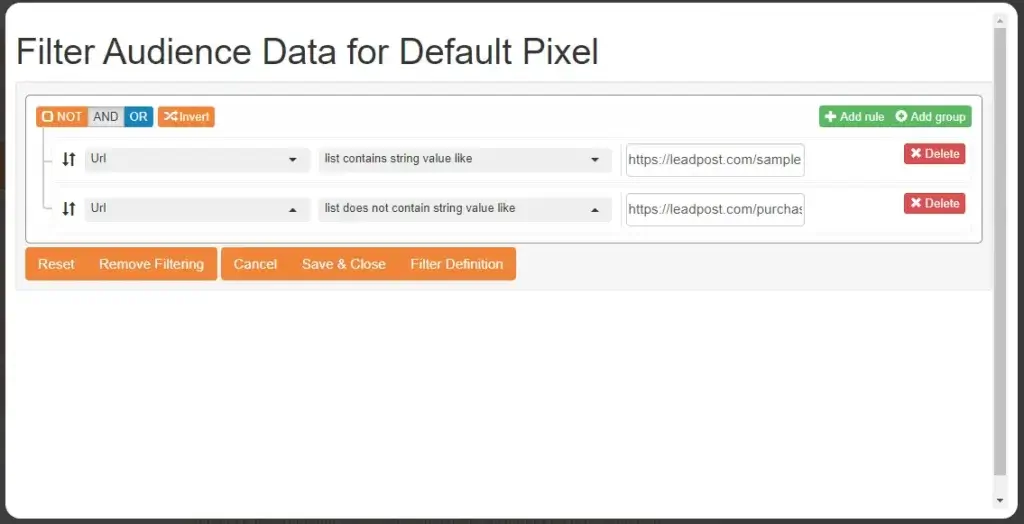
LeadPost includes filtering controls to help you avoid paying for every possible match. B2B users can filter by location, email availability, industry, and job title, while broader campaign filters can include pages visited, excluded pages, state, or ZIP code.
You can also suppress existing customers using email addresses or full names and addresses. This reduces duplicate spending and prevents current customers from entering prospecting workflows unnecessarily.
Because pricing is tied to lead volume, campaigns should focus on relevant people visiting commercial pages who are not already known contacts.
5. CRM and Marketing Integrations
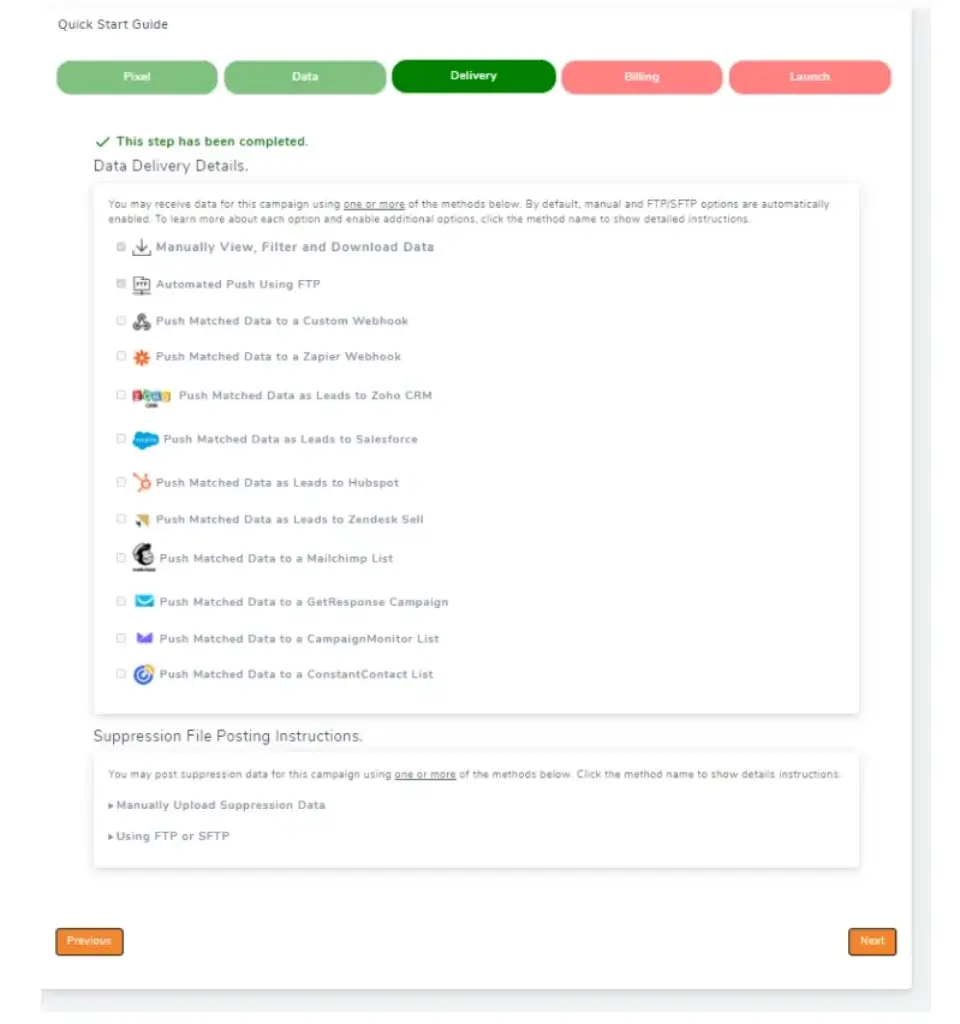
LeadPost can send identified leads to external systems through one-click integrations, Zapier, custom webhooks, automated FTP, or manual downloads. Current integration options include platforms such as Salesforce, HubSpot, Klaviyo, Mailchimp, HighLevel, Zoho CRM, ActiveCampaign, Constant Contact, Reply.io, and Facebook.
This keeps LeadPost focused on identification while your existing stack handles scoring, segmentation, outreach, deals, and reporting. The strongest setup automatically labels, qualifies, routes, and suppresses records without manual exports.
6. Cross-Channel Retargeting
LeadPost includes an integrated retargeting platform for email, paid social, display ads, and direct mail. This allows you to activate identified visitors without building every campaign in a separate tool.
The direct-mail capability is particularly distinctive. Personalized postcards can help expensive or location-based services stand out after a visitor leaves the website.
Still, integrated activation should not replace campaign strategy. You need frequency controls, audience exclusions, compelling offers, conversion tracking, and channel-specific creative. Sending more messages to unidentified visitors does not automatically improve results.
7. Data Enrichment and Demographic Insights
LeadPost’s data enrichment product can improve existing records by adding fields such as age range, education level, gender, homeowner status, household income range, marital status, net worth range, presence of children, verified email, name, address, and an unverified phone number.
Demographic insights can also reveal whether a campaign attracts the wrong household profile, income range, or customer segment.
These features are more relevant for B2C segmentation than standard B2B sales intelligence. They should be used with strict governance, limited access, clear business purposes, and careful review of applicable privacy obligations.
8. Agency and White-Label Capabilities
LeadPost is particularly well positioned for agencies. Its partner and white-label options support branded logins, dashboards, reports, client access, multi-account management, and packaging the technology inside a recurring service.
An agency can combine visitor identification with PPC, SEO, direct mail, email, or conversion optimization. The strongest packages add campaign setup, routing, qualification, creative, outreach, reporting, and privacy guidance rather than only reselling access.
Pros and Cons
Advantages and Disadvantages
LeadPost offers a broader activation workflow than many visitor identification tools, but its US-only coverage and data-sensitive use case mean it is not the right fit for every organization.
Positive
✅ Identifies individual B2B and B2C visitors
✅ Connects identity with page-level behavior
✅ Supports integrated multichannel retargeting
✅ Includes useful filters and suppression controls
✅ Offers broad CRM and marketing integrations
✅ Provides strong agency and white-label options
Negative
❌ Visitor identification is limited to US traffic
❌ Requires at least 1,000 monthly unique visitors
❌ Match completeness varies by visitor and field
❌ Costs rise as identified lead volume increases
❌ Sensitive data use requires careful governance
❌ Public security certification details are limited
👍 Pros
✅ Identifies individual B2B and B2C visitors
LeadPost goes beyond basic company identification and can return person-level contact data. The combination of B2B and B2C support also makes it relevant to a wider range of businesses than platforms built only for account-level sales intelligence.
✅ Connects identity with page-level behavior
Visited pages, timestamps, referral data, UTM parameters, and repeat activity make each lead more actionable. Your team can prioritize intent instead of treating every matched contact as equally valuable.
✅ Supports integrated multichannel retargeting
Email, paid social, display advertising, and direct mail can be managed through the same ecosystem. This is useful for teams that want to move from identification to activation without building a large collection of separate tools.
✅ Includes useful filters and suppression controls
Page, geography, industry, job title, and email filters help reduce irrelevant lead volume. Existing-customer suppression is another practical feature because it prevents known contacts from consuming prospecting budget.
✅ Offers broad CRM and marketing integrations
Direct integrations, Zapier, webhooks, FTP, and exports provide several ways to move data into your existing workflows. This makes LeadPost easier to adopt without replacing your CRM, email platform, or sales engagement software.
✅ Provides strong agency and white-label options
Branded dashboards, reports, client access, and multi-account capabilities make LeadPost especially relevant for marketing agencies, direct-mail companies, and lead generation providers building recurring services.
👎 Cons
❌ Visitor identification is limited to US traffic
LeadPost currently identifies visitors in the United States only. Businesses with international demand, especially those serving Europe, Canada, Asia, or mixed global markets, will not receive complete coverage.
❌ Requires at least 1,000 monthly unique visitors
Very small or early-stage websites may not have enough traffic to use the visitor identification service effectively. Even above the minimum, low-intent traffic may produce too few qualified matches to justify the cost.
❌ Match completeness varies by visitor and field
Not every identified lead will include every desired field. A record may have a name and email but no phone number, job title, or complete company information. Trial results should be judged by usable lead rate, not only match rate.
❌ Costs rise as identified lead volume increases
Pricing is tied to monthly lead allowances, and separate enrichment or retargeting charges may add to the total. Teams need clear filters and ROI tracking to prevent low-value matches from consuming budget.
❌ Sensitive data use requires careful governance
Person-level identity, browsing behavior, household information, and inferred demographic attributes can create privacy, compliance, and brand-trust risks. Access should be limited, disclosures should be clear, and outreach should remain relevant and respectful.
❌ Public security certification details are limited
LeadPost describes encryption, MFA, access controls, monitoring, incident response, vendor oversight, and secure development practices in its privacy policy. However, buyers that require publicly documented SOC 2 or ISO certification should request current evidence directly during due diligence.
User Experience
Setup and Daily Workflow
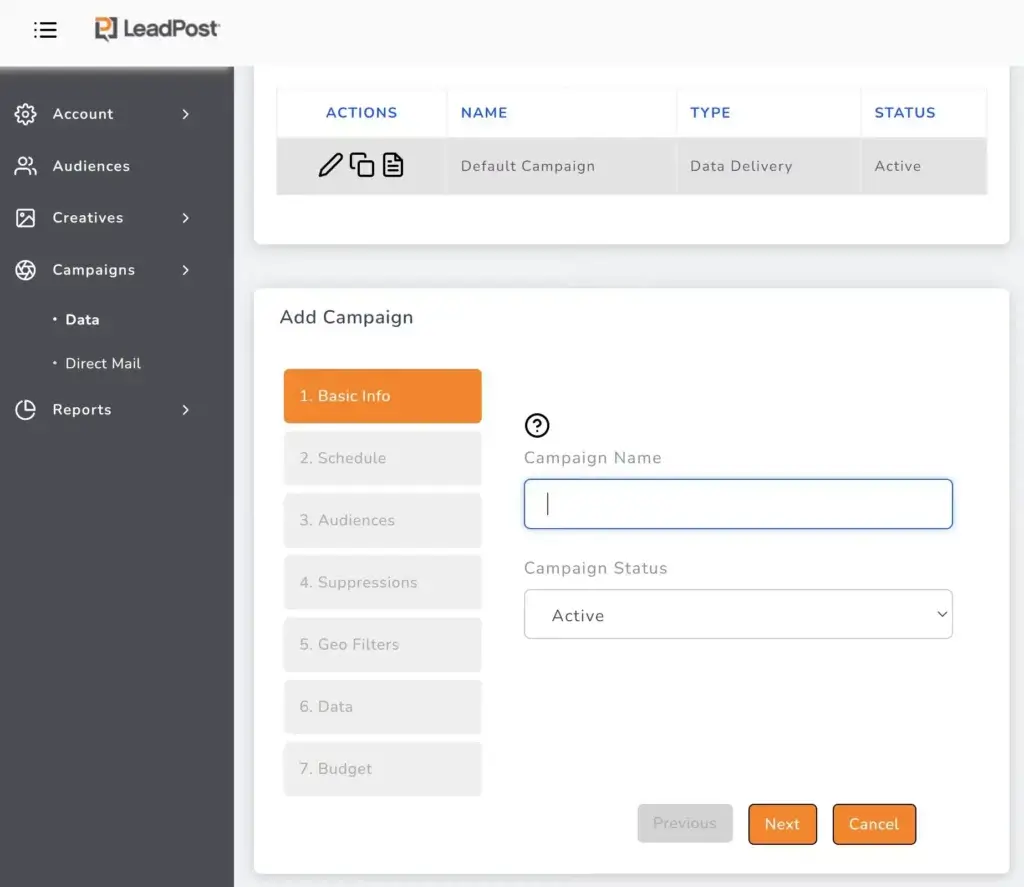
LeadPost is relatively straightforward to deploy because setup centers on a website pixel and campaign rules. Organizations with strict tag governance should still use an approved deployment process.
The most important setup decisions are strategic rather than technical. You need to define which pages indicate meaningful intent, which geographies and profiles are relevant, which existing contacts should be suppressed, and where new records should go.
The dashboard focuses on lead delivery and campaign management rather than complex business intelligence. Advanced journey analysis, attribution modeling, or product analytics still require dedicated tools.
Lead quality review should be part of the first two weeks. Check field completeness, email deliverability, company accuracy, geographic fit, page intent, duplicate rate, and eventual conversion. A high raw match rate has limited value when most records do not fit your target market.
Plans and Cost Structure
LeadPost Pricing
LeadPost separates pricing for B2B visitor identification, B2C visitor identification, data enrichment, demographic insights, and integrated retargeting. This modular structure lets you buy only the capabilities you need, but total costs can become more complex when you combine several products.
B2B and B2C visitor identification both include a 14-day free trial without a credit card. B2B trials include up to 100 leads, while B2C trials include up to 200 leads.
| Plan | Monthly Lead Allowance | Monthly Price |
| B2B Standard | Up to 250 leads | $199 |
| B2B Advanced | Up to 500 leads | $349 |
| B2B Premium | Up to 1,000 leads | $649 |
| B2C Standard | Up to 750 leads | $249 |
| B2C Advanced | Up to 2,000 leads | $499 |
| B2C Premium | Up to 4,500 leads | $999 |
Data Enrichment Pricing
LeadPost also offers a free enrichment tier with 1,000 monthly credits. Paid enrichment plans currently start at $149 per month for 6,000 credits, followed by $349 for 17,500 credits and $799 for 50,000 credits.
Different fields consume different numbers of credits. A verified email address, for example, uses more credits than a single demographic attribute. You should estimate the cost around the exact fields and record volume you plan to enrich.
Retargeting Costs
Integrated retargeting does not require a separate monthly service fee, but it is priced by delivery. Current listed rates include $0.85 for a 4 x 6 direct-mail postcard, $0.05 per delivered email, and $0.07 per record for 30-day display and social campaigns with ad spend included.
Evaluate pricing by cost per qualified and converted lead, including platform, enrichment, activation, creative, and follow-up costs.
Security, Privacy, and Compliance
How Secure Is LeadPost?
LeadPost processes identity, contact, browsing, device, behavioral, and inferred data, so security and privacy review should be a central part of the buying process rather than a brief checklist item.
Its privacy policy describes encryption in transit and at rest, multi-factor authentication, role-based access controls, network segmentation, firewalls, intrusion detection, endpoint detection and response, security logging, a secure development lifecycle, vendor assessments, and a written incident response plan.
LeadPost also identifies itself as a registered data broker operating under multiple US state privacy frameworks. Its policy describes consumer access, deletion, correction, opt-out, appeal, and suppression processes, along with retention schedules for different data categories.
What LeadPost Does Well
- Technical safeguards: The published policy describes encryption, MFA, monitoring, access controls, EDR, and secure development practices.
- Consumer rights: LeadPost provides mechanisms for access, deletion, correction, sale or sharing opt-outs, and appeals where applicable.
- Suppression controls: Customers can suppress existing records, while LeadPost maintains opt-out suppression data to prevent future collection.
- Vendor oversight: The policy states that processors undergo security, privacy, and data-minimization assessments.
What Buyers Should Verify
- Independent certification: Request current SOC 2, ISO 27001, penetration testing, or equivalent evidence if your procurement process requires it.
- Contractual terms: Review the DPA, subprocessor terms, breach notification commitments, deletion obligations, and permitted data uses.
- State privacy requirements: Confirm how your privacy notice, opt-out mechanisms, consent signals, and outreach practices align with each applicable jurisdiction.
- Internal access: Restrict person-level and demographic data to employees who need it for approved sales, marketing, or compliance purposes.
LeadPost is not a shortcut around privacy rules. Your organization remains responsible for lawful collection, disclosure, targeting, messaging, opt-outs, retention, and downstream use.
Business Size and Use-Case Fit
Who Should Use LeadPost?
LeadPost is best for US-focused businesses with enough website traffic, a defined target audience, and a process for turning visitor data into relevant follow-up. It is less suitable when traffic is mostly international, monthly volume is low, or privacy governance is not mature.
| Business Type | Fit | Why |
| Marketing agencies | Excellent | White-label access, multi-client workflows, reporting, and recurring-service potential |
| US B2B companies | Strong | Person-level contact data, page intent, job filters, and CRM delivery |
| High-value B2C services | Strong | Names, emails, addresses, demographics, and direct-mail activation |
| Ecommerce brands | Good | Useful for retargeting higher-value visitors, but outreach sensitivity matters |
| Small low-traffic websites | Limited | Requires at least 1,000 monthly unique visitors and enough intent to justify cost |
| International businesses | Poor | Visitor identification is currently limited to the United States |
| Highly regulated organizations | Conditional | Requires deeper legal, security, data-processing, and procurement review |
LeadPost Is Best For
LeadPost is strongest for agencies and US-based marketing teams that want person-level visitor identification and built-in activation across digital and direct-mail channels.
LeadPost May Not Be Right For
Choose another platform when you mainly need international company-level identification, a full sales database, advanced product analytics, or a complete outbound sales engagement system.
How It Compares
LeadPost Alternatives
The best LeadPost alternative depends on whether you need company-level website intelligence, person-level identification, sales data, outbound execution, or enterprise go-to-market tooling.
| Tool | Best For | Main Difference From LeadPost |
| Leadfeeder | International B2B company identification | More focused on identifying companies and account intent than US person-level B2C data |
| Instantly.ai | Visitor identification plus cold email execution | Broader outbound platform with deliverability, email accounts, database, and CRM tools |
| Apollo.io | B2B database and sales engagement | Stronger for prospect discovery and outbound sequences, less focused on B2C visitor matching |
| ZoomInfo | Enterprise GTM intelligence | Deeper enterprise data and intent ecosystem with a higher-cost, sales-led buying process |
Leadfeeder
Leadfeeder is a strong choice when your priority is identifying which companies visit your website and using that intent data for account-based sales. Its international B2B focus is broader than LeadPost’s US-only identification model.
LeadPost is the better fit when person-level B2B or B2C identity and direct-mail activation matter more. Leadfeeder is usually more relevant for teams that want company intelligence, account prioritization, and sales follow-up across global markets.
Instantly.ai
Instantly.ai has expanded beyond cold email into a broader outbound platform that includes a lead database, verification, CRM, deliverability tools, email infrastructure, AI agents, and website visitor identification.
Instantly is more suitable when your main goal is to identify visitors and launch scalable cold email campaigns from the same platform. LeadPost is stronger for B2C identification, direct-mail retargeting, demographic enrichment, and white-label agency packaging. Read the full Instantly.ai review.
Apollo.io
Apollo.io combines a large B2B database with contact enrichment, prospecting filters, email sequences, calling, workflow automation, and pipeline tools.
Apollo is the better option when you need to find prospects beyond your existing website traffic and run outbound sales engagement at scale. LeadPost is more specialized around identifying visitors who have already shown intent on your website. Read the full Apollo.io review.
ZoomInfo
ZoomInfo is an enterprise go-to-market intelligence platform with company and contact data, intent signals, enrichment, orchestration, and website visitor intelligence through WebSights.
ZoomInfo is more appropriate for large sales organizations that need a broad data and workflow ecosystem. LeadPost is easier to evaluate with public pricing and is more distinctive for person-level B2C identification, direct mail, and agency white labeling. Read the full ZoomInfo review.
Conclusion
Is LeadPost Worth It?
LeadPost is worth considering when anonymous US website traffic represents meaningful lost revenue and your team has a clear plan to qualify, route, and activate identified visitors.
Its strongest advantages are person-level identification across both B2B and B2C, page-level intent data, integrated email and advertising activation, direct-mail retargeting, data enrichment, and agency-friendly white labeling. That combination makes it more than a simple website visitor tracker.
Coverage is limited to the United States, at least 1,000 monthly unique visitors are required, match completeness varies, and person-level outreach demands careful governance. LeadPost also does not replace your CRM, analytics, or compliance process.
The best buying approach is to use the free trial with a tightly defined audience and a small group of high-intent pages. Measure usable match rate, qualified lead rate, outreach performance, opt-outs, pipeline created, and revenue. LeadPost provides strong value when those results justify the total cost and the workflow remains respectful to the people being contacted.
Frequently Asked Questions
Have more questions?
What is LeadPost?
LeadPost is website visitor identification and retargeting software. It helps businesses match some anonymous US website visitors with contact data, analyze their page activity, and activate those leads through connected sales and marketing channels.
How does LeadPost identify website visitors?
LeadPost uses a website pixel, third-party data providers, deterministic matching, and probabilistic signals such as IP and device characteristics. The resulting match can be combined with page views, source data, and repeat-visit information.
Does LeadPost identify individual people or only companies?
LeadPost can identify individual contacts rather than only company names. B2B records may include names, emails, job details, company data, and social profiles, while B2C records may include names, verified emails, and mailing addresses.
How much does LeadPost cost?
B2B visitor identification starts at $199 per month for up to 250 leads. B2C visitor identification starts at $249 per month for up to 750 leads. Enrichment and retargeting have separate credit-based or usage-based pricing.
Does LeadPost offer a free trial?
Yes. LeadPost offers a 14-day free trial without a credit card. The B2B trial includes up to 100 leads, while the B2C trial includes up to 200 leads.
What countries does LeadPost support?
LeadPost’s anonymous website visitor identification service currently works only for visitors in the United States. Businesses with mostly international traffic should consider a platform with broader geographic coverage.
How much traffic do you need for LeadPost?
LeadPost requires at least 1,000 unique monthly website visitors for its visitor identification service. More important than raw traffic is whether enough visitors match your target audience and view high-intent pages.
Which platforms integrate with LeadPost?
LeadPost supports integrations and delivery options including Salesforce, HubSpot, Klaviyo, Mailchimp, HighLevel, Zoho CRM, ActiveCampaign, Reply.io, Zapier, webhooks, FTP, and manual downloads.
Is LeadPost suitable for marketing agencies?
Yes. LeadPost offers agency and white-label capabilities such as branded dashboards, client logins, reports, and multi-account management. Agencies can package visitor identification with PPC, SEO, email, direct mail, or lead nurturing services.
What are the best LeadPost alternatives?
Strong LeadPost alternatives include Leadfeeder for international B2B company identification, Instantly.ai for visitor identification plus cold email, Apollo.io for B2B data and engagement, and ZoomInfo for enterprise GTM intelligence.