
Introduction
Choosing the right financial management system can change how your business handles accounting, reporting, approvals, multi-entity consolidation, revenue recognition, projects, and finance automation. In this Sage Intacct review, you will get a practical look at what the platform offers, where it performs well, where it becomes complex, and which types of companies are most likely to benefit from it in 2026.
Sage Intacct is a cloud-based accounting and financial management platform designed mainly for growing small and mid-sized businesses. It is especially strong for finance teams that need deeper accounting controls, real-time reporting, dimensional analysis, multi-entity management, project accounting, subscription billing, and automation.
The most important thing to understand is that Sage Intacct is not a traditional all-in-one ERP in the same way as NetSuite, Microsoft Dynamics 365, or SAP S/4HANA Cloud. It is better understood as a best-in-class cloud financial management system with ERP-like capabilities in specific areas.
That positioning makes Sage Intacct very attractive if your biggest operational pain is financial complexity. If you need manufacturing, warehouse management, advanced supply chain planning, or native CRM in one platform, you may need to connect Sage Intacct with other systems or compare it against broader ERP suites.
What Is Sage Intacct?
Sage Intacct is a cloud accounting and financial management platform built to help businesses manage general ledger, accounts payable, accounts receivable, cash management, purchasing, order management, reporting, dashboards, multi-entity consolidation, project accounting, contract revenue, and financial automation.
It is commonly used by finance teams that have outgrown entry-level accounting software and need stronger visibility, controls, and scalability. Instead of relying on spreadsheets, manual reconciliations, and disconnected approval workflows, Sage Intacct gives you a more structured financial system that can support growth.
Background and Positioning
Sage Intacct is part of Sage, a well-known business software provider with accounting, payroll, HR, and financial management products. Within the Sage portfolio, Intacct is the cloud financial management product aimed at growing organizations with more complex finance requirements.
The platform is particularly known for its dimensional general ledger. This allows you to track financial performance by department, location, project, customer, fund, product line, or other business dimensions without creating an overly complicated chart of accounts.
That is one of the main reasons Sage Intacct appeals to finance leaders. It gives you more reporting flexibility without forcing every business view into a rigid account structure.
Target Users and Use Cases
Sage Intacct is especially relevant for several buyer types:
- Growing finance teams – Stronger accounting, reporting, approvals, and controls.
- Multi-entity companies – Consolidations, intercompany transactions, and entity reporting.
- Professional services firms – Project accounting, time, billing, and profitability visibility.
- SaaS and subscription companies – Contract billing and revenue recognition support.
- Nonprofits – Fund accounting, grants, programs, and donor-related reporting.
Sage Intacct is not the best fit if you want a very low-cost accounting system, a simple self-serve tool, or a complete operational ERP with native manufacturing and supply chain depth. It is strongest when finance is the center of your software decision.
Core Financial Management Features
How Does Sage Intacct Work?
Sage Intacct works by centralizing financial data, transactions, approvals, reporting, and accounting workflows in a cloud-based system. Instead of managing finance through spreadsheets, disconnected applications, and manual journal entries, your team can manage core accounting processes from one financial platform.
The platform is modular. Most companies start with core financials, then add capabilities such as multi-entity consolidation, project accounting, fixed assets, contract billing, revenue recognition, spend management, inventory control, or advanced reporting depending on their needs.
Core Financial Management
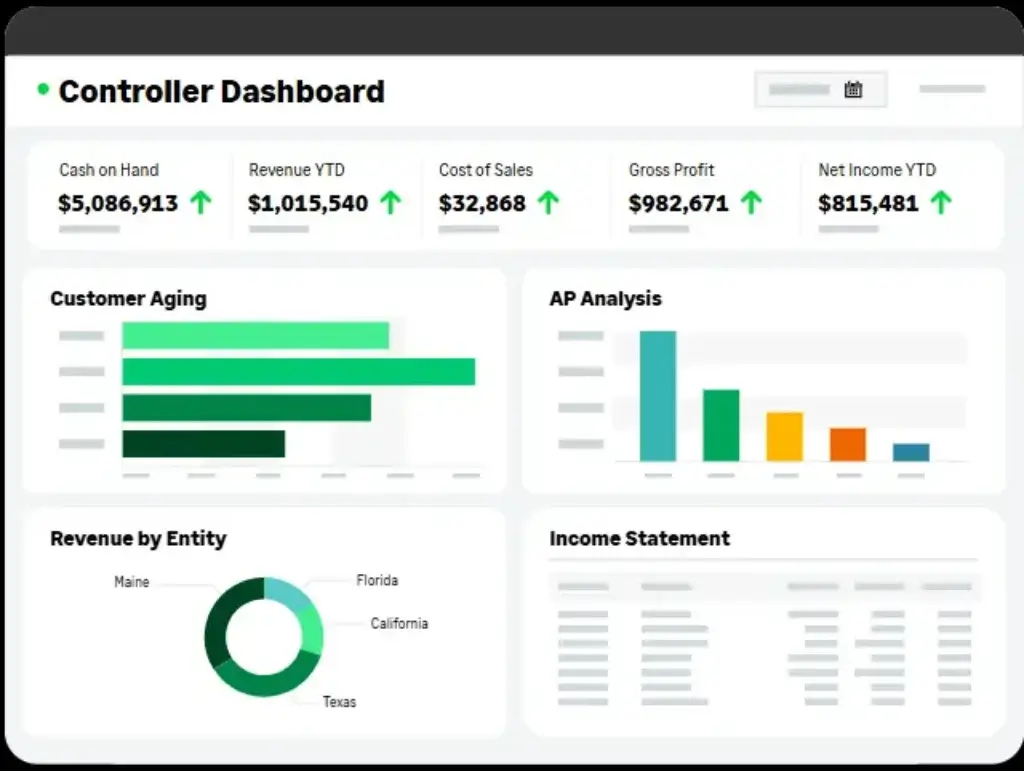
Core financial management is the strongest part of Sage Intacct. The platform supports general ledger, accounts payable, accounts receivable, cash management, purchasing, order management, dashboards, reporting, and financial controls.
For growing businesses, this is a major step up from entry-level accounting software. You get more structure around approvals, audit trails, reporting dimensions, consolidations, and finance workflows.
The value becomes even clearer when your company has multiple departments, entities, locations, programs, products, or customer groups. Sage Intacct helps you view financial data from different angles without building a messy chart of accounts.
Dimensional Accounting
Dimensional accounting is one of Sage Intacct’s most important differentiators. Instead of creating hundreds or thousands of accounts to track every financial view, you can tag transactions with dimensions such as department, location, project, customer, vendor, employee, grant, fund, item, or class.
This gives finance teams more flexible reporting. You can analyze profitability by project, expenses by department, revenue by customer segment, or performance by location without constantly rebuilding reports.
For companies with complex reporting needs, this can be a major advantage. It helps keep the chart of accounts cleaner while still giving leadership the financial visibility they need.
Accounts Payable and AP Automation
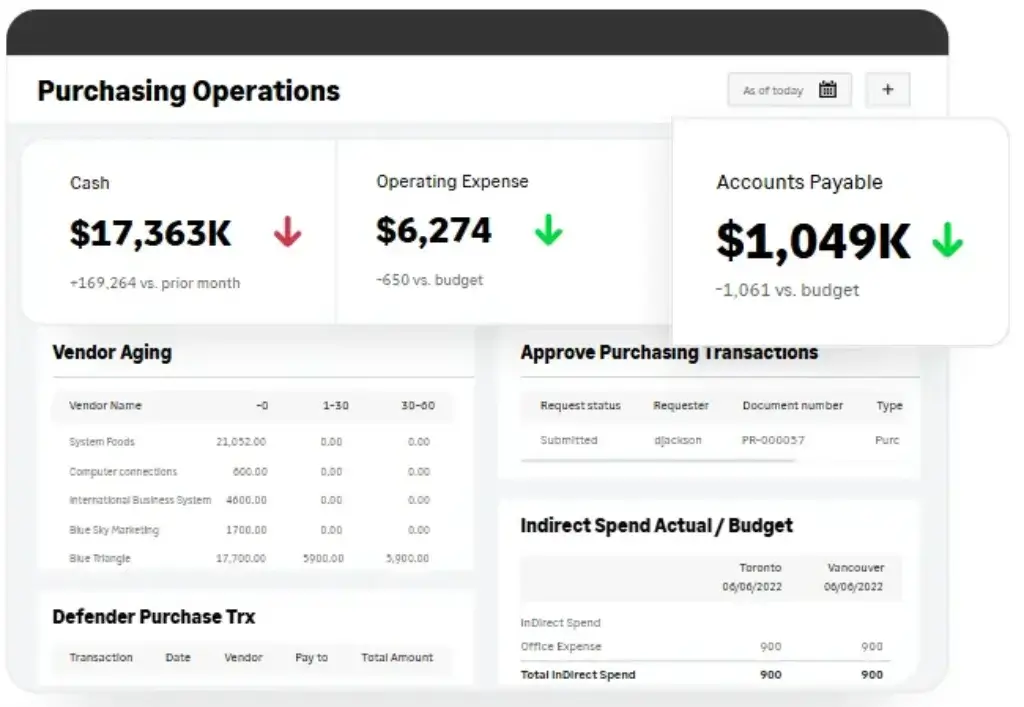
Sage Intacct includes accounts payable features that help you manage bills, vendors, approvals, payments, and payables reporting. The platform also supports automation capabilities that can reduce manual entry and improve control over invoice workflows.
Depending on your setup, AP automation can help read incoming bills, match them against purchase orders, flag duplicate invoices, and route documents for approval. This is useful for finance teams that process a high volume of invoices or need better visibility into payables.
AP automation is not only about saving time. It can also improve accuracy, reduce duplicate payments, strengthen approval controls, and help finance leaders monitor cash outflows more effectively.
Accounts Receivable and Cash Management
Sage Intacct supports accounts receivable workflows such as customer invoicing, collections visibility, cash application, aging reports, and receivables tracking. This helps your finance team monitor what customers owe, which invoices are overdue, and how receivables affect cash flow.
Cash management capabilities help teams manage bank accounts, reconciliations, cash balances, and liquidity visibility. For companies moving away from spreadsheet-heavy cash tracking, this can provide better financial discipline.
Multi-Entity Consolidation
Multi-entity management is one of the strongest reasons to consider Sage Intacct. The platform is well suited for companies with multiple entities, locations, funds, subsidiaries, or business units.
You can manage entity-level reporting while also consolidating financials across the organization. This is especially valuable for companies that need intercompany accounting, shared chart of accounts, multi-currency support, and faster period-end consolidation.
For finance leaders, this can reduce reliance on spreadsheet-based consolidation and manual reporting packages.
Project Accounting
Sage Intacct supports project accounting for businesses that need to track project costs, revenue, time, expenses, billing, budgets, and profitability. This is especially useful for professional services, consulting, engineering, nonprofit programs, and project-based businesses.
The platform can help you understand project margins, compare actuals against budgets, and connect project activity with financial reporting. If project profitability matters to your business model, Sage Intacct is much stronger than basic accounting tools.
Revenue Recognition and Contract Billing
Sage Intacct can support companies with more advanced billing and revenue needs. This is useful for SaaS companies, subscription businesses, service providers, and organizations that must manage complex contracts.
Revenue recognition features help finance teams align revenue with accounting standards and contract terms. Contract billing can help manage recurring billing, usage-based billing, renewals, and customer contract workflows depending on the configuration.
These features make Sage Intacct especially relevant for businesses that have outgrown simple invoicing tools.
Reporting and Dashboards
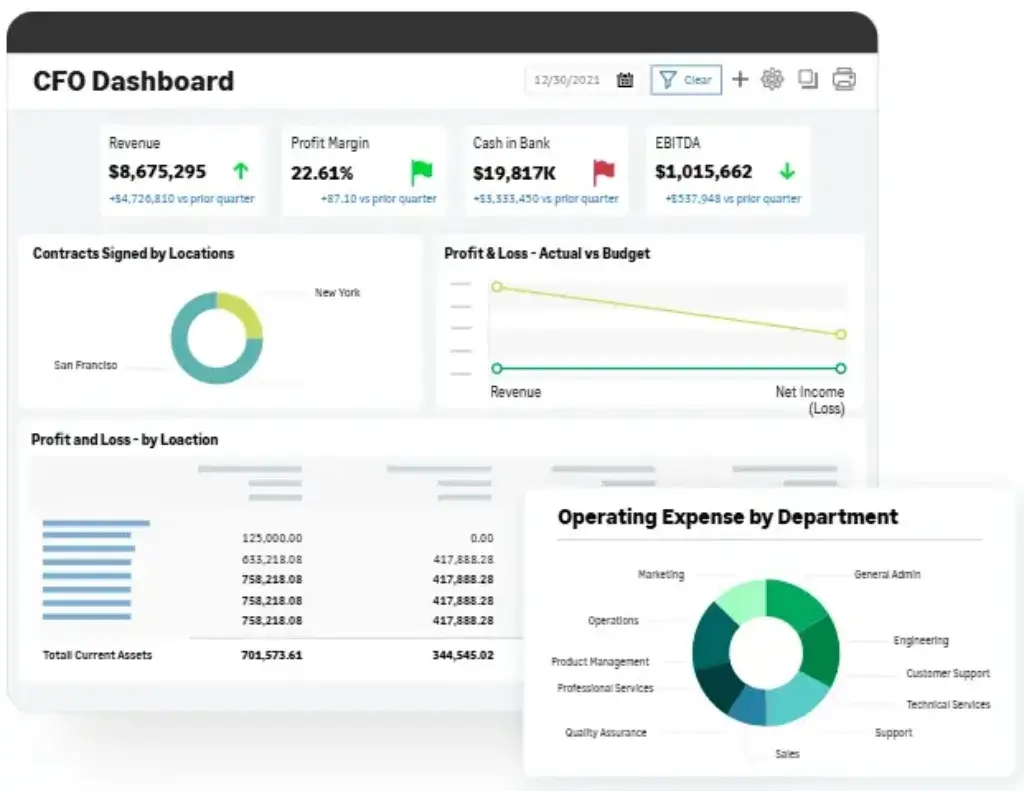
Reporting is one of Sage Intacct’s biggest strengths. The platform gives finance teams real-time dashboards, custom reports, financial statements, operational metrics, and drill-down analysis.
You can create dashboards for executives, controllers, department heads, project managers, and finance users. This helps different stakeholders see the financial data that matters to them without waiting for manual reports.
For leadership teams, the biggest benefit is visibility. Instead of relying only on month-end static reports, you can monitor financial performance more continuously.
AI and Automation Features
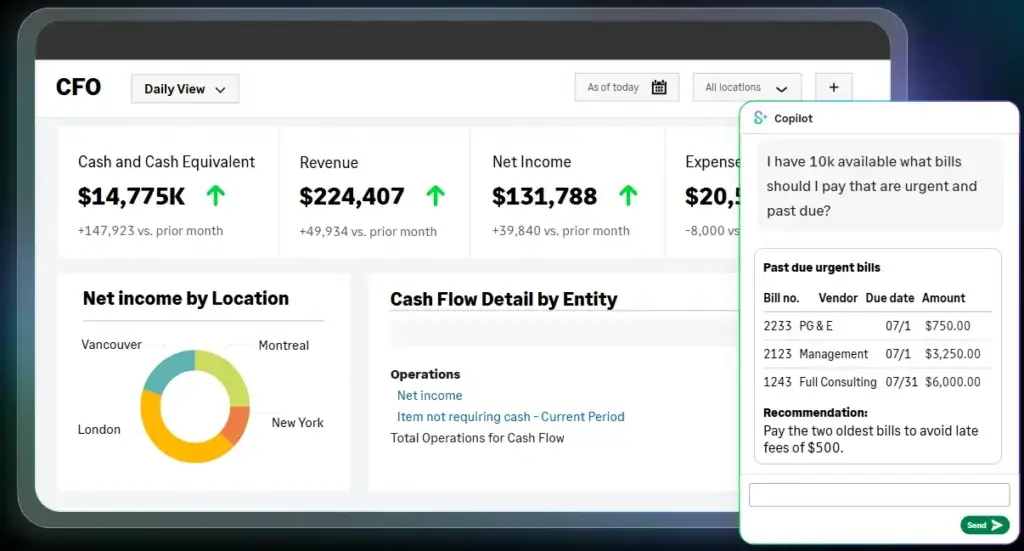
Sage has been expanding automation and AI capabilities across Intacct. Depending on your configuration and available features, Sage Intacct can support AI-assisted AP workflows, budget variance analysis, timesheet automation, and finance process automation.
These tools can reduce repetitive manual work and help finance teams identify exceptions faster. However, AI should not be treated as a replacement for clean data, strong approval rules, and good accounting governance.
The best results usually come when automation is implemented around clearly defined finance processes.
Integrations and Ecosystem
Sage Intacct integrates with a wide range of business systems, including CRM, payroll, HR, budgeting, expense management, AP automation, ecommerce, payments, and industry-specific tools.
Salesforce integration is one of the most common examples. For companies that use Salesforce as their CRM, Sage Intacct can help connect sales activity, contracts, billing, and finance workflows.
This integration-first approach is useful, but it also requires careful planning. If your business depends on many connected systems, you need to evaluate integration quality, data flow, ownership, and ongoing maintenance before implementation.
Platform Structure
Sage Intacct Modules and Capabilities
Sage Intacct uses a modular structure, which means you can start with core financials and add more advanced capabilities as your needs grow. This is useful because not every company needs every module from day one.
However, modular pricing also means you need to scope the system carefully. The more modules, entities, users, and integrations you add, the more your subscription and implementation costs can increase.
Core Financials
Core Financials is the foundation of Sage Intacct. It generally includes key accounting functions such as general ledger, accounts payable, accounts receivable, cash management, order management, purchasing, reporting, and dashboards.
This is the starting point for most businesses. It gives finance teams the structure they need to manage daily accounting and financial reporting more effectively.
Multi-Entity and Global Consolidations
Multi-entity capabilities help companies manage subsidiaries, entities, currencies, intercompany transactions, and consolidated reporting. This is one of the areas where Sage Intacct is especially strong.
For a growing company with several legal entities or locations, this can reduce manual work and improve reporting accuracy.
Project Accounting
Project accounting helps businesses track project budgets, expenses, time, billing, revenue, and profitability. This is valuable if your business needs to understand margin at the project level.
It is especially useful for professional services, consulting, architecture, engineering, nonprofits, and service-based organizations.
Contract Billing and Revenue Management
Contract billing and revenue management support businesses with recurring revenue, subscription billing, deferred revenue, and complex contract structures.
This can be important for SaaS companies and subscription-based businesses that need better control over billing schedules, renewals, and revenue recognition.
Inventory Control
Sage Intacct does offer inventory-related capabilities, but it is not usually positioned as a deep manufacturing or warehouse management ERP. Inventory Control can help track items, stock movement, purchasing, fulfillment, and inventory-related reporting.
For light inventory needs, Sage Intacct may be enough. For advanced manufacturing, warehouse automation, production planning, or complex supply chain management, you may need an integrated operational system or a broader ERP platform.
Fixed Assets
Fixed asset management helps finance teams track asset purchases, depreciation, disposals, and asset-related reporting. This is useful for organizations with significant equipment, property, infrastructure, or capital assets.
Spend Management
Spend management features help companies control purchasing, approvals, expenses, and budget visibility. This can help finance teams reduce unauthorized spending and improve procurement governance.
Module Comparison
The table below summarizes the most important Sage Intacct modules and where they are most useful.
| Module or Capability | Best For | Main Value |
| Core Financials | Growing finance teams | GL, AP, AR, cash management, purchasing, reporting |
| Dimensional Accounting | Companies needing flexible reporting | Track performance by department, entity, project, customer, or location |
| Multi-Entity Consolidation | Multi-company organizations | Consolidated reporting, intercompany transactions, entity-level visibility |
| Project Accounting | Project-based businesses | Project budgets, costs, billing, margins, and profitability |
| Contract Billing | SaaS and subscription companies | Recurring billing, contract workflows, customer billing control |
| Revenue Recognition | Companies with complex revenue rules | Revenue schedules, compliance support, deferred revenue management |
| Inventory Control | Businesses with light inventory needs | Item tracking, replenishment, fulfillment, inventory reporting |
| Fixed Assets | Asset-heavy organizations | Asset tracking, depreciation, disposals, financial reporting |
Pros and Cons
Benefits and Limitations of Sage Intacct
Positive
✅ Strong financial reporting
✅ Flexible dimensions
✅ Multi-entity strength
✅ Cloud-native finance
Negative
❌ Quote-based pricing
❌ Implementation required
❌ Limited operational ERP
❌ Add-ons increase cost
Strengths and Benefits
Sage Intacct has several major advantages, especially for finance-led businesses that need stronger accounting infrastructure.
- Financial reporting – Strong dashboards, reports, and drill-down visibility.
- Dimensional GL – Flexible analysis without bloated account structures.
- Multi-entity support – Useful for consolidations, intercompany, and global growth.
- Automation – Helps reduce manual work in AP, approvals, and financial workflows.
- Industry fit – Strong for nonprofits, SaaS, services, and multi-entity companies.
The biggest benefit is financial visibility. Sage Intacct helps you move from reactive reporting to more timely, structured, and decision-ready finance management.
Limitations and Drawbacks
Sage Intacct is powerful, but it is not the right answer for every business.
- Pricing transparency – Public pricing is limited and usually requires a quote.
- Implementation effort – Setup often requires partner support and planning.
- Operational gaps – Not as deep as full ERP suites for manufacturing or supply chain.
- Learning curve – Advanced reporting and dimensions require training.
- Cost expansion – More modules, users, and integrations can raise total cost.
My opinion is that Sage Intacct is one of the best financial management platforms for growing companies that need accounting depth, but it should not be bought as a universal ERP replacement. It is strongest when finance is the main problem you need to solve.
Operational Fit
Sage Intacct User Experience, Support, and Security
The Sage Intacct user experience depends on the complexity of your configuration. A finance team using core accounting, dashboards, and standard reporting may find the platform relatively approachable. A larger company using multi-entity consolidation, revenue recognition, project accounting, integrations, and custom dimensions will need more training.
Ease of Use
Sage Intacct is generally easier to use than many legacy accounting systems, but it is not as simple as entry-level tools like QuickBooks or Xero. The interface is built for finance professionals who need control, accuracy, and reporting depth.
The platform becomes easier to use when dashboards, approval workflows, dimensions, user roles, and reports are configured properly. If implementation is rushed, users may struggle with navigation, reporting logic, and workflow ownership.
Implementation Experience
Implementation is one of the most important parts of a Sage Intacct project. You need to define your chart of accounts, dimensions, entities, approval workflows, reporting needs, integrations, users, permissions, and migration plan.
For simple use cases, implementation can be relatively manageable. For multi-entity companies or businesses with complex billing, revenue recognition, projects, or integrations, implementation requires more structured planning.
In most cases, you should expect to work with Sage or an implementation partner. The quality of that partner can strongly influence your final experience.
Customer Support and Partner Network
Sage Intacct has a broad partner ecosystem, including implementation consultants, accountants, finance transformation advisors, and integration specialists. This can be a major advantage when you need help designing finance workflows or connecting Intacct with other business systems.
However, user feedback across review platforms often shows that support and implementation experiences can vary. This is not unusual in ERP and financial management software, but it means you should evaluate your partner carefully before signing.
Security and Compliance
Sage Intacct is built for business finance teams that need secure access, permissions, audit trails, approval workflows, and financial controls. Role-based access is important because different users should only see and edit the financial data relevant to their responsibilities.
Security also depends on how your company configures the system. You should define user roles, approval policies, password and access rules, integration permissions, audit procedures, and data governance before rollout.
AI Governance Considerations
Sage Intacct’s automation and AI features can support faster finance workflows, but finance leaders should still apply governance. AI-assisted workflows should be reviewed carefully when they touch invoices, payments, timesheets, budgets, or accounting decisions.
You should define who can use automation, what data it can access, how exceptions are reviewed, and which approvals must remain human-controlled.
Pricing
Sage Intacct Pricing and Plans
Sage Intacct pricing is quote-based. Sage does not publish a simple fixed pricing table for every buyer because cost depends on your selected modules, number of users, number of entities, implementation scope, integrations, support needs, and contract structure.
This means Sage Intacct should be evaluated based on total cost of ownership, not only subscription price. Your budget should include software subscription, implementation, data migration, integrations, training, partner services, reporting setup, and ongoing optimization.
How Sage Intacct Pricing Works
Sage Intacct pricing generally starts with core financial management and then expands based on the modules you need. For example, a company using only core financials will typically have a different cost than a company using multi-entity consolidation, project accounting, revenue recognition, contract billing, and several integrations.
User count also matters. Finance users, limited users, approvers, executives, and operational users may have different access needs, which can affect licensing.
Common Cost Drivers
The biggest cost drivers are usually modules, entities, integrations, and implementation complexity. A single-entity business with standard accounting needs will usually be simpler to implement than a multi-entity organization with revenue recognition, Salesforce integration, custom reporting, and complex approval workflows.
Before requesting a quote, document your required workflows. This will help you avoid paying for modules you do not need and reduce the risk of scope expansion during implementation.
Pricing Table
The table below explains how Sage Intacct pricing is typically structured. Always confirm current pricing directly with Sage or an authorized Sage partner before purchasing.
| Pricing Area | How It Usually Works | What to Check Before Buying |
| Core Financials | Quote-based subscription | Which financial modules are included in the base package |
| Advanced Modules | Added based on need | Project accounting, revenue recognition, multi-entity, inventory, fixed assets |
| User Licensing | Depends on access type and user count | Full users, limited users, approvers, executives, read-only users |
| Entities | May affect scope and cost | Number of legal entities, currencies, consolidations, intercompany workflows |
| Implementation | Usually separate from subscription | Partner fees, data migration, configuration, testing, training |
| Integrations | Varies by system complexity | CRM, payroll, HR, AP automation, payments, budgeting, ecommerce |
| Ongoing Support | Depends on contract and partner | Support response times, admin support, optimization services |
Is Sage Intacct Expensive?
Sage Intacct is more expensive than entry-level accounting software, but that is not the right comparison for most buyers. It competes more directly with mid-market financial management and ERP systems.
If your business only needs basic bookkeeping, invoicing, and bank reconciliation, Sage Intacct will likely feel too expensive. If your business needs multi-entity reporting, stronger financial controls, automated approvals, complex revenue management, and real-time dashboards, the cost can be easier to justify.
How to Control Sage Intacct Costs
The best way to control cost is to phase your implementation. Start with the modules that solve your most urgent finance problems, then expand after adoption improves.
You should also clarify what is included in the quote, what is billed separately, what partner services cost, and what future module additions may require. Ask for a clear implementation scope before signing.
Best Use Cases
Who Should Use Sage Intacct?
Sage Intacct is best for organizations that need stronger financial management but do not necessarily need a full operational ERP suite. It is particularly strong when finance complexity is growing faster than your current accounting system can support.
Growing Small and Mid-Sized Businesses
Sage Intacct is a strong fit for growing SMBs that have outgrown QuickBooks, Xero, Sage 50, spreadsheets, or disconnected finance tools. It gives finance teams more structure, automation, approvals, and reporting depth.
This is especially useful when leadership needs more reliable financial visibility and the finance team spends too much time on manual reporting.
Multi-Entity Organizations
Companies with multiple entities, locations, subsidiaries, or funds can benefit heavily from Sage Intacct. Consolidation, intercompany accounting, and entity-level reporting are areas where the platform performs well.
If your month-end close depends on manual spreadsheets and repeated consolidation work, Sage Intacct can create meaningful efficiency gains.
Professional Services Firms
Professional services companies can use Sage Intacct to connect project financials, time, expenses, billing, and margin reporting. This helps leaders understand whether projects are profitable and where delivery costs are increasing.
For consulting, engineering, architecture, agencies, and other services businesses, project-level financial visibility can be a major advantage.
SaaS and Subscription Businesses
Sage Intacct can be a good fit for SaaS and subscription companies that need contract billing, deferred revenue, revenue recognition, renewal visibility, and financial reporting across recurring revenue models.
These businesses often outgrow basic invoicing tools because billing and revenue become more complex as customer contracts expand.
Nonprofits
Sage Intacct is commonly used by nonprofits because it can support fund accounting, grant tracking, program reporting, donor-related reporting, and multi-dimensional financial analysis.
For nonprofit leaders, this can improve transparency and help connect financial activity with programs, restrictions, grants, and outcomes.
When Sage Intacct Might Not Be Right
Sage Intacct may not be the right choice if your business needs deep native manufacturing, warehouse management, supply chain planning, retail POS, ecommerce, or operational ERP functionality in one platform.
It may also be too much if your company is still small, has simple accounting needs, or wants the cheapest possible software option.
User Feedback
Sage Intacct Customer Reviews
User feedback for Sage Intacct is generally positive around financial reporting, cloud access, dimensional accounting, dashboards, and finance workflow flexibility. Many users like that the platform gives them better visibility than legacy systems or entry-level accounting tools.
What Users Like Most
Positive reviews often mention reporting flexibility, customizable dashboards, drill-down visibility, multi-entity management, and the ability to analyze financial data by dimensions.
Finance users also tend to appreciate that Sage Intacct is cloud-based. This makes it easier for distributed teams, remote finance staff, executives, and approvers to access financial data without relying on desktop software or local files.
Common Complaints
Common complaints usually focus on implementation complexity, support responsiveness, learning curve, bugs, and rising cost. Some users also note that advanced features require configuration and training before they become truly useful.
These concerns are important because they reflect the reality of mid-market financial systems. Sage Intacct can provide strong results, but it is not a tool you should expect to configure casually without planning.
My Take on the Review Pattern
The review pattern suggests that Sage Intacct succeeds when companies buy it for the right reason. It works best when the goal is to improve finance operations, reporting, consolidations, and accounting control.
It is less ideal when buyers expect it to behave like a complete ERP for every operational department. The platform is excellent for finance-led use cases, but broader operational needs may require integrations or a different ERP system.
Competitors
Sage Intacct Alternatives and Competitors
Sage Intacct competes with ERP and financial management platforms such as NetSuite, Microsoft Dynamics 365 Business Central, QuickBooks Enterprise, Acumatica, Oracle Fusion Cloud ERP, SAP S/4HANA Cloud, and Odoo. The right alternative depends on whether your priority is finance depth, operational ERP, affordability, manufacturing, CRM, or ecosystem fit.
| Feature Type | Sage Intacct | NetSuite | Dynamics 365 Business Central | QuickBooks Enterprise |
| Core angle | Cloud financial management | Cloud ERP suite | Microsoft-based SMB ERP | Advanced small business accounting |
| Best for | Finance-led growing companies | Companies needing finance plus operations | Microsoft-first SMBs | Smaller teams needing accounting depth |
| Reporting strength | Very strong with dimensions | Strong ERP reporting | Strong with Microsoft ecosystem | Good for smaller businesses |
| Operational ERP depth | Moderate, integration-dependent | Strong | Moderate to strong | Limited |
| Implementation complexity | Moderate | Moderate to high | Moderate | Low to moderate |
| Pricing style | Quote-based | Quote-based | Published base pricing plus implementation | Published pricing options |
| Overall fit | Best for financial control and reporting | Best for broader ERP standardization | Best for Microsoft ecosystem alignment | Best for smaller accounting teams |
Compared with NetSuite, Sage Intacct is usually stronger for finance-led buyers that want deep accounting and reporting without adopting a broader operational ERP suite. NetSuite is stronger if you want finance, CRM, inventory, ecommerce, procurement, and operations in one system.
Compared with Microsoft Dynamics 365, Sage Intacct is more focused on financial management. Dynamics 365 is stronger if your company already uses Microsoft heavily and wants ERP, CRM, productivity, BI, and automation inside one ecosystem.
Compared with QuickBooks Enterprise, Sage Intacct is better for businesses that have outgrown small business accounting and need more scalable reporting, workflows, and multi-entity capabilities. QuickBooks Enterprise is usually easier and less expensive for smaller teams.
Compared with Acumatica, Sage Intacct is stronger for finance and accounting depth, while Acumatica may be more attractive for companies that need broader ERP functionality with industry editions.
Best Practices
Getting Started with Sage Intacct
Getting started with Sage Intacct requires planning. The platform can create major value, but only if your finance processes, data structure, reporting requirements, and implementation scope are clear before launch.
Define Your Finance Requirements
Start by mapping your finance workflows. Document what you need for general ledger, AP, AR, cash management, approvals, entities, revenue recognition, projects, reporting, budgeting, integrations, and compliance.
This prevents overbuying and helps Sage or your implementation partner recommend the right modules.
Design Dimensions Carefully
Dimensions are one of Sage Intacct’s biggest advantages, but they require thoughtful design. Decide which dimensions matter for reporting, such as department, location, customer, project, entity, vendor, item, fund, or program.
A strong dimension strategy gives you better reporting. A weak strategy can create confusion and inconsistent data.
Clean Data Before Migration
Data migration is one of the most common ERP and accounting system challenges. Clean your chart of accounts, vendors, customers, projects, items, historical balances, open invoices, and entity records before migration.
If you migrate poor data, the new system may not deliver the reporting quality you expect.
Choose the Right Implementation Partner
Partner selection matters. Look for a Sage Intacct partner with experience in your industry, company size, and required modules.
Ask about project methodology, timeline, scope, data migration, reporting setup, integrations, training, post-launch support, and references from similar companies.
Train Users by Role
Training should be role-based. Controllers, AP teams, AR teams, department heads, project managers, executives, and administrators need different training.
Focus on daily workflows first. Users adopt systems faster when they understand how the software helps them complete real work.
Roll Out in Phases
A phased rollout is often safer than implementing every module at once. You may start with core financials and reporting, then add multi-entity, project accounting, revenue recognition, AP automation, or integrations later.
This reduces risk and helps your team build confidence before expanding the system.
Conclusion
Final Thoughts
Sage Intacct is one of the strongest cloud financial management systems for growing businesses that need better accounting control, financial reporting, multi-entity consolidation, dimensional analysis, project accounting, and finance automation.
Its biggest strengths are reporting flexibility, dimensional accounting, multi-entity support, finance workflow automation, and strong fit for organizations that have outgrown entry-level accounting software.
It is not the simplest or cheapest option. Pricing is quote-based, implementation requires planning, and advanced modules can increase total cost. It also may not be the best fit if you need deep native manufacturing, warehouse management, or supply chain functionality in one system.
Overall, Sage Intacct is easy to recommend for finance-led companies that need stronger financial visibility and control. If your biggest challenge is accounting complexity, reporting delays, manual consolidations, or weak financial visibility, Sage Intacct deserves serious consideration in 2026.
Frequently Asked Questions
Have more questions?
What is Sage Intacct?
Sage Intacct is a cloud accounting and financial management platform for growing businesses. It supports core financials, reporting, dashboards, accounts payable, accounts receivable, cash management, multi-entity consolidation, project accounting, and financial automation.
Is Sage Intacct an ERP system?
Sage Intacct has ERP-like capabilities, but it is best described as a cloud financial management platform. It is strongest for accounting, reporting, consolidations, project accounting, revenue recognition, and finance automation rather than full manufacturing or supply chain ERP.
Who is Sage Intacct best for?
Sage Intacct is best for growing small and mid-sized businesses that need stronger financial reporting, multi-entity accounting, dimensional analysis, project accounting, subscription billing, or finance automation. It is especially relevant for nonprofits, SaaS companies, professional services firms, and multi-entity organizations.
How much does Sage Intacct cost?
Sage Intacct pricing is quote-based. Cost depends on selected modules, number of users, entities, integrations, implementation scope, and support needs. You should request a tailored quote from Sage or an authorized Sage partner and evaluate total cost of ownership, not only subscription cost.
What are the main Sage Intacct modules?
Common Sage Intacct modules and capabilities include Core Financials, accounts payable, accounts receivable, cash management, purchasing, order management, dashboards, dimensional accounting, multi-entity consolidation, project accounting, contract billing, revenue recognition, fixed assets, and inventory control.
Does Sage Intacct support multi-entity accounting?
Yes. Multi-entity accounting is one of Sage Intacct’s strongest capabilities. It can help companies manage multiple entities, locations, currencies, intercompany transactions, and consolidated financial reporting.
Does Sage Intacct support project accounting?
Yes. Sage Intacct supports project accounting for businesses that need to track project budgets, costs, billing, time, expenses, revenue, and profitability. This makes it useful for professional services firms, consulting companies, nonprofits, and project-based businesses.
Is Sage Intacct good for nonprofits?
Yes. Sage Intacct is a strong option for nonprofits because it can support fund accounting, grants, programs, dimensions, multi-entity reporting, approvals, and financial transparency. Nonprofits should still confirm module requirements before purchasing.
What are the best Sage Intacct alternatives?
The best Sage Intacct alternatives include NetSuite, Microsoft Dynamics 365 Business Central, Acumatica, QuickBooks Enterprise, Oracle Fusion Cloud ERP, SAP S/4HANA Cloud, and Odoo. The right choice depends on whether you need finance depth, broader ERP functionality, Microsoft ecosystem fit, manufacturing, or lower-cost accounting software.
Is Sage Intacct worth it?
Sage Intacct is worth considering if your business has outgrown basic accounting software and needs stronger reporting, automation, multi-entity consolidation, project accounting, or revenue management. It may not be worth it for very small businesses with simple accounting needs or companies that require a full operational ERP in one platform.