
Introduction
Choosing the right ERP system can reshape how your business manages finance, operations, inventory, supply chain, reporting, and customer data. In this Microsoft Dynamics 365 review, you will get a practical look at what the platform offers, where it performs well, where it becomes complex, and which types of companies are most likely to benefit from it in 2026.
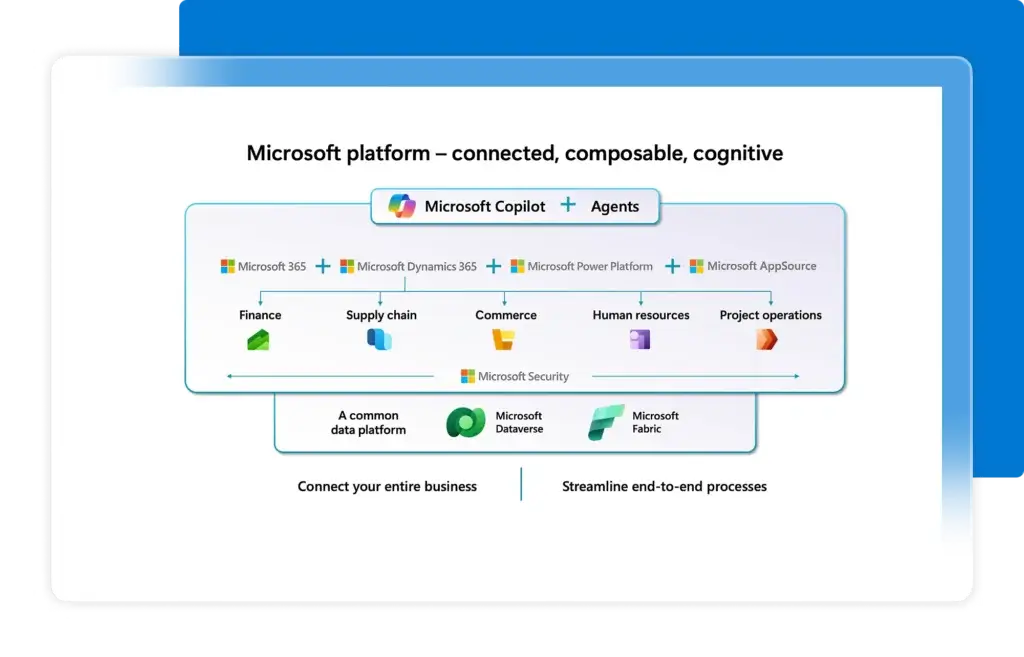
Microsoft Dynamics 365 is not a single ERP product. It is a connected suite of business applications that includes ERP, CRM, supply chain, finance, commerce, project operations, customer service, and sales tools. For ERP buyers, the most relevant products are usually Dynamics 365 Business Central, Dynamics 365 Finance, Dynamics 365 Supply Chain Management, Dynamics 365 Commerce, and Dynamics 365 Project Operations.
That structure is both the biggest strength and the biggest challenge of Dynamics 365. You can build a powerful Microsoft-based business management ecosystem, but you also need to understand which applications your company actually needs before comparing cost, implementation effort, and long-term value.
What Is Microsoft Dynamics 365?
Microsoft Dynamics 365 is a cloud-based suite of enterprise business applications built to connect ERP, CRM, analytics, productivity, and automation workflows. It is designed to help companies manage core business operations such as finance, sales, customer service, procurement, inventory, manufacturing, supply chain, retail, and project delivery.
For ERP use cases, Microsoft offers different Dynamics 365 applications for different business sizes and operational needs. Dynamics 365 Business Central is the most relevant option for small and mid-sized companies. Dynamics 365 Finance and Dynamics 365 Supply Chain Management are more suitable for larger organizations with complex financial, manufacturing, distribution, and global operational requirements.
Background and Positioning
Dynamics 365 sits inside Microsoft’s broader business ecosystem, which includes Microsoft 365, Teams, Outlook, Excel, Power BI, Power Platform, Azure, Copilot, and Microsoft Dataverse. This gives Dynamics 365 a major advantage for companies that already use Microsoft tools and want ERP data to connect with reporting, communication, workflow automation, and productivity systems.
Unlike lighter ERP platforms that focus on one core workflow, Dynamics 365 can support a wide range of business functions. You can use it as a finance-led ERP, an operations platform, a manufacturing system, a project accounting solution, or a broader business management suite.
Target Users and Use Cases
Microsoft Dynamics 365 is especially relevant for several buyer types:
- Growing SMBs – Business Central supports finance, sales, inventory, and operations.
- Mid-market companies – Dynamics 365 can scale across departments and entities.
- Enterprise finance teams – Finance supports complex financial management and reporting.
- Manufacturers and distributors – Supply Chain Management supports production, planning, warehouse, and assets.
- Microsoft-first companies – Dynamics 365 integrates deeply with Microsoft 365, Power BI, Teams, and Power Platform.
Dynamics 365 is not the best fit if you want the simplest possible ERP system, a low-cost tool that can be self-implemented quickly, or a product with one clear pricing path. It is strongest when you need Microsoft ecosystem depth, ERP scalability, and the flexibility to build around specific operational needs.
Core ERP Features
How Does Microsoft Dynamics 365 Work?
Microsoft Dynamics 365 works by connecting different business applications around shared data, workflows, reporting, and automation. Instead of treating ERP, CRM, reporting, and collaboration as separate systems, Dynamics 365 allows companies to build a more connected operating model using Microsoft’s cloud ecosystem.
The exact setup depends on the products you choose. A small business may use Business Central as its main ERP. A larger enterprise may combine Finance, Supply Chain Management, Commerce, Project Operations, Power BI, and Microsoft 365 Copilot to support a more complex environment.
Financial Management
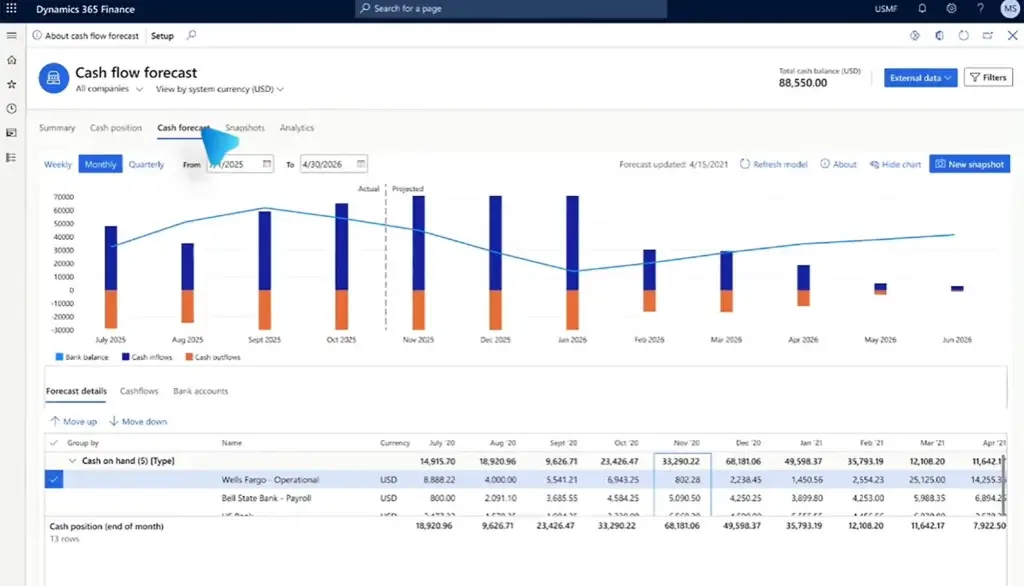
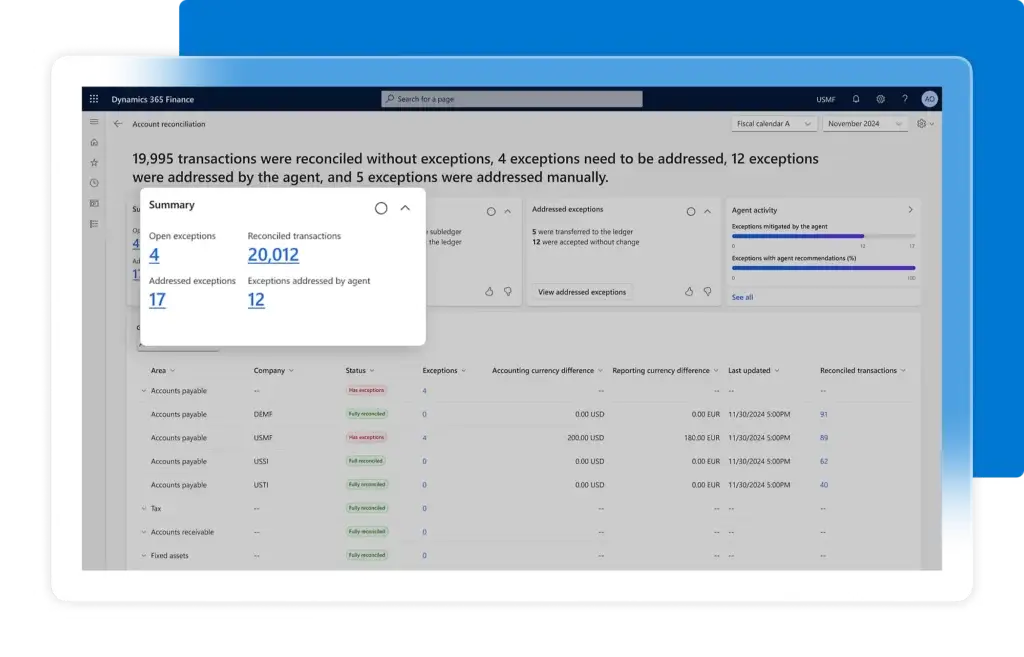
Financial management is one of the strongest areas of Dynamics 365. Business Central supports general ledger, accounts payable, accounts receivable, budgeting, cash flow, bank reconciliation, fixed assets, and financial reporting for small and mid-sized companies.
Dynamics 365 Finance goes deeper for larger organizations. It is built for global financial operations, budgeting, forecasting, compliance, financial insights, multi-currency environments, and advanced performance management. This makes it more suitable for companies with multiple legal entities, complex reporting needs, and enterprise-level financial controls.
Supply Chain Management
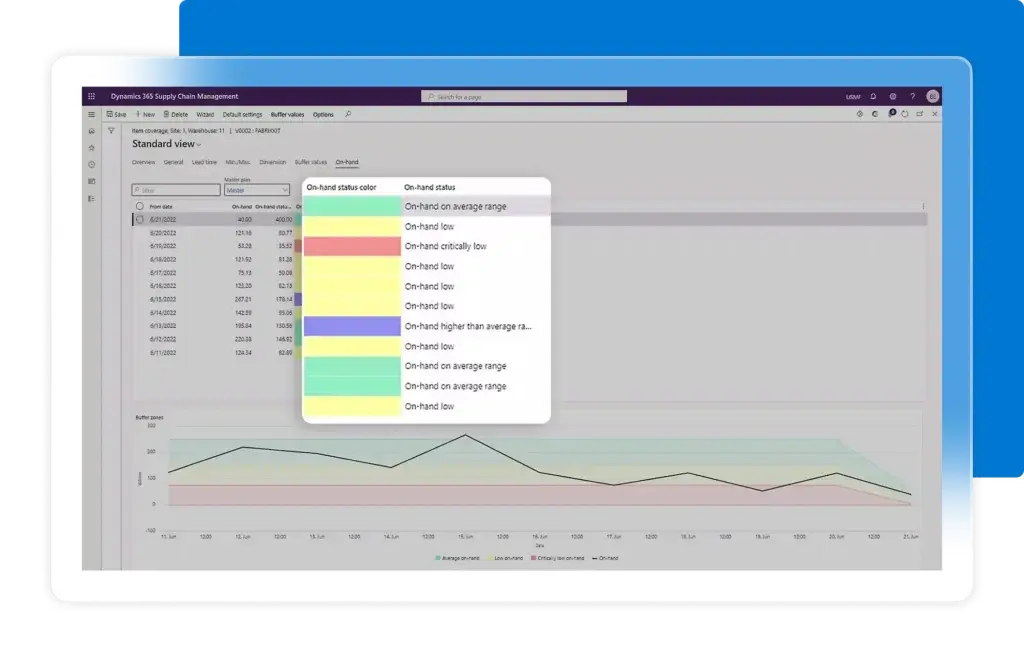
Dynamics 365 Supply Chain Management supports procurement, inventory, warehousing, manufacturing, asset management, demand planning, order management, and fulfillment. It is designed for companies that need real-time operational visibility across suppliers, production, inventory, and logistics.
This is one of the main reasons Dynamics 365 is competitive for manufacturers, distributors, wholesalers, and product-based companies. When implemented correctly, it can help connect finance and operations instead of forcing teams to manage production, stock, procurement, and reporting in separate systems.
Inventory and Warehouse Management
Inventory and warehouse capabilities are available through Business Central for smaller companies and through Supply Chain Management for more advanced operations. You can manage items, locations, stock movements, replenishment, purchasing, order fulfillment, and warehouse processes.
For companies with simple inventory needs, Business Central may be enough. For more complex warehouse operations, Supply Chain Management is the stronger option because it supports deeper warehouse, planning, quality, and fulfillment workflows.
Manufacturing and Production Planning
Dynamics 365 supports manufacturing through Business Central Premium and through Dynamics 365 Supply Chain Management. Business Central Premium is more appropriate for smaller manufacturers that need production orders, basic manufacturing workflows, and service management.
Supply Chain Management is better suited for companies with advanced manufacturing requirements. It can support production planning, shop floor management, asset management, quality processes, demand planning, procurement, and operational visibility across production environments.
Sales, CRM, and Customer Management
Dynamics 365 has strong CRM coverage because the broader suite includes applications such as Dynamics 365 Sales, Customer Service, Field Service, and Customer Insights. This is useful if your ERP strategy also requires sales pipeline management, customer service, field operations, and customer data alignment.
Business Central includes sales and service-related functionality, but it is not a full CRM in the same way as Dynamics 365 Sales. If your sales process is complex, you may need both ERP and CRM applications connected through the Microsoft ecosystem.
Project Operations
Dynamics 365 Project Operations is designed for project-centric businesses that need to manage deals, resources, project delivery, time, expenses, costing, billing, and profitability. It is especially relevant for professional services, consulting firms, engineering businesses, and companies that sell complex project work.
Its value is strongest when project delivery needs to connect with finance. If your company only needs simple task management, a lighter project management tool may be more practical. If you need project accounting and operational visibility, Project Operations becomes more relevant.
Commerce and Retail Operations
Dynamics 365 Commerce supports omnichannel retail operations, ecommerce, store operations, pricing, loyalty, personalization, and connected customer experiences. It is designed for retailers that need to connect online, in-store, and back-office processes.
This is not a necessary module for every ERP buyer. However, for retail, ecommerce, and omnichannel businesses, Commerce can extend Dynamics 365 beyond finance and operations into customer-facing retail workflows.
Reporting, Dashboards, and Business Intelligence
Reporting is a major strength because Dynamics 365 works closely with Power BI, Excel, Dataverse, and Microsoft’s analytics ecosystem. You can build dashboards, track financial performance, analyze operations, and connect ERP data to broader business intelligence workflows.
This matters because ERP value depends heavily on visibility. Dynamics 365 is not only about entering transactions. It can help executives, finance teams, and operations leaders understand performance across departments when data architecture is planned correctly.
Automation and AI Features
Dynamics 365 benefits from Microsoft’s investment in Copilot, Power Automate, AI-assisted workflows, and low-code automation. Depending on the application, you can use automation for approvals, financial workflows, supply chain processes, customer engagement, document handling, and operational alerts.
AI should be viewed as a productivity layer rather than a replacement for process design. The companies that get the most value from Dynamics 365 AI capabilities are usually those with clean data, clear workflows, and well-defined reporting needs.
Integrations and Microsoft Ecosystem
Integration is one of the biggest reasons to consider Dynamics 365. It connects naturally with Microsoft 365, Teams, Outlook, Excel, Power BI, Power Apps, Power Automate, Azure, and Dataverse.
This ecosystem fit can reduce friction for teams that already work inside Microsoft tools. For example, finance teams may export and analyze data in Excel, leaders may review dashboards in Power BI, and employees may collaborate through Teams while workflows are automated through Power Platform.
Platform Structure
Microsoft Dynamics 365 ERP Modules and Applications
One of the most important things to understand before buying Microsoft Dynamics 365 is the product structure. The name “Dynamics 365” covers several applications, and not every company needs the same combination.
For ERP selection, you should identify whether your business needs Business Central, Finance, Supply Chain Management, Commerce, Project Operations, or a broader connected setup.
Dynamics 365 Business Central
Business Central is Microsoft’s ERP solution for small and mid-sized businesses. It brings together finance, sales, service, inventory, purchasing, project management, and operations in one system.
This is usually the best Dynamics 365 starting point for companies that are moving beyond QuickBooks, spreadsheets, or disconnected accounting and inventory tools. It is also easier to understand and budget for than a full enterprise Dynamics 365 Finance and Supply Chain Management deployment.
Dynamics 365 Finance
Dynamics 365 Finance is built for larger and more complex finance teams. It supports global financial management, planning, budgeting, forecasting, compliance, cash flow visibility, automation, and advanced financial reporting.
This application is most relevant when your organization has complex finance operations, multiple entities, multi-currency needs, strict reporting requirements, or a finance team that needs deeper control than Business Central can provide.
Dynamics 365 Supply Chain Management
Supply Chain Management is built for companies that need stronger control over planning, production, procurement, inventory, warehouse operations, logistics, asset management, and fulfillment.
It is especially useful for manufacturers, distributors, and product-based enterprises. However, it is also more complex to implement, so the business case should justify the added investment.
Dynamics 365 Project Operations
Project Operations is designed for project-based businesses that need to connect sales, resources, project delivery, time tracking, expenses, invoicing, and profitability.
This is a strong fit for professional services and consulting organizations that want project financials and operational data in one Microsoft-based platform.
Dynamics 365 Commerce
Commerce supports retailers and ecommerce businesses that need connected digital and physical commerce operations. It can help manage pricing, customer experiences, loyalty, transactions, and omnichannel retail workflows.
This module is most relevant when retail operations are central to the business. If your company only needs back-office ERP, Commerce may not be necessary.
Dynamics 365 Human Resources
Dynamics 365 Human Resources supports employee data, benefits, leave, compensation, compliance, and workforce-related processes. It can be useful for companies that want HR information connected to the Microsoft business ecosystem.
However, it should not be treated as a universal replacement for every HRIS, payroll, or talent management platform. You should compare it carefully against dedicated HR software if HR is a major buying priority.
ERP Module Comparison
The table below summarizes the most important Dynamics 365 ERP-related applications.
| Application | Best For | Main Capabilities |
| Dynamics 365 Business Central | Small and mid-sized businesses | Finance, sales, purchasing, inventory, operations, projects |
| Dynamics 365 Finance | Mid-market and enterprise finance teams | Global finance, budgeting, forecasting, compliance, reporting |
| Dynamics 365 Supply Chain Management | Manufacturers, distributors, product companies | Planning, procurement, inventory, warehouse, manufacturing, assets |
| Dynamics 365 Project Operations | Project-based businesses | Resource management, project delivery, time, expenses, billing |
| Dynamics 365 Commerce | Retail and ecommerce businesses | Omnichannel commerce, store operations, pricing, loyalty |
| Dynamics 365 Human Resources | Companies needing workforce management | Employee records, benefits, leave, compensation, HR workflows |
Pros and Cons
Benefits and Limitations of Microsoft Dynamics 365
Positive
✅ Strong Microsoft ecosystem
✅ Scalable ERP structure
✅ Strong finance tools
✅ Deep Power BI fit
Negative
❌ Complex licensing
❌ Partner-dependent setup
❌ Implementation can be costly
❌ Overkill for simple needs
Strengths & Benefits
Microsoft Dynamics 365 has several major advantages, especially for companies that already operate in the Microsoft ecosystem.
- Microsoft integration – Strong fit with Microsoft 365, Teams, Excel, Power BI, and Azure.
- Scalable structure – Supports SMB, mid-market, and enterprise ERP needs.
- Finance depth – Strong capabilities for accounting, reporting, planning, and compliance.
- Supply chain coverage – Useful for manufacturing, inventory, warehouse, and procurement workflows.
- Power Platform – Low-code tools help extend workflows and automate processes.
Limitations & Drawbacks
Dynamics 365 is powerful, but it is not the easiest ERP system to evaluate or implement.
- Complex licensing – Buyers must understand apps, users, attach licenses, and add-ons.
- Implementation effort – Setup often requires experienced Microsoft partners.
- Total cost – Licenses are only one part of the full ERP investment.
- Learning curve – Advanced modules require training and process discipline.
- Overbuying risk – Smaller teams may choose more functionality than they need.
My opinion is that Dynamics 365 is one of the strongest ERP choices for Microsoft-first organizations, but it should not be treated as a plug-and-play ERP. The real value appears when the system is properly scoped, implemented, integrated, and adopted across teams.
Operational Fit
Microsoft Dynamics 365 User Experience, Support, and Security
The user experience of Dynamics 365 depends heavily on which application you use and how well it is configured. Business Central is generally more approachable for smaller companies, while Finance and Supply Chain Management are more powerful but also more complex.
Ease of Use
Dynamics 365 is easier to adopt when your team already uses Microsoft tools. Familiar products such as Excel, Outlook, Teams, and Power BI reduce the learning gap because users can interact with business data through tools they already know.
That said, ERP usability is not only about interface design. It also depends on process setup. A poorly configured Dynamics 365 environment can feel confusing, while a well-designed implementation can make finance, operations, and reporting much easier to manage.
Implementation Experience
Implementation is one of the most important areas to evaluate. Business Central can be implemented faster than enterprise Dynamics 365 deployments, but any ERP project still requires data migration, workflow design, permissions, reporting setup, integrations, testing, and user training.
For Dynamics 365 Finance and Supply Chain Management, implementation usually requires a certified Microsoft partner. You should expect a structured project involving discovery, solution design, configuration, integrations, data migration, testing, training, and phased rollout.
Customer Support and Partner Network
Microsoft has a large partner ecosystem, which is one of the major advantages of Dynamics 365. You can work with implementation partners, consultants, managed service providers, and industry specialists that understand different ERP use cases.
However, this also means your experience may depend heavily on partner quality. The software matters, but the partner often determines whether the ERP implementation stays aligned with your budget, timeline, and business goals.
Security and Compliance
Dynamics 365 benefits from Microsoft’s enterprise cloud security, identity management, role-based access, compliance resources, and Azure infrastructure. This can be valuable for companies with strict security, audit, and governance requirements.
Still, security is not automatic. You need to configure permissions, data access, approvals, user roles, integrations, and governance policies correctly. ERP security should be part of the implementation plan, not something reviewed after launch.
AI Governance Considerations
Dynamics 365 increasingly includes AI and Copilot capabilities that can help users summarize information, automate work, generate insights, and improve productivity. These features can be useful, especially when combined with clean ERP data and clear business processes.
For regulated companies, AI governance should be reviewed carefully. You should define what AI can access, who can use it, how outputs are reviewed, and how sensitive financial or operational data is protected.
Pricing
Microsoft Dynamics 365 Pricing & Plans
Microsoft Dynamics 365 pricing depends on the applications you choose, the number of users, user types, add-ons, implementation scope, integrations, support, and partner services. This is why Dynamics 365 pricing should be evaluated as total cost of ownership, not just software license cost.
Microsoft publishes pricing for several Dynamics 365 applications, but the final cost can vary by region, licensing agreement, partner, implementation complexity, and required modules.
Business Central Pricing
Dynamics 365 Business Central is the most straightforward ERP pricing path in the Dynamics 365 family. Essentials is designed for core business management across finance, sales, and operations. Premium includes everything in Essentials plus enhanced service management and manufacturing capabilities.
Business Central is usually the best value option for small and mid-sized businesses that need a modern ERP without the cost and complexity of a full enterprise deployment.
Finance Pricing
Dynamics 365 Finance is priced for larger organizations that need advanced financial management. It is more expensive than Business Central because it is built for deeper financial control, global operations, compliance, planning, and enterprise-grade reporting.
Finance Premium adds advanced business performance management capabilities, which may be relevant for finance teams that need stronger planning, forecasting, and decision support.
Supply Chain Management Pricing
Dynamics 365 Supply Chain Management Premium is designed for companies that need advanced supply chain planning, analytics, and operational visibility. It is most relevant for manufacturers, distributors, wholesalers, and product-based companies with complex operations.
This application should be evaluated carefully because implementation cost can become significant. If your supply chain processes are simple, Business Central may be more practical.
Project Operations and Commerce Pricing
Project Operations and Commerce are separate Dynamics 365 applications. Project Operations is relevant for project-centric companies that need resource planning, project financials, time, expense, and billing workflows. Commerce is relevant for retailers and ecommerce businesses that need omnichannel operations.
These applications can be valuable, but they should only be added when they support a clear business requirement.
Pricing Table
The table below summarizes commonly published Dynamics 365 ERP-related pricing. Always confirm current pricing with Microsoft or an authorized Microsoft partner before purchasing.
| Product | Published Price | Best For |
| Business Central Essentials | $80/user/month, paid yearly | SMB finance, sales, purchasing, inventory, and operations |
| Business Central Premium | $110/user/month, paid yearly | SMBs needing manufacturing and service management |
| Business Central Team Members | $8/user/month, paid yearly | Limited users who read data, approve workflows, or update select records |
| Dynamics 365 Finance | $210/user/month, paid yearly | Enterprise financial management and global finance teams |
| Dynamics 365 Finance Premium | $300/user/month, paid yearly | Advanced business performance management |
| Supply Chain Management Premium | $300/user/month, paid yearly | Advanced planning, analytics, supply chain, and operations |
| Project Operations | $135/user/month, paid yearly | Project-based businesses needing delivery and profitability control |
| Commerce | $210/user/month, paid yearly | Retailers and omnichannel commerce businesses |
License pricing is only part of the budget. You should also account for implementation, data migration, integrations, customization, training, change management, reporting setup, ongoing support, and future optimization.
For most companies, the safest buying approach is to define required processes first, then select the Dynamics 365 applications that match those processes. Buying too much too early can increase cost and slow adoption.
Use Cases
Who Should Use Microsoft Dynamics 365?
Microsoft Dynamics 365 is best for companies that need ERP depth and are willing to invest in a proper implementation. It can support many industries, but the best fit depends on whether you choose Business Central or the larger enterprise applications.
Small and Mid-Sized Businesses
For small and mid-sized businesses, Dynamics 365 Business Central is the most relevant product. It is a good fit if you need to replace basic accounting software, spreadsheets, or disconnected systems with one platform for finance, inventory, purchasing, sales, and operations.
Business Central is especially attractive if your team already uses Microsoft 365 and wants ERP data to connect naturally with Outlook, Excel, Teams, and Power BI.
Mid-Market and Enterprise Companies
For larger organizations, Dynamics 365 Finance and Supply Chain Management provide stronger scalability. They are better suited for companies with multiple entities, advanced financial controls, global operations, complex procurement, manufacturing, warehouse, and compliance needs.
This setup is more powerful than Business Central, but also more expensive and implementation-heavy. It is best for companies that need enterprise-level control and have the internal resources to support a larger ERP project.
Manufacturing and Distribution Companies
Dynamics 365 can be a strong fit for manufacturers and distributors. Business Central Premium can support smaller manufacturing needs, while Supply Chain Management supports more advanced planning, production, warehouse, inventory, procurement, and asset workflows.
If manufacturing is central to your business, you should compare Dynamics 365 against other manufacturing ERP systems such as NetSuite, SAP, Infor, Epicor, Odoo, Acumatica, and SYSPRO.
Project-Based Companies
Dynamics 365 Project Operations is a strong option for companies that need to connect project sales, resourcing, delivery, time, expenses, invoicing, and profitability. It is most useful when project work has a direct financial impact and leadership needs better visibility into margins.
If your company only needs basic project task tracking, a dedicated project management tool may be easier and less expensive. If project accounting matters, Dynamics 365 becomes more relevant.
Retail and Commerce Businesses
Retailers and ecommerce companies may benefit from Dynamics 365 Commerce, especially when they need to connect store operations, ecommerce, customer engagement, loyalty, and back-office ERP processes.
This is most valuable for businesses with omnichannel complexity. Smaller ecommerce brands may prefer lighter ecommerce and inventory platforms before moving into a larger ERP ecosystem.
When Microsoft Dynamics 365 Might Not Be Right
Dynamics 365 may not be the best choice if your company wants a very simple, low-cost, self-service ERP system. It can also be too complex if your processes are still informal or if your team is not ready for a structured ERP implementation.
It may also be less appealing if your company does not use Microsoft tools, prefers a more independent ERP ecosystem, or wants a vendor with simpler all-in-one pricing.
User Feedback
Microsoft Dynamics 365 Customer Reviews
User feedback for Dynamics 365 is generally strongest around Microsoft integration, finance functionality, reporting, flexibility, and the ability to connect business processes. Many users value the platform because it fits naturally with familiar Microsoft tools.
What Users Like Most
Positive review patterns often focus on the Microsoft ecosystem, Power BI reporting, finance management, automation options, scalability, and integration with tools such as Excel, Outlook, Teams, and Power Platform.
For Business Central specifically, users often appreciate that it gives growing companies more structure than basic accounting software while staying more accessible than heavier enterprise ERP systems.
Common Complaints
Common complaints usually focus on implementation complexity, customization difficulty, licensing confusion, learning curve, and the need for experienced consultants. Some users also find that reporting and workflows require careful setup before they deliver full value.
These complaints are important because they reflect a common ERP reality. Dynamics 365 can be very strong, but it is not a shortcut. You need clear processes, clean data, strong partner support, and internal ownership.
My Take on the Review Pattern
The review pattern suggests that Dynamics 365 succeeds when buyers understand the scope before implementation. It works best for companies that treat ERP as a strategic operating system, not just a software subscription.
If you want a simple tool that works out of the box with little planning, Dynamics 365 may feel heavy. If you want a scalable Microsoft-based ERP ecosystem that can grow with your business, it is one of the strongest options in the market.
Competitors
Competitor Alternatives to Microsoft Dynamics 365
Microsoft Dynamics 365 competes with other ERP systems such as NetSuite, SAP, Oracle Fusion Cloud ERP, Odoo, Acumatica, Sage Intacct, Infor CloudSuite, and Epicor. The right alternative depends on your company size, industry, budget, implementation resources, and preferred ecosystem.
| Feature Type | Microsoft Dynamics 365 | NetSuite | SAP S/4HANA Cloud | Odoo |
| Core angle | Microsoft-based ERP and CRM ecosystem | Cloud ERP suite for growing companies | Enterprise ERP for complex global operations | Modular and flexible business apps |
| Best for | Microsoft-first SMBs, mid-market, and enterprise teams | Growing businesses needing cloud financials and operations | Large enterprises with complex processes | Cost-conscious teams wanting modular ERP |
| Pricing style | Published app pricing plus partner implementation | Quote-based pricing | Quote-based enterprise pricing | Published app-based pricing options |
| Implementation complexity | Moderate to high | Moderate to high | High | Low to high depending on scope |
| Reporting strength | Strong with Power BI | Strong native reporting and SuiteAnalytics | Strong enterprise analytics | Good, but varies by setup |
| Overall fit | Best for Microsoft ecosystem alignment | Best for cloud ERP standardization | Best for large global enterprises | Best for modular flexibility |
Compared with NetSuite, Dynamics 365 is stronger if your company wants deep Microsoft alignment and flexibility across ERP and CRM apps. NetSuite may feel more unified for buyers that want one cloud ERP suite from one vendor environment.
Compared with SAP S/4HANA Cloud, Dynamics 365 is often more approachable for Microsoft-first mid-market companies, while SAP remains a stronger fit for very large enterprises with complex global process standardization needs.
Compared with Odoo, Dynamics 365 is more enterprise-ready and stronger for companies already invested in Microsoft. Odoo may be more attractive if you want a modular, lower-cost, highly flexible ERP starting point.
Compared with Acumatica, Dynamics 365 has the stronger Microsoft ecosystem, while Acumatica may appeal to mid-market buyers that prefer flexible licensing and strong industry editions.
Best Practices
Getting Started with Microsoft Dynamics 365
Getting started with Microsoft Dynamics 365 requires more planning than buying a simple SaaS tool. The platform can be highly valuable, but only if you define your goals, select the right applications, and avoid unnecessary complexity.
Start with Business Requirements
Before choosing a Dynamics 365 application, map your business requirements. Define what you need for finance, purchasing, inventory, manufacturing, reporting, CRM, projects, commerce, and integrations.
This prevents overbuying. Many companies do not need every Dynamics 365 application at the beginning. A focused rollout usually creates better adoption than a large implementation that tries to solve every problem at once.
Choose the Right Dynamics 365 Application
If you are a small or mid-sized company, start by evaluating Business Central. If you are a larger company with complex finance and operations, evaluate Finance and Supply Chain Management.
If you sell project-based services, evaluate Project Operations. If you run omnichannel retail, evaluate Commerce. The right answer depends on your operating model.
Work with the Right Microsoft Partner
Partner selection is critical. Look for a Microsoft partner with experience in your industry, similar company size, and the specific Dynamics 365 applications you plan to implement.
Ask about implementation methodology, data migration, integrations, support, timeline, scope control, and references. A strong partner can make Dynamics 365 feel strategic. A weak partner can turn a good system into a costly project.
Plan Data Migration Carefully
ERP data migration is often harder than expected. You should clean customer records, vendor records, chart of accounts, inventory data, open transactions, historical balances, and operational data before migration.
Poor data quality can reduce trust in the new system. If teams do not trust the data, adoption will suffer even if the software is configured correctly.
Train Users by Role
Training should be role-based. Finance users, warehouse teams, sales teams, project managers, executives, and administrators do not need the same training.
Focus on the workflows each group performs every day. ERP adoption improves when users understand how the system helps them complete real work, not only where buttons are located.
Roll Out in Phases
A phased rollout is often safer than launching every module at once. You may start with finance and core operations, then add supply chain, reporting, automation, CRM, project operations, or commerce later.
This approach reduces risk and gives your team time to adjust. It also helps you capture feedback before expanding the system.
Conclusion
Final Thoughts
Microsoft Dynamics 365 is one of the strongest ERP options for companies that want a scalable business platform connected to the Microsoft ecosystem. Its biggest strengths are finance depth, supply chain capabilities, Microsoft 365 integration, Power BI reporting, Power Platform automation, CRM connectivity, and flexible application structure.
It is not the simplest ERP system. Licensing can be confusing, implementation often requires a partner, and total cost can rise quickly when you add modules, customizations, integrations, and support. For smaller companies, Business Central is usually the best starting point. For larger companies, Finance and Supply Chain Management offer much deeper ERP capabilities.
Overall, Microsoft Dynamics 365 is easy to recommend for Microsoft-first companies that need a serious ERP system and are ready to invest in proper implementation. If your business wants a scalable ERP ecosystem that can connect finance, operations, reporting, automation, CRM, and productivity tools, Dynamics 365 deserves a serious look in 2026.
Frequently Asked Questions
Have more questions?
What is Microsoft Dynamics 365?
Microsoft Dynamics 365 is a suite of cloud business applications that includes ERP, CRM, finance, supply chain, commerce, project operations, sales, customer service, and analytics tools. For ERP use cases, the most relevant applications are Business Central, Finance, Supply Chain Management, Commerce, and Project Operations.
Is Microsoft Dynamics 365 an ERP system?
Yes. Microsoft Dynamics 365 includes ERP applications, but it is broader than a single ERP product. Dynamics 365 Business Central is the main ERP for small and mid-sized businesses, while Dynamics 365 Finance and Supply Chain Management support larger and more complex ERP deployments.
Who is Microsoft Dynamics 365 best for?
Microsoft Dynamics 365 is best for companies that want a scalable ERP and business application ecosystem connected to Microsoft 365, Teams, Excel, Power BI, Power Platform, and Azure. It is especially strong for Microsoft-first SMBs, mid-market companies, enterprises, manufacturers, distributors, retailers, and project-based businesses.
How much does Microsoft Dynamics 365 cost?
Microsoft Dynamics 365 pricing depends on the applications selected. Business Central Essentials is listed at $80 per user/month, Business Central Premium at $110 per user/month, Finance at $210 per user/month, Finance Premium at $300 per user/month, Supply Chain Management Premium at $300 per user/month, Project Operations at $135 per user/month, and Commerce at $210 per user/month, paid yearly where stated. Final cost can vary based on implementation, users, add-ons, support, and partner services.
What is the difference between Dynamics 365 and Business Central?
Dynamics 365 is the broader Microsoft business application suite. Business Central is one ERP application within that suite, designed mainly for small and mid-sized businesses that need finance, sales, purchasing, inventory, projects, and operations management.
Does Microsoft Dynamics 365 support manufacturing?
Yes. Manufacturing is supported through Business Central Premium for smaller manufacturing needs and Dynamics 365 Supply Chain Management for more advanced manufacturing, planning, procurement, warehouse, asset, and production workflows.
Does Microsoft Dynamics 365 integrate with Power BI?
Yes. Microsoft Dynamics 365 integrates well with Power BI, allowing companies to build dashboards, analyze ERP data, track financial performance, monitor operations, and connect business intelligence with Microsoft’s wider data ecosystem.
Is Microsoft Dynamics 365 easy to use?
Microsoft Dynamics 365 can be easy to use when it is configured well and when users already work with Microsoft tools. However, advanced ERP modules such as Finance and Supply Chain Management have a learning curve and usually require proper training and implementation support.
What are the best Microsoft Dynamics 365 alternatives?
The best Microsoft Dynamics 365 alternatives include NetSuite, SAP S/4HANA Cloud, Oracle Fusion Cloud ERP, Odoo, Acumatica, Sage Intacct, Infor CloudSuite, and Epicor. The right alternative depends on company size, industry, budget, implementation resources, and preferred software ecosystem.
Is Microsoft Dynamics 365 worth it?
Microsoft Dynamics 365 is worth considering if your company needs a scalable ERP platform and already uses Microsoft tools. It is especially valuable for businesses that want ERP, CRM, reporting, automation, and productivity tools connected in one ecosystem. It may be too complex for very small teams with simple accounting or inventory needs.