
Introduction
Choosing the right ERP system can improve how your business manages finance, inventory, projects, manufacturing, distribution, customer data, reporting, and field operations. In this Acumatica Cloud ERP review, you will get a practical look at what the platform offers, where it performs well, where it may feel complex, and which types of companies are most likely to benefit from it in 2026.
Acumatica Cloud ERP is a cloud-based business management platform designed mainly for small and mid-sized companies that need more flexibility than basic accounting software, but do not want the user-based licensing model common in many traditional ERP systems.
The platform is especially relevant if your company needs strong financial management, distribution, manufacturing, construction, retail, project accounting, field service, CRM, and reporting capabilities in one connected system.
Acumatica’s biggest advantage is its flexible architecture. It offers unlimited users, modern cloud access, industry-specific editions, low-code customization, and a pricing model based on functionality, usage, and deployment needs rather than charging per user seat.
What Is Acumatica Cloud ERP?
Acumatica Cloud ERP is a cloud-native enterprise resource planning system that helps companies manage core business operations from a single platform. It brings together accounting, financial management, inventory, procurement, order management, CRM, project accounting, manufacturing, distribution, construction, commerce, field service, and reporting.
Unlike lightweight accounting tools, Acumatica is built to support more complex operational workflows. You can use it to manage multi-entity financials, monitor inventory, automate purchase orders, connect sales and fulfillment, track projects, manage production, and give teams real-time visibility into business performance.
Background and Positioning
Acumatica is positioned as a modern cloud ERP system for growing companies that need flexibility, scalability, and industry-specific functionality. It is not built only for one department. It is designed to connect finance, operations, sales, service, supply chain, projects, and reporting in one business management environment.
One of the main reasons Acumatica stands out is its licensing model. Instead of pricing primarily by the number of users, Acumatica allows unlimited users and bases pricing on selected applications, expected business usage, resource requirements, and deployment preferences.
This can make Acumatica attractive for companies that want broad ERP access across departments without paying for every additional employee who needs to view data, approve transactions, enter time, check inventory, or interact with workflows.
Target Users and Use Cases
Acumatica Cloud ERP is especially relevant for several buyer types:
- Growing SMBs – Companies moving beyond QuickBooks, spreadsheets, or disconnected tools.
- Distributors – Businesses needing inventory, purchasing, order management, and warehouse visibility.
- Manufacturers – Teams managing production, materials, scheduling, estimating, and shop floor workflows.
- Construction firms – Contractors needing project accounting, job costing, field workflows, and financial control.
- Retail and commerce teams – Companies connecting ecommerce, inventory, fulfillment, and back-office operations.
- Project-based businesses – Firms needing project accounting, time, expense, billing, and profitability tracking.
Acumatica is not the best fit if you want the cheapest possible accounting tool, a very simple self-service ERP, or a system with fully public flat-rate pricing. It is strongest when your business needs flexible ERP functionality, multiple departments need access, and your processes are becoming too complex for entry-level software.
Core ERP Features
How Does Acumatica Cloud ERP Work?
Acumatica works by centralizing business data, workflows, approvals, reporting, and operational processes in one cloud ERP platform. Instead of managing finance, inventory, sales, purchasing, projects, and reporting in separate systems, you can connect them in one shared environment.
The exact setup depends on your industry edition, modules, integrations, and implementation partner. A distributor may use Acumatica for inventory, purchasing, sales orders, warehouse management, and financials. A construction company may focus on job costing, project accounting, compliance, field workflows, and billing. A manufacturer may prioritize production, materials, scheduling, and shop floor visibility.
Financial Management
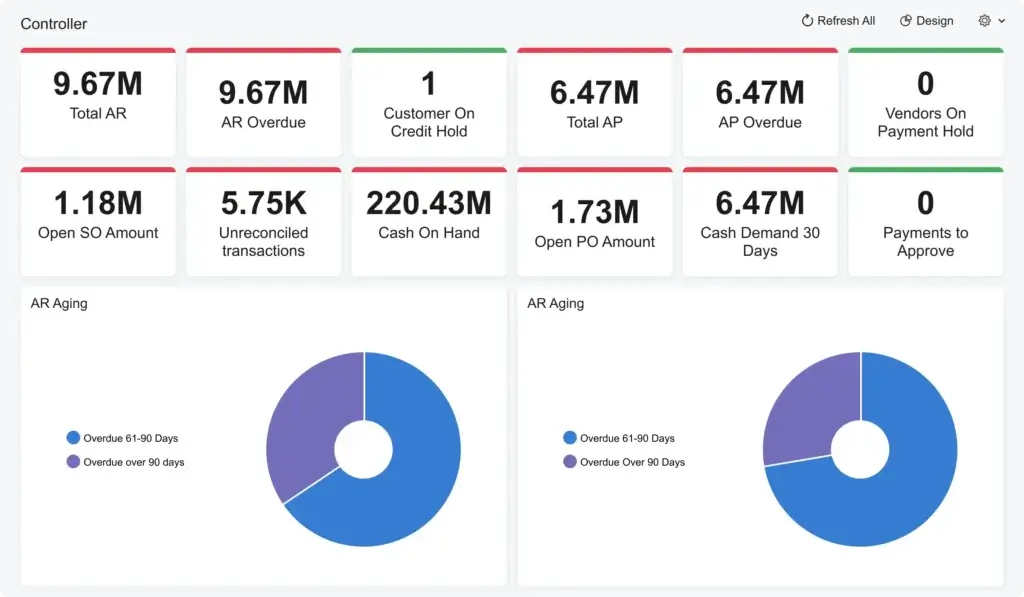
Financial management is one of Acumatica’s core strengths. The platform supports general ledger, accounts payable, accounts receivable, cash management, tax management, fixed assets, deferred revenue, multi-entity accounting, intercompany transactions, and financial reporting.
This makes Acumatica useful for growing companies that have outgrown basic accounting software and need stronger financial controls. You can manage transactions, automate workflows, monitor cash flow, close periods, and view financial performance across entities, locations, or departments.
Inventory and Order Management
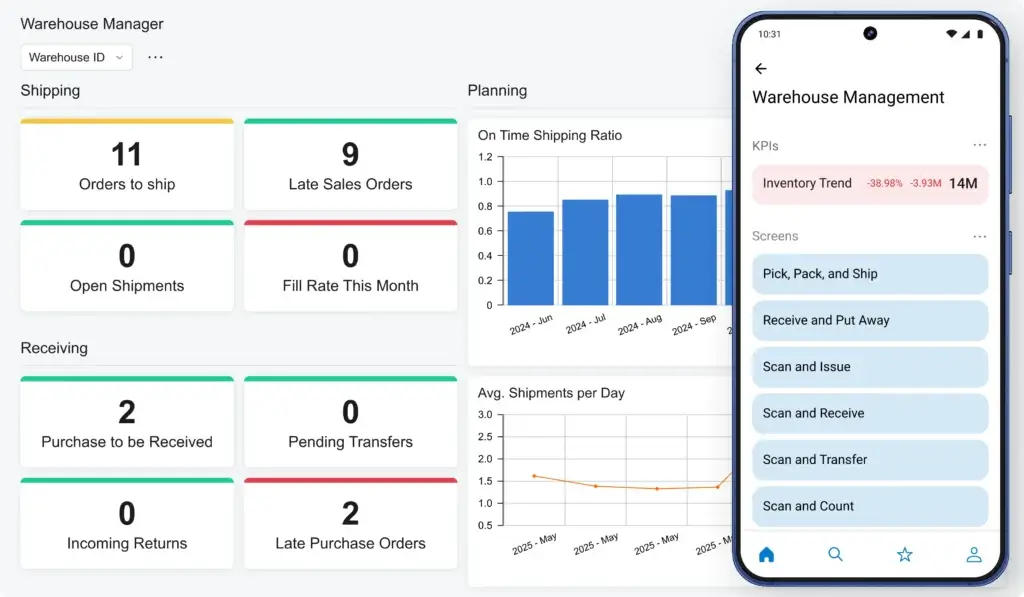
Acumatica includes strong inventory and order management capabilities for companies that sell, distribute, store, assemble, or fulfill physical products. You can manage stock levels, warehouses, item classes, purchasing, replenishment, sales orders, purchase orders, returns, and fulfillment workflows.
This is especially valuable for distributors and commerce businesses that need more accurate inventory visibility. Acumatica can help reduce manual work, improve stock accuracy, and connect purchasing decisions with sales demand.
Distribution Management
Acumatica Distribution Edition is designed for wholesalers, distributors, and product-based companies that need better control over purchasing, inventory, order fulfillment, warehouse activity, and customer service.
It helps teams manage supply chain workflows from quote to cash and procure to pay. For companies struggling with spreadsheets, manual inventory checks, or disconnected warehouse tools, Acumatica can provide a more structured and scalable operational foundation.
Construction and Project Accounting
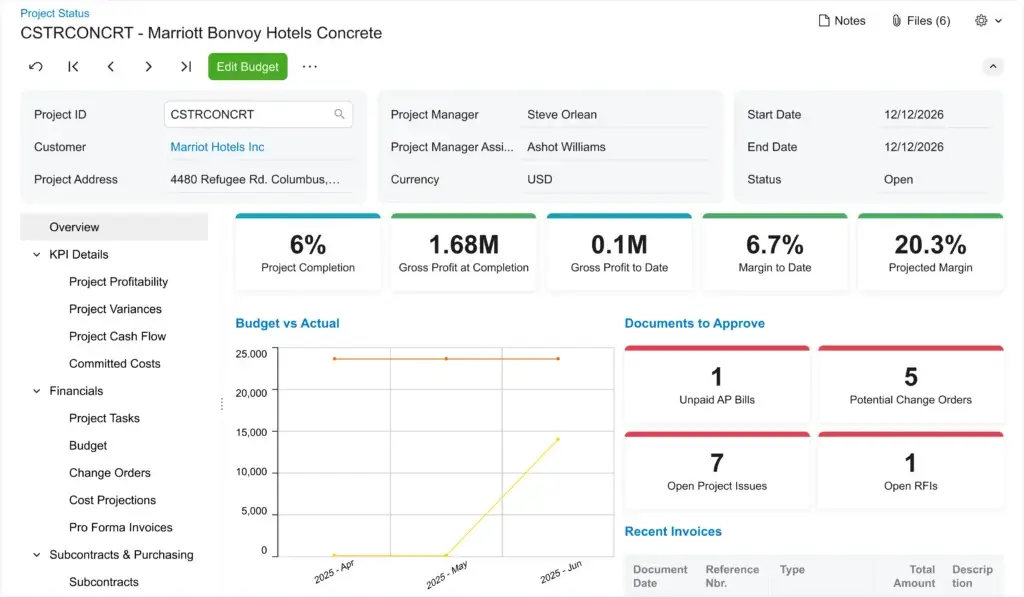
Acumatica Construction Edition is built for contractors and construction firms that need job costing, project accounting, change orders, commitments, subcontract management, compliance tracking, payroll integrations, billing, and field visibility.
This is one of Acumatica’s strongest vertical use cases. Construction companies often need ERP capabilities that connect finance and field operations, and Acumatica is designed to support that kind of operational complexity.
CRM and Customer Management
Acumatica includes CRM functionality for managing leads, opportunities, contacts, accounts, activities, quotes, cases, and customer interactions. This can help businesses connect sales activity with order management, inventory, fulfillment, and finance.
It is not always a replacement for a dedicated enterprise CRM like Salesforce or HubSpot, especially for sophisticated marketing and sales teams. However, it is useful for companies that want CRM data connected directly to ERP workflows.
Field Service Management
Acumatica supports field service use cases such as appointment scheduling, dispatching, service orders, equipment, contracts, billing, and mobile technician workflows. This can be valuable for service companies, contractors, equipment businesses, and companies that need to connect service delivery with inventory and finance.
The strongest use case is when field service is part of a broader operational process. For example, a company may need to schedule technicians, track parts used in the field, bill customers, and update financial records from the same system.
Retail and Commerce Management
Acumatica Retail and Commerce Edition supports companies that sell across ecommerce, retail, marketplaces, and physical locations. It can connect sales channels with inventory, order management, warehouse operations, fulfillment, and financials.
This is useful for growing commerce companies that need stronger back-office control than a standalone ecommerce platform can provide. Acumatica can help unify online sales, stock availability, and operational reporting.
Reporting, Dashboards, and Business Intelligence
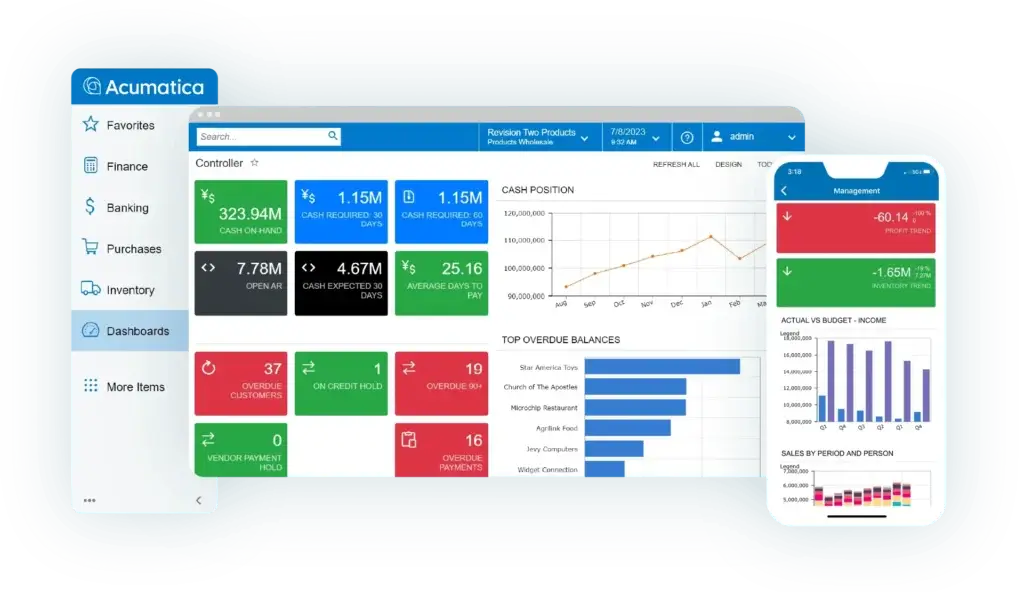
Acumatica includes dashboards, inquiries, reports, KPIs, and role-based visibility. Users can access real-time information about financial performance, inventory levels, order status, project profitability, cash flow, sales activity, and operational bottlenecks.
Reporting is one of the key reasons to move to ERP. When Acumatica is implemented correctly, it gives leaders a clearer view of what is happening across finance and operations instead of relying on delayed spreadsheet updates.
Automation, AI, and Low-Code Customization
Acumatica includes workflow automation, business events, approvals, mobile access, AI and machine learning capabilities, and low-code customization options. These features help companies tailor dashboards, forms, reports, workflows, and business logic to their needs.
The flexibility is a major strength, but it should be managed carefully. Customization can improve fit, but excessive customization can increase implementation time, upgrade testing, and long-term maintenance effort.
Manufacturing Management
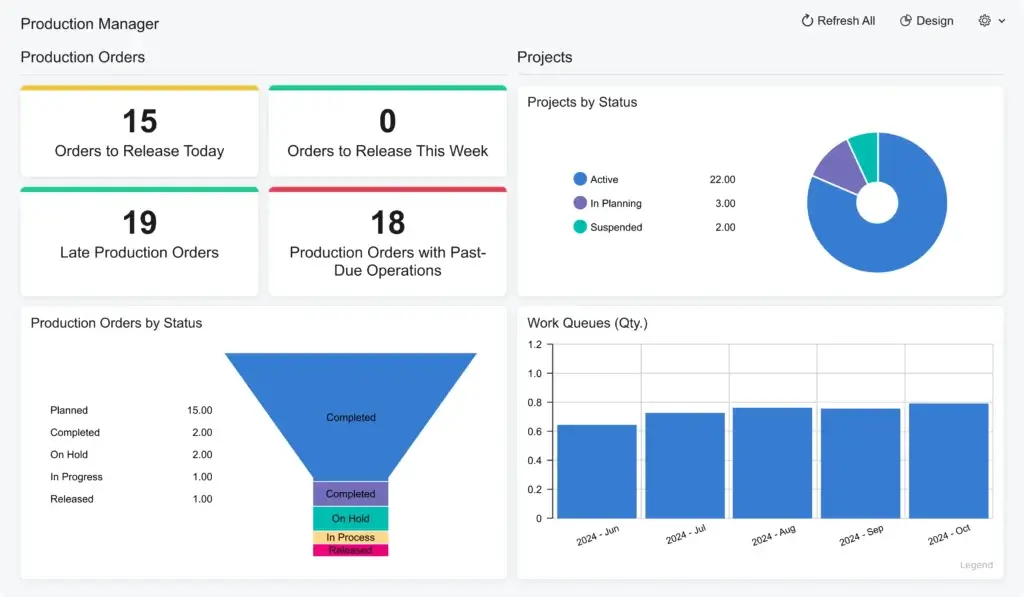
Acumatica Manufacturing Edition supports production management, bills of materials, routings, material requirements planning, estimating, engineering change control, shop floor data collection, production orders, and scheduling.
This makes it a strong fit for small and mid-sized manufacturers that need more than accounting and inventory. It can help connect production activity with financial data, purchasing, inventory availability, and customer demand.
Platform Structure
Acumatica Cloud ERP Modules and Industry Editions
Acumatica is organized around core ERP functionality and industry-specific editions. This is important because the right Acumatica setup depends on your operational model, not only your company size.
Most buyers should begin by identifying which edition best matches their business, then confirm which modules, integrations, and resource levels are required.
General Business Edition
Acumatica General Business Edition is suitable for companies that need core financials, CRM, reporting, project accounting, and operational workflows without a highly specialized vertical requirement.
This edition can be a good fit for service-based companies, multi-entity organizations, holding companies, and growing businesses that need stronger financial control and operational visibility.
Distribution Edition
Distribution Edition is designed for wholesalers, distributors, suppliers, and product-based businesses. It supports purchasing, inventory, sales orders, warehouse operations, replenishment, returns, and customer management.
This edition is one of Acumatica’s strongest options if your business depends on accurate stock levels, supplier coordination, warehouse efficiency, and reliable order fulfillment.
Manufacturing Edition
Manufacturing Edition supports companies that manage production workflows. It includes functionality for bills of materials, production orders, routings, material planning, estimating, scheduling, product configuration, and shop floor activity.
It is especially relevant for manufacturers that need to connect production planning with inventory, purchasing, sales orders, and financial results.
Construction Edition
Construction Edition is built for contractors and construction firms. It supports job costing, project accounting, commitments, change orders, subcontractor management, billing, compliance, and field workflows.
This edition is a strong option if your company needs ERP functionality that reflects the way construction projects are estimated, managed, billed, and reported.
Retail and Commerce Edition
Retail and Commerce Edition is designed for businesses that sell across ecommerce, marketplaces, retail stores, or multiple sales channels. It helps connect online sales, inventory, fulfillment, customer activity, and financial data.
This edition is most useful when commerce operations have grown beyond what standalone ecommerce and accounting tools can manage comfortably.
Professional Services Edition
Professional Services Edition supports project-based service firms that need project accounting, resource visibility, time and expense tracking, billing, financial management, and reporting.
It can be a strong fit for consulting firms, engineering companies, technology service providers, and other project-driven organizations that need to understand project profitability.
ERP Module Comparison
The table below summarizes Acumatica’s most relevant editions and use cases.
| Edition | Best For | Main Capabilities |
| General Business Edition | Growing companies needing core ERP | Financials, CRM, reporting, project accounting, workflows |
| Distribution Edition | Wholesalers, distributors, suppliers | Inventory, purchasing, sales orders, warehouse, fulfillment |
| Manufacturing Edition | Small and mid-sized manufacturers | BOMs, production, MRP, scheduling, estimating, shop floor |
| Construction Edition | Contractors and construction firms | Job costing, project accounting, change orders, compliance, billing |
| Retail and Commerce Edition | Retailers and ecommerce businesses | Commerce, inventory, fulfillment, sales channels, financials |
| Professional Services Edition | Project-based service firms | Project accounting, time, expenses, billing, profitability |
Pros and Cons
Benefits and Limitations of Acumatica Cloud ERP
Positive
✅ Unlimited users
✅ Strong industry editions
✅ Flexible customization
✅ Cloud-native access
Negative
❌ Quote-based pricing
❌ Partner-dependent setup
❌ Customization can add cost
❌ Not ideal for very small teams
Strengths & Benefits
Acumatica has several major advantages, especially for growing companies that need ERP access across many users and departments.
- Unlimited users – Pricing is not primarily based on charging for every user seat.
- Industry editions – Strong fit for distribution, manufacturing, construction, retail, and services.
- Flexible platform – Dashboards, workflows, reports, and screens can be customized.
- Cloud-native access – Users can access data through browser and mobile experiences.
- Connected operations – Finance, inventory, sales, projects, and reporting work together.
The unlimited-user model is particularly important. In many ERP systems, companies restrict access because each additional user adds cost. Acumatica’s model can make it easier to involve managers, warehouse users, project teams, executives, field staff, and operational employees.
Limitations & Drawbacks
Acumatica is flexible, but it is not a simple plug-and-play tool. Like most ERP systems, the value depends heavily on implementation planning, data quality, partner expertise, and internal ownership.
- No simple public pricing – Buyers usually need a custom quote.
- Implementation effort – ERP setup requires process mapping, migration, testing, and training.
- Partner dependency – Your implementation experience may depend on partner quality.
- Customization risk – Too much customization can increase cost and maintenance.
- Small-team cost – Very small companies may find the entry point too high.
My opinion is that Acumatica is one of the strongest ERP options for mid-market companies that want flexible cloud ERP without per-user licensing pressure. However, it should be evaluated carefully if your company has very simple accounting needs or lacks the resources to support a structured ERP implementation.
Operational Fit
Acumatica User Experience, Support, and Security
Acumatica’s user experience is generally modern compared with older ERP systems. It is browser-based, role-driven, customizable, and accessible from different devices. Users can work with dashboards, forms, reports, workflows, and mobile access depending on their role.
Ease of Use
Acumatica is easier to use than many legacy ERP systems, especially because it offers configurable dashboards and role-based navigation. Teams can personalize views, access relevant KPIs, and work from a browser without needing outdated desktop software.
That said, ERP usability always depends on implementation quality. A well-designed Acumatica environment can make daily work easier. A poorly scoped implementation can make even flexible software feel confusing.
Implementation Experience
Implementation typically involves discovery, business process mapping, configuration, data migration, integrations, reporting setup, testing, user training, and go-live support. The timeline depends on company size, modules, industry edition, integrations, customization, and data complexity.
For simpler finance-led deployments, implementation may be more manageable. For manufacturing, construction, distribution, or multi-entity setups, you should expect a more structured project with a certified Acumatica partner.
Customer Support and Partner Network
Acumatica is sold and implemented through a partner ecosystem. This can be a major advantage because partners often bring industry experience, implementation methodology, technical expertise, and local support.
However, it also means partner selection is critical. You should evaluate whether the partner has experience with your industry, company size, integrations, reporting needs, and specific Acumatica edition.
Security and Compliance
Acumatica includes security features such as role-based access, encryption, cloud infrastructure controls, and governance capabilities. This is important because ERP systems contain sensitive financial, customer, supplier, employee, project, and operational data.
You should still treat security as an implementation requirement. Permissions, approval workflows, audit trails, integrations, mobile access, and administrative controls should be configured carefully before launch.
AI and Automation Governance
Acumatica includes AI, machine learning, and automation capabilities that can help reduce manual work, identify anomalies, improve decision-making, and support operational efficiency.
These capabilities are valuable, but they work best when your data is clean and your workflows are well defined. Before using AI-driven insights or automation at scale, your company should define governance rules around data access, user permissions, approval controls, and exception handling.
Pricing
Acumatica Cloud ERP Pricing & Plans
Acumatica pricing is quote-based, so you will not find a simple public price per user on its website. This is intentional because Acumatica uses a different pricing approach from many ERP vendors.
Instead of charging primarily by user count, Acumatica bases pricing on the applications you need, expected usage and resource requirements, and deployment preferences. This means the final cost depends on your modules, edition, transaction volume, storage needs, integrations, implementation scope, and ongoing support requirements.
Unlimited User Pricing Model
The most important pricing difference is that Acumatica offers unlimited users. This can be a major advantage for companies that want many employees to access ERP data without worrying about every added user increasing software license cost.
For example, executives, project managers, warehouse users, finance staff, sales teams, field employees, and department leaders may all need different levels of ERP access. With a per-user ERP model, that can become expensive. With Acumatica, user expansion is less directly tied to seat-based licensing.
Application-Based Cost
Your Acumatica cost depends partly on the applications and editions you implement. A company using core financials will not have the same cost as a manufacturer using production management, inventory, warehouse, CRM, field service, project accounting, and commerce integrations.
This approach can be efficient if you select only the capabilities you need. However, it also means scope control matters. Adding modules, integrations, or custom workflows can increase both subscription and implementation costs.
Usage and Resource Requirements
Acumatica also considers expected business usage and resource requirements. Transaction volume, data storage, processing needs, and operational scale can affect pricing.
This is why two companies with the same number of employees may receive very different quotes. A high-volume distributor, for example, may require more resources than a service firm with fewer transactions.
Implementation and Partner Costs
Software subscription is only one part of the total ERP investment. You should also budget for implementation partner services, process consulting, data migration, configuration, customization, integrations, training, testing, change management, and post-launch support.
Implementation cost can vary significantly depending on complexity. A focused financials implementation may be much lighter than a multi-site manufacturing or construction deployment with integrations and custom reporting.
Pricing Table
The table below summarizes the main pricing factors you should evaluate before requesting an Acumatica quote.
| Pricing Factor | How It Works | What to Consider |
| Users | Unlimited users included in the pricing model | Useful when many employees need ERP access |
| Applications | Cost depends on selected modules and editions | Choose only the functionality your business needs |
| Usage | Resource needs and transaction volume influence cost | High-volume businesses may need higher resource levels |
| Deployment | Deployment preferences affect the final quote | Review cloud, private cloud, and partner options |
| Implementation | Partner services are priced separately | Budget for migration, setup, testing, and training |
| Customization | Custom workflows, reports, and integrations add cost | Control scope to avoid unnecessary complexity |
Acumatica can be cost-effective when many users need access and the company has a strong operational need for ERP. However, it may not be the lowest-cost choice for very small companies that only need accounting, invoicing, and basic reporting.
The safest pricing approach is to document your must-have workflows, separate them from nice-to-have customizations, and ask the partner to break down subscription, implementation, integration, support, and future expansion costs clearly.
Use Cases
Who Should Use Acumatica Cloud ERP?
Acumatica is best for growing companies that need cloud ERP flexibility, operational depth, and broad system access across teams. It is particularly strong for businesses that have outgrown entry-level accounting systems but do not want a rigid enterprise ERP implementation.
Small and Mid-Sized Businesses
Acumatica is a strong fit for small and mid-sized companies that need better control over finance, inventory, purchasing, sales, projects, and reporting. It is especially useful when the business has multiple departments that need ERP access.
If you are moving away from QuickBooks, spreadsheets, or disconnected tools, Acumatica can give your business a more scalable operating system.
Distribution Companies
Distribution companies are one of Acumatica’s strongest target segments. The platform supports inventory visibility, purchasing, sales orders, replenishment, warehouse management, returns, and fulfillment.
If your company struggles with stock accuracy, order delays, disconnected warehouse processes, or poor visibility into demand and supply, Acumatica is worth evaluating.
Manufacturing Companies
Acumatica Manufacturing Edition is a strong option for manufacturers that need production management, materials planning, bills of materials, scheduling, estimating, and shop floor visibility.
It is best for manufacturers that want cloud ERP flexibility without moving into the complexity of large enterprise systems such as SAP or Oracle too early.
Construction Firms
Acumatica Construction Edition is well suited for contractors that need project accounting, job costing, change order management, commitments, compliance, billing, and financial visibility across projects.
It is particularly useful when construction teams need to connect office accounting with field operations and project-level profitability.
Retail and Ecommerce Businesses
Retail and ecommerce companies can use Acumatica to connect sales channels, inventory, fulfillment, warehouse processes, customer data, and financials.
This is a good fit when standalone ecommerce systems no longer provide enough back-office control, especially for businesses selling across multiple channels or locations.
When Acumatica Might Not Be Right
Acumatica may not be the best choice if your company only needs simple accounting, has very few users, or wants a low-cost self-service tool that can be deployed with minimal planning.
It may also feel too flexible for organizations that want a highly standardized ERP with minimal customization decisions. Acumatica’s flexibility is a strength, but it requires disciplined scoping.
User Feedback
Acumatica Cloud ERP Customer Reviews
User feedback for Acumatica is generally strongest around flexibility, usability, customization, cloud access, and the ability to support industry-specific workflows. Many users value that the system can be adapted to match their business processes instead of forcing every company into the same rigid structure.
What Users Like Most
Positive review patterns often mention Acumatica’s adaptability, customizable dashboards, cloud access, unlimited-user model, industry capabilities, and ability to connect finance with operations.
Users also tend to appreciate that Acumatica is modern compared with older ERP systems. For companies replacing legacy platforms, the browser-based experience and flexible reporting can feel like a major improvement.
Common Complaints
Common complaints usually focus on implementation complexity, pricing for smaller companies, reporting setup, module costs, and the effort required to maintain customizations.
These complaints are important because they reflect a common ERP reality. Acumatica is flexible, but flexibility requires planning. If you customize heavily without a clear strategy, you may increase cost and make future changes harder.
My Take on the Review Pattern
The review pattern suggests that Acumatica performs best when buyers understand what they want before implementation. It is a strong ERP system for companies with real operational complexity, but it should not be treated as a simple accounting upgrade.
If your company needs a cloud ERP that can adapt to your workflows, Acumatica is a strong option. If your priority is the lowest possible starting cost or a simple self-service setup, you may be better served by lighter accounting or business management software.
Competitors
Competitor Alternatives to Acumatica Cloud ERP
Acumatica competes with ERP systems such as NetSuite, Microsoft Dynamics 365 Business Central, Sage Intacct, Odoo, SAP S/4HANA Cloud, Oracle Fusion Cloud ERP, Infor CloudSuite, and Epicor. The right alternative depends on your business size, industry, budget, internal resources, and preferred software ecosystem.
| Feature Type | Acumatica Cloud ERP | NetSuite | Dynamics 365 Business Central | Odoo |
| Core angle | Flexible cloud ERP with unlimited users | Unified cloud ERP suite | Microsoft-based SMB ERP | Modular business apps |
| Best for | Mid-market distribution, manufacturing, construction, and commerce | Growing companies needing strong financials and operations | Microsoft-first small and mid-sized businesses | Cost-conscious teams wanting modular flexibility |
| Pricing style | Quote-based, usage and application driven | Quote-based subscription | Published per-user pricing | Published app-based pricing options |
| User licensing | Unlimited users | User-based licensing | User-based licensing | User and app-based licensing |
| Implementation complexity | Moderate to high | Moderate to high | Moderate | Low to high depending on scope |
| Overall fit | Best for flexible ERP access across many users | Best for standardized cloud ERP growth | Best for Microsoft ecosystem alignment | Best for modular affordability |
Compared with NetSuite, Acumatica is often more appealing if unlimited users and flexible customization are major priorities. NetSuite may be stronger if you want a more mature, standardized cloud ERP suite with a large global footprint.
Compared with Microsoft Dynamics 365, Acumatica is less tied to the Microsoft ecosystem and may be easier to justify when many users need access. Dynamics 365 can be stronger if your company already relies heavily on Microsoft 365, Power BI, Teams, and Power Platform.
Compared with Sage Intacct, Acumatica is usually stronger for inventory, manufacturing, distribution, construction, and operational workflows. Sage Intacct is often stronger for finance-led organizations that want best-in-class accounting and reporting.
Compared with Odoo, Acumatica is generally more mature for mid-market ERP needs and industry-specific operations. Odoo may be more attractive if you want lower starting costs, modular apps, and broader flexibility across many business functions.
Best Practices
Getting Started with Acumatica Cloud ERP
Getting started with Acumatica requires more planning than buying a simple SaaS tool. The platform can deliver strong value, but only when the implementation is aligned with your real business processes.
Start with Business Requirements
Before speaking with a partner, document your required workflows. Focus on finance, purchasing, inventory, manufacturing, distribution, projects, construction, commerce, field service, reporting, approvals, and integrations.
This helps you avoid buying modules you do not need or customizing workflows before understanding whether native functionality already solves the problem.
Choose the Right Edition
Acumatica’s industry editions are a major advantage, but you need to choose carefully. A distributor, manufacturer, contractor, retailer, and professional services firm will usually need different configurations.
Start with the edition that best matches your operating model, then refine the module list based on your actual workflows.
Select the Right Implementation Partner
Partner selection can make or break your Acumatica experience. Look for a partner with proven experience in your industry, similar company size, and the exact edition you plan to implement.
Ask for references, project methodology, data migration approach, reporting examples, integration experience, and post-launch support details.
Plan Data Migration Early
ERP data migration is often more difficult than expected. You should review customer records, vendor records, item masters, chart of accounts, open transactions, historical balances, inventory data, project records, and reporting structures before migration.
Clean data improves trust in the new system. Poor data quality can damage adoption even if the software is configured well.
Train Users by Role
Acumatica training should be role-based. Finance users, warehouse staff, project managers, production teams, executives, and field employees do not need the same training.
Focus training on daily workflows, approvals, dashboards, reporting, and exception handling. This makes adoption more practical and reduces frustration after go-live.
Roll Out in Phases
A phased rollout is often safer than trying to implement every module at once. Many companies start with financials and core operations, then add manufacturing, field service, commerce, reporting, or advanced automation later.
This approach lowers risk and gives your team time to learn the platform before expanding it.
Conclusion
Final Thoughts
Acumatica Cloud ERP is one of the most compelling ERP options for growing small and mid-sized businesses that need flexible cloud ERP, broad user access, industry-specific functionality, and strong operational visibility.
Its biggest strengths are unlimited users, flexible licensing, modern cloud access, industry editions, customization options, inventory and distribution depth, manufacturing capabilities, construction functionality, and connected financial management.
It is not the simplest or cheapest ERP system for every company. Pricing is quote-based, implementation requires planning, partner quality matters, and customization should be managed carefully. Very small companies with basic accounting needs may find Acumatica more powerful than necessary.
Overall, Acumatica is easy to recommend for companies that have outgrown entry-level systems and need a scalable ERP platform that can support finance, operations, inventory, projects, manufacturing, construction, commerce, and reporting. If your company wants flexible cloud ERP without paying for every additional user seat, Acumatica deserves serious consideration in 2026.
Frequently Asked Questions
Have more questions?
What is Acumatica Cloud ERP?
Acumatica Cloud ERP is a cloud-based enterprise resource planning platform that helps businesses manage finance, inventory, purchasing, sales, CRM, projects, manufacturing, distribution, construction, commerce, field service, and reporting from one connected system.
Is Acumatica a true cloud ERP system?
Yes. Acumatica is a cloud-native ERP system that users can access through a browser and mobile devices. It is designed for real-time business visibility, flexible deployment, role-based access, and modern cloud operations.
Who is Acumatica best for?
Acumatica is best for growing small and mid-sized businesses that need flexible cloud ERP. It is especially strong for distribution, manufacturing, construction, retail, ecommerce, professional services, and project-based companies that need financial and operational visibility.
How much does Acumatica cost?
Acumatica pricing is quote-based. The cost depends on the applications you need, expected business usage, resource requirements, deployment preferences, implementation scope, integrations, and support. Acumatica does not price primarily by user seat and offers unlimited users.
Does Acumatica charge per user?
No. Acumatica is known for its unlimited-user pricing model. Instead of charging mainly per user, pricing is based on selected applications, usage, resources, and deployment needs. This can be useful for companies that want many employees to access ERP data.
What industries does Acumatica support?
Acumatica supports several industries through dedicated editions, including general business, distribution, manufacturing, construction, retail and commerce, and professional services. Each edition includes ERP functionality tailored to common workflows in that industry.
Does Acumatica support manufacturing?
Yes. Acumatica Manufacturing Edition supports bills of materials, routings, production orders, material planning, estimating, scheduling, product configuration, engineering changes, and shop floor workflows.
Does Acumatica include CRM?
Yes. Acumatica includes CRM functionality for leads, opportunities, contacts, accounts, activities, quotes, cases, and customer management. It is useful when sales and customer data need to connect directly with ERP workflows.
What are the best Acumatica alternatives?
The best Acumatica alternatives include NetSuite, Microsoft Dynamics 365 Business Central, Sage Intacct, Odoo, SAP S/4HANA Cloud, Oracle Fusion Cloud ERP, Infor CloudSuite, and Epicor. The right choice depends on your industry, budget, company size, and implementation needs.
Is Acumatica worth it?
Acumatica is worth considering if your business needs flexible cloud ERP, unlimited users, industry-specific functionality, and stronger visibility across finance and operations. It may be too advanced for very small companies that only need basic accounting software.