
Introduction
Creating a professional presentation can easily turn into a time-consuming process. You need a clear structure, strong copy, polished visuals, consistent branding, and a delivery flow that keeps your audience engaged.
Decktopus addresses this challenge with an AI-powered presentation platform designed to help you move from idea to finished deck faster. Instead of starting with a blank slide, you can enter a prompt, paste existing content, or import a document, then let Decktopus generate a structured presentation with layouts, visuals, notes, and audience interaction elements.
What makes Decktopus different from many traditional presentation tools is its guided workflow. Rather than giving you a completely open canvas and expecting you to design everything manually, it walks you through the process and helps you build a professional-looking deck step by step.
In this Decktopus review, you will learn how the platform works, what features matter most, how much it costs, where it performs well, where it feels limited, and how it compares with alternatives such as Gamma, Canva, Beautiful.ai, and PowerPoint.
Software Specification
Decktopus Core Features
AI presentation generation
Decktopus’ core feature is its AI presentation generator. You can start with a topic, prompt, or short description, then let the system create a deck structure for you.
This is useful when you know what you want to communicate but do not want to spend hours deciding the order of slides, writing the first draft, or selecting a visual direction. Decktopus helps you move quickly from concept to a usable presentation draft.
The platform is especially helpful for business users who create recurring presentations, such as sales decks, client proposals, internal updates, webinar decks, and startup pitch materials.
Paste text into slides
If you already have your content prepared, Decktopus lets you paste text and turn it into a clean presentation. This is useful when you want to repurpose existing notes, blog content, reports, research summaries, or meeting materials into slides.
Instead of manually copying content into individual slides, you can use Decktopus to organize the information into a more presentable format. You still need to review the output carefully, but the first draft is much faster than building a deck from scratch.
AI image generation
Decktopus includes AI image generation, which helps reduce dependence on stock imagery. You can generate visuals that match the topic of your presentation and use them to make slides feel more specific and modern.
This is valuable for marketing teams, educators, consultants, and founders who want their presentations to look more original. However, as with any AI image tool, you should review generated images for accuracy, brand fit, and professional quality before publishing or presenting.
Speaker notes, scripts, and storytelling support
Decktopus does not only focus on slide design. It also helps with presentation delivery by generating speaker notes, scripts, hooks, icebreakers, and story-like structures.
This makes it more useful than basic slide builders for users who need help presenting confidently. If you are preparing for a pitch, webinar, class, or sales call, these delivery features can help you organize your talking points and avoid relying too heavily on slide text.
AI Q&A assistance
One of the more interesting Decktopus features is its AI-supported Q&A functionality. The platform can help you prepare for possible audience questions, which is particularly useful for pitch decks, investor meetings, product demos, webinars, and training sessions.
This feature supports a more complete presentation workflow. Instead of only creating slides, Decktopus helps you think about what might happen after the presentation, when your audience starts asking for clarification, objections, or next steps.
PDF import and document-to-presentation workflow
Decktopus can help transform PDF content into presentations. This is useful when you have a report, brochure, whitepaper, or document that needs to become a more visual and interactive presentation.
For consultants, agencies, educators, and internal teams, this can save significant formatting time. You should still edit the final deck, shorten dense sections, and make sure the narrative is presentation-friendly.
Design mode and drag-and-drop editing
Decktopus includes design controls that let you adjust layouts, fonts, images, and slide elements. The editing experience is designed to be simple, so non-designers can refine their decks without needing advanced presentation design skills.
The tradeoff is that Decktopus is not as flexible as a fully open design tool like Canva or PowerPoint. It is strongest when you want a clean, guided presentation workflow rather than complete creative freedom over every pixel.
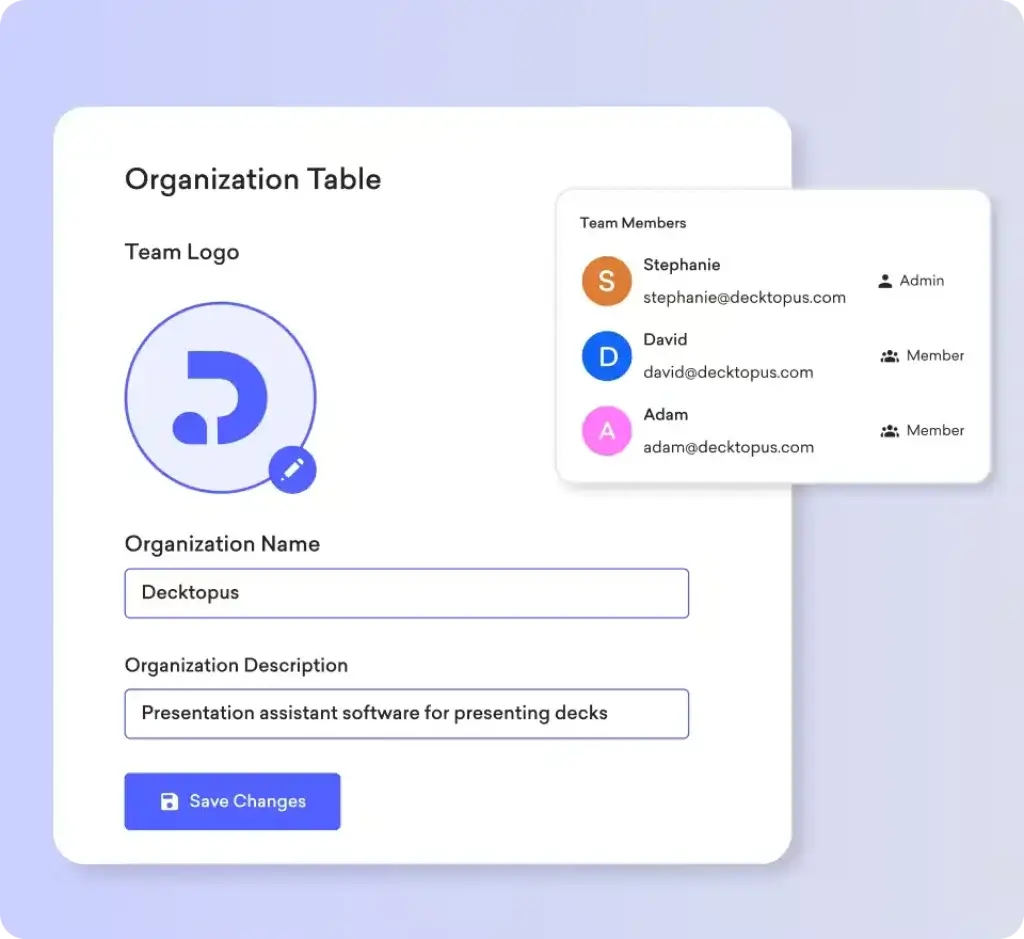
Team workspace and organization tools
Decktopus includes team and organization features for managing decks across departments. You can categorize presentations, work with team members, and create a more structured presentation library.
This makes Decktopus more useful for teams than a simple one-off AI slide generator. However, larger enterprises that need advanced approval workflows, granular permissions, and strict brand governance may still prefer more enterprise-focused tools.
Forms, lead generation, and interactive decks
Decktopus can be used for more than standard presentations. It supports use cases such as proposals, sales funnels, lead generation, bio links, microsites, and forms.
This is one of its strongest differentiators. Instead of treating a deck as a static file, Decktopus can help you build interactive experiences that collect responses, support conversion goals, and work as shareable business assets.
Zapier integration
Decktopus connects with Zapier, which allows teams to automate presentation creation from other apps. For example, you can create decks from form responses, meeting notes, CRM updates, spreadsheets, and other workflow triggers.
This is valuable for teams that create recurring presentation assets. Agencies, consultants, sales teams, and customer-facing departments can use automation to reduce repetitive deck-building tasks.
Auto branding and custom templates
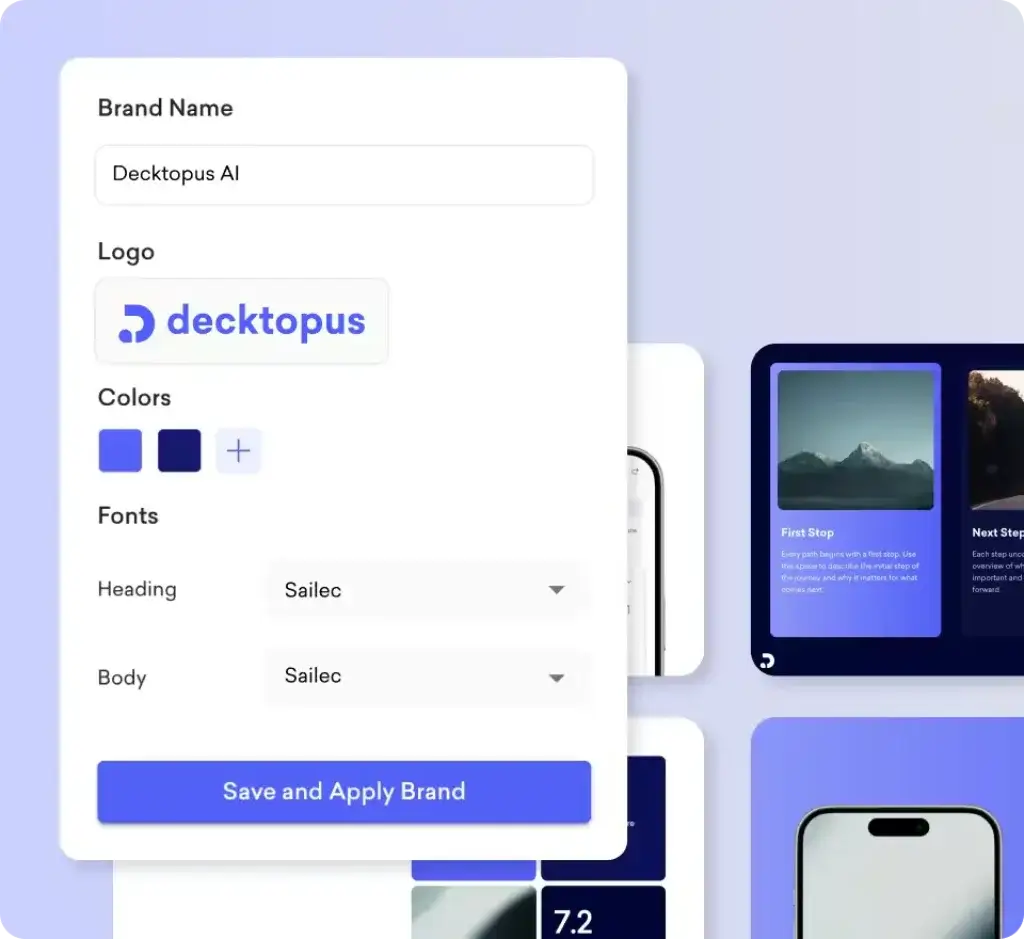
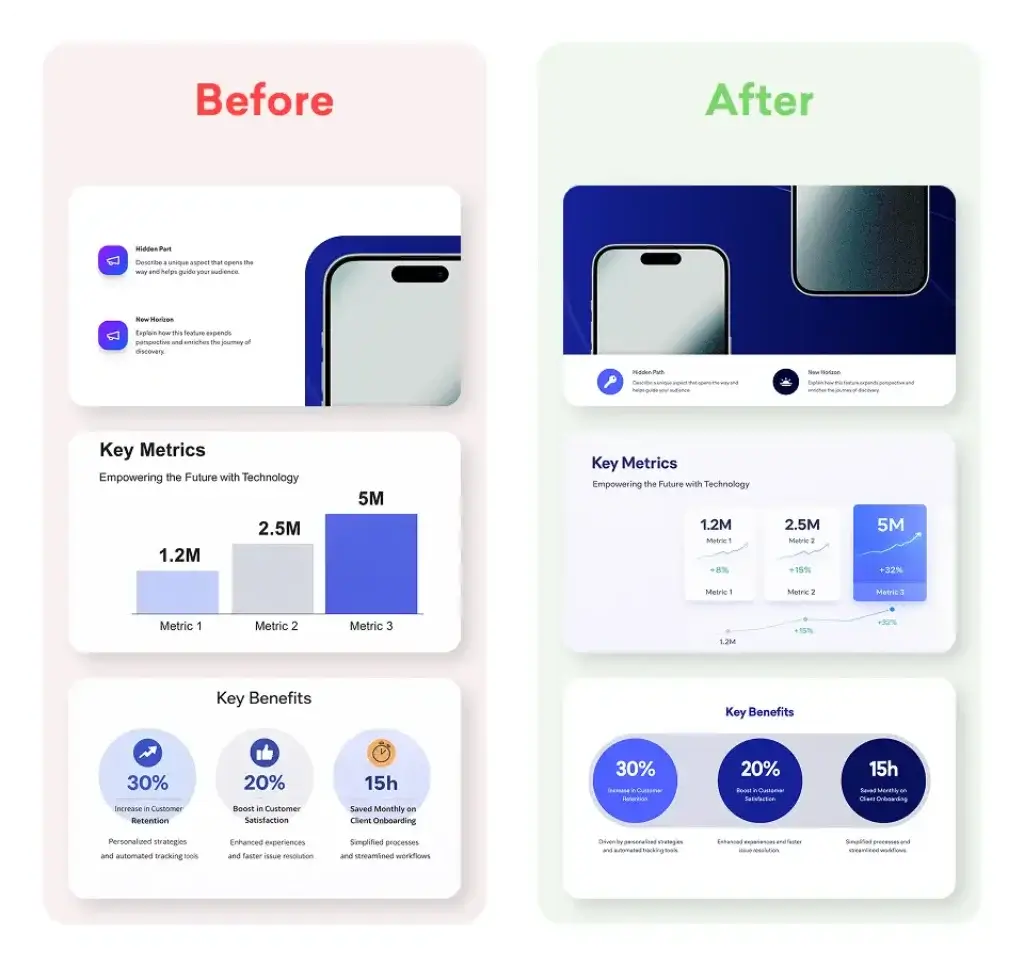
Decktopus supports branding features that help you apply logos, colors, and fonts across your presentations. For teams, this matters because inconsistent slides can make client-facing decks look less professional.
Business and enterprise users can benefit from branded slide libraries and custom presentation templates. This is especially relevant for agencies, sales teams, marketing teams, and customer success teams that create many external-facing presentations.
Pros and Cons
Advantages and Disadvantages
Positive
✅ Very fast presentation creation
✅ Helpful AI scripts and Q&A support
✅ Good fit for business decks and proposals
✅ Branding and team features available
Negative
❌ Less flexible than Canva or PowerPoint
❌ AI output still needs editing
❌ Best features require paid plans
❌ Not ideal for complex custom design work
Pros
✅ Very fast presentation creation
Decktopus is built for speed. You can generate a complete first draft from a prompt, pasted text, or document, then refine it instead of building each slide manually. This is the main reason to choose Decktopus over traditional slide tools.
✅ Helpful AI support beyond slide generation
The platform helps with speaker notes, scripts, storytelling, hooks, and possible audience questions. This gives Decktopus more value for users who want to improve delivery, not just design slides.
✅ Strong fit for business presentations
Decktopus is well-suited for sales decks, proposals, pitch decks, webinars, client reports, marketing presentations, and internal updates. It works best when your goal is a polished business deck rather than highly artistic design.
✅ Interactive and conversion-focused use cases
Forms, lead generation, microsites, and proposal-style decks make Decktopus useful for business workflows. This gives it an advantage over tools that only create static slides.
✅ Branding and team features
Business users can work with brand colors, fonts, logos, custom templates, team organization, slide analytics, and custom domains. This makes Decktopus more scalable than basic AI slide generators.
Cons
❌ Less flexible than fully open design tools
Decktopus is intentionally guided and template-driven. This helps non-designers, but it can feel restrictive if you want complete control over slide structure, advanced animations, or custom layouts.
❌ AI-generated decks still need human review
Decktopus can create a strong first draft, but you should still edit the messaging, remove generic wording, check accuracy, and adapt the deck to your audience. AI-generated presentations should not be published without review.
❌ Paid plans are needed for serious use
The most useful capabilities are tied to paid plans, especially if you need regular AI generation, exports, analytics, branding, and team functionality. Casual users may find the free experience limited.
❌ Not the best choice for advanced enterprise governance
Decktopus offers business and enterprise features, but large organizations with strict brand compliance, deep permissions, approval workflows, and content governance may prefer tools built specifically for enterprise presentation management.
User Experience
Simple, Guided, and AI-First
Decktopus is designed for users who want a guided presentation-building experience. The interface does not feel like a blank design canvas. Instead, it helps you move through the process with prompts, slide suggestions, generated content, and predefined layouts.
This makes the tool approachable for people who do not enjoy traditional slide design. If you often struggle with where to start, what structure to use, or how to make slides look consistent, Decktopus reduces that friction.
Creation workflow
The typical workflow starts with your topic, existing text, or document. Decktopus then generates a presentation structure and adds content, visuals, and design suggestions.
From there, you can edit text, adjust visual elements, change the design direction, refine your script, and prepare for delivery. The workflow is practical because it starts with a usable draft rather than an empty slide.
Editing experience
Decktopus editing is simple enough for non-designers. You can adjust slide elements, images, layouts, and branding without needing advanced design knowledge.
However, users who are used to PowerPoint, Canva, or Figma-level design freedom may find Decktopus more controlled. The platform is better for speed and structure than deep visual experimentation.
Collaboration experience
For teams, Decktopus provides organization features, branded presentation assets, and team management capabilities. This helps centralize decks and reduce inconsistent presentation design across departments.
It is a good fit for smaller and mid-sized business teams. For enterprise-level collaboration, compare it carefully with tools such as Beautiful.ai, Pitch, Canva for Teams, and PowerPoint with Microsoft 365.
Audience experience
Decktopus presentations are designed to look clean and professional. The added Q&A, script, forms, and proposal-style features can also make your deck more useful after the presentation itself.
For sales and client-facing teams, this matters. A Decktopus deck can act as a presentation, follow-up asset, lead capture page, or proposal experience, depending on how you structure it.
Best Use Cases
Who Should Use Decktopus
Decktopus is not the right presentation platform for every user. It is best for people and teams who want to create business-ready presentations quickly without spending hours on structure and design.
Sales teams and account executives
Sales professionals can use Decktopus to create pitch decks, product explainers, follow-up materials, and proposal presentations. The ability to generate slides quickly, add scripts, prepare Q&A, and use forms makes it valuable for sales workflows.
If your team creates many similar decks for different prospects, Decktopus can help reduce repetitive work while keeping the presentation professional.
Founders and startup teams
Founders often need investor decks, product updates, demo presentations, and partnership proposals. Decktopus can help you create a polished first draft quickly, especially when you do not have a designer available.
It is not a substitute for a deeply customized fundraising deck, but it is a strong option for early drafts, internal review, and fast iteration.
Marketing teams and agencies
Marketing teams can use Decktopus for campaign plans, reports, webinar decks, strategy presentations, and client-facing proposals. Agencies can also use it to turn briefs, forms, or meeting notes into presentation assets.
The Zapier integration is particularly useful here because it can connect Decktopus with form submissions, meeting tools, spreadsheets, and other marketing workflows.
Consultants and business advisors
Consultants regularly turn analysis, research, and recommendations into client presentations. Decktopus can help convert written content into a more structured deck and reduce time spent on formatting.
For strategic work, you will still need to refine the narrative. Decktopus is best used as a production accelerator, not as a replacement for expert thinking.
Educators, trainers, and webinar hosts
Decktopus can help educators and trainers generate lesson presentations, training materials, and webinar decks. The AI script and Q&A features help prepare delivery and anticipate audience questions.
For more complex educational content, you should review slide accuracy carefully and add your own examples, references, and explanations.
Compare with Others
Alternatives to Decktopus
The AI presentation software market is highly competitive. Decktopus is a strong option for fast, guided business deck creation, but other tools may be better depending on your workflow.
| Feature Type | Decktopus | Gamma | Canva | Beautiful.ai | PowerPoint |
| Best For | Fast AI business decks, proposals, and interactive presentations | Quick AI-generated decks, docs, and webpages | Visual design, templates, and marketing assets | Brand-consistent business presentations | Traditional slide workflows and Microsoft compatibility |
| AI Capabilities | Prompt-to-deck, AI images, scripts, Q&A, PDF conversion | Prompt-to-deck, text generation, web-style layouts | Magic Design, Magic Write, AI images, template assistance | AI-assisted layouts and smart templates | Copilot support, Designer, summaries, slide generation |
| Design Flexibility | Guided and template-based | Fast but less traditional slide control | Very flexible drag-and-drop design | Structured, polished, brand-focused | Highly flexible, especially for experienced users |
| Business Features | Forms, analytics, custom domains, branding, teams | Sharing and lightweight collaboration | Brand kits, content design, team templates | Team templates and brand governance | Deep Microsoft 365 collaboration |
| Best Alternative When | You want speed plus audience interaction | You want the fastest AI deck draft | You need broader visual content creation | You need polished team-wide brand consistency | You need full PPTX compatibility and enterprise adoption |
Decktopus vs Gamma
Gamma is one of the strongest alternatives if you want very fast AI-generated presentations, documents, and web-style content. It feels modern, simple, and flexible for users who want quick results.
Decktopus is better when you want a guided business presentation workflow with scripts, Q&A support, forms, proposals, and lead-focused use cases. Gamma is stronger for fast content generation, while Decktopus is stronger for business presentation workflows.
Decktopus vs Canva
Canva is better if you need a complete design platform. It gives you access to presentations, social media graphics, videos, documents, brand kits, and a huge template library.
Decktopus is better if your main goal is to generate a presentation quickly with AI and prepare for delivery. Canva gives you more design freedom, while Decktopus gives you a more focused AI presentation workflow.
Decktopus vs Beautiful.ai
Beautiful.ai is a strong option for teams that need polished, brand-consistent presentations with smart slide design. It is more focused on maintaining professional layouts and consistent visual structure across business decks.
Decktopus feels more lightweight and guided. Choose Beautiful.ai if design automation and brand control matter most. Choose Decktopus if speed, AI generation, proposals, and audience interaction features matter more.
Decktopus vs PowerPoint
PowerPoint remains the standard for many organizations because of its flexibility, offline editing, Microsoft 365 integration, and file compatibility. If your team works heavily with PPTX files, PowerPoint is still hard to replace.
Decktopus is better when you want AI to help create the first draft quickly. PowerPoint is better when you need full manual control, advanced formatting, complex internal collaboration, and compatibility with existing corporate workflows.
Pricing & Plans
Find the Right Fit for Your Team
Decktopus offers plans for individuals, teams, and enterprises. Pricing may change, so you should always verify the latest details on the official Decktopus pricing page before purchasing.
At the time of this review, Decktopus lists annual pricing for Pro and Business plans, plus a custom Enterprise option.
Pro plan
The Pro plan is designed for individual users who want access to Decktopus’ AI presentation capabilities. It includes all platform access, AI assistance, AI presentation generation, AI image generation, and PDF export.
The official annual pricing page lists Pro at $14.99 per month, billed annually at $179.99. It includes 9,000 AI credits per year, which Decktopus positions as enough for 300 AI presentations per year.
Business plan
The Business plan is designed for teams that want to create presentations more efficiently and manage branded assets across users. It includes everything in Pro, plus more AI credits, custom domain connection, slide analytics, webhook access, and team and organization features.
The official annual pricing page lists Business at $34.99 per user per month, billed annually at $419.99. It includes 12,000 AI credits per year, described as 400 AI presentations per year for the organization, multiplied by the number of seats.
Enterprise plan
The Enterprise plan is intended for organizations that need tailored, corporate-branded AI presentation solutions. It includes everything in Business, plus corporate branded slides, AI setup for branded slides, custom slide layouts, importing existing documents, and custom corporate templates.
Enterprise pricing is custom, so larger teams need to contact Decktopus for a quote.
Student discount
Decktopus also promotes a student discount code on its pricing page. If you are a student or educator, check the official pricing page to confirm current eligibility and discount terms.
| Plan | Price | AI Credits | Best For | Key Features |
| Pro | $14.99/month, billed annually | 9,000 credits/year | Individuals, freelancers, educators, solo professionals | AI assistance, AI presentation generation, AI image generation, PDF export, all platform access |
| Business | $34.99/user/month, billed annually | 12,000 credits/year per organization seat allocation | Sales, marketing, agencies, customer-facing teams | Everything in Pro, custom domain, slide analytics, webhook, team and organization tools |
| Enterprise | Custom | Custom | Larger organizations and branded presentation teams | Corporate-branded slides, custom layouts, branded AI setup, custom templates, document importing |
How to Use
A Step-by-Step Guide
Decktopus is built to make presentation creation easier, but the best results still come from a clear process. Here is a practical workflow you can follow.
1. Start with a specific goal
Before opening Decktopus, define the purpose of the presentation. Are you trying to win a client, explain a product, train a team, present research, or summarize a report?
The more specific your goal, the better your AI prompt will be. For example, “Create a 10-slide sales deck for a CRM software demo targeting small B2B agencies” will usually produce a better result than “Create a CRM presentation.”
2. Enter a prompt or paste your content
You can start from a prompt, paste existing text, or import a document. If you already have source material, use it. AI works better when it has context, facts, structure, and audience details.
For business decks, include the audience, industry, desired tone, main message, and expected outcome. This helps Decktopus generate a more relevant structure.
3. Review the AI-generated outline
Once Decktopus generates the structure, review the flow before focusing on design. Make sure the presentation has a logical beginning, middle, and end.
Remove unnecessary slides, combine repetitive sections, and add missing points. The outline is the foundation of the presentation, so this step matters more than choosing colors too early.
4. Refine slide copy
AI-generated text can be useful, but it often needs tightening. Rewrite generic statements, add concrete examples, and remove anything that sounds vague.
For professional presentations, keep each slide focused on one main idea. Avoid overloading slides with long paragraphs or too many bullet points.
5. Customize visuals and branding
After the structure and copy are solid, adjust colors, fonts, logos, and images. Use Decktopus’ branding features to keep the deck consistent with your company or client identity.
If you use AI-generated images, check whether they match your tone and message. Replace weak visuals with branded screenshots, product images, charts, or clearer illustrations when needed.
6. Prepare your script and Q&A
Use Decktopus’ speaker notes, scripts, and Q&A support to prepare your delivery. This is particularly useful for pitch decks, webinars, investor meetings, and sales presentations.
Do not memorize every word. Instead, use the generated script as a guide and practice the main points until your delivery feels natural.
7. Share, export, or use the deck as a business asset
Once your deck is ready, choose how you want to use it. You can present it, share it, export it, embed it, connect it to a custom domain, or use it as a proposal or lead generation asset.
This flexibility is one of Decktopus’ main advantages. A presentation can become more than a slide file, especially for sales and marketing teams.
Conclusion
Final Thoughts
Decktopus is a strong AI presentation maker for users who want to create polished decks quickly without spending hours on slide structure, formatting, and basic design. Its biggest strength is not unlimited creative flexibility. Its biggest strength is speed, guidance, and business-focused presentation support.
The platform works especially well for sales teams, marketers, agencies, consultants, founders, educators, and business professionals who need to produce presentations regularly. Features like AI scripts, Q&A support, PDF conversion, AI images, forms, analytics, custom domains, and Zapier automation make Decktopus more useful than a basic AI slide generator.
That said, Decktopus is not the best option for every workflow. If you need full manual design control, Canva or PowerPoint may be better. If you want ultra-fast AI-generated decks and web-style presentations, Gamma is a strong alternative. If your priority is enterprise-grade brand consistency, Beautiful.ai may be a better fit.
Overall, Decktopus is worth considering if you want an AI-first presentation workflow that helps you move from idea to professional deck faster. It is particularly valuable when you need to create business presentations, proposals, training materials, and sales assets at a consistent pace.
Frequently Asked Questions
Have more questions?
What is Decktopus?
It is an AI-powered presentation maker that helps you generate slide decks from prompts, pasted text, and documents. It also supports AI images, speaker notes, scripts, Q&A preparation, branding, forms, analytics, and team workspaces.
Is Decktopus good for business presentations?
Yes. It is a strong fit for business presentations such as sales decks, proposals, pitch decks, webinars, client reports, marketing plans, and internal updates. Its guided AI workflow helps you create polished decks faster.
Does Decktopus create presentations with AI?
Yes. It can generate presentations with AI based on a prompt, pasted content, or imported document. It can also help with slide copy, images, speaker notes, scripts, audience questions, and presentation structure.
Can Decktopus convert PDFs into presentations?
Yes. It supports PDF-to-presentation workflows, allowing you to convert static PDF documents into slide decks. You should still review, edit, and simplify the output before presenting it to an audience.
How much does Decktopus cost?
Decktopus pricing may change, but its official annual pricing page lists Pro at $14.99 per month and Business at $34.99 per user per month. Enterprise pricing is custom. Always confirm current prices on the official pricing page.
Does Decktopus have a free plan?
It has offered free access and trial-style entry points, but plan availability and limits can change. Check the official Decktopus pricing page for the latest free plan, trial, and credit details.
What are Decktopus AI credits?
AI credits are usage allowances for AI-powered actions such as generating presentations and AI content. Decktopus’ annual Pro plan lists 9,000 AI credits per year, while Business lists 12,000 AI credits per year with team-based allocation.
Is Decktopus better than PowerPoint?
It is better if you want AI to create a polished presentation draft quickly. PowerPoint is better if you need advanced manual control, deep Microsoft 365 collaboration, full PPTX workflows, and complex formatting flexibility.
What are the best Decktopus alternatives?
The best Decktopus alternatives include Gamma for fast AI-generated decks, Canva for flexible design and templates, Beautiful.ai for polished business presentations, and PowerPoint for traditional slide workflows and Microsoft compatibility.
Who should use Decktopus?
Decktopus is best for sales teams, founders, consultants, agencies, marketers, educators, and business professionals who create presentations regularly and want to save time on structure, copy, design, and delivery preparation.