

Introduction
Choosing accounting software is not only about sending invoices or tracking expenses. The right platform should help you understand cash flow, reduce manual work, stay tax-ready, and give you cleaner financial visibility as your business grows.
That is where Zoho Books becomes an interesting option.
Zoho Books is a cloud-based accounting software built for freelancers, small businesses, and growing teams that want strong automation without the higher cost or complexity of some larger accounting platforms. It covers the core accounting workflow, including invoicing, expenses, bank reconciliation, bills, inventory, project billing, reporting, and tax support.
It is especially attractive if you already use other Zoho products, such as Zoho CRM, Zoho Inventory, Zoho Projects, or Zoho Analytics. In that case, Zoho Books can become part of a connected business system rather than just a standalone bookkeeping app.
Still, it is not the right fit for every company. If you need a very large third-party app ecosystem, deep payroll coverage in every country, or advanced multi-entity consolidation, you may need to compare it carefully with QuickBooks Online, Xero, FreshBooks, or more advanced financial systems.
In this Zoho Books review, you will learn:
- What Zoho Books does best for small business accounting
- Where it falls short compared with QuickBooks, Xero, FreshBooks, and Wave
- How its pricing plans work in 2026
- Which features matter most for invoicing, expenses, banking, reporting, and inventory
- Whether it is the right accounting software for your business
Bottom line: Zoho Books is one of the strongest value-for-money accounting tools for small and mid-sized businesses, particularly if you want automation, clean usability, and native integration with the Zoho ecosystem.
Before reviewing each feature in detail, here is the practical summary. This section is useful if you are comparing accounting tools quickly and want to know whether Zoho Books deserves a closer look.
| Category | Zoho Books Summary |
| Best For | Freelancers, small businesses, service companies, agencies, and teams already using Zoho apps |
| Starting Price | Free plan available, paid plans start from $15/month when billed annually |
| Strongest Features | Invoicing, automation, bank reconciliation, project billing, client portal, and Zoho ecosystem integration |
| Main Limitation | Smaller third-party app marketplace than QuickBooks Online and Xero |
| Best Alternative | QuickBooks Online for accountant familiarity, Xero for integrations, FreshBooks for simple service invoicing |
| Our Recommendation | Excellent value for small and mid-sized businesses that want automation without unnecessary complexity |
Who Is Zoho Books Best For?
Find out if it fits your business needs
Zoho Books is not trying to be everything for every business. It is strongest when you need reliable accounting, practical automation, and a connected system that stays manageable for a small or mid-sized team.
✅ Best For
- Freelancers and consultants who need invoicing, time tracking, expenses, and payment reminders
- Service-based businesses that bill by project, milestone, retainer, or recurring service
- Small and mid-sized businesses that need accounting, inventory, approvals, and reporting in one platform
- Zoho ecosystem users who want CRM, inventory, projects, analytics, and accounting to work together
- International sellers and agencies that need multi-currency support and regional tax handling
❌ When It Might Not Be the Right Fit
- You need advanced payroll in every region and do not want to rely on regional availability or integrations
- You work with an accountant who only supports QuickBooks or Xero
- You depend on many niche third-party apps that may not have a direct integration
- You run a large enterprise finance operation with multi-entity consolidation and complex controls
💡 Real Scenarios Where Zoho Books Shines
- A marketing agency billing clients monthly while tracking time and project profitability
- A startup using Zoho CRM and needing clean invoicing after deals close
- An ecommerce business syncing product, order, and payment data with accounting
- A consultant sending recurring invoices and automated payment reminders
- A small international business working with multiple currencies and tax rules
Software Specification
Zoho Books Features: What You Get in 2026
Zoho Books is more than a simple invoicing app. It is a full cloud accounting system that helps you manage the complete money flow of your business.
The biggest advantage is how it connects everyday finance tasks. Your invoices, expenses, bank feeds, bills, inventory, projects, and reports can all sit inside one accounting environment.
Invoicing and Payments
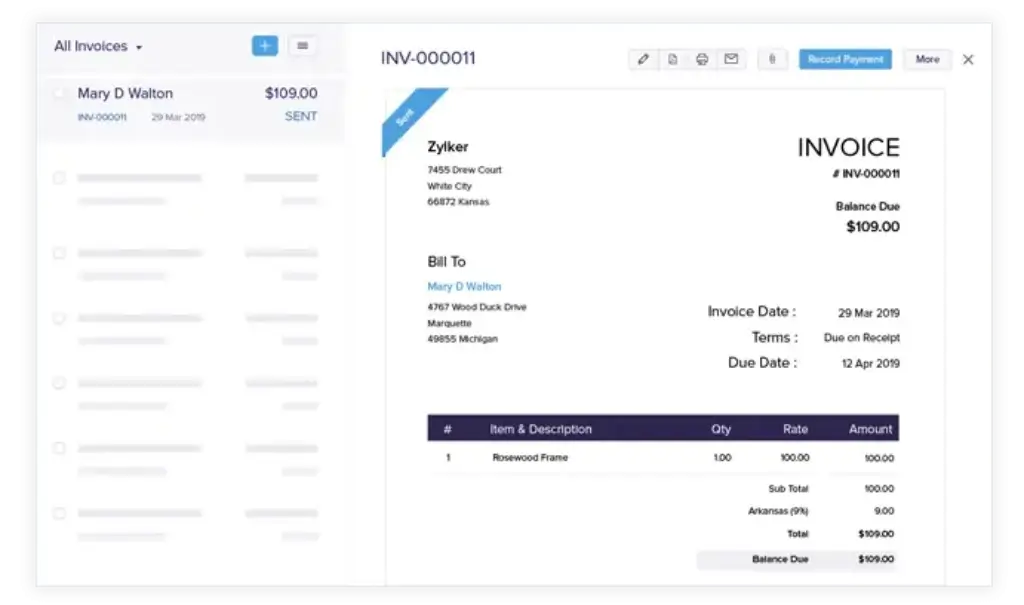
Zoho Books makes invoice creation fast, but its real value is in receivables management. You can create professional invoices, send estimates, convert quotes into invoices, and automate follow-ups when clients are late.
- Create branded invoices with custom fields and payment terms
- Send recurring invoices for retainers, subscriptions, and repeat services
- Use automated reminders to reduce late payments
- Accept online payments through supported payment gateways
Accounting insight: This matters because invoicing is not only a document workflow. It directly affects cash flow, days sales outstanding, and how quickly you convert work into collected revenue.
Expense Tracking and Receipt Management
Expense tracking helps you understand where money is going and keeps records ready for tax time. Zoho Books lets you record expenses, categorize them, attach receipts, and connect them to customers or projects when needed.
- Capture and attach receipts to expense records
- Categorize costs for cleaner reporting
- Track reimbursable expenses for client billing
- Use approval workflows to control team spending
This is especially useful for agencies, consultants, and businesses where billable expenses need to be passed on to clients accurately.
Bank Reconciliation and Bank Feeds
Bank reconciliation is one of the most important accounting tasks because it confirms that your books match your actual bank activity. Zoho Books can connect bank and credit card accounts, import transactions, and suggest matches.
- Connect bank accounts and credit cards where supported
- Import transactions automatically or manually
- Match bank transactions with invoices, bills, and expenses
- Spot missing entries or duplicate records more easily
Practical benefit: When reconciliation is done regularly, month-end close becomes faster and financial reports become more reliable.
Inventory and Order Management
For product-based businesses, Zoho Books includes inventory features in higher plans. You can track items, monitor stock levels, create sales orders, manage purchase orders, and improve visibility into product movement.
- Track stock levels and reorder points
- Manage purchase orders and sales orders
- Monitor inventory value and product movement
- Use advanced inventory features in higher-tier plans
Zoho Books is not a full ERP system, but for many small retailers, wholesalers, and ecommerce sellers, its inventory features are strong enough before moving to a more advanced platform.
Project Billing and Time Tracking
If you bill clients by hour, milestone, or project, Zoho Books gives you project-based financial visibility. You can track time, associate expenses with a project, and invoice clients more accurately.
- Track billable and non-billable hours
- Connect time entries to client invoices
- Monitor project income and expenses
- Review profitability by client or project
This is valuable for consultants, development teams, marketing agencies, legal services, and other service businesses where profitability depends on accurate time and cost tracking.
Reporting and Financial Dashboards
Zoho Books includes essential financial reports such as profit and loss, balance sheet, cash flow, sales tax reports, receivables, payables, and expense reports.
- Review profit and loss, balance sheet, and cash flow reports
- Track aged receivables and aged payables
- Use tax summaries to prepare for filing
- Schedule reports depending on your plan limits
The reporting is strong for small and mid-sized businesses. However, if you need highly advanced custom reporting or multi-entity consolidation, you may eventually need Zoho Analytics, Zoho Finance Plus, or a more advanced accounting platform.
Mobile App Access
The mobile app is one of Zoho Books’ strongest everyday usability advantages. It gives you access to key accounting tasks when you are away from your desk.
- Create and send invoices from mobile
- Capture receipts and record expenses
- View payment status and overdue invoices
- Check reports and business activity on the go
For freelancers, founders, and small business owners, this can make a meaningful difference. You can handle quick finance tasks without waiting until you are back in the office.
Pros and Cons
A balanced look before you choose
No accounting software is perfect. The best decision depends on your workflow, budget, accounting complexity, and the tools your team already uses.
Zoho Books stands out for affordability and automation, but it has limits if you need a very broad app ecosystem or advanced enterprise accounting.
Positive
✅ Strong value for small businesses
✅ Excellent Zoho ecosystem integration
✅ Clean interface and simple onboarding
✅ Useful automation for invoices, reminders, and approvals
Negative
❌ Smaller app ecosystem than Xero or QuickBooks
❌ Advanced features require higher plans
❌ Less accountant adoption in some markets
❌ Not built for complex enterprise consolidation
✅ What You’ll Appreciate
Strong value for small businesses
Zoho Books gives you a broad accounting feature set at a competitive price. For many small businesses, the Standard, Professional, or Premium plan can cover daily bookkeeping without forcing you into a costly enterprise tool.
Excellent fit for Zoho users
If your sales team uses Zoho CRM, your operations team uses Zoho Inventory, or your team already works inside Zoho One, Zoho Books becomes more powerful. You can connect customer records, invoices, payments, inventory, and reporting with less manual transfer.
Clean and approachable interface
You do not need to be a CPA to understand the main dashboard. Sales, purchases, banking, reports, and projects are organized clearly, which makes it easier for business owners to manage routine finance tasks.
Helpful automation
Recurring invoices, payment reminders, workflow rules, bank reconciliation suggestions, and approval flows can reduce repetitive admin work. That matters because manual bookkeeping errors often start with repeated copy-paste tasks.
❌ What Could Be Better
Third-party integrations are not as broad as Xero or QuickBooks
Zoho Books integrates well with key payment, ecommerce, and productivity tools, but its biggest strength is still the Zoho ecosystem. If your business relies on a large mix of niche third-party apps, compare the integration list carefully before switching.
Some important features sit in higher plans
Inventory tracking, advanced reporting, more workflow rules, vendor portals, and advanced analytics may require higher-tier plans. The pricing is still competitive, but smaller teams should check the plan limits before choosing.
Accountant familiarity can vary
Many accountants know QuickBooks Online and Xero very well. Zoho Books is gaining adoption, but in some regions you may find fewer external accountants who use it as their default system.
Not ideal for large, complex finance teams
If you need multi-entity consolidation, advanced revenue recognition, or sophisticated global financial controls, Zoho Books may not be enough. At that stage, tools like Sage Intacct, NetSuite, or Microsoft Dynamics 365 Business Central may be more appropriate.
User Experience
User Interface and Operational Simplicity
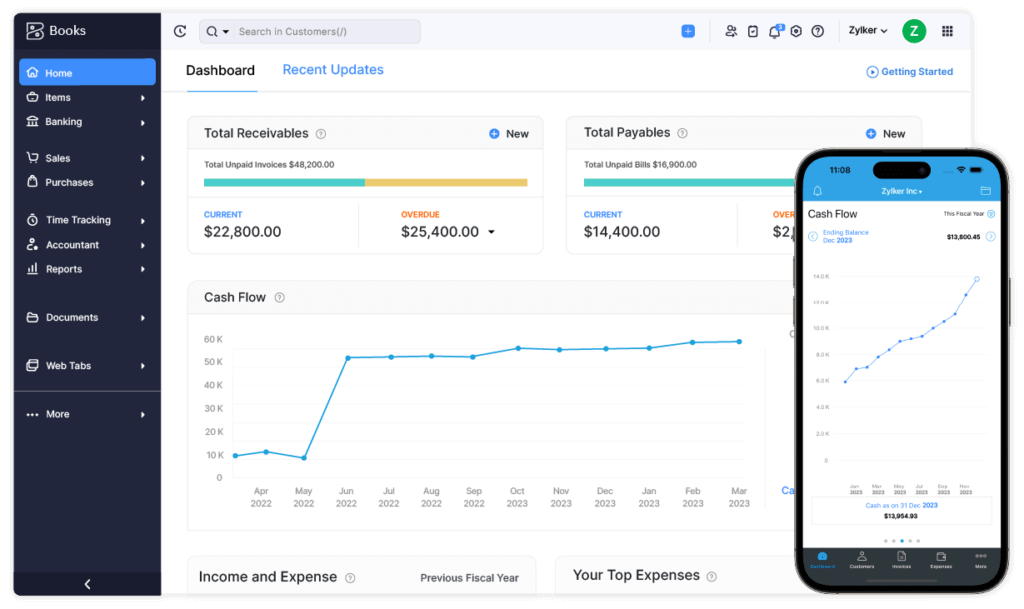
Zoho Books feels more modern and approachable than many legacy accounting tools. The layout is clean, the left-side navigation is logical, and common tasks are easy to find.
This matters because small business owners usually do not want accounting software that requires weeks of training. They need a system that helps them invoice, reconcile, track cash, and collaborate with an accountant quickly.
First-Time Setup and Onboarding
The setup process is straightforward. You can add your company details, configure tax settings, set your base currency, customize invoice templates, and invite users or an accountant.
- Business profile setup is guided
- Invoice template customization is simple
- Contacts and opening balances can be imported
- Bank connections can be added where supported
If you already use Zoho CRM or another Zoho app, the learning curve feels shorter because the interface style is familiar.
Navigation and Layout
The dashboard gives you a quick view of receivables, payables, bank balances, income, expenses, and cash flow trends. Sales, purchases, banking, accounting, reports, and settings are logically grouped.
That makes daily work easier. You can move from invoice creation to expense review, then to bank reconciliation without feeling lost inside the software.
Team Collaboration and Accountant Access
Zoho Books supports user roles and permissions, which is important when more than one person touches financial data. You can give different access levels to employees, managers, finance staff, and external accountants.
- Invite accountants to review and reconcile books
- Control access to sensitive financial areas
- Track activity through audit trails
- Reduce accidental edits with role-based permissions
Bottom line on UX: Zoho Books is simple enough for non-accountants but structured enough for serious bookkeeping. It gives you a professional accounting environment without making routine tasks feel unnecessarily technical.
Pricing and Plans
Zoho Books Pricing and Plans Explained
Zoho Books is competitively priced compared with many accounting platforms. It offers a free plan for very small businesses in eligible regions and several paid plans that scale by features, users, automation, inventory, and analytics.
Pricing may vary by country, billing cycle, taxes, and promotions. Always check the current pricing page before subscribing.
Which Plan Is Right for You?
| Plan | Best For | Annual Billing Price* | Monthly Billing Price* | Key Features |
| Free | Very small businesses and freelancers in eligible regions | $0 | $0 | 1 user + 1 accountant, invoices, expenses, basic reports, limited usage |
| Standard | Small teams needing core accounting automation | $15/month | $20/month | More users, recurring invoices, workflows, project tracking, basic automation |
| Professional | Service or product businesses needing inventory and purchasing | $40/month | $50/month | Purchase orders, sales orders, multi-currency, inventory tracking, more users |
| Premium | Growing teams needing vendor tools and custom reporting | $60/month | $70/month | Vendor portal, budgeting, custom reports, advanced collaboration features |
| Elite | Businesses with more advanced inventory needs | $120/month | $150/month | Advanced inventory, warehouse tracking, serial and batch tracking, landed cost |
| Ultimate | Data-driven teams needing advanced analytics | $240/month | $275/month | Zoho Analytics integration, advanced BI reports, higher reporting capacity |
Free Plan Limitations
The free plan is useful, but it is not unlimited. It is best for very small businesses with simple accounting needs and limited annual revenue.
Use the free plan if you are testing the platform or running a simple freelance business. Upgrade if you need more users, more automation, inventory, multi-currency, purchase orders, vendor tools, or advanced reporting.
Is Zoho Books Worth the Price?
For most small businesses, the strongest value sits in the Standard, Professional, and Premium plans.
- Choose Standard if you need affordable accounting with basic automation
- Choose Professional if you need inventory, purchase orders, and multi-currency
- Choose Premium if you need stronger reporting, vendor management, and growing team controls
- Choose Elite or Ultimate if inventory and analytics are central to your operations
Compared with QuickBooks Online and Xero, Zoho Books often gives you more built-in value at a lower starting price. The trade-off is that QuickBooks and Xero usually offer broader third-party integrations and stronger accountant adoption in some markets.
Integrations and Ecosystem
Connect accounting with the rest of your business
Zoho Books is strongest when it is used as part of a connected business workflow. It integrates especially well with other Zoho apps, which is one of the biggest reasons to choose it over some competitors.
Built for the Zoho Ecosystem
If you already use Zoho products, Zoho Books can connect accounting with sales, inventory, projects, payroll, and analytics.
- Zoho CRM: connect customer records, deals, invoices, and payment data
- Zoho Inventory: sync stock, orders, and inventory workflows
- Zoho Projects: connect project work and billable time to accounting
- Zoho Analytics: build deeper dashboards and financial reports
- Zoho Payroll: manage payroll where available by region
This is the main reason Zoho Books is such a good fit for existing Zoho users. You can build a connected operating system for your business without relying on too many external connectors.
Key Third-Party Integrations
Zoho Books also supports many important third-party tools, especially for payments, ecommerce, file storage, and tax workflows.
- Payments: Stripe, PayPal, Razorpay, Square, and other supported gateways
- Ecommerce: Shopify and WooCommerce through supported integrations or Zoho Flow
- Storage: Google Drive, Dropbox, and OneDrive
- Tax tools: Avalara and regional tax settings where supported
The important caveat is that Zoho Books does not have the same depth of third-party marketplace coverage as QuickBooks Online or Xero. If you rely heavily on niche tools, check compatibility before moving your accounting data.
Automation with Zoho Flow and APIs
For more advanced workflows, you can use Zoho Flow or Zoho Books APIs. This allows you to connect accounting with other business systems and reduce repetitive data entry.
- Create invoices when a CRM deal is closed
- Send notifications for overdue payments
- Sync ecommerce orders into accounting
- Build custom dashboards or integrations with developer support
Bottom line: Zoho Books is excellent for Zoho-based businesses and solid for common integrations. It is less ideal if your company needs a very broad plug-and-play app marketplace.
Alternatives to Zoho Books
How Zoho Books Compares to Competitors
Choosing accounting software is not only about features. It is about fit. Zoho Books is strong for automation and affordability, but QuickBooks, Xero, FreshBooks, and Wave may be better depending on your priorities.
| Software | Best For | Where It Beats Zoho Books | Where Zoho Books Wins |
| QuickBooks Online | U.S. small businesses and accountant-led bookkeeping | Broader accountant adoption and larger app marketplace | Often better value for Zoho users and automation-focused SMBs |
| Xero | Global teams and integration-heavy businesses | Large app marketplace and strong collaboration features | Stronger native Zoho CRM and Zoho ecosystem connection |
| FreshBooks | Freelancers and service businesses | Simpler invoicing and client billing experience | More complete accounting, inventory, and operational depth |
| Wave | Very small businesses needing free basic accounting | Free core accounting for simple needs | Better scalability, automation, inventory, and paid-plan depth |
Zoho Books vs QuickBooks Online
QuickBooks Online is the safer option if your accountant already works inside QuickBooks or if you need a very large network of third-party integrations. It is also widely used in the U.S. market.
Zoho Books is better if you want lower-cost accounting with strong automation and you already use Zoho CRM, Zoho Inventory, or Zoho One.
Zoho Books vs Xero
Xero is a strong choice for businesses that prioritize integrations, unlimited-user collaboration, and a modern cloud accounting experience. It is especially popular with accountants and global small businesses.
Zoho Books wins when you want a tighter connection between CRM, inventory, projects, and accounting within one software ecosystem.
Zoho Books vs FreshBooks
FreshBooks is easier for freelancers who mainly need invoicing, proposals, time tracking, and simple expense management. It is very approachable for non-accountants.
Zoho Books is the stronger option when you need deeper accounting, inventory, vendor management, and more structured financial reporting.
Zoho Books vs Wave
Wave is attractive if your budget is the top priority and your accounting needs are simple. It is a practical option for early-stage freelancers and very small businesses.
Zoho Books is better if you want a more scalable accounting system with automation, integrations, inventory, projects, and more advanced controls.
User Reviews and Feedback
What real users usually like and dislike
User feedback around Zoho Books is generally positive, especially from small businesses that want strong features at a reasonable price.
Common Praise
- Clean interface that is easier to learn than many accounting tools
- Good value compared with larger competitors
- Strong invoicing, automation, and recurring billing features
- Useful connection with Zoho CRM, Zoho Inventory, and Zoho Projects
- Solid mobile app for invoices, expenses, and quick financial checks
Common Complaints
- Lower-tier plans can feel restrictive as a business grows
- Support response times can vary by region and plan
- Some advanced reporting and customization options require higher plans
- Third-party integrations are not as extensive as QuickBooks or Xero
- External accountants may be less familiar with it in certain markets
Overall, user sentiment supports the same conclusion: Zoho Books is a high-value accounting tool for SMBs, but it works best when its limits align with your business model.
Security and Compliance
Your financial data deserves serious protection
Accounting software stores some of your most sensitive business information. That includes customer records, banking data, invoices, tax details, vendor information, and financial reports.
Zoho Books benefits from Zoho’s broader security infrastructure, which includes encryption, account protection, access controls, and compliance programs.
Data Encryption and Account Protection
- Data is protected with encryption in transit and at rest
- Two-factor authentication can add another layer of login protection
- User sessions and access can be managed through account security settings
- Data is logically separated between customers in Zoho’s cloud environment
Compliance and Privacy
Zoho maintains compliance programs across its cloud services, including SOC 2 Type II and ISO/IEC 27001. It also provides GDPR-focused privacy controls for businesses handling EU personal data.
For a small business, this matters because accounting data is not just operational data. It often includes personally identifiable information, payment records, tax records, and audit-sensitive documents.
Roles, Permissions, and Audit Trails
Zoho Books lets you assign user roles and control access based on job responsibilities. This is important if your team includes owners, finance staff, sales users, operations staff, and outside accountants.
- Limit who can view or edit sensitive records
- Give accountants access without sharing full admin control
- Use audit trails to track changes
- Reduce the risk of accidental edits or unauthorized changes
Security takeaway: Zoho Books provides the controls most small and mid-sized businesses need. Larger companies with stricter internal control requirements should review permissions, audit trails, data residency, and compliance requirements before implementation.
Migration and Setup
Moving from another accounting system
If you are switching from spreadsheets, QuickBooks, Xero, or another accounting tool, migration planning matters. Accounting data is sensitive, and even small import errors can create reporting issues later.
What You Can Typically Import
- Customer and vendor records
- Chart of accounts
- Opening balances
- Products and services
- Invoices, bills, and transactions depending on the source format
What to Check Before Going Live
- Confirm opening balances match your previous accounting system
- Review tax rates and regional compliance settings
- Test invoice templates and payment gateway settings
- Invite your accountant before the first reporting cycle
- Reconcile bank accounts after importing historical records
If your books are simple, migration can be straightforward. If you have years of transactions, multiple currencies, inventory history, or complex tax settings, it is worth involving your accountant before switching.
Conclusion
Is Zoho Books the Right Accounting Tool for You?
⭐ Overall Rating: 9.3/10
Zoho Books is one of the best accounting software options for small and mid-sized businesses that want strong features without overpaying for complexity. It is not just affordable; it is genuinely capable across invoicing, expenses, banking, inventory, projects, reporting, and automation.
Our recommendation is clear: choose Zoho Books if you want a practical, scalable, and automation-friendly accounting tool, especially if you already use Zoho apps. It gives you more depth than basic invoicing platforms and better value than many larger accounting systems.
However, it is not the perfect choice for every business. If your accountant strongly prefers QuickBooks, if your workflow depends on a large marketplace of third-party apps, or if you need advanced multi-entity finance features, you should compare alternatives carefully.
Our Recommendation by Business Type
- Freelancers: Strong option if you want invoicing, expenses, and room to grow
- Service businesses: Excellent fit for project billing, time tracking, and recurring invoices
- Zoho users: One of the best choices because of native ecosystem integration
- Ecommerce businesses: Good fit if supported integrations match your sales channels
- Large enterprises: Consider more advanced platforms if you need consolidation and deeper controls
Still comparing options? Read our full guide to the Top 10 Accounting Software in 2026 to see how Zoho Books compares with other leading platforms.
Have more questions?
Frequently Asked Questions
What is Zoho Books used for?
It is used to manage small business accounting tasks such as invoicing, expenses, bank reconciliation, bills, inventory, project billing, reporting, and tax-related workflows.
Is Zoho Books good for small businesses?
Yes. It is a strong option for small businesses that want affordable accounting software with automation, invoicing, reporting, bank reconciliation, and integration with other business tools.
Is Zoho Books better than QuickBooks?
It depends on your needs. It can be better for Zoho ecosystem users and budget-conscious businesses, while QuickBooks is often stronger for accountant familiarity and third-party app coverage.
Does Zoho Books have a free plan?
Yes. A free plan is available in eligible regions for very small businesses, but it comes with limits. Growing teams usually need a paid plan for more users, automation, inventory, and reporting.
Can Zoho Books handle inventory?
Yes. Inventory tracking is available in paid plans. It can help you manage items, stock levels, purchase orders, sales orders, and more advanced inventory needs in higher-tier plans.
Does Zoho Books support multi-currency accounting?
Yes. Multi-currency support is available in paid plans, making it useful for businesses that invoice international clients or work with vendors in different currencies.
Can I migrate from QuickBooks or Excel to Zoho Books?
Yes. You can import key records such as contacts, accounts, items, opening balances, and transactions. For complex books, it is best to involve an accountant before migration.
Does Zoho Books include payroll?
Payroll availability depends on your country and setup. In some regions, it connects with Zoho Payroll, while other businesses may need a third-party payroll solution.
Is Zoho Books safe for financial data?
Yes. It uses Zoho’s broader security infrastructure, including encryption, access controls, two-factor authentication, audit trails, and compliance programs such as SOC 2 Type II and ISO/IEC 27001.
Who should not use Zoho Books?
It may not be ideal for large enterprises that need advanced multi-entity consolidation, very complex reporting, or a broad third-party integration ecosystem beyond the Zoho suite.








