
Introduction
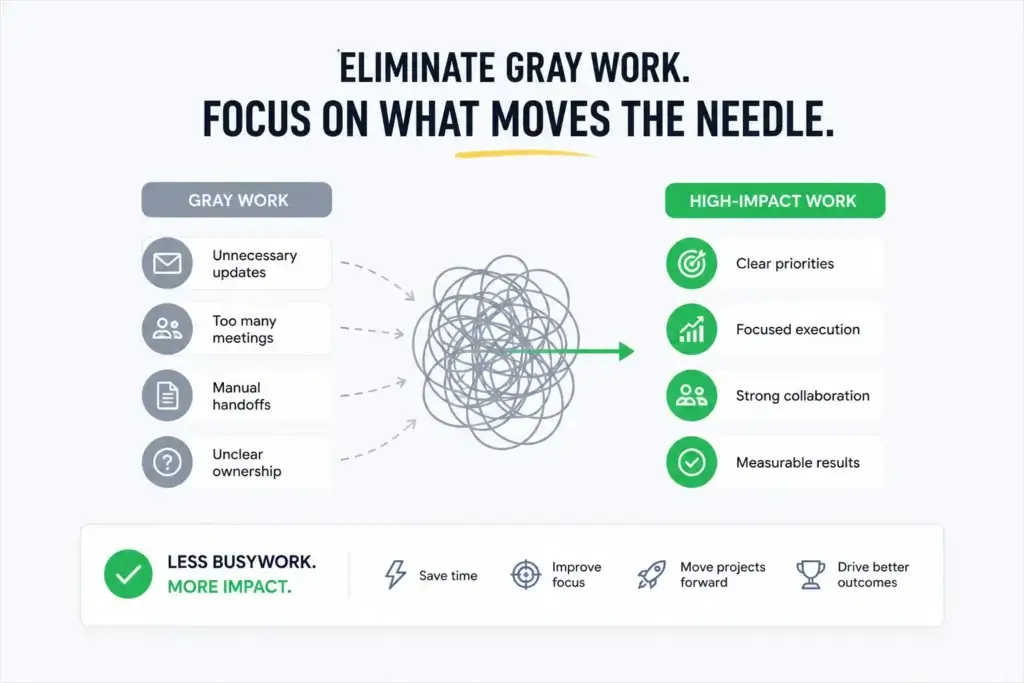
Gray work is one of the most common productivity problems inside modern teams, but it is also one of the hardest to see. Your team may look busy. Meetings are happening, Slack messages are moving, tasks are being updated, and managers are asking for progress. On the surface, everything looks active. But under the surface, people may be losing hours to work that should not need to happen at all.
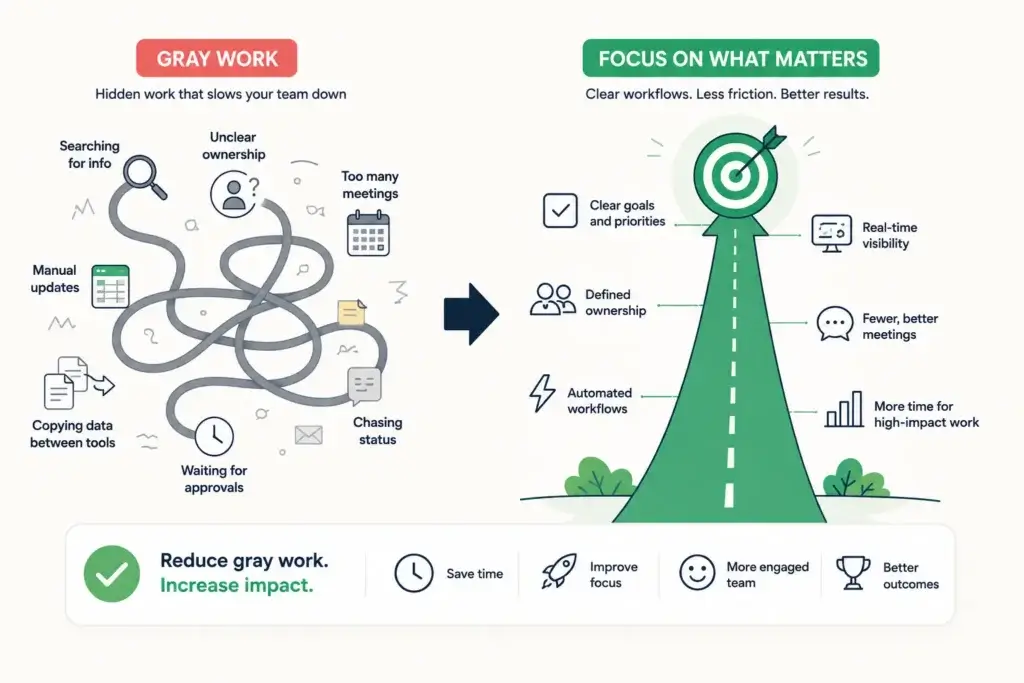
They are searching for missing context, asking who owns the next step, copying data between tools, joining status meetings, waiting for approvals, and rebuilding information that already exists somewhere else.
That is gray work.
It is the hidden layer of coordination between planned work and completed work. It does not always appear in your project plan, workload dashboard, or time report, but it quietly reduces output and makes good employees feel less effective than they really are.
In this guide, you will learn what gray work means, how it differs from deep work and normal admin tasks, how to audit it, and which tools and strategies can help you reduce it.
You will also see why platforms like monday Work Management, ClickUp, Asana, Zapier, Make, n8n, and AI note-taking tools can help teams remove hidden productivity killers when they are used with the right workflow structure.
What Is Gray Work? (Definition & Examples)
Gray work is the hidden, unstructured, and often unmeasured work people do because a process is unclear, a tool is disconnected, ownership is missing, or information is hard to find.
It is not the main work your team was hired to do. It is the extra coordination required to make the main work possible.
In project management, gray work usually happens when workflows depend too much on personal memory, side conversations, spreadsheets, status meetings, and manual handoffs instead of a clear operating system.
Gray work in one sentence
Gray work is the invisible effort your team spends finding information, clarifying ownership, updating tools, moving data, chasing approvals, and coordinating tasks that should already be clear inside the workflow.
A helpful way to identify it is simple: if the activity does not directly create value, move a deliverable forward, or support a necessary business requirement, it may be gray work.
Examples of gray work in real teams
Gray work can appear in almost every department, especially in remote teams, fast-growing companies, and cross-functional projects.
- Searching Slack, email, and docs to understand the latest project status
- Joining a meeting only because the project board is outdated
- Manually copying customer details from a CRM into a spreadsheet
- Waiting for approval because nobody knows who owns the final decision
- Asking the same status question every week because there is no live dashboard
- Rebuilding reports because data lives in too many disconnected systems
- Following up with three people to confirm whether one task is complete
Individually, these tasks may look small. Together, they create a second job inside the job.
Why gray work is easy to miss
Gray work hides because it often looks responsible.
A manager asks for an update. A team member creates a temporary spreadsheet. Someone schedules a meeting to align stakeholders. Another person sends a reminder to prevent a delay.
None of these actions are wrong on their own. The problem is repetition.
When your team repeats the same coordination tasks every week, you are no longer solving a one-time issue. You are maintaining a broken workflow.
Why Gray Work Is Hurting Your Team’s Output
Gray work hurts productivity because it consumes attention before it consumes time.
A five-minute clarification message may not sound expensive, but the context switching around that message can break focus, delay decisions, and push meaningful work later into the day.
This is why gray work is more damaging than normal busywork. It spreads across people, tools, and workflows. It interrupts deep work, creates duplicate effort, and makes project progress harder to trust.
It reduces time for high-value work
Your best people should spend more time solving problems, creating assets, managing customers, improving operations, and making decisions.
Gray work pulls them into coordination loops instead.
For example, a marketing manager may need two focused hours to build a campaign strategy. Instead, that time gets broken into pieces by missing asset approvals, unclear task ownership, outdated timelines, and status questions from different channels.
The result is not just slower work. It is weaker work, because quality often depends on sustained attention.
It creates false productivity
Gray work makes teams feel busy without creating proportional progress.
Calendars look full, message volume rises, dashboards get updated, and managers receive more reports. But output does not improve at the same pace.
This creates a dangerous management illusion. Leadership sees activity and assumes momentum. The team feels pressure and assumes the workload is normal.
Over time, the organization becomes skilled at managing work instead of completing it.
It increases frustration and burnout
Employees rarely burn out only because they have hard work. They often burn out because too much of their effort feels wasted.
Gray work creates that feeling.
People spend energy fixing preventable process gaps, repeating updates, and navigating unclear systems. When they finally reach the real work, they are already drained.
It slows decision-making
When ownership is unclear, decisions move slowly. When context is scattered, decisions become risky. When approvals are manual, decisions wait in inboxes.
Gray work turns simple decisions into coordination projects. The larger the team becomes, the more expensive this gets.
How Gray Work Differs from Deep Work and Admin Tasks
Gray work is often confused with deep work, shallow work, admin work, and normal operational coordination.
The difference matters because you should not try to eliminate all non-creative work. Some administrative and operational work is necessary.
The goal is to remove the wasteful layer that exists only because your systems are unclear or disconnected.
| Work Type | What It Means | Example | What To Do With It |
| Deep work | Focused work that creates meaningful value and requires concentration | Writing strategy, designing a product flow, analyzing campaign performance | Protect it |
| Admin tasks | Necessary operational work that supports the business | Submitting invoices, updating payroll details, filing compliance records | Streamline it |
| Coordination work | Useful communication that helps people align and make decisions | A weekly planning session with clear outcomes | Structure it |
| Gray work | Hidden work caused by missing clarity, disconnected tools, or manual workarounds | Chasing updates because the project board is outdated | Reduce or eliminate it |
Gray work vs deep work
Deep work is where your team creates value. Gray work is what prevents that value from happening consistently.
Deep work requires clarity before it starts. The person needs to know the goal, the available inputs, the deadline, the decision criteria, and the next step.
Gray work appears when those inputs are missing.
If someone spends 40 minutes finding the right brief before they can start writing, designing, selling, analyzing, or coding, the 40 minutes are gray work.
Gray work vs administrative overhead
Administrative overhead is not automatically bad.
Payroll, documentation, compliance, reporting, procurement, and customer records are necessary in most organizations.
The difference is that good admin work has a clear purpose, owner, format, and frequency. Gray work does not. It is usually reactive, duplicated, and poorly documented.
For example, submitting a monthly expense report is admin work. Recreating that same expense report from screenshots, email threads, and missing receipts because the process is unclear is gray work.
Gray work vs work about work
Work about work is the broader category of status updates, planning, coordination, meetings, and communication around the actual work.
Some of it is useful. Some of it is not.
Gray work is the avoidable part of work about work. It is the work created by friction.
A planning meeting with clear priorities can be valuable. A meeting held because nobody trusts the project tracker is gray work.
Common Gray Work Traps: Meetings, Unclear Ownership, Manual Handoffs
Gray work usually grows around predictable workflow weaknesses. Once you know the patterns, you can identify them quickly.
Meetings that replace workflow visibility
Meetings are not the enemy. Unnecessary meetings are.
The most common meeting-related gray work happens when meetings are used to compensate for poor project visibility.
If people join calls mainly to ask what changed, who owns what, and whether tasks are done, the workflow is not providing enough clarity.
A strong workflow should answer basic status questions before a meeting begins. Meetings should be used for decisions, trade-offs, creative discussion, and problem-solving, not manual status collection.
Unclear ownership
Gray work increases when tasks have contributors but no accountable owner.
Everyone is involved, but nobody is clearly responsible for moving the work forward.
This creates follow-up loops. People ask who should approve, who should update the client, who should brief design, who should send the report, and who should close the task.
Every recurring ownership question is a workflow design problem. The fix is simple but powerful: every task, approval, deliverable, and decision should have one directly responsible owner.
Manual handoffs between teams
Manual handoffs are one of the biggest sources of hidden productivity loss.
They happen when work moves from one person, team, or tool to another without a standardized process.
For example, sales closes a deal, then manually messages operations. Operations asks for missing details. Finance waits for the contract. Customer success creates another onboarding tracker. Marketing later asks which customer segment the deal belongs to.
The work is moving, but every movement creates friction.
A better workflow would use forms, required fields, automations, and standardized handoff stages to move the work without constant human chasing.
Too many sources of truth
If your team has project data in one tool, decisions in Slack, files in Drive, deadlines in spreadsheets, and approvals in email, gray work is almost guaranteed.
People will spend time reconciling conflicting information. They will ask which version is updated. They will duplicate updates across tools.
Eventually, trust in the system drops, and people create personal workarounds.
The more tools you use, the more important your source-of-truth rules become.
How to Audit Your Team’s Gray Work
You cannot reduce gray work until you make it visible.
The best audit is not complicated. You need to identify where time is being spent, why that work exists, and whether the workflow can remove it.
Step 1: Map the real workflow
Choose one recurring workflow, such as campaign production, client onboarding, invoice approval, bug resolution, content publishing, or employee onboarding.
Map every step from the initial request to final completion. Include approvals, messages, meetings, file transfers, system updates, and reporting steps.
Do not map the ideal process. Map the real process your team actually follows.
Step 2: Label the hidden coordination steps
After you map the workflow, mark every step that exists only to clarify, chase, copy, search, reformat, remind, reconcile, or manually update information.
These are your gray work indicators.
- Clarify: asking what the task means or what is required
- Chase: following up because the next step did not happen
- Copy: moving data manually between tools
- Search: looking for files, decisions, links, or context
- Reconcile: comparing multiple versions of the same information
- Remind: sending manual nudges for recurring deadlines
- Update: creating manual reports from live work activity
Step 3: Track frequency and time cost
You do not need perfect time tracking to find the problem. A simple two-week sample is enough for most teams.
Ask team members to log gray work moments in a shared tracker. Keep the fields simple: activity, workflow, tool, reason, estimated minutes, and suggested fix.
The goal is not to monitor employees. The goal is to improve the system around them.
Step 4: Calculate your gray work load
Use a simple formula:
Gray work load = recurring gray work minutes per week × number of affected employees
For example, if 10 employees each spend 3 hours per week chasing updates, searching for context, and manually moving data, that is 30 hours of gray work per week.
That is almost a full workweek lost before anyone has done more strategic, customer-facing, or creative work.
| Audit Question | What It Reveals | Best Fix |
| Where do people repeatedly ask for status? | The project system is not trusted or not updated | Live dashboard, required fields, automated status changes |
| Where do tasks wait without movement? | Ownership or approval path is unclear | Clear task owner, approval stage, escalation rule |
| Where is data copied manually? | Tools are disconnected | Integration, automation, form-based intake |
| Where do meetings repeat the same updates? | Meetings are replacing workflow visibility | Async updates, decision-focused agendas |
| Where do people search for context? | Knowledge is scattered | Single source of truth, documentation standards |
Tools & Strategies to Eliminate Gray Work
The best way to reduce gray work is not to tell people to be more productive. It is to redesign the workflow so less hidden coordination is required.
Tools help, but only when they support a clear operating model. A messy process inside a better tool is still a messy process.
monday.com: best for building one central workflow system
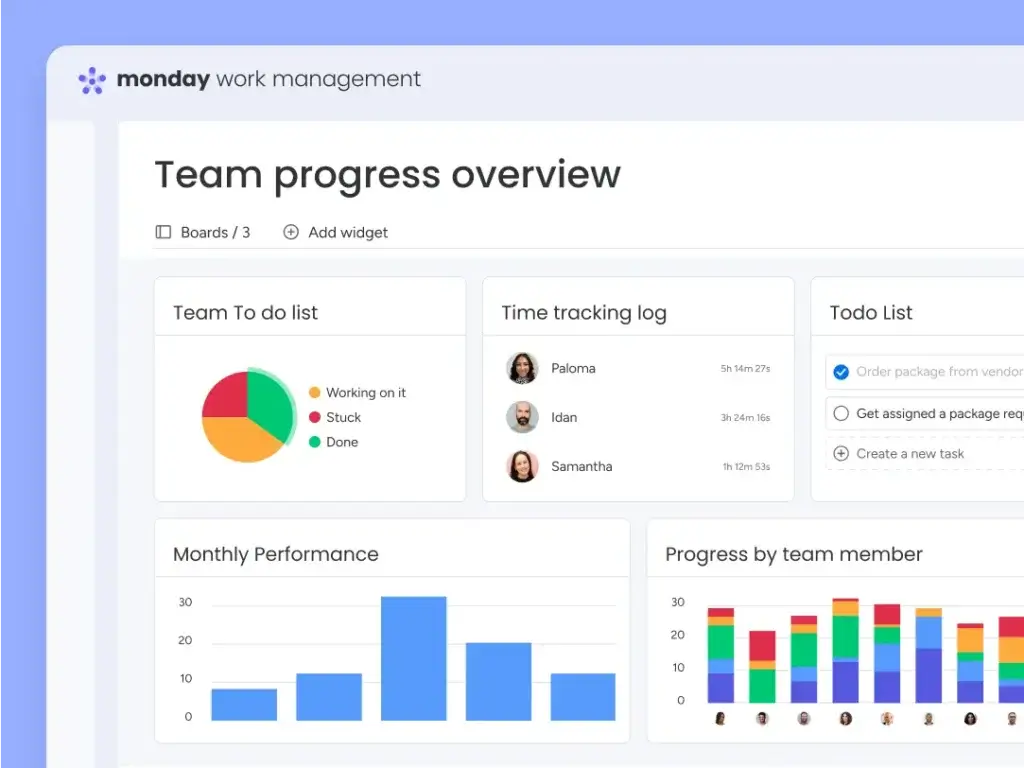
For most teams, monday Work Management is the strongest place to start because it combines task ownership, workflow stages, dashboards, automations, forms, approvals, and cross-team visibility in one flexible platform.
This matters because gray work usually grows between tools and between teams.
monday.com helps reduce that gap by giving every workflow a visible structure: who owns the work, what stage it is in, what is blocking it, what data is required, and what happens next.
For example, you can create a campaign board where every request enters through a form, automatically assigns the right owner, moves through approval stages, notifies stakeholders, and updates dashboards without a separate reporting process.
That is exactly the kind of structure gray work needs. Instead of chasing updates, people work from the same live system.
ClickUp: best for consolidating tasks, docs, chat, and AI
ClickUp is useful for teams that want to reduce tool switching by bringing tasks, docs, goals, chat, whiteboards, automations, and AI features into a single productivity workspace.
It can help reduce gray work when the main problem is scattered execution.
If project details live in tasks, discussions live in chat, and process notes live in docs, ClickUp can bring more of that context into one environment.
The trade-off is that ClickUp can become complex if the workspace is not governed well. To reduce gray work, you need naming rules, status rules, ownership rules, and clear views.
Asana: best for structured project coordination
Asana is a strong option for teams that need structured project coordination, task dependencies, goals, portfolios, and status reporting.
It is especially relevant for teams trying to reduce work about work, because it helps create better visibility around progress, responsibility, and blockers.
Asana is a good fit for teams that want a clean project management system with strong task clarity.
In my view, monday.com is the stronger all-around choice for teams that want more workflow customization, operational dashboards, and flexible no-code automation across departments.
Zapier, Make, and n8n: best for removing manual handoffs
Manual handoffs are one of the easiest forms of gray work to automate.
Tools like Zapier, Make, and n8n can move data between apps, trigger notifications, create tasks, route requests, update records, and reduce repetitive coordination.
Zapier is usually best for fast, accessible automation across many business apps. Make is better when you want visual, multi-step workflows with more control over logic and data. n8n is a strong option for technical teams that want deeper customization, self-hosting options, and more advanced workflow design.
You can compare these platforms in our guide to the best automation workflow tools.
AI note-takers and AI agents: best for reducing meeting follow-up work
AI tools can reduce gray work when they summarize meetings, extract action items, classify requests, draft updates, route tickets, or answer questions from connected knowledge sources.
For meetings, tools like tl;dv, Fireflies.ai, Granola, and ClickUp AI Note-Taker can reduce manual note-taking and follow-up work.
For broader workflow automation, AI agents from monday.com, ClickUp, Zapier, n8n, and other platforms can help complete repeatable actions with more context.
You can explore more options in our guide to the best AI agent tools for work.
The important point is governance. AI should not create another layer of unclear output. Every AI-assisted workflow should still have an owner, approval rule, data source, and fallback process.
| Tool Category | Relevant Tools | How It Reduces Gray Work | Best For |
| Work management | monday.com | Centralizes ownership, dashboards, forms, automations, and workflow stages | Teams that need one flexible operating system |
| Project management | Asana | Improves project visibility, task clarity, dependencies, and status reporting | Structured project teams |
| All-in-one productivity | ClickUp | Connects tasks, docs, goals, chat, and AI in one workspace | Teams consolidating multiple tools |
| No-code automation | Zapier | Automates simple handoffs and repetitive app-to-app actions | Non-technical teams |
| Visual automation | Make | Builds multi-step automations with more visual control | Operations and growth teams |
| Technical automation | n8n | Supports advanced logic, integrations, and customizable workflows | Technical and automation-heavy teams |
| AI meeting notes | tl;dv, Fireflies.ai, Granola | Turns meetings into notes, summaries, and action items | Remote and meeting-heavy teams |
Strategies that matter more than the tool
Software will not fix gray work alone. Your team also needs operating rules that make the workflow easier to trust.
- Set one source of truth for every workflow
- Assign one accountable owner to every task and deliverable
- Create required intake fields before work can begin
- Replace recurring status meetings with live dashboards where possible
- Automate reminders, handoffs, and status changes
- Create decision logs for important approvals and trade-offs
- Review gray work patterns during retrospectives
The best workflow is not the one with the most features. It is the one that makes the next step obvious.
Building a Gray Work-Free Workflow
A gray work-free workflow does not mean a perfect workflow.
It means your team has reduced avoidable coordination to the point where people can spend most of their energy on meaningful work.
To build one, start with workflow design before tool configuration.
Start with clear intake
Many gray work problems begin at the request stage. A vague request creates follow-up questions, missing details, delayed assignments, and unclear expectations.
Use structured intake forms for recurring work. For example, a content request should include topic, target keyword, audience, deadline, owner, supporting links, required assets, and approval path. A support escalation should include customer details, issue type, urgency, account owner, and required response time.
When intake is clear, the rest of the workflow becomes easier to automate.
Create ownership rules
Every workflow should answer three questions without a meeting:
- Who owns the current step?
- Who approves the next step?
- Who is informed when the status changes?
These rules remove ambiguity. They also prevent the common situation where several people are involved, but nobody feels fully responsible.
Make status visible by default
If people need to ask for status, your workflow is not visible enough.
Status should be visible in the project board, dashboard, or workflow view.
A manager should be able to see what is on track, what is blocked, what is overdue, and who owns the next action without sending a message.
This is one of the reasons monday.com is so effective for reducing gray work. Its boards, dashboards, automations, and customizable statuses can turn workflow progress into a shared operating view.
Use automations for repeatable movement
Any repeated “when this happens, do that” action should be considered for automation.
Examples include assigning an owner when a request enters a category, notifying finance when a deal is closed, moving a task when approval is complete, creating a follow-up task after a meeting, or updating a dashboard when a status changes.
Start small. Automate the most frequent and lowest-risk handoffs first. Then expand into more complex workflows once the team trusts the system.
Replace status meetings with decision meetings
A strong meeting should create a decision, solve a blocker, align priorities, or improve the quality of work.
If the meeting only collects updates, it is probably gray work.
Before every recurring meeting, ask whether the basic status questions can be answered asynchronously, whether a dashboard can show progress, and whether the live discussion is actually needed.
This does not mean eliminating collaboration. It means reserving live collaboration for work that benefits from live collaboration.
Final Thoughts
Gray Work Is a Workflow Design Problem
Gray work is not a people problem. In most cases, it is a workflow design problem.
Your team is not wasting time because they lack discipline. They are losing time because the system around them requires too much searching, clarifying, updating, copying, reminding, and chasing. The fix is to make work easier to understand, easier to own, and easier to move forward.
That means clearer intake, fewer sources of truth, stronger ownership, automated handoffs, better dashboards, and fewer meetings that exist only to compensate for poor visibility.
If you are serious about reducing gray work, start with one recurring workflow. Map it, identify the hidden coordination, calculate the time cost, and remove the biggest friction points first.For most teams, monday.com is the best starting point because it gives you the flexibility to build structured workflows without forcing every department into the same rigid system.
ClickUp, Asana, Zapier, Make, n8n, and AI note-taking tools can also play important roles depending on your team’s process maturity and technical needs.
In 2026, the strongest teams will not only work harder. They will remove the hidden work that makes execution harder than it needs to be.
FAQs
What is gray work in project management?
Gray work in project management is the hidden coordination work caused by unclear processes, disconnected tools, missing ownership, and manual workarounds. Examples include chasing updates, searching for context, copying data between systems, and attending meetings that only exist because project visibility is weak.
How do I measure how much gray work my team is doing?
Start by auditing one recurring workflow for two weeks. Ask team members to log time spent clarifying tasks, searching for information, manually updating systems, chasing approvals, and repeating status updates. Then multiply the recurring weekly minutes by the number of affected employees to estimate your gray work load.
What’s the difference between gray work and administrative overhead?
Administrative overhead is necessary support work, such as documentation, compliance, reporting, or payroll. Gray work is avoidable work created by poor workflow design, such as duplicated updates, unclear ownership, manual handoffs, and searching for information that should already be easy to find.
Which tools help reduce gray work for remote teams?
monday.com is one of the best tools for reducing gray work because it centralizes ownership, workflows, automations, dashboards, and cross-team visibility. Other useful tools include ClickUp, Asana, Zapier, Make, n8n, Slack, tl;dv, Fireflies.ai, Granola, and AI agent tools, depending on the workflow problem you need to solve.
Can gray work be completely eliminated?
Gray work cannot be completely eliminated because teams will always need some coordination and clarification. However, it can be reduced significantly by improving intake, ownership, documentation, automation, reporting, and meeting discipline. The goal is to remove repeated hidden work that should not be necessary.