Introduction
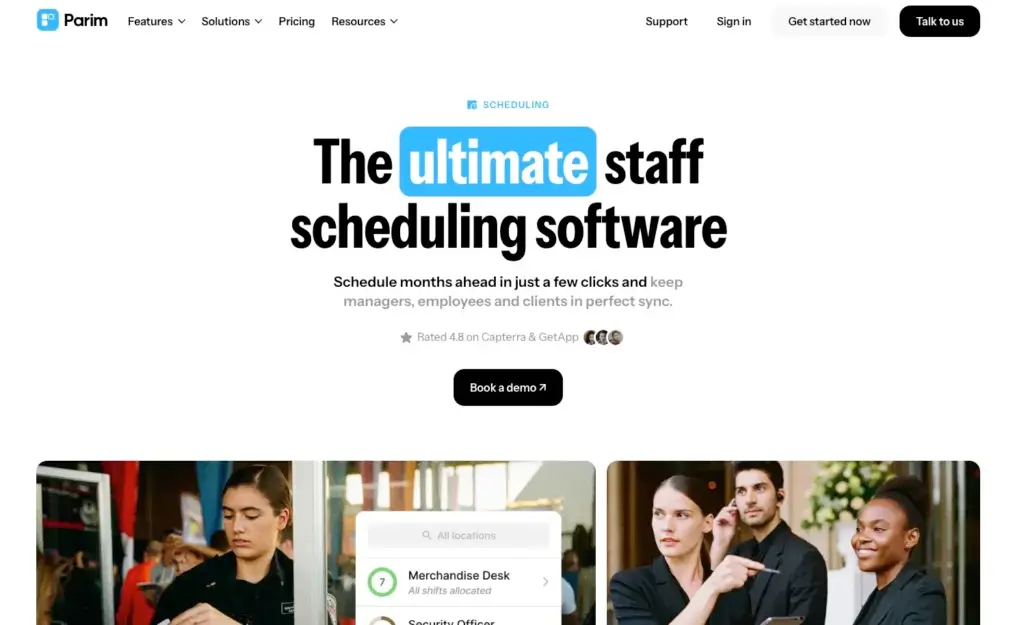
Managing shift-based teams becomes difficult when schedules change often, employees work across multiple sites, and managers need accurate attendance, pay, and coverage data. Parim is a workforce management and shift scheduling platform designed to help businesses organize rotas, fill open shifts, track attendance, manage absences, and prepare payroll-ready timesheets from one system.
In this Parim review, you will get a practical look at its core features, pricing structure, user experience, best-fit industries, pros and cons, and how it compares with Homebase, Shiftie, and 7shifts. By the end, you should have a clear view of whether Parim is the right shift management software for your workforce model, especially if you manage complex rotas, temporary staff, security teams, event workers, or multi-site operations.
Overview
What is Parim
Parim is a cloud-based workforce management platform for businesses that rely on shift workers, temporary staff, hourly employees, field teams, or multi-site operations. It is especially relevant for industries where the challenge is not only creating a weekly rota, but also making sure the right qualified people are assigned to the right shift, at the right location, with accurate attendance and pay data.
Compared with lighter scheduling tools, Parim goes deeper into operational control. You can use it to import staff, create employee profiles, define roles and qualifications, build complex shift patterns, publish open shifts, track clock-ins, manage absences, prepare payroll-ready timesheets, and handle client-related shift requests.
The platform is particularly strong when you manage a large or flexible workforce. For example, security companies can use features such as guard tours, lone worker safety, SIA badge reminders, incident reporting, and location-based attendance. Event staffing companies can use Parim to build event-specific schedules, track shift coverage, and fill large numbers of shifts quickly.
Parim is best understood as a shift management system for operationally complex teams. If your business only needs a basic weekly rota for a small team, it may feel more powerful than necessary. But if you manage employees across roles, locations, clients, qualifications, and pay rules, Parim offers a more serious workforce management setup.
- Employee scheduling: Build rotas, shift patterns, open shifts, and long-term schedules.
- Time and attendance: Track clock-ins, breaks, attendance, and real-time shift status.
- Payroll-ready timesheets: Generate timesheets with hours, pay, and charge data.
- Absence management: Manage leave, sickness, holidays, and availability requests.
- Compliance tools: Track qualifications, documents, work rules, and rest periods.
- Security features: Support guard tours, NFC checkpoints, check calls, and SIA reminders.
- Client management: Let clients request shifts and view staffing information through a portal.
Key Features
Parim Software Specification
Shift Scheduling
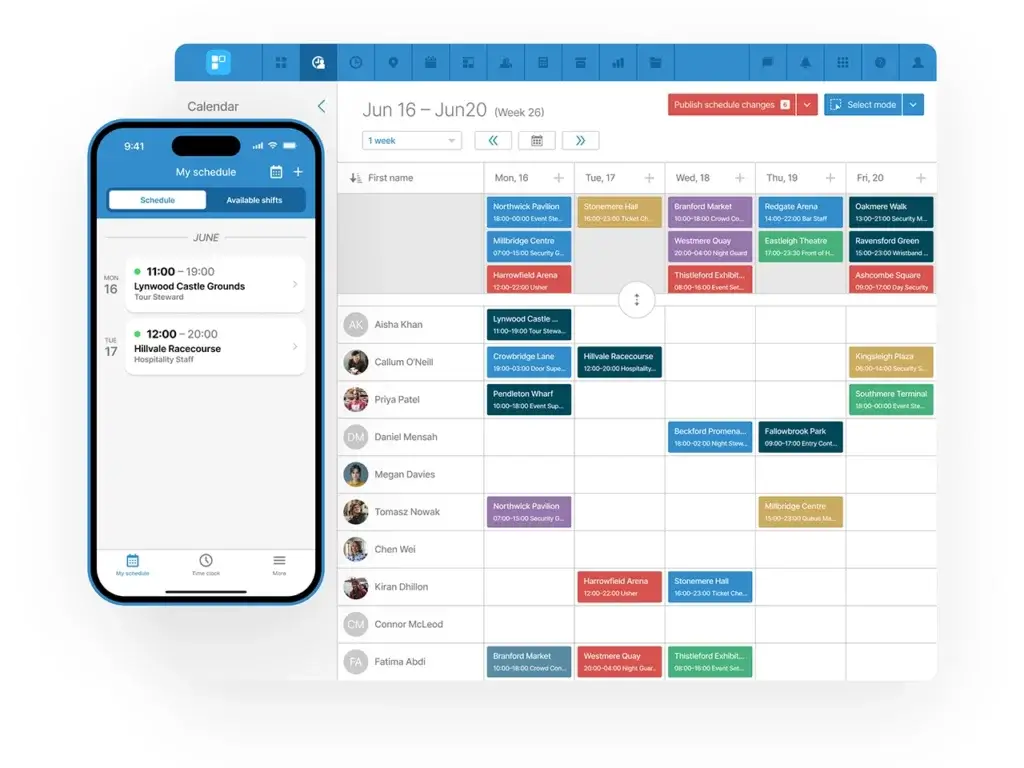
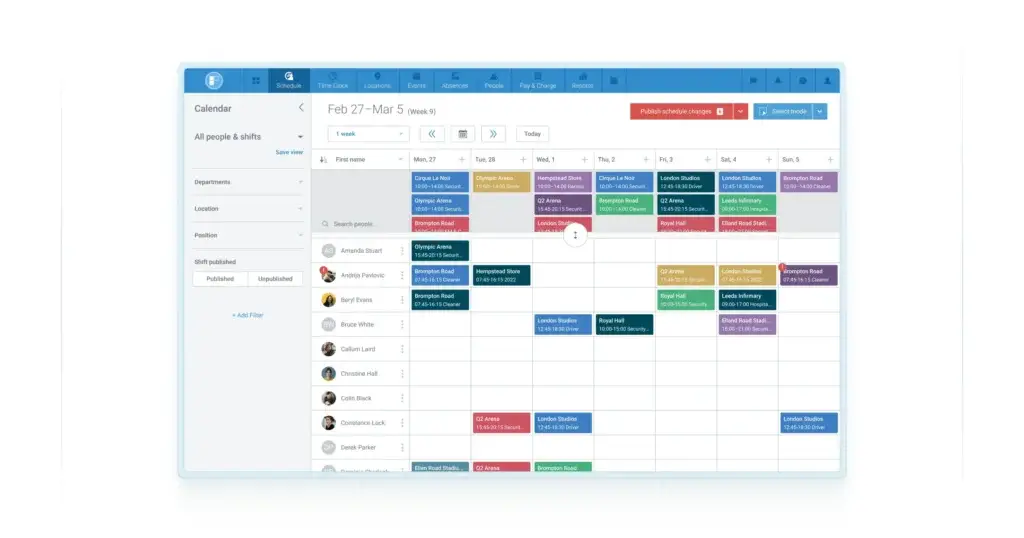
Scheduling is the center of Parim. The platform is designed for businesses that need more than a simple calendar, especially when shifts depend on roles, locations, qualifications, client requirements, employee availability, and coverage targets.
You can create standard shifts, rolling rotas, long-term schedules, event schedules, and open shifts. Managers can also publish available shifts to employees who match the right role, location, or qualification requirements. This makes Parim useful for teams that often need to fill gaps quickly without manually messaging every available employee.
- Shift patterns: Build recurring schedules for predictable rota planning.
- Open shifts: Let qualified employees apply for available shifts.
- Position matching: Assign shifts based on roles, skills, and requirements.
- Bulk shift creation: Create or upload many shifts for events or large projects.
- Conflict alerts: Reduce scheduling errors caused by absence, availability, or missing qualifications.
Time and Attendance Tracking
Parim connects schedules with attendance data, helping managers see whether employees started on time, took breaks correctly, and completed their shifts as expected. This is important for industries where employees work away from a central office, such as security, events, staffing, healthcare, warehousing, and hospitality.
Employees can clock in through the mobile app, SMS, phone calls, or a kiosk-style setup, depending on your configuration. The system can also use geofencing to improve location accuracy and reduce time theft.
- Real-time clock-ins: Monitor who is working, late, absent, or running shifts.
- Break tracking: Track rest breaks and support compliance with work rules.
- Geofence clock-in: Confirm that staff are at the right job site.
- Kiosk mode: Use a shared tablet for on-site attendance capture.
- Live attendance visibility: Give managers a clearer view of workforce coverage.
Payroll-Ready Timesheets
Parim does not position itself as a full payroll provider in the same way as some payroll platforms. Instead, its strength is preparing accurate payroll-ready data from schedules, clock-ins, breaks, absences, and pay rules.
This matters because payroll problems often start before payroll is even processed. If the shift data is wrong, the timesheets are incomplete, or the pay rules are manual, payroll becomes slow and error-prone. Parim helps by turning shift activity into timesheets with work hours, pay information, charge rates, and exportable finance data.
- Automatic timesheets: Create timesheets from real-time attendance records.
- Pay run reports: Prepare payroll data for review and export.
- Payroll exports: Export timesheet and salary data into payroll workflows.
- Pay lock: Lock approved data before final payroll processing.
- Smart filtering: Review timesheets by location, position, team, or period.
Pay and Charge Rules
One of Parim’s more advanced areas is pay and charge management. This is especially useful for staffing companies, security providers, event staffing businesses, and service companies that need to calculate what employees are paid and what clients are charged for each shift.
You can configure pay and charge rates based on variables such as position, client, location, contract type, person, age range, hours worked, day of the week, or time of day. This gives finance teams better control than basic scheduling tools that only track start and end times.
- Custom pay rates: Create pay rules based on shift and employee conditions.
- Charge rates: Calculate client billing data alongside staff pay data.
- Holiday pay rules: Manage holiday-related pay and charge calculations.
- Rule priority: Define which pay or charge rule applies first.
- Invoice-ready data: Prepare finance exports for client billing workflows.
Absence and Leave Management
Availability and absence management are important in shift-based work because one missing employee can affect coverage, safety, service levels, or client commitments. Parim lets employees request leave and mark unavailability through the mobile app, while managers can review requests and avoid scheduling conflicts.
You can also configure custom absence types, national holidays, holiday allowances, and absence reporting. This makes Parim stronger than basic rota tools for organizations that need structured absence control across many employees or sites.
- Time-off requests: Employees can request leave from the mobile app.
- Custom absence types: Configure annual leave, sick days, unpaid leave, and other categories.
- Holiday accrual: Support more accurate holiday allowance tracking.
- Absence reporting: Monitor leave patterns across departments or locations.
- Scheduling protection: Avoid assigning shifts to unavailable employees.
Compliance and Qualification Tracking
Parim is well suited to industries where compliance is tied directly to scheduling. For example, a security company may need to confirm that staff have valid licenses before assigning them to specific jobs. A healthcare provider may need to track training, certificates, visas, or role-specific documents.
The platform can help managers monitor expiring qualifications, certificates, visas, and other staff documentation. It can also support work and rest time rules, which helps reduce the risk of scheduling people into non-compliant patterns.
- Qualification tracking: Store and monitor employee qualifications and certificates.
- Expiry reminders: Receive alerts before important documents expire.
- Work and rest rules: Support compliance with scheduling limits.
- SIA reminders: Useful for UK security companies managing licensed staff.
- Role-based access: Limit sensitive pay and employee data to approved users.
Security Operations Features
Parim has a stronger security-industry fit than many general scheduling platforms. Security companies can use it to manage shift coverage, track guards on site, handle check calls, support lone worker safety, use NFC checkpoints, and report incidents.
These features make Parim more than a rota builder for security teams. It can support daily operational control, accountability, and safety procedures that matter when employees are working alone or across multiple client sites.
- Guard tour system: Use NFC checkpoints for site patrol verification.
- Lone worker safety: Support check calls and worker safety workflows.
- Incident reporting: Capture operational incidents from the field.
- Asset management: Track operational assets where relevant.
- Client site visibility: Improve accountability across job locations.
Mobile App
Parim’s mobile app is important because many shift workers do not sit at a desk. Employees can view shifts, apply for open shifts, clock in and out, manage absences, receive notifications, and access key work information from their phones.
Managers can also use mobile access to create or confirm shifts, review attendance, manage absences, and stay updated on schedule changes. This makes the platform practical for field-heavy and site-based teams.
- Employee self-service: Staff can view shifts, pay details, and requests.
- Mobile clock-in: Track attendance directly from the app.
- Push notifications: Notify staff about shift updates and open shifts.
- Mobile scheduling: Managers can handle schedule changes on the go.
- Digital employee ID: Support employee identification inside the app.
Communication
Parim includes communication features to reduce the need for scattered calls, texts, and external messaging apps. Managers can send messages to groups of employees, notify staff about open shifts, and send reminders through the system.
This is especially useful for temporary staffing and events, where quick communication can be the difference between a fully covered shift and a last-minute staffing gap.
- Group messaging: Send updates to multiple employees at once.
- Shift reminders: Reduce missed shifts with automated reminders.
- App, email, and SMS notifications: Choose the right notification channel.
- Open shift alerts: Notify matching staff about available shifts.
- Operational announcements: Keep shift-related communication in one place.
Client Portal
Parim’s client portal is useful for staffing companies, security providers, and service businesses that schedule employees for client sites. Clients can request shifts, view scheduled staff information, and access relevant job details depending on how the portal is configured.
This is a meaningful advantage over simple employee scheduling tools because it connects workforce planning with client-facing operations. For staffing businesses, it can reduce back-and-forth and make scheduling more transparent.
Reporting and Analytics
Parim provides reporting around timesheets, attendance, absences, pay, charge data, coverage, and payroll exports. The reporting value is strongest when you use the platform as an operational system rather than only as a schedule calendar.
For finance managers, payroll-ready reports can reduce manual calculations. For operations managers, coverage and attendance visibility can make it easier to identify recurring gaps, late arrivals, and staffing risks.
Pros and Cons
Advantages and Disadvantages
Positive
✅ Built for complex shift operations
✅ Strong scheduling and self-scheduling
✅ Advanced time and attendance
✅ Payroll-ready pay and charge rules
✅ Security and compliance depth
Negative
❌ Pricing is not fully transparent
❌ Less suitable for very small simple teams
❌ Industry fit is more specialized
✅ Advantages
- Built for complex shift operations: Parim is a strong fit when you need to manage employees across multiple sites, roles, clients, qualifications, and shift patterns.
- Strong scheduling and self-scheduling: Open shifts, shift patterns, role matching, and bulk scheduling help managers fill coverage gaps faster.
- Advanced time and attendance: Mobile clock-ins, geofencing, kiosk options, breaks, and real-time visibility make attendance tracking more reliable.
- Payroll-ready pay and charge rules: Custom pay and billing rules help finance teams prepare cleaner payroll and invoicing data.
- Security and compliance depth: Features like qualification tracking, SIA reminders, guard tours, incident reporting, and lone worker safety make Parim especially relevant for regulated shift work.
❌ Disadvantages
- Pricing is not fully transparent: Parim provides a starting price, but many businesses need to request pricing based on functionality and monthly shift volume.
- Less suitable for very small simple teams: If you only need a basic weekly rota for a small staff, Parim may offer more functionality than you need.
- Industry fit is more specialized: Parim is strongest for complex shift operations, so general office-based teams may find broader HR platforms more suitable.
User Experience
User Experience and Ease of Use
Parim’s user experience is built around operational workforce planning rather than simple HR administration. That means the platform gives managers strong control over shifts, sites, attendance, pay data, and staff records, but it may require more setup than lighter scheduling apps.
Onboarding and Setup
Getting started with Parim begins with setting up employees, positions, locations, qualifications, absence rules, pay rules, and schedule structures. This setup matters because the platform becomes more valuable when it can match employees to shifts based on the right operational rules.
For businesses moving from spreadsheets, the initial configuration may take some planning. However, once the structure is in place, Parim can reduce repetitive work by supporting reusable shift patterns, open shifts, automated reminders, and payroll-ready reporting.
Manager Experience
Managers get the most value from Parim when they use it as a live operational control system. They can create schedules, publish open shifts, monitor attendance, review absence requests, check timesheets, and access pay or charge data from one place.
The platform is especially useful for operations managers who need to answer practical questions quickly, such as who is on site, which shifts are uncovered, which employees are qualified, which timesheets are ready, and which documents are expiring.
Employee Experience
Employees can use the mobile app to check schedules, apply for open shifts, clock in and out, manage leave requests, and receive notifications. This self-service layer helps reduce manager workload and gives shift workers more visibility into upcoming work.
For temporary or flexible staff, open shift visibility is particularly useful because employees can apply for available work without needing manual coordination.
Device Compatibility
Parim works across web and mobile environments. That flexibility is important for shift-based industries because managers may work from an office while employees clock in from client sites, event venues, warehouses, hospitals, hospitality venues, or security posts.
Pricing
How Much Does Parim Cost?
Parim pricing starts from £47 per month, and its plans include unlimited users. However, the company also states that pricing is based on the functionality you need and the number of shifts you schedule each month. That means you should treat the listed starting price as an entry point rather than a complete cost estimate for every business.
For evaluation, the most important pricing question is not only how many employees you have. It is how many shifts you schedule, which modules you need, whether you require payroll exports, whether you manage clients, and whether security, compliance, or event functionality matters to your operation.
Starter
The Starter plan is positioned around advanced scheduling tools and is likely the most relevant entry point for businesses moving away from spreadsheets. It includes core features such as employee scheduling, configurable shift lists, locations and roles, time-off requests, automated shift reminders, dedicated staff and management apps, mobile shift creation, and SIA badge expiry reminders.
Pro
The Pro plan adds stronger time and attendance management. It includes features such as scheduling patterns, configurable timesheet lists, configurable people lists, pay run reports, configurable automated pay schedules, and CSV exports. This plan is better suited to businesses that need shift scheduling connected to attendance and payroll preparation.
Premium
The Premium plan is designed as a more complete workforce management option. It adds features such as shift cancellation tracking, timesheet analytics, payroll export, employment-type management, invoicing reports, position coverage reports, pay lock, and client shift requests.
In practice, Premium is the more relevant plan for businesses that want Parim to support scheduling, attendance, payroll preparation, invoicing, and client-facing workforce workflows together.
Parim Pricing Comparison Table
| Feature / Plan | Starter | Pro | Premium |
| Starting Price | From £47/month | Request pricing | Request pricing |
| Unlimited Users | Included | Included | Included |
| Employee Scheduling | Included | Included | Included |
| Locations and Roles | Included | Included | Included |
| Time-Off Requests | Included | Included | Included |
| Scheduling Patterns | Not highlighted | Included | Included |
| Configurable Timesheets | Not highlighted | Included | Included |
| Pay Run Report | Not highlighted | Included | Included |
| Payroll Export | Not highlighted | Not highlighted | Included |
| Invoicing Report | Not highlighted | Not highlighted | Included |
| Client Shift Requests | Not highlighted | Not highlighted | Included |
Common Use Cases
Best Use Cases and Industries
Parim is best suited to businesses where scheduling is operationally complex. That usually means you are managing hourly teams, temporary workers, multiple sites, client assignments, compliance requirements, or high-volume shifts.
- Security companies: Strong fit because of guard tours, check calls, SIA reminders, incident reporting, and site-based attendance.
- Event staffing: Useful for filling hundreds or thousands of shifts, tracking coverage, and managing temporary staff.
- Temporary staffing agencies: Supports employee databases, open shifts, client requests, and pay or charge rules.
- Hospitality teams: Helpful for shift coverage, time tracking, absence management, and payroll-ready timesheets.
- Warehousing and logistics: Useful when employees work across shifts, departments, and job locations.
- Healthcare and care teams: Relevant for teams that need shift coverage, qualification tracking, and mobile attendance.
- Multi-site operations: Strong fit when managers need visibility across many locations or client sites.
Compare with Others
Alternatives to Parim
Parim competes with several shift scheduling and workforce management tools, but its positioning is different from many small-business scheduling apps. It is stronger for complex shift operations, multi-site teams, staffing businesses, security companies, and event work.
Below is a comparison with Homebase, Shiftie, and 7shifts.
| Parameter | Parim | Homebase | Shiftie | 7shifts |
| Core Purpose | Workforce management for complex shift-based operations | All-in-one scheduling, time tracking, payroll, and HR for small businesses | Scheduling and HR management for shift-based teams | Restaurant scheduling, labor management, payroll, and tips |
| Best Fit | Security, events, staffing, healthcare, hospitality, and multi-site teams | Small businesses with hourly workers | Attractions, leisure, hospitality, and general shift teams | Restaurants, cafés, bars, and hospitality groups |
| Scheduling Depth | Strong for patterns, open shifts, roles, qualifications, and large shift volumes | Good for small business scheduling and time tracking | Good for rota planning, open shifts, and schedule insights | Very strong for restaurant scheduling and labor planning |
| Time Tracking | Strong, with real-time attendance, geofencing, kiosk, app, SMS, and phone options | Strong for hourly teams and payroll workflows | Built-in time clock and timesheets | Strong for restaurant time clocking |
| Payroll Support | Payroll-ready timesheets, pay rules, charge rules, and exports | Payroll add-on available | Timesheets and reporting | Payroll available on higher plans |
| Compliance | Strong, especially for qualifications, documents, rest rules, and security operations | HR and compliance available on higher plans | Useful HR records and leave tools | Restaurant labor compliance tools |
| Pricing Model | Starts from £47/month, based on functionality and monthly shifts | Free plan available, paid plans per location | Published third-party pricing often starts around £79/month | Free plan and paid plans per location |
| Best Choice When | You manage complex shifts, sites, clients, qualifications, and pay rules | You want a broad small-business workforce app | You want simple rota management with HR basics | You run a restaurant and need restaurant-specific workflows |
Parim vs Homebase
Homebase is a strong all-in-one workforce app for small businesses. It combines scheduling, time tracking, team communication, payroll add-ons, hiring, HR, and compliance tools. It is especially appealing for small teams that want an affordable and easy-to-use system.
How Parim compares:
Parim is more operationally advanced for complex shift environments. It offers deeper support for locations, roles, qualifications, open shifts, pay and charge rules, client shift requests, and security-specific workflows. Homebase is easier to recommend for small businesses that want broad workforce management without heavy configuration.
Who should choose which:
- Parim: Choose it for complex shift operations, staffing, security, events, or multi-site workforce control.
- Homebase: Choose it for small business scheduling, time tracking, payroll add-ons, and general hourly team management.
Parim vs Shiftie
Shiftie is a clean scheduling and HR management platform for shift-based teams. It focuses on rotas, open shifts, availability, leave, time clocking, timesheets, documents, messaging, and reports.
How Parim compares:
Shiftie is simpler and easier to understand for businesses that need straightforward scheduling and HR tools. Parim is more advanced when you need deeper workforce operations, pay and charge rules, client portals, compliance tracking, security workflows, and high-volume shift scheduling.
Who should choose which:
- Parim: Choose it if your scheduling depends on qualifications, client sites, payroll exports, and complex operational rules.
- Shiftie: Choose it if you want a simpler scheduling-first platform with HR basics and a modern rota experience.
Parim vs 7shifts
7shifts is one of the strongest scheduling platforms for restaurants. It combines restaurant scheduling, team communication, time clocking, labor compliance, tip management, onboarding, and payroll tools.
How Parim compares:
7shifts is more specialized for restaurants, while Parim is more flexible across complex shift-based industries such as security, events, staffing, healthcare, warehousing, and hospitality. If you run a restaurant and need tip tools, POS-connected labor planning, and restaurant-specific workflows, 7shifts is usually the sharper fit. If you manage shift workers across clients, locations, certifications, and pay rules, Parim is more relevant.
Who should choose which:
- Parim: Choose it for multi-site, client-based, security, staffing, and event workforce management.
- 7shifts: Choose it for restaurant scheduling, labor forecasting, payroll, tips, and hospitality-specific workflows.
Overall Takeaway
Parim is not just another employee scheduling app. It is a workforce management platform for teams that need stronger control over shift coverage, attendance, qualifications, pay rules, client sites, and operational compliance.
Parim is the better choice when workforce complexity is the problem. Homebase is better for small businesses that want an easy all-in-one system. Shiftie is better for simpler rota management. 7shifts is better for restaurants that need a hospitality-first platform.
Setup and Support
Get Started & Tips for Best Use
Getting Started
To get the most from Parim, start by mapping your workforce structure before building schedules. Define your locations, roles, positions, qualifications, pay rules, absence types, and client sites first. This prevents the platform from becoming just another calendar and allows it to support smarter shift matching, timesheets, and reporting.
If you manage complex operations, it is worth involving operations, HR, payroll, and finance early. Parim touches all of these areas because scheduling affects attendance, compliance, payroll, invoicing, and client delivery.
Customer Support
Parim provides support resources and demo options, and businesses can contact the company to discuss plan requirements. Since pricing depends on functionality and shift volume, the buying process should include a clear discovery conversation around your workforce size, number of shifts, modules, compliance needs, and reporting expectations.
Tips for Maximising Your Use of Parim
To get better results from Parim, treat implementation as an operations improvement project rather than a simple software switch.
- Set up qualifications carefully: This improves role matching and compliance alerts.
- Use open shifts strategically: Let suitable employees apply for shifts without manual outreach.
- Configure pay rules early: Clean pay rules make timesheets and payroll exports more useful.
- Train employees on mobile use: Adoption improves when staff understand clock-ins, requests, and shift applications.
- Review timesheets regularly: Do not wait until payroll deadlines to fix attendance issues.
- Use reporting by site and role: This helps identify coverage risks and recurring attendance problems.
Conclusion
Final Thoughts
Parim is a strong shift management software choice for businesses that need more than basic scheduling. Its main value is in connecting schedules with attendance, employee qualifications, absences, pay rules, client requirements, and payroll-ready timesheets.
The platform is especially relevant for security companies, event staffing teams, temporary staffing agencies, multi-site operations, and other shift-based businesses where mistakes in coverage, attendance, or compliance can create real operational problems.
Parim may not be the best fit for very small teams that only need a simple weekly rota. In that case, Homebase or Shiftie may feel easier and more cost-effective. Restaurants may also prefer 7shifts because it is more focused on hospitality workflows, tips, POS-related labor planning, and restaurant payroll.
However, if your main challenge is managing complex shift operations across people, sites, clients, qualifications, and pay rules, Parim is a serious platform to consider. Its combination of scheduling, mobile attendance, compliance tools, pay and charge logic, and operational reporting makes it one of the more capable options in the shift management software category.
Have more questions?
Frequently Asked Questions
What is Parim?
Parim is a workforce management and shift scheduling platform for businesses that manage hourly employees, temporary staff, field workers, or multi-site shift operations. It helps with scheduling, attendance, absences, timesheets, pay rules, and compliance workflows.
Who is Parim best for?
Parim is best for security companies, event staffing teams, temporary staffing agencies, hospitality teams, healthcare organizations, warehousing operations, and businesses that manage complex shifts across multiple sites or clients.
Does Parim include time tracking?
Yes. Parim includes time and attendance tools such as mobile clock-ins, real-time attendance visibility, break tracking, geofencing, kiosk options, and phone or SMS clock-in options depending on configuration.
Can employees apply for open shifts?
Yes. Managers can publish open shifts to employees who match the required role, location, or qualification rules. Employees can then apply for available shifts through the system.
Does Parim handle payroll?
Parim is not positioned as a full payroll provider, but it does create payroll-ready timesheets, pay run reports, payroll exports, and pay rule calculations that can support payroll processing.
How much does Parim cost?
Parim pricing starts from £47 per month, with unlimited users included. Final pricing depends on the functionality you need and the number of shifts you schedule each month, so many businesses will need to request pricing.
Is Parim good for security companies?
Yes. Parim is particularly strong for security companies because it includes features such as guard tours, NFC checkpoints, lone worker safety, check calls, incident reporting, qualification tracking, and SIA badge reminders.
Can Parim manage event staffing?
Yes. Parim supports event scheduling, high-volume shift creation, open shifts, coverage tracking, attendance monitoring, and temporary staff management, making it useful for event staffing operations.
What are the best Parim alternatives?
The best alternatives depend on your use case. Homebase is strong for small businesses, Shiftie is good for simpler rota management, and 7shifts is a strong choice for restaurant scheduling and labor management.
Is Parim suitable for small businesses?
Parim can work for small businesses, but it is usually most valuable when scheduling is complex. Very small teams that only need a basic rota may prefer a simpler tool such as Homebase or Shiftie.