
Storydoc is an AI-powered business document platform for creating interactive presentations, sales decks, proposals, reports, pitch decks, one-pagers, and other client-facing content. Rather than producing another static slide file, it helps you build responsive web presentations that can include videos, forms, calendars, live data, calls to action, e-signatures, and payment options.
Its most valuable differentiator is what happens after you share a presentation. Storydoc gives you engagement analytics that show who opened the document, which sections attracted attention, how long viewers stayed, and where they stopped reading. Sales and marketing teams can use this information to prioritize follow-ups and improve underperforming content.
Storydoc also combines AI generation, reusable templates, CRM-powered personalization, brand controls, and workflow automation. This makes it more than a presentation design tool. It is closer to a sales content platform for teams that want their decks and proposals to support measurable business outcomes.
In this Storydoc review, you will learn how the platform works, which features provide the most value, what its current plans include, where it falls short, and how it compares with Gamma, Prezi, and Pitch.
Software Specification
Storydoc’s Core Features
AI presentation and business document generator
Storydoc can generate a complete presentation from a prompt, pasted text, document, existing webpage, or other source material. The AI builds an initial structure, writes slide content, recommends layouts, and adds relevant visual elements.
You can also use AI while editing. The Add with AI feature helps create new sections, while Edit with AI can rephrase, shorten, expand, or refine existing copy. This is useful when you need help improving a proposal or sales deck without regenerating the entire document.
The AI is best viewed as a first-draft assistant rather than a replacement for strategic writing. Generic business content can be created quickly, but technical claims, customer-specific messaging, pricing information, and competitive positioning still require review.
Interactive web-based presentations
Storydoc presentations are hosted as responsive web experiences rather than conventional slide files. Readers move through a vertically structured document that can include animations, expandable sections, tabs, carousels, charts, videos, and interactive content.
This format works particularly well for presentations that are sent to prospects and consumed without a presenter. The reader can explore information at their own pace instead of clicking through a static PDF or PowerPoint attachment.
Storydocs are also optimized for different screen sizes. A sales proposal or pitch deck can adapt more naturally to desktop and mobile devices than a landscape slide file that requires zooming and horizontal navigation.
Conversion-focused embeds and calls to action
Storydoc lets you insert functional elements directly into a presentation. These can include scheduling calendars, forms, videos, live chat, payment tools, dashboards, approval buttons, and e-signature workflows.
For example, a sales proposal can include a Calendly booking tool at the moment when a prospect reaches the implementation section. A commercial proposal can connect readers to a payment or signing workflow without requiring a separate email exchange.
This is one of Storydoc’s clearest advantages over general presentation software. Instead of ending with a passive contact slide, you can give readers a direct next step while their interest is highest.
Presentation engagement analytics
Storydoc tracks how recipients interact with shared documents. Depending on the plan and sharing setup, you can see who viewed a presentation, when it was opened, how long readers spent in different sections, and where engagement declined.
This information is particularly useful for sales teams. A representative can distinguish between a prospect who briefly opened the link and one who returned several times, reviewed the pricing section, and shared the document with additional stakeholders.
Analytics also help content teams improve templates. If readers repeatedly leave before reaching the main value proposition, you can shorten the introduction or move essential information higher in the document.
Personalized document versions
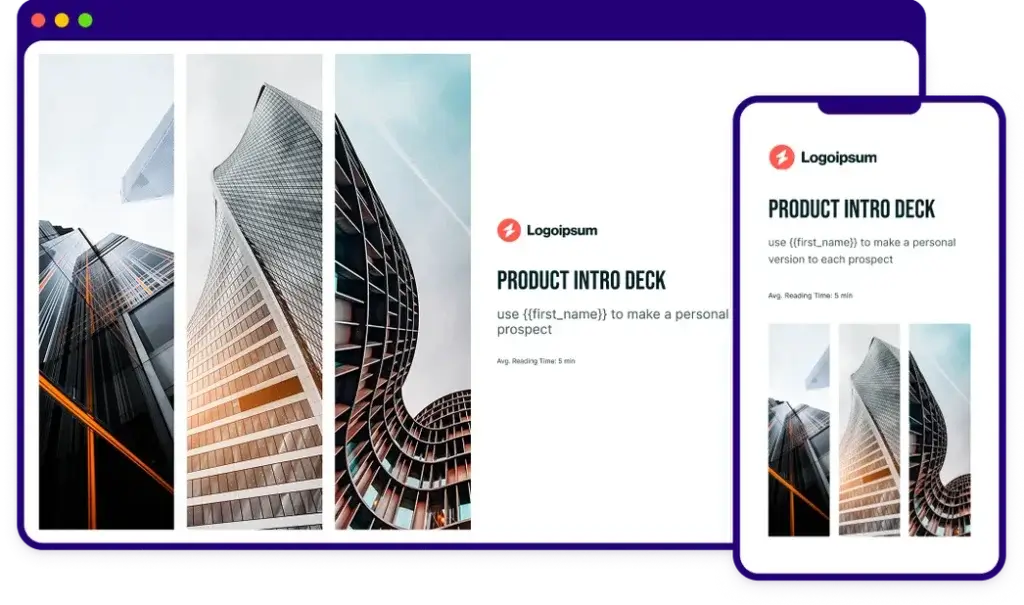
You can create a master Storydoc and generate personalized versions for individual prospects, customers, industries, or campaigns. Personalization variables can update text such as the recipient’s name and company, while more advanced implementations can also use images, videos, and live data.
Each version receives its own shareable URL and can be tracked separately. Editing one customer version does not change the master template, which makes it easier to maintain consistent messaging while still creating relevant buyer experiences.
Pro and team-focused functionality also supports bulk personalization and CRM-connected workflows. This can reduce the repetitive work involved in producing account-specific proposals and sales presentations.
CRM integrations and workflow automation
Storydoc connects with CRM systems and sales tools so teams can bring customer data into presentations and return engagement information to their existing workflows. Supported use cases include creating personalized documents from Salesforce, HubSpot, Pipedrive, Zoho, Outreach, and other platforms.
The platform also supports automation through Zapier, Make, API access, Google Sheets, Airtable, Typeform, monday.com, Slack, and other tools. A workflow could automatically create a personalized proposal when an opportunity reaches a particular stage or generate candidate-facing material when a hiring status changes.
These capabilities make Storydoc more scalable than a standalone presentation editor. However, several advanced CRM, API, and automation features are intended for Pro or team deployments and may require additional setup.
Collaboration, permissions, and version control
Teams can collaborate in shared workspaces, organize content into folders, and manage access through roles and permissions. More advanced plans add stronger administrative controls, multiple workspaces, SSO support, and enterprise onboarding options.
Version control is especially valuable for externally shared content. You can update a document after sending it, expire a link, change access settings, or replace outdated information without distributing a new attachment.
This reduces one of the common risks of PDF and PowerPoint proposals, where recipients may continue referring to an outdated file after pricing, timelines, or terms have changed.
PDF export and link-based sharing
Storydoc is designed primarily for live web sharing. Each document receives a link that can be sent by email, included in a CRM sequence, shared on social media, or embedded on a website.
You can also export content as a PDF when a traditional file is needed. However, interactive elements, responsive layouts, engagement tracking, embedded forms, and dynamic content will not retain their full functionality in the offline version.
Storydoc does not position editable PowerPoint export as its main workflow. If your organization requires every presentation to be delivered and edited as a native PPTX file, a PowerPoint-focused platform may be more suitable.
Reusable templates and brand controls
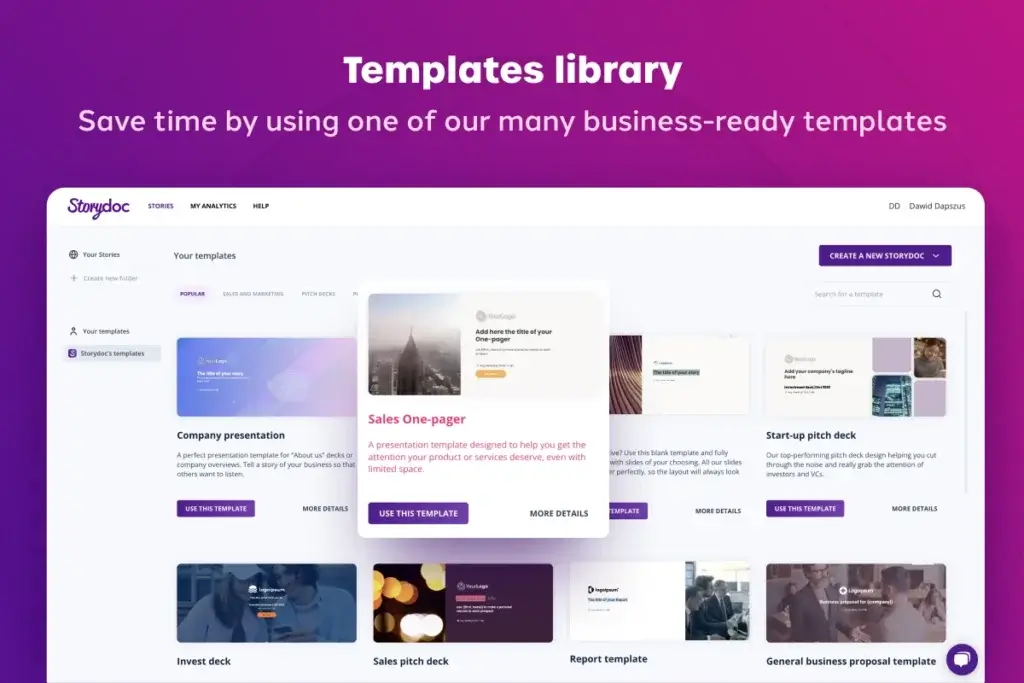
Storydoc includes templates for sales decks, proposals, reports, pitch decks, case studies, one-pagers, company profiles, and other business documents. Templates are built from predefined slide structures, such as timelines, comparisons, pricing sections, charts, and process explanations.
The centralized brand editor lets you manage fonts, colors, buttons, overlays, typography, and other design settings across a document. You can save brand profiles and apply them to future content, which reduces the risk of each salesperson creating a visually inconsistent deck.
Storydoc can also extract visual information from an existing website, PDF, or presentation. This gives teams a faster way to establish an initial branded design, although the imported result should still be reviewed for accuracy and consistency.
Pros and Cons
Advantages and Disadvantages
Positive
✅ Detailed engagement analytics
✅ Strong interactive content options
✅ Scalable document personalization
✅ Useful CRM and automation tools
Negative
❌ No permanent free plan
❌ Advanced capabilities cost more
❌ Limited pixel-level design freedom
❌ Best experience requires online sharing
Pros
✅ Detailed engagement analytics
Storydoc gives client-facing teams more visibility than a conventional attachment. You can identify which recipients opened a document, which sections received attention, and where readers stopped. These signals help salespeople follow up with better timing and context.
✅ Strong interactive content options
You can embed videos, forms, calendars, dashboards, chat tools, approval actions, e-signature flows, and payment options inside a Storydoc. This turns a presentation into a functional buyer experience instead of a passive collection of slides.
✅ Scalable document personalization
Reusable master templates and dynamic variables make it possible to create customer-specific versions without rebuilding every document. This is especially useful for account-based sales, proposals, onboarding material, recruiting, and campaign-specific presentations.
✅ Useful CRM and automation tools
Storydoc can connect presentation creation and engagement data to CRM records and broader workflows. Sales teams can automate personalized collateral, reduce repetitive editing, and keep presentation activity closer to the systems they already use.
Cons
❌ No permanent free plan
Storydoc provides a 14-day trial rather than a long-term free tier. This makes it less accessible than Gamma or Pitch for users who want to experiment gradually or create occasional presentations without maintaining a subscription.
❌ Advanced capabilities cost more
The Starter plan covers basic individual use, but the features that make Storydoc particularly valuable for revenue teams are concentrated in higher tiers. Extended analytics, stronger personalization, collaboration, CRM access, automation, permissions, and enterprise controls may require Pro or a custom plan.
❌ Limited pixel-level design freedom
Storydoc uses predefined layouts and structured content blocks to keep presentations polished and responsive. This improves consistency but gives designers less control than free-form tools such as PowerPoint, Canva, or Figma. Users who want to position every object manually may find the editor restrictive.
❌ Best experience requires online sharing
Interactive components and analytics work in the live web version, not in a static PDF. Organizations with strict offline workflows, attachment-only policies, or a strong requirement for editable PowerPoint files may not receive the platform’s full value.
User Experience
Designed Around the Reader Experience
Storydoc’s user experience differs from conventional slide software because the editor is built around structured, responsive storytelling. You assemble documents from professionally designed sections instead of placing every object on a blank canvas.
Fast starting point with AI or templates
You can begin by describing the presentation you need, importing existing content, or choosing a template for a specific use case. This makes the blank-page problem less intimidating for non-designers.
The AI-generated draft is generally most useful as a starting framework. You should still refine the hierarchy, replace generic claims, remove repetitive language, and adjust the call to action for the intended reader.
Structured editing rather than free-form design
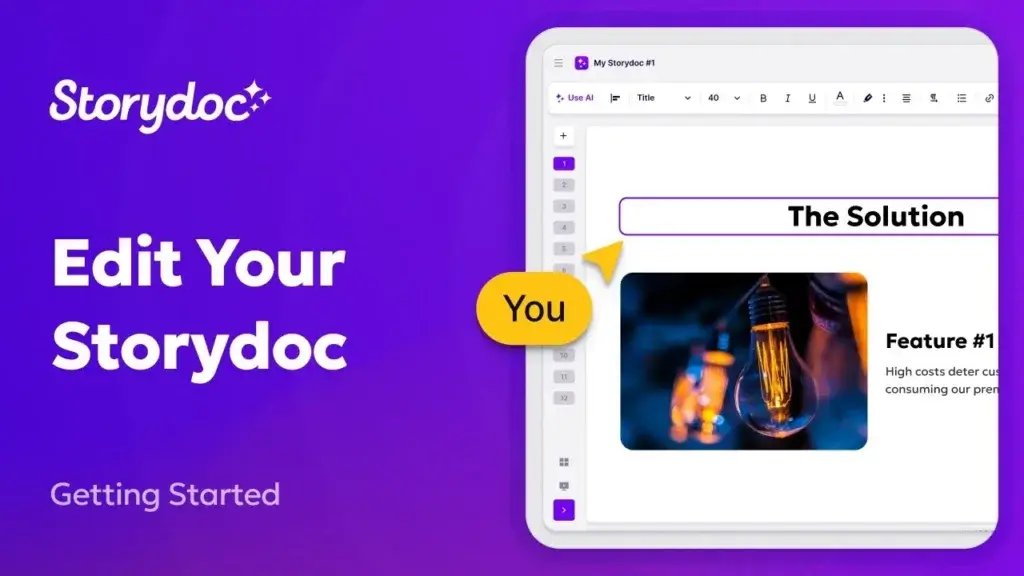
The editor lets you add, remove, and rearrange sections while inserting text, images, videos, charts, buttons, tabs, timelines, and other content types. Design settings can be managed globally, so typography or color updates do not need to be applied manually to every section.
This approach helps business users create polished documents without learning advanced design principles. The tradeoff is that you work within Storydoc’s design system rather than controlling every detail independently.
Strong experience for asynchronous presentations
Storydoc is particularly effective when the recipient will review a presentation alone. The web format feels closer to an interactive microsite than a static slideshow, making it easier to combine narrative content with product demonstrations, proof points, and response options.
Because the document is responsive, readers can also consume it more comfortably on mobile devices. This matters for sales materials that may be opened from an email notification rather than during a scheduled presentation.
Centralized updates after sharing
Shared links remain connected to the source content. If you discover a pricing error or need to update a timeline, you can edit the Storydoc without asking recipients to download a new file.
You can also control whether a version remains public, private, identified, or available until a specific expiration date. These controls make externally shared content easier to manage than conventional attachments.
Learning curve for advanced workflows
Basic presentation creation is approachable, but Storydoc becomes more complex when you introduce CRM fields, bulk personalization, analytics integrations, API automations, permissions, and customized enterprise workflows.
Teams adopting these capabilities should establish clear ownership for templates, data fields, brand rules, and analytics. Without governance, personalization and automation can create more content versions than the team can manage effectively.
Best Use Cases
Who Should Use Storydoc
Storydoc is best suited to organizations that share business documents externally and want those documents to generate measurable engagement. It is less compelling for users who only need simple internal slides or conventional PowerPoint files.
Sales and business development teams
Sales teams can use Storydoc for product presentations, proposals, account plans, follow-up decks, pricing documents, and digital sales rooms. Personalization and CRM integrations help representatives create relevant material, while analytics show how prospects interact with it.
The platform is especially valuable for asynchronous sales cycles where decision-makers review content between meetings or forward it to additional stakeholders.
Marketing and revenue enablement teams
Marketing teams can create reusable content templates that sales representatives personalize without changing the core positioning or visual identity. Engagement data can then reveal which case studies, messages, and calls to action perform best.
This gives enablement leaders a more measurable way to manage presentation content than storing static files in a shared folder.
Agencies and consultants
Agencies and consultants can use Storydoc for proposals, strategy presentations, service overviews, audit reports, client onboarding, and campaign summaries. A master template can be adapted for each account without recreating the full document.
Embedded calendars, approval options, and forms can also reduce friction between reviewing a proposal and taking the next step.
Founders and fundraising teams
Founders can build interactive investor decks, company overviews, and fundraising presentations with video, product demonstrations, financial charts, and supporting material.
However, investors may still request a PDF or PowerPoint version for internal circulation. Founders should therefore confirm the preferred format before relying exclusively on the interactive link.
Customer success and account management
Customer success teams can create onboarding documents, business reviews, adoption reports, renewal presentations, and account-specific recommendations. Live data and personalized versions can make these presentations more relevant to each customer.
Engagement analytics may also help teams identify whether stakeholders reviewed key renewal or implementation information after a meeting.
Recruiting and HR teams
Storydoc can support employer branding, candidate information packs, onboarding materials, benefit explanations, and training content. Integrations with workflow and recruitment systems can help automate personalized candidate-facing documents.
It is most valuable when the presentation needs to feel polished, interactive, and tailored rather than functioning as a simple policy document.
Compare with Others
Alternatives to Storydoc
Storydoc occupies a specific position between presentation software, sales enablement, and interactive document creation. The best alternative depends on whether you prioritize rapid AI generation, live presentation impact, collaborative slide editing, or conversion-focused buyer engagement.
Gamma is the strongest alternative for fast, flexible AI content generation and modern web sharing. Prezi offers a more distinctive visual format for live presentations. Pitch is better suited to teams that want traditional slide collaboration, brand management, and presentation workflows.
| Feature Type | Storydoc | Gamma | Prezi | Pitch |
| Best for | Interactive sales documents, proposals, personalization, and buyer analytics | Fast AI-generated presentations, documents, and web pages | Dynamic live storytelling with visual movement | Collaborative team presentations and branded slide workflows |
| Core format | Responsive interactive business document | Card-based web presentation or document | Zoomable visual canvas | Modern collaborative slide deck |
| AI strength | Business document generation, rewriting, and personalized content workflows | Rapid drafting, restructuring, restyling, and multi-format content creation | AI-assisted presentation structure and visual storytelling | AI-assisted slide creation, editing, summaries, and content refinement |
| Analytics | Strong reader-level engagement, section activity, and sales follow-up signals | Useful link analytics on eligible plans | Presentation analytics available on selected plans | Advanced links, analytics, and pitch rooms on higher plans |
| Interactive elements | Forms, calendars, video, payments, signatures, dashboards, and live tools | Embeds, media, buttons, and web-style interactions | Motion, zooming, video, and visual navigation | Interactive embeds, videos, links, and shared pitch rooms |
| Collaboration | Strong for managed business content and personalized versions | Good for shared web content and async communication | Good for presentation-focused teamwork | Excellent for real-time deck collaboration |
| Main limitation | Less suitable for editable PowerPoint and offline-first workflows | Less control over traditional slide exports | Visual movement may not suit every audience | Some sharing and analytics features require higher plans |
When to choose another presentation platform
- Choose Gamma if you want fast AI generation across presentations, documents, and simple web pages. Gamma is more flexible for general-purpose content creation and provides a free plan. Read the full Gamma review.
- Choose Prezi if your priority is delivering a memorable live presentation. Its zoomable canvas creates a more dynamic sense of movement and visual connection between ideas. Read the full Prezi review.
- Choose Pitch if your team prefers a familiar slide-based format with strong real-time collaboration, brand controls, shared workspaces, and presentation analytics. Read the full Pitch review.
- Choose Storydoc if presentations are part of your sales or client journey and you need personalization, reader analytics, interactive calls to action, CRM connections, and centrally managed web documents.
Pricing & Plans
Pricing Built Around Document Usage
Storydoc offers Starter, Pro, and custom team plans. The published annual prices are lower than the month-to-month rates, and the pricing page currently advertises savings of up to 40% with annual billing.
There is no permanent free plan. Instead, Storydoc provides a 14-day free trial without requiring a credit card. Because pricing and plan limits can change, confirm the current terms before subscribing.
Starter plan
The Starter plan is listed at $19.80 per month when billed annually, or $237.60 for the year. It is intended for individual professionals who need a smaller number of active documents.
- Starter – Includes 5 active documents, 20 AI image credits per month, 25 AI text credits per month, limited analytics, up to 10 links and versions, 20 slides per template, and 3 live deck templates.
This plan is suitable for consultants, founders, freelancers, or sales professionals who create a limited number of external presentations. The restrictions become important if you need a larger reusable content library or frequent personalization.
Pro plan
The Pro plan is listed at $36 per month when billed annually, or $432 for the year. It is positioned for businesses and teams that need more documents, stronger analytics, collaboration, and personalization.
- Pro – Includes 30 active documents, 50 AI image credits per month, 125 AI text credits per month, extended analytics, unlimited links, unlimited slides, unlimited live deck templates, additional workspace folders, collaboration, and more advanced personalization capabilities.
For most sales and marketing teams, Pro is the more realistic starting point because it removes several limits that can quickly constrain repeated client-facing use.
Teams plan
The Teams tier is designed for organizations with five or more users and uses custom pricing. It can include unlimited active documents, stronger AI allowances, advanced roles and permissions, multiple workspaces, CRM access, SAML-based SSO, custom implementation support, and enterprise security documentation.
Storydoc can also provide onboarding, training, workspace configuration, custom templates, design services, analytics reviews, and a designated specialist. These services may be useful for larger deployments but should be included when calculating total implementation cost.
Free trial and cancellation considerations
The 14-day free trial lets you test the editor and core workflow before committing. You should use the trial to create a real document, share it internally, inspect the mobile experience, test the analytics, and confirm that required integrations are available on your intended plan.
Storydoc states that documents remain available through their existing links after cancellation. However, you lose access to the editor, new version creation, and analytics panel. This means your content can stay online, but your ability to manage and measure it becomes restricted.
| Plan | Published Annual Price | Best For | Key Limits and Benefits |
| Starter | $19.80/month, billed annually | Individual professionals and light usage | 5 active documents, limited analytics, 20 AI image credits, 25 AI text credits, and restricted templates |
| Pro | $36/month, billed annually | Businesses and presentation-driven teams | 30 active documents, extended analytics, collaboration, personalization, and higher AI limits |
| Teams | Custom pricing | Organizations with 5+ users | Unlimited scale options, enterprise controls, CRM access, roles, SSO, onboarding, and support services |
| Free trial | 14 days | Product evaluation | No credit card required according to Storydoc’s current product information |
How to Use Storydoc
A Step-by-Step Guide
Storydoc is straightforward for basic presentations, but the quality of the final result depends on how clearly you define the audience, objective, and desired action.
Choose the document objective
- Define the reader and identify whether the document is intended for a prospect, client, investor, candidate, employee, or internal stakeholder.
- Choose one primary outcome, such as booking a meeting, approving a proposal, understanding a report, or signing an agreement.
- Collect your source material, including messaging, proof points, customer data, screenshots, pricing, videos, and brand assets.
Start with AI, a template, or imported content
You can ask the AI generator to create the first draft, select a template for your use case, or transform existing material. A detailed prompt should explain the audience, document type, core problem, value proposition, tone, supporting evidence, and desired call to action.
Templates are usually the better option when you already know the document structure. AI generation is more helpful when you need assistance organizing unstructured notes or developing an initial narrative.
Apply your brand settings
Add your logo, fonts, colors, image style, and button treatments through the design settings. Review the full document after applying the brand profile because some color combinations may reduce contrast or make embedded elements less visible.
Replace generic content with specific proof
Strengthen the AI-generated draft with customer outcomes, product screenshots, implementation details, quantified benefits, testimonials, and relevant case studies. Avoid unsupported claims and remove sections that repeat the same idea.
For sales documents, arrange content around the buyer’s problem and decision process rather than presenting a long list of company features.
Add interactive conversion elements
Embed only the elements that support the reader’s next action. A calendar can work well in a sales deck, while an approval button or e-signature workflow is more appropriate for a proposal.
Too many videos, forms, animations, or buttons can make the document feel unfocused. Interactive functionality should reduce friction rather than distract from the main message.
Create personalized versions
Build a master template first, then use variables or CRM data to create recipient-specific versions. Verify every dynamic field before sending, especially names, company details, images, pricing, and account data.
Share and monitor engagement
Send the unique Storydoc link through your preferred channel and monitor viewer activity. Use engagement as a conversation signal, not as proof of purchase intent. A long view may indicate interest, but it can also mean the recipient left the document open.
Improve the master template
Compare performance across versions and look for consistent patterns. Shorten sections with high drop-off, move strong proof points earlier, and test more relevant calls to action.
The greatest long-term value comes from treating Storydoc as an iterative content system rather than creating isolated presentations and never reviewing their performance.
Conclusion
A Strong Platform for Measurable Business Content
Storydoc is one of the more distinctive tools in the presentation software category because it focuses on what happens after a document is shared. Its interactive elements, personalization tools, analytics, CRM integrations, and automation capabilities make it particularly valuable for sales, marketing, consulting, and customer-facing teams.
The platform is strongest when a presentation needs to guide the reader toward an action. Proposals can include approval or signing workflows, sales decks can include meeting calendars, and account-specific presentations can pull in personalized data while sending engagement signals back to the CRM.
Storydoc is less suitable when you need unrestricted slide design, offline editing, a permanent free plan, or editable PowerPoint output as the final deliverable. Its structured editor also means advanced designers may feel constrained by predefined layouts.
Pricing is reasonable for individual professionals who need only a few active documents, but teams will probably need the Pro or custom tier to access Storydoc’s most meaningful benefits. The business case becomes stronger when analytics and personalization improve an existing sales process, not when the platform is used only to make occasional internal slides.
Storydoc is therefore best considered as an interactive business document and sales content platform rather than a direct replacement for every presentation tool. If you want externally shared decks to become personalized, trackable, and actionable experiences, Storydoc is one of the strongest options to evaluate.
Frequently Asked Questions
Have more questions?
What is Storydoc?
Storydoc is an AI-powered platform for creating interactive presentations and business documents. It is commonly used for sales decks, proposals, pitch decks, reports, one-pagers, case studies, and other client-facing content.
Is Storydoc a presentation maker?
Yes. Storydoc is a presentation maker, but it focuses on responsive web presentations rather than conventional slide files. Its documents can include interactive content, analytics, personalization, forms, calendars, videos, and calls to action.
Does Storydoc use AI?
Yes. Storydoc can generate a presentation from a prompt, text, URL, or document. Its AI tools can also add new sections and rephrase, shorten, expand, or refine content inside the editor.
Is Storydoc free?
Storydoc does not currently provide a permanent free plan. It offers a 14-day free trial, after which you need a paid Starter, Pro, or custom team subscription to continue editing and creating documents.
How much does Storydoc cost?
Storydoc’s published annual pricing starts at $19.80 per month for Starter and $36 per month for Pro. Team plans use custom pricing. Monthly rates and plan limits may differ, so check the current pricing page before subscribing.
Can Storydoc track presentation views?
Yes. Storydoc provides presentation analytics that can show who viewed a document, when it was opened, how long readers spent in different sections, which content received attention, and where viewers stopped reading.
Can Storydoc integrate with a CRM?
Yes. Storydoc supports CRM-connected workflows with platforms such as Salesforce, HubSpot, Pipedrive, and Zoho. Teams can use CRM data to personalize documents and connect engagement information to sales records.
Can you export Storydoc presentations?
Storydoc supports PDF export on eligible plans. However, interactive features, responsive layouts, embedded tools, and engagement analytics work best in the live online version. Storydoc is not primarily designed around editable PowerPoint export.
Who should use Storydoc?
Storydoc is best for sales teams, marketers, agencies, consultants, founders, customer success teams, and other professionals who send business documents externally and want personalization, engagement analytics, and interactive calls to action.
What is the best Storydoc alternative?
Gamma is a strong alternative for fast AI content generation, Prezi is better for dynamic live storytelling, and Pitch is stronger for collaborative slide-based workflows. Storydoc remains the better choice when personalized business documents and reader engagement analytics are the priority.