
Introduction
Feedback platforms often fail when findings remain disconnected from the systems where customer, employee, or product decisions are made.
Alchemer is designed to close that gap. Formerly known as SurveyGizmo, it combines an advanced survey builder with research-grade question types, AI-assisted text analysis, digital feedback collection, integrations, and no-code workflows that can route each response to the right person or business system.
This approach creates tradeoffs. The interface takes longer to master than lightweight form builders, prices rise sharply between plans, and major automation, AI, digital, and enterprise capabilities require custom platform pricing.
In this Alchemer review, you will learn:
- How its survey builder handles complex logic and customization
- Which market research and reporting features justify higher plans
- How Pulse AI, Workflow, Connect, and Digital expand the platform
- What the free, Collaborator, Professional, and Full Access plans include
- When Qualtrics, SurveyMonkey, SurveySparrow, Typeform, or QuestionPro may be a better fit
Bottom line: Alchemer is best for teams that have outgrown basic survey software but do not want the complexity and cost of a large enterprise experience-management deployment. Its strongest value appears when you need advanced survey design and a reliable process for turning responses into follow-up actions.
| Category | Alchemer Review Summary |
| Best For | Customer experience, market research, product, marketing, HR, education, nonprofit, and enterprise feedback programs |
| Free Plan | Available with up to 3 surveys and 100 responses per survey, plus limited question types and reporting |
| Strongest Features | Advanced logic, research question types, survey customization, workflow automation, integrations, and AI text analysis |
| Main Limitation | Large price jumps between plans and quote-based pricing for the broader platform |
| Best Alternative | Qualtrics for large XM programs, SurveyMonkey for easier self-service, SurveySparrow for conversational CX |
| Our Recommendation | Best for teams that need flexible surveys and operational feedback workflows rather than simple questionnaires |
Who Is Alchemer Best For?
Identify whether your feedback program needs this level of flexibility
Alchemer is most useful when a questionnaire is part of a recurring research, customer experience, or operational process. A simple poll does not need its full feature set.
✅ Best For
- Market research teams using conjoint, MaxDiff, card sorting, image heatmaps, quotas, and advanced exports
- Customer experience teams running NPS, CSAT, CES, churn, onboarding, and closed-loop feedback programs
- Product teams collecting website or in-app feedback and routing insights into product and support systems
- Marketing and operations teams that need highly customized forms, campaigns, and automated response handling
- Enterprises and regulated organizations requiring SSO, permissions, data residency, retention controls, and formal security review
❌ When It Might Not Be the Right Fit
- You only need occasional polls that can be handled by a simpler free survey tool
- You want a visually guided one-question-at-a-time experience with minimal setup
- Your team lacks time to learn advanced logic, reporting, scripting, and workflow configuration
- You need predictable low-cost pricing for several users without requesting a platform quote
- You mainly need payments, signatures, documents, or approvals rather than research and feedback management
Where Alchemer Creates the Most Value
A low CSAT score can open a follow-up workflow, alert the account owner, update a customer record, and ask a targeted question. Alchemer is strongest when you need that connected process.
Survey Builder and Advanced Logic
Build simple questionnaires or research-grade survey paths
Alchemer Survey provides a drag-and-drop builder with more than 40 question types. You can create surveys, forms, polls, quizzes, payment forms, and 360-review projects, then customize pages, themes, validation, completion behavior, and distribution settings.
Question Types and Customization
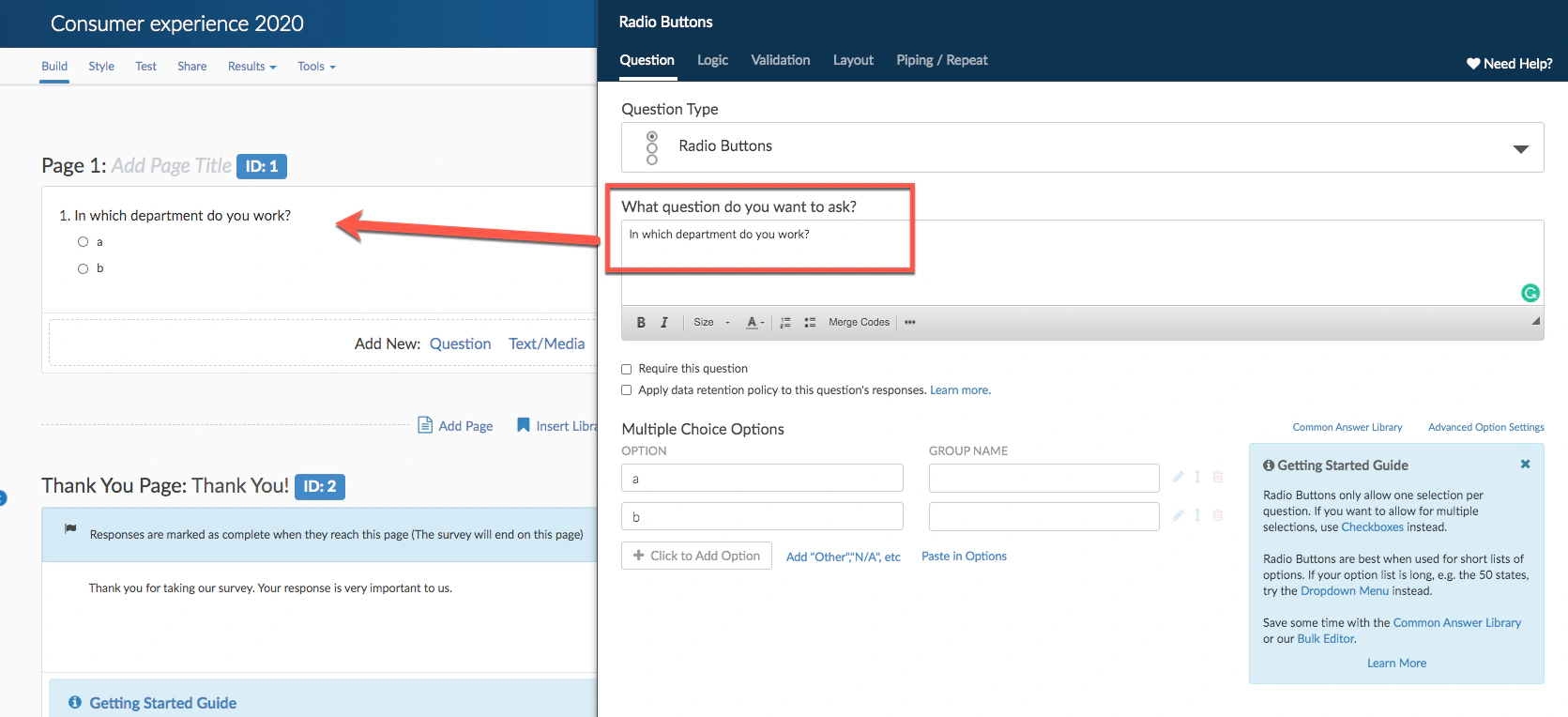
Standard questions include selections, text fields, rankings, grids, ratings, and file uploads. Higher plans add heatmaps, text highlighters, card sorting, media sentiment, MaxDiff, and choice-based conjoint.
This range matters when you need to test concepts or preferences rather than collect basic contact information. You can also apply logos, premium themes, fonts, colors, and custom templates so different teams follow a consistent design system.
Logic, Piping, Branching, and Randomization
Logic can show or hide questions, pages, and actions based on answers or contact data. Piping carries a respondent’s selection into a later question. Repeating logic can create follow-up sections for multiple chosen items, while randomization and percent branching help reduce order effects or divide respondents between different experiences.
Complex projects should include a logic map and test responses for every major path.
Quotas, Variables, and Survey Personalization
Overall, segmented, and link-based quotas control response volumes. URL variables and contact fields personalize surveys or connect responses with CRM records, while multilingual tools manage translated versions.
Scripting and Developer Flexibility
Advanced users can extend projects with JavaScript, custom actions, webhooks, APIs, and a custom question development kit. Beginners may require additional onboarding.
Market Research and Data Collection
Use specialist methods for concept, product, and preference research
Alchemer becomes particularly competitive when a survey must support formal market or user research. Full Access includes advanced question types and analysis options that are uncommon in general-purpose form builders.
Conjoint, MaxDiff, and Card Sorting
Choice-based conjoint estimates how respondents value product attributes. MaxDiff supports clearer prioritization, while open and closed card sorting show how users group information.
Heatmaps and Media Testing
Image heatmaps capture reactions to designs, text highlighters identify influential passages, and media sentiment questions collect continuous feedback while content plays.
Distribution and Field Collection
You can distribute surveys through web links, email campaigns, SMS, social media, QR codes, website intercepts, embedded surveys, offline collection, and kiosk mode. Email campaigns use unique links, allowing you to track progress and send reminders or thank-you messages. Offline mode is useful for field research, events, healthcare, education, and locations with unreliable connectivity.
Panel and research services are available separately for organizations that need respondent recruitment or study support.
Alchemer Pulse and AI Features
Separate survey intelligence from the broader AI analysis platform
Alchemer’s AI strategy is centered on understanding unstructured feedback rather than only generating survey questions. The main product is Alchemer Pulse, an AI-driven text analysis system within the broader platform.
Theme and Sentiment Analysis
Pulse can analyze open-text feedback from surveys, reviews, support tickets, chat transcripts, app stores, and other connected sources. It identifies themes, sentiment, trends, and observations, then lets you filter findings by attributes such as product, region, customer group, or experience type.
Impact Analysis and Executive Reporting
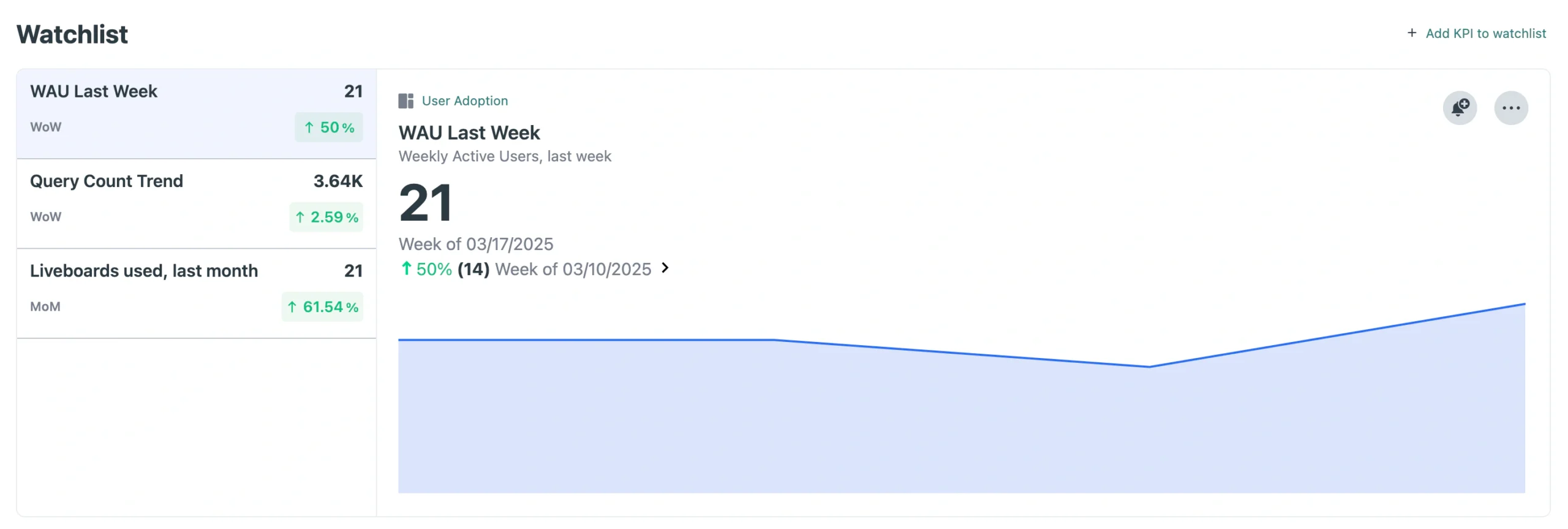
The system can connect themes with NPS, CSAT, or review scores, helping you identify issues associated with satisfaction, loyalty, or reputation. Dashboards simplify leadership reporting.
AI Smart Question
Alchemer also provides an AI Smart Question integration that can generate a targeted follow-up after a respondent submits an open-text answer. Used carefully, this can uncover the reason behind a vague comment without forcing every respondent through the same additional questions.
Important AI Limitations
Pulse is not included in every self-service plan. Confirm data sources, languages, volume, onboarding, and pricing, and retain human review for sensitive findings or automated actions.
Workflow Automation and Alchemer Digital
Connect feedback to people, systems, and digital experiences
Alchemer’s strongest differentiator is that a response can become the start of a process. Survey collects the information, while Workflow, Connect, and Digital determine where feedback appears and what happens next.
Alchemer Workflow
Alchemer Workflow is a no-code add-on built for cross-survey orchestration and closed-loop programs. A workflow can listen for an event, send a survey, evaluate the response, create follow-up steps, and move data between teams or systems.
A ticket closure can trigger a survey, while a detractor response can notify support, create a recovery task, and schedule follow-up.
Alchemer Connect
Alchemer Connect provides a drag-and-drop environment for integrations and automations. It can update CRM records, trigger alerts, send surveys after business events, and coordinate multi-step journeys across sales, marketing, support, HR, commerce, and data tools.
Alchemer Digital
Alchemer Digital collects feedback inside websites and iOS or Android apps. You can target people using behavior, sentiment, or custom data, launch in-app surveys and prompts, collect feature requests, track sentiment, and guide satisfied users toward app-store reviews.
Digital is a separate platform capability, so buyers should not assume it is included in a self-service survey license.
Analytics and Reporting
Turn response data into reports your stakeholders can use
Alchemer offers real-time standard reports, filtering, segmentation, crosstabs, exports, and shareable report links. The exact depth depends on your license.
Standard Reports and Segmentation
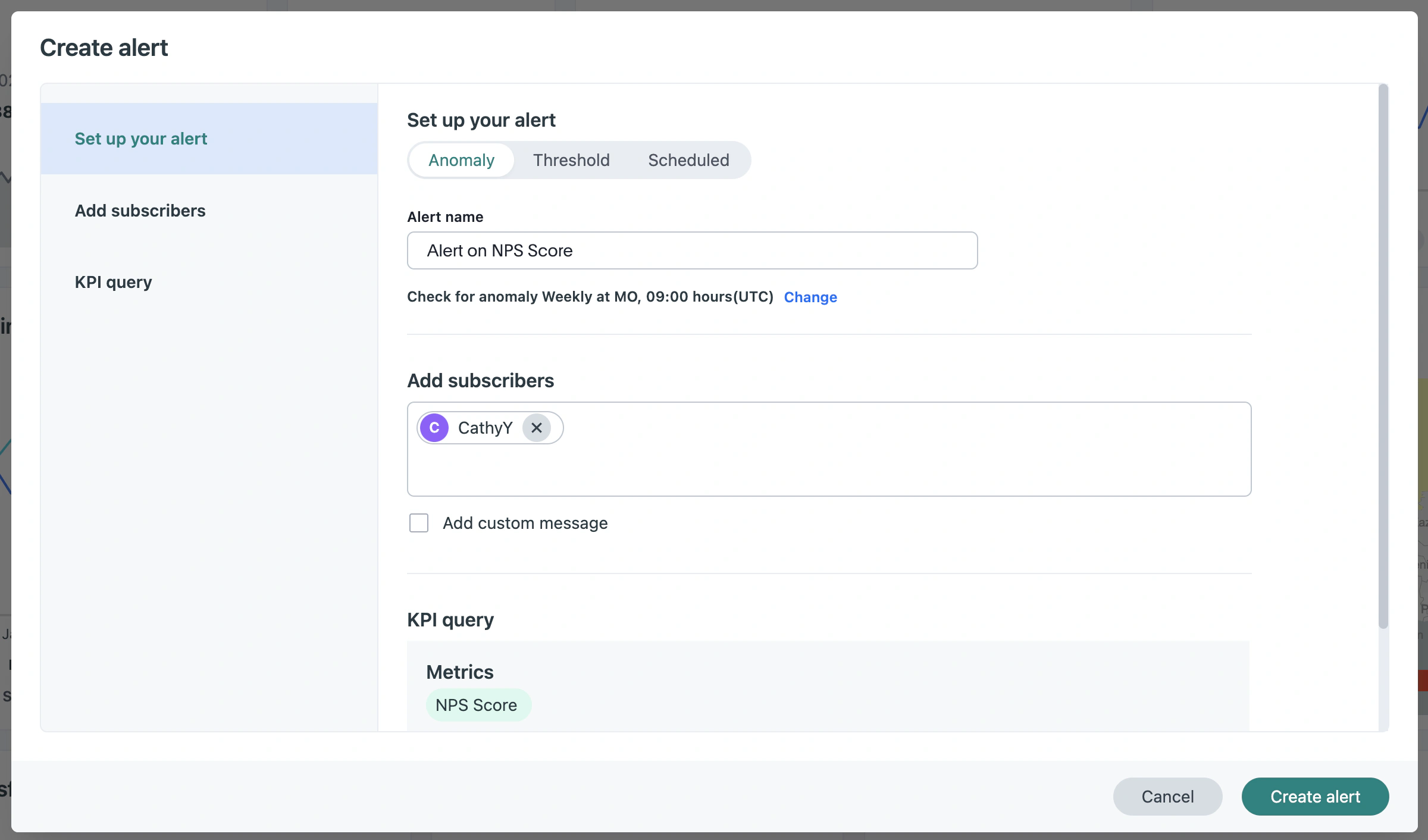
Standard reports summarize questions with charts, tables, statistics, and response counts. Filters isolate respondents by answer, source, status, date, contact data, variables, or geography, while segmentation compares groups.
Crosstabs and Advanced Analysis
Crosstab reports help you examine relationships between questions and subgroups. Full Access adds advanced analysis and research tools, including conjoint and open-text capabilities. These functions make Alchemer stronger than basic survey tools for researchers who need more than automatic charts.
Exports and Stakeholder Sharing
Exports include Excel, CSV, PDF, PowerPoint, Word, and SPSS, depending on the plan. Shareable URLs provide current findings without workspace access. For broader modeling, see our guide to the best business intelligence software.
Our assessment: Reporting is flexible and business-friendly, although the most sophisticated statistical analysis still belongs in specialist research or analytics software.
Pros and Cons
Balance flexibility and workflow depth against cost and complexity
User feedback commonly praises Alchemer’s customization, logic, reporting, integrations, and support. The recurring concerns are pricing, the learning curve for advanced functions, and an interface that can feel less intuitive as projects become more complex.
Positive
✅ Highly flexible survey logic and customization
✅ Advanced market research question types
✅ Strong integrations and feedback automation
✅ Generous response allowances on paid plans
Negative
❌ Significant price jumps between license levels
❌ Advanced projects have a steeper learning curve
❌ Broader platform pricing is mostly quote-based
❌ Important capabilities are split across products and add-ons
✅ What You Will Appreciate
Advanced flexibility without forcing every team into an enterprise suite
You can start with a self-service survey license and access logic, branding, exports, campaigns, and reporting. More complex organizations can expand into platform integrations, AI, digital feedback, and workflow automation.
Research features that go beyond standard questionnaires
Conjoint, MaxDiff, heatmaps, card sorting, media sentiment, SPSS export, quotas, and crosstabs support product, UX, pricing, and market research.
Feedback can trigger real operational work
Workflow and Connect help your team update records, alert owners, initiate recovery processes, and close the loop instead of leaving findings in a static report.
Human support and extensive learning resources
Email support is available around the clock for paid self-service licenses, while eligible annual Professional and Full Access accounts receive weekday phone support. Documentation and Alchemer University support self-directed learning.
❌ What Could Be Better
The Professional plan costs far more than Collaborator
The monthly price increases from $55 to $165 per user. Teams should confirm that advanced logic, branding, reporting, and phone support will be used often enough to justify the difference.
The platform is not as immediately intuitive as a lightweight form builder
Basic surveys are straightforward, but complex logic, scripting, advanced reports, and workflow orchestration require planning and testing.
Product packaging can make total cost difficult to estimate
Pulse, Digital, Workflow, Connect, platform integrations, enterprise administration, and services are not represented by one simple public price.
The free plan is suitable for evaluation, not a scaled feedback program
Three surveys and 100 responses per survey can support small tests, but the restricted question types, reporting, and exports will push most business users toward a paid license.
Pricing and Plans
Calculate license cost and platform scope before committing
Alchemer pricing is divided between self-service licenses for one to three users and a custom Business Platform for larger or more complex deployments. Public prices are listed in US dollars, with monthly and annual options.
Current Public Pricing Overview
| Plan | Public US Price* | Best For | Important Limits or Features |
| Free | $0 | Learning the platform and small surveys | Up to 3 surveys, 100 responses per survey, limited question types and reporting |
| Collaborator | $55/user/month or $315/user/year | Basic surveys and collaboration | Unlimited surveys, 75,000 annual account responses, branding, logic, reports, exports, email support |
| Professional | $165/user/month or $1,075/user/year | Advanced business surveys and analysis | 100,000 annual account responses, additional logic, scripting, reporting, custom templates, phone support on annual plans |
| Full Access | $275/user/month or $1,895/user/year | Market research and advanced analysis | 125,000 annual account responses, advanced research questions, SPSS, statistical and reporting tools |
| Business Platform | Custom quote | Organizations with more than 3 users or connected feedback programs | Omnichannel collection, integrations, open-text analysis, 24/7 support, customer success, SSO, permissions, enterprise security |
Free Plan and Trial
The free account supports up to three active or closed surveys and up to 100 responses per survey. It includes a limited set of question types, standard reporting, and CSV or Excel exports. Alchemer also offers a seven-day trial without a credit card, with features limited to the Professional license and up to 100,000 responses during the trial.
Which Plan Offers the Best Value?
Collaborator provides good value when you need unlimited surveys, generous response capacity, branding, exports, and standard logic. Professional is the practical choice for advanced business surveys, but only when its extra logic, scripting, templates, reporting, and support justify the steep price increase.
Full Access is best evaluated as a research license. If you will not use conjoint, MaxDiff, heatmaps, advanced analysis, or SPSS, the extra cost is difficult to defend. Organizations with more than three users must discuss Business Platform pricing.
Pricing assessment: Alchemer can be cost-effective compared with large enterprise research platforms, but it is not a budget survey maker. Build a requirements list before requesting a quote so you can separate essential survey capabilities from optional AI, digital, integration, service, and workflow products.
Integrations, Collaboration, and Support
Evaluate how easily feedback fits into your existing technology stack
Alchemer promotes more than 400 prebuilt integrations within its Business Platform, along with APIs and webhooks for custom connections. The integration catalog covers CRM, support, marketing, HR, commerce, collaboration, analytics, identity, and data platforms.
CRM, Support, and Collaboration Integrations
Connections include Salesforce, HubSpot, Zendesk, Slack, Jira, ServiceNow, Shopify, Workday, Snowflake, Tableau, and Power BI. Responses can update records, tickets, alerts, or workflows.
Team Collaboration and Governance
Small teams can share surveys and reports, while platform accounts add permissions, SSO, role-based access, administrative controls, and customer success support. Large organizations should define who owns templates, integrations, respondent data, reports, and workflow changes before expanding access.
Customer Support
Email support is available 24/7 for Collaborator, Professional, and Full Access users. Standard phone support is available on eligible annual Professional and Full Access plans during published weekday hours in North America and Europe. Business Platform packages include broader support and a dedicated customer success relationship.
Implementation advice: Test the exact integration actions you need during procurement. A brand appearing in an integration catalog does not guarantee that every object, field, trigger, and action required by your process is supported on your chosen package.
Security and Privacy
Review the controls before collecting sensitive feedback
Alchemer’s security program includes encryption at rest and in transit, regional data isolation, SAML 2.0 SSO, multi-factor authentication, role-based access control, data-retention controls, monitoring, logging, and a 24/7 in-house security operations function.
Certifications and Compliance Support
The company lists ISO 27001 and SOC 2 Type II, along with support for GDPR, CCPA, HIPAA, and FERPA requirements. HIPAA-capable configurations and a Business Associate Agreement are associated with eligible platform arrangements rather than every account by default.
Data Residency and Retention
Customers can select supported data regions and manage retention or deletion policies. Enterprise buyers should confirm hosting, backups, subprocessors, deletion, and contract terms for every product.
Your Configuration Still Matters
A secure platform does not make every survey compliant automatically. You remain responsible for lawful collection, appropriate notices and consent, access permissions, anonymity settings, retention, exports, integrations, and automated decisions. Sensitive employee, healthcare, education, and customer research should receive legal and security review before launch.
Alchemer Alternatives
Compare survey depth, usability, and enterprise scope
The closest Alchemer alternative depends on whether you value enterprise experience management, self-service usability, conversational surveys, customer experience automation, or specialist research depth.
| Software | Best For | Where It Beats Alchemer | Where Alchemer Is Stronger |
| Qualtrics | Large enterprise research and experience management | Broader XM suite, governance, and large-program analytics | More accessible self-service pricing and flexible survey customization |
| SurveyMonkey | General business surveys and easy adoption | Simpler onboarding, templates, and audience recruitment | Deeper customization, research questions, scripting, and workflow flexibility |
| SurveySparrow | Conversational CX and recurring feedback programs | More engaging survey presentation and packaged CX workflows | Advanced research methods and technical customization |
| Typeform | Branded lead capture and conversational questionnaires | Polished one-question-at-a-time respondent experience | Complex logic, research depth, reporting, and enterprise automation |
| QuestionPro | Survey research, communities, and experience programs | Broad research product portfolio and community capabilities | Workflow integration approach and highly customizable survey projects |
Alchemer vs Qualtrics
Qualtrics is better for multinational organizations building formal customer, employee, product, and brand experience programs with extensive governance and analytics. Alchemer is easier to approach when you need research-grade surveys and integrations without adopting a full XM ecosystem. Read our Qualtrics review for a detailed comparison.
Alchemer vs SurveyMonkey
SurveyMonkey is the more familiar self-service option, with strong templates, distribution, audience recruitment, AI-assisted creation, and business reporting. Alchemer provides more technical customization, specialist research questions, scripting, and connected workflow options. See our SurveyMonkey review.
Alchemer vs SurveySparrow
SurveySparrow is a strong choice for conversational surveys, recurring NPS or CSAT programs, and teams that want packaged customer experience workflows. Alchemer is better for complex research design and custom feedback processes. Explore our SurveySparrow review.
Alchemer vs Typeform
Typeform wins when visual presentation and short, conversion-focused questionnaires matter most. Alchemer is better for dense studies, advanced logic, quotas, research question types, and operational feedback automation. Read our Typeform review.
Alchemer vs QuestionPro
QuestionPro competes closely in survey research, customer experience, employee experience, and research communities. It deserves consideration when panel, community, and research-program capabilities are central. Alchemer is especially compelling when feedback must connect with customized workflows and business systems.
Conclusion
Final Recommendation
⭐ Overall Rating: 8.8/10
Alchemer combines advanced survey design with the systems needed to analyze, route, and act on feedback. Its logic, research questions, exports, integrations, Workflow, Digital, and Pulse products create a flexible platform for teams that have moved beyond isolated questionnaires.
Choose Alchemer when survey customization and feedback-driven action are equally important. Choose a simpler tool when you only need basic polls or polished lead forms, and choose a larger XM platform when your organization requires a globally standardized experience-management suite across many departments.
Frequently Asked Questions
Have More Questions?
What is Alchemer used for?
Alchemer is used to create and analyze surveys, forms, polls, quizzes, market research studies, customer feedback programs, employee surveys, and digital feedback workflows. Its platform can also route responses into business systems and follow-up processes.
Is Alchemer the same as SurveyGizmo?
Yes. SurveyGizmo rebranded as Alchemer. The current brand has expanded beyond survey creation into workflow automation, integrations, AI text analysis, digital feedback, reputation management, and broader customer intelligence capabilities.
Is Alchemer free?
Alchemer offers a free account with up to three surveys and 100 responses per survey. The free plan limits question types, reporting, and exports, so most recurring business programs will require a paid license.
How much does Alchemer cost?
Public monthly pricing starts at $55 per user for Collaborator, followed by $165 for Professional and $275 for Full Access. Discounted annual subscriptions are available, while Business Platform products require a custom quote.
Does Alchemer have AI features?
Yes. Alchemer Pulse uses purpose-built AI to identify themes, sentiment, observations, trends, and relationships within open-text feedback. Alchemer also offers an AI Smart Question integration for generating relevant follow-up questions.
Can Alchemer handle advanced market research?
Yes. Full Access includes research capabilities such as choice-based conjoint, MaxDiff, card sorting, image heatmaps, media sentiment, advanced reporting, and SPSS export. Confirm the exact license requirements before purchasing.
What is Alchemer Workflow?
Alchemer Workflow is a no-code add-on that connects surveys with people and business systems. It can trigger surveys, evaluate responses, coordinate follow-up steps, and automate closed-loop customer or employee feedback processes.
Is Alchemer secure?
Alchemer provides encryption, SSO, MFA, role-based access, data residency and retention controls, monitoring, and enterprise security options. It lists ISO 27001 and SOC 2 Type II, plus support for GDPR, CCPA, HIPAA, and FERPA requirements.
Is Alchemer better than SurveyMonkey?
Alchemer is better for advanced customization, research question types, scripting, integrations, and feedback workflows. SurveyMonkey is generally easier for broad self-service adoption, template-led creation, audience recruitment, and common business surveys.
Is Alchemer worth it?
Alchemer is worth considering when advanced survey logic, research methods, integrations, and automated follow-up influence important decisions. It is harder to justify for occasional polls or simple forms that a lower-cost tool can manage.

- 1Who Is Alchemer Best For?
- 2Survey Builder and Advanced Logic
- 3Market Research and Data Collection
- 4Alchemer Pulse and AI Features
- 5Workflow Automation and Alchemer Digital
- 6Analytics and Reporting
- 7Pros and Cons
- 8Pricing and Plans
- 9Integrations, Collaboration, and Support
- 10Security and Privacy
- 11Alchemer Alternatives
- 12Conclusion
- 13Frequently Asked Questions