
Introduction
NinjaOne is a cloud-based IT management platform built for IT teams and managed service providers that need better visibility, automation, and control across endpoints, users, tickets, assets, and remote support workflows.
In this NinjaOne review, you will learn where the platform performs best, where it may feel limited, how its pricing works, and whether it is the right choice for your IT environment in 2026.
The platform is especially strong if your IT operation depends on endpoint management, patch automation, remote monitoring, device visibility, and technician efficiency. Unlike traditional ITSM tools that mainly focus on tickets, approvals, and service catalogs, NinjaOne is more operational. It is designed to help you monitor devices, automate repetitive work, support users remotely, secure endpoints, and keep IT assets under control from one unified system.
That makes it relevant for internal IT departments, MSPs, hybrid companies, healthcare organizations, education teams, financial services firms, and any business managing a distributed device environment.
Still, it is important to set the right expectation. NinjaOne is not the best fit for every company looking for ITSM software. If you mainly need deep ITIL workflows, advanced change management, a complex service catalog, or broad enterprise service management, you may also want to compare it with other options in our best ITSM software comparison list.
However, if your priority is endpoint control, automation, patching, remote access, IT asset visibility, and MSP service delivery, NinjaOne deserves serious consideration.
Software Overview
What Is NinjaOne?
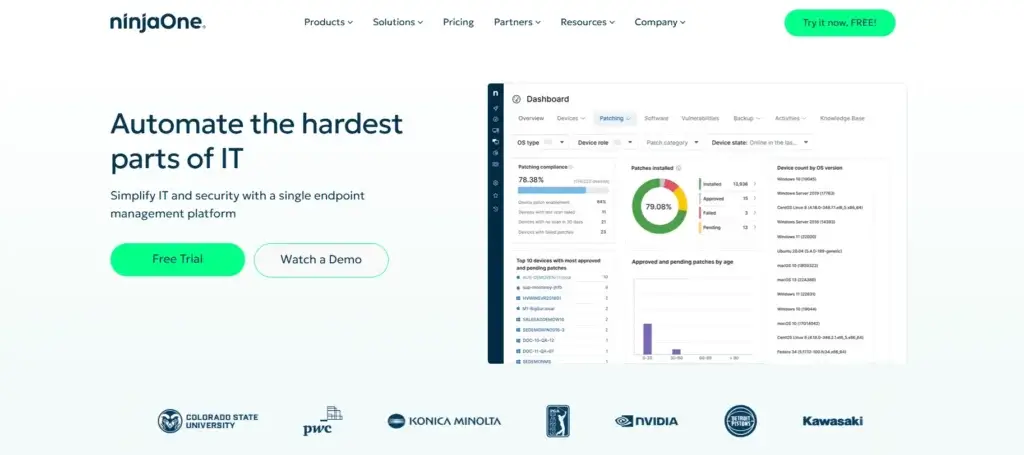
NinjaOne is a unified endpoint and IT management platform. It combines remote monitoring and management, endpoint management, patch management, remote access, backup, ticketing, documentation, IT asset management, and MSP-focused operational tools.
The product is used by internal IT teams that need to manage distributed devices and by MSPs that manage multiple client environments. In both cases, the main value is the same: you get a centralized system for seeing what is happening across your endpoints and taking action quickly.
From my perspective, the strongest reason to consider NinjaOne is not that it has one impressive feature. It is the way its features work together. You can identify an issue, automate a fix, deploy patches, access a device remotely, check asset details, and document the work without constantly jumping between disconnected tools.
Who Is NinjaOne Best For?
NinjaOne is best for teams that want to reduce manual endpoint work and improve operational visibility. It is particularly useful when your IT team is responsible for many laptops, desktops, servers, mobile devices, and remote users.
- MSPs: Best for service providers that need RMM, ticketing, documentation, billing, backup, and asset visibility.
- Internal IT teams: Best for companies that need endpoint monitoring, patching, automation, and remote support.
- Hybrid organizations: Best for teams supporting users across offices, homes, and field locations.
- Security-focused teams: Best for organizations that want stronger patch compliance and device visibility.
Who Should Consider Alternatives?
NinjaOne may not be the right first choice if you only need a lightweight help desk system or a traditional ITSM platform focused on service catalog, change management, and ITIL-heavy workflows.
It can support service workflows, but its strongest value is endpoint-centered IT operations. If your main challenge is managing tickets, approvals, SLAs, and internal service requests, compare it with tools like Freshservice, Jira Service Management, or ManageEngine ServiceDesk Plus.
Software Specification
Core Features of NinjaOne
NinjaOne provides a broad set of IT management tools, but the platform is most valuable when you use several of them together. Below are the core features that matter most when evaluating the software.
Remote Monitoring and Management
NinjaOne’s RMM capabilities give IT teams and MSPs real-time visibility into endpoint health, device performance, alerts, and system issues.
This is one of the platform’s strongest areas. Instead of waiting for users to report a problem, technicians can monitor endpoints proactively, detect issues earlier, and automate routine remediation. For MSPs, this is especially important because it helps standardize support across multiple client environments.
Endpoint Management
Endpoint management is the foundation of the platform. You can manage Windows, macOS, and Linux endpoints from a centralized console, making it easier to track device health, deploy actions, and keep systems aligned with your IT policies.
This matters if your company supports remote employees, distributed offices, or field teams. When devices are spread across locations, manual management becomes slow and inconsistent. A centralized endpoint management system helps you reduce that operational friction.
Patch Management
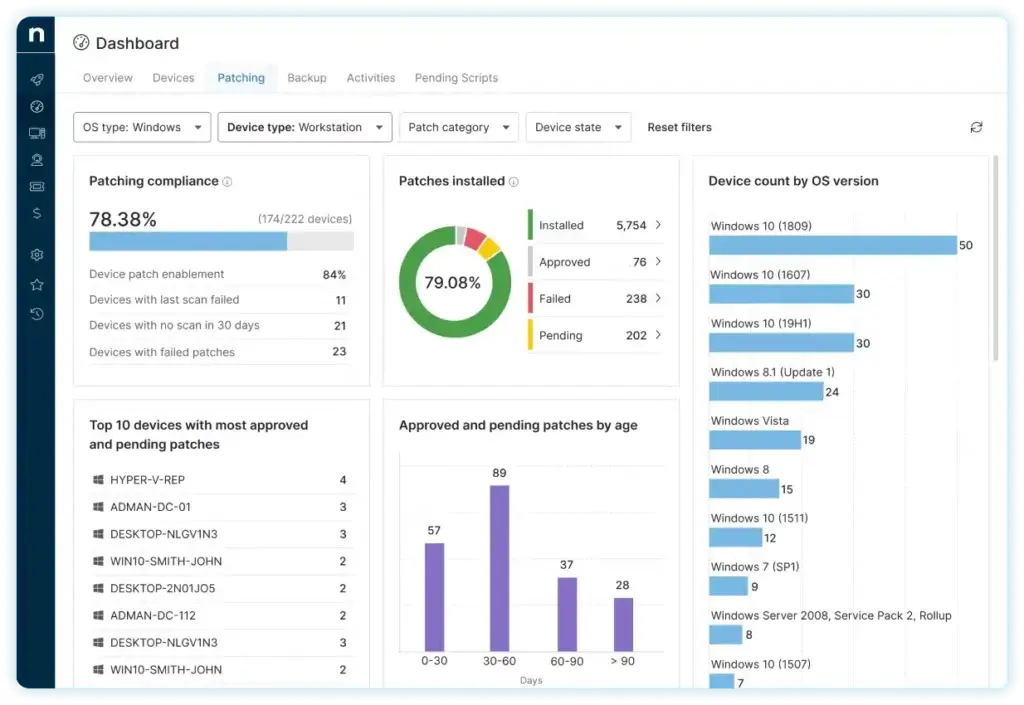
Patch management is one of the best reasons to choose NinjaOne. The platform helps automate operating system and third-party application patching, which can reduce vulnerabilities and improve endpoint compliance.
For IT teams, this saves time. For security teams, it helps reduce risk. For MSPs, it provides a more repeatable way to keep client environments updated without relying on manual patch tracking.
IT Asset Management
NinjaOne has been expanding its IT asset management capabilities, and this is an important update for 2026. The platform now provides stronger visibility into hardware, software, software licenses, assignments, and asset-related costs.
This is valuable because IT asset management should not only be about knowing what you own. It should help you understand how assets are used, where software licenses are assigned, and where unnecessary costs may be hiding.
In practical terms, ITAM helps you answer questions like:
- Which devices are active, inactive, or unmanaged?
- Which software licenses are assigned but underused?
- Which endpoints need attention from a security or compliance perspective?
- How much does your software and device footprint actually cost?
Mobile Device Management
The platform also supports mobile device management, which is increasingly important for organizations managing smartphones and tablets alongside traditional computers.
Recent updates improved mobile device recovery and control, including Lost Mode support for managed Android, iOS, and iPadOS devices. This is useful for companies that need to protect mobile assets, track lost devices, and reduce the risk of sensitive business data being exposed.
Remote Access and Remote Support
Remote access allows technicians to connect to devices and resolve issues without being physically present. This is a core need for modern IT teams, especially when employees work from different locations.
For MSPs, remote access is even more important. The ability to support client endpoints quickly can directly affect customer satisfaction, ticket resolution times, and technician productivity.
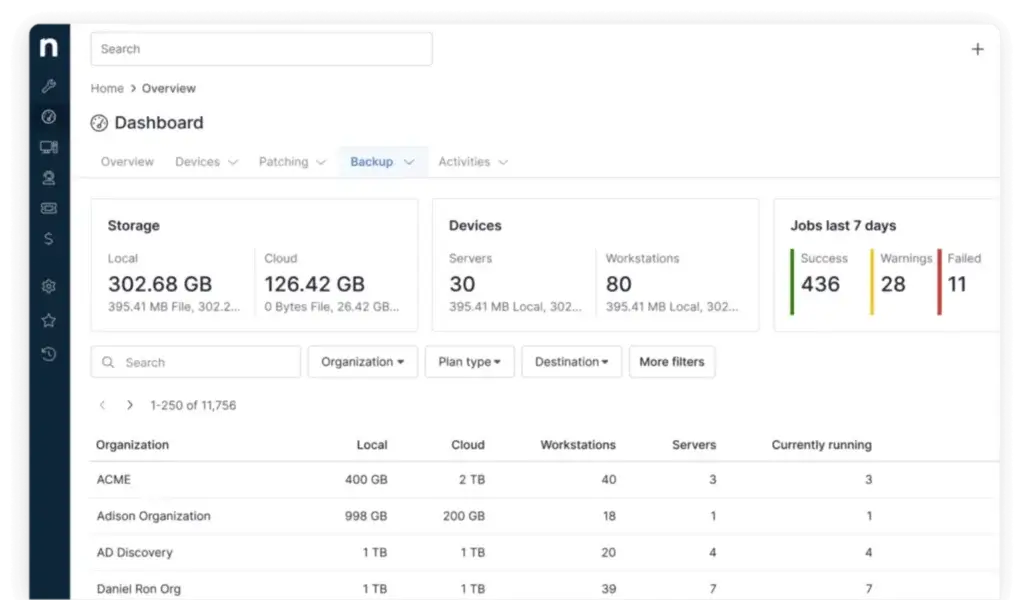
Backup and Recovery
NinjaOne includes backup and recovery capabilities for protecting endpoint data. This can help teams recover from accidental deletion, device failure, ransomware incidents, or other disruptions.
The main benefit is operational continuity. When backup is connected to endpoint management, your technicians can manage protection and recovery workflows closer to the devices they already monitor.
Ticketing and Documentation
NinjaOne also includes ticketing and documentation capabilities. This helps IT teams document assets, standard operating procedures, support history, and internal knowledge.
For smaller MSPs, this can reduce the need for separate tools. For internal IT teams, it helps create a more organized support process by connecting endpoint information with service activity.
PSA and Billing for MSPs
One of the most important recent additions is NinjaOne’s PSA Bundle. This brings billing, ticketing, documentation, and IT asset management into a native platform for MSPs.
This is a meaningful improvement because MSPs often struggle with tool sprawl. When RMM, PSA, billing, documentation, and asset data live in disconnected systems, technicians lose time and business owners lose visibility into profitability.
The PSA direction makes NinjaOne more competitive as an MSP operations platform, not only an RMM tool.
Automation and Scripting
Automation is another major strength. You can automate repetitive endpoint tasks, run scripts, trigger remediation workflows, and reduce manual technician work.
This is where the platform can deliver real ROI. If your team spends too much time on repetitive maintenance, patch checks, device cleanup, or basic troubleshooting, automation can free technicians to focus on higher-value work.
Reporting and Analytics
NinjaOne provides reporting tools that help you track device health, patch status, software inventory, technician activity, and overall IT performance.
Reporting is particularly useful for MSPs that need to show clients what work has been completed. It is also useful for internal IT leaders who need to communicate endpoint risk, compliance status, and operational progress to business stakeholders.
Why These Features Matter
The biggest value of NinjaOne is not only the number of features. It is the operational connection between them.
You can monitor endpoints, detect issues, automate fixes, manage patches, support users remotely, document work, and track assets from the same ecosystem. That creates a more efficient IT workflow than using separate tools for every part of the process.
Product Updates
What’s New in NinjaOne?
NinjaOne has continued to expand beyond traditional RMM. The most important recent updates are around IT asset management, software license visibility, mobile device control, and MSP operations.
NinjaOne 13.0 and ITAM Improvements
The 13.0 release strengthened IT asset management with improved software license tracking, usage history, cost visibility, and better control over assignments and permissions.
This is a useful update for IT leaders because software license waste is a common hidden cost. When you can see license usage and assignment history more clearly, it becomes easier to identify unused licenses, control spending, and improve audit readiness.
Lost Mode for Managed Mobile Devices
NinjaOne also improved mobile device security with Lost Mode support for Android, iOS, and iPadOS devices. This gives IT teams a stronger way to track and recover lost mobile assets.
For organizations managing company-owned phones or tablets, this is more than a convenience feature. It helps reduce data exposure risk when devices are misplaced, stolen, or used in field environments.
Native PSA Direction for MSPs
The newer PSA Bundle is especially relevant for MSPs. By combining billing, ticketing, documentation, and IT asset management with RMM, NinjaOne is moving toward a more complete operational system for managed service providers.
This matters because many MSPs are trying to reduce the number of separate tools they use. A more unified system can improve service delivery, reduce duplicated data entry, and provide better visibility into margins and client work.
Strengths and Limitations
NinjaOne Pros and Cons
Positive
✅ Strong endpoint automation
✅ Excellent patch management
✅ Broad MSP-focused platform
✅ Strong security and compliance posture
Negative
❌ Pricing requires a quote
❌ Not a pure ITSM tool
❌ Advanced setup takes planning
❌ May be too broad for basic help desk needs
Pros
- Strong endpoint automation: The platform is excellent at reducing repetitive IT work through monitoring, scripting, automation, and remediation workflows.
- Excellent patch management: Patch automation is one of its strongest use cases, especially for teams that need better compliance across distributed endpoints.
- Broad MSP-focused platform: With RMM, ticketing, documentation, billing, backup, PSA, and ITAM, it can support more than basic endpoint monitoring.
- Strong security and compliance posture: The platform provides important trust signals for organizations that need stronger governance, endpoint visibility, and audit readiness.
Cons
- Pricing requires a quote: You can see general pricing guidance, but the final cost depends on your endpoint count, region, selected products, and commercial terms.
- Not a pure ITSM platform: It is stronger for endpoint operations than for deep ITIL workflows, complex change management, and advanced service catalog use cases.
- Advanced setup takes planning: Automation, PSA, documentation, billing, and ITAM can deliver strong value, but teams need time to configure them properly.
- May be too broad for simple help desk needs: Smaller teams that only need basic ticketing may find the platform more comprehensive than necessary.
Operational Value
Benefits of Using NinjaOne
The main benefit of NinjaOne is operational efficiency. It helps IT teams move from reactive support to proactive management by combining endpoint visibility, automation, patching, remote support, and asset intelligence.
Less Manual Endpoint Work
Many IT teams lose hours each week on repetitive tasks such as patch checks, device cleanup, software updates, service restarts, and basic troubleshooting.
NinjaOne helps reduce that manual workload through automation. The result is not only faster work, but more consistent work. When standard tasks are automated, your team is less dependent on memory, manual checklists, or individual technician habits.
Better Patch Compliance
Patch management is one of the most practical security benefits of the platform. Unpatched software remains one of the most common risks in IT environments.
With automated patching and reporting, you can improve compliance across endpoints and reduce the time it takes to close known vulnerabilities.
Faster Remote Support
Remote access helps technicians support users without waiting for physical access to a device. This can improve response times, especially for hybrid teams and MSP clients.
For organizations with distributed employees, remote support is no longer optional. It is part of how modern IT teams keep users productive.
More Visibility Across Devices and Assets
The platform gives IT teams better visibility into devices, software, licenses, and asset status. This helps with operational planning, security reviews, budgeting, and lifecycle management.
This visibility is valuable because many IT teams are still working with incomplete spreadsheets, disconnected inventory systems, or outdated asset records.
Integrations and Compatibility
NinjaOne integrates with tools across remote access, security, SSO, documentation, communication, and MSP workflows. This makes it easier to connect endpoint management with the rest of your IT stack.
Compatibility is also important. The platform supports common endpoint environments, including Windows, macOS, and Linux, which makes it practical for mixed-device organizations.
Better MSP Service Delivery
For MSPs, the benefit is not only technical. The platform can also improve service delivery by connecting RMM, ticketing, documentation, ITAM, billing, and reporting.
This can help you reduce tool switching, improve client visibility, and create more consistent service operations.
User Experience
User Interface and Operational Simplicity
NinjaOne’s user experience is one of its main advantages. Many RMM and endpoint management platforms are powerful but difficult to navigate. This platform feels more modern, cleaner, and easier to adopt than many legacy IT management tools.
That matters because IT software is only useful if technicians actually use it consistently. A complicated interface can slow down support, create mistakes, and increase training time.
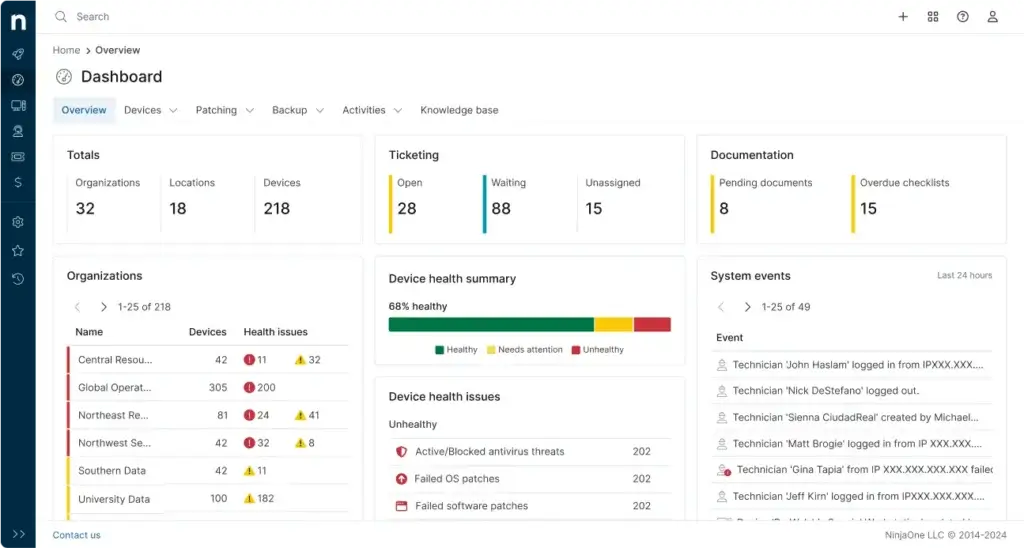
Centralized Dashboard
The dashboard gives you a practical view of device status, patching, alerts, and operational tasks. Instead of switching between multiple screens to understand what needs attention, technicians can see important signals from one place.
This is helpful for both small IT teams and MSPs. Small teams need speed. MSPs need consistency across multiple clients.
Clean Navigation
The navigation is logical and technician-friendly. Common workflows, such as checking endpoint health, reviewing alerts, starting a remote session, or running an automation, are relatively easy to access.
This lowers the learning curve, especially compared with older RMM systems that can feel crowded or overly technical.
Customization and Alerts
You can customize dashboards, alerts, policies, and reports based on your environment. This is important because every IT team has different priorities.
For example, an MSP may want client-specific reporting, while an internal IT team may care more about patch compliance, device uptime, and software inventory.
Good Fit for Technician Productivity
The interface is not only visually clean. It supports faster work. When technicians can move from alert to action quickly, the software becomes part of the service workflow instead of another system to maintain.
My opinion is that this is one of NinjaOne’s biggest advantages. It gives you serious endpoint management depth without making the product feel unnecessarily heavy.
Pricing and Plans
How Much Does NinjaOne Cost?
NinjaOne does not use simple public pricing tiers like Basic, Pro, and Enterprise. Instead, it uses a custom per-device pricing model. This means your final price depends on the number of endpoints you manage, your region, the products you purchase, and any commercial or promotional terms available at the time.
According to NinjaOne’s pricing page, commercial pricing can start as low as $1.50 per device per month at 10,000 endpoints and increase to $3.75 per device per month at 50 or fewer endpoints. This makes volume an important factor. The more endpoints you manage, the lower your per-device rate may become.
Per-Device Pricing Explained
Per-device pricing is common in RMM and endpoint management because the cost is tied to the number of endpoints under management. For internal IT teams, this usually means laptops, desktops, servers, and sometimes mobile devices. For MSPs, it means client endpoints across managed environments.
This model can be attractive because you pay based on the size of the environment. However, you need to request a quote to understand the real cost for your use case.
What Affects the Final Price?
Several factors can influence your quote:
- Endpoint count: Larger deployments may qualify for better volume pricing.
- Products selected: RMM, backup, MDM, PSA, and other modules can affect the total cost.
- Business type: MSPs and internal IT teams may have different buying needs.
- Region: Pricing can vary based on location and commercial terms.
- Deployment requirements: More complex environments may need more planning and onboarding.
Free Trial, Support, and Onboarding
NinjaOne offers a free trial, which is useful because the product should be tested in a real IT environment before purchase. You should evaluate patching, automation, remote access, reporting, ticketing, and asset visibility during the trial period.
The company also positions support, onboarding, and training as part of the customer experience. This is important because RMM and endpoint management tools can become complex when you start configuring automation, policies, scripts, and client environments.
Who Gets the Best Value?
NinjaOne usually provides the best value for teams that will use multiple parts of the platform, not only one feature.
It is a strong investment if you need:
- Endpoint monitoring and management
- Automated patching
- Remote access and support
- IT asset visibility
- Backup and recovery
- MSP ticketing, documentation, billing, or PSA workflows
It may feel expensive if you only need basic help desk ticketing or a lightweight remote access tool. In that case, a simpler platform may be more cost-effective.
Alternatives and Competitors
NinjaOne Compared to Other IT Management Tools
NinjaOne competes with several IT management, RMM, and endpoint management platforms. The best alternative depends on whether you are an MSP, an internal IT team, or a business looking for a more traditional ITSM solution.
| Software | Best For | Main Strength | Potential Limitation |
| NinjaOne | MSPs and IT teams managing endpoints | RMM, patching, automation, ITAM, and remote support | Pricing requires a custom quote |
| Atera | Small MSPs and IT teams wanting simple pricing | RMM, PSA, help desk, and remote access in one platform | May feel lighter for complex enterprise endpoint environments |
| ManageEngine Endpoint Central | IT teams wanting deep endpoint control | Endpoint security, patching, and device management | Interface can feel more complex |
| N-able | Established MSPs with mature service operations | Broad MSP ecosystem and monitoring depth | Can require more setup and tuning |
| Freshservice | Teams that need modern ITSM workflows | Service desk, ITIL workflows, automation, and service catalog | Not as endpoint-centered as NinjaOne |
If your main priority is endpoint operations, NinjaOne is one of the stronger options. If your main priority is ITSM workflow depth, Freshservice or Jira Service Management may be better suited. If your main priority is technician-based pricing, Atera is also worth comparing.
Security and Compliance
Enhanced Security Features in NinjaOne
Security is one of the most important considerations when choosing IT management software. A platform like NinjaOne has access to endpoints, remote sessions, automation policies, scripts, device data, and sometimes backup workflows. That level of access makes trust and governance essential.
Compliance and Trust Signals
NinjaOne provides several important security and compliance signals through its trust resources. These include references to FedRAMP Moderate, GovRAMP, TX-RAMP, GDPR, CCPA, SOC 3, and SOC 2 Type 2 resources.
For buyers in government, healthcare, finance, education, or regulated industries, these trust signals matter. They do not replace your own due diligence, but they show that the vendor is investing in security governance and compliance readiness.
Patch Management as a Security Advantage
One of the strongest security benefits is patch management. Keeping operating systems and applications updated is one of the most practical ways to reduce exposure to known vulnerabilities.
Automated patching, patch visibility, and reporting can help IT teams maintain stronger endpoint hygiene across distributed environments.
Remote Access Security Considerations
Remote access is powerful, but it must be managed carefully. IT teams should configure access policies, role-based permissions, authentication controls, and monitoring practices before rolling it out broadly.
This is especially important for MSPs, where technicians may access multiple client environments from the same platform.
Device Visibility and Asset Control
Security is also about visibility. If you do not know which devices exist, what software is installed, which assets are unmanaged, or which endpoints are missing patches, it becomes difficult to reduce risk.
NinjaOne’s endpoint and ITAM capabilities help close that visibility gap. This is one of the reasons I see it as more than a support tool. It can become part of your broader security operations foundation.
Security Recommendation
Before implementation, define clear admin roles, automation permissions, remote access rules, patch policies, and reporting requirements. The platform can support strong security operations, but your configuration will determine how well it fits your governance model.
Final Thoughts
Is NinjaOne Worth It?
⭐ Overall Rating: 9.6/10
NinjaOne is one of the stronger choices for IT teams and MSPs that want to manage endpoints, automate patching, support users remotely, and improve visibility across devices and assets.
What I like most about the platform is its operational focus. It is not trying to be a generic project management tool or a basic help desk. It is built around the real work technicians do every day: monitoring devices, fixing issues, deploying patches, running scripts, accessing endpoints, documenting work, and keeping systems secure.
The platform is especially compelling for MSPs because the product has expanded into PSA, billing, documentation, and IT asset management. That makes it more useful for service providers that want to reduce tool sprawl and operate from a more unified system.
For internal IT departments, the strongest value is endpoint control. If your team manages many distributed devices, struggles with patch compliance, or spends too much time on manual support tasks, NinjaOne can make your operation more efficient.
However, I would not recommend it as the first choice for every ITSM buyer. If your main need is advanced service catalog management, complex approval workflows, change management, or ITIL-heavy service desk operations, you should also compare dedicated ITSM platforms in our best ITSM software guide.
Overall, NinjaOne is highly recommended for endpoint-heavy IT teams and MSPs that want automation, patching, remote support, asset visibility, and security-focused operations in one platform. You can learn more about the product directly on the NinjaOne website.
Have more questions?
Frequently Asked Questions
Is NinjaOne an RMM or ITSM tool?
NinjaOne is primarily an RMM, endpoint management, and IT operations platform. It includes ticketing and service workflow features, but it is stronger for endpoint-centered operations than traditional ITSM use cases like advanced service catalogs and change management.
How much does NinjaOne cost?
NinjaOne uses custom per-device pricing. Public pricing guidance shows that commercial pricing can start as low as $1.50 per device per month at very large endpoint volumes and rise for smaller deployments, but you need a custom quote for accurate pricing.
Does NinjaOne offer a free trial?
Yes. NinjaOne offers a free trial, which is useful for testing patch management, remote access, automation, endpoint monitoring, reporting, and asset visibility before committing to a paid plan.
Is NinjaOne good for MSPs?
Yes. NinjaOne is a strong option for MSPs because it combines RMM, remote support, patch management, ticketing, documentation, IT asset management, backup, billing, and PSA capabilities in one platform.
Does NinjaOne include patch management?
Yes. Patch management is one of NinjaOne’s strongest features. It helps automate operating system and third-party application patching, improve compliance, and reduce manual work for IT teams.
Does NinjaOne include IT asset management?
Yes. NinjaOne includes IT asset management capabilities that help teams track hardware, software, licenses, assignments, usage history, and asset-related costs.
Does NinjaOne support mobile device management?
Yes. NinjaOne supports mobile device management and has expanded mobile controls, including Lost Mode support for managed Android, iOS, and iPadOS devices.
What are the best NinjaOne alternatives?
Common NinjaOne alternatives include Atera, ManageEngine Endpoint Central, N-able, Freshservice, and Jira Service Management. The best choice depends on whether you need RMM, endpoint management, MSP workflows, or deeper ITSM capabilities.
Is NinjaOne secure?
NinjaOne provides several strong security and compliance signals, including references to FedRAMP Moderate, GovRAMP, GDPR, CCPA, SOC 3, and SOC 2 Type 2 resources. Buyers should still review the trust center and validate requirements before purchase.
Is NinjaOne better than Atera?
NinjaOne is usually better for teams that want stronger endpoint management, patching depth, and MSP operational scale. Atera may be better for smaller teams that prefer simpler technician-based pricing and an easier all-in-one starting point.