
Introduction
Intego has built its reputation as a Mac-first security company. Unlike many antivirus brands that started on Windows and later adapted to macOS, Intego was designed specifically for Apple environments. That focus makes it particularly appealing to Mac users, creative professionals, and organizations running Mac-heavy infrastructures.
But in 2026, cybersecurity expectations are higher than ever.
You need more than basic malware protection. You need real-time threat detection, ransomware defense, phishing protection, firewall controls, and ideally VPN coverage. If you’re managing a team, you also need centralized deployment, device control, and scalable licensing.
So how well does Intego deliver for:
- Individual Mac users?
- Families needing parental controls?
- Small to mid-sized businesses running macOS?
- Hybrid Mac and Windows environments?
In this updated Intego Antivirus review, you’ll discover:
- How Intego performs in independent lab testing
- What features are included for personal vs business plans
- Whether Intego Antivirus for Windows changes the equation
- How its firewall and VPN compare to competitors like Bitdefender and Norton
- Where it falls short, especially in mobile protection and identity monitoring
- Whether it offers strong value for money
Whether you’re protecting a single MacBook or managing dozens of endpoints across your organization, this guide will help you decide if Intego is the right cybersecurity partner for your needs.
Overview
Intego Antivirus Overview
When evaluating any security solution, you need clarity on who it’s built for. In this Intego Antivirus review, one thing becomes clear quickly. Intego is a Mac-first security platform that has expanded into Windows and business environments, while still maintaining its Apple-focused DNA.
Founded in 1997, Intego built its reputation around protecting macOS systems long before Mac malware became mainstream. That long-term specialization still defines the product today.
Who Is Intego Designed For?
Intego primarily serves three audiences:
- Mac home users who want advanced antivirus and firewall protection
- Families looking for parental controls and device security
- Small to mid-sized businesses running Mac-based infrastructures
If your ecosystem is heavily Apple-based, Intego feels purpose-built. If you’re running a Windows-first enterprise with mobile device management needs, you may find its feature set more limited compared to competitors like Bitdefender or Norton.
Personal Use: What You Get with Intego
For individual users, Intego offers several bundled packages built around macOS security.
Core personal features typically include:
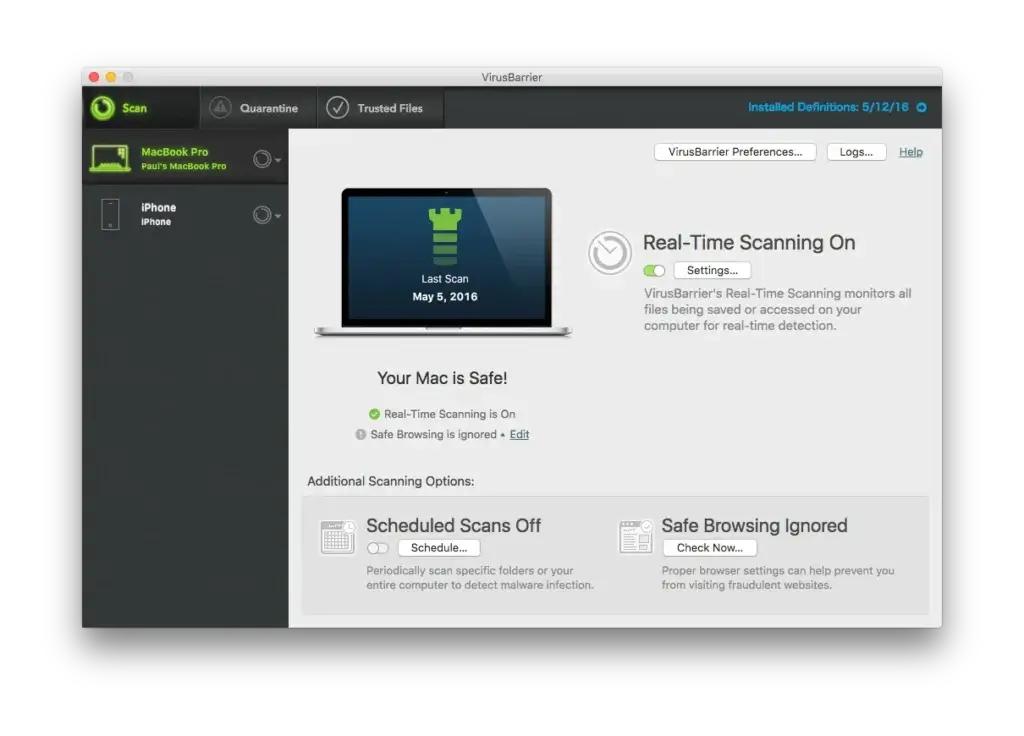
- VirusBarrier real-time antivirus engine
- NetBarrier smart firewall
- Ransomware and spyware detection
- Phishing protection
- Optional Privacy Protection VPN
- Parental controls via ContentBarrier
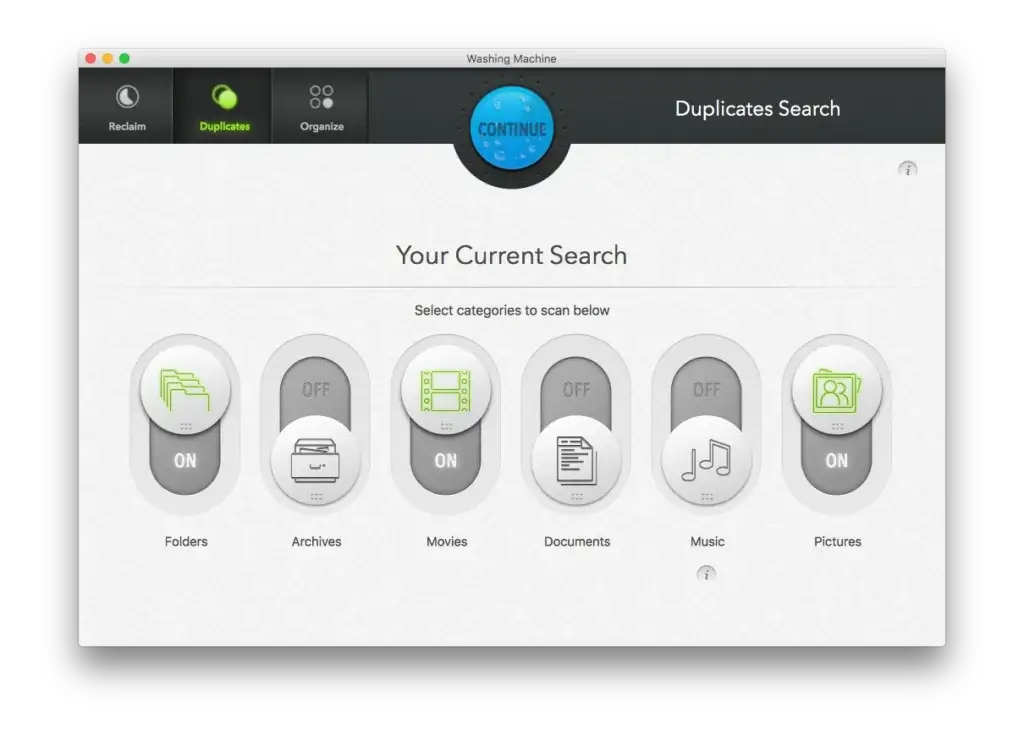
- System cleanup tools through Washing Machine
The Mac Premium Bundle X9 remains the flagship package for home users, combining malware protection, firewall security, backup tools, and optimization utilities in one suite.
If you’re a Mac-only household, Intego delivers strong protection with minimal system impact. Scans are fast, CPU usage remains relatively low, and the interface is clean and intuitive.
However, it does not include:
- A built-in password manager
- Identity theft monitoring
- Dark web monitoring
- Dedicated iOS or Android antivirus apps
If mobile security or identity protection is critical for you, you may need supplemental tools.
Business Use: Intego for SMBs and Mac-Based Teams
For businesses, Intego positions itself as a lightweight but effective endpoint protection solution, especially for Mac-heavy environments.
Through Intego for Business, organizations gain:
- Centralized management console
- Multi-device licensing
- Real-time threat monitoring
- Smart firewall management
- Deployment across macOS and Windows endpoints
- Customizable licensing based on number of devices
This makes Intego particularly attractive for:
- Creative agencies using Mac workstations
- Education institutions with Apple labs
- Legal and media firms operating on macOS
- SMBs needing streamlined endpoint protection
Intego’s business suite focuses on performance and simplicity rather than feature overload. You won’t find enterprise-grade EDR, identity monitoring, or deep compliance reporting. But you do get stable, reliable antivirus protection optimized for Mac environments.
If your organization prioritizes low system impact and ease of deployment over extensive security add-ons, Intego can be a strong fit.
Software Specification
Core Features and Security Tools
When evaluating any security suite, features matter more than marketing claims. In this Intego Antivirus review, the platform stands out for its Mac-first architecture and streamlined protection model.
Unlike bloated security suites packed with unnecessary extras, Intego focuses on essential endpoint protection, firewall control, and network security.
Let’s break it down.
Real-Time Malware Protection with VirusBarrier
At the heart of Intego is VirusBarrier, its real-time antivirus engine.
It continuously scans files, applications, downloads, and external drives to detect:
- Malware
- Ransomware
- Spyware
- Trojans
- Phishing-based threats
The engine uses signature-based detection combined with heuristic analysis to identify zero-day and emerging threats.
For personal users, this means your Mac stays protected without manual intervention.
For businesses, real-time scanning ensures every endpoint remains secured against active threats, reducing the risk of lateral movement across networks.
Background updates are automatic, and the system impact remains low even during full scans.
Smart Firewall Protection with NetBarrier
Intego includes NetBarrier, a dynamic two-way firewall designed specifically for macOS.
NetBarrier automatically adjusts firewall rules based on your network type:
- Home network
- Work network
- Public Wi-Fi
For personal users, this protects you when connecting to coffee shop or airport Wi-Fi.
For businesses, it adds an extra layer of protection for hybrid and remote teams.
You can monitor inbound and outbound connections, restrict suspicious applications, and enforce stricter rules for unsecured networks.
This is especially useful in remote-first organizations where employees frequently change networks.
Ransomware and Phishing Protection
Ransomware protection has become essential in 2026.
Intego monitors suspicious encryption behavior and blocks unauthorized file modification attempts. It also filters phishing links and malicious attachments before they compromise your system.
For businesses handling sensitive data, this layer is critical in preventing operational downtime and data loss.
While Intego does not offer advanced EDR capabilities found in enterprise-heavy solutions, it delivers solid core protection for SMB-level risk profiles.
Parental Controls and Web Filtering
Through ContentBarrier, Intego offers web filtering and content controls.
This feature is more relevant for:
- Families
- Educational environments
- Mac-based school labs
While originally designed for home use, businesses in education or controlled environments can repurpose it to limit access to specific websites or categories.
However, it is not a substitute for enterprise-grade web security gateways.
Optional VPN Integration
Intego offers Privacy Protection VPN as an add-on rather than a bundled feature.
The VPN provides:
- Encrypted browsing
- Public Wi-Fi protection
- IP masking
- Access to global servers
For individual users, it enhances privacy while browsing or streaming.
For businesses, VPN functionality is more limited compared to fully integrated corporate VPN solutions. It works best as an additional privacy tool rather than a network infrastructure replacement.
Unlike competitors such as Norton or Bitdefender, VPN is not automatically included in all plans.
Cross-Platform Coverage
Historically known as a Mac antivirus, Intego now also supports Windows 10 and 11.
For hybrid teams, this allows:
- Mac and Windows endpoint protection
- Unified deployment in SMB environments
However, mobile device protection is still missing. There are no dedicated iOS or Android antivirus apps.
For organizations with BYOD policies, this gap may require pairing Intego with an MDM solution.
Pros and Cons
Advantages and Disadvantages
Positive
✅ Best for Mac Networks
✅ Reliable Real-Time Protection
✅ Smart Adaptive Firewall
✅ Great User Interface
Negatives
❌ No Mobile App
❌ VPN Not Included
❌ No Identity Monitoring
❌ Lacks Password Manager
✅ Pros of Using Intego for Business
Best for Mac Networks
If your business primarily uses macOS, Intego is one of the most trusted names on the market. It was built for Mac from the ground up and continues to outperform general-purpose antivirus tools in Mac-specific environments.
Reliable Real-Time Protection
Intego’s real-time scanning engine continuously monitors for malware, ransomware, spyware, and phishing attempts. Threats are neutralized before they can cause damage, ensuring proactive rather than reactive protection.
Smart Adaptive Firewall
Its NetBarrier firewall is a standout feature. It automatically detects whether you’re connected to a trusted office network or public Wi-Fi and adjusts firewall settings accordingly. This is especially valuable for hybrid and remote workforces.
Great User Interface
From setup to daily operations, Intego offers a clean, intuitive dashboard that simplifies security management. Even IT managers without deep security backgrounds can deploy and monitor systems quickly.
❌ Cons of Using Intego for Business
No Mobile App
Unlike many competitors, Intego does not offer antivirus apps for iOS or Android. If mobile device protection is essential for your team, you’ll need to integrate a separate MDM or mobile security solution.
VPN Not Included
VPN functionality is not bundled in Intego’s business plans. Some rivals like Bitdefender GravityZone or McAfee Total Protection include built-in VPNs, making Intego less comprehensive out of the box.
No Identity Monitoring
Intego currently lacks tools for dark web monitoring, identity theft alerts, or breach reporting. This may be a dealbreaker for businesses in regulated industries like healthcare or finance.
Lacks Password Manager
There’s no integrated password manager, which could complicate secure credential sharing and storage across teams. You’ll need to pair it with external tools like 1Password or LastPass.
Summary:
While Intego excels in real-time Mac security and firewall protection, it lacks some modern extras that competitors bundle in, such as VPNs, mobile apps, and identity monitoring. If your business doesn’t rely heavily on these features, Intego is a strong, lightweight choice, especially for Mac-based networks.
Software Capabilities
Performance and User Experience
When it comes to business security software, performance and usability are just as crucial as protection. You need an antivirus that runs smoothly in the background, without dragging down system performance or creating workflow bottlenecks.
Let’s explore how Intego performs under real-world usage.
System Impact (CPU Usage During Scans)
Intego is designed to run light on system resources, especially on macOS. It’s optimized to ensure background scans don’t interrupt productivity.
- Quick scans typically use 5–10% CPU
- Full scans hover around 15–20% CPU
- Minimal RAM usage, even on older Mac hardware
For businesses managing dozens of endpoints, this means less disruption during scheduled or real-time scans.
Speed of Scans and Updates
Intego delivers fast scan speeds compared to many competitors, particularly when scanning macOS systems.
- Quick scan: ~3–5 minutes
- Full system scan: ~15–25 minutes (depends on file volume)
- Virus definitions update: Auto-downloads every 2–4 hours
Smart scan caching avoids re-checking unchanged files, further improving speed.
Ease of Setup and Navigation
Getting started with Intego is a breeze, even for teams without dedicated IT staff.
- Download and install in under 10 minutes
- Simple license activation via email
- Intuitive admin dashboard for policy setup and alerts
- Reports and logs are easy to access and export
If you’re managing multiple devices, centralized controls in the business suite make onboarding and maintenance efficient.
Mobile App Usability (If Applicable)
No mobile app is available for iOS or Android. This is a notable gap for businesses with BYOD (Bring Your Own Device) policies or remote staff relying on phones for work access.
If mobile endpoint security is a must, you’ll need to pair Intego with a third-party MDM or antivirus provider that covers mobile platforms.
User Experience Summary
- Low system impact
- Fast scanning and update speeds
- Easy setup and centralized control
- No mobile support or management
For most Mac-based SMBs, Intego strikes a near-perfect balance between performance and simplicity. However, if your team operates across devices or platforms, the limitations in mobile support may require workaround solutions.

Lab Results
Independent Test Lab Results
Third-party lab evaluations are essential when judging antivirus software for business use. They provide unbiased insights into how well a product defends against actual threats, beyond marketing promises.
Intego participates in testing by recognized organizations like AV-Test and AV-Comparatives, especially for its macOS security solutions.
AV-Test Scores
The German-based AV-Test Institute scores antivirus solutions across three categories: Protection, Performance, and Usability. Intego has consistently earned above-average ratings, especially for macOS.
Latest AV-Test results (macOS):
- Protection: 6/6
Blocks 100% of widespread malware and zero-day attacks - Performance: 5.5/6
Slight delay during app launches, but light on CPU - Usability: 6/6
Zero false positives or alerts on safe apps
These results highlight Intego as a reliable and efficient solution for professional Mac environments.
AV-Comparatives Performance
While Intego doesn’t submit its Windows antivirus to every round of AV-Comparatives testing yet, its Mac version was recently awarded for Real-World Protection and Malware Detection.
Key Highlights:
- Detected 99.9% of Mac-specific threats
- Low false alarm rate
- High usability score across monitored test machines
For businesses using both Mac and Windows, it’s important to know that Windows test data is limited. If you need proven Windows protection, consider complementing Intego with another solution or confirming updates from future lab releases.
Comparison to Industry Averages:
| Test Category | Intego | Industry Average |
| Protection | 100% | 99.3% |
| Performance | 5.5/6 | 5.3/6 |
| Usability | 6/6 | 5.8/6 |
📈 Intego meets or exceeds most industry benchmarks in macOS testing, making it a great fit for Apple-first teams.
Pricing
Pricing and Plans
In this Intego Antivirus review, pricing is structured around Mac, Windows, and Business users. Plans are straightforward, with a 30-day money-back guarantee on personal subscriptions.
You can explore their full business offerings here.
| Plan | Best For | Starting Price (1-Year) |
| Mac Internet Security X9 | Basic Mac protection | $39.99 (1 Mac) |
| Mac Premium Bundle X9 | Families & power users | $69.99 (1 Mac) |
| Mac Premium + VPN | Privacy-focused users | Higher tier |
| Windows Antivirus | PC users | $39.99 (1 PC) |
| Business Plans | SMBs & Mac-based teams | Custom quote |
⚠️ Prices may vary based on region, support level, and whether you’re running a hybrid Mac/Windows network.
What’s Included in Each Tier
Mac Internet Security X9
- VirusBarrier antivirus
- NetBarrier firewall
- Anti-phishing protection
Mac Premium Bundle X9 adds:
- Parental controls
- Backup tools
- System optimization
VPN (optional add-on):
- 25,000+ servers
- WireGuard & OpenVPN
- Kill switch
- Up to 10 devices
Pricing Positioning
Intego is competitively priced for Mac-focused protection.
It does not include:
- Password manager
- Identity monitoring
- Dark web alerts
If you want specialized Mac security, pricing is fair.
If you want a bundled all-in-one security suite, competitors may offer more included features.
Free Trials and Money-Back Guarantee
- Free Trial: 7-day full-featured trial available for all Mac packages
- Money-Back Guarantee: 30-day refund policy on all plans
- Renewal Pricing: Typically remains the same, but discounts may be reduced after the first year
💡 Tip: For the best value, speak directly to an Intego sales rep for a volume license discount tailored to your business size.
Feedbacks
User Feedback and Reviews
While lab scores and specs are important, nothing beats real-world feedback from IT managers, system admins, and business owners who’ve used Intego in production environments.
Let’s look at both the praise and the pain points from verified users across popular platforms like Trustpilot, G2, and Capterra.
Common Praise from Business Users
Reliable Mac Protection
Business users consistently mention Intego’s exceptional performance on macOS. It’s often praised as being “the most effective Mac antivirus” by reviewers managing creative teams, developers, and legal firms using Apple hardware.
Simple Interface
Users love Intego’s intuitive dashboard, making it easy for non-technical staff to manage settings, run scans, and generate reports. Admins mention smooth onboarding even for team members without IT experience.
Light on Resources
Companies report minimal system slowdown, even during full scans. This is especially important for smaller teams working on resource-intensive tasks like video editing or development.
Great Customer Support
Several businesses highlight Intego’s fast and helpful support team. Response times are reportedly quick, and solutions are provided in plain language, not jargon-heavy explanations.
Common Complaints
No Mobile Support
Many users express frustration that Intego does not support Android or iOS devices, which limits protection in BYOD (Bring Your Own Device) environments.
Limited Extra Features
Unlike competitors such as Bitdefender or Norton, Intego doesn’t include VPNs, password managers, or dark web monitoring, leading to additional spending on separate tools.
Lack of Transparent Pricing
Business buyers note that pricing details for enterprise tiers are not easily available online, requiring manual contact with sales for quotes.
Mac-Centric Focus
While this is a pro for Apple-heavy environments, users managing Windows-first networks often find the protection underwhelming compared to alternatives built for Windows from day one.
Ratings Snapshot
| Platform | Rating | Key Highlight |
| Trustpilot | 4.3 / 5 | Great Mac protection |
| G2 | 4.2 / 5 | User-friendly dashboard |
| Capterra | 4.4 / 5 | Low system impact |
🔍 Overall sentiment: Highly recommended for businesses with macOS fleets, but may require supplementation in hybrid or mobile-first organisations.
Intego VS Alternatives
Comparison with Other Antivirus Software
Choosing the right antivirus depends on what you value most, Mac specialization, bundled features, identity protection, or cross-platform coverage.
Here’s how Intego compares to major competitors.
Intego vs Norton 360
If you’re comparing Intego vs Norton, the key difference is specialization versus bundled features.
Intego is designed primarily for Mac users and offers strong firewall control and focused malware protection. Norton, on the other hand, provides a broader all-in-one security suite that includes identity monitoring, password management, and VPN by default.
Here’s how they compare:
| Feature | Intego | Norton 360 |
| Mac Optimization | Excellent (Mac-first) | Strong |
| Windows Protection | Good | Excellent |
| Built-in VPN | Add-on | Included |
| Password Manager | No | Included |
| Identity Monitoring | No | Included (higher tiers) |
Intego vs Bitdefender
When comparing Intego vs Bitdefender, the difference comes down to simplicity versus feature depth.
Both deliver strong malware detection and low system impact. However, Bitdefender includes more extra tools, such as a password manager and broader cross-platform support, while Intego keeps its focus on Mac-native optimization and firewall control.
Here’s the breakdown:
| Feature | Intego | Bitdefender |
| Mac Malware Detection | Very Strong | Very Strong |
| System Impact | Low | Very Low |
| VPN Included | Add-on | Limited (basic tier) |
| Extra Security Tools | Limited | Extensive |
| Best For | Mac-first users | All-in-one protection |
Intego vs Avast
If you’re considering Intego vs Avast, the decision often revolves around specialization versus accessibility.
Avast offers a free tier and broader consumer appeal. Intego, however, provides a more advanced firewall and deeper Mac-specific security architecture, which can be especially valuable in Mac-heavy households or small businesses.
Here’s how they compare:
| Feature | Intego | Avast |
| Mac Specialization | Yes (primary focus) | No |
| Free Version | No | Yes |
| Firewall (Mac) | Advanced (NetBarrier) | Limited |
| Identity Protection | No | Limited |
| Business Support | SMB-focused | Broader enterprise |
When Intego Is the Better Choice
Intego stands out if:
- You primarily use Macs
- You want Mac-native firewall protection
- You prefer lightweight performance
- You run a Mac-based small business
Its focused approach makes it one of the strongest Mac antivirus options available.
When Competitors May Be Better
You may prefer Norton or Bitdefender if:
- You want VPN included by default
- You need a password manager
- Identity theft monitoring is important
- You protect many device types, including mobile
Bottom Line of the Comparison
If your environment is Mac-heavy, Intego remains one of the most specialized and performance-efficient antivirus solutions.
If you want a fully bundled cybersecurity ecosystem with identity tools and cross-platform extras, Norton or Bitdefender may offer stronger overall value.
Conclusion
Is Intego Worth It for Your Business?
⭐ Overall Rating: 7.7/10
After thoroughly analyzing this Intego Antivirus review, the answer depends on one key factor: your environment.
If you’re a Mac-first user, Intego remains one of the most specialized antivirus solutions available. Its real-time protection, smart NetBarrier firewall, and lightweight performance make it an excellent choice for individuals, families, and creative professionals using macOS.
If you run a Mac-based small business, Intego offers reliable endpoint protection with centralized management and volume licensing. It’s particularly strong for agencies, education environments, and Apple-heavy teams that want focused security without unnecessary complexity.
However, Intego is not built to be an all-in-one cybersecurity ecosystem.
It does not include:
- Built-in password management
- Identity theft monitoring
- Dark web alerts
- Mobile antivirus apps
- Advanced enterprise EDR capabilities
If you need bundled extras across multiple device types, competitors like Norton or Bitdefender may offer broader packages.
But if your priority is high-performance Mac protection with a powerful firewall and clean interface, Intego delivers exactly that.
Who Should Choose Intego?
Choose Intego if:
- You primarily use macOS
- You want specialized Mac security
- You run a Mac-based small business
- You prefer lightweight performance over feature overload
Consider alternatives if:
- You want VPN included by default
- Identity monitoring is important
- You need mobile device protection
- You manage a large enterprise environment
Should You Try Intego?
With a 30-day money-back guarantee on personal plans, there’s minimal risk in testing it yourself.
If your ecosystem revolves around Macs, Intego remains one of the most focused and performance-efficient antivirus solutions available in 2026.
For Mac users especially, it’s not just another antivirus option. It’s one of the few platforms built specifically for your system from day one.
Frequently Asked Questions (FAQs)
Have more questions?
Is Intego a good antivirus for Mac?
Yes, Intego is one of the best antivirus solutions specifically designed for Mac. It offers strong real-time malware protection, a dedicated firewall, and optimized performance for macOS environments.
Does Intego work on Windows?
Yes, Intego offers a Windows version with real-time malware protection, ransomware defense, and web protection. However, its main strength and feature depth remain focused on macOS.
Does Intego include a VPN?
Intego offers a VPN called Privacy Protection, but it is not included in most base plans. It is available as an optional add-on or bundled in higher-tier packages.
Is Intego good for business use?
Intego is a strong choice for small to mid-sized businesses, especially those using Mac devices. It offers endpoint protection, centralized management, and volume licensing, but lacks advanced enterprise security features.
Does Intego have a mobile app?
No, Intego does not offer dedicated antivirus apps for iOS or Android. However, it can scan connected iOS devices through its Mac software.
How much does Intego cost?
Intego pricing starts at around $39.99 per year for basic Mac protection. More advanced bundles with additional features cost more, and business plans are available via custom quotes.
Does Intego slow down your Mac?
No, Intego is known for its lightweight performance. It runs efficiently in the background and has minimal impact on system speed, even during full scans.
Is Intego better than Norton or Bitdefender?
Intego is better for Mac-focused users who want specialized protection. Norton and Bitdefender offer more bundled features like VPN, password managers, and identity protection, making them better for all-in-one security.
Does Intego protect against ransomware?
Yes, Intego includes ransomware protection as part of its real-time scanning engine. It monitors suspicious file behavior and blocks unauthorized encryption attempts.
Is there a free version of Intego?
No, Intego does not offer a free version. However, it provides a 30-day money-back guarantee, allowing you to test the software risk-free.