
Introduction
CrewAI is a prominent multi-agent development platform, but it is easy to misunderstand what you are evaluating. It combines an open-source Python framework with a visual development environment and an enterprise platform for deployment, monitoring, governance, and optimization.
You can install the framework and run agents locally, use CrewAI Studio to build visually, or adopt the Agent Management Platform, also called CrewAI AMP, for managed deployment, tracing, integrations, approval gates, and access control.
In this CrewAI review, you will learn how the framework and platform work, which features provide the most value, what pricing really includes, where the learning curve becomes noticeable, and how CrewAI compares with LangGraph, the OpenAI Agents SDK, AutoGen, and visual automation platforms.
What Is CrewAI?
CrewAI is an open-source Python framework and commercial agent management platform for building AI agents that collaborate on multi-step work. You define specialized agents with roles, goals, tools, knowledge, and responsibilities, assign tasks to them, and organize their execution through Crews and Flows.
A Crew is a group of agents working toward a shared outcome. For example, you could create a market researcher, data analyst, writer, and reviewer that work sequentially on a competitive intelligence report. A Flow provides more controlled orchestration around that work, including state, conditions, branching, loops, persistence, and event-driven execution.
The framework is released under the MIT License. At the time of this CrewAI review, its GitHub repository showed more than 55,000 stars and 7,800 forks.
The commercial platform adds visual building, managed deployment, integrations, tracing, governance, security controls, and enterprise support.
Key Features
How CrewAI Works
CrewAI is built around a team metaphor. Instead of asking one general-purpose model to complete every step, you create specialized agents and give each one a clear role. Tasks define what must be done, Crews define how agents collaborate, and Flows add deterministic structure around the process.
This approach is strongest when your workflow benefits from specialization, review, delegation, or different tools at different stages. It is less useful when a single LLM call or a basic trigger-action automation can complete the work reliably.
CrewAI Key Features
Role-Based AI Agents
An agent in CrewAI is configured around a role, goal, and backstory. These fields sound simple, but they create a practical separation of responsibilities. You can give one agent research tools, another access to a knowledge base, and another strict instructions for validating the final output.
Agents can use tools, access knowledge, remember context, reason before acting, and delegate work. You can also control iteration limits, rate limits, retries, execution time, and output behavior.
Tasks, Crews, and Execution Processes
Tasks describe the work an agent must complete, the expected output, the tools it may use, and any context it receives from earlier tasks. You can use sequential execution when work should move from one agent to the next, or hierarchical execution when a manager agent should coordinate assignments and validate results.
Crew outputs can be returned as raw text, JSON, or structured Pydantic models. Structured output is especially important for production workflows because it gives downstream systems predictable fields instead of relying on free-form text.
Callbacks, caching, usage metrics, asynchronous execution, streaming, replay, and checkpointing help you monitor and resume workflows.
CrewAI Flows for Deterministic Orchestration
Flows are the more controlled side of CrewAI. They let you combine Crews, direct LLM calls, standard Python code, APIs, and business logic in an event-driven workflow.
You can maintain state, route execution through conditions, run branches and loops, request human feedback, and resume long-running processes. CrewAI’s production guidance recommends a Flow-first architecture because it makes control and observability clearer.
Tools, MCP Servers, and Business Apps
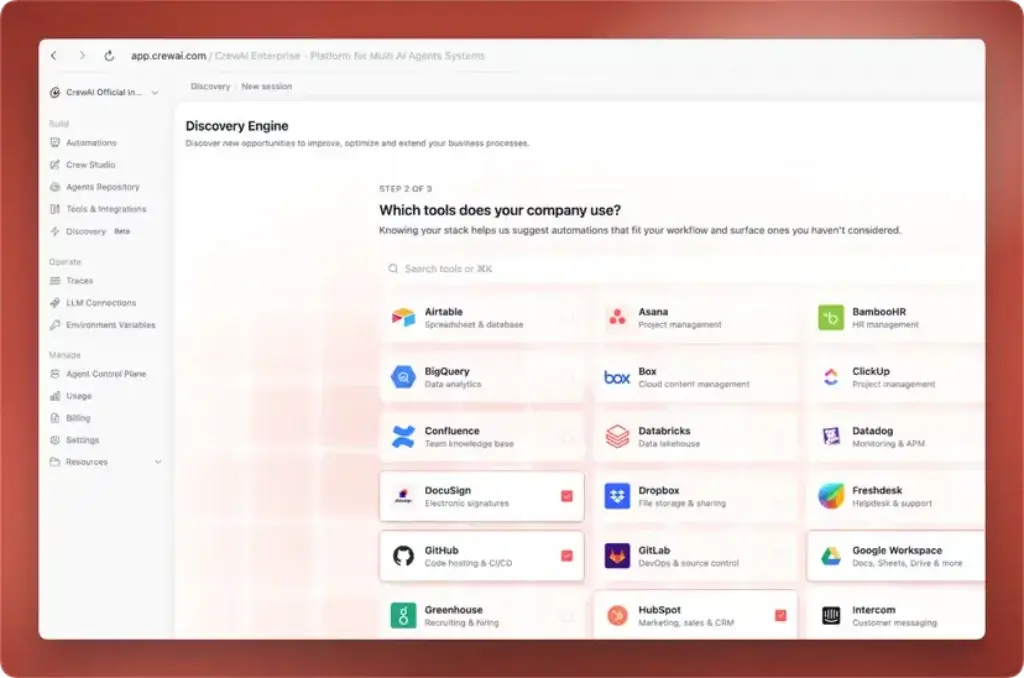
CrewAI gives agents several ways to take action. Local tools can search the web, read files, query databases, call APIs, or run custom functions. Model Context Protocol connections let you expose remote tool servers to agents. CrewAI Apps connect agents with business platforms such as Gmail, Slack, Jira, Salesforce, Google Workspace, Microsoft tools, HubSpot, and other supported services.
Developers can also create custom tools, call APIs, connect databases, and package reusable business logic.
Memory, Knowledge, and Skills
CrewAI separates several forms of context. Memory helps agents retain information from prior work. Knowledge sources let agents retrieve relevant facts from files, documents, URLs, and other sources through semantic search. Skills inject reusable instructions, standards, and domain guidance into the agent prompt.
A compliance agent, for example, might use a skill for review procedures, knowledge for current policies, and memory for details retained throughout the case. Context still needs careful scoping because irrelevant retrieval increases cost and latency.
Guardrails, Human Review, and Checkpointing
CrewAI supports task guardrails that validate outputs before they are accepted. A guardrail can check structure, length, required fields, business rules, or custom quality criteria and then ask the agent to retry when validation fails.
Human review can pause sensitive actions for approval, while checkpointing saves state so interrupted work can resume. These controls matter because production reliability depends on validation, retries, approvals, and recovery.
CrewAI Studio and Visual Building
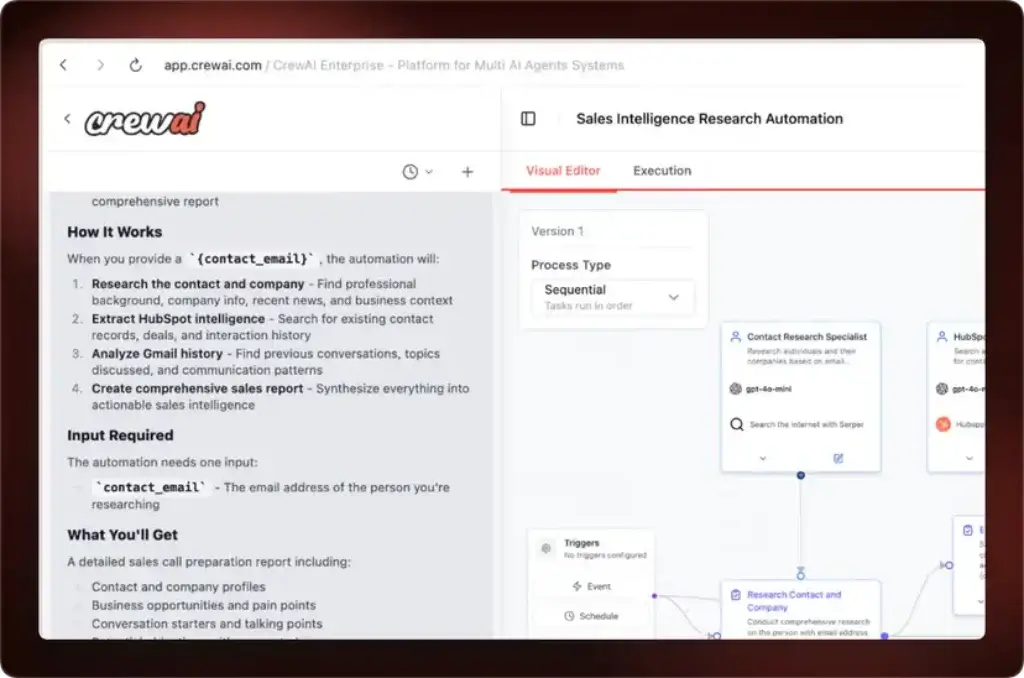
CrewAI Studio gives you a visual editor and AI copilot for creating agent workflows without starting entirely in code. You can configure steps, agents, tools, and integrations on a canvas, test the workflow, connect GitHub, and export visual work to Python.
Studio lowers the entry barrier, but complex or business-critical workflows still need technical ownership.
CrewAI AMP, Tracing, and Governance
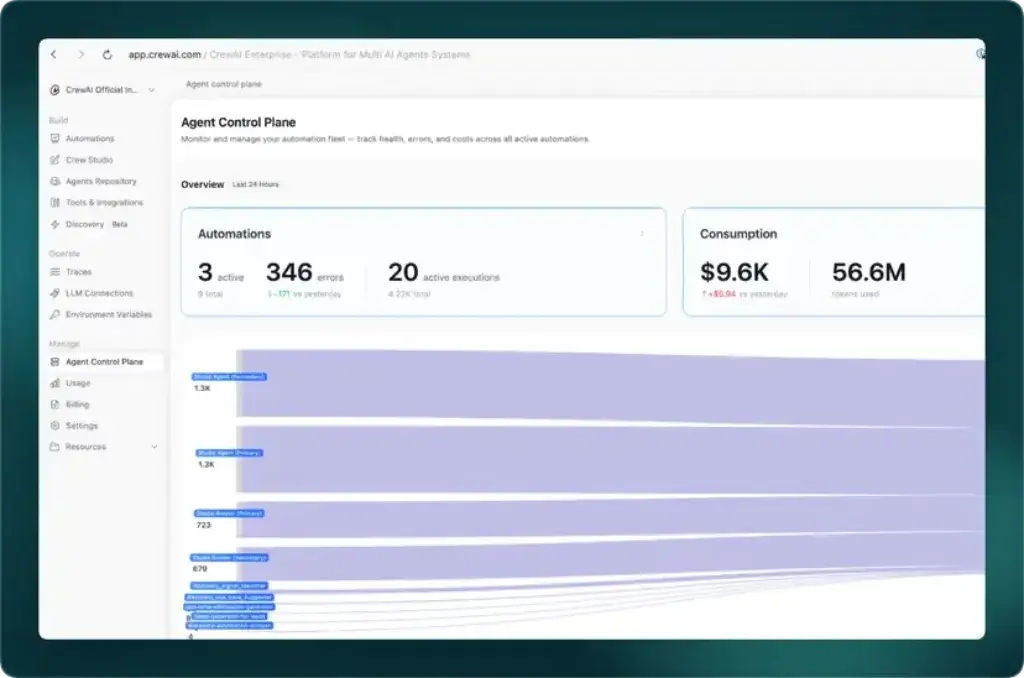
CrewAI AMP adds the operational layer needed to deploy, observe, govern, and improve agent workflows. The platform includes tracing for LLM calls, tool calls, memory activity, token usage, performance, and deployment history.
Enterprise controls include SSO, role-based access, audit capabilities, private infrastructure options, PII redaction, external secret management, human approval gates, and dedicated support. OpenTelemetry support also helps teams connect external observability tools.
CrewAI Feature Overview
| Feature Area | What CrewAI Offers | Best For |
| Agents and Crews | Role-based agents, tasks, delegation, sequential and hierarchical processes | Collaborative multi-agent workflows |
| Flows | Stateful, event-driven orchestration with branches, loops, and persistence | Production workflows requiring control |
| Tools and MCP | Custom tools, APIs, MCP servers, databases, and platform apps | Agents that must act across systems |
| Context | Memory, knowledge sources, skills, and multimodal files | Domain-aware and long-running work |
| Reliability | Guardrails, retries, human review, tracing, testing, and checkpointing | Business-critical automations |
| Studio and AMP | Visual building, GitHub integration, deployment, governance, and observability | Teams moving from prototype to production |
Overall, CrewAI’s strongest design choice is the combination of autonomous Crews and controlled Flows. You can use collaboration where flexibility matters and deterministic orchestration where reliability matters.
Use Cases & Benefits
Who Should Use CrewAI?
CrewAI is best for work that can be divided into specialized responsibilities while retaining technical control. More agents do not automatically improve results, so effective implementations use the smallest crew that can complete the process reliably.
Best Use Cases for CrewAI
- Research and reporting: Coordinate research, analysis, writing, and fact-checking agents.
- Sales operations: Enrich leads, score accounts, prepare summaries, and route follow-up actions.
- Customer support: Classify tickets, retrieve knowledge, draft responses, and escalate sensitive cases.
- Document processing: Extract data, validate fields, summarize content, and generate structured outputs.
- Software workflows: Plan changes, inspect repositories, write code, run tests, and review results.
- Compliance operations: Gather evidence, compare policies, flag exceptions, and request human approval.
- Content production: Build research, outline, drafting, optimization, and review pipelines.
Who Gets the Most Value?
Developers, AI engineers, technical automation teams, data teams, product teams, and consultants will get the most immediate value from CrewAI. The framework is Python-based, flexible, and designed for people who want to define how agents collaborate rather than accept a fixed workflow model.
Studio also serves technical business users who can map a process without writing the first version in Python. AMP is most relevant when an organization needs governance, tracing, private infrastructure, and support across many workflows.
CrewAI is a weaker fit for personal productivity, simple chatbots, or basic app-to-app automations.
Where CrewAI Fits in Your Software Stack
CrewAI usually sits between your models, data, tools, and business applications. It does not replace your CRM, project management platform, data warehouse, or automation platform. Instead, it coordinates agents that use those systems.
You can combine CrewAI with model providers, local models, vector databases, APIs, MCP servers, and internal services. A webhook from n8n, Zapier, or Make can start a CrewAI workflow, while CrewAI handles interpretation, planning, and agent collaboration.
Pros and Cons
CrewAI Benefits and Limitations
Positive
✅ Intuitive role-based agent design
✅ Open-source framework with strong flexibility
✅ Combines autonomous Crews with controlled Flows
✅ Production features for tracing and governance
Negative
❌ Requires technical knowledge for serious use
❌ Multi-agent runs can increase cost and latency
❌ Free cloud plan is limited to 50 executions
❌ Enterprise pricing is not publicly listed
CrewAI gives you more control than most no-code agent platforms, but that control comes with implementation responsibility. You still need to design tasks, choose models, manage tools, test outputs, monitor cost, and plan for failure.
✅ Pros
- The role, goal, and task model is easy to understand for multi-agent collaboration.
- The open-source framework is free under the MIT License.
- Crews and Flows support both autonomous reasoning and deterministic control.
- You can connect different LLM providers, local models, tools, APIs, and MCP servers.
- Memory, knowledge, skills, structured outputs, and multimodal files support advanced use cases.
- Guardrails, checkpointing, retries, tracing, and human review improve production reliability.
- Studio reduces the barrier for visual builders while keeping a path to Python.
- AMP provides enterprise deployment, governance, access control, and observability.
❌ Cons
- CrewAI is not a plug-and-play business assistant, especially when used through the framework.
- Debugging several agents is harder than debugging one prompt or one deterministic workflow.
- Every agent handoff can add tokens, latency, and another opportunity for context loss.
- The public Basic plan allows only 50 workflow executions per month.
- Enterprise pricing requires a sales conversation, which makes budgeting less transparent.
- Some integrations and governance features are easier to access through the commercial platform.
- The framework evolves quickly, so teams need to test upgrades and follow documentation changes.
- Simple tasks can become over-engineered when users create unnecessary agents.
My practical recommendation is to start with one Flow and one focused Crew. Add agents only when specialization, parallel work, independent validation, or tool separation creates measurable value.
User Experience
Setup, Learning Curve, and Reliability
CrewAI offers two very different user experiences. The open-source framework is a developer product built around Python, YAML configuration, a command-line interface, and API integrations. CrewAI Studio is a visual experience designed to reduce the amount of code needed to build and test an automation.
Ease of Use
If you already work with Python, APIs, environment variables, and LLM providers, CrewAI is relatively approachable. The role-based model helps you create a working prototype without designing a complex graph from scratch.
Non-technical users still face a learning curve around dependencies, API keys, model behavior, errors, and data flow. Studio is a visual development layer, not a replacement for version control, testing, monitoring, or engineering review.
Developer Experience and Documentation
The documentation covers the main framework and platform capabilities, supported by examples, quickstarts, courses, and an active GitHub project. Its opinionated abstractions accelerate common role-and-task patterns, although highly unusual orchestration may require lower-level control.
Reliability and Debugging
LLM uncertainty remains. An agent can choose the wrong tool, lose context, or return a plausible answer that fails a business rule. Structured outputs, narrow tasks, guardrails, retries, checkpoints, human approval, tracing, and evaluation reduce this risk.
Productivity Impact
CrewAI can reduce development time by providing coordination, state, tool calling, delegation, and monitoring abstractions. For simple processes, a single model call, Python function, or visual automation may be faster and cheaper.
Pricing
How Much Does CrewAI Cost?
CrewAI pricing is easier to understand when you separate the open-source framework from the hosted platform. The framework itself is free, but you still pay for the models, infrastructure, databases, search services, APIs, and observability tools used by your application.
The current public platform pricing lists a free Basic plan and a custom Enterprise plan. Teams that exceed the Basic limit must discuss requirements and pricing with sales.
CrewAI Pricing Overview
| Option | Current Public Price | What You Get | Best For |
| Open-Source Framework | Free | Python framework, Crews, Flows, tools, memory, knowledge, guardrails, and local deployment flexibility | Developers and teams managing their own stack |
| Basic Platform | Free | Studio, AI copilot, GitHub integration, standard tools and triggers, tracing, and 50 workflow executions per month | Testing, prototypes, and light usage |
| Enterprise Platform | Custom | Enterprise connectors, flexible execution volume, customer infrastructure options, SSO, RBAC, dedicated support, training, and development assistance | Organizations running production agent programs |
| Models and Infrastructure | Variable | LLM tokens, embeddings, vector storage, search APIs, databases, hosting, and third-party services | Every deployment, depending on architecture |
Open-Source Framework
The open-source framework is the most cost-effective route if you have development resources and want control over deployment. You can run CrewAI locally, in your cloud environment, or inside a broader application.
Operating cost still varies with model calls, search, retrieval, hosting, and retries. Multi-agent workflows can multiply these expenses.
Basic Free Plan
The Basic plan includes Studio, an AI copilot, GitHub integration, standard tools and triggers, templates, tracing, guardrails, human input, and usage metrics. Its 50 monthly workflow executions are suitable for testing and small pilots, not most operational automations.
Enterprise Plan
Enterprise adds hosted or customer-managed infrastructure, enterprise connectors, higher execution volume, SSO, role-based access, dedicated support, training, onboarding, and development assistance. Confirm overage rules, connector availability, support commitments, and infrastructure requirements in the proposal.
Pricing Takeaway
CrewAI is inexpensive to test but not automatically inexpensive to operate. Before production, measure tokens, latency, tool calls, retries, failure rates, and cost per successful outcome.
Compatibility and Governance
CrewAI Integrations, Models, and Security
CrewAI is designed to be model-flexible and integration-friendly. You can connect hosted LLM providers, custom or fine-tuned models, and local models through supported interfaces. This reduces dependence on one model vendor and lets you assign different models to different tasks.
LLM and Model Flexibility
You can assign different models to reasoning, tool use, and evaluation. Local models support privacy and control, but tool use, structured output, context handling, and reasoning quality vary between providers.
Tools, MCP, and SaaS Integrations
CrewAI agents can use local tools, custom Python functions, APIs, databases, and MCP servers. The platform also documents integrations for Google Workspace, Microsoft 365, Slack, Salesforce, HubSpot, Jira, GitHub, Snowflake, Databricks, Stripe, Zendesk, and other systems.
Triggers can start workflows from events in Gmail, Google Drive, Google Calendar, Outlook, Teams, Slack, Salesforce, HubSpot, Zapier, and webhooks. This lets you combine CrewAI with the broader tools covered in our guide to the best automation workflow platforms.
Deployment and Infrastructure
You can self-manage the open-source framework or use CrewAI’s commercial infrastructure. Enterprise deployments can run in CrewAI-managed environments or customer infrastructure, depending on the agreement and security requirements.
Self-hosting provides control, but your team must manage scaling, secrets, logging, upgrades, availability, and security.
Security and Governance
CrewAI’s Trust Center states that the company maintains a SOC 2 Type 2 certified security program. Enterprise features include SSO, role-based access, audit controls, PII redaction, human approval gates, private repositories, external secret managers, and customer infrastructure options.
Your configuration still matters. Apply least-privilege permissions, approval gates for high-impact tools, external secret storage, and careful trace handling.
How CrewAI Compares With Similar Tools
| Tool | Main Strength | Best Fit | Main Tradeoff |
| CrewAI | Role-based multi-agent collaboration plus controlled Flows | Teams that want fast multi-agent development and an enterprise path | Agent overhead and technical learning curve |
| LangGraph | Fine-grained stateful graph orchestration | Developers building complex, durable agent applications | More explicit architecture and setup |
| OpenAI Agents SDK | Lean agent runtime with handoffs, guardrails, sessions, and tracing | Teams standardized on OpenAI models and services | Closer alignment with one model ecosystem |
| AutoGen | Event-driven and message-based multi-agent systems | Research, distributed agents, and asynchronous collaboration patterns | Can be more complex for standard business workflows |
| n8n | Visual workflow automation with AI nodes, code, and self-hosting | Technical teams automating apps and APIs | Less specialized for role-based agent collaboration |
Comparison
CrewAI Alternatives
The best CrewAI alternative depends on whether you prioritize agent collaboration, deterministic control, a specific model ecosystem, distributed messaging, or visual app automation.
CrewAI vs LangGraph
LangGraph is stronger when you want an explicit stateful graph, durable execution, human review, and detailed control over transitions. CrewAI is faster to understand when work maps naturally to specialist roles and tasks.
CrewAI vs OpenAI Agents SDK
The OpenAI Agents SDK offers a lean runtime for tools, handoffs, guardrails, sessions, and tracing. CrewAI is more model-flexible and opinionated about teams, while the OpenAI SDK is a simpler choice for teams standardized on OpenAI.
CrewAI vs AutoGen
AutoGen emphasizes event-driven, message-based multi-agent systems and asynchronous communication. CrewAI is generally easier for business processes described as agents completing assigned tasks.
CrewAI vs n8n
n8n is usually easier for moving data and taking predictable actions across business systems. CrewAI is stronger when agents need to reason, delegate, critique, or collaborate. The two can also work together.
CrewAI vs No-Code AI Agent Builders
No-code platforms such as Relevance AI, Lindy, and Gumloop are easier for business users who do not want to manage Python or infrastructure. CrewAI provides deeper control and a stronger open-source path, but requires more technical ownership. Compare both categories in our guide to the best AI agent tools for work.
Conclusion
Final Thoughts
CrewAI is one of the strongest options when you want to build multi-agent systems around clear roles, tasks, tools, and collaboration patterns. Its open-source framework makes experimentation accessible, while Flows, guardrails, checkpointing, tracing, Studio, and AMP provide a credible path toward production.
Its biggest strength is balance: Crews handle flexible collaboration, while Flows control state, branching, approvals, and recovery. Its main limitation is complexity because multi-agent systems still require testing, cost monitoring, validation, and secure tool permissions.
CrewAI is best for developers and technically mature teams that want an open framework with an enterprise management layer. Use it when specialization creates enough value to justify orchestration, then expand only when each additional agent has a clear responsibility.
Frequently Asked Questions
Have more questions?
What is CrewAI?
CrewAI is an open-source Python framework and commercial platform for building AI agents that work together. It uses Agents, Tasks, Crews, and Flows to orchestrate multi-step work, connect tools, manage state, and deploy agent workflows.
Is CrewAI free?
Yes. The CrewAI open-source framework is free under the MIT License. CrewAI also offers a free Basic platform plan with Studio, GitHub integration, tracing, standard tools and triggers, and up to 50 workflow executions per month.
How much does CrewAI cost?
CrewAI’s current public pricing lists a free Basic plan and a custom Enterprise plan. Enterprise cost depends on execution volume, infrastructure, connectors, security, support, and implementation requirements. Model and third-party service costs are separate.
What is the difference between CrewAI Crews and Flows?
Crews coordinate role-based agents that collaborate autonomously on tasks. Flows provide structured, event-driven control with state, conditions, branches, loops, persistence, and human feedback. Production applications often combine both.
Do you need to know Python to use CrewAI?
Python knowledge is recommended for the open-source framework and advanced implementations. CrewAI Studio provides a visual editor and AI copilot, but production workflows still benefit from technical skills for integrations, testing, deployment, and debugging.
Can CrewAI use different AI models?
Yes. CrewAI can connect to multiple hosted model providers, custom models, fine-tuned models, and local models. You can also assign different models to reasoning, tool calling, and evaluation tasks.
What integrations does CrewAI support?
CrewAI supports custom tools, APIs, databases, MCP servers, and platform integrations. Its documentation includes connections for services such as Gmail, Slack, Salesforce, HubSpot, Google Workspace, Microsoft 365, Jira, GitHub, Snowflake, and Zendesk.
Is CrewAI suitable for production use?
CrewAI can support production workflows when you use Flows, structured outputs, guardrails, retries, tracing, checkpointing, human approval, access controls, and proper deployment practices. Production reliability still depends on workflow design and testing.
What are the best CrewAI alternatives?
The best CrewAI alternatives include LangGraph for stateful graph orchestration, the OpenAI Agents SDK for OpenAI-centered agent applications, AutoGen for event-driven multi-agent systems, and n8n for visual workflow automation with AI capabilities.
Is CrewAI worth using?
CrewAI is worth using when your workflow benefits from specialized agents, dynamic reasoning, tool use, and independent review. It may be unnecessary for simple tasks that a single model call, Python function, or visual automation can complete more efficiently.