
Introduction
Relevance AI is designed for businesses that want AI to perform repeatable work, not simply answer questions. The platform lets you create specialized AI agents, give them access to business tools and knowledge, connect them into multi-agent teams, and deploy them across sales, marketing, support, research, and operational processes.
This places Relevance AI somewhere between an AI agent builder, a workflow automation platform, and an enterprise AI orchestration system. You can create a relatively simple agent that researches an account before a sales call, or design an entire AI Workforce where several agents divide responsibilities, exchange information, and escalate decisions to people.
That flexibility is one of the platform’s main strengths. It is also the source of its complexity. Relevance AI can help you create more adaptive automations than a traditional rule-based workflow, but reliable results still require clear instructions, suitable integrations, testing, usage monitoring, and human oversight.
In this Relevance AI review, you will learn how the platform works, which features matter most, how its pricing model is structured, where it performs well, and when an alternative such as Gumloop, n8n, Lindy, or Zapier may be a better match.
What Is Relevance AI?
Relevance AI is a low-code and no-code platform for creating, deploying, and managing AI agents. These agents use large language models, tools, integrations, business knowledge, and predefined instructions to complete tasks with varying levels of autonomy.
The platform refers to collections of connected agents as Workforces. Each agent can have a distinct role, such as researching prospects, qualifying leads, drafting outreach, updating CRM records, reviewing outputs, or escalating unusual cases to a person.
This is different from using one general-purpose AI assistant for every request. With Relevance AI, you can create narrowly defined agents that follow documented business processes and use only the tools and information assigned to them.
The platform is accessible enough for business users to create initial agents without traditional software development. However, it also supports APIs, Python steps, custom tools, model selection, MCP connections, webhooks, and more advanced orchestration for technical teams.
Relevance AI at a Glance
| Category | Relevance AI Assessment |
| Best For | Teams building specialized agents and multi-agent business processes |
| Primary Users | Sales, marketing, support, research, operations, and enterprise teams |
| Technical Level | Low-code and no-code entry point with advanced options for developers |
| Core Strength | Combining agents, tools, knowledge, integrations, and governance in one platform |
| Free Plan | Available for building and testing small agent workflows |
| Main Limitation | Complex workflows require testing, monitoring, and careful usage planning |
Key Features
How Relevance AI Works
Relevance AI combines five main building blocks: agents, tools, knowledge, triggers, and Workforces. You can use each component independently, but the platform becomes more valuable when you connect them into a controlled business process.
An agent provides the reasoning layer. Tools give the agent permission to perform actions. Knowledge supplies business-specific context. Triggers determine when work begins. Workforces coordinate multiple agents, tools, conditions, and human approvals.
AI Agent Builder
The agent builder is where you define what an agent should do, how it should behave, which information it can access, and which tools it can use. You can create an agent with Invent, clone one from the Marketplace, or start from scratch.
Invent provides the fastest entry point. You describe the desired role and expected result in natural language, and the platform generates an initial prompt and recommends suitable tools. This can help you move from an idea to a working prototype without designing every component manually.
Starting from scratch gives you more control over instructions, model selection, tools, knowledge, memory, escalation rules, and output formatting. This approach is more suitable when the agent will interact with customers or update important business systems.
Multi-Agent Workforces
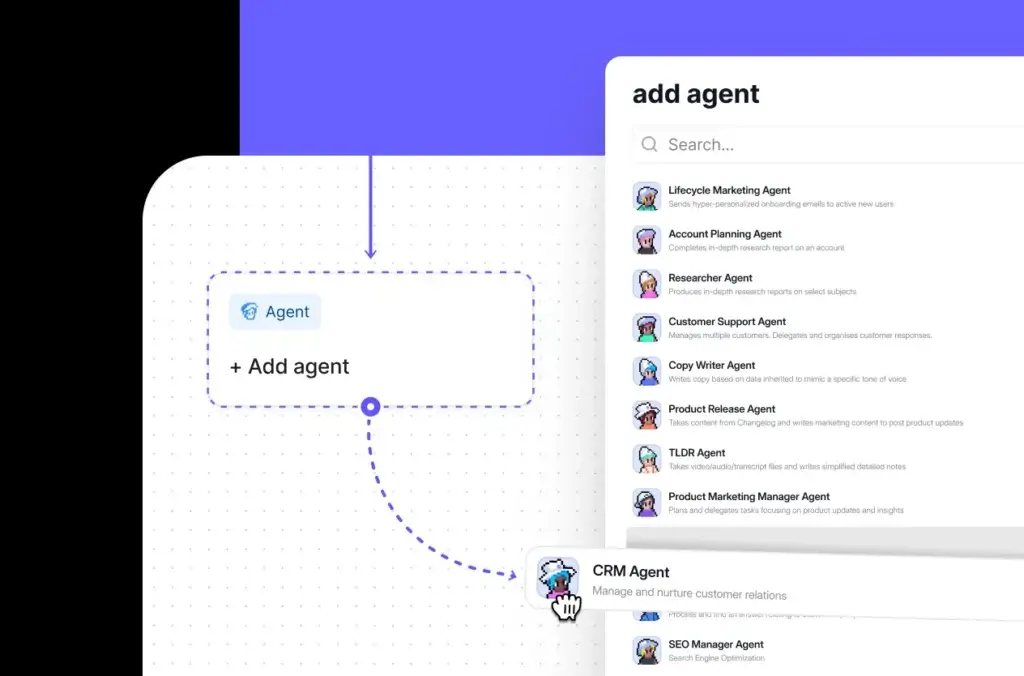
Workforces let you connect several specialized agents on a visual canvas. Instead of asking one agent to research, analyze, write, review, update systems, and communicate results, you can assign each responsibility to a separate agent.
For example, an account research Workforce could include one agent that gathers company data, another that reviews recent news, a third that scores the opportunity, and a final agent that prepares a sales brief. Connections determine how information moves between them.
You can configure forced handovers, conditional routes, agent-decided delegation, tool steps, and approvals. This makes Workforces more flexible than a basic linear workflow, although additional autonomy also creates more testing and monitoring requirements.
Tools and Actions
Tools allow agents to perform work instead of only generating text. A tool might send an email, search the web, add information to a spreadsheet, update a CRM record, retrieve a document, call an external API, run Python code, or execute a multi-step process.
You can use prebuilt tools, generate a tool through Invent, or design a custom tool with several internal steps. Reusable tools are particularly useful because you can standardize a business action once and make it available to multiple agents.
Relevance AI counts each tool run as an Action for billing purposes. A complex multi-step tool can still count as one Action, but a single agent task may use several tools and therefore consume several Actions.
Triggers and Scheduled Work
Triggers determine when an agent or Workforce begins working. Depending on your plan and integration, you can initiate work manually, through a schedule, by API, with a webhook, or in response to an event inside another application.
This is what turns an agent from an on-demand assistant into an operational system. You might trigger an agent when a lead enters your CRM, a support ticket receives a low satisfaction score, a document is added to Google Drive, or a recurring reporting deadline arrives.
Knowledge and Business Context
Knowledge gives agents access to information beyond a model’s general training. You can upload files, synchronize supported sources, connect websites, and organize structured data that agents can retrieve while completing tasks.
This can improve accuracy when an agent needs to follow your product documentation, sales playbooks, brand guidelines, support policies, qualification rules, or internal procedures.
Knowledge does not eliminate the need for testing. You still need to confirm that documents are current, permissions are appropriate, retrieval produces relevant context, and the agent cites or explains its sources when the workflow requires traceability.
Marketplace and Templates
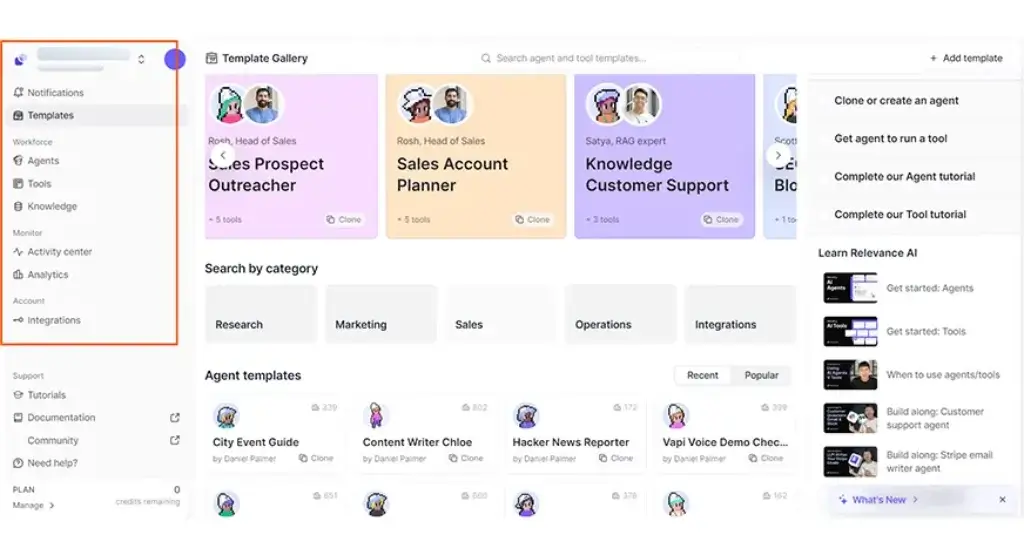
The Relevance AI Marketplace contains prebuilt agents, tools, and Workforces that you can clone into your workspace. Templates cover areas such as sales prospecting, research, content, customer support, operations, and data enrichment.
This can shorten setup time, especially when you are learning the platform. However, templates should be treated as starting points rather than finished business processes. You will usually need to adjust prompts, connect your own accounts, add company knowledge, and test outputs against realistic scenarios.
Relevance Chat
Relevance AI separates building from everyday use. The Builder is where you create and configure agents, tools, knowledge, and Workforces. Relevance Chat gives users a more familiar conversational interface for interacting with approved agents.
Your team can mention agents in a conversation, reuse saved prompts, access specialist agents, and bring several agents into the same chat. This helps make custom agents accessible to employees who do not need access to the underlying builder.
Agent Evaluations and Analytics
Evaluation becomes increasingly important as agents move into customer-facing or revenue-sensitive work. Enterprise capabilities include agent evaluations, test cases, live-run sampling, performance analytics, A/B testing, task tracing, and cost monitoring.
These controls help you measure whether an agent follows instructions consistently rather than judging quality from a few successful examples. You can define expected outcomes, compare versions, identify performance drift, and investigate why a task failed.
Relevance AI Feature Overview
| Feature Area | What Relevance AI Provides | Best For |
| Agent Builder | Invent, Marketplace cloning, and manual agent creation | Creating specialized AI workers |
| Workforces | Visual orchestration for agents, tools, conditions, and approvals | Multi-agent business processes |
| Tools | Prebuilt actions, custom workflows, APIs, and code steps | Letting agents perform operational work |
| Knowledge | Files, websites, connected sources, and structured business data | Grounding agents in company context |
| Triggers | Schedules, APIs, webhooks, and application events | Running agents automatically |
| Chat | Conversational access to agents and Workforces | Making agents available to end users |
| Evaluations | Testing, scoring, tracing, analytics, and performance monitoring | Enterprise reliability and governance |
Use Cases and Benefits
Who Should Use Relevance AI?
Relevance AI is most useful when you have a repeatable business process that includes both structured actions and judgment-based decisions. It is less compelling when you only need occasional AI writing or a simple two-step automation.
Best Relevance AI Use Cases
- Sales research: Research accounts, enrich leads, identify buying signals, and prepare meeting briefs.
- Lead qualification: Review form submissions, CRM data, intent signals, and qualification criteria.
- Personalized outreach: Generate contextual emails or messages and route them for approval.
- Customer support: Classify requests, retrieve answers, draft responses, and escalate complex cases.
- Marketing operations: Repurpose content, prepare campaign reports, and analyze customer feedback.
- Business research: Gather information from multiple sources and create structured reports.
- Internal operations: Process requests, update records, generate documents, and coordinate handoffs.
- Voice workflows: Build agents for outbound calls, appointment reminders, and qualification conversations.
Sales and Go-to-Market Teams
Relevance AI has a particularly strong focus on go-to-market work. You can create agents for account research, CRM enrichment, inbound qualification, meeting preparation, post-call administration, outreach personalization, and pipeline review.
This is valuable when your sales representatives spend too much time collecting information or updating systems. Agents can prepare the context, complete administrative steps, and leave higher-value conversations to your team.
Marketing and Research Teams
Marketing teams can use Relevance AI to research markets, monitor competitors, repurpose content, summarize campaigns, analyze qualitative feedback, and prepare recurring reports.
The main advantage is repeatability. Instead of asking a general chatbot to complete the same research task every week, you can build an agent with approved sources, formatting rules, brand guidance, and a defined delivery process.
Customer Support and Operations Teams
Support agents can classify incoming requests, retrieve relevant documentation, draft answers, detect escalation conditions, and update customer systems. Operations teams can use similar patterns for onboarding, document processing, internal requests, compliance checks, and recurring administrative work.
For sensitive workflows, you should retain human approval before an agent sends a message, changes a critical record, or makes a decision with legal, financial, employment, or customer-impacting consequences.
Enterprise AI Programs
Relevance AI is also suited to organizations that want a common environment for building and governing agents across several departments. Enterprise controls include role-based access, SSO, audit logs, integration governance, data retention settings, usage controls, tracing, and advanced evaluations.
The platform publishes several customer examples. In one vendor-reported case study, Qualified used more than 35 specialized agents and attributed $7 million in additional pipeline over six months to its AI workforce. These results should not be treated as typical, but they demonstrate the scale of deployment Relevance AI is targeting.
Who May Not Need Relevance AI?
Relevance AI may be more platform than you need if your main goal is drafting emails, summarizing documents, or creating occasional content. A general AI assistant may handle those tasks with less setup.
It can also be excessive for predictable app-to-app automations where every step follows a fixed rule. In that situation, a traditional workflow platform may be easier to maintain and audit.
Pros and Cons
Benefits and Limitations of Relevance AI
Positive
✅ Extensive integrations and model options
✅ Accessible no-code starting point
✅ Enterprise governance and evaluation tools
Negative
❌ Usage pricing requires active monitoring
❌ Advanced Workforces have a learning curve
❌ Failed tool runs can still consume Actions
❌ Major governance features are Enterprise-focused
✅ Relevance AI Pros
- Combines agents, tools, knowledge, integrations, and orchestration in one environment.
- Supports both individual agents and coordinated multi-agent Workforces.
- Invent and Marketplace templates reduce the barrier to creating a first agent.
- Connects agents to more than 2,000 applications and services.
- Supports several AI model providers instead of locking you into one model.
- Offers human approvals, escalations, and structured handoffs.
- Provides APIs, MCP access, Python steps, and custom tools for advanced teams.
- Enterprise plans include evaluations, analytics, tracing, RBAC, SSO, and audit logs.
❌ Relevance AI Cons
- The Actions and Vendor Credits model takes time to understand.
- Multi-agent systems can become difficult to debug without clear process design.
- A failed tool execution still counts as an Action.
- The free plan is suitable for testing rather than production-scale automation.
- Team pricing represents a significant jump from the entry-level Pro plan.
- Some of the strongest governance and evaluation features require Enterprise.
- Agent outputs still require review when accuracy or compliance is critical.
- Autonomous workflows can consume more Actions than expected if agents use several tools.
Overall, Relevance AI’s strengths become most apparent when you are building a portfolio of task-specific agents rather than one isolated automation. Its limitations become more noticeable when usage is unpredictable or when your team lacks time to test and maintain agent behavior.
Ease of Use
User Interface and Agent-Building Experience
Relevance AI provides a more approachable interface than developer-first agent frameworks. The platform organizes its major components into clear areas for agents, Workforces, tools, knowledge, integrations, Marketplace templates, analytics, and Chat.
Creating Your First Agent
Invent makes the first stage relatively easy. You describe what you want the agent to accomplish, and Relevance AI prepares an initial structure. A Marketplace template can be even faster when your use case closely matches an existing agent.
The interface becomes more demanding when you begin adding multiple tools, knowledge sources, triggers, conditions, approval points, and agent-to-agent handoffs. The difficulty is not necessarily caused by the visual builder itself. It comes from translating an informal human process into precise instructions and decision paths.
Building Workforces
The Workforce canvas helps you understand how agents and tools connect. You can see the major stages of a process, add conditional branches, and decide whether a handoff should be mandatory or left to an agent’s judgment.
Even with a visual interface, multi-agent systems require discipline. Agents should have narrow responsibilities, clear inputs, defined outputs, and explicit escalation conditions. Giving every agent broad instructions and unrestricted access usually makes the system harder to test.
Testing and Debugging
You should expect an iterative setup process. A prompt that works in one example may fail when an input is incomplete, unusual, ambiguous, or inconsistent with your normal data.
The best approach is to begin with a small test set that includes successful cases, edge cases, missing information, conflicting instructions, and examples that should be escalated to a person. Enterprise evaluation and tracing features can make this process more systematic.
User Feedback
User-review summaries commonly praise Relevance AI for its interface, customization, flexible integrations, and ability to reduce manual work. Recurring concerns include cost, interface complexity in advanced projects, and the learning curve involved in building reliable agents.
This aligns with the platform’s positioning. Relevance AI is easier than developing a complete agent system from code, but it is more sophisticated than a simple automation template or conversational assistant.
Pricing and Plans
How Much Does Relevance AI Cost?
Relevance AI uses a two-part usage model based on Actions and Vendor Credits. Understanding both is essential because the subscription price alone does not represent your complete usage capacity.
What Is an Action?
An Action is one run of a tool. Sending an email may count as one Action, updating a CRM record may count as another, and running a reusable tool containing several internal workflow steps may still count as one Action.
An agent task can consume multiple Actions if it calls several tools. Relevance AI also states that a tool run can count as an Action when it fails, so testing inefficient or unstable workflows can use part of your allowance.
What Are Vendor Credits?
Vendor Credits cover the cost of the AI models and certain external services used by your agents. Relevance AI states that model costs are passed through without a markup.
Paid customers can bring their own supported API keys and bypass Vendor Credits for those models. This may be useful when your organization already has provider accounts, negotiated pricing, or centralized model-governance requirements.
Relevance AI Pricing Plans
| Plan | Current Price Reference | Included Usage | Best For |
| Free | $0 | 200 Actions per month and 1,000 one-time Vendor Credits | Testing agents and learning the platform |
| Pro | From $19/month annually or $29 monthly | Approximately 2,500 Actions and $20 in monthly Vendor Credits | Individuals and small agent projects |
| Team | From $234/month annually or $349 monthly | Approximately 7,000 Actions and $70 in monthly Vendor Credits | Teams collaborating on production agents |
| Enterprise | Custom pricing | Custom Actions, Vendor Credits, users, projects, and Workforces | Large-scale deployment and governance |
At the time of this review, Relevance AI’s public pricing page primarily promotes its Enterprise offering, while current documentation continues to reference Free, Pro, and Team subscriptions. You should confirm self-service prices and allowances inside the platform before purchasing.
Free Plan
The Free plan includes 200 Actions per month and 1,000 Vendor Credits as a one-time allocation. It is useful for creating your first agent, testing Marketplace templates, and understanding how Actions are consumed.
The allowance is relatively limited for recurring business workflows. A Workforce that uses several tools during each run can consume 200 Actions quickly, especially while you are still testing and revising it.
Pro Plan
The Pro plan is the most practical entry point for an individual builder or a small team experimenting with regular agent workflows. Current plan references show approximately 2,500 monthly Actions, monthly Vendor Credits, two builder users, scheduled tasks, broader project access, and bring-your-own-model-key support.
This plan can work well for a small number of focused agents. It may become restrictive when you run high-frequency triggers, large research tasks, or Workforces that call several tools during every execution.
Team Plan
The Team plan is intended for organizations that need more users, higher usage, shared projects, advanced analytics, calling or meeting agents, A/B testing, and priority support.
The price increase from Pro to Team is substantial. You should map expected monthly Actions, builder seats, end-user access, required integrations, and analytics needs before upgrading.
Enterprise Plan
Enterprise provides custom usage, unlimited agents and tools, unlimited users and projects, unlimited Workforces, advanced triggers, agent evaluations, analytics, SSO, role-based access controls, audit logs, and a dedicated account manager.
This is the most relevant option when agents will access sensitive systems, operate across departments, interact with customers, or require centralized security and governance.
Additional Usage Costs
Paid users can purchase additional capacity. Relevance AI documentation lists Action top-ups at $80 per 1,000 Actions and Vendor Credit top-ups at $20 per 10,000 Vendor Credits.
Included Actions reset at renewal. Purchased Action top-ups can carry into the next billing cycle, while Vendor Credits roll over indefinitely as long as the subscription remains active.
Is Relevance AI Pricing Predictable?
The model is more transparent once you understand the two meters, but forecasting still requires real usage data. The number of Actions depends on how frequently agents run and how many tools they call. Vendor Credit consumption depends on model choice, prompt size, output length, and external services.
The safest approach is to build one representative workflow, run it against realistic inputs, and measure the average Actions and Vendor Credits per completed task. You can then multiply that amount by expected monthly volume before selecting a plan.
Compatibility and Governance
Integrations, APIs, and Security
Relevance AI Integrations
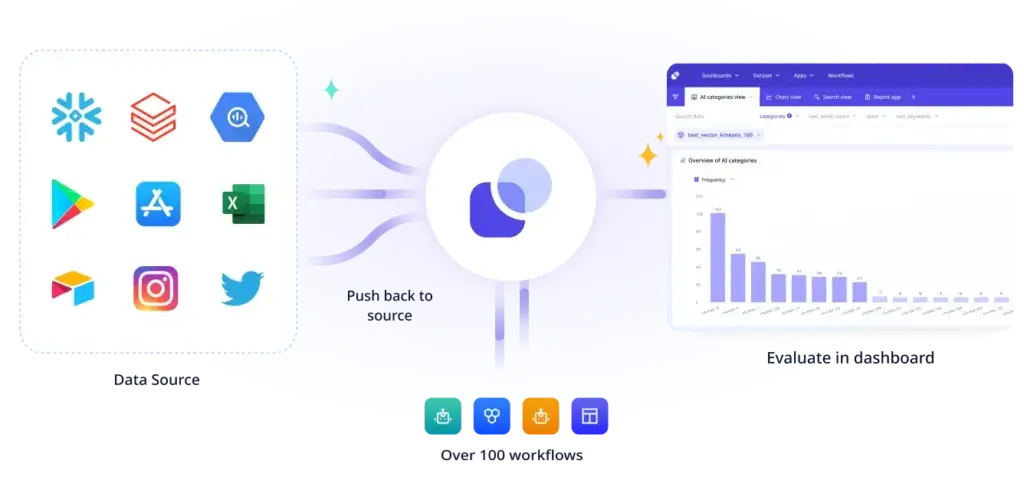
Relevance AI’s integration directory advertises more than 2,000 connections. Examples include Gmail, Outlook, Slack, Microsoft Teams, Salesforce, HubSpot, Google Drive, Google Sheets, Notion, Airtable, Zendesk, Freshdesk, GitHub, Twilio, WhatsApp, Canva, and several data providers.
Integrations can provide triggers, actions, or both. An email integration might trigger an agent when a new message arrives and then allow the agent to draft or send a response. A CRM integration might let an agent retrieve account data, enrich fields, change a stage, or add a note.
Model Flexibility
Relevance AI is model-agnostic and supports models from several providers, including OpenAI, Anthropic, and Google. You can select a model manually or use model-selection options that prioritize performance or lower cost.
This flexibility helps you avoid using the most expensive model for every task. A smaller model may be sufficient for classification or formatting, while a stronger reasoning model may be reserved for complex research or decision support.
API, Webhooks, and MCP
Agents can be triggered through direct API requests, making it possible to connect Relevance AI with custom applications and internal systems. You can also build tools that call external APIs or use Python for transformations and custom processing.
Relevance AI supports MCP connections for compatible AI clients and development environments. This gives technical teams another way to inspect and manage agents, tools, knowledge, triggers, Workforces, and evaluations.
Security and Data Controls
Relevance AI states that it is SOC 2 Type II compliant and supports GDPR-related requirements. Its enterprise capabilities include data residency, PII masking, audit logs, role-based access control, SSO and SAML, human approvals, version control, data-retention policies, and integration governance.
The platform also states that customer data is not used to train its models. API keys are encrypted, scoped to the relevant project, and designed not to appear in logs or agent responses.
These controls make Relevance AI more credible for business adoption, but you should still complete your own security review. Confirm available data regions, subprocessors, model-provider retention settings, authentication methods, user permissions, incident procedures, and contract terms before connecting sensitive data.
Comparison
Relevance AI Alternatives
Relevance AI is not directly interchangeable with every automation or AI agent product. The best alternative depends on whether you prioritize visual workflows, self-hosting, personal productivity, app connectivity, or enterprise governance.
Relevance AI Alternatives Compared
| Platform | Main Strength | Best Fit |
| Relevance AI | Specialized agents and multi-agent Workforces | Teams building a governed AI workforce |
| Gumloop | Visual AI workflow automation | Marketing, sales, and operations workflows |
| n8n | Flexible technical automation and self-hosting | Developers and technical automation teams |
| Lindy | Email, calendar, meeting, and admin agents | Executives, founders, and client-facing professionals |
| Zapier | Large no-code application ecosystem | Fast cross-app automation for business users |
Relevance AI vs Gumloop
Gumloop places greater emphasis on visual workflow automation. Its canvas makes it relatively easy to connect AI steps, data transformations, application actions, and deterministic logic into a repeatable flow.
Relevance AI is stronger when you want agents with defined roles to collaborate as an AI Workforce. It also places more emphasis on enterprise evaluations, governance, model optimization, and agent performance.
Choose Gumloop when the workflow itself is the central product. Choose Relevance AI when you want to manage several specialized agents that use workflows as tools.
Relevance AI vs n8n
n8n gives technical teams extensive control over workflow logic, APIs, data transformations, code, deployment, and self-hosting. It is especially strong when deterministic automation is as important as AI reasoning.
Relevance AI offers a more agent-oriented experience for business teams. Workforces, Marketplace templates, knowledge, Chat, and Invent reduce the amount of technical setup required to create an AI worker.
Choose n8n when you need infrastructure control, self-hosting, or highly customized workflows. Choose Relevance AI when multi-agent orchestration and business-user accessibility are higher priorities.
Relevance AI vs Lindy
Lindy focuses on practical assistant-style workflows such as email management, meeting preparation, scheduling, note-taking, and follow-ups. It is easier to understand when you want an AI executive assistant rather than a platform for designing an entire agent architecture.
Relevance AI is broader and more configurable. It is better suited to cross-department processes, specialized agents, custom tools, knowledge retrieval, and multi-agent coordination.
Choose Lindy for straightforward administrative assistance. Choose Relevance AI when you need a configurable platform for building several types of AI workers.
Relevance AI vs Zapier
Zapier remains one of the easiest ways to automate predictable actions across a broad SaaS stack. Its strength is the depth of its application ecosystem and the accessibility of its no-code workflow builder.
Relevance AI provides greater depth for agent reasoning, knowledge, delegation, and multi-agent systems. Zapier is usually easier for simple triggers and actions, while Relevance AI is more suitable for processes that require interpretation and dynamic decisions.
You may also use both platforms together. Zapier can handle predictable application events, while Relevance AI manages research, classification, drafting, or judgment-based steps.
For a wider comparison, see our guides to the best AI agent tools and best automation workflow tools.
Final Thoughts
Is Relevance AI Worth Using?
Relevance AI is one of the more complete platforms for building an AI workforce without developing every orchestration, integration, knowledge, evaluation, and governance component independently.
Its strongest capabilities are the agent builder, multi-agent Workforces, reusable tools, knowledge connections, broad integration directory, model flexibility, and enterprise controls. Together, these features let you move beyond isolated prompts and create repeatable systems for sales, marketing, support, research, and operations.
The platform is not effortless. Reliable agents need well-defined responsibilities, accurate business knowledge, realistic testing, human approvals, and ongoing monitoring. The Actions and Vendor Credits model also means you need to understand how each workflow consumes resources before deploying it at scale.
Relevance AI is a strong choice when your goal is to create several specialized agents that operate as part of a wider business process. It is less suitable when you only need a writing assistant, a simple personal productivity agent, or a predictable two-step application automation.
Start with a narrow, measurable use case. Give the agent one clear responsibility, connect only the tools it needs, retain human approval, and measure accuracy, completion time, and cost per task. Once that agent performs reliably, you can connect it to additional agents and gradually build a broader Workforce.
Frequently Asked Questions
Have More Questions?
What is Relevance AI?
Relevance AI is a low-code and no-code platform for building, deploying, and managing AI agents. It combines agents, tools, knowledge, integrations, triggers, Chat, and multi-agent Workforces for business automation.
What is Relevance AI used for?
Relevance AI is used for sales research, lead qualification, personalized outreach, customer support, marketing operations, reporting, data enrichment, internal processes, and other repeatable tasks that require AI reasoning and business actions.
Is Relevance AI free?
Yes. Relevance AI offers a free plan with 200 Actions per month and a one-time allocation of 1,000 Vendor Credits. It is most suitable for testing agents and learning how the platform works.
How much does Relevance AI cost?
Current plan references show Pro from $19 per month with annual billing or $29 monthly, Team from $234 per month annually or $349 monthly, and custom Enterprise pricing. Confirm current prices inside the platform before purchasing.
What is an Action in Relevance AI?
An Action is one run of a tool. Sending an email, updating a CRM, or running a reusable workflow tool can each count as one Action. A single agent task may consume several Actions if it uses multiple tools.
What are Relevance AI Workforces?
Workforces are visual multi-agent systems where specialized agents, tools, triggers, conditions, and human approvals work together. They let you divide a complex process among several agents with defined responsibilities.
Does Relevance AI require coding?
No. You can create agents with natural-language instructions, Marketplace templates, and no-code tools. Advanced users can also add APIs, Python steps, webhooks, custom tools, and MCP connections.
Is Relevance AI secure?
Relevance AI states that it is SOC 2 Type II compliant and supports features such as encrypted API keys, data residency, PII masking, SSO, RBAC, audit logs, human approvals, and data-retention controls. Availability varies by plan.
What are the best Relevance AI alternatives?
Leading Relevance AI alternatives include Gumloop for visual AI workflows, n8n for technical and self-hosted automation, Lindy for email and administrative assistance, and Zapier for accessible cross-app automation.
Is Relevance AI worth it?
Relevance AI is worth considering when you need multiple specialized agents, business integrations, knowledge grounding, and governance in one platform. It may be excessive for occasional AI writing or simple rule-based automations.