
Introduction
Lindy is an AI assistant built to take routine administrative work off your plate. It can organize your inbox, draft replies, prepare you for meetings, record calls, create follow-ups, manage scheduling, and complete one-off research or calendar tasks through a conversational interface.
The product has changed significantly from the version covered in many older Lindy reviews. It was previously known mainly as a no-code platform for building multiple AI agents and workflows. Lindy now presents itself primarily as a personalized AI executive assistant that works across your email, calendar, meetings, phone messages, and connected business apps.
In this Lindy review, you will learn how the current platform works, which features are most useful, how its usage-based plans are structured, where the experience still has limitations, and whether it is a practical choice for founders, executives, consultants, sales professionals, and other busy knowledge workers.
What Is Lindy?
Lindy is an AI executive assistant that connects to your email and calendar, learns your working preferences, and performs recurring or ad hoc tasks on your behalf. You can interact with it through the web app, email, Slack, iMessage, or SMS, which makes the experience feel closer to delegating work to an assistant than configuring a traditional automation platform.
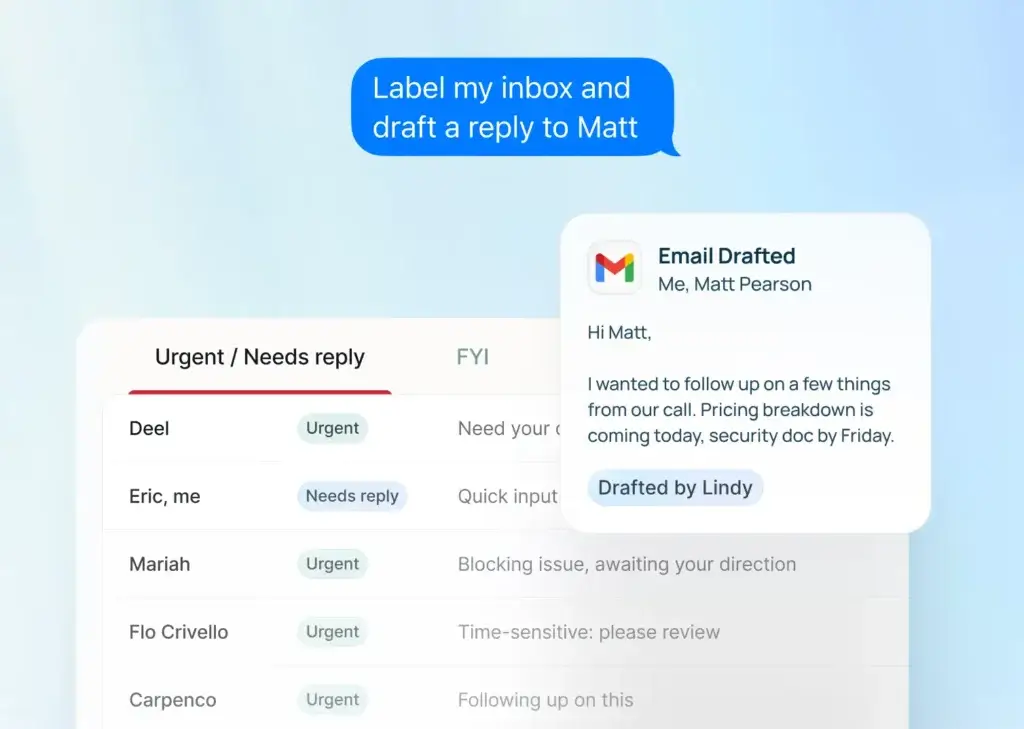
Its strongest capabilities center on inbox management and the full meeting lifecycle. Lindy can classify incoming email, draft replies in your style, identify urgent messages, schedule calls, produce pre-meeting briefings, join and record meetings, summarize discussions, extract action items, and prepare follow-up communications.
Lindy also supports broader agent-style tasks such as web research, reminders, CRM updates, content summaries, and recurring briefings. However, its current positioning is more focused than tools designed for complex visual workflow automation. You should view Lindy first as an AI work assistant, and second as a general automation platform.
Key Features
How Lindy Works
Lindy works by combining your work context with AI models and connected applications. After you link an email account and calendar, it can interpret messages, meetings, contacts, preferences, and previous interactions. You can then give it instructions in natural language or allow selected features to run automatically.
The platform is designed around one assistant that becomes more personalized over time. Older multi-agent workflow tools still exist, but the core experience now revolves around daily delegation.
Lindy Key Features
AI Email Triage and Custom Labels
Lindy can read incoming messages and sort them into practical categories such as To Respond, FYI, Newsletters, Comments, Notifications, and Invoices. You can create your own labels, define what each label should capture, and choose whether matching emails remain in the inbox or are archived automatically.
You can create labels for clients, sales opportunities, invoices, or other role-specific priorities. Lindy can also text you when a message meets your definition of urgent.
Email Drafting That Learns Your Style
For messages that need a response, Lindy can create drafts inside your email client. You can specify tone, length, preferred sign-offs, escalation rules, and contacts that should never receive an automated draft. The assistant also builds learned instructions based on how you edit and send messages.
Standard replies are saved for approval rather than sent automatically. Lindy can also prepare follow-up drafts when a recipient has not replied after a defined period.
Meeting Scheduling and Calendar Management
Lindy can propose available times, add events, reschedule meetings, cancel calls, change locations, and notify attendees. You set rules for working hours, meeting length, buffers, and blocked periods in plain language, then ask Lindy to manage the details.
You can delegate scheduling by text or let Lindy insert available times into an email draft so the recipient can book with one click.
Meeting Prep, Recording, and Searchable Notes
Before a meeting, Lindy can prepare a briefing with the attendee’s role, company, previous conversations, relevant context, and agenda. You can receive the briefing by email or text, either as a daily digest or shortly before the meeting.
Lindy can join Google Meet, Zoom, and Microsoft Teams to record and transcribe calls. Its meeting library stores recordings, summaries, action items, and searchable transcripts that you can query later.
Automated Meeting Follow-Ups
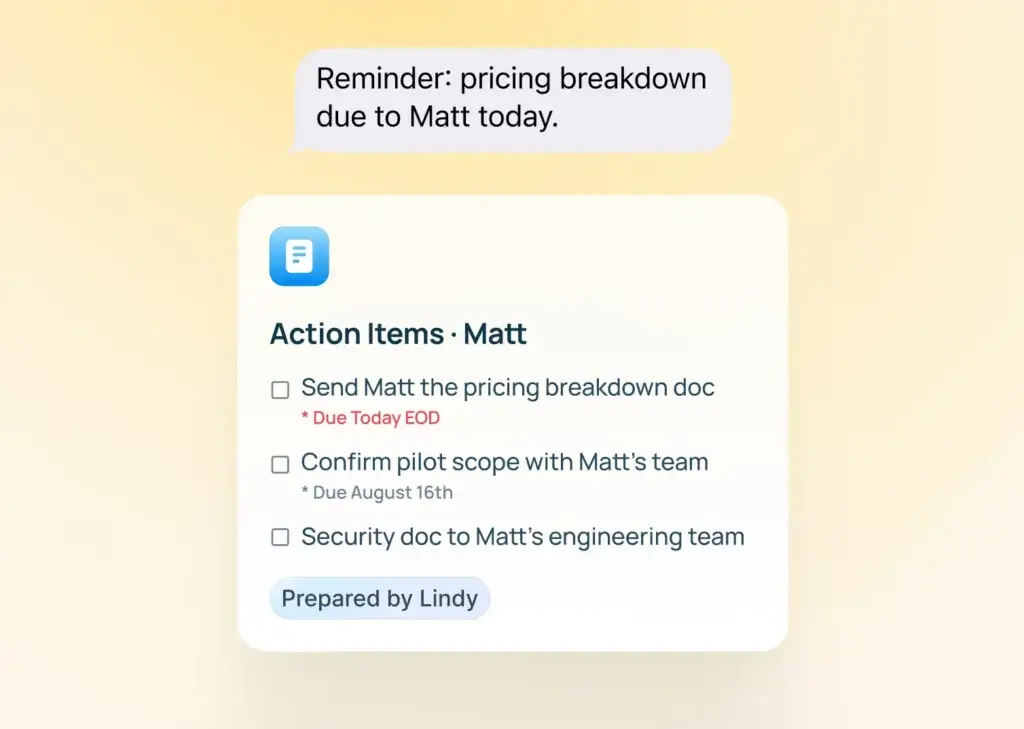
After a recorded meeting, Lindy can identify decisions, owners, and next steps. It can prepare or send follow-up emails according to your settings, post action items in Slack, update a CRM, create a Notion page, or send tasks to a connected productivity app.
This connects meeting intelligence to execution by routing outputs into the systems where your team already works.
iMessage, SMS, and Voice Note Delegation
You can text Lindy through iMessage or standard SMS without installing a separate mobile app. Android users can use SMS, while iPhone users receive the more native iMessage experience. You can ask for meeting summaries, schedule changes, inbox searches, reminders, CRM updates, research, or recurring briefings from your phone.
Lindy can also process voice notes, which is useful when you are away from your desk.
Ad Hoc Research and Recurring Briefings
Lindy can combine web research with information from your email, calendar, and meeting history. You can ask it to research a company before a call, summarize a URL, find previous commitments, or create a competitive update linked to your current work context.
You can set recurring instructions for daily agendas, weekly recaps, reminders, or CRM updates, making Lindy more proactive than a general chatbot.
Computer Use and Lindy Build
The Pro plan adds computer use for operating web applications when a direct integration is unavailable. Lindy also offers Build, a separate prompt-based full-stack app builder with automated QA. Both capabilities are useful, but they sit outside the assistant’s strongest email and meeting workflows.
Lindy Feature Overview
| Feature Area | What Lindy Offers | Best For |
| Inbox Management | AI labels, prioritization, archiving, and urgent alerts | Professionals with high email volume |
| Email Drafting | Personalized drafts and follow-up reminders | Faster responses with human approval |
| Meeting Assistant | Prep, recording, transcription, notes, and searchable history | Sales, consulting, and leadership meetings |
| Scheduling | Availability rules, proposed times, invitations, and calendar changes | Reducing scheduling administration |
| Mobile Delegation | iMessage, SMS, and voice note interaction | Busy professionals working away from a desk |
| Ad Hoc Tasks | Research, reminders, summaries, and connected app actions | General executive-assistant support |
| Computer Use | Web app operation on Pro and higher plans | Tasks without a suitable direct integration |
| Lindy Build | Prompt-based creation of full-stack apps | Rapid prototypes and internal tools |
Overall, Lindy’s feature set is strongest when your administrative workload is concentrated in email, calendar, meetings, and follow-ups. It is less suitable when you need highly technical data pipelines, extensive branching logic, or self-hosted workflow infrastructure.
Use Cases & Benefits
Who Should Use Lindy?
Lindy is designed for people whose workday is fragmented by communication and coordination. It can be valuable when email, scheduling, meeting preparation, and post-meeting administration consume time that should be spent on strategy, sales, client service, or decision-making.
Best Use Cases for Lindy
- Executives and founders: Delegate inbox triage, calendar changes, meeting prep, and daily briefings.
- Sales professionals: Research prospects, record calls, update CRM records, and send follow-ups.
- Consultants and agencies: Capture client meetings, track commitments, and organize multiple inboxes.
- Recruiters: Coordinate interviews, summarize conversations, and maintain candidate follow-ups.
- Operations teams: Route meeting actions into Slack, Notion, CRMs, and task management tools.
- Independent professionals: Use one assistant for reminders, research, email, and scheduling.
Who Gets the Most Value?
You will get the most value from Lindy when you already have a meaningful volume of email and meetings. A professional who processes dozens of messages and attends several calls each day can save more time than someone with a light administrative workload.
You should also be comfortable granting an AI system access to email, calendar, meetings, and connected apps. Review permissions and define which tasks require approval.
Where Lindy Fits in Your Software Stack
Lindy can replace parts of several tools, including an inbox organizer, meeting recorder, scheduling assistant, reminder app, and basic research assistant. It does not replace your CRM, project management system, or collaboration platform. Instead, it helps move information and actions between them.
For broader automation, you may still use tools such as Zapier, Make, or Gumloop. Lindy is more useful as the conversational assistant layer that handles human-centered work.
Pros and Cons
Benefits and Limitations of Lindy
Positive
✅ Strong inbox and meeting automation
✅ Easy delegation through text messages
✅ Personalized drafting and memory
✅ Broad integrations and enterprise controls
Negative
❌ No permanent free plan
❌ Usage limits are not expressed clearly
❌ Complex automations still need oversight
❌ Higher plans become expensive quickly
✅ Pros
- Combines inbox triage, drafting, scheduling, meeting notes, and follow-ups in one assistant.
- iMessage and SMS delegation reduce the need to open another productivity dashboard.
- Drafting instructions and learned preferences make email responses more personalized over time.
- Meeting recordings become a searchable knowledge source rather than isolated transcripts.
- Human approval is retained for normal email drafting, which reduces communication risk.
- Google and Outlook multi-account support is useful for consultants and business owners.
- Higher plans add computer use, onboarding, and enterprise controls.
❌ Cons
- The starting price is high if you only need email drafting or meeting notes.
- Plan pages describe relative usage rather than publishing simple task or credit allowances.
- Unused resources do not roll over, and overage usage costs more than standard usage.
- Important AI-generated outputs still require review.
- Computer-use workflows can be less predictable than direct integrations.
- Older tutorials may describe a different workflow-builder experience.
- A browser extension is listed as coming soon rather than generally available.
Independent user reviews often praise Lindy’s setup and time savings, while complaints commonly focus on pricing and usage limits. This makes the seven-day trial especially important.
Ease of Use
User Interface and Experience
Lindy’s current interface is deliberately simple. You can use a conversational task bar in the web app or delegate through text messages. This is easier to understand than a visual automation canvas because you describe the outcome you want rather than assembling every trigger and action manually.
Setup and Onboarding
Initial setup involves creating an account, optionally adding a phone number, connecting a Google or Outlook account, and reviewing permissions. Lindy states that the basic setup can be completed in a few minutes. The seven-day trial includes Pro features, but payment information is required to activate it.
After connection, review labels, drafting rules, meeting settings, follow-up recipients, scheduling availability, and app permissions.
Learning Curve and Personalization
Basic tasks are easy to delegate, but reliable automation still depends on clear instructions. Lindy performs better when you define specific rules such as which clients are urgent, which meetings should be recorded, how concise drafts should be, and which actions require approval.
You can inspect and edit learned instructions, giving you control over personalization.
Reliability and Human Oversight
Lindy can reduce repetitive work, but it is still an AI system operating with incomplete context. You should verify client-facing drafts, scheduling decisions, CRM updates, research conclusions, and automated follow-ups during the early stages of use.
Start with low-risk organization and preparation, then expand automation after the results become reliable.
Pricing and Plans
How Much Does Lindy Cost?
According to the official Lindy pricing page, Lindy does not offer a permanent free plan. New accounts receive a seven-day trial with full Pro features, after which you must choose Plus, Pro, Max, or an Enterprise agreement. The plans are based on relative usage capacity rather than a simple published number of tasks.
Lindy Pricing Overview
| Plan | Monthly Price | Main Limits and Features | Best For |
| Plus | $49.99 | Standard usage, 2 inboxes, assistant features, 100+ integrations | Individual professionals |
| Pro | $99.99 | 3x Plus usage, 3 inboxes, computer use, model selection, onboarding | Heavy daily users |
| Max | $199.99 | 7x Plus usage and up to 5 inboxes | Very high-volume users |
| Enterprise | Custom | Shared usage, SSO, SCIM, audit logs, support, HIPAA BAA | Teams with governance needs |
Plus Plan
Plus includes the main assistant features and supports up to two inboxes. It suits individuals managing work and secondary business accounts.
Pro Plan
Pro provides three times the Plus usage, three inboxes, computer use, model selection, and one-to-one onboarding. It suits heavier daily delegation.
Max Plan
Max provides seven times the Plus usage and five inboxes. At $199.99 per month, it should replace several tools or substantial manual work to justify the cost.
Enterprise Plan
Enterprise adds shared usage, support, onboarding, company context, SSO, SCIM, audit logs, and HIPAA compliance with a signed BAA.
How Lindy Usage and Overage Charges Work
Each action consumes plan resources. Email labeling has a low impact, meeting recording is moderate, and research varies. Lindy may pause unusually intensive tasks for confirmation.
Unused resources do not roll over. You cannot buy one-off credit packs, but you can upgrade or enable overages. Overage usage is charged at twice the standard cost, so you should monitor usage before allowing unrestricted high-volume research or computer-use tasks.
Pricing Takeaway
Plus is the best starting tier for most individuals. Pro is justified when computer use, model selection, higher volume, or additional inboxes create measurable value.
Compatibility & Governance
Integrations, Security, and Control
Lindy Integrations
Lindy’s pricing page includes more than 100 integrations, while its broader directory covers hundreds of applications. Popular options include Gmail, Google Calendar, Outlook, Slack, Notion, Google Sheets, Google Drive, HubSpot, Salesforce, Airtable, Calendly, and CRM or support platforms.
A completed meeting can trigger a Slack message, CRM update, Notion page, or task. However, dedicated workflow tools provide clearer logic for complex branching and data transformation.
Security and Compliance
Lindy’s security documentation states that customer data is encrypted with AES-256, is not sold, and is not used to train models. The company lists SOC 2 Type II certification and compliance with HIPAA, GDPR, and PIPEDA. Enterprise plans add SSO, SCIM provisioning, audit logs, and a signed BAA for healthcare use cases.
Before connecting regulated data, review retention, model providers, permissions, deletion processes, and the scope of each compliance commitment.
Important Control Considerations
Lindy gives you configurable approval and notification settings, but some workflows can be set to act automatically. Start with drafts and alerts, then enable automatic sending or system updates only after testing representative scenarios.
You should also separate low-risk tasks from sensitive workflows. Meeting summaries and calendar changes are easier to supervise than financial approvals, legal communications, or actions involving protected customer information.
Comparison
Lindy Alternatives
The right alternative depends on whether you prioritize email, calendar planning, meeting intelligence, workflow automation, or technical control.
Lindy vs Relevance AI
Relevance AI offers more flexibility for custom agents, multi-agent operations, evaluations, and team deployment. Choose it for structured AI workforces, or Lindy for immediate personal help with email and meetings.
Lindy vs Gumloop
Gumloop is stronger for visual AI workflows with visible triggers, branches, and outputs. Choose Gumloop when process design matters most, or Lindy when personal productivity and communication are the main goals.
Lindy vs Zapier
Zapier offers a larger integration ecosystem and predictable rule-based automation. Lindy is better at interpreting communication, preparing context, drafting language, and handling meetings. Many businesses could use both.
Lindy vs Motion
Motion focuses on task planning and automatic calendar optimization. Choose Motion for AI-driven time blocking, or Lindy for email, meetings, follow-ups, and executive administration.
Lindy Alternatives Comparison
| Tool | Main Strength | Best Fit |
| Lindy | Personal AI assistant across email, meetings, calendar, and tasks | Busy professionals wanting broad administrative support |
| Relevance AI | Custom AI workforces and structured agent operations | Teams deploying specialized business agents |
| Gumloop | Visual AI workflow automation | Teams that need repeatable, inspectable processes |
| Zapier | Large app ecosystem and deterministic automation | App-to-app workflows and data movement |
| Motion | AI scheduling and task planning | People optimizing workload and calendar capacity |
Final Thoughts
Is Lindy Worth It?
Lindy is one of the more complete AI executive assistants available because it connects inbox management, scheduling, meeting intelligence, mobile delegation, follow-ups, and research in one product. Its strongest advantage is not any single feature, but the continuity between them.
The platform is best for professionals who lose meaningful time to email and meetings and are willing to train an assistant through instructions and feedback. It is less compelling for light users, buyers who only need one narrow feature, or teams that require detailed visual workflow control.
The main concern is pricing transparency. The plans describe usage as multiples rather than publishing straightforward task allowances, and overages can become expensive. You should use the trial with real workloads, check consumption after each feature, and calculate whether the time savings justify the monthly fee.
Overall, Lindy is worth considering when you want a proactive assistant that works across communication and coordination. Start with Plus after the trial unless you specifically need computer use, model selection, more than two inboxes, or substantially higher capacity.
Frequently Asked Questions
Have More Questions?
What is Lindy AI?
Lindy is an AI executive assistant that manages email, scheduling, meetings, follow-ups, research, and connected-app tasks. It works through a web interface, email, Slack, iMessage, and SMS, using context from your inbox, calendar, meetings, and instructions.
What is Lindy used for?
Lindy is used to reduce administrative work. Common uses include organizing email, drafting replies, scheduling meetings, creating pre-call briefings, recording and summarizing calls, tracking action items, updating CRMs, sending reminders, and completing ad hoc research.
Is Lindy free?
Lindy does not have a permanent free plan. It offers a seven-day trial with Pro features. Payment information is required when starting the trial, so you should review the cancellation date and test realistic workflows before the trial ends.
How much does Lindy cost?
Lindy Plus costs $49.99 per month, Pro costs $99.99 per month, and Max costs $199.99 per month. Enterprise pricing is customized. Plans differ by usage capacity, connected inboxes, computer use, onboarding, and governance features.
Does Lindy send emails automatically?
Normal email drafting saves replies in your drafts folder for review, so nothing is sent without your approval. However, you can configure certain meeting follow-up and connected-app workflows to run automatically. Test these rules carefully before enabling autonomous actions.
Does Lindy work with Gmail and Outlook?
Yes. Lindy supports Google and Microsoft email and calendar accounts. Depending on your plan, you can connect two, three, or five inboxes. Multiple Google and Outlook accounts can be connected at the same time.
Can Lindy record Zoom and Microsoft Teams meetings?
Yes. Lindy can join, record, and transcribe meetings on Google Meet, Zoom, and Microsoft Teams. It stores the recording, summary, action items, and searchable transcript in a meeting library that you can query in natural language.
Is Lindy secure?
Lindy states that it uses AES-256 encryption, does not sell customer data, and does not use customer data to train models. It lists SOC 2 Type II, HIPAA, GDPR, and PIPEDA compliance. Enterprise plans add SSO, SCIM, audit logs, and a signed BAA.
What are the best Lindy alternatives?
Strong Lindy alternatives include Fyxer for email, Motion for AI scheduling, Relevance AI for custom agent workforces, Gumloop for visual AI workflows, and Zapier for app automation. The best choice depends on whether you prioritize personal assistance or process automation.
Is Lindy worth the price?
Lindy can be worth the price if email, meetings, scheduling, and follow-ups consume several hours of your week. It is less cost-effective for light users or people who need only one narrow feature. Use the trial to measure time saved and resource usage.